

SPF, DMARC & DKIM Checker — Bulk Domain WHOIS, DNS & SSL
Pricing
from $1.28 / 1,000 domain reports
SPF, DMARC & DKIM Checker — Bulk Domain WHOIS, DNS & SSL
Bulk SPF, DMARC, DKIM, MTA-STS, TLS-RPT, DANE and DNSSEC checks with an email security score, plus RDAP WHOIS, DNS, TLS certificate expiry, HTTP headers and tech stack. Opt-in: security.txt, AI-crawler rules, llms.txt, ASN and hosting. One JSON record per domain, pay per domain.
Pricing
from $1.28 / 1,000 domain reports
Rating
0.0
(0)
Developer

Owlabee
Maintained by CommunityActor stats
0
Bookmarked
2
Total users
1
Monthly active users
9 hours ago
Last modified
Categories
Security
Limited permissionsShare
Bulk SPF, DMARC and DKIM checker with WHOIS and DNS lookup: check hundreds or thousands of domains in one run and get one JSON record per domain with an email-security score (SPF, DMARC, DKIM, MTA-STS, BIMI), mail transport checks (TLS-RPT, DNSSEC validation, DANE, MTA-STS policy vs MX, CAA), RDAP WHOIS registration, DNS records, SSL certificate expiry, security headers and tech stack hints. Two opt-in sections add security.txt, AI-crawler rules and other well-known files, and the IP, ASN and hosting provider. The domains list has no fixed item cap; up to 20 domains are checked in parallel (maxConcurrency), and the run stops cleanly when its maximum total charge is reached.
Example. Input "domains": ["https://www.example.com/pricing", "jane@example.com"] is reduced to one domain, example.com, and its record includes (values from the Actor's RDAP test fixture):
The full record, with DNS, email security, TLS and HTTP sections, is in Output example below.
Renamed on 2026-11-07: this Actor's address changed from
owlabee/domain-intelligencetoowlabee/spf-dmarc-dkim-checker. Saved tasks, schedules, webhooks and integrations keep working, because they point to the Actor's ID, which did not change. Update anything that calls it by name: API URLs (owlabee~spf-dmarc-dkim-checker), MCP tool lists (owlabee/spf-dmarc-dkim-checker) and bookmarks.
What it does
Give this Actor a list of domains and it returns one enriched JSON record per domain with everything a sales, security or IT team usually has to collect from four different tools:
- WHOIS via RDAP — registrar, registration / expiration / last-changed dates, days until the domain expires, EPP status codes, nameservers, DNSSEC, and registrant organisation / country when the registry publishes them (redacted fields stay
null; nothing is guessed). The IANA RDAP directory covers all generic TLDs but few country codes, so the Actor also asks the registry of .io and .me (Identity Digital) directly. - DNS records — A, AAAA, MX (sorted by priority), NS, TXT, CAA and SOA over DNS-over-HTTPS, plus a mail-provider guess (Google, Microsoft, Zoho, Proton, Fastmail, Mimecast, Proofpoint, other).
- Email security — SPF record and syntax check (lookup count,
-all/~all/?all), DMARC policy, subdomain policy,pct, aggregate/forensic reporting addresses, DKIM selectors found (18 common selectors probed, plus your own), MTA-STS record and policy mode, BIMI record, and an email security score 0–100. - Mail transport and DNSSEC — TLS-RPT record and its reporting addresses, whether the resolver validates the zone with DNSSEC (not just "signed at the registry"), DNSKEY algorithms and DS digest types, DANE TLSA records on up to 3 MX hosts, the MTA-STS policy's
mx:patterns with any MX host they do not cover, the CA domains allowed by CAA and whether CAA allows the CA of the current certificate (caaAllowsIssuer), plus a plain-languagemailTransportIssueslist. - TLS certificate — subject CN, issuer, valid-from / valid-to, days until expiry, SAN count, protocol version and whether the chain actually verifies.
- HTTP — final URL, status code, full redirect chain,
server/x-powered-by, security headers (HSTS, CSP, X-Frame-Options, X-Content-Type-Options, Referrer-Policy), page title, meta generator and tech stack hints (Shopify, WordPress, Wix, Squarespace, Webflow, HubSpot, Cloudflare, Next.js, Nuxt, Drupal, Ghost, Framer, Vercel, Netlify, Google Tag Manager, Google Analytics, Intercom, Stripe). - Well-known files (opt-in section
wellknown) — security.txt (RFC 9116: contacts, expiry and whether it has expired, policy, signed or not, problems found), AI-crawler rules in robots.txt per bot (GPTBot, ChatGPT-User, OAI-SearchBot, ClaudeBot, Claude-User, Claude-SearchBot, anthropic-ai, CCBot, Google-Extended, Applebot-Extended, PerplexityBot, Bytespider, Meta-ExternalAgent, Amazonbot) and whether robots.txt blocks everything, llms.txt (present, title, size), ads.txt (records, ad systems, DIRECT and RESELLER counts), Global Privacy Control (gpc.json), the change-password URL, the OpenID Connect issuer, and iOS and Android app links. - IP and hosting (opt-in section
ip) — for up to 2 IPv4 and 1 IPv6 address: ASN, network name, announced prefix, country, regional registry, allocation date, reverse DNS and a hosting / CDN guess (Cloudflare, AWS, Google Cloud, Azure, Akamai, Fastly, DigitalOcean, Hetzner, OVHcloud, Vercel, Netlify, Shopify, Squarespace, Wix, GitHub and others). Data from Team Cymru's IP-to-ASN service over DNS, with RIPEstat as the fallback.
Every section is independent: if a registry is slow or a site is down, the other sections are still filled in and the problem is recorded in errors. It only uses public RDAP, public DNS resolvers and the domain's own public endpoints — no API keys, no proxies, no browser — which is why it costs $0.0015 per domain (plus $0.0005 per opt-in section when you add wellknown or ip). Results are available as JSON, CSV, Excel, via API, webhooks or the Apify MCP server, like any Apify dataset.
Typical uses: lead enrichment and segmentation by tech stack and mail provider, email deliverability audits (SPF/DMARC/DKIM gaps), certificate and domain expiry monitoring, M&A / vendor due diligence, and competitor technology research.
To watch what those domains publish afterwards, Website Change Monitor — Sitemap Monitor & Page Diff reports new, removed and changed pages between runs.
Why this Actor
| This Actor | Typical scraper in this category | Do it yourself | |
|---|---|---|---|
| Data sources covered | RDAP registries, DNS-over-HTTPS resolvers (Cloudflare with Google as fallback), the domain's own TLS endpoint and landing page | WHOIS and DNS, or availability only; email security and tech stack usually need a second Actor | Four clients (RDAP, DoH, TLS socket, HTTP) and a scorer |
| Modes | Six independent sections switched on or off per run (whois, dns, tls, http, plus the opt-in wellknown and ip); each fails alone and the rest are still returned | A fixed bundle, or one lookup type per Actor | Whatever you wire together, with your own fallbacks |
| Output fields | One record per domain with nested sections plus flattened columns: registrar, expiry, mail provider, DMARC policy, TLS days left, HTTP status, tech hints, email security score, one-line summary | Raw WHOIS text or record lists; scoring is rare | Your schema |
| Pricing unit | Per domain record, whichever default sections run, plus a small per-section charge only for the two opt-in sections; an invalid input costs the same as a record | Per domain or per lookup type, so a full picture costs several lookups | Your time plus compute; the sources are free |
| Proxies or browsers needed | None | Some use proxies to work around WHOIS port-43 rate limits | WHOIS over port 43 is rate-limited; most RDAP servers are not |
| Agent / MCP ready | Yes: pay-per-event, limited permissions, pin link, prompts and a call example below | Sometimes, with an example prompt | You write and host the tool definition |
| Limits | 20 second budget per domain; DKIM is discovered from 18 common selectors plus yours, not enumerated; registrable-domain reduction uses a curated suffix list | Varies | Timeouts, redirects and resolver fallbacks are yours to handle |
- One run replaces four tools for a lead list or a deliverability audit: registration, DNS, SPF/DMARC/DKIM/MTA-STS/BIMI with a 0–100 score, certificate and tech stack.
- Sections are independent: a slow registry or a dead web server never blanks the other sections, and
errorsnames the source that failed. - Nothing is guessed: redacted WHOIS fields stay
null, andwhois.sourcetells you which server answered. - Flattened columns make the Console table, the CSV export and a spreadsheet readable without unpacking JSON.
- Every record is charged as it is saved under a hard 20 second budget per domain, so a list of dead domains costs the same as a list of live ones and finishes in bounded time.
How to use
- Paste your Domains (one per line). URLs such as
https://www.example.com/pricingand email addresses such asjane@example.comare fine — the registrable domain is extracted and duplicates are merged. - Optionally untick Sections you do not need or add the opt-in Well-known files and IP, ASN & hosting sections, add Extra DKIM selectors your ESP uses, and set Max concurrency.
- Click Start. Each domain is written to the dataset as soon as it is finished; download the table or connect it to your CRM, spreadsheet or agent via the API.
Quick start input
The same input the Store runs in its daily automated test, so it is cheap and always available; paste it into the JSON tab of the input form or send it as the body of an API or MCP call:
Ready-to-run inputs
Three inputs you can paste as they are; each validates against the input schema.
DNS and email-security audit of a customer list (SPF, DMARC, DKIM, MTA-STS, BIMI and the score; add your ESP's DKIM selectors)
WHOIS-only check: registrar, registration and expiry dates
Security posture and hosting (opt-in sections: security.txt, AI-crawler rules, llms.txt, ads.txt, ASN and hosting provider, plus the mail transport checks of the DNS section)
Certificate and web stack only, from URLs and email addresses (no registry or DNS calls)
Input
| Field | Type | Required | Description |
|---|---|---|---|
domains | string[] | yes | Domains, URLs or email addresses to check. Deduplicated by registrable domain. |
sections | string[] | no | Any of whois, dns, tls, http, wellknown, ip. Default: whois, dns, tls, http (the two newer sections run only when you add them, at $0.0005 per section per domain on top of the record). |
dkimSelectors | string[] | no | Extra DKIM selectors to probe in addition to the built-in 18. |
maxConcurrency | integer | no | Domains checked in parallel (1–20, default 5). |
webhookUrl | string | no | POST target for the run summary (counts, charges, finish time). |
Output example
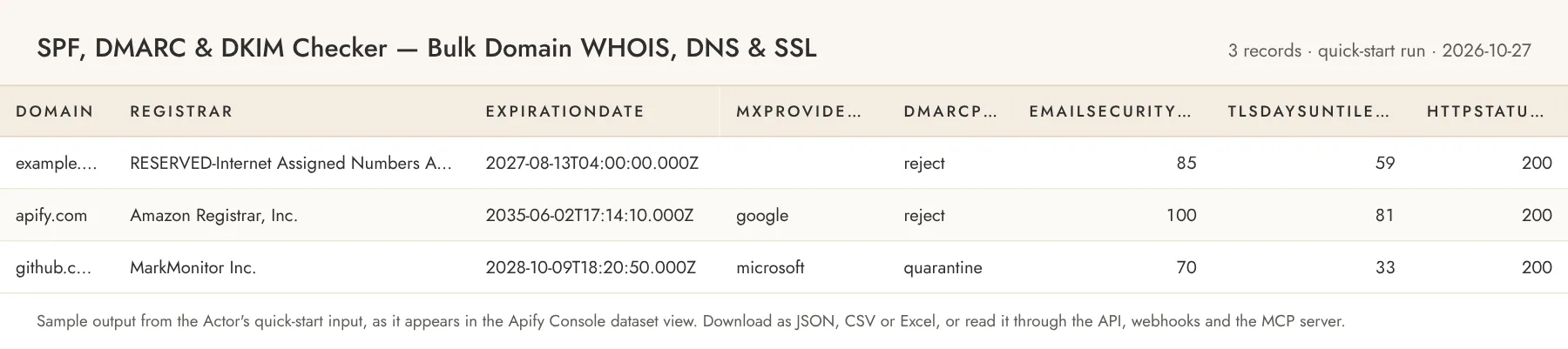
Records from 2026-11 on also carry the mail transport fields in dns, a top-level caaAllowsIssuer, and, when you add the opt-in sections, wellknown, ip, hostingProvider and hasSecurityTxt (each is null when its section did not run). Values from a local run on 2026-11-07, shortened (some fields and list entries left out):
The values above are illustrative; live records reflect what the registry, resolvers and the site return at run time. The top-level registrar, expirationDate, mxProviderGuess, dmarcPolicy, tlsDaysUntilExpiry, httpStatusCode, techHints, emailSecurityScore and summary columns are flattened copies so the Console table and CSV export stay readable.
Each section has a status: ok, error (reached the source, got a bad answer), unavailable (could not reach the source at all — for example a domain with no web server on port 443, or a country-code TLD with no RDAP server) or skipped (not requested). When a section fails, errors holds the reason, e.g. { "tls": "ECONNREFUSED: connect ECONNREFUSED 93.184.216.34:443" }, and the remaining sections are still returned.
Inputs that are not a domain at all produce { "input": "not a domain", "error": "INVALID_DOMAIN", "errorMessage": "..." } and are charged at the same rate, because the work to classify them was done.
Email security score
| Check | Points |
|---|---|
| SPF record present and syntactically valid (≤ 10 lookups, no unknown terms, single record) | 25 |
DMARC policy reject / quarantine / none | 35 / 20 / 5 |
| At least one DKIM selector found | 25 |
| MTA-STS record present | 10 |
| BIMI record present | 5 |
If the output saves you time, a review on the Store page helps other buyers find this Actor; the Store invites you to leave one after you have run it a few times.
Alerts and delivery
The Actor has no diff mode: every run returns the full record for every domain, which makes it easy to schedule for expiry and deliverability monitoring and compare the columns you care about downstream.
- Schedule in the Console. Save the domain list as a Task, then create a schedule under Schedules (weekly is enough for
daysUntilExpiryandtlsDaysUntilExpiry; daily if you watch DMARC or MX changes) and attach the Task. - The Actor's own webhook. Set
webhookUrland the Actor POSTs one JSON document when the run finishes (10 second timeout, two retries; a failed delivery is logged and never fails the run). The body is the run summary:actor,runId,domains,invalidInputs,produced,sectionErrors,timeBudgetDomains,charges,limitReached,finishedAt. Domain records are not in the body; read them from the dataset, for example with thefieldsparameter to pull onlydomain,expirationDate,tlsDaysUntilExpiryanddmarcPolicy. - Apify run webhooks. On the Actor's Integrations tab add a webhook for run events such as
ACTOR.RUN.SUCCEEDED,ACTOR.RUN.FAILEDorACTOR.RUN.TIMED_OUT; Apify POSTs the run id and the default dataset id to your URL, which is all your own code needs to fetch the items. - Slack, Make, Zapier, Google Sheets, email. The same Integrations tab lists Apify's ready-made integrations: a Slack message when a run finishes, Make and Zapier modules that start runs and read the dataset, an export of each run's dataset to a Google Sheet, and an email notification. They are configured per Actor or per task, without code.
- API and dataset endpoints. Start a run with
POST https://api.apify.com/v2/acts/owlabee~spf-dmarc-dkim-checker/runs, read the newest results withGET https://api.apify.com/v2/acts/owlabee~spf-dmarc-dkim-checker/runs/last/dataset/items?format=json(alsocsvorxlsx, andfieldsto pick columns), or read any run's dataset athttps://api.apify.com/v2/datasets/<datasetId>/items. For short runsrun-sync-get-dataset-itemsstarts the run and returns the items in one call. A Google Sheets export per run plus a sheet formula ondaysUntilExpiryis a complete expiry alert without code.
Pricing
Pay per event. You only pay for records the Actor produces; set a maximum cost per run in the run options to cap spend.
| Event | Price | Notes |
|---|---|---|
Domain report (domain-enriched) | $0.0015 | Per domain record written to the dataset, including error records; covers the default sections (whois, dns, tls, http) whichever of them run |
Opt-in section check (section-checked) | $0.0005 | Per opt-in section (wellknown, ip) per domain checked, on top of the domain report, whether the section succeeds, fails or times out; never charged for the default sections or for invalid inputs |
| Actor start | $0.00005 | Apify platform event |
Example: 1,000 domains ≈ $1.50 with the default sections; running fewer of them does not change the price per domain, it only makes the run faster. Adding both opt-in sections makes it 1,000 × ($0.0015 + 2 × $0.0005) = $2.50; wellknown alone ≈ $2.00.
Store pricing discounts: users on the Scale plan (Silver) pay 10% less per event, Business (Gold) 15% less.
Limits and fair use
- Each domain triggers roughly 37 small requests in the default sections: one RDAP lookup, about 34 DNS-over-HTTPS queries (7 record types, DMARC, MTA-STS, BIMI, TLS-RPT, DNSKEY, DS, TLSA on up to 3 MX hosts, 18 DKIM selectors), one TLS handshake and one HTTP GET (≤ 5 redirects, body capped at 512 KB). Public DNS resolvers are built for this volume; registries and target sites receive at most one request per domain.
- The opt-in
wellknownsection sends 9 small GETs to the domain's own host (robots.txt first, then 8 files, 500 ms apart), skips any path robots.txt disallows, and requests nothing more when robots.txt answers with a server error (RFC 9309 reads that as "disallow everything"). Each file is read up to a few KB (ads.txt and robots.txt up to 16 and 24 KB), 72 KB per domain at most. An HTML page served where a text file belongs is not counted as the file. - The opt-in
ipsection asks Team Cymru's IP-to-ASN service and reverse DNS through the same DNS-over-HTTPS resolvers (up to 8 queries) and calls RIPEstat only for an address Team Cymru does not answer for. The hosting guess covers well-known clouds, CDNs and hosts and staysnullfor other networks. - Country-code TLDs: RDAP answers come from the IANA directory plus the registry of .io and .me. Other country codes the directory does not list (for example .us, .de, .ch, .co, .eu, .jp) come back with
whois.status: "unavailable"; .de, .ch and .li registries publish RDAP but restrict how lookups may be used, so they are not queried until that is reviewed. Identity Digital (.io, .me) rate-limits hard: requests to it are spaced 2 seconds apart, a refusal is not retried, and after one the Actor stops asking it for 60 seconds, so a long list of .io domains may show someunavailableWHOIS sections. caaAllowsIssuercompares the CAA records with the CA of the certificate served today; a certificate issued before the CAA records were set can showfalsewithout having been misissued. Unknown CAs givenull.- Timeouts: up to 15 s for RDAP and HTTP, 8 s per DNS query and for the TLS handshake, always within the domain's 20 s budget. A slow source marks its section
error/unavailable; it never blocks the other sections. - Time budget per domain. All sections of a domain share a 20 second budget and run in parallel; every request and redirect hop is capped by what is left of it, so a dead or silent host is cut off after about 20 seconds instead of waiting out every hop and resolver (the sections that did not finish are marked
errororunavailable). ARetry-Afterlonger than 10 seconds is not waited for. The record is still produced and charged like every record; when every requested section failed after the budget ran out it carrieserror: "TIME_BUDGET", and the run summary counts these domains intimeBudgetDomains. - Default run memory is 512 MB (also the maximum).
- DKIM can only be discovered, not enumerated: a domain whose selector is not in the probed list shows
dkimSelectorsFound: []even though DKIM is configured. Add your selectors indkimSelectors. - The SPF lookup count covers the top-level record only (includes are not recursed), so it is a lower bound.
- Registrable-domain extraction uses a curated list of common multi-label suffixes (
co.uk,com.au,github.io, …) rather than the full Public Suffix List; exotic suffixes may be reduced one label too far. - Tech hints are header/HTML fingerprints of the landing page only and are meant as a signal, not an audit.
- Subdomains are reduced to their registrable domain (
mail.example.com→example.com). To inspect a specific host's certificate, run the host through a dedicated TLS scanner.
Related Actors
Other pay-per-event Actors from the same account, all limited-permission and agent-friendly:
- Website Change Monitor — Sitemap Monitor & Page Diff — watch the pages behind these domains for new, removed and changed content.
- Shopify Catalog Monitor & Price Tracker — Products Scraper — when the tech hints say Shopify, pull the store's full catalog or monitor its prices.
- Hiring Signals & ATS Jobs Scraper — Greenhouse, Lever, Ashby — add open roles and hiring velocity from the company's public job board.
Guide and code examples
- Guide: Bulk SPF, DMARC and DKIM Checker for Domain Lists, covering the source, its fields and limits, and curl and MCP examples.
- Runnable examples (curl, Python, Node.js and an MCP config): owlabee/owlabee on GitHub.
Use from AI agents (MCP)
Pin this Actor in the Apify MCP server with one link: https://mcp.apify.com?tools=owlabee/spf-dmarc-dkim-checker, or let the agent find it with the search-actors tool. It is pay-per-event with limited permissions, so agents can discover it, inspect the input schema with fetch-actor-details and pay per run through agentic payments. Prompts that map directly onto the input:
- "Check SPF, DMARC and DKIM for these 50 customer domains and flag any without a DMARC reject policy or with an invalid SPF record."
- "Which of these competitor domains run on Shopify or WordPress, and which use Google Workspace vs Microsoft 365 for email?"
- "List the domains in this sheet whose TLS certificate or domain registration expires in the next 30 days, with registrar and issuer."
The agent receives the same dataset records shown in the output example above.
To call it from an agent that already has the Apify MCP server connected, copy this tool call and change only the input object (shown with the quick-start input; any input that validates in the Console works here too). The server returns the run's dataset items, and its per-call maximum total charge (maxTotalChargeUsd) caps spend the same way the run option does in the Console.
FAQ
Does this need proxies or an API key? No. RDAP, DNS-over-HTTPS (Cloudflare, with Google as fallback), the domains' own public endpoints and, in the ip section, Team Cymru's IP-to-ASN service and RIPEstat are all free and open; the Actor runs on Apify's standard datacenter infrastructure.
How is cost controlled? Every domain is charged the moment its record is saved, and the Actor stops cleanly when the run's maximum total charge is reached. Deduplication means you never pay twice for www.example.com and example.com.
Why is a WHOIS field empty? Most registries redact personal data under GDPR/ICANN rules, and some ccTLDs do not offer RDAP at all. The Actor reports exactly what the registry returns and never fills gaps with guesses; whois.source tells you which server answered. A domain whose TLD has no known RDAP server gets whois.status: "unavailable", never registered: false.
Do the well-known and IP sections cost extra? Yes, $0.0005 per section per domain on top of the $0.0015 record, because each adds its own requests (about 9 to the domain's own host for wellknown, up to 11 lookups for ip) and a few seconds per domain. The four default sections are included in the record whichever of them run, so a run that does not add wellknown or ip costs exactly what it always did.
Which AI crawlers does the robots.txt check cover? GPTBot, ChatGPT-User, OAI-SearchBot, ClaudeBot, Claude-User, Claude-SearchBot, anthropic-ai, CCBot, Google-Extended, Applebot-Extended, PerplexityBot, Bytespider, Meta-ExternalAgent and Amazonbot. Each gets blocked (the whole site), partial (some paths), allowed or not-mentioned (it follows the User-agent: * rules).
Why does dkimSelectorsFound say nothing when I know DKIM is set up? DKIM selectors are not discoverable from the outside; the Actor probes 18 common ones. Add your provider's selector in dkimSelectors (for example fm1, fm2, fm3 for Fastmail or krs for Klaviyo).
What is tls.status: "unavailable"? Nothing answered on port 443 (no web server, firewall, or DNS does not resolve). It is a finding about the domain, not an Actor error; the other sections are still filled.
Can an AI agent use this? Yes; see "Use from AI agents (MCP)" above for the pin link and example prompts. Schedules and webhooks work the same way from the Console or the API.
Can I try it for free? Yes. The Apify free plan comes with monthly platform credit, and the quick-start input above costs a few cents per run, so you can test it on your own inputs before paying anything.
How do I find this Actor again? Bookmark it on the Store page (the bookmark icon next to the title); bookmarked Actors are listed in your Console, and the Store page shows new versions as they ship.
Support
Questions, bugs or a source you'd like added? Open an issue on the Actor's Issues tab, or email jacob@owlabee.com.
Changelog
- 2026-11-08 — Pricing: new
section-checkedevent ($0.0005; Silver $0.00045, Gold $0.0004) per opt-in section (wellknown,ip) per domain, on top of the domain report. The default sections and every saved input that does not add the two opt-in sections cost exactly what they did before. - 2026-11-07 — Wider checks, defaults unchanged. DNS section: TLS-RPT, DNSSEC validation (AD flag, DNSKEY, DS), DANE TLSA on the MX hosts, MTA-STS policy vs MX, CAA issuers,
mailTransportIssues, and a top-levelcaaAllowsIssuer(the email security score is unchanged). New opt-in sectionswellknown(security.txt, robots.txt AI-crawler rules, llms.txt, ads.txt, GPC, change-password, OpenID, app links) andip(ASN, network, prefix, country, reverse DNS, hosting guess). WHOIS now also covers .io and .me through their registry. Fix: a TLD without any RDAP server was reported asregistered: false; it is nowwhois.status: "unavailable". - 2026-11-07 — Renamed from
owlabee/domain-intelligencetoowlabee/spf-dmarc-dkim-checkerso the address matches what people search for. Input, output and pricing are unchanged; calls by Actor ID, saved tasks and schedules are unaffected. Name-based calls to the old address stop resolving: update API URLs and MCP tool lists. - 2026-10-27 — README: comparison table, ready-to-run inputs for a DNS/email-security audit and a WHOIS-only check, alerts and delivery, MCP call example, changelog.
- 2026-10-25 — Pricing round: event title pluralized and Store discount tiers for the Scale and Business plans described; applied in the Console on 2026-10-26.
- 2026-10-23 — 20 second time budget per domain shared by all sections, every request and redirect hop capped by the remaining budget,
TIME_BUDGETmarker andtimeBudgetDomainscount, worst-case margin tests. Listing: new title, SEO fields, MCP section, quick start, task examples; Related Actors use the new display titles. - 2026-10-17 — Public task examples published next to the Actor.
- 2026-10-16 — First release on the Store: RDAP, DNS and email security score, TLS, HTTP headers and tech hints, flattened columns.
Legal
The Actor reads only public registration data (RDAP), public DNS, public TLS certificates and the public landing page of each domain, at a rate of one request per domain per source. Use the data in compliance with the registries' terms and applicable law. This Actor is not a consumer reporting agency and its output must not be used for employment, credit, insurance, or tenant screening decisions.


