

Shopify Catalog Monitor & Price Tracker — Products Scraper
Pricing
from $0.56 / 1,000 product or variant records
Shopify Catalog Monitor & Price Tracker — Products Scraper
Scrape any public Shopify store's full catalog (every variant with price, compare-at price, availability, SKU, images) from its products.json, or monitor it and get price, stock and new/removed product change events. $0.0007 per product/variant, $0.0005 per change.
Pricing
from $0.56 / 1,000 product or variant records
Rating
0.0
(0)
Developer

Owlabee
Maintained by CommunityActor stats
0
Bookmarked
2
Total users
1
Monthly active users
4 days ago
Last modified
Categories
Features
Share
Shopify catalog monitor and price tracker: give it any public Shopify store and get its full catalog from products.json, every variant with price, compare-at price, availability, SKU and images, or run it on a schedule to get price, stock and new or removed product change events by webhook.
What it does
This Actor reads the public catalog of any Shopify store straight from the storefront JSON that every Shopify shop exposes (/products.json, optionally /collections.json) and turns it into clean, flat records: one per variant by default (price, compare-at price, availability, SKU, barcode, options, image, weight) or one per product. Point it at one store or a hundred; it paginates each store 250 products at a time, normalizes prices to numbers, builds canonical product URLs and stamps every record with fetchedAt.
Switch it to changes mode and it becomes a price and stock monitor: it keeps the previous snapshot of each store in a key-value store you name, diffs the new catalog against it and writes only what changed, with before/after values and the percentage price move. Typical users are competitor price trackers, dropshippers and resellers watching supplier stock, brand teams auditing MAP compliance, affiliate and deal sites, and analysts building catalog datasets. There are no browsers, proxies or API keys involved, so it is cheap and fast, and the output is available as JSON, CSV, Excel, through the Apify API, webhooks, or the Apify MCP server for AI agents.
Not on Shopify? Website Change Monitor — Sitemap Monitor & Page Diff tracks page and sitemap changes on any site, and the two share the same monitor-and-webhook pattern.
Why this Actor
| This Actor | Typical scraper in this category | Do it yourself | |
|---|---|---|---|
| Stores covered | Any public Shopify storefront, one or hundreds per run, from a bare domain | Any Shopify store, often one collection or product URL at a time | One store at a time with your own pagination code |
| Modes | Full catalog snapshot plus a changes diff with before/after values and the percentage price move | Snapshot only; diffing is left to you | Snapshot; you store the last run and compare |
| Output fields | Flat variant or product rows: price, compare-at price, availability, SKU, barcode, options, image, weight, canonical URL, fetchedAt; change rows add changeType, changedFields, before, after, percentChange | Nested product JSON close to the raw storefront payload | Raw products.json pages |
| Pricing unit | Per record written, per detected change and per catalog page fetched; nothing per minute, nothing per store | Per result, sometimes with platform compute on top | Your own server time and upkeep |
| Proxies or API keys | None | Often a proxy group for stores that block | None, until a store rate-limits you |
| Agent / MCP ready | Yes: pin link, three prompts and a copy-paste call-actor block below | Sometimes | No |
| Limits | Public storefront JSON only; password-protected and WAF-blocked stores return one charged error item instead of a workaround | Varies; some use proxies to get past blocks | Whatever you build and maintain |
- Change events, not just catalogs. The
changesmode turns a daily schedule into a price and stock feed: only what moved is written, with the previous and current values on the same row. - Pay for work you can count. Records, changes and catalog pages are the only events; a 500-variant store that changed 20 prices costs a handful of change events plus two pages, not a full re-export.
- Spreadsheet-ready rows. One flat record per variant (or product) loads straight into Sheets, a warehouse or a BI tool without unnesting.
- Nothing to configure. No proxy, token or browser; paste domains and start.
- A hard spend cap. The run's maximum total charge stops the Actor cleanly, and in
changesmode the old snapshot is kept so nothing is lost.
How to use
- Enter one or more Shopify store URLs (bare domains like
allbirds.comor any URL on the store). - Pick a Mode:
snapshotfor the full catalog,changesto receive only price, stock, title and new/removed product events compared with the previous run. Optionally set Granularity, Max products per store and a Webhook URL. - Click Start (or schedule it daily). Records appear in the dataset as they are saved; download them or consume them via API, integrations or MCP.
Quick start input
The same input the Store runs in its daily automated test, so it is cheap and always available; paste it into the JSON tab of the input form or send it as the body of an API or MCP call:
Ready-to-run inputs
Complete inputs for the three most common jobs; paste one into the JSON tab and change the domains.
Full catalog export, one row per product, with collection handles:
Daily price and stock change monitor with a webhook (schedule it daily; the first run writes the baseline):
New-product watch across several stores (filter the dataset on changeType = new-product):
Input
| Field | Type | Required | Description |
|---|---|---|---|
storeUrls | string[] | yes | Stores to scrape; domains or any store URL, reduced to the origin |
mode | snapshot | changes | no | Full catalog (default) or only changes since the last run |
granularity | variant | product | no | One record per variant (default) or per product |
maxProductsPerStore | integer | no | Pagination cap per store (default 5000) |
includeCollections | boolean | no | Add a collections array of collection handles to each record (extra requests) |
stateStoreName | string | no | Key-value store holding snapshots for changes mode (default shopify-catalog-monitor-state) |
webhookUrl | string | no | POST target for the run summary and change sample |
Output example
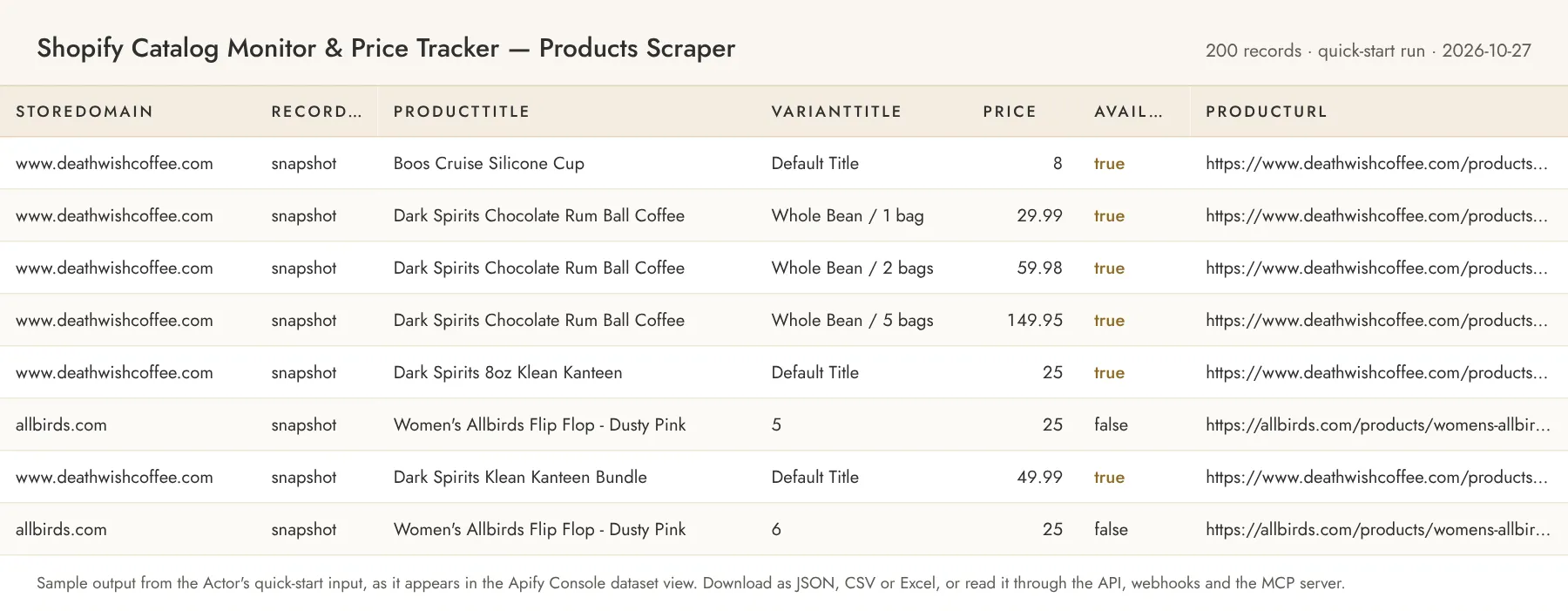
Variant record (recordType is snapshot, or baseline on the first changes run):
Change record (changes mode, from the second run on). changeType is one of new-product, removed-product, new-variant, removed-variant, price-changed, availability-changed, title-changed; all current variant fields from above are included as well:
Error items look like { "storeDomain": "example.com", "recordType": "error", "error": "PASSWORD_PROTECTED", "errorMessage": "..." } with codes NOT_SHOPIFY, PASSWORD_PROTECTED, BLOCKED (HTTP 403), RATE_LIMITED, EMPTY_CATALOG, FETCH_FAILED or INVALID_STORE_URL. They are charged like one product record, because the work to discover the problem was done.
If the output saves you time, a review on the Store page helps other buyers find this Actor; the Store invites you to leave one after you have run it a few times.
Alerts and delivery
- Schedules. Create a schedule in the Apify Console (hourly, daily, weekly or a cron expression) with a
changesinput; each run appends only the new change records to its dataset. - The Actor's own
webhookUrl. After every run the Actor POSTs one JSON document to the URL you set:actorandrunId, themodeandgranularity, astoresarray with each store's status, record count and whether it was truncated, the totalproduced, thechargessummary,limitReached,finishedAt, andchanges, a sample of up to 200 change records in the same shape as the dataset rows. Delivery has a 10 s timeout and two retries; a failing endpoint never fails the run and is recorded aswebhookDelivered: falsein the run'sSUMMARYkey-value record. - Apify integrations. On the Actor's Integrations tab you can attach Slack, Make, Zapier, Google Sheets, email or a generic Actor webhook that fires on run events (
ACTOR.RUN.SUCCEEDED,ACTOR.RUN.FAILED,ACTOR.RUN.TIMED_OUT) and carries the run and dataset ids, so any downstream tool can pull the items. - API and dataset endpoints. Start a run and wait for its items in one call with
POST https://api.apify.com/v2/acts/owlabee~shopify-catalog-monitor/run-sync-get-dataset-items?token=<APIFY_TOKEN>(the input JSON as the body), or start it asynchronously withPOST /v2/acts/owlabee~shopify-catalog-monitor/runsand readGET /v2/datasets/{datasetId}/items?format=json(alsocsv,xlsx) when it finishes. The run'sSUMMARYrecord is atGET /v2/key-value-stores/{storeId}/records/SUMMARYand includeswebhookDeliveredwhen a webhook was set.
Pricing
Pay per event. You only pay for records the Actor writes; set a maximum cost per run in the run options to cap spend.
| Event | Price | Notes |
|---|---|---|
| Product or variant record | $0.0007 | Per record in snapshot mode and per baseline record on the first changes run; error items too |
| Detected change | $0.0005 | Per change record in changes mode |
| Catalog page | $0.002 | Per products.json page requested (250 products per page), in snapshot and changes mode, including a first page that fails or comes back empty, and each collection products page when includeCollections is on |
| Actor start | $0.00005 | Apify platform event |
Examples: 1,000 variants from one store ≈ $0.70 + 4 catalog pages $0.008 ≈ $0.71. A daily check of a 500-variant store that changes 20 prices ≈ $0.01 + 2 catalog pages $0.004 ≈ $0.014 + start fee (the first run writes the 500-record baseline for $0.35 + $0.004 for the pages).
Store pricing discounts: users on the Scale plan (Silver) pay 10% less per event, Business (Gold) 20% less.
Limits and fair use
- Requests to each store are spaced about 500 ms apart with bounded retries on 429/5xx, so a 5,000-product store takes roughly 15–20 s; two stores are processed in parallel.
- Each store has a time budget (
maxSecondsPerStore, default 900 s, collections included) and an idle limit of 60 s without a finished page. If paging fails or the budget runs out after the first page, the pages already fetched are kept and charged as usual, the store counts as a truncated listing (no removals reported) and, inchangesmode, the snapshot keeps the products that were not reached. If the very first page fails you get one charged error item. Default run memory is 512 MB. - Only the public storefront JSON is read. Inventory quantities are not exposed by most stores and are
nullunless the store publishes them. - Stores that are password-protected, not on Shopify, or that block datacenter traffic with a WAF return an error item; this Actor does not use residential proxies or browsers to get around that.
maxProductsPerStoretruncates the listing; inchangesmode removals are not reported for a truncated store to avoid false "removed" events.- Snapshots live in the key-value store named by
stateStoreName, one key per store and granularity. Delete the key (or use a new store name) to start a fresh baseline.
Related Actors
Other pay-per-event Actors from the same account, all limited-permission and agent-friendly:
- Website Change Monitor — Sitemap Monitor & Page Diff — sitemap and page content changes for stores and brands that are not on Shopify.
- SPF, DMARC & DKIM Checker — Bulk Domain WHOIS, DNS & SSL — detect which domains in a list run on Shopify before you monitor them.
- Bluesky Monitor & Scraper — Posts, Keywords, Followers — brand and product mentions, profiles and followers on Bluesky.
Guide and code examples
- Guide: Shopify Price Tracker: Catalog and Changes as JSON, covering the source, its fields and limits, and curl and MCP examples.
- No-code recipe: Competitor Shopify Price Changes to Slack with Make, step by step with Apify's official Make app and a ready input.
- Runnable examples (curl, Python, Node.js and an MCP config): owlabee/owlabee on GitHub.
Use from AI agents (MCP)
Pin this Actor in the Apify MCP server with one link: https://mcp.apify.com?tools=owlabee/shopify-catalog-monitor, or let the agent find it with the search-actors tool. It is pay-per-event with limited permissions, so agents can discover it, inspect the input schema with fetch-actor-details and pay per run through agentic payments. Prompts that map directly onto the input:
- "Export the full product catalog of allbirds.com and gymshark.com as one row per variant with price, compare-at price and availability, then tell me which variants are discounted more than 20%."
- "Every morning check www.deathwishcoffee.com for price or stock changes versus yesterday and post only the changes to my Slack webhook."
- "Monitor these five competitor Shopify stores for new products added this week and give me their titles, prices and URLs."
The agent receives the same dataset records shown in the output example above.
Copy this block to call it through the Apify MCP server with the quick-start input; the agent gets the dataset items back in the tool result and can follow up with get-dataset-items for larger runs:
FAQ
Does this need proxies or an API key? No. It reads the public products.json endpoint that Shopify serves for every storefront, using plain HTTP from Apify's standard infrastructure.
How is cost controlled? Set maxProductsPerStore and the run's maximum total charge. The Actor charges each record as it is written and stops cleanly when the limit is reached; in changes mode it then keeps the old snapshot so the next run re-detects anything it could not emit.
Why does the first changes run write so many records? There is nothing to compare against yet, so the full catalog is stored as baseline records (charged at the product rate). From the next run on you only receive change events.
What exactly counts as a change? Price, compare-at price, availability, product title and variant title per variant (per product with granularity: product), plus products and variants that appear or disappear. A brand-new product is one new-product event, not one per variant.
Can an AI agent use this? Yes; see "Use from AI agents (MCP)" above for the pin link and example prompts. Schedules and webhooks work the same way from the Console or the API.
Which fields can I filter on? recordType (snapshot, baseline, change, error), changeType, storeDomain, vendor, productType, tags, available, price.
Can I try it for free? Yes. The Apify free plan comes with monthly platform credit, and the quick-start input above costs a few cents per run, so you can test it on your own inputs before paying anything.
How do I find this Actor again? Bookmark it on the Store page (the bookmark icon next to the title); bookmarked Actors are listed in your Console, and the Store page shows new versions as they ship.
Support
Questions, bugs or a source you'd like added? Open an issue on the Actor's Issues tab, or email jacob@owlabee.com.
Changelog
- 2026-11-01 — Price decrease: product or variant record $0.001 → $0.0007 (Scale $0.00063, Business $0.00056); change and catalog-page prices unchanged.
- 2026-10-27 — README: comparison table, ready-to-run inputs, alerts and delivery, MCP call example, changelog.
- 2026-10-25 — Pricing round (in the Console from 2026-10-26): new per-catalog-page event for every
products.jsonand collection page fetched, event titles pluralized, Store discount tiers for the Scale and Business plans; figures in the pricing table. - 2026-10-23 — Per-store time budget (
maxSecondsPerStore) with an idle limit, request deadlines that include retries, charged error items for stores abandoned mid-run, and a unit-economics test. - 2026-10-23 — Store listing: title now names the price tracker use case, SEO fields, quick start input, MCP section, task examples.
- 2026-10-17 — Published on the Apify Store with pay-per-event pricing; charged events verified on a platform run.
- 2026-10-16 — First release:
snapshotandchangesmodes, variant or product granularity, collections, webhook delivery, named state store.
Legal
This Actor accesses only data the store publishes to every visitor and respects per-host rate limits. Use the data in compliance with the store's terms and applicable law. It collects no personal data, is not a consumer reporting agency, and its output must not be used for employment, credit, insurance, or tenant screening decisions.


