

PDF Table Extractor: PDF to Excel & CSV Converter with OCR
Pricing
Pay per event
PDF Table Extractor: PDF to Excel & CSV Converter with OCR
Use this to extract every table from PDF files into Excel and CSV (PDF to Excel converter, OCR for scans). Input: PDF URLs or uploads plus optional page ranges. Output: one row per table with pages, header, row and column counts and cell data, plus Excel and CSV files.
Pricing
Pay per event
Rating
0.0
(0)
Developer

Panda Federation
Maintained by CommunityActor stats
0
Bookmarked
2
Total users
1
Monthly active users
4 days ago
Last modified
Categories
Share
PDF to Excel on Apify: pull every table from PDF reports, financial statements and filings into clean Excel and CSV files, with OCR for scanned pages. Apify's free plan includes $5 of monthly platform credit, enough for thousands of pages at $0.001 per page plus $0.003 per table (pricing below).
Pull every table out of a PDF report, financial statement or government publication into clean Excel and CSV files. One sheet per table, page numbers kept, headers detected, dot leaders and wrapped rows cleaned up, and tables that run over a page break joined back together.
Copying tables out of PDFs by hand is slow and error-prone: columns shift, numbers land on the wrong row and "Total ........ 1,234" pastes as one cell. PDF Table Extractor reads the PDF's own text layer, finds ruled and borderless tables, cleans them and hands you a workbook you can sort, sum and chart straight away.
- 📄 Digital PDFs, any layout: ruled grids (cell borders) and borderless, whitespace-aligned tables such as statistical releases, annual reports and 10-K/10-Q statements
- 🧹 Cleanup built in: multi-line headers joined ("Sept." + "2026" → "Sept. 2026"), dot leaders stripped, wrapped labels merged back onto their numbers,
$columns removed, titles and footnotes pulled out of the grid - 📑 Multi-page tables joined: a table that continues on the next page comes out as one table with a page range (
22-35) - 🔢 Real numbers in Excel:
1,234,(56)and4.2%become numbers you can sum. The CSV and dataset keep the text exactly as printed - 🔍 Scanned pages handled honestly: pages with no text layer are detected and listed instead of being parsed into garbage. Optional OCR (beta) reads clean scans and marks those tables verify
- 📊 Excel + CSV + JSON: an Excel workbook with an Index sheet and one sheet per table, a ZIP of CSVs, one CSV per table, and one dataset row per table with the full data
- 💸 $0.001 per page + $0.003 per table. A 20-page report with 8 tables costs $0.044. Scanned pages are flagged for free
Who it's for
- Analysts and researchers: BLS, Census, central bank and agency tables into a spreadsheet in seconds
- Finance and accounting teams: balance sheets, income and cash-flow statements from annual reports and filings
- Data journalists and consultants: turn a stack of PDF reports into one workbook to compare
- Developers and AI agents: call it from the API or MCP and get each table as JSON rows keyed by header
Not for coursework. PDF Table Extractor converts documents you are allowed to use. It isn't meant for completing assignments on someone else's behalf. Always spot-check important figures against the PDF, especially OCR'd pages.
How to use the PDF to Excel
- Click Try for free and paste one or more PDF URLs, upload PDFs from your computer, or pick a key-value store that already holds PDFs (read-only access to that store only).
- Optional: limit Pages (
1-5, 8, 12-end) and the maximum pages per PDF. - Leave Table detection on Auto unless you know your PDF only uses ruled or only borderless tables.
- Click Start. A 40-page report usually takes under a minute.
- Download TABLES_XLSX (Excel) or TABLES_CSV_ZIP from Storage → Key-value store, or read the dataset via API.
Input example
Output example
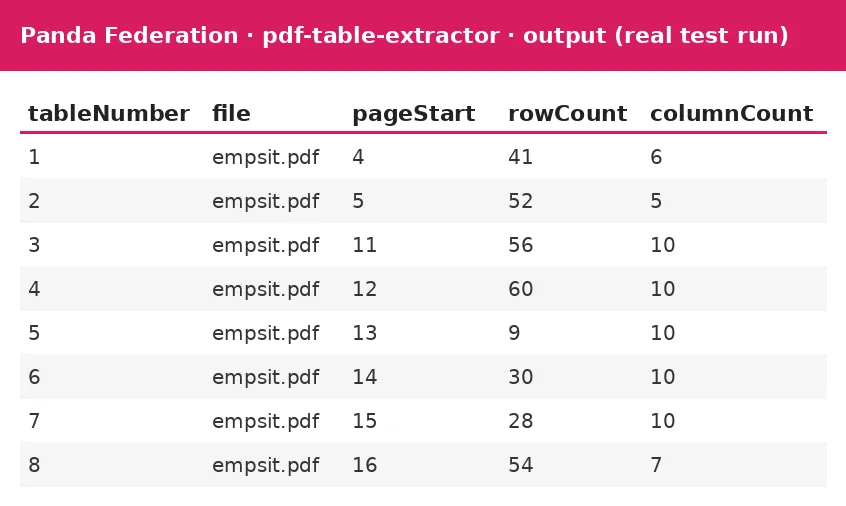
One dataset row per table (data shortened). This is the BLS Employment Situation, page 4:
Fields
| Field | What it is |
|---|---|
tableNumber, tableOnFile | Position across the run and within the file |
file, sourceUrl | File name and where it came from |
pageStart, pageEnd, pages | Page(s) the table is on (a range when it continues over page breaks) |
title, notes | Title lines above the table and footnotes below it, kept out of the grid |
header, hasHeader | Column names (generic Column 1… when no header row was found) |
rowCount, columnCount, data | Size and the rows as objects keyed by header (first 2,000 rows; the CSV/Excel always have all rows) |
method | lattice (ruled grid), stream (whitespace-aligned) or ocr (scanned page) |
check | Why to look twice, if anything: OCR, no header found, or mostly text |
sheetName, csvKey | Where the table is in TABLES_XLSX and its single CSV in the key-value store |
Files in the key-value store
| Key | What it is |
|---|---|
TABLES_XLSX | Excel workbook: Index sheet (with links) and one sheet per table, title and source page on top, footnotes below |
TABLES_CSV_ZIP | All tables as CSV files in one ZIP |
table-001-p4.csv … | One CSV per table (UTF-8, opens cleanly in Excel) |
SUMMARY | Per file: page count, pages analysed, tables, scanned pages (OCR'd or flagged), empty pages and any error |
Scanned PDFs
Every page is checked for a text layer first. A page that is just an image (a scan or photo) is never parsed as if it were text:
- OCR off (default), or over the OCR page cap: the page is skipped, costs nothing and is listed under
scannedNotOcrinSUMMARY, on the Index sheet and in the run status. - OCR on (beta): the page is rendered at about 250 dpi (capped for very large pages), read with Tesseract (English) and parsed. Those tables get
method: "ocr"and a verify note. OCR takes about 5-15 seconds per page and can misread digits (4.4 → 44) and dot leaders, so it suits clean, straight scans where you will check the numbers.
Digital PDFs give exact results. Phone photos, skewed scans and handwriting are out of scope.
For AI agents
Use this Actor to extract every table from PDF files into structured rows, Excel and CSV. Call it with Apify's MCP server (https://mcp.apify.com, tool call-actor, Actor pandadad0214/pdf-table-extractor) or the API (POST https://api.apify.com/v2/acts/pandadad0214~pdf-table-extractor/run-sync-get-dataset-items).
Minimal input:
Each dataset item includes:
summary: one line, e.g.Table 3 'Revenue by segment' from report.pdf p12: 14 rows x 5 columns (lattice); columns ...tableNumber,file,pages: where the table isheader: column namesrowCount,columnCount: table sizemethod:lattice,streamorocrcheck: a warning to verify (OCR, no header, mostly text)data: rows as objects keyed by header (first 2,000 rows; full table in the CSV)
The run's key-value store has a SUMMARY record with counts (tablesTotal, per-file pages, OCR and scanned pages) and file names (TABLES_XLSX, TABLES_CSV_ZIP), a one-line takeaway. Every input field has a description with formats, units and limits.
PDF to Excel pricing and free results
Apify paid-plan discounts: Bronze members pay 10% less, Silver 20% less and Gold 30% less per result. Free-plan prices are shown below; the discount applies automatically.
Pay-per-event, no subscription:
| Event | Price |
|---|---|
| Page analysed (digital page) | $0.001 |
| Table extracted | $0.003 |
| Scanned page OCR'd (beta, only when turned on) | $0.02 |
| Actor start | $0.00005 |
Empty pages, flagged scanned pages and files that fail to download cost nothing. Your maximum charge per run is respected: the run stops cleanly before going over it.
FAQ
Is there a free way to try this PDF to Excel? Yes. Apify's free plan includes $5 of monthly platform credit, enough for thousands of pages at $0.001 per page plus $0.003 per table.
Which PDFs work best? PDFs made by software (reports, statements, exports) with a text layer you can select. Those are read exactly, not guessed.
Why are some headers split oddly? Group headers that span several columns ("Seasonally adjusted" above five months) are attached to the column they sit over. Rename columns in Excel if you need a different layout, or set Header row to First row / None.
Can I process password-protected PDFs? Yes, if you have the password: add it in PDF password (stored encrypted).
Is my file kept? Downloads are deleted after processing. Results stay in your own Apify storage under your retention settings.
Can I use it from code or an AI agent? Yes, via the Apify API, the Python/JS clients, or as a tool through Apify's MCP server.
More Panda Federation tools
- Reference Checker
- Citation Generator
- Google Scholar Scraper Alternative
- PubMed Scraper
- Grants.gov Scraper
- Academic Research MCP Server
All Panda Federation Actors on Apify
Questions or a custom data feed? Open an issue on this Actor's Issues tab.
Changelog
- 2026-10-30 (agent update): Built for AI agents: a one-line
summaryon every result,takeawayin the SUMMARY record, and input fields with formats, limits and examples. - 2026-10-30: New search-friendly title and page, FAQ, safe demo run on empty input, Bronze/Silver/Gold discounts, output screenshot.
- 2026-10-29: First public release with pay-per-event pricing.


