Apify Store Actors Scraper
Pricing
from $1.00 / 1,000 records
Apify Store Actors Scraper
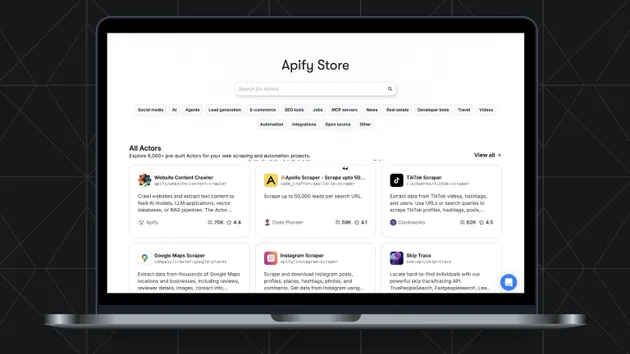
Scrapes Apify Store actor listings by search term, category, pricing model, or maintainer. Returns each actor as a flat row with title, description, pricing, stats, and optional quality scores.
Pricing
from $1.00 / 1,000 records
Rating
5.0
(2)
Developer

ParseForge
Maintained by CommunityActor stats
1
Bookmarked
31
Total users
0
Monthly active users
a month ago
Last modified
Categories
Share

Apify Store Actors Scraper
Scrape Apify Store actors by search term, category, pricing model, or maintainer, up to a million per run. Each actor includes its title, description, pricing, stats, and optional quality scores. No login or API key. Export to CSV, JSON, Excel, or XML.
Apify's own API needs an account, a token, and rate limits. This reads the public Apify Store listings directly, filtered by search query, category, pricing model, or maintainer, and returns each matching actor in one fixed schema. It is the fastest way to build a dataset of Apify actors for market research, competitive analysis, or lead generation.
| Who uses it | What they scrape Apify Store for |
|---|---|
| Market researchers | Which Apify actors are popular in a niche and how they are priced |
| Competitive analysts | What features and pricing competitors offer on the Apify Store |
| Lead generators | A list of actor developers and their contact details for outreach |
| SEO professionals | Which actor titles and descriptions rank for target keywords |
| Product managers | Gaps in the Apify Store that a new actor could fill |
What it does
This Actor collects Apify Store actor listings by search term, category, pricing model, or maintainer, and returns each one as a flat row.
- 🔍 Search terms: one or more queries, processed sequentially until maxItems is reached
- 🏷️ Category filter: narrow to AI, E-commerce, SEO tools, Real estate, and more
- 💰 Pricing model filter: Pay per result, Pay per event, Pay per usage, or Rental
- 👥 Maintainer filter: Apify-maintained or community-maintained actors
- 📊 Quality scores: optional actor quality percentiles and feedback, with a small delay per actor
Results export to CSV, JSON, Excel, or XML, or straight from the API.
What you can do with Apify Store data
📈 Track actor popularity and trends.
A market researcher runs the scraper weekly with a category filter and maxItems 1000 to see which new actors are gaining users and ratings.
🔎 Competitive pricing analysis.
A product manager scrapes all actors in the SEO tools category with pricing model filters to compare pay-per-result and rental rates.
📋 Build a lead list of developers.
A sales team scrapes community-maintained actors in the Real estate category to get developer usernames and actor URLs for outreach.
🧪 Find gaps in the store.
An entrepreneur searches for 'AI agents' and reviews the returned actors to identify underserved niches before building a new actor.
Why choose this scraper
| What you get | |
|---|---|
| No API key | Reads the public Apify Store directly, no account or token needed |
| Up to 1,000,000 actors | One run can collect the entire store or a filtered subset |
| Fixed schema | Every actor returns the same flat fields for easy analysis |
| Optional quality data | Add actor quality scores and feedback when you need deeper insight |
How it compares
No other Store actor targets Apify Store the same way, so the honest comparison is with the alternatives teams actually weigh.
| Apify Store Actors Scraper | Build it in-house | By hand | |
|---|---|---|---|
| Setup | Run it now, zero config | Days of engineering | None, but hours per pull |
| When Apify Store changes | Maintained for you | You fix it | You re-learn the page |
| Proxies, retries, anti-bot | Built in | Your problem | Browser only |
| Output | Fixed JSON schema, CSV/Excel export | Whatever you build | Copy-paste |
| Cost | Pay per result | Engineering time | Analyst hours |
Configure the run
Drive the Actor from search terms, categories, pricing models, and maintainer filters, alone or together. Filters run as each actor is read so only matches reach your dataset. The Input tab lists every parameter.
A first run with the defaults:
A larger pull:
Pricing
Pay-per-result: $0.5 per result collected. You pay only for the results written to your dataset.
| Results collected | Approximate cost |
|---|---|
| 100 results | $50.00 |
| 1,000 results | $500.00 |
| 10,000 results | $5000.00 |
New Apify accounts start with $5 in free credit.
Free users
Free-plan runs return up to 10 results as a preview. Upgrade your Apify plan to collect up to 1,000,000 results per run.
Run it
- Create a free Apify account with $5 in credit.
- Open the Apify Store Actors Scraper.
- Set your inputs and any filters, then click Start.
- Export the results as CSV, Excel, JSON, or XML from the Dataset tab.
Run it programmatically through the Apify API (run-sync-get-dataset-items) or the ApifyClient for JavaScript and Python.
Use with AI agents (MCP)
Give an AI agent live access to Apify Store through the Model Context Protocol. Add the Actor to Claude, Cursor, or any MCP client:
Then prompt it in plain language to run the scraper and read back the results.
Troubleshooting
Why am I getting no results?
Check your filters. If you set a category or pricing model that does not match any actors, the result set will be empty. Try clearing filters or using a broader search term.
Why is the run slow when I enable quality scores?
Quality scores and praises require an extra request per actor, adding 1 to 3 seconds each. Disable these options if speed is more important than depth.
Why did the run stop before reaching maxItems?
The Actor stops when all search terms have been processed and no more actors match. If you want more results, add more search terms or remove filters.
Can I get actor contact information?
The Actor returns the developer username and actor URL. For direct contact, visit the actor page on Apify Store.
FAQ
| Question | Answer |
|---|---|
| Do I need an Apify API token to use this scraper? | No. This Actor reads the public Apify Store pages directly, so no account or token is required. |
| Can I scrape the entire Apify Store? | Yes. Leave the searches field empty and set maxItems to 1000000 to collect every actor listing. |
| What filters can I apply? | You can filter by search term, category, pricing model, and maintainer. Combine them to narrow results. |
| What does the quality score include? | When you enable includeActorQuality, the Actor adds quality scores and percentiles. It waits 1 to 3 seconds per actor to fetch this data. |
| What are praises and improvements? | These are quality feedback items from Apify's actor quality system. Enable includePraisesAndImprovements to add them, with the same per-actor delay. |
| How are search terms processed? | The Actor processes each search term sequentially until maxItems is reached. You can use plain terms like 'real estate' or actor IDs like 'parseforge/auction-com-property-scraper-ppe'. |
| What output formats are supported? | You can export the dataset to CSV, JSON, Excel, or XML from the Apify platform. |
| Is this scraper legal? | It only reads publicly available Apify Store pages. You are responsible for complying with Apify's terms of service for any use of the data. |
| Can I schedule this scraper to run regularly? | Yes. Use Apify's scheduler to run it daily, weekly, or on any cron schedule. |
| Does this scraper work with proxies? | Apify's platform automatically handles IP rotation and retries, so you do not need to configure proxies. |
Related actors
Browse the full ParseForge collection for more scrapers.
🆘 Need help? Email parseforge@protonmail.com with your run ID, your input, and what you expected.
⚠️ Disclaimer. This Actor is unofficial and is not affiliated with, endorsed by, or sponsored by Apify Technologies s.r.o. It collects only publicly available data. You are responsible for using the collected data in compliance with the source's terms of service and applicable data-protection laws, including GDPR, CCPA, and PIPL. Do not use it to collect personal data unlawfully.