
Vintage Photo Restorer
Pricing
from $90.00 / 1,000 results
Vintage Photo Restorer
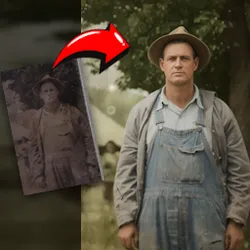
Restores vintage and damaged photos from image URLs using AI. Fixes tears, scratches, fading, and stains, and optionally colorizes black and white images.
Vintage Photo Restorer
Pricing
from $90.00 / 1,000 results
Restores vintage and damaged photos from image URLs using AI. Fixes tears, scratches, fading, and stains, and optionally colorizes black and white images.
You can access the Vintage Photo Restorer programmatically from your own applications by using the Apify API. You can also choose the language preference from below. To use the Apify API, you’ll need an Apify account and your API token, found in API & Integrations in Apify Console.
{ "openapi": "3.0.1", "info": { "version": "1.0", "x-build-id": "oahoEDuPP5vL0YofR" }, "servers": [ { "url": "https://api.apify.com/v2" } ], "paths": { "/acts/parseforge~vintage-photo-restorer/run-sync-get-dataset-items": { "post": { "operationId": "run-sync-get-dataset-items-parseforge-vintage-photo-restorer", "x-openai-isConsequential": false, "summary": "Executes an Actor, waits for its completion, and returns Actor's dataset items in response.", "tags": [ "Run Actor" ], "requestBody": { "required": true, "content": { "application/json": { "schema": { "$ref": "#/components/schemas/inputSchema" } } } }, "parameters": [ { "name": "token", "in": "query", "required": true, "schema": { "type": "string" }, "description": "Enter your Apify token here" } ], "responses": { "200": { "description": "OK" } } } }, "/acts/parseforge~vintage-photo-restorer/runs": { "post": { "operationId": "runs-sync-parseforge-vintage-photo-restorer", "x-openai-isConsequential": false, "summary": "Executes an Actor and returns information about the initiated run in response.", "tags": [ "Run Actor" ], "requestBody": { "required": true, "content": { "application/json": { "schema": { "$ref": "#/components/schemas/inputSchema" } } } }, "parameters": [ { "name": "token", "in": "query", "required": true, "schema": { "type": "string" }, "description": "Enter your Apify token here" } ], "responses": { "200": { "description": "OK", "content": { "application/json": { "schema": { "$ref": "#/components/schemas/runsResponseSchema" } } } } } } }, "/acts/parseforge~vintage-photo-restorer/run-sync": { "post": { "operationId": "run-sync-parseforge-vintage-photo-restorer", "x-openai-isConsequential": false, "summary": "Executes an Actor, waits for completion, and returns the OUTPUT from Key-value store in response.", "tags": [ "Run Actor" ], "requestBody": { "required": true, "content": { "application/json": { "schema": { "$ref": "#/components/schemas/inputSchema" } } } }, "parameters": [ { "name": "token", "in": "query", "required": true, "schema": { "type": "string" }, "description": "Enter your Apify token here" } ], "responses": { "200": { "description": "OK" } } } } }, "components": { "schemas": { "inputSchema": { "type": "object", "required": [ "imageUrls" ], "properties": { "imageUrls": { "title": "Photo image URLs to restore", "type": "array", "description": "Direct URLs of the vintage photos to restore." }, "restorationStyle": { "title": "Restoration Style", "enum": [ "full-recovery", "auto", "time-degradation", "physical-damage", "color-restoration", "contrast-enhancement", "scratch-removal", "stain-removal", "fade-correction", "noise-reduction" ], "type": "string", "description": "Choose the type of restoration to apply: 'auto' automatically detects and applies the best restoration techniques; 'time-degradation' fixes yellowing, fading, stains, and age-related damage; 'physical-damage' repairs tears, creases, missing pieces, and physical deterioration; 'full-recovery' performs complete restoration fixing all types of damage; 'color-restoration' focuses on restoring faded colors; 'contrast-enhancement' improves contrast and clarity; 'scratch-removal' removes scratches and surface marks; 'stain-removal' removes stains and spots; 'fade-correction' corrects fading; 'noise-reduction' reduces grain and noise. Default: auto", "default": "full-recovery" }, "recolorStyle": { "title": "Recolor Style", "enum": [ "auto", "natural", "vibrant", "vintage", "warm", "cool", "cinematic", "pastel", "sepia", "black-white" ], "type": "string", "description": "Choose the colorization style: 'auto' automatically detects and applies the best colors, 'natural' uses realistic colors, 'vibrant' uses bright colorful tones, 'vintage' uses period-appropriate muted colors, 'warm' uses warm tones (oranges, reds, yellows), 'cool' uses cool tones (blues, greens, purples), 'cinematic' uses dramatic film-like colors, 'pastel' uses soft pastel colors, 'sepia' preserves sepia tone, 'black-white' preserves black and white. Default: auto", "default": "auto" }, "customPrompt": { "title": "Custom Restoration Instructions (Optional)", "type": "string", "description": "Optional custom instructions to guide the restoration process. Examples: 'Keep the vintage sepia tone', 'Restore the blue sky in the background', 'Fix the torn corner on the left side', 'Make the colors more vibrant'. These instructions will be combined with the selected restoration style." }, "removeAiArtifacts": { "title": "Remove AI Artifacts with extra call per image", "type": "boolean", "description": "If enabled, the restored photo will be reprocessed to remove any AI artifacts, distortions, or unnatural elements for a cleaner, more natural result. This adds an additional processing step. Default: false", "default": false } } }, "runsResponseSchema": { "type": "object", "properties": { "data": { "type": "object", "properties": { "id": { "type": "string" }, "actId": { "type": "string" }, "userId": { "type": "string" }, "startedAt": { "type": "string", "format": "date-time", "example": "2025-01-08T00:00:00.000Z" }, "finishedAt": { "type": "string", "format": "date-time", "example": "2025-01-08T00:00:00.000Z" }, "status": { "type": "string", "example": "READY" }, "meta": { "type": "object", "properties": { "origin": { "type": "string", "example": "API" }, "userAgent": { "type": "string" } } }, "stats": { "type": "object", "properties": { "inputBodyLen": { "type": "integer", "example": 2000 }, "rebootCount": { "type": "integer", "example": 0 }, "restartCount": { "type": "integer", "example": 0 }, "resurrectCount": { "type": "integer", "example": 0 }, "computeUnits": { "type": "integer", "example": 0 } } }, "options": { "type": "object", "properties": { "build": { "type": "string", "example": "latest" }, "timeoutSecs": { "type": "integer", "example": 300 }, "memoryMbytes": { "type": "integer", "example": 1024 }, "diskMbytes": { "type": "integer", "example": 2048 } } }, "buildId": { "type": "string" }, "defaultKeyValueStoreId": { "type": "string" }, "defaultDatasetId": { "type": "string" }, "defaultRequestQueueId": { "type": "string" }, "buildNumber": { "type": "string", "example": "1.0.0" }, "containerUrl": { "type": "string" }, "usage": { "type": "object", "properties": { "ACTOR_COMPUTE_UNITS": { "type": "integer", "example": 0 }, "DATASET_READS": { "type": "integer", "example": 0 }, "DATASET_WRITES": { "type": "integer", "example": 0 }, "KEY_VALUE_STORE_READS": { "type": "integer", "example": 0 }, "KEY_VALUE_STORE_WRITES": { "type": "integer", "example": 1 }, "KEY_VALUE_STORE_LISTS": { "type": "integer", "example": 0 }, "REQUEST_QUEUE_READS": { "type": "integer", "example": 0 }, "REQUEST_QUEUE_WRITES": { "type": "integer", "example": 0 }, "DATA_TRANSFER_INTERNAL_GBYTES": { "type": "integer", "example": 0 }, "DATA_TRANSFER_EXTERNAL_GBYTES": { "type": "integer", "example": 0 }, "PROXY_RESIDENTIAL_TRANSFER_GBYTES": { "type": "integer", "example": 0 }, "PROXY_SERPS": { "type": "integer", "example": 0 } } }, "usageTotalUsd": { "type": "number", "example": 0.00005 }, "usageUsd": { "type": "object", "properties": { "ACTOR_COMPUTE_UNITS": { "type": "integer", "example": 0 }, "DATASET_READS": { "type": "integer", "example": 0 }, "DATASET_WRITES": { "type": "integer", "example": 0 }, "KEY_VALUE_STORE_READS": { "type": "integer", "example": 0 }, "KEY_VALUE_STORE_WRITES": { "type": "number", "example": 0.00005 }, "KEY_VALUE_STORE_LISTS": { "type": "integer", "example": 0 }, "REQUEST_QUEUE_READS": { "type": "integer", "example": 0 }, "REQUEST_QUEUE_WRITES": { "type": "integer", "example": 0 }, "DATA_TRANSFER_INTERNAL_GBYTES": { "type": "integer", "example": 0 }, "DATA_TRANSFER_EXTERNAL_GBYTES": { "type": "integer", "example": 0 }, "PROXY_RESIDENTIAL_TRANSFER_GBYTES": { "type": "integer", "example": 0 }, "PROXY_SERPS": { "type": "integer", "example": 0 } } } } } } } } }}OpenAPI is a standard for designing and describing RESTful APIs, allowing developers to define API structure, endpoints, and data formats in a machine-readable way. It simplifies API development, integration, and documentation.
OpenAPI is effective when used with AI agents and GPTs by standardizing how these systems interact with various APIs, for reliable integrations and efficient communication.
By defining machine-readable API specifications, OpenAPI allows AI models like GPTs to understand and use varied data sources, improving accuracy. This accelerates development, reduces errors, and provides context-aware responses, making OpenAPI a core component for AI applications.
You can download the OpenAPI definitions for Vintage Photo Restorer from the options below:
If you’d like to learn more about how OpenAPI powers GPTs, read our blog post.
You can also check out our other API clients:
