

Job Scraper: Indeed, LinkedIn, Glassdoor & More
Pricing
from $1.40 / 1,000 jobs
Job Scraper: Indeed, LinkedIn, Glassdoor & More
Search Indeed, LinkedIn and Glassdoor (plus Naukri and Bayt) in one run. One clean table, salaries as yearly figures, duplicates merged, and an 'only new jobs' mode for daily alerts. Pay per job; proxies included.
Pricing
from $1.40 / 1,000 jobs
Rating
0.0
(0)
Developer

Paul Yu
Maintained by CommunityActor stats
0
Bookmarked
2
Total users
1
Monthly active users
2 days ago
Last modified
Categories
Features
Share
What is Job Scraper?
Job Scraper runs one search across Indeed, LinkedIn and Glassdoor (plus Naukri in India, Bayt in the Gulf and SEEK in Australia and New Zealand) and returns a single table of job listings: title, company, location, salary, date posted, apply link, full description and company details. Enter a job title, a city and a country, then press Start. The default search takes about a minute. It is an Indeed scraper, LinkedIn jobs scraper and Glassdoor scraper in one: no login, cookies or API keys needed, results as JSON, CSV or Excel. SEEK rows here carry the shared fields; for SEEK's applicant counts and screening questions use the SEEK Jobs Scraper.
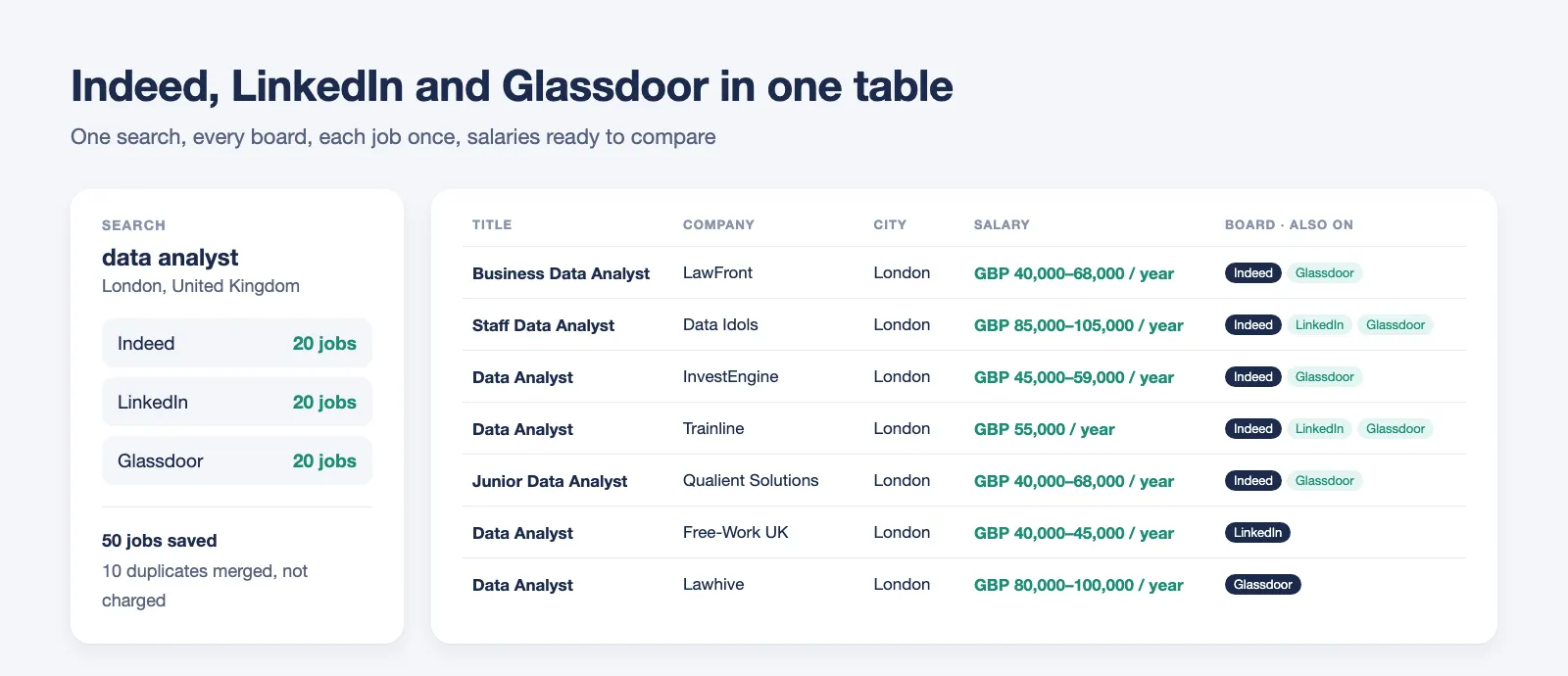
What you get compared with running one scraper per board
- One table instead of three exports. Every board fills the same columns.
- Each opening once. If Indeed and Glassdoor list the same job, you get one row with
alsoFoundOn: "Glassdoor"and pay for one row. - Alerts that only bill new jobs. With Only new jobs on a daily schedule, each run delivers and charges only jobs you have not received yet.
- Salaries you can compare. Hourly, weekly and monthly pay also appears as a yearly figure, and as text like
USD 91,700–118,400 / year. - A report on every board. Boards are searched separately and retried on fresh proxies. If one is blocked, the rest are still saved, and the run report says which board failed and why.
- Remote, hybrid or on-site. Each job is labelled from the posting's own wording, the same way on every board, so you can ask for hybrid roles only.
- Visa sponsorship and agencies flagged. Each job is marked when the posting offers or rules out visa sponsorship, and when it comes from a recruitment agency - filter on either, or exclude specific companies.
- Filters applied before you pay. LinkedIn ignores the remote and job-type filters, so the Actor removes non-matching LinkedIn jobs itself, and they are not charged.
- A results page you can search and sort. Every run includes a page where you can search, filter by board or work arrangement, sort by date or salary, and download a CSV - on a laptop or a phone.
- Job alerts by e-mail, built in. Add your address and schedule the run: you get a short list of new openings, with salaries and apply links. No Zapier or Make needed.
- Several cities in one run. Search up to 10 locations at once; a job that turns up in two nearby searches is saved once.
- Recruiter targeting. Follow specific companies on LinkedIn, keep only Easy Apply jobs, or continue a large search where the last run stopped.
- Extra filters, free of charge. Exclude titles containing words like senior or intern, keep only jobs that show a salary, or set a minimum yearly pay (compared with the top of the advertised range). Jobs you filter out are not charged.
- One price. You pay per job saved: $2.00 per 1,000 on the Apify Free plan, less on paid plans, so $1 ≈ 500 jobs on the Free plan, up to 714 on Gold. Proxies and compute are included; there is no separate platform usage charge, only a start fee of $0.003 per run ($0.002 on Gold).
What data can you extract from job boards?
| Job | Salary | Company |
|---|---|---|
| Title, seniority, job type | Readable text (GBP 30,000 / year) | Name, website, logo |
| City, state, ISO country code | Min / max, currency, pay interval | Industry, employees, revenue |
| Remote, hybrid or on-site | Yearly min / max for comparison | Rating and number of reviews |
| Visa sponsorship offered or ruled out | Whether the salary is an estimate | Recruitment agency or direct employer |
| Date posted, job URL, direct apply URL | Board, and other boards listing the job | |
| Full description (Markdown or HTML) |
Titles and descriptions are kept in their original language and script (German, Arabic, Chinese and so on).
How to scrape job listings
- Click Try for free and open the Input tab.
- Enter one or more job titles or keywords (one per line), e.g.
registered nurse. - Enter one or more locations, one per line, such as
Austin, TX,LondonorSydney, NSW- or leave it empty to search the whole country. - Choose the country. Boards that do not serve it are skipped automatically, and you are never charged for them.
- Optional: under Filters, set Posted within, Work arrangement, Job type or a Minimum yearly pay. Under Sorting and output, choose Newest first or Highest pay first.
- Click Start. The status line shows each board as it finishes. On the Output tab, open the Results page to search, filter and sort, or download everything as Excel, CSV or JSON.

Tip: search in the local language for the best matches outside English-speaking countries - for example Krankenpfleger in Germany or infirmier in France.
How much does it cost to scrape jobs?
You pay $2.00 per 1,000 jobs saved on the free plan, less on paid Apify plans. Proxies and compute are included. Each run has a start fee of $0.003 ($0.002 on Gold). The only other extra is optional: if you turn on e-mail alerts, Apify's Send Email Actor adds a fraction of a cent per message. Duplicates that were merged, jobs removed by your filters and jobs already delivered to a monitor are not charged.
| Search | Jobs saved (typical) | Cost |
|---|---|---|
| Default run: 1 title, 1 city, 3 boards × 20 | up to 60 | about $0.12 |
| 5 titles, 3 boards × 50 | up to 750 | about $1.50 |
| 1,000 jobs | 1,000 | $2.00 |
| Daily alert, ~30 new jobs a day for a month | ~900 | about $1.80 / month |
Apify's free plan includes $5 of monthly credit - roughly 2,500 jobs a month at no cost. To cap a single run, set Maximum cost per run in the run options: the run never goes over it, and with a small limit it only asks the boards for about as many jobs as the limit can pay for. The cost limit always uses your own plan's price.
Input example
Daily job alert
Save it as a Task and add a daily Schedule - that is the whole setup. Each morning you get an e-mail listing only the new openings
(no e-mail on days with nothing new). You can also connect Google Sheets or Slack under Integrations. The first run delivers
everything that matches; later runs deliver only new openings. Each alert name (monitorName) keeps its own memory - change the name to start fresh.
Openings are forgotten 120 days after they were last seen.
Use cases
| You are | Set up | What you get |
|---|---|---|
| Looking for a job | Your title and city, Posted within = Last 24 hours, Only new jobs on, your e-mail, a daily schedule | One e-mail a day with new openings, salaries and apply links |
| Moving abroad (work visa) | Your title and target cities, Visa sponsorship = Only jobs that offer sponsorship, Hide detected recruitment agencies on | Employers that say they sponsor visas, directly - not through agencies |
| Recruiting or sourcing | Several titles, several cities, LinkedIn company IDs for target employers | Who is hiring for what, merged across boards, with company size and industry |
| Selling to companies (lead generation) | Titles that signal a need (e.g. "SDR", "data engineer"), the Companies view | Companies actively hiring, with website, size and the role they are hiring for |
| Researching salaries or the market | Many titles and cities, Salary shown on, Results per board = 200+ | Yearly salary ranges you can compare across cities and boards |
| Running a job board or newsletter | Your niche titles, Only new jobs, a schedule, the API or a webhook | A clean, deduplicated feed of fresh listings |
| Building with AI | Call it through the Apify MCP server or the API, descriptions off | Structured job data an assistant can reason over quickly |
Readable digest for e-mail, Slack and AI tools
Next to the table, every run stores a digest of the jobs it saved, grouped by search term and newest first:
digest.html- a clean page you can open in a browser or send by e-mail (links go straight to the application page).digest.md- the same list in Markdown, for Slack, Notion or an AI assistant.
Both appear on the run's Output tab and list up to the 300 newest jobs (all jobs are always in the dataset).
To receive it by e-mail, fill in E-mail results to (up to 5 addresses; on Apify's free plan only your own account address works). The e-mail is sent through Apify's own Send Email Actor in your
account, which costs a fraction of a cent per message. For Slack, Make, Zapier or n8n, forward digest.md or digest.html when the run finishes. Links open the employer's application page when the board
provides one, otherwise the listing.
Output example
One row per job. Every field is flat, so CSV and Excel exports open as a tidy table.
The Output tab opens with the Results page (search, filter, sort, CSV download), followed by the table with three views: Jobs, Salaries and Companies.
Run report
Every run also stores a report in its key-value store under OUTPUT, so automations can check what they got:
OK - every board answered · PARTIAL - a board was blocked, could not find your location (its results are discarded and not charged),
or the run hit its time or cost limit; everything that worked is saved ·
FAILED - no board answered, nothing was charged.
Which job boards and countries are supported?
| Board | Countries |
|---|---|
| Indeed | 62 countries |
| worldwide | |
| Glassdoor | US, UK, Canada, Australia, New Zealand, India, Singapore, Hong Kong, Ireland, Germany, France, Netherlands, Belgium, Austria, Switzerland, Spain, Italy, Mexico, Brazil, Argentina |
| Naukri | India |
| Bayt | UAE, Saudi Arabia, Qatar, Kuwait, Bahrain, Oman, Egypt, Morocco |
| SEEK | Australia and New Zealand. For applicant counts, screening questions and the working-holiday checks, use the SEEK Jobs Scraper |
| ZipRecruiter | US and Canada - optional, often blocked (see FAQ) |
FAQ
Why did a board return 0 jobs?
Open the run report (OUTPUT). no_results means the board genuinely had no match - try a broader title or a larger radius.
blocked means the board refused the request after three attempts on different proxies; the other boards' jobs are still saved and you are not charged for the blocked one.
Why is ZipRecruiter off by default?
Its bot protection currently blocks cloud servers, including residential proxies, so it almost always returns nothing. You can still select it; it is never charged when it fails.
How is "hybrid" detected?
From the posting's own wording: "Hybrid" in the title or location, phrases such as "hybrid working" or "3 days in the office", or LinkedIn's #LI-Hybrid tag. "Hybrid cloud", "Agile/hybrid delivery", "not a hybrid role" and "remote sensing" are not counted, and "5 days in the office" reads as on-site. Postings that do not say are left blank rather than guessed, so a Work arrangement filter excludes them. Detection reads English wording only.
How are visa sponsorship and agencies detected?
Visa sponsorship comes from the description: "visa sponsorship available" or "we will sponsor" mark a job as offered; "unable to sponsor", "must have full working rights" or "citizens only" mark it as not offered. Most postings do not mention it and stay blank. Refusals win: "we cannot provide H-1B sponsorship" is not offered. Agencies are recognised by exact agency names (Hays, Robert Half), names containing "Recruitment" or "Staffing", or "on behalf of our client" wording; "Hudson River Trading" or "Reed Elsevier" are not agencies. Both read English wording only and are best-effort: always read the posting before applying.
Does sorting cover every job?
Sorting by salary or date orders all the jobs a run collects, so results are saved at the end of the run rather than as they arrive. If you set a cost limit, the run stops collecting when the limit is reached; jobs from searches it did not reach are not included. The results page shows up to 3,000 jobs; the full list is always in the dataset (Output tab, Export).
Why do I see a job twice?
The same opening is merged when the title, company, city and country match on different boards. Two listings on the same board are always kept, because they can be two real openings. Boards sometimes spell the company differently ("Acme Motor Group" vs "Acme Garages") or give a different location for one job; those are kept as separate rows rather than risk merging two real openings.
How do I follow specific companies?
Open the company's jobs on LinkedIn and copy the number after f_C= in the address bar (for example 1441 for Google).
Put it in LinkedIn company IDs. Other boards keep searching normally, so add the company name to the job title if you want them narrowed too.
Can I get more than 1,000 jobs?
Yes. Add more search terms (up to 20) or locations (up to 10), or raise Results per board. To go deeper into the same search, run it again with Skip the first results set to where the last run stopped. For very large pulls, split the work into several tasks.
Do I need a LinkedIn, Indeed or Glassdoor account?
No. The Actor reads public job listings only and never logs in.
Is it legal to scrape job listings?
The Actor collects publicly available job postings and company information. It does not extract recruiter e-mail addresses into a separate field; job descriptions are passed through as the employer posted them. You are responsible for using the data in line with the boards' terms and the laws that apply to you. If you are unsure, ask a lawyer.
Can I use it from Claude, ChatGPT or another AI assistant?
Yes. Every Apify Actor is available through the Apify MCP server. Add this server to your assistant (Claude, Cursor, VS Code and other MCP clients):
Then ask, for example: "Find remote Python developer jobs in the US posted this week and list the ones that pay over $150k." Set Include job descriptions to off for faster, shorter answers.
Can I use it through the API, Make, Zapier or n8n?
Yes. Every run is available through the Apify API and the official integrations. With the Python client:
Something is wrong or missing
Open an issue in the Issues tab - include the run link. Feature requests are welcome.
Built on the open-source JobSpy library (MIT), with fixes for its current upstream issues.


