

SEEK Jobs Scraper: Applicants, Work Rights & Visas
Pricing
from $1.00 / 1,000 jobs
SEEK Jobs Scraper: Applicants, Work Rights & Visas
SEEK jobs in Australia and New Zealand with applicant counts, employer screening questions, working holiday and citizenship checks, super, licences, company ratings and yearly salary. Only new jobs by e-mail.
Pricing
from $1.00 / 1,000 jobs
Rating
0.0
(0)
Developer

Paul Yu
Maintained by CommunityActor stats
0
Bookmarked
2
Total users
1
Monthly active users
2 days ago
Last modified
Categories
Features
Share
What does SEEK Jobs Scraper do?
It collects jobs from SEEK, Australia's and New Zealand's biggest job site, with what the search page does not show: how many people have already applied, the employer's screening questions, who can apply, and the company's rating. Pay is turned into a yearly figure, and on a schedule you get only new jobs, by e-mail if you like.
- Applicant numbers.
applicantsis SEEK's own count of applications so far ("1,159 applicants", "5 applicants"). Sort by fewest applicants to find the jobs with the least competition, or set a maximum. - Who can apply, read from the ad. Working holiday visa welcome or not accepted; citizens or permanent residents only; full work rights required; valid work rights (visa holders can apply); 482 and other sponsorship. Filters let you hide the jobs you cannot take.
- The employer's screening questions. The questions SEEK asks when you apply, for example "Which of the following statements best describes your right to work in Australia?", so you know what to prepare.
- Licences and checks. RSA, RCG, White Card, Working with Children Check, police check, driver's licence, forklift licence, first aid, security licence, NDIS screening, AHPRA and more, listed per job.
- Pay you can compare. The pay as advertised, plus a yearly figure (hourly × 2,080), and whether it is plus or including super.
- Company details. SEEK company rating and number of reviews, size, industry and website, when the company has a SEEK profile; whether the advertiser is verified; the closing date.
- Job alerts. Only new jobs on a schedule returns, and charges for, only jobs you have not received before, and can e-mail you a digest.
Price: $0.0015 per job saved on the Apify Free plan, down to $0.001 on Gold. $1 ≈ 666 jobs on the Free plan, up to 1,000 on Gold. Jobs removed by your filters, duplicates and jobs already delivered to an alert are free. Each run also has a start fee of $0.003 ($0.002 on Gold), so a scheduled alert run that finds no new jobs costs a third of a cent. To cap spending, set Maximum cost per run in Run options: the run never goes over it, and with a small limit it only asks SEEK for about as many jobs as the limit can pay for. The cost limit always uses your own plan's price.
What you get for each job
| Job | Who can apply | Company |
|---|---|---|
| Title, link, location as SEEK shows it, suburb and state | Working holiday visa | Name, logo, SEEK profile |
| Category and sub-category, work type, work arrangement | Work rights required | Rating and reviews |
| Pay as advertised, yearly min and max, super | Sponsorship offered or ruled out | Size, industry, website |
| Listed date, closing date, featured ad | Screening questions | Advertiser verified, on SEEK since |
| Applicants, application volume | Licences and checks | Recruitment agency or not |
| Full description, highlights |
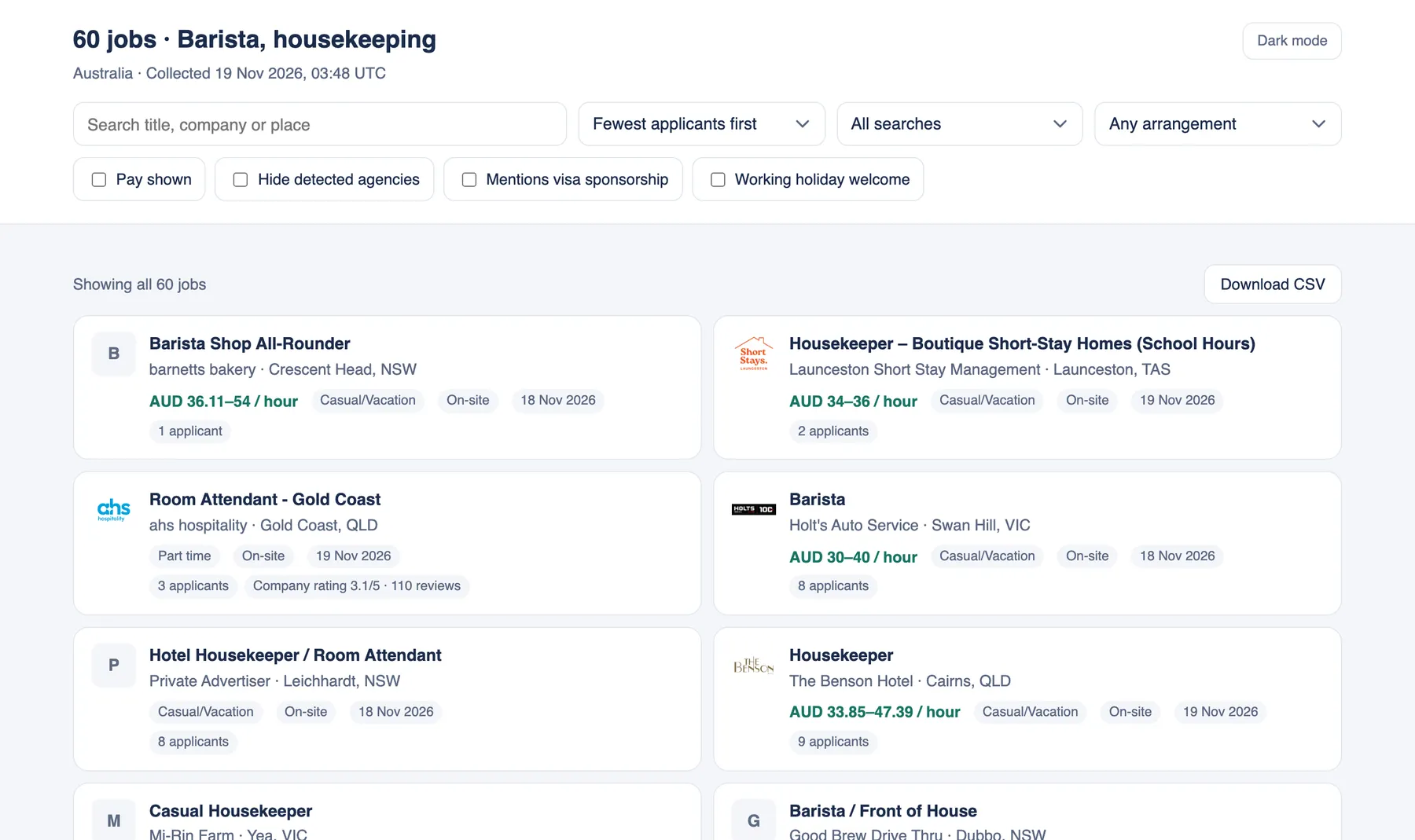
After each run, the Results page in the Output tab lists the jobs with search, sorting (newest, highest pay, fewest applicants), filters for pay, agencies, sponsorship and working holiday visas, light and dark mode, and a CSV download.
How to use it
- Enter job titles, one per line, e.g.
baristaorregistered nurse. - Enter places: a suburb, city, region or state (
Bondi NSW,Melbourne,QLD). Leave empty for the whole country. - Choose Australia or New Zealand and how many jobs per search.
- Set who can apply and other filters if you like, and click Start.
For a daily alert, turn on Only new jobs, give the alert a name, add your e-mail and a schedule.
Input example
Output example
Use cases
- Job seekers and working holiday makers: find the jobs you can actually take, with the least competition, every morning by e-mail.
- Recruiters and agencies: market maps by category, suburb and pay; employers hiring now and how many applicants they get.
- Migration and education advisers: which roles offer sponsorship, which ask for citizenship, which licences are in demand.
- Researchers and AI tools: clean, consistent rows with full descriptions.
FAQ
How reliable are the "who can apply" fields?
They are read from the ad's own wording and its screening questions, with rules tested on real SEEK ads. An ad that does not mention a working holiday visa or work rights gets an empty value, never a guess. "Full work rights required" and "citizens or residents only" both rule out a working holiday visa, so Hide jobs that rule it out removes them too.
Why is applicants sometimes empty?
SEEK shows the count for most ads, but not all. Those ads are kept by the At most this many applicants filter and sorted last by Fewest applicants first.
How is pay turned into a yearly figure?
Hourly × 2,080, daily × 260, weekly × 52, monthly × 12. The advertised text is kept in salaryLabel, and superannuation says whether it is plus or including super.
Does it cover JobStreet or Jobsdb?
Not yet: SEEK in Australia and New Zealand only. The Job Scraper searches Indeed, LinkedIn and Glassdoor in Australia and New Zealand too.
Is it legal to scrape SEEK?
The Actor reads public job ads without signing in and does not collect applicants' personal data. Make sure your use complies with SEEK's terms and privacy law.
Use it from AI assistants and code
Works as a tool in Claude, ChatGPT, Cursor and other assistants through the Apify MCP server. Add https://mcp.apify.com?tools=paul_studio/seek-jobs-scraper to your MCP client and ask, for example: "Find barista jobs in Melbourne that accept working holiday visas and have fewer than 30 applicants."
Pricing
You pay per job saved, the same price with every field included. Jobs removed by your filters, duplicates and jobs already delivered to an alert are free. Proxies are included. Set a maximum cost per run in the run options and the Actor never goes over it.
Feedback
Something missing or wrong? Open an issue on the Issues tab with the search you ran.


