

YouTube Scraper: Videos, Channels & Subscribers
Pricing
from $2.00 / 1,000 videos
YouTube Scraper: Videos, Channels & Subscribers
Scrape YouTube videos from channels, playlists, hashtags and searches: views, likes, subscribers, tags, chapters, optional transcripts. One clear price per video, no add-ons, free date-range and view filters.
Pricing
from $2.00 / 1,000 videos
Rating
0.0
(0)
Developer

Paul Yu
Maintained by CommunityActor stats
0
Bookmarked
2
Total users
1
Monthly active users
2 days ago
Last modified
Categories
Features
Share
What does YouTube Scraper do?
It collects YouTube video data in bulk: views, likes, publish date, length, tags, hashtags, chapters, and the channel with its subscriber count. Paste any mix of channels, playlists, hashtags, search terms and video links. Transcripts are an option, not a separate tool.
- Charged once per video, no add-ons. Date ranges, view and length filters are free, and videos skipped by a filter are not charged. Transcripts are optional: videos that have one are charged at the Video with transcript rate, all others at the Video rate.
- Paste anything. Video and Shorts links in any format,
@handles, channel and playlist links,#hashtags, or plain search words, all in one list. - Channel numbers included. Saved videos carry the channel's subscriber count (looked up once per channel), when YouTube shows it.
- Spot what is working. Each video gets views per day and likes per 100 views; the results page marks breakout videos (views compared with the same channel's median) and has a channel table you can sort.
- Free date range. Published after and Published before together give an exact window, for channels, playlists, hashtags and searches.
- Follow channels on a schedule. Only new videos returns, and charges for, only uploads you have not received before.
- Every input accounted for. A private or removed video, or a channel that does not exist, gets a row with the reason in plain words, not charged.
Price: $0.003 per video on the Free plan ($0.002 on Gold), or $0.005 for a video with its transcript ($0.0035 on Gold). $1 ≈ 333 videos on the Free plan, up to 500 on Gold. Each run also has a start fee of $0.001 ($0.0007 on Gold), so a scheduled run that finds nothing new costs a tenth of a cent. To cap spending, set Maximum cost per run in Run options; the run never goes over it. The cost limit always uses your own plan's price. When the limit cannot cover a video with its transcript, the video is saved at the plain video price instead.
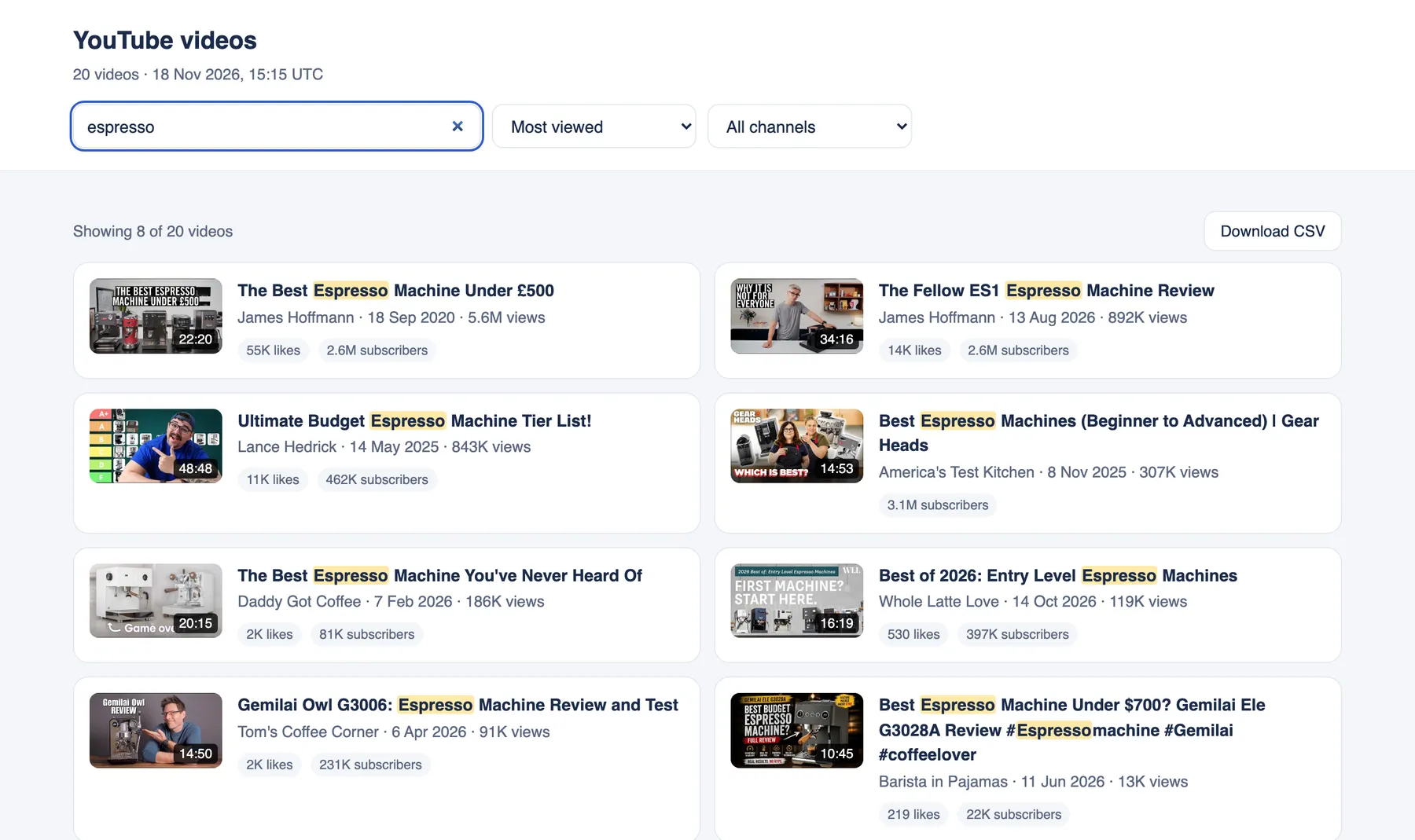
What you get for each video
| Video | Channel | Optional |
|---|---|---|
| Title, link, thumbnail | Name, link, ID | Transcript in paragraphs |
| Views, likes, category | Subscribers | Readable transcript with timestamp links |
| Published date, length (and in seconds) | Timed segments, chunks for AI tools | |
| Tags, hashtags, chapters | SRT and WebVTT subtitles | |
| Short or live, caption languages | ||
| Views per day, likes per 100 views | ||
| Description |
After each run, the Results page in the Output tab shows:
- a summary: videos, channels, total and median views;
- the videos as cards, sortable by views, likes, date, length or breakout (a video with 3× its channel's median views is tagged "3× channel median"; this needs 3 or more videos from the channel in the results);
- a Channels view: subscribers, videos in the results, median views, likes per 100 views and latest upload for each channel;
- search over titles and channels (and transcripts, when included), and CSV downloads of either view.
How to use it
- Paste channels, playlists, hashtags, search terms or video links into the first field, one per line.
- Set Videos per channel, playlist, hashtag or search. Channels are read newest first.
- Optionally set a date range, minimum views or length under Filters.
- Click Start. Ten videos from two sources usually take about a minute.
To follow channels or a topic, turn on Only new videos, give the monitor a name and add a schedule. Each run looks at the newest videos (as many as you set) and returns only those you have not received.
Input example
Output example
Use cases
- Market and competitor research: what a set of channels published this month, and how each video performed.
- Influencer and creator discovery: search a topic or hashtag, then sort by views and subscribers.
- Content planning and SEO: the tags, hashtags, titles and chapters that work in a niche.
- AI and research: add transcripts to get the spoken text of every video, with timestamps.
FAQ
How is this different from other YouTube scrapers?
One charge per video with no add-ons, free date ranges and filters, hashtags and searches in the same list as channels, subscriber counts on every row, and transcripts from YouTube's own captions instead of paid AI transcription. If you only need transcripts, YouTube Transcript Scraper is cheaper per transcript.
Can I search in other languages or countries?
Search words can be in any language. Search results language sets the interface language YouTube uses when it ranks searches and hashtags (for example Japanese), which tends to surface videos in that language. It does not restrict the spoken language or the country of the videos. Titles and descriptions always come back in their original language.
What do views per day and likes per 100 views mean?
viewsPerDay is the lifetime average: views divided by days since publishing (at least one day, so a video published this morning shows its views so far). engagementRate is likes divided by views, times 100. Both are empty when YouTube hides the number.
How exact are the numbers?
Views and likes are YouTube's exact counts at the moment of the run. Subscriber counts are rounded the way YouTube shows them (8.76M becomes 8,760,000). Comment counts are not included yet.
What about transcripts?
They come from the captions the video already has (made by the creator, or by YouTube automatically), in the video's own language or one you choose. Videos without captions are saved at the normal video price with transcriptStatus: "no_captions". Nothing is transcribed by AI, so there are no per-minute charges.
What happens when YouTube blocks a request?
A blocked video is tried again up to eight times from new IP addresses and alternating YouTube's Android and iOS apps, then once more at the end of its source. If datacenter IPs keep getting blocked, the run switches to residential IPs when your Apify plan includes them. A video that still cannot be read is listed as blocked and not charged.
Is it legal to scrape YouTube?
The Actor reads information YouTube shows publicly to any viewer, without signing in, and does not download videos. How you use the data is up to you: respect copyright, privacy and YouTube's terms.
Use it from AI assistants and code
Works as a tool in Claude, ChatGPT, Cursor and other assistants through the Apify MCP server. Add https://mcp.apify.com?tools=paul_studio/youtube-scraper to your MCP client and ask, for example: "List the 20 most viewed videos about home espresso from the last 30 days."
Pricing
You pay per video saved. A video saved with a transcript is one "Video with transcript" event instead of a "Video" event. Videos skipped by filters, duplicates, unreadable videos and blocked requests are free. Proxies are included. Set a maximum cost per run in the run options and the Actor never goes over it.
Feedback
Something missing or wrong? Open an issue on the Issues tab with the input you used.


