
YouTube Transcript Scraper: Channels & Playlists
Pricing
from $2.80 / 1,000 transcripts
YouTube Transcript Scraper: Channels & Playlists
Transcripts from YouTube videos, Shorts, whole channels, playlists and searches in one run. Clean paragraphs, chapters, timestamp links, SRT/VTT and AI-ready chunks. Videos without captions are listed with the reason and never charged.
Pricing
from $2.80 / 1,000 transcripts
Rating
0.0
(0)
Developer

Paul Yu
Maintained by CommunityActor stats
0
Bookmarked
2
Total users
1
Monthly active users
2 days ago
Last modified
Categories
Features
Share
What does YouTube Transcript Scraper do?
It gets the transcript of YouTube videos in bulk, and works as a YouTube transcript API: extract subtitles and captions as JSON, CSV, Excel, plain text, SRT or WebVTT. Paste any mix of video links, Shorts, channels, playlists and search terms, and every video comes back as one row: the transcript in clean paragraphs, the video's details, its chapters, and the formats you choose.
- Paste anything. Video and Shorts links in any format,
@handles, channel and playlist links, or plain search words, all in one list. - No language codes to look up. By default you get the language spoken in the video, detected from YouTube's own caption and audio information. Pick a language and you get it where it exists; where it does not, you get the original and a note, or a list of the languages the video does have.
- Any language YouTube has captions in. English, Spanish, Hindi, Chinese, Japanese, Korean and 100+ more; search terms and channels can be in any language too. Chinese and Japanese text is joined without stray spaces.
- Every video is accounted for. Videos without a transcript still get a row with the reason in plain words: no captions, private, members only, age-restricted, removed, not yet premiered. You are not charged for them.
- Ready to read or to feed an AI. Paragraphs instead of 2-second fragments, chapter headings, a link to the exact moment for each paragraph, SRT and WebVTT, and chunks sized for embeddings.
- Follow channels on a schedule. Only new videos returns, and charges for, only uploads you have not received before.
Price: $0.004 per transcript on the Free plan, down to $0.0028 on Gold. $1 ≈ 250 transcripts on the Free plan, up to 357 on Gold. Videos without a transcript are free. Each run also has a start fee of $0.001 ($0.0007 on Gold), so a scheduled run that finds nothing new costs a tenth of a cent. To cap spending, set Maximum cost per run in Run options; the run never goes over it. The cost limit always uses your own plan's price.
What you get for each video
| Video | Transcript | Extras you can add |
|---|---|---|
| Title, channel, channel link | Plain text in paragraphs | Readable Markdown with chapter headings and timestamp links |
| Published date, length, views, likes | Language and whether captions are by the creator or auto-generated | Timed segments (start, end, text) |
| Thumbnail, category, link | Word count | Chunks for AI tools, about N words each, with start time and link |
| Status in plain words | Chapters from the description | SRT and WebVTT subtitles |
| Languages the video has captions in | Video description |
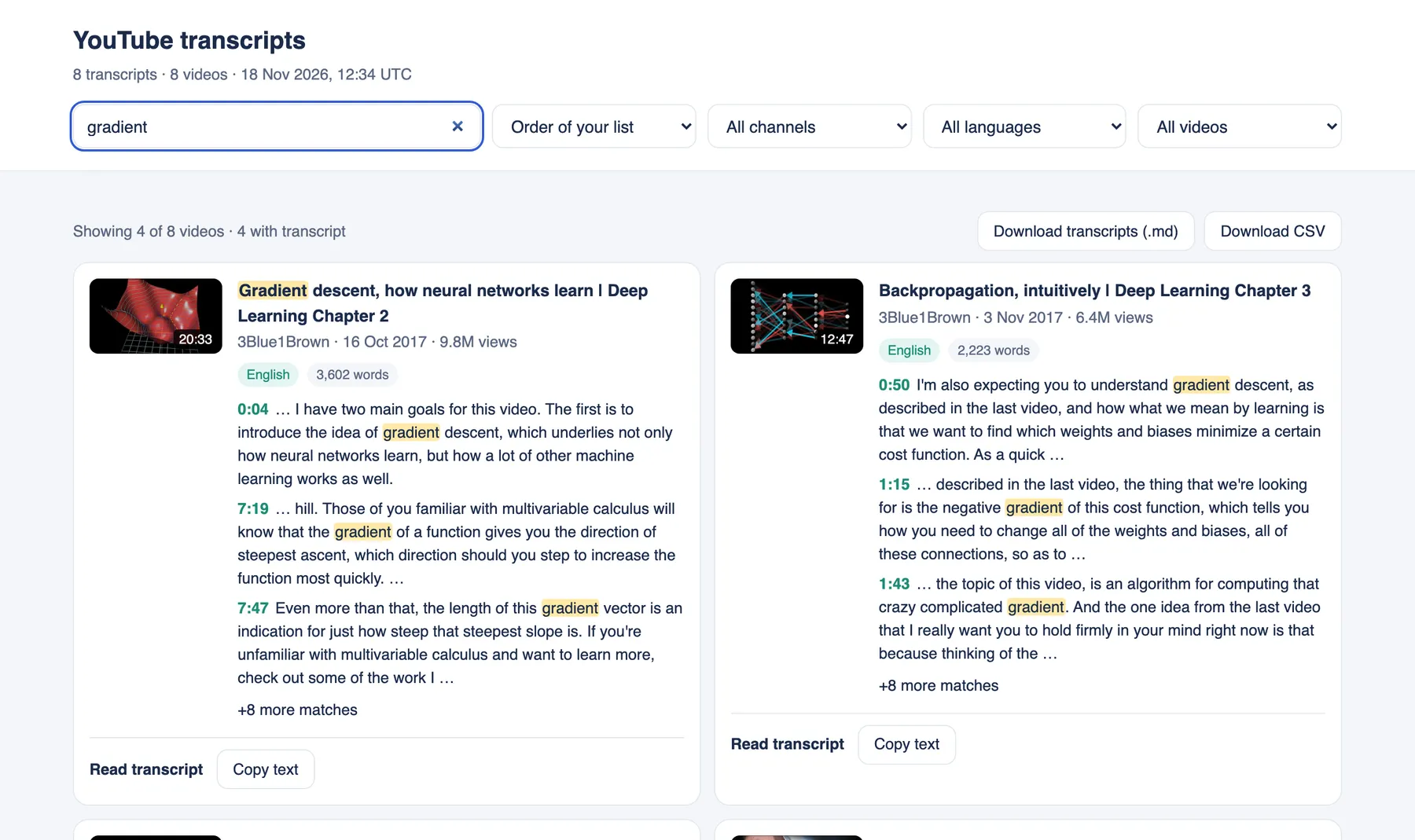
After each run, the Results page in the Output tab lets you search inside the transcripts and jump to the matching moment on YouTube, filter by channel and language, read or copy a transcript, and download the shown transcripts as one Markdown file. The page holds up to 1,000 videos and about 6 million characters of text; for bigger runs it says so, and the complete data is always in the dataset (Output tab, Export).
How to use it
- Paste videos, channels, playlists or search terms into Videos, channels, playlists or searches, one per line.
- For channels, playlists and searches, set Videos per channel, playlist or search. Channels are read newest first; with several tabs chosen (Videos, Shorts, Live), the newest of each tab are taken in turn and share the limit. A link to a tab, such as
youtube.com/@name/shorts, reads only that tab. - Leave Transcript language on Original language unless you need a specific one.
- Click Start. A run of 10 videos usually takes under a minute.
To follow channels, turn on Only new videos, give the monitor a name, and add a schedule (for example daily). Each run looks at the newest uploads (as many as Videos per channel, playlist or search) and returns only those you have not received, so it never digs into older videos. Set the number a little above the uploads you expect between runs. A video without captions, or without captions in your language, is checked again on later runs until it is a week old. The monitor remembers delivered videos for a year. It remembers videos, not settings: to get videos it already delivered again, in another language for example, use a new monitor name.
Input example
Rows for videos without a transcript have the video details and the reason, but no transcript or chapters (subtitles you asked for are kept when the captions are only music or sound cues). Fields that do not apply are null or left out.
Output example
A video without a transcript looks like this, and is free:
Use cases
- AI and research: turn a channel or a playlist into text for summaries, search or a knowledge base. Chunks come with timestamps, so every answer can link to the moment in the video.
- Content and SEO: repurpose videos into articles and posts; find what competitors' videos actually say.
- Market and media monitoring: follow channels or search terms on a schedule and get new transcripts only.
- Education and accessibility: subtitles as SRT or WebVTT, readable notes with chapter headings.
FAQ
Which language do I get?
Original language is the language spoken in the video, as far as YouTube's caption and audio information shows it. YouTube's auto-generated captions are always in that language, so almost every video with speech has one. If you choose a language, creator captions in that language come first, then auto-generated ones. Codes are matched sensibly: Spanish also finds es-419 and es-US, Chinese (Traditional) finds zh-TW and zh-HK.
Why does a video have no transcript?
Some videos have no captions at all (often music, or very new uploads; YouTube adds auto-generated captions within hours to a few days). Private, members-only and removed videos cannot be read, and age-restricted videos need a signed-in account. Each case gets its own status and is not charged.
How accurate are the transcripts?
You get the captions exactly as YouTube has them. Checked word by word against the open-source youtube-transcript-api on English, Chinese, Japanese and Spanish videos: same lines, same words, same timings. The only change is in the transcript and readable fields, where sound cues such as [Music] are removed and lines are joined into paragraphs.
How good the captions are depends on who made them. Creator captions are written or checked by the channel. YouTube's auto-generated captions are usually close on clear speech, such as lectures, and often wrong on songs.
For music, creator captions are always preferred when the video has them. When a music video has only auto-generated captions, its row says so (statusMessage), so you can decide whether to use it.
Are creator captions better than auto-generated ones?
Usually. They have punctuation and fewer errors. Turn on Creator captions only if you need that quality and can accept fewer results.
Can it translate?
No. YouTube's automatic translations cannot be read reliably, and we do not list features that do not work. You get the captions a video actually has; availableLanguages shows which those are.
Can I search in other languages?
Yes. Search words can be in any language, and Search results language asks YouTube to rank searches and hashtags for one language, for example Japanese.
Is there a limit?
Up to 200 lines per run and up to 5,000 videos per channel, playlist or search. Very large channels take longer; set Published after to limit a run to recent uploads.
What happens when YouTube blocks a request?
A blocked video is tried again up to eight times, each time from a new IP address and alternating between YouTube's Android and iOS apps, and then up to eight more times in a second round at the end of its channel, playlist or search. If datacenter IPs keep getting blocked, the run switches to residential IPs when your Apify plan includes them. A video that still cannot be read is listed as blocked and not charged.
Is it legal to scrape YouTube transcripts?
The Actor reads captions that YouTube shows publicly to any viewer. It does not download videos or audio and does not sign in. How you use the text is up to you: respect copyright and YouTube's terms, and check with a lawyer for commercial reuse.
Use it from AI assistants and code
The Actor works as a tool in Claude, ChatGPT, Cursor and other assistants through the Apify MCP server. Add https://mcp.apify.com?tools=paul_studio/youtube-transcript-scraper to your MCP client and ask, for example: "Get the transcripts of the last 5 videos on @veritasium and summarize each one."
From code, run it with the Apify API or the Python and JavaScript clients:
Pricing
You pay per transcript saved. Videos without a transcript, duplicates, videos outside your filters, and blocked requests are free. Proxies are included.
Set a maximum cost per run in the run options and the Actor never goes over it.
Feedback
Found a video that should work but does not? Open an issue on the Issues tab with the link, and it will be looked at quickly.


