

Ozyshare: Talking-Head Video Editor & Clip Maker
Pricing
from $100.00 / 1,000 finished edits
Ozyshare: Talking-Head Video Editor & Clip Maker
Auto captions and subtitles timed to every word for your own talking-head videos, plus animations, music and cuts, as finished MP4s. Or repurpose a long podcast, talk or stream into short clips for TikTok, Reels, YouTube Shorts, LinkedIn and X, each with a ready post.
Pricing
from $100.00 / 1,000 finished edits
Rating
0.0
(0)
Developer

Petros Hong
Maintained by CommunityActor stats
0
Bookmarked
1
Total users
0
Monthly active users
a month ago
Last modified
Categories
Features
Share
Add auto captions (subtitles timed to every word) to your own talking-head videos and get finished MP4s with music, clean cuts and, if you want them, animations. Turn a long podcast, talk or stream into short clips for TikTok, Instagram Reels, YouTube Shorts, LinkedIn and X (video to shorts, each with a ready-to-post title, caption and hashtags). Or get just the subtitles: an SRT and VTT file and a word-timed transcript, without a video. Upload the files, paste links, or take them from another Actor's dataset. No editing skills, no software to install.
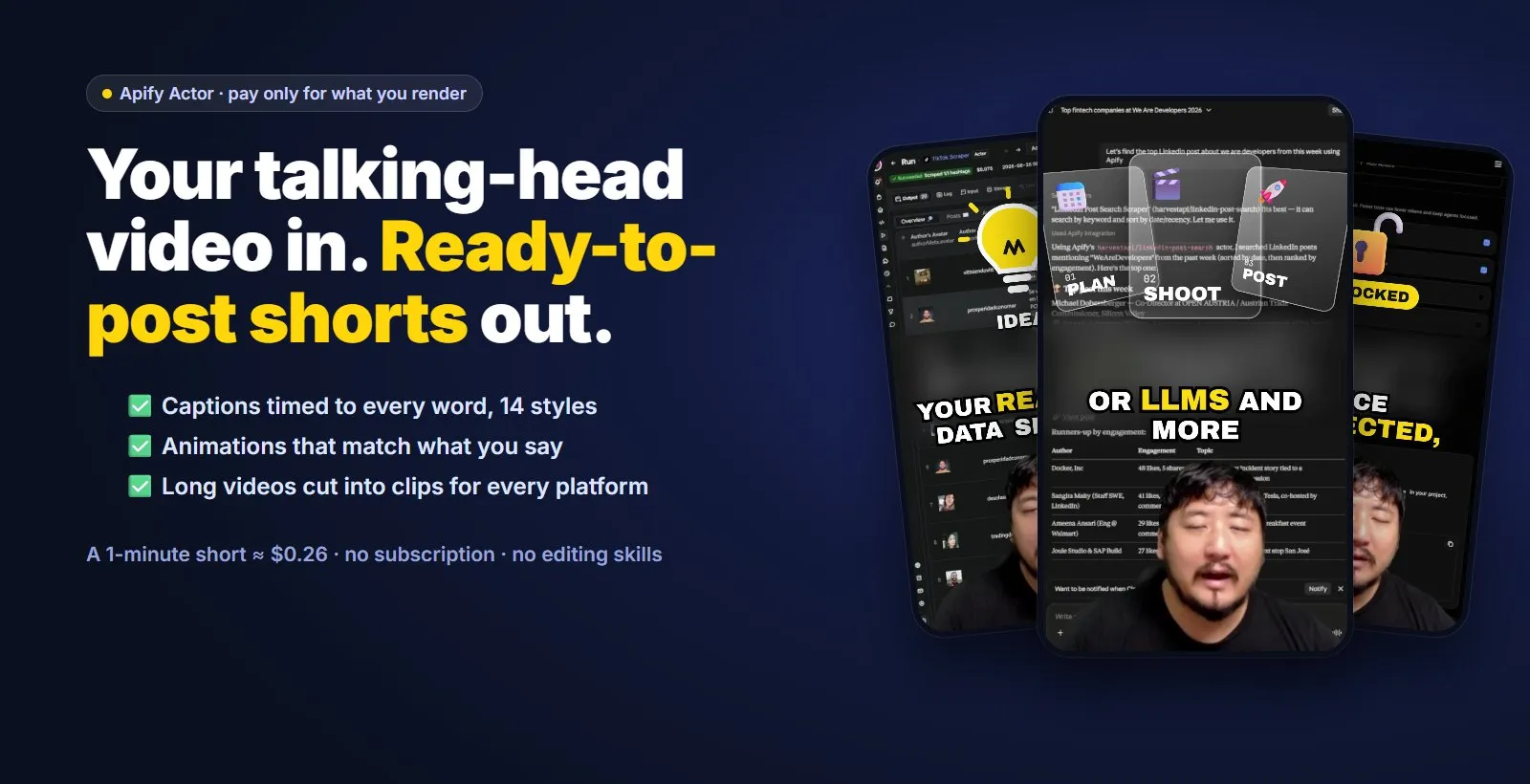
Ozyshare edits footage you already have; it does not generate video.
What it costs: a 1-minute video made into a captioned short is about $0.38: $0.10 for the finished edit, $0.04 per minute transcribed and $0.12 per minute rendered, counted twice because every frame is drawn exactly. 5 clips from a 30-minute podcast are about $4. A subtitles file alone is $0.04 per minute. No subscription, and a video that fails is not charged for its edit. Full pricing
What it does
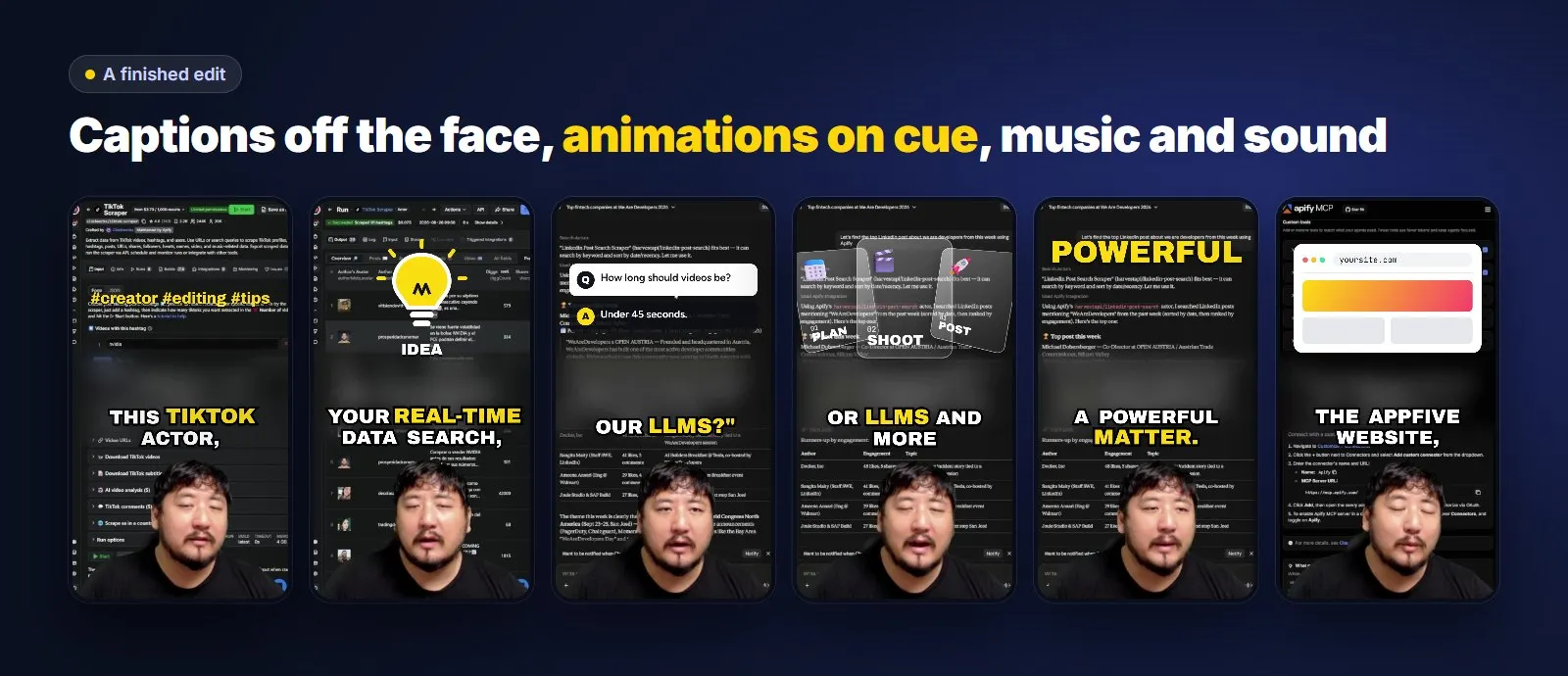
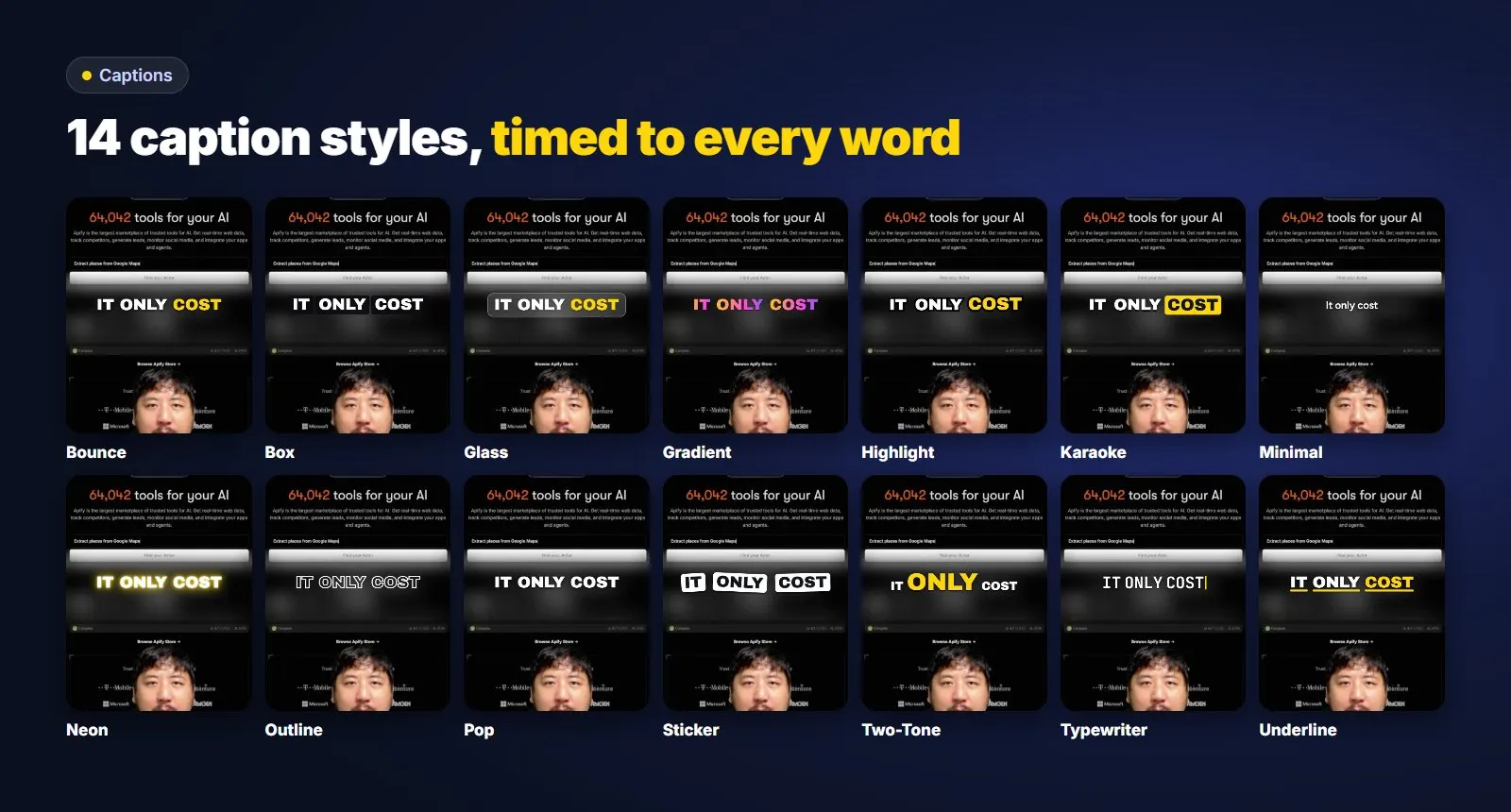
- Captions timed to every word, in 14 styles: pop, karaoke, highlight, boxed, bounce, neon, sticker, two-tone and more, kept off the speaker's face automatically
- Animations matched to what is said, only when you ask for them (off by default): numbers become counters and charts, lists build line by line, places become maps. Choose a few, balanced or lots, or say it in Direction ("a few animations")
- Subtitles file only: turn on Captions file only for an .srt and .vtt file, the plain transcript and word-timed JSON, with no video made; only the transcription is charged
- Music and sound effects, generated, so there is nothing to license
- Cuts: pauses, filler words ("um", "uh"), or a long video condensed to its best parts
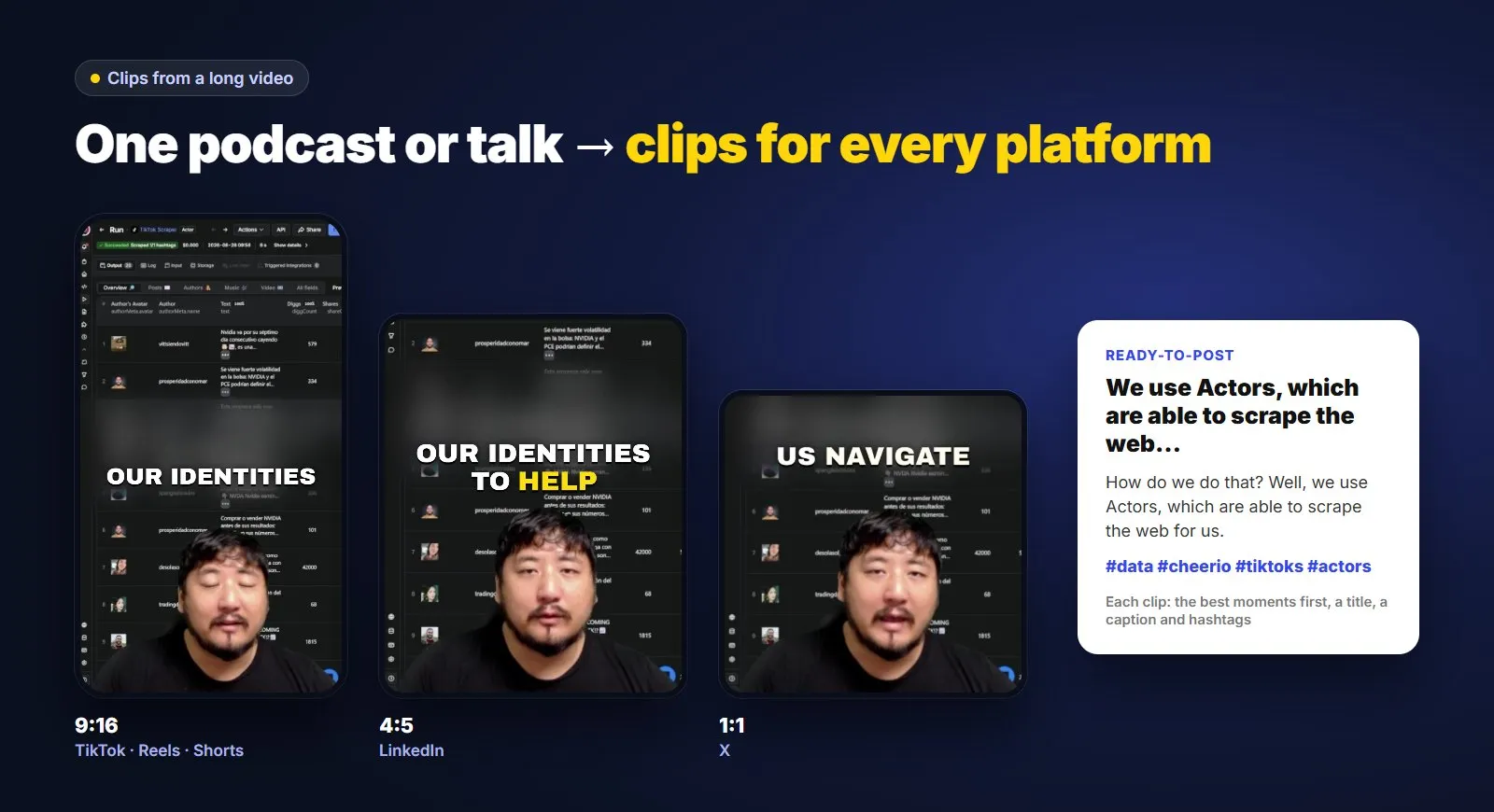
- Clips from long videos: the moments that stand on their own, each rendered in every frame its platforms need (9:16, 4:5, 1:1, 16:9), with a post written for it
- Camera: keeps the speaker's face in frame when 16:9 footage becomes 9:16, follows the person you pick when several are in the shot (left, middle or right), plus punch-in zooms
- Batches: up to 20 videos per run, each edited with the same settings, from your uploads and links or from another Actor's dataset (Videos from a dataset)
- Optional AI director: Claude reads the whole transcript, plans the edit, picks the clips and writes the posts (on a paid Apify plan, or on any plan with your own Anthropic API key)
- Cheaper second runs: each video's transcript is remembered, so running the same file again (another caption style, fixed words) skips transcription
- Every frame exact: the video is drawn and recorded one frame at a time (Smooth render), so no frame is ever dropped or repeated and the sound is exactly in sync: a steady 30 frames a second on any machine. It takes longer than real time
Six moments of a finished edit: captions placed off the speaker's face, animations on cue (a lightbulb on "idea", a card fan on "plan, shoot, post", lightning on "powerful"):
One long video becomes clips in every frame the platforms need, each with its post:
How to use it
- Under Videos, upload your files or paste links: Dropbox and Google Drive share links work (shared with anyone who has the link), as does any direct link to an MP4, MOV or WebM file. YouTube or TikTok pages don't: upload your own file instead.
- Pick a preset, or describe what you want in Direction: "a 30 s TikTok, cut the ums, lo-fi music".
- For clips, turn on Make clips from a long video and choose the platforms.
A run takes about four times as long as the video it renders (every frame is drawn exactly), plus about half the video's length to transcribe it. A subtitles file alone takes about half the video's length.
Ready-made inputs
Podcast episode → 5 clips for TikTok, Reels and LinkedIn
Captions only, on a batch of videos
A punchy 30-second short from a longer take
Fix your last edit of a video, through the API: a name spelled wrong, line 12 rewritten, animation 3 taken out (only the render is charged)
Everything the Ozyshare API accepts also works in More options, e.g. {"trim": {"start": 5, "end": 65}, "overlays": [{"url": "https://…/logo.png", "start": 0, "end": 5, "layout": "pip"}]}.
Output
The Video link in the Output tab opens the finished MP4 (or the best clip). All the files are saved in the run's key-value store, and the dataset has one row per edit, or one row per clip, best first:
The Output tab opens on Video & captions: the finished video (each clip's, for clips) with every caption line and animation under it, numbered and timed; click a time to play the video from there. It is also where you fix the edit: change a caption right there, keep, remove or replace each animation and change its words, then press Rerun with these fixes: with your Apify API token (best one that can only run this Actor; the page never saves it) the fix run starts right away. Agents and automations send the same fix through the API (see Fix an edit below).
Every row also has a storyboard (six frames of the finished video), the plan of every caption and animation, a project file you can open in the Ozyshare editor to change anything by hand, and checks measured on the finished file (caption coverage, loudness, smoothness). In a batch, a video that could not be edited gets a row of type error saying why, and its edit is not charged.
Files in a run's storage are kept for 7 days (Apify's default for unnamed storage); download what you want to keep.
Fix an edit
A word wrong, a line to reword, an animation you don't want? Open the run's Video & captions page (Output tab), change it there and press Rerun with these fixes. The edit is reopened exactly as it was made, only what you changed is done, and you pay only for the render: nothing is transcribed or planned again.
Fixes start from that page or through the API, not from the Actor's Input form: the form keeps the last run's input, so a fix left in it would take over your next new edit. A run started from the form always makes a new edit.
Through the API (agents, automations), a fix is a run with fixEdit: true, the same video, fromRun (the run whose edit to fix; empty for the last edit of the video) and any of these:
changes: say it in words: "line 12 should say 'case study', remove the circle near 0:40, bigger captions" (read by Claude: your own Anthropic key, or a paid Apify plan).fixWords: a word or name wrong everywhere it shows, in captions, animations and clip posts:{"Apify C": "Apify Competitor"}.fixLines: whole lines by their number on the Video & captions page (the same numbers as captions.srt):{"12": "the new text"}.removeAnimations: by number,[3, 7];replaceAnimations: another one in its place,{"3": "Slam"}(the page lists the ones that fit each, and the whole library);addAnimations: a new one on a caption line,{"4": "Keyword Slam"}, its words from that line (or set them, its number and when it plays:{"4": {"animation": "Keyword Slam", "words": "Wow", "start": 3.2, "end": 4.5}}; with your own Anthropic key, Claude words a pick its line doesn't fit);animationText: new words for one,{"3": "3× faster"};animationTiming: when one plays,{"3": {"start": 12.4, "end": 14}}.cutsandtrim: in seconds of the finished video as the page times it,[{"start": 12.5, "end": 15}]and{"start": 2, "end": 58}.- On the Video & captions page you can do all of this by clicking: change a line, pick an animation and its words, move it, change the captions' style, place and colors, and press Preview to watch an animation over your video before you rerun.
captionsFile: a link to the run's captions.srt corrected in any text editor (the words, or the times).- A caption style, music or resolution you pick applies on top.
- So do the edit's other settings, when you change them from the edit you're fixing: Animations (none takes them all off; another amount plans them again, captions untouched), Frame, Remove pauses, Remove filler words, Punch-in zooms, Keep the face in frame, Translate captions to and Names & terms. Settings left as they were change nothing, so earlier fixes stay. Preset, Direction, AI director, Make clips, Condense to and the language make a new edit: turn off Fix an earlier edit for those (a new edit of the same video isn't transcribed again).
- Clips are fixed too, in every frame;
fixClips[2]renders only the ones you changed, so you pay only for those.
Words you fix are also fixed in the remembered transcript, so a new edit of the video gets them right. A fix builds on the last edit, so fixes add up; fromRun picks the edit of a particular run instead. The Actor keeps your edits (the last one of each video, and those of its last 20 runs) with the transcripts in a key-value store in your own account; turn off Remember transcripts if you don't want them kept.
Get names right the first time: list them under Names & terms (your name, your brand, product names). Words the transcription hears a little wrong ("Appify", "a pify", "Hormozy") become them before the edit is made, and the run's checks list what was put right.
Agents and automations get the same numbered lines and animations as JSON (sheetData in the dataset row), so they can check the captions and send the fixes themselves.
Use it from the API, automations and AI agents
AI agents (Claude, ChatGPT, Cursor and others) can run Ozyshare through Apify's MCP server: add the Actor petroshong/Ozyshare and ask in plain words, e.g. "Make a 30-second TikTok with karaoke captions from this video: https://…/take.mp4". Every field has a description the agent reads, and the dataset row's summary says what came out.
For agents: a run takes minutes, not seconds. An edit renders at about four times the video's length, plus half its length to transcribe: a 1-minute short takes about 5 minutes, 5 clips from a 30-minute podcast about 40. So don't wait on the call:
- Start the run without waiting (
call-actorwithwaitSecs: 0, or the API'sPOST /v2/acts/petroshong~Ozyshare/runs), and keep its run ID. - Check it every minute or two (
get-actor-run). ItsstatusMessagesays the stage and how long is left, e.g. "Rendering (70%) · about 3 min left"; the log's first lines say how long the whole edit should take. - When its
statusisSUCCEEDED, read the dataset (get-dataset-itemsondefaultDatasetId). Every row hasstatus(succeededorfailed),type(edit,clip,captionsorerror),summary, and links:video,captions(.srt) and, for clips,title,captionandhashtags. AFAILEDrun'sstatusMessagesays why (a link that doesn't open, a video too long); nothing is charged for its edit.
Only want the words? subtitlesOnly: true returns the .srt, .vtt, transcript and word-timed JSON in about half the video's length, and the row's text holds the transcript itself.
After another Actor: give Videos from a dataset (datasetId) the dataset of a run that collected your video files (a storage or download Actor, say): each row's link to a video file is edited. Or add Ozyshare as an integration on that Actor (Integrations → Apify Actor): when its run succeeds, Ozyshare edits the videos in its dataset with the input you set there. datasetField names the field holding the link when it isn't one of the usual ones (videoFileUrl, downloadUrl, fileUrl, mediaUrl, videoUrl, video, url).
Make, Zapier and n8n: use the Apify app's Run Actor step with Ozyshare, then map the dataset's video field (a link to the MP4) and, for clips, title, caption and hashtags into the next step: save to Google Drive, post to your channels, send for review.
The Apify API, from any language:
A run takes minutes, so for long videos start it and take the result from a webhook or the run's dataset rather than waiting on one request.
FAQ
Can I give a YouTube or TikTok link? No: Ozyshare edits your own videos. Download your file and upload it, or share it from Dropbox or Google Drive.
How long are my videos kept? As long as the run's storage: Apify deletes a run's files after your plan's data retention period, and the links stop working. Download your videos when the run is done (Output tab → Video, or the video link of each dataset row), or have your automation copy them to your own storage.
How long does a run take? About four times the video's length to render (measured: a 29 s video in 113 s at 8 GB), plus about half its length to transcribe it (a third at 16 GB). An edit that would not finish before the run's timeout this way (more than about 25 minutes of finished video in a 2-hour run) renders in real time instead, is charged once per minute, and the row's notes say so; raise the timeout to keep every frame exact.
Which languages? Any of the 99 the speech model knows. The spoken language is detected (or set it under Spoken language), and captions are in that language: Chinese, Japanese and Thai without spaces between words, Arabic and Hebrew right to left. English, the big European languages, Russian, Japanese and Korean are heard with the fast model; other languages with a larger, more accurate one, so they take longer to transcribe. Translate captions to writes them in another language.
A word in the captions is wrong. Correct it on the run's Video & captions page and press Rerun with these fixes. Only the render is charged, and nothing else in the edit changes. To get a name right from the start, list it under Names & terms.
Can I change the edit by hand? Yes: every result has a project file. Open it in the Ozyshare editor to change any caption, animation or cut, and export from there.
How do I keep costs in check? Set Max cost per run in the run options. Each video is checked against it before any work, and skipped with a message if it would cost more.
Pricing
You pay per event, only for what you get. Transcription is charged as soon as the transcript is saved (it is kept, so a later run on the same video skips it); everything else only once the video is finished. A video that fails is never charged for its edit or rendering.
What typical runs cost:
| Run | Cost |
|---|---|
| A 1-minute video made into a captioned short | about $0.38 |
| The same video again with another caption style (transcript remembered) | about $0.34 |
| A 30-minute podcast made into 5 clips for TikTok, Reels and LinkedIn | about $4 |
| Fixing a word or a line in that video | about $0.24 |
| Subtitles only (.srt, .vtt, transcript) for a 10-minute video | $0.40 (nothing if it was transcribed before) |
| AI director on a 1-minute video | add $0.15 (nothing extra with your own Anthropic key) |
| Event | When |
|---|---|
edit | once per finished edit, or per finished set of clips (not for a fix of an earlier edit) |
transcribed-minute | each started minute of video transcribed (not charged when its transcript is remembered from an earlier run, or when you give one) |
rendered-minute | each started minute of video rendered (each clip in each frame counts); two for each minute, since every frame is drawn exactly (one for an edit too long for the run's timeout, which renders in real time) |
ai-minute | each started minute read by Claude, only with the AI director or translation; a fix said in words under Changes is one per 100 caption lines (not charged when you give your own Anthropic API key) |
Before each video, the run checks what it can cost against what is left of your Max cost per run, and skips it with a message if the limit is too low.
Limits
- One edit: videos up to 10 minutes. Condense and clips: up to 60 minutes.
- Up to 20 videos and 10 clips per video per run.
- Video formats: MP4 (H.264), MOV, WebM.
- Memory: runs use 8 GB by default (2 CPUs), which is all a frame-by-frame render needs. 16 GB (4 CPUs) transcribes about twice as fast: worth it for videos over 20 minutes. On a plan whose memory limit is 16 GB, an 8 GB run can start while another Actor runs.
Your data
Your videos are only used to make your edits. Transcripts are remembered in a key-value store in your own Apify account (ozyshare-transcripts), which you can delete at any time; turn off Remember transcripts to keep nothing between runs. By running this Actor you confirm that you own the videos you give it, or have the right to edit and publish them, and you accept the Ozyshare terms.
Also available
The same editor as an MCP connector for Claude and ChatGPT, an HTTP API paid per use, and a browser editor at ozyshare.com.


