
SAM.gov Scraper: Federal Government Contracts and Award Winners
Pricing
from $2.00 / 1,000 contract notices
SAM.gov Scraper: Federal Government Contracts and Award Winners
Federal contract opportunities from SAM.gov, searched by keyword, NAICS, set-aside and state: government contracts, public procurement tenders, RFPs, solicitations, sources sought and bids. Each notice shows past award winners for its agency and NAICS code, from USAspending.gov. Unofficial tool.
Pricing
from $2.00 / 1,000 contract notices
Rating
0.0
(0)
Developer

Plain Record Labs
Maintained by CommunityActor stats
0
Bookmarked
2
Total users
1
Monthly active users
2 days ago
Last modified
Categories
Features
Share
SAM.gov Scraper: Federal Contracts, RFPs, Past Award Winners
Search open US federal contract notices from SAM.gov by keyword, NAICS code, set-aside, state or agency. Each notice comes with its market history from USAspending.gov: how many contracts the same agency awarded under the same NAICS code over about three fiscal years, and the five companies that won the most. Federal data has no "incumbent" field, so these past winners are the closest public signal of who holds similar work today.
Type a keyword or a NAICS code and press Start. You get one row per open notice, newest first.
To see the data before you run anything, Set-aside contracts this week is a free page on our site with one recent week of small business set-aside notices by type, NAICS code and state.
This is an unofficial tool, not affiliated with SAM.gov, GSA, the Treasury or any agency. Always read the full notice on SAM.gov before you bid. Notices change and get amended.
What people use it for
- Small businesses and government contractors: a daily list of open bids in your NAICS codes and states.
- Capture and business development teams: see who already wins this kind of work at this agency before you decide to bid.
- Consultants and bid services: fresh, filtered notices for clients, ready for a spreadsheet or a CRM.
How to use
- Type one or more words in Keywords, like
janitorialorHVAC. You can leave it empty if you use a filter. - Optional: open Filters and add NAICS codes, Set-aside codes, States, Agency or office contains or Notice types.
- Optional: open Deadlines and dates to keep only notices due or posted within a number of days.
- Set Max results to cap how many notices the run returns and what it costs.
- Press Start. When the run ends, open the Output tab or download the results from the Storage tab as CSV, Excel or JSON.
- For daily alerts, turn on Only notices not seen in my earlier runs and add a daily schedule in Apify Console.
Input
| Field | What it does |
|---|---|
| Keywords | Notices whose title or description contains any of these words, like janitorial or HVAC. |
| Exclude keywords | Drop notices that contain any of these words. |
| Search descriptions too | Off searches titles only. |
| NAICS codes | Notices whose NAICS code starts with any of these, like 541512 or 2362. |
| Set-aside codes | Like SBA, 8A, HZC, SDVOSBC or WOSB. The input form lists them all. |
| States | Two-letter codes. Uses the place of performance, or the contracting office's state when the notice gives none. |
| Agency or office contains | Like Army, Veterans or Forest Service. |
| Notice types | Like Solicitation, Sources Sought or Presolicitation. |
| Open notices only | On by default. Turn it off to include award notices from the last 90 days. |
| Response due within (days) | Only notices due soon. |
| Posted within (days) | Only notices posted recently. |
| Include past award winners | Adds the marketHistory block. On by default. |
| Include description text | Adds the description, up to 8,000 characters. |
| Max results | A cap on how many notices one run returns. |
| Only notices not seen in my earlier runs | Returns only new notices. Pair with a daily schedule for alerts. |
Output
One item per notice:
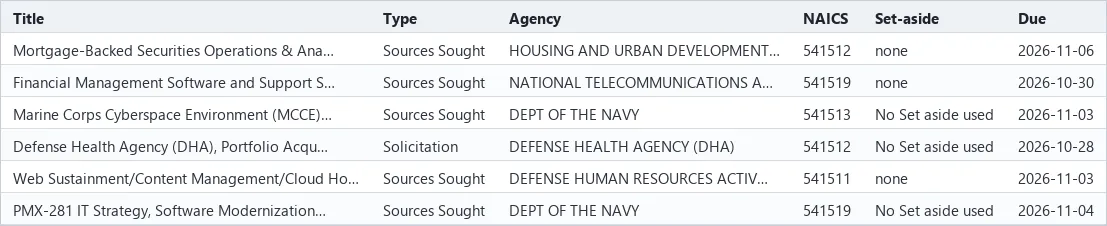
The figures in the example are illustrative. Real values come from the data.
Free pages on our site list open notices for three kinds of work: medical equipment maintenance, security guards and design-build construction.
marketHistorycovers the whole agency (for example the Forest Service or the Department of the Army) and the notice's NAICS code, not the single office. Large agencies buy a lot, so the top recipients there are often big companies. It is context for your bid decision, not a list of who will compete.contractAwardscounts contract award records in USAspending for that agency and code since the start of the period, including small orders and modifications.obligatedUsdis what each company was obligated in that window.marketHistoryis null when a notice has no NAICS code or its agency could not be matched in USAspending (under 1% of notices today).- Contracting officer names, emails and phone numbers are not included. Emails and phone numbers are removed from
titles and descriptions too. Open
samUrlto see who to contact.
| Field | What it holds |
|---|---|
noticeId, title, solicitationNumber | The SAM.gov notice ID, title and solicitation number. |
agency, subTier, office | The department, agency and contracting office. |
noticeType | Solicitation, Sources Sought, Award Notice and so on. |
postedDate, responseDeadline, daysToDeadline | When it was posted, when responses are due, and the days left. |
naicsCode, pscCode | The industry code and the product or service code. |
setAsideCode, setAside | The small business set-aside, if there is one. |
state, placeOfPerformance, officeLocation | Where the work is done and where the contracting office is. |
award | Award number, date, amount and awardee on award notices. |
description | The notice text, up to 8,000 characters. |
marketHistory | Past contract count and top 5 recipients for the agency and NAICS code. |
samUrl | The notice on SAM.gov. |
Where the data comes from
- Notices: the SAM.gov Contract Opportunities public data extract, which SAM.gov rebuilds once a day. We load it into our index each morning (UTC). The index holds every active notice with a future deadline plus anything posted in the last 90 days, about 39,000 notices.
- Market history: the USAspending.gov API, refreshed once a week for each agency and NAICS pair.
- This Actor reads our index only. It never scrapes the SAM.gov website.
FAQ
How do I export SAM.gov contract opportunities to Excel or CSV? Run a search, then download the results from the Storage tab as CSV, Excel or JSON. Each row is one notice with its deadline, NAICS code, set-aside, place of performance and a link back to SAM.gov.
How do I get a daily list of new SAM.gov bids in my NAICS codes? Enter your NAICS codes and states, turn on Only notices not seen in my earlier runs, and add a daily schedule in Apify Console. Each run then returns only notices you have not had before. A webhook or one of Apify's integrations can send them on.
How do I find small business, 8(a), SDVOSB, WOSB or HUBZone set-aside contracts?
Use Set-aside codes: SBA for small business, 8A, SDVOSBC, WOSB or HZC. The input form lists every code.
Who is the incumbent on this contract?
Federal data has no incumbent field. marketHistory shows the five companies that won the most of this agency's
work under the same NAICS code, which is the closest public signal. Check the notice itself on SAM.gov for any
named incumbent or earlier contract number.
Do I need a SAM.gov account or API key? No. The Actor reads our own index of SAM.gov's public daily extract.
How current is it? Notices load once a day, each morning UTC, from SAM.gov's daily extract. Market history refreshes weekly.
Use it from an AI agent or MCP
AI agents can find and run this Actor through the Apify MCP server. Its search-actors
tool finds it, fetch-actor-details reads the input and output fields described above, and call-actor runs it on
your Apify account at the prices on the Pricing tab. To give an agent only this Actor as a tool, add it to the server
URL: https://mcp.apify.com?tools=plainrecordlabs/federal-contract-opportunities.
For example, this input finds open janitorial contracts in Virginia due in the next 14 days:
Pricing
You pay per notice returned, plus a small start fee per run. There is no monthly rental.
| Apify plan | Per notice | Start fee per run |
|---|---|---|
| Free and Bronze | 0.0025 USD | 0.0005 USD |
| Silver | 0.00225 USD | 0.0005 USD |
| Gold, Platinum and Diamond | 0.002 USD | 0.0005 USD |
The start fee is charged once per GB of run memory. This Actor runs at 256 MB by default, so that is one start fee.
Example: a run that returns 100 notices on the Free or Bronze plan costs 100 x 0.0025 = 0.25 USD for the notices plus 0.0005 USD to start, so 0.2505 USD in all. This is only an example. The Pricing tab shows the current prices and is the one to go by. Max results caps what one run can cost.
Related Actors
- SEC Form D Funding Rounds: US companies that just reported a private fundraise to the SEC.
- UK Companies House Search: lists of UK companies filtered by SIC code, postcode, status and incorporation date.
Feedback
Need a field, a filter or a fix? Open an issue on the Issues tab.


