
SEC Form D Startup Funding Rounds: Recently Funded US Companies
Pricing
from $2.00 / 1,000 form d filings
SEC Form D Startup Funding Rounds: Recently Funded US Companies
Recently funded US companies from SEC EDGAR Form D (Reg D) private placement filings, including many raises the press never reports: amount sold, round size, investor count, industry, state and first or repeat raiser. Funds and real estate filtered out. No login or cookie needed. Unofficial tool.
Pricing
from $2.00 / 1,000 form d filings
Rating
0.0
(0)
Developer

Plain Record Labs
Maintained by CommunityActor stats
0
Bookmarked
2
Total users
1
Monthly active users
2 days ago
Last modified
Categories
Features
Share
Find US companies that just raised money. Every company that sells securities under a Regulation D exemption files a Form D with the SEC within 15 days of its first sale. This Actor turns those filings into one clean row per company: how much it has sold so far, how big the round is, how many investors bought in, its industry, city and state, and whether this is the company's first Form D or a repeat raise.
Many of these raises are never reported in the press. A company files a Form D whether or not it announces the round, so you see raises that never made the news. Some companies file late or never, so this is not every raise.
No cookie, login or outside account is needed. The data is public on SEC EDGAR, and every row links the filing itself so you can check any figure at the source.
Press Start with the defaults to get the last week of operating company raises, newest first. Pooled investment funds and real estate offerings are filtered out unless you turn them on.
To see the data before you run anything, New Form D filings this week is a free page on our site with one recent week of filings, the largest raises and counts by industry and state.
This is an unofficial tool, not affiliated with the SEC. A Form D is a notice, not an audited report. Amounts are what the company filed, and some companies file late or not at all.
What people use it for
- Sales and business development: reach companies right after they raise, when they buy tools and hire.
- Investors and analysts: track who is raising in a sector or state, and how much.
- Recruiters and agencies: find newly funded companies before they post jobs.
How to use
- Set Filed within (days), like 7 for the past week. The index keeps about 90 days.
- Optional: open Filters and add Industries, States, Minimum raised so far (USD), Minimum offering size (USD), Company name contains or First-time or repeat raisers.
- Optional: open Offering types to keep equity rounds only, or to add funds, real estate or amendments.
- Set Max results to cap how many filings the run returns and what it costs.
- Press Start. When the run ends, open the Output tab or download the results from the Storage tab as CSV, Excel or JSON.
- For daily alerts, turn on Only filings not seen in my earlier runs and add a daily schedule in Apify Console.
Input
| Field | What it does |
|---|---|
| Filed within (days) | Filings from the last N days. The index keeps about 90 days. |
| Industries | Form D industry groups, like Biotechnology, Technology, Health Care or Restaurants. |
| States | Two-letter codes of the company's principal place of business. |
| Minimum raised so far (USD) | Only companies that report at least this much sold. |
| Minimum offering size (USD) | Only rounds at least this big. |
| Company name contains | Matches current or previous names. |
| First-time or repeat raisers | Any, first Form D only, or repeat raisers only. |
| Equity rounds only | Leaves out debt-only offerings. |
| Include funds and real estate | Off by default. |
| Include amendments | Form D/A updates to earlier filings. Off by default. |
| Max results | A cap on how many filings one run returns. |
| Only filings not seen in my earlier runs | Returns only new filings. Pair with a daily schedule for alerts. |
Output
One item per filing:
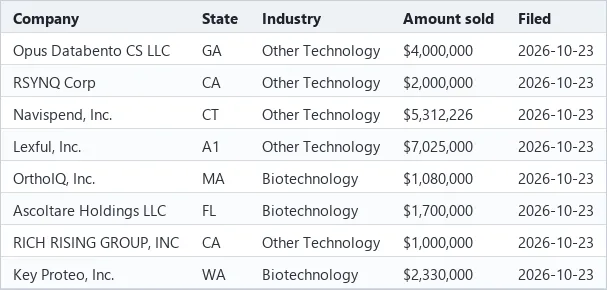
The figures in the example are illustrative. Real values come from the filings.
totalAmountSoldUsdis what the company had sold when it filed.totalOfferingAmountUsdis the round's target, null when the company marked it indefinite.isFirstFormDis true when this round is the company's first Form D on EDGAR and false for a repeat raiser.priorFormDCountcounts the company's earlier Form D notices andfirstFormDDateis the date of its first one. A first Form D is a first notice to the SEC, not proof of a first round, since a company may have raised before without filing one. For an amendment,priorFormDCountincludes the round being updated.- Those three fields are null for a filing we have not checked yet and when the SEC's list cannot settle it, for example for a company with over 1,000 SEC filings, where only a sure repeat is marked.
- A company can file more than one Form D, one per offering, so the same name can appear twice on one day.
dateOfFirstSalecan be months or years back for offerings that stay open over a year.filedDateis when the filing reached the SEC.industryGroupis the company's own choice from the SEC's short list, so many land in "Other".- Each row has the company's city, state and zip, not its street address or phone.
- Names of executives, directors and promoters are not included. The
filingUrlopens the full filing on EDGAR. - Foreign companies show a country code in
state.
| Field | What it holds |
|---|---|
companyName, cik, previousNames | The company as filed, its SEC CIK number and earlier names. |
filedDate, formType | When the filing reached the SEC, and D or D/A. |
industryGroup, entityType, yearOfIncorporation | The industry group, legal form and age the company filed. |
city, state, zip | Where the company is based. |
totalOfferingAmountUsd, totalAmountSoldUsd, totalRemainingUsd | Round size, raised so far and left to sell, in US dollars. |
investorsSoFar | How many investors had bought in. |
securitiesOffered, exemptions | What was sold and the Reg D rule claimed. |
isFirstFormD, priorFormDCount, firstFormDDate | First Form D or a repeat raiser. |
filingUrl | The full filing on EDGAR. |
Where the data comes from
Our index reads the SEC's EDGAR daily index each morning (UTC) and parses each Form D filing. For each company it also reads the SEC's public list of that company's filings once, to tell a first Form D from a repeat. It holds about the last 90 days. This Actor reads that index only, so a run takes seconds.
FAQ
How do I find startups that just raised money?
Press Start for the last week of operating company raises. Narrow it with Industries, States and
Minimum raised so far (USD), for example Technology, CA and 1000000.
Can I find companies raising for the first time? Set First-time or repeat raisers to First Form D only. That keeps companies filing their first Form D on EDGAR. Repeat raisers only does the opposite, for companies coming back for more money.
Do I need a login, cookie or proxy? No. The filings are public on SEC EDGAR, and this Actor reads our own index of them.
What is an SEC Form D filing? A short notice a company files with the SEC within 15 days of first selling securities under a Regulation D exemption, the route most private startup and small business rounds use. It lists the amount offered, the amount sold so far, the number of investors, the industry and the location.
Can I export Form D filings to CSV or Excel? Yes. Each run's results download from the Storage tab as CSV, Excel or JSON.
Does it include founder or executive names, emails or phone numbers?
No. Each row has the company, its city and state, and the round figures. The filingUrl opens the full filing on
EDGAR.
How far back does it go? About the last 90 days. The index adds the SEC's new filings each morning UTC.
Why is a company that announced a round missing? Not every raise uses Regulation D, some companies file late, and some never file. A Form D can also come weeks after the announcement.
Use it from an AI agent or MCP
AI agents can find and run this Actor through the Apify MCP server. Its search-actors
tool finds it, fetch-actor-details reads the input and output fields described above, and call-actor runs it on
your Apify account at the prices on the Pricing tab. To give an agent only this Actor as a tool, add it to the server
URL: https://mcp.apify.com?tools=plainrecordlabs/sec-form-d-funding.
For example, this input finds biotech companies in California that filed a Form D in the last 7 days:
Pricing
You pay per filing returned, plus a small start fee per run. There is no monthly rental.
| Apify plan | Per filing | Start fee per run |
|---|---|---|
| Free and Bronze | 0.003 USD | 0.0005 USD |
| Silver | 0.0025 USD | 0.0005 USD |
| Gold, Platinum and Diamond | 0.002 USD | 0.0005 USD |
Only filings not seen in my earlier runs costs nothing extra. New filings are charged at the same price per filing.
The start fee is charged once per GB of run memory. This Actor runs at 256 MB by default, so that is one start fee.
Example: a run that returns 100 filings on the Free or Bronze plan costs 100 x 0.003 = 0.30 USD for the filings plus 0.0005 USD to start, so 0.3005 USD in all. This is only an example. The Pricing tab shows the current prices and is the one to go by. Max results caps what one run can cost.
Related Actors
- UK Companies House Search: new UK companies by SIC code, postcode and incorporation date, from the Companies House register.
- SAM.gov Contract Opportunities: open US federal contract notices with the agency's past award winners.
Feedback
Need a field or a filter? Open an issue on the Issues tab.


