

ATS Job Scraper: Greenhouse, Lever, Ashby & More
Pricing
from $0.50 / 1,000 job saveds
ATS Job Scraper: Greenhouse, Lever, Ashby & More
Get every open job from company careers pages on Greenhouse, Lever, Ashby, Workable, Recruitee and Personio in one clean format. Filter by keyword, location and remote, or track only new and closed jobs.
Pricing
from $0.50 / 1,000 job saveds
Rating
0.0
(0)
Developer

Elliott Tyson
Maintained by CommunityActor stats
0
Bookmarked
2
Total users
1
Monthly active users
10 days ago
Last modified
Categories
Share
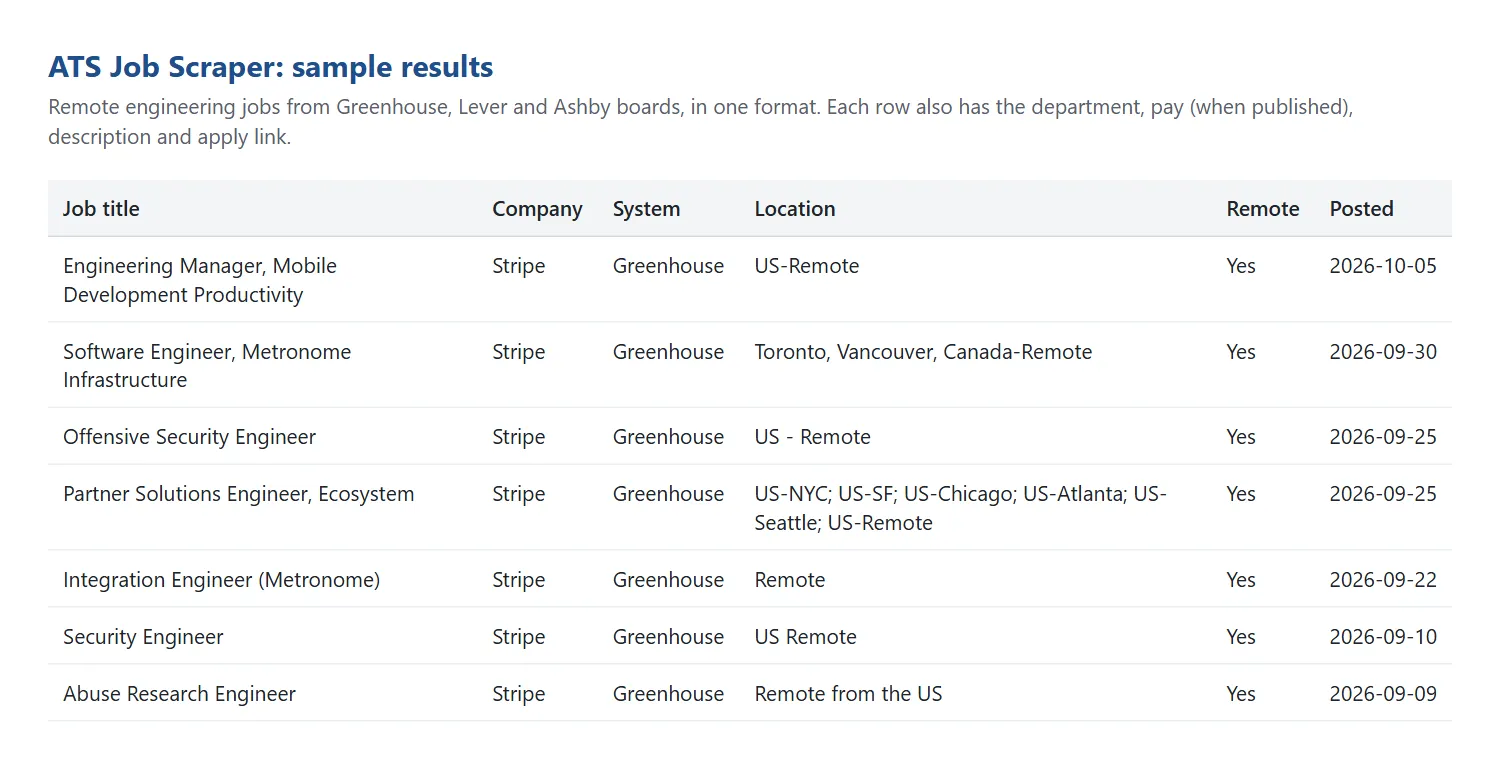
ATS Job Scraper collects every open job from company careers pages that run on Greenhouse, Lever, Ashby, Workable, Recruitee or Personio, and gives them to you in one consistent format. Paste a list of companies, add a few filters if you like, and get job titles, locations, remote status, pay ranges (when published), posting dates, apply links and full descriptions. The results are ready for a spreadsheet, your own job board, a CRM or an AI tool.
It reads the public job feeds these systems provide for companies' own careers pages. No logins and no browser automation, so it's fast (thousands of jobs a minute) and cheap.
What can this ATS job scraper do?
- Six job systems, one format. Greenhouse, Lever, Ashby, Workable, Recruitee and Personio jobs all come out with the same fields, so you don't have to clean up each one differently.
- Paste whatever you have. A job-board link (
https://jobs.lever.co/spotify), a short form (greenhouse:stripe), the company's own careers page (we look for the job-board link on it), or just the company name (we try each system). - Filter before you pay. Keep only jobs matching your keywords, locations, departments, remote status or posting date. Filters run before anything is saved, and you only pay for the jobs you keep.
- Track new and closed jobs. Turn on monitoring and schedule a daily run. You get only the jobs that are new since last time, plus a row for each job that was taken down.
- Clear run summary. For every company you entered, the summary says which system it uses, how many jobs it found, and what went wrong if something did.
- Built to be polite. It respects each site's robots.txt and spaces out its requests.
What data does it collect?
| Field | What it is |
|---|---|
title, companyName, companySlug | Job title, company name (when the system provides it) and the company's board name |
ats, jobId | Which system the job came from, and its ID there |
location, locations, isRemote, workplaceType | Main location, all listed locations, remote flag, and remote / hybrid / onsite |
employmentType, department, team | Full-time, part-time, contract, temporary or internship, plus department and team |
salaryMin, salaryMax, salaryCurrency, salaryPeriod, salaryText | Pay range, when the company publishes it |
postedAt, updatedAt | When the job was posted and last changed |
jobUrl, applyUrl | Links to the job and to the application |
descriptionText, descriptionHtml | The full description as plain text and/or HTML |
changeType | In monitoring mode: new or closed |
inputEntry, scrapedAt | The line of your input it came from, and when it was collected |
How to scrape jobs from company careers pages
- Click Try for free (you'll need a free Apify account).
- In Companies, add one company per line. A job-board link is the most reliable, for example
https://job-boards.greenhouse.io/stripe. - Optionally add keywords, locations or other filters, and choose how you want the job description.
- Click Start. Most runs finish in under a minute.
- Download the jobs as CSV, Excel or JSON, or connect them to Google Sheets, Make, Zapier, n8n or your own code through the Apify API.
Which address should I paste?
Open any job ad on the company's careers site and look at the address bar or the "Apply" link. If it includes greenhouse.io, lever.co, ashbyhq.com, workable.com, recruitee.com or personio.de / personio.com, paste that link. If the careers page is on the company's own website, paste that page and we'll look for the job-board link on it.
Input example
Output example
One result as JSON:
How much does it cost to scrape jobs?
You pay $0.50 per 1,000 jobs saved, plus a tiny start fee of $0.00005 per run. There's no monthly fee, and you only pay for jobs that pass your filters.
- 100 jobs: about $0.05
- A large company's whole board (700 jobs): about $0.35
- A daily monitor of 50 companies that finds about 20 new jobs a day: about $0.30 a month
Apify's free plan includes $5 of monthly credit, which covers about 10,000 jobs. To cap any single run, set a maximum cost when you start it; the run stops cleanly when it gets there.
Track new and closed jobs (monitoring)
Turn on Only new jobs since the last run and schedule the Actor (for example daily) in Apify Console:
- The first run returns every matching job. After that, you only get jobs that are new since the previous run.
- With Also report jobs that were taken down on, you also get a row marked
closedfor each job that disappeared from the board. - Give each monitor a Monitor name if you run several schedules. Keep the same company list and filters between runs.
- Jobs held back by a limit or the run's maximum cost aren't marked as seen, so they show up next time instead of being lost.
Run summary
Each run saves a RUN_SUMMARY record in its key-value store. For each line of your input it shows one of these statuses:
okorno_open_jobs: the board was found and read.not_found: no board was found at that address or under that name.ats_not_detected: we couldn't find a supported job board on the careers page you gave.blocked_by_robots_txt: the site asks automated tools not to access that address, so we didn't.skipped: a duplicate of an earlier line, or the run stopped early.error: something else went wrong; the message explains what.
Limits and good to know
- Supported systems: Greenhouse, Lever, Ashby, Workable, Recruitee and Personio.
- Not supported:
- Workday, iCIMS, Taleo and SuccessFactors: there's no documented public feed.
- SmartRecruiters: its robots.txt asks automated tools not to use its API.
- Job boards such as LinkedIn or Indeed.
- Company names: Lever and Ashby don't publish them, so
companyNameis empty for those. UsecompanySlugor your input line instead. - Pay: included when the company publishes it in a structured way (Ashby, Lever, Recruitee). Many Greenhouse companies put pay in the description text instead.
- Typing a company name: we use the first board with open jobs we find under that name, and a different company with the same name is possible. The run summary flags these matches; check
companyNameand the job links. - Careers pages built with JavaScript may hide their job-board link from us. If a page gives
ats_not_detected, open a job ad and paste the job-board link instead. - Very long lists: a run stops by itself shortly before its time limit (one hour by default), so it still finishes successfully. Companies not reached are marked
skippedin the run summary. For big lists, raise the run's timeout or split the list. - Email addresses are removed from descriptions so no personal contact details are collected. Use the apply link to apply.
FAQ
Is it legal to scrape job postings?
This Actor only reads the public job feeds that these systems publish so companies can show jobs on their own careers sites. It doesn't log in, respects robots.txt, and doesn't collect personal data. Job descriptions belong to the employers, so if you plan to republish them in full (for example on a public job board), check that your use is allowed. If you're unsure, ask a lawyer.
Can I use it through the API or with AI agents?
Yes. Every run can be started and read through the Apify API, with ready-made clients for JavaScript and Python. AI agents can call it through Apify's MCP server. It's also available in Make, Zapier, n8n and Google Sheets through Apify's integrations.
Why did I get fewer jobs than the careers page shows?
Usually it's your filters or the per-company limit. Some companies also list a few jobs on a second system or a separate board, and unlisted jobs (shared only by direct link) aren't in the public feed.
Can you add another job system or field?
Please open an issue on the Issues tab with an example careers page. Bug reports are welcome there too, and I aim to reply within a couple of days.


