

Website Technology Lookup: Tech Stack, DNS & Email
Pricing
from $1.00 / 1,000 domain checkeds
Website Technology Lookup: Tech Stack, DNS & Email
Find out what any website runs on: CMS, e-commerce platform, analytics, ad pixels, hosting and CDN, plus email provider, DNS host, SaaS tools from DNS records, SSL expiry and security headers. One row per domain, ready for lead lists.
Pricing
from $1.00 / 1,000 domain checkeds
Rating
0.0
(0)
Developer

Elliott Tyson
Maintained by CommunityActor stats
0
Bookmarked
2
Total users
1
Monthly active users
10 days ago
Last modified
Categories
Share
Website Technology Lookup tells you what a website runs on and which business tools the company behind it uses. Give it a list of domains and get one tidy row per domain covering:
- the CMS or e-commerce platform, analytics and ad pixels, hosting and CDN, and JavaScript frameworks;
- the email provider and email-sending services;
- the DNS host;
- SaaS tools found in public DNS records (Google Workspace, Microsoft 365, Atlassian, Stripe, HubSpot, Zendesk and many more);
- SSL certificate expiry and security headers.
It's built for lead qualification, competitor research, agency prospecting and IT audits. It works fast: each domain needs one homepage request plus a few DNS lookups, with no browser.
What can this website technology lookup do?
- Detect 1,100+ web technologies from a site's homepage: CMS, site builders, e-commerce platforms, analytics, tag managers, ad pixels, live chat, cookie banners, accessibility overlays, CDNs, frameworks, web servers and more. Versions are included when the site shows them.
- Read public DNS records to find:
- who hosts the company's email (Google Workspace, Microsoft 365, Zoho...);
- which services send email for it (HubSpot, SendGrid, Mailchimp, Zendesk...);
- its DMARC policy and DNS host;
- the SaaS tools it has verified in DNS. This often reveals Atlassian, Slack, Stripe, Adobe, DocuSign, Zoom, OpenAI and others, even when they're not on the website.
- Check the SSL certificate: issuer, expiry date, days left, and whether browsers trust it.
- Score the security headers: HSTS, Content Security Policy, clickjacking protection, nosniff, Referrer-Policy and Permissions-Policy.
- Spot AI and SEO files: whether the site has robots.txt, sitemap.xml and llms.txt.
- Stay polite: respects robots.txt, so if a site asks automated tools not to load its pages, we only check DNS and SSL.
What data does it return?
| Field | What it is |
|---|---|
domain, url, statusCode, title, language | The domain, its final homepage address, HTTP status, page title and language |
technologyNames, technologies | Every technology found, plus details (categories, version, confidence, and whether it came from the website or DNS) |
cms, ecommerce, analytics, advertising, marketing, hostingCdn, javascriptFrameworks, accessibilityOverlays | Handy summary columns for filtering |
emailProvider, emailServices, dmarcPolicy, dnsProvider, verifiedServices, mxRecords, nameservers, wwwCname | What the DNS records reveal |
sslIssuer, sslValidTo, sslDaysLeft, sslValid, sslError | SSL certificate details |
securityHeadersScore and the has... fields | Security headers present (0 to 6), plus robots.txt, sitemap.xml and llms.txt |
error, blockedByRobotsTxt | What couldn't be checked, and why |
How to look up a website's technology stack
- Click Try for free (you'll need a free Apify account).
- Paste your domains, one per line. Plain domains (
shopify.com) and full addresses (https://www.example.ca/about) both work. - Click Start. A list of 100 domains usually takes a minute or two.
- Download the results as CSV, Excel or JSON, or send them to Google Sheets, HubSpot, Make, Zapier or n8n with Apify's integrations.
Input example
Output example
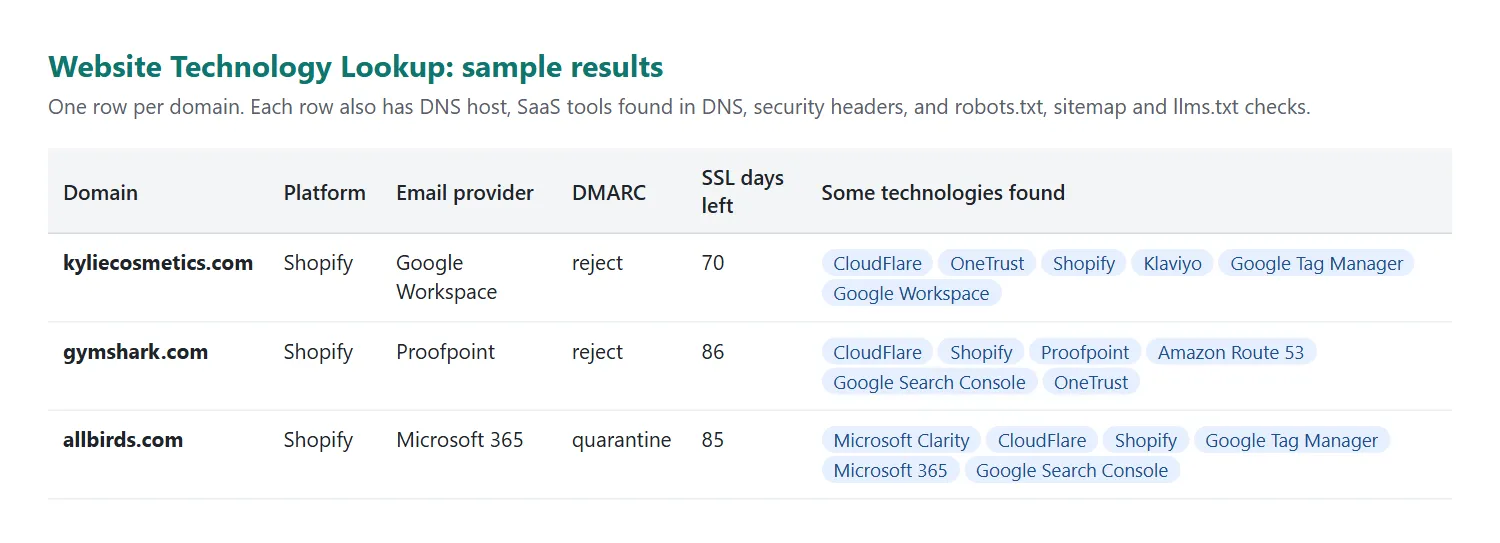
One result as JSON:
The example is shortened, and the values are illustrative.
How much does it cost?
You pay $1.00 per 1,000 domains (a tenth of a cent each), plus a tiny start fee of $0.00005 per run. You aren't charged for domains that don't exist.
- 100 domains: about $0.10
- 5,000 domains: about $5
Apify's free plan includes $5 of monthly credit, which covers about 5,000 domains. To cap any single run, set a maximum cost when you start it.
Limits and good to know
- Homepage only. We look at the homepage (after redirects). Technology used only deeper in the site, or loaded later by JavaScript, may not show up. This tool doesn't run a browser, which keeps it fast and cheap.
- Some sites block automated visitors (with a 403 page, for example). We still read what their headers reveal (often the CDN or hosting) and everything in DNS.
- Detection is based on known fingerprints, so very new or custom-built tools may be missed. DNS-based findings are reliable because they come straight from the domain's own records.
- Very long lists: a run stops by itself about a minute before its time limit (one hour by default), so it still finishes successfully. Domains not reached are listed under
notCheckedin RUN_SUMMARY. For big lists, raise the run's timeout or split the list. - No personal data is collected. We don't extract emails, phone numbers or names, only technology and infrastructure facts.
- robots.txt is respected. If a site asks automated tools to stay away,
blockedByRobotsTxtis true and only DNS and SSL are checked.
FAQ
How is this different from BuiltWith or Wappalyzer?
It uses the same kind of fingerprint matching for the website, and adds what DNS records reveal, which browser extensions don't show. You pay per domain with no subscription, and you can run thousands of domains through the API.
Can I use it through the API or with AI agents?
Yes. Start runs and read results through the Apify API (JavaScript and Python clients are available), call it from AI agents through Apify's MCP server, or connect it to Make, Zapier, n8n, Google Sheets or HubSpot.
Is it legal?
It reads public information: a website's public homepage, as any browser would, and public DNS records. It respects robots.txt and doesn't collect personal data. As always, use the results in line with the laws that apply to you.
Something's wrong or missing?
Please open an issue on the Issues tab with the domain and what you expected to see. Missing technologies are usually quick to add.
Credits
Technology fingerprints include data from Wappalyzer 5.9.34, used under the MIT License (copyright Elbert Alias and Wappalyzer contributors), plus our own additions.


