
Local Business Leads: Emails, Owners & Services
Pricing
from $2.40 / 1,000 businesses
Local Business Leads: Emails, Owners & Services
Google Maps businesses with the emails, phones and social profiles on their websites. Optional AI read adds the owner or lead, team, services, prices and booking link. One row per business.
Pricing
from $2.40 / 1,000 businesses
Rating
0.0
(0)
Developer

Plumbline
Maintained by CommunityActor stats
0
Bookmarked
3
Total users
2
Monthly active users
4 days ago
Last modified
Categories
Features
Share
Local Business Leads finds every matching business on Google Maps for a business type and a city, then reads each business's own website for its email addresses, phone numbers and social profiles. Turn on the AI read and each website is also read for the owner or lead professional, the team with titles, services, published prices and the booking link. One row per business, with the pages each detail came from.
Last verified working: 2026-11-21 (automatic live test run passed).
What can Local Business Leads do?
- Agency prospecting: dentists, lawyers, gyms or salons in a city, with an email and a named decision maker to write to.
- Local B2B sales: know what each business offers, and who runs it, before you call.
- Market maps: every competitor in an area with services, prices, ratings and review counts side by side.
- CRM enrichment: Google Maps data and website contacts in one row, ready for a spreadsheet or CRM.
- Many cities in one run: every business type is searched in every location you list.
What data does Local Business Leads extract?
| Field | What it is | Needs the AI read |
|---|---|---|
name, category, address, phone | The business as Google Maps lists it | No |
website | Business website, without tracking parameters | No |
rating, reviewCount | Google rating (1 to 5) and number of reviews | No |
googleMapsUrl, placeId | Opens the place on Google Maps; Google's place ID | No |
emails | Email addresses published on the website, the business's own domain first | No |
websitePhones | Other phone numbers on the website, not repeating the Maps phone | No |
facebook, instagram, linkedin, x, youtube, tiktok | Social profiles linked from the website | No |
ownerName, ownerTitle | Owner, founder or lead professional named on the website, with their title | Yes |
team | People listed on the website, each with name and title | Yes |
services | Services the website lists | Yes |
prices | Published prices, each with service and price | Yes |
bookingUrl | Online booking or appointment page | Yes |
websiteStatus | read (read with AI), contacts_only (without AI), unreachable or no_website | No |
sourcePages | Website pages the details came from | No |
search, position | The search that found the business and its rank in the results | No |
Every row has the same columns. A detail the website does not show is empty, never guessed.
How well does it work?
Measured on 20 dentists in Austin, TX (October 2026).
Standard (about 30 seconds for 20 businesses):
| Field | Found for |
|---|---|
| Phone, website, rating, address | 20 of 20 |
| Email address | 11 of 20 |
| 14 of 20 | |
| 13 of 20 | |
| 5 of 20 |
With the AI read (3 to 4 minutes for 20 businesses):
| Field | Found for |
|---|---|
| Services | 20 of 20 |
| Team members | 19 of 20 |
| Facebook and Instagram | 19 of 20 |
| Online booking link | 17 of 20 |
| Email address | 11 of 20 |
| Owner or lead named as such | 8 of 20 |
| Published prices | 5 of 20 |
Many local businesses publish only a contact form, so no tool finds an email for every one.
How to use Local Business Leads
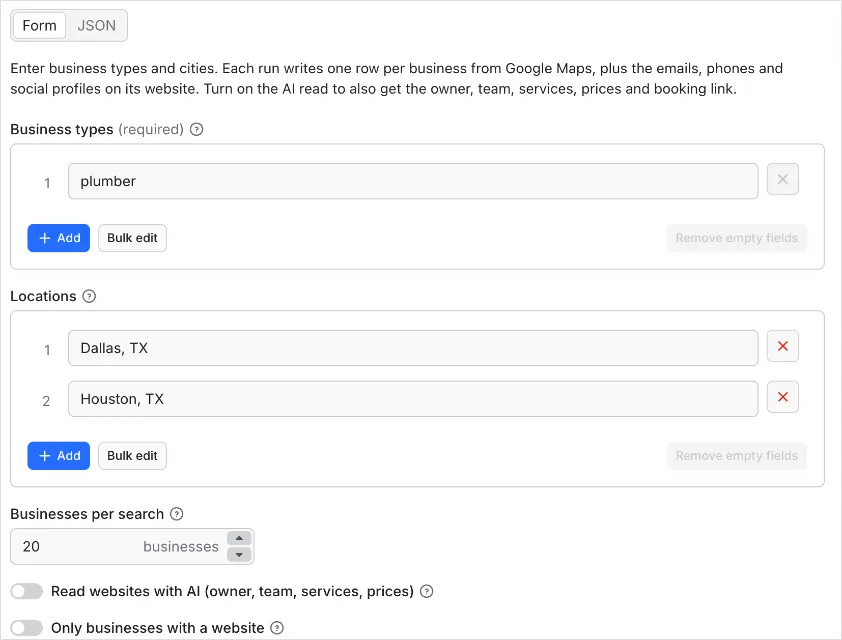
- Under Business types, enter what to search, for example
dentist. - Under Locations, enter cities, for example
Austin, TX. Every business type is searched in every location. - Set Businesses per search (20 is one page of Google Maps; up to 200).
- Turn on Read websites with AI if you want owners, team, services, prices and booking links.
- Click Start. Leads appear in the Output tab, with views for leads, team and services, social profiles, and Google Maps data. Download them as CSV, Excel or JSON.
Example input
Example output
An illustrative row (made-up business, real field names and formats) with the AI read on:
Without the AI read, ownerName, ownerTitle, team, services, prices and bookingUrl are empty and websiteStatus is contacts_only.
How much does Local Business Leads cost?
Pay per result: $3.00 per 1,000 businesses, plus $0.001 per run start. No subscription. With Apify's Store discounts: $2.70 per 1,000 on the Silver tier, $2.40 on Gold and above. The AI read is an add-on.
| Event | When | Price |
|---|---|---|
| Actor start | Once per run (per GB of memory; the default 256 MB counts as one) | $0.001 |
| Business | Each business saved: Google Maps data, website emails, phones and social profiles | $0.003 |
| AI website read | Only when Read websites with AI is on and the website was read | +$0.025 |
| Example | Businesses | Cost |
|---|---|---|
| 100 businesses | 100 | $0.001 + $0.30 = $0.301 |
| 1,000 businesses | 1,000 | $0.001 + $3.00 = $3.001 |
| 100 businesses with the AI read | 100 | $0.001 + $0.30 + $2.50 = $2.801 |
- A search that fails saves one error row explaining why. Error rows are free.
- A business whose website could not be read never pays the AI price.
- Your spending limit is respected: the run reads only as many websites with AI as the limit pays for.
- On Apify's free plan a run stops at 5 businesses, so you can check the data before you pay. Any paid Apify plan removes that limit.
What you can count on
- Same columns on every row. Missing values are empty, so spreadsheets and CRMs never break.
- Nothing guessed. Emails, owners and prices come only from the business's own website, and
sourcePagesshows where. - No silent failures. A search that fails gets an error row with
errorCodeand a plain-languageerrorMessage. The other searches keep running. - Limits respected. Max results and your spending limit stop the run cleanly, keeping every row saved so far.
Local Business Leads API for code, automations, and AI agents
API (returns the rows when the run finishes):
Python (pip install apify-client):
JavaScript (npm install apify-client):
No-code: connect the Actor in Make, Zapier, n8n, or Google Sheets through Apify's integrations, or add a webhook to get notified when a run finishes.
AI agents (MCP): add https://mcp.apify.com?tools=plumblinedata/local-business-leads to Claude, Cursor, or any MCP client. The agent can call this Actor as a tool with the same input as above.
Limitations
- Emails, owners and prices are found only when the business publishes them on its website. Many small businesses use a contact form instead.
- Google Maps shows up to 200 businesses per search. For more, split a city into neighborhoods in Locations.
- The AI read takes about 3 to 4 minutes per 20 businesses, because every website is opened and read.
- Websites that block automated visits are marked
unreachable; their Google Maps data is still saved.
FAQ
How do I find emails of local businesses?
Enter the business type in Business types (searchTerms) and the city in Locations (locations). Each business's website is read for published email addresses, phones and social profiles, and they are saved in emails, websitePhones and the social fields.
How do I find the owner of a local business?
Turn on Read websites with AI (readWebsiteWithAI). The website is read for the owner, founder or lead professional (ownerName, ownerTitle) and the team with titles (team).
Why does a business have no email?
Its website does not publish one, usually because it uses a contact form. Nothing is guessed. Turn on Only businesses with a website (skipPlacesWithoutWebsite) to leave out businesses with no website at all.
Can I search several cities and business types at once?
Yes. Put one per line in Business types and Locations. Every business type is searched in every location, as type in location.
How do I export the leads to Excel or a CRM?
Download the dataset as CSV, Excel or JSON from the Output tab, or send it to Google Sheets, HubSpot or another CRM through Apify's integrations.
What does an error row mean?
It marks a search that failed after retries. errorCode is short (for example blocked or empty_result) and errorMessage says what to do. Error rows are free.
Is it legal to collect this data?
It collects business information that companies publish on Google Maps and their own websites. Some of it, such as names and work emails, can be personal data. Check the rules that apply to you (for example GDPR or CAN-SPAM) before you contact anyone, and ask a lawyer if you are not sure.
Related Actors
| Actor | What it does |
|---|---|
| Google Maps Scraper | Google Maps places as rows, without website visits, at a lower price |
| Company Website Profile | One company website read into a profile: emails, phones, social networks, people, products |
| Company Contacts Finder | Best contacts at the companies you list, with verified work emails |
| B2B Leads Finder | Leads by title, seniority and company filters, with verified work emails |
Support
Found a problem or need a field? Open an issue on the Issues tab. Include the run ID and one input that shows the problem. We read every issue.


