

📩 Google Maps Email Extractor
Pricing
from $2.00 / 1,000 results
📩 Google Maps Email Extractor
Quickly collect all business details, including emails, phone numbers, and social media links from Google Maps listings and their websites. Export data as JSON or CSV. Run via API, schedule runs, or integrate with your tools.
Pricing
from $2.00 / 1,000 results
Rating
1.9
(11)
Developer

PoiData
Maintained by CommunityActor stats
31
Bookmarked
2.5K
Total users
15
Monthly active users
a month ago
Last modified
Categories
Share
💌 Google Maps Email Extractor
What is Google Maps Email Extractor?
Google Maps Email Extractor is a fast web scraping tool that finds businesses on Google Maps and transforms them into actionable google map leads by gathering email addresses, phone numbers and social media links along with other key business details. Supports coordinate radius and GeoJSON polygon searches for precise geographic targeting. Simply specify your search keywords and location, and it does all the work—saving the results directly to an downloadable Apify Dataset.
🤔 What can this Email Extractor do?
- Find Businesses: Use keywords (
terms) and a location to discover google map leads on Google Maps. - Advanced Search Methods:
- Location-based: Traditional city/address searches
- Coordinate Radius: Search within a specific radius around latitude/longitude
- GeoJSON Polygon: Search within custom polygon boundaries
- Extract Emails & Contacts: Automatically visit each business's website and collect email addresses along with resolved contact names, job titles, and profile links.
- Extract Phones: Capture all phone numbers found, split into mobile and landline buckets.
- Gather Social Links: Capture social media URLs (Facebook, Instagram, LinkedIn, YouTube) from each site.
- Refine Your Search: Apply filters (
min_rating,min_reviews,min_photos,has_website,categories_filter) to focus on the most relevant leads. - Save & Export: All data—including contacts, phones, ratings, addresses, and metadata—is saved in your Dataset and can be exported as JSON, CSV, Excel, or HTML.
🎯 Advanced Search Methods
Location-based Search (Traditional)
Use city names or addresses for broad area searches.
Coordinate Radius Search
Search within a specific radius around exact coordinates:
latitude: Decimal latitude coordinatelongitude: Decimal longitude coordinateradius: Search radius in milestotalAroundCoordinate: Maximum results within the radius
GeoJSON Polygon Search
Search within custom polygon boundaries:
polygon: GeoJSON polygon coordinates defining the search areatotalAroundCoordinate: Maximum results within the polygon
Search Priority: Polygon > Geocoordinate > Location
�� Input Parameters
Provide a JSON input to configure your run:
Basic Parameters
| Parameter | Type | Description | Default |
|---|---|---|---|
terms | array | Keywords to search (e.g., ["cafe","bakery"]). Each up to 50 chars. | ["Restaurant"] |
term | array | Deprecated alias for terms, used only when terms is empty. | ["Restaurant"] |
location | string | City or address (e.g., "New York, USA"). | "New York, USA" |
total | integer | Max number of listings to fetch per term (max 300). The search API returns ~20 results per page, max 7 pages (~130) per query — larger totals need more keywords or coordinate/polygon grids. | 20 |
Advanced Search Parameters
| Parameter | Type | Description | Default |
|---|---|---|---|
latitude | number | Decimal latitude for coordinate search. | — |
longitude | number | Decimal longitude for coordinate search. | — |
radius | number | Search radius in miles for coordinate search. | 1.0 |
polygon | string | GeoJSON polygon coordinates for polygon search. | — |
totalAroundCoordinate | integer | Max results for coordinate/polygon searches (max 300). | 20 |
Email & Contact Options
| Parameter | Type | Description | Default |
|---|---|---|---|
has_email | boolean | Only include businesses with extracted emails. | false |
social_enabled | boolean | Extract social media links from websites. | true |
Website enrichment (emails, contact names, job titles, phones with a mobile/landline split, and social profiles) is always performed by the built-in contact-enrichment service; there is no separate
tech_enabledtoggle.
Filters
| Parameter | Type | Description | Default |
|---|---|---|---|
min_rating | number | Minimum star rating (0–5). | 0 |
min_reviews | integer | Minimum number of reviews. | 0 |
min_photos | integer | Minimum number of photos. | 0 |
name_filter | array | Matches and filters specific name (e.g., ["KFC"]). | [] |
has_website | boolean | Only include businesses with a website. | false |
categories_filter | array | Filter by business categories. | [] |
🎯 Filters Explained
min_rating(0–5): Exclude lower-rated businesses.min_reviews(integer): Ensure listings have sufficient review volume.min_photos(integer): Only include listings with a minimum number of photos.has_website(boolean): Skip businesses that don't list a website.categories_filter(array): Narrow results to specific business categories.
Use these filters alone or combined to target precise google map leads.
�� Output Structure
Each record in your Apify Dataset contains:
- Business Details:
name,address,city,state,zip,country,latitude,longitude - Contact Info:
phone,website,emails(array),website_emails,uncertain_emails,contact_phones,contact_mobile,contact_landline,social(object) - People:
contacts(array of{email, full_name, job_title, phones, mobile, landline, photo_url, profile_url, confidence_level, …}),email_contacts(flat per-email rows:{email, full_name, first_name, last_name, job_title, confidence_level, source_url}— name/title included when resolved),contact_names,contact_job_titles - Enrichment:
enrich_status(enriched/no_contacts/dns_failed/ …),enrich_pages,organization,site_social_links,needs_js - Metrics:
rating,reviewCount - Metadata:
original_rank,display_rank,distance_miles,searchTerm,searchLocation,timestamp
View your google map leads in the Overview tab as a simple, ready-to-use table.
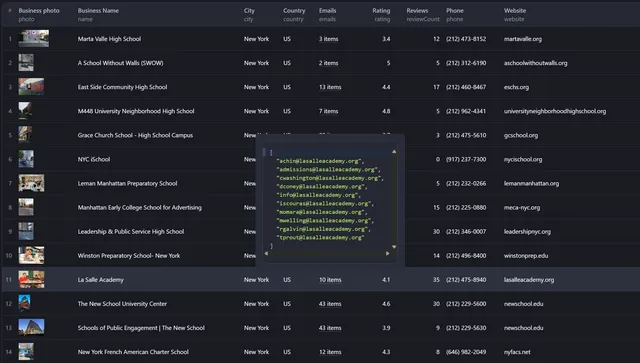
Each Dataset record contains:
- Business Details:
name,address,city,state,zip,country,latitude,longitude - Contact Info:
phone,website,emails(array),website_emails,uncertain_emails,contact_phones,contact_mobile,contact_landline,social(object) - People:
contacts(array of{email, full_name, job_title, phones, mobile, landline, photo_url, profile_url, confidence_level, …}),email_contacts(flat per-email rows:{email, full_name, first_name, last_name, job_title, confidence_level, source_url}— name/title included when resolved),contact_names,contact_job_titles - Enrichment:
enrich_status(enriched/no_contacts/dns_failed/ …),enrich_pages,organization,site_social_links,needs_js - Metrics:
rating,reviewCount - Metadata:
original_rank,display_rank,distance_miles,searchTerm,searchLocation,timestamp
View your results in the Overview tab as a clean table of Google Maps leads with emails.
💡 Quick Start
- Open Google Maps Email Extractor in the Apify Store.
- Paste your JSON input into the Input tab.
- Click Run.
- Explore or download data under Dataset → Overview.
Example Inputs
Location-based Search
Coordinate Radius Search
GeoJSON Polygon Search
📘 Full JSON Example
⚡ Performance & Processing
Processing & Saving
- Businesses are collected and enriched first, then saved to the dataset in one pass
- Progress is shown in the run log as searching → enrichment → saving
- A failed enrichment is marked
enrich_status: "failed"on the record so it can be filtered out
Deduplication
- Unique businesses collected by
gid(Google ID) - Prevents duplicate entries across multiple search terms
- Prioritizes records with more complete data
Processing Flow
- Collect Unique Businesses: Gather all unique businesses by
gidfirst - Enrich Websites: Process unique websites concurrently through the contact-enrichment service (emails, names, titles, phones, socials)
- Save Incrementally: Push results to dataset as they're processed
Concurrency
Websites are enriched in parallel by a fixed-size worker pool — the pool is the only concurrency control, so the actor really does run N requests at once. The pool size is controlled by the CONTACTS_CONCURRENCY environment variable (default 10 — i.e. 10 websites are processed simultaneously; clamped to 1–200). Raise it to push more sites through at once, or lower it if the enrichment gateway reports rate limiting. The run log prints the effective value, e.g. 🔍 Enriching 250 websites (10 in parallel)....
Search grid & cost control
Coordinate and polygon searches work by sampling a grid of points, and each point is a billable search. To keep one run from exploding into tens of thousands of billable requests, the grid step is widened automatically for large areas so a run stays within GRID_MAX_POINTS points (default 500). Small areas (a 1-mile radius, a neighbourhood polygon) keep the exact 1-mile grid; a wide radius such as 100 miles is sampled more coarsely instead of generating ~31,000 points. When this happens the run log warns:
Resuming, aborts and partial results
- Quota is platform-authoritative. How many results may still be saved is derived from what is already in the dataset, so a run that resumes after a migration continues where it left off instead of re-scraping and re-enriching work that was already paid for.
- Graceful abort. If you stop the run from the Console (or the platform stops it), the actor finishes the current item, saves its state and exits — it does not keep scraping until it is killed.
- Records that cannot be saved fail the run. See
FAIL_ON_DROPPED_RECORDSbelow.
🔐 Environment Variables
The internal gateway endpoints and their API keys are never hardcoded in the source and are never written to the run log (log output is filtered through a redaction layer). Supply them as environment variables on the Actor:
Actor → Source → Environment variables
| Variable | Required | Secret? | Description |
|---|---|---|---|
RESULTS_API_URL | yes | – | Base URL of the business-search gateway (POST /scrape). |
RESULTS_API_KEY | yes | yes | API key for the business-search gateway. |
CONTACTS_API_URL | yes | – | Base URL of the contact-enrichment gateway (POST /enrich). |
CONTACTS_API_KEY | yes | yes | API key for the contact-enrichment gateway. |
CONTACTS_CONCURRENCY | no | – | Websites enriched in parallel (default 10, clamped 1–200). |
GRID_MAX_POINTS | no | – | Max search-grid points per term for coordinate/polygon search (default 500, clamped 1–100,000). Larger areas are sampled more coarsely. |
FAIL_ON_DROPPED_RECORDS | no | – | true (default) fails the run if any business record cannot be saved to the dataset. Set to false to log a warning and finish normally. |
Notes:
- Always tick “Secret” for the two API keys. Non-secret variables are visible to anyone who can see the Actor.
/scrapeand/enrichare appended automatically if the URL doesn't already end with them.- If a required variable is missing, the run stops immediately with a clear error naming it — instead of failing later against an unreachable endpoint.
FAIL_ON_DROPPED_RECORDS=falseis useful when you would rather receive a partial dataset than no dataset.
Why records can fail to be saved
The dataset schema types fields strictly (identifiers are string, coordinates and ratings are numbers). Values coming back from the maps and enrichment gateways are coerced to match before saving — a numeric CID becomes an exact string, a "4.5" rating becomes a number — so ordinary records are never dropped. If a record still cannot be represented (for example a business with no coordinates, while the schema requires them), the run fails with the field name rather than silently returning a smaller dataset than you paid for.
Keeping variables across pushes
Environment variables belong to an Actor version, and apify push writes that version's definition. If the pushed definition declares none, the new version gets an empty set — which is why Console-configured variables appear to vanish after a push. .actor/actor.json therefore declares them explicitly:
The @name values are resolved from your local CLI secret store (~/.apify) at push time, so the real values never enter the repository:
Three things worth knowing:
-
A referenced secret that does not exist locally is only a warning —
apify pushstill succeeds but silently omits that variable (apify-cli #921). The Actor then stops immediately withMissing required actor environment variable(s): …naming exactly what is absent, so the mistake is loud at run time rather than silent. -
Because
actor.jsontakes precedence over the Console, change these four values through the CLI — Console edits to them are overridden on the next push. -
The tuning variables (
CONTACTS_CONCURRENCY,GRID_MAX_POINTS,FAIL_ON_DROPPED_RECORDS) are deliberately not declared inactor.json, so they can still be set in the Console and otherwise fall back to their code defaults. -
For local runs, set the same variables in your shell or an
.envfile beforeapify run.
💰 Pricing
Google Maps Email Extractor uses a clear, pay-as-you-go model:
- $8 per 1,000 results ($0.008 per business record).
- No setup fees or subscriptions.
For example, fetching 1,000 google map leads costs $8, and pulling 625 free leads with the trial plans credit. Your bill reflects the exact number of records saved to the Dataset.
🤝 Integrations & Support
- API & Webhooks: Automate via Apify's REST API.
- Connect: Zapier, Make, Slack, Google Sheets, and more.
- Support: Open a GitHub issue or message us on the Apify Store.
🔑 Keywords
Google Maps Email Extractor, google map leads, email scraping, lead generation, Apify Actor, Google map social media, coordinate search, polygon search, GeoJSON
🛠️ Tools & Resources
🗺️ GeoJSON Polygon Creation
Need to create custom geographic boundaries for polygon searches? Use this free tool:
Keene College Polyline Tool - Create and generate GeoJSON polygons for precise geographic targeting.
Features:
- Interactive Map: Click on the map to create polygon vertices
- GeoJSON Export: Generate properly formatted GeoJSON coordinates
- Right-Hand Rule: Automatically conforms to proper coordinate ordering
- Free to Use: No registration required
- Simple Interface: Easy-to-use polygon drawing tool
How to Use:
- Visit the Polyline Tool
- Right-click on the map to begin drawing
- Click to add vertices and create your polygon
- Use the "Close Shape" button to complete your polygon
- Copy the generated GeoJSON coordinates
- Use the coordinates in your polygon search parameters
Perfect for:
- Creating custom search areas for polygon-based searches
- Defining precise geographic boundaries
- Targeting specific neighborhoods or regions
- Complex area coverage requirements
📩 Need Custom Data?
For bulk datasets by city, country, or global coverage, contact us at Poidata.io.


