
Google Maps Scraper
Pricing
from $0.40 / 1,000 results
Google Maps Scraper
🔥 $0.40/1K results 🔥 Get 📧 emails, 📞 phones, 🌐 websites, 📱 social profiles, addresses, ratings, reviews, hours & more. Find businesses by keyword, category, location, radius or polygon. Super fast & cheapest Google Maps Scraper & API with CSV, Excel, JSON & API export.
Pricing
from $0.40 / 1,000 results
Rating
4.3
(13)
Developer

PoiData
Maintained by CommunityActor stats
32
Bookmarked
2.9K
Total users
91
Monthly active users
13 hours ago
Last modified
Categories
Share
Google Maps Scraper extracts structured business and location data from Google Maps using keywords, categories, city or area names, exact coordinates, radius searches, and custom GeoJSON polygons. Collect up to 15,000 results per search with automatic deduplication, advanced filtering, and worldwide coverage.
Use it in the Apify Console for no-code data collection or connect it to your workflow as a Google Maps scraper API. Export results in JSON, CSV, Excel, or XML, schedule recurring runs, trigger webhooks, and integrate the data with CRMs, analytics tools, business intelligence systems, or your own applications.
In short: search Google Maps at scale, target exactly the geographic area you need, filter businesses before saving them, and receive structured business data ready for analysis or integration.
🗺️ Google Maps Scraper Features
This Google Maps scraper is built for precise local-business discovery rather than broad, uncontrolled crawling. You can search a city, focus on a radius around a coordinate, or define an irregular service area with a polygon.
| Feature | What it does |
|---|---|
| Keyword and category search | Find businesses using one or multiple Google Maps search terms. |
| Location search | Target a city, area, or named location. |
| Coordinate search | Search from exact latitude and longitude coordinates. |
| Radius filtering | Limit coordinate searches to a 1–100 mile radius. |
| GeoJSON polygon search | Search within custom geographic boundaries. |
| Multiple search terms | Use up to 100 search terms per request. |
| Large result sets | Collect up to 15,000 results per search. |
| Advanced filters | Filter by rating, review count, category, photo count, or business name. |
| Detailed business data | Optionally fetch the complete business profile per place and merge it flat into each result (menu, amenities, hotel booking/pricing, service options, and more). |
| Website contact enrichment | Optionally add emails, phones, job titles and social links found on each business's official website. |
| Automatic deduplication | Remove duplicate businesses while collecting results. |
| Structured business data | Extract contact, address, location, rating, category, opening-hours, identifier, photo, amenity, and other business fields. |
| Global coverage | Search across 240+ countries with support for 70+ languages. |
| API and automation | Run through the Apify API, schedule jobs, use webhooks, and connect results to other systems. |
| Multiple export formats | Download or process results as JSON, CSV, Excel, or XML. |
🔌 Google Maps Scraper API
Yes. This Actor can be used programmatically as a Google Maps scraper API through the Apify API.
Use the API when you want to:
- run Google Maps searches from your application or backend;
- automate recurring business-data collection;
- send different search terms and locations dynamically;
- collect results into an Apify Dataset;
- trigger downstream workflows with webhooks;
- integrate Google Maps business data with a CRM, database, lead-generation system, analytics platform, or internal tool.
The Actor supports REST-based execution through Apify and can be used from common development environments such as Python, JavaScript, CLI, HTTP, OpenAPI, and MCP through the integrations available on the Actor page.
What can you send to the Google Maps scraper API?
At minimum, provide a search term and a location method. You can search by a named location, by coordinates, or by polygon.
Common inputs include:
| Input | Purpose |
|---|---|
term | Search term or array of search terms. |
location | City, neighborhood, region, or other named area. |
latitude | Latitude for coordinate-based searches. |
longitude | Longitude for coordinate-based searches. |
radius | Search radius in miles, from 1 to 100. |
polygon | Custom GeoJSON polygon boundary. |
totalAroundCoordinate | Target number of unique results for coordinate or area searches. |
min_rating | Minimum Google rating from 0 to 5. |
min_reviews | Minimum number of reviews. |
categories_filter | Restrict results to selected business categories. |
min_photos | Minimum number of photos. |
name_filter | Match one or more keywords in business names. |
scrape_reviews | Also collect reviews for each business found. |
scrape_place_details | Also enrich each business with the detailed business profile. |
enrich_contacts | Also add emails, phones and social profiles from each business's website. |
📍 Ways to Search Google Maps
Search by location name
Use a city or area name when you want the simplest way to discover businesses in a known place.
This works well for searches such as:
- dentists in Austin;
- coffee shops in London;
- hotels in Dubai;
- hardware stores in Manila;
- restaurants in New York.
Search by exact coordinates and radius
Use latitude and longitude when you need more precise geographic targeting.
Coordinate-based search gives you:
- precise targeting around a known point;
- 1–100 mile radius control;
- systematic coverage of the selected area;
- a target result limit with
totalAroundCoordinate; - distance information where available.
This is useful for territory analysis, service-area prospecting, store-location research, real estate analysis, and other location-sensitive workflows.
Search inside a GeoJSON polygon
Use a custom polygon when a circle or city boundary is too broad.
Polygon searches are designed for:
- irregular sales territories;
- neighborhoods;
- custom delivery areas;
- franchise territories;
- administrative or planning zones;
- market-research boundaries that do not fit a simple radius.
The Actor validates polygon input and processes searches within the supplied boundary.
Search multiple terms at once
Use an array when several related Google Maps queries should be searched in the same request.
You can use up to 100 search terms per request. Automatic duplicate removal helps prevent the same place from being returned repeatedly when it matches multiple searches.
🔍 Google Maps Business Filters
Filters help reduce unnecessary results and focus the dataset on businesses that match your requirements.
Minimum rating
Return businesses that meet a minimum star rating.
Supported range: 0–5 stars.
Minimum review count
Exclude businesses with too few reviews.
This is useful when you want established or more frequently reviewed businesses.
Category filter
Keep only businesses matching selected Google Maps categories.
See the complete Google Maps Categories list when building category-based searches.
Minimum photo count
Filter businesses by the number of available photos.
Business name filter
Match one keyword or several keywords against business names.
or:
Combine multiple filters
Filters can be combined in one request.
📊 What Data Can the Google Maps Scraper Extract?
The Actor returns structured Google Maps business data that can be used for lead generation, market research, location intelligence, enrichment, analytics, and application development.
Business identity and status
Depending on availability, results can include:
searchTermsearchLocationdisplayRanknamelocalNamebusinessTypestatusisClaimedopenNowownerNameshortDescriptionlongDescriptionreviewSnippetlanguagelanguageCodedisplayLanguageregionCode
Address and location data
Available location fields can include:
addressaddressPartsfullAddressstreetcitycityRegionstatezipCodecountrycountryCodeneighborhoodlatitudelongitudedistance_milestimezonegeoHierarchy
Example:
Contact details
Available contact data can include:
phonephoneIsdwebsitewebsiteDomain
Example:
These formats are stable: if a detailed profile refreshes a contact value it is converted to the format shown here, so the columns never change representation.
Google Maps IDs and URLs
The Actor can return identifiers used to reference a business or Google Maps place:
urlurlSlugplaceIdfidcidproviderIdauthorId
url is a ready-to-open Google Maps link built from the place's Google Place ID. When a
place ID is not available it falls back to the CID (https://www.google.com/maps?cid=…,
derived from fid when needed), then to the feature ID (https://www.google.com/maps?ftid=…).
Example:
Ratings, reviews, and photos
Available popularity and media fields can include:
ratingreviewCountreviewSnippetphotoCountphotosphotoprofilePhoto
Example:
Photo objects can include an ID, image URL, thumbnail, caption, and image coordinates where available.
Categories and classification
Businesses can include multiple Google Maps categories.
Opening hours
Hours-related fields can include:
openingHoursweeklyHourscurrentHoursopenNowtimezone
Example:
Services, amenities, and attributes
Additional business details can include:
amenitiesattributesdiningOptionsorderOnlineAvailableorderOnlineUrlhasDelivery
Depending on the business, these fields may describe options such as:
- outdoor seating;
- no-contact delivery;
- delivery;
- onsite services;
- takeout;
- dine-in;
- local specialties;
- breakfast, lunch, and dinner;
- catering;
- counter service;
- table service;
- coffee and desserts;
- accessibility;
- restroom availability;
- seating;
- atmosphere;
- group suitability;
- tourist popularity;
- reservations;
- payment methods;
- mobile NFC payments;
- child-friendly options;
- high chairs;
- parking.
Example:
Online ordering and delivery information
Where available, results can include:
orderOnlineAvailableorderOnlineUrlhasDelivery
Hotel-specific fields
For hotel results, available fields can include:
hotelCheckInhotelCheckOuthotelStarRatinghotelPricePerNighthotelBookingUrlhotelAmenities
Detailed business data
Enable Scrape Detailed Business Data to enrich every result with the full business profile. The extra fields are added as top-level columns on the same record, so the output stays flat and easy to load — no nested objects to unpack, and the column set is identical whether or not a profile was found.
What it adds
Beyond the search fields, a details profile can add:
| Field | What it contains |
|---|---|
popularTimes | How busy the business is by day and hour, with a live busy status |
reviewsDetail | Individual reviews with author, avatar, rating, relative date and badge |
reviews | Review snippets |
photos | Photo and video thumbnails with captions and media type |
posts | Posts published by the business owner, with text and media |
menu | Menu sections and items, with descriptions and prices where published |
menuUrl | Link to the business's menu |
priceLevel, priceRange | Price indication, e.g. "$100+" and "$100 or above" |
adminDivisions | Administrative divisions the business sits in, with a relevance score |
peopleAlsoSearch | Related businesses |
reviewSummary | An AI-generated summary of what reviewers say |
ratingSummary | Star-rating breakdown as [{stars, amount}] |
typicalTimeSpent | How long visitors typically stay |
openState, hoursLastUpdated | Current open/closed state and when the hours were last updated |
serviceOptions, placeAttributes | Ordering options and place attributes |
logoUrl, shareLink | Business logo and a shareable Google Maps link |
hotelBooking | Hotel booking and pricing block: dates, star rating, lowest price, booking link, nearby hotels and attractions |
areaInfo | Area name, description and rankings for the surrounding area |
subPlaces, subPlaceHours | Departments or venues inside the business, with their hours |
atThisPlace | Other places located at the same address |
admission, experiences, events | Venue admission, bookable experiences and events |
evChargers, fuelPrices | Charging and fuel information where applicable |
Example
How it behaves
- The column set never changes. A details profile only adds columns and refreshes values already present. Every record has the same columns with or without a profile, so downstream pipelines do not need to branch on whether details were fetched.
- Refreshed values keep their format. Where a profile offers a newer figure it
replaces the search value in place — for example
ratingandreviewCount. Where the two sources express a value differently, the established output format is preserved:phonestays international format,countrystays the two-letter code (the full name is added ascountryName), andactionLinkskeeps itsaction/urlkeys. - Identifiers are never replaced.
name,fid,placeId,cidandproviderIdalways keep the values from the search result, so joins stay stable. - Longer descriptions are kept in
longDescription, with the shorter text inshortDescription, so nothing is truncated away. - Duplicates are collapsed. Fields that restate data already present are not emitted twice, so a record never carries the same value under two column names.
Category-specific blocks
- Restaurants, cafes, bars —
menu,menuUrl,diningOptions,serviceOptions,priceLevel,typicalTimeSpent. - Hotels —
hotelBooking(check-in/out dates, star rating, lowest price, booking link, nearby hotels and attractions),hotelPriceRange,checkInTime,checkOutTime,areaInfo. - Hospitals, clinics, gas stations —
subPlaces,subPlaceHours,openState,hoursLastUpdated,serviceOptions. - Museums, arenas and other venues —
admission,experiences,events,atThisPlace,typicalTimeSpent. - Charging and fuel stations —
evChargers,fuelPrices.
Two fields are best-effort: the provider returns
menuandpopularTimesfor most — but not all — businesses, so treat an empty value as "not published" rather than an error.
Contact enrichment
Enable Enrich Contact Details to add the emails, phone numbers, job titles and social profiles published on each business's own website. Only businesses that have a website can be enriched; the rest are saved unchanged with the same columns.
What it adds
| Column | What it contains |
|---|---|
contactEmails | Email addresses found on the site, deduplicated |
contactPhones, contactMobiles, contactLandlines | Phone numbers, split by kind where the site distinguishes them |
contactJobTitles, contactNames | Job titles and people found on the site |
facebookUrl, instagramUrl, twitterUrl, youtubeUrl, linkedinUrl | One column per major social platform |
socialLinks | All social profiles as {platform, url}, including platforms beyond the five above |
contactSocialLinks | Social profiles attached to individual contacts |
contactStatus | Outcome of the lookup: enriched, no_contacts or dns_failed |
contactBusinessName, contactPagesCrawled | Business name found on the site and how many pages were read |
techStack, adStack | Technologies and advertising tools detected on the site |
contactEnrichment | The complete contact record, including every contact with a confidence level |
Example
A business with no website, or one whose site cannot be reached, is saved with the search
fields only — contactStatus, when present, tells you which case it is.
How it behaves
- Billing is per outcome. Every business whose website was actually looked up is
charged on the
contact-enrichment-tryevent, whatever the result. A business is charged oncontact-enrichmentonly when at least one real contact detail was found — an email, a phone number, a social link or a person contact. Businesses with no website are never looked up and never charged. - Throughput is bounded so large runs stay stable: lookups are issued at up to 12 requests per second, one website per request, and each request is allowed a generous time budget so slow sites still complete.
- Data quality varies. The details come from whatever the site publishes, so results
can include role addresses rather than named contacts. Each entry in
contactEnrichmentcarries a confidence level and the supporting evidence, which is the right signal to filter on.
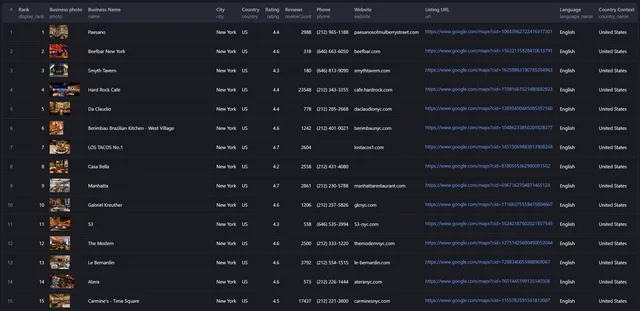
📍 Example Google Maps Scraper Output
The exact fields returned depend on the business and what information is available for that place.
🎯 Google Maps Scraper Use Cases
Lead generation and sales prospecting
Build targeted lists of local businesses using search terms, geographic boundaries, ratings, categories, and other filters.
Typical workflows include:
- finding businesses in a sales territory;
- creating prospect lists by industry and city;
- locating high-rated businesses;
- identifying businesses with websites or phone numbers;
- collecting local business data for account-based marketing;
- planning sales territories.
Market research and competitive intelligence
Use Google Maps data to understand local market structure and business density.
You can use the dataset to:
- compare competitor distribution;
- identify areas with high or low business density;
- analyze category coverage;
- research local market penetration;
- discover underserved areas;
- support geographic expansion decisions.
Real estate, site selection, and development
Combine location, category, rating, and density data to research commercial areas.
Common uses include:
- comparing potential store locations;
- analyzing nearby businesses;
- evaluating local competition;
- researching commercial real estate;
- studying neighborhood business composition;
- identifying opportunity areas.
Location-based applications
Use the Google Maps scraper API to populate or enrich applications with structured local-business information.
Examples include:
- local search tools;
- directories;
- maps;
- market-intelligence applications;
- sales platforms;
- territory-management tools;
- business-discovery products.
Database enrichment
Match scraped businesses with existing records to add or refresh:
- addresses;
- coordinates;
- phone numbers;
- websites;
- categories;
- ratings;
- review counts;
- opening hours;
- Google Maps identifiers.
🧪 Google Maps Scraper Examples
Market research across a custom area
Competitive intelligence around a coordinate
Site-selection research in a city
⚡ Performance, Scale, and Reliability
The Google Maps scraper is designed for large searches while keeping the workflow straightforward.
Scale
- Up to 100 search terms per request.
- Up to 15,000 results per search.
- Efficient handling of large result sets.
- Target-based stopping when the requested result count is reached.
- Automatic duplicate removal.
Reliability
The Actor includes:
- accurate, structured extraction of available business information;
- automatic retries for failed requests;
- graceful recovery from network issues;
- input and output validation;
- progress tracking;
- memory-efficient processing;
- systematic area coverage.
Actual run time depends on the query, target area, filters, requested result volume, and the amount of data available.
🌍 Global Google Maps Data Coverage
Search worldwide using country-, region-, and language-specific targeting.
Current functionality includes:
- 240+ countries;
- 70+ languages;
- country and language-specific results;
- precise coordinate targeting;
- radius calculations;
- custom polygon boundaries;
- systematic coverage of defined geographic areas.
🔄 Automation, Integrations, and Export Formats
API integration
Run the Actor through the Apify API using standard HTTP requests or supported client integrations.
Webhooks
Use webhooks to trigger another service when a run reaches a relevant state.
Scheduling
Schedule repeated Google Maps scraping jobs for recurring data collection or refresh workflows.
Batch processing
Run large searches and process the resulting dataset at scale. Results become available during the run, supporting immediate downstream processing and monitoring.
Export options
Results can be exported in:
- JSON
- CSV
- Excel
- XML
Workflow integrations
Google Maps business data can be used with:
- CRM systems;
- analytics platforms;
- business intelligence tools;
- marketing automation workflows;
- internal databases;
- custom applications.
🚀 How to Use the Google Maps Scraper
1. Choose what you want to find
Enter one or more search terms such as restaurant, dentist, hotel, coffee shop, or another business category.
2. Choose a geographic targeting method
Use one of the supported methods:
- a named
location; latitudeandlongitude;- a GeoJSON
polygon.
For coordinate searches, set a radius from 1 to 100 miles when needed.
3. Add filters
Optionally narrow the results with:
min_rating;min_reviews;categories_filter;min_photos;name_filter.
4. Set your target result count
Use totalAroundCoordinate where applicable to control how many unique results you want to collect.
5. Run and monitor the Actor
Start the Actor from Apify Console or call it through the Google Maps scraper API.
6. Export or integrate the results
Download the dataset or send it into your application, database, CRM, analytics workflow, or other system.
✅ Best Practices for Better Google Maps Scraping
Use specific search terms
A precise query such as Italian restaurant or used car dealer usually produces a more focused dataset than a very broad term.
Use multiple related terms for broader coverage
If businesses may be categorized in different ways, search several related phrases and rely on automatic deduplication.
Use coordinates for precision
Coordinates are useful when the center point of a market or territory matters.
Use polygons for irregular areas
A polygon is better than a radius when you need to stay inside a custom boundary.
Apply filters before collecting large datasets
Filtering by rating, review count, category, photos, or name can reduce irrelevant results.
Set realistic result targets
Choose a target that matches the expected density of businesses in the selected geographic area.
Schedule refreshes when freshness matters
For recurring research, schedule new runs rather than relying indefinitely on an old export.
Data management
For large or recurring datasets:
- validate important fields before using them in production workflows;
- store exports efficiently for the format and query pattern you need;
- keep backups when the dataset is business-critical;
- schedule periodic refreshes when current business information matters.
❓ Google Maps Scraper FAQ
What is a Google Maps scraper?
A Google Maps scraper is a data-extraction tool that converts business information visible on Google Maps into structured records. This Actor can collect business names, addresses, coordinates, phone numbers, websites, ratings, review counts, categories, hours, identifiers, photos, amenities, and other available fields.
Does this Actor provide a Google Maps scraper API?
Yes. You can run the Actor programmatically through the Apify API and use it as a Google Maps scraper API in automated applications and data workflows.
Is this the official Google Maps API?
No. This is an Apify Actor for extracting Google Maps business data; it is not the official Google Maps Platform API.
How many Google Maps results can I scrape?
The Actor supports up to 15,000 results per search.
Can I scrape multiple Google Maps search terms in one run?
Yes. The Actor supports up to 100 search terms per request.
Can I search Google Maps by latitude and longitude?
Yes. Provide latitude and longitude, then optionally set a radius from 1 to 100 miles and a target result count.
Can I scrape businesses inside a custom polygon?
Yes. The Actor accepts a GeoJSON polygon so you can target custom or irregular geographic boundaries.
Can I filter Google Maps results by rating?
Yes. Use min_rating to set a minimum star rating from 0 to 5.
Can I filter by the number of Google reviews?
Yes. Use min_reviews to exclude businesses below your required review count.
Can I filter businesses by Google Maps category?
Yes. Use categories_filter with one or more business categories.
Can I filter businesses by name?
Yes. name_filter supports a single keyword or multiple keywords.
Can I scrape phone numbers and websites from Google Maps?
Yes, when those details are available for the business. Relevant output fields include phone, phoneIsd, website, and websiteDomain.
Can I get emails and social profiles for a business?
Yes. Enable Enrich Contact Details and the Actor looks up each business's official
website and adds the emails, phone numbers, job titles and social profiles it publishes,
described in
Contact enrichment.
It works for any business that has a website, not just those with full detail data. It is
billed on two pay-per-event charges: contact-enrichment-try for every website actually
looked up, and contact-enrichment when a real contact detail is found.
Can I get the complete profile of a business?
Yes. Enable Scrape Detailed Business Data and the full profile is merged flat into
every result — menus, amenities, hotel booking and pricing, service options, popular
times, place attributes, photos, posts, and the category-specific blocks described in
Detailed business data. Duplicates
between the two sources are removed.
This option is billed separately on the place-details event.
What geographic areas are supported?
The Actor supports worldwide searches across 240+ countries and 70+ languages.
What output formats are available?
You can work with or export results in JSON, CSV, Excel, and XML.
Does the scraper remove duplicate businesses?
Yes. The Actor includes automatic duplicate removal to reduce repeated results, including when several search terms return the same business.
Can I schedule recurring Google Maps scraping jobs?
Yes. Use Apify scheduling to automate recurring data-collection runs.
Can I connect the scraper to another application?
Yes. Use the Apify API, webhooks, and dataset exports to connect results to CRMs, analytics platforms, databases, business intelligence tools, marketing automation systems, and custom software.
Can I use the data for market research or lead generation?
Yes. Common use cases include lead generation, market analysis, competitor research, territory planning, geographic expansion, site selection, database enrichment, and location-based applications.
🔒 Security and Compliance
The existing Actor functionality includes security and compliance measures described as:
- encrypted data transmission;
- GDPR and CCPA compliance;
- secure API access management;
- activity logging and audit trails;
- data validation and quality assurance;
- performance monitoring.
Users are responsible for ensuring that their own collection, storage, and use of scraped data complies with applicable laws, contractual requirements, and platform terms.
📚 Support and Documentation
Resources for working with the Actor include:
- API documentation;
- implementation examples;
- optimization and best-practice guidance;
- troubleshooting information.
Support options include:
- technical support;
- custom solutions;
- training and onboarding;
- consulting for business use cases.
📧 Need Emails and Social Profiles Too?
For deeper contact enrichment, use the Google Maps Email Extractor.
It is designed to enrich Google Maps businesses with additional contact information from their websites, including:
- email addresses;
- phone numbers;
- website information;
- Facebook profiles;
- Instagram profiles;
- LinkedIn profiles;
- YouTube profiles.
It also supports coordinate-radius searches and GeoJSON polygon targeting, concurrent email extraction at 5 RPS, and deduplication by Google ID.
Typical use cases include lead generation, contact-database building, social outreach, and email marketing research.
🛠️ Create a GeoJSON Polygon
Need a custom boundary for a polygon search? Use the free Keene College Polyline Tool.
It provides:
- an interactive map for drawing polygon vertices;
- GeoJSON coordinate output;
- right-hand-rule coordinate ordering;
- a simple interface with no registration required.
How to create a polygon
- Open the Polyline Tool.
- Right-click on the map to begin drawing.
- Click to add polygon vertices.
- Select Close Shape to complete the boundary.
- Copy the generated GeoJSON coordinates.
- Paste the coordinates into the Actor's
polygoninput.
This is useful for neighborhoods, sales territories, service areas, and other custom geographic boundaries.
📩 Need a Custom Google Maps Dataset?
For bulk datasets by city, country, category, or global coverage, contact Poidata.io.
Use the Google Maps Scraper when you need flexible self-service extraction. For larger one-off datasets or custom requirements, Poidata can provide a tailored data solution.


