

Apartments.com Scraper — Rentals, Prices & Reviews | 2$/1k
Pricing
from $2.00 / 1,000 results
Apartments.com Scraper — Rentals, Prices & Reviews | 2$/1k
Extract rental listings from Apartments.com with 94+ fields: pricing, scores, reviews, amenities, photos, emails, and contacts. Filter by location, price range & property type. No browser — fast HTTP. Perfect for real estate research & lead generation.
Pricing
from $2.00 / 1,000 results
Rating
0.0
(0)
Developer

Raven
Maintained by CommunityActor stats
3
Bookmarked
157
Total users
25
Monthly active users
6 days ago
Last modified
Categories
Share
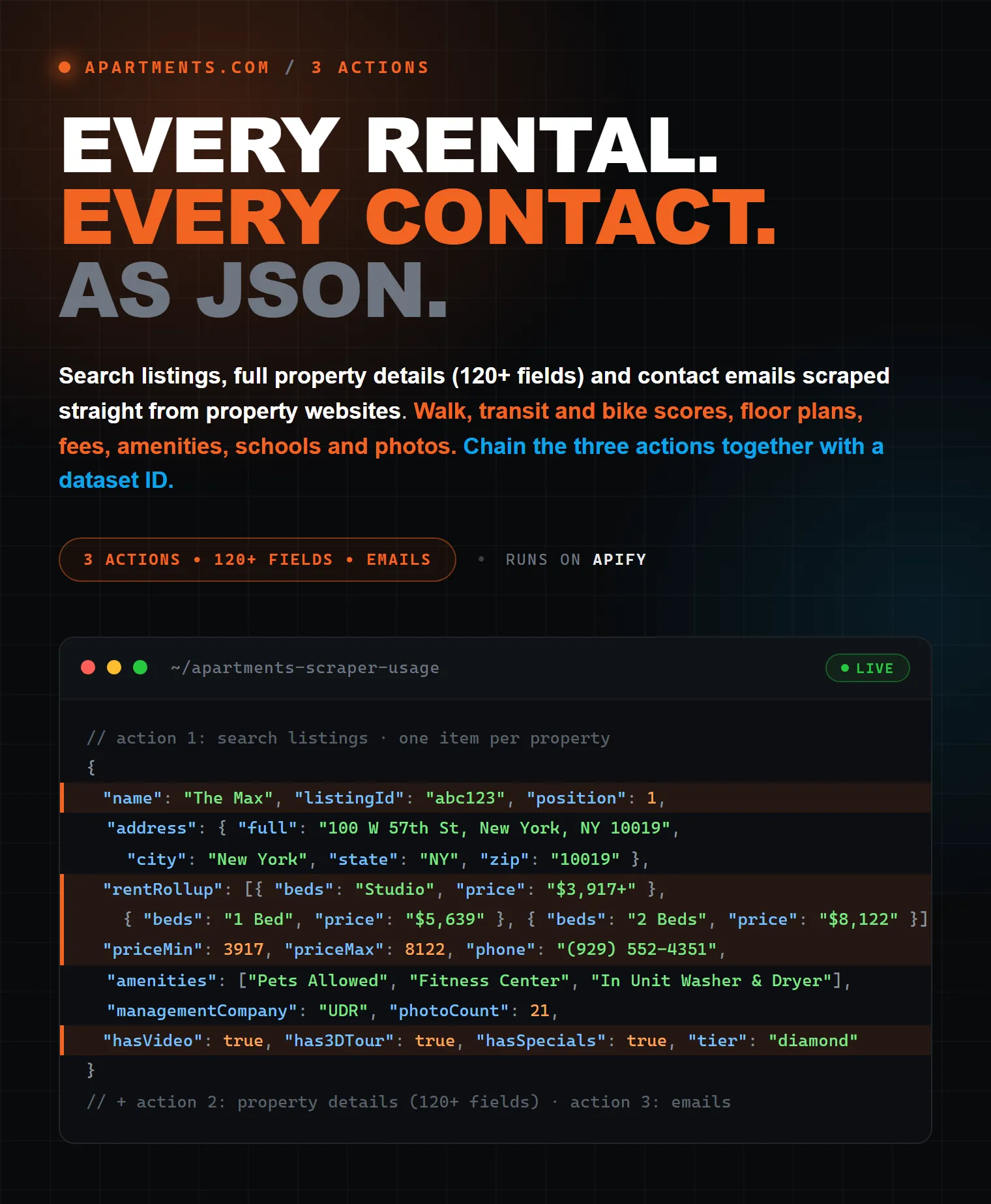
Apartments.com Scraper — Rental Listings, Scores, Reviews & Email Contacts
Extract every detail from apartments.com listings — pricing, walk/transit/bike scores, ratings, floor plans, fees, amenities, schools, photos, and contact emails scraped directly from property websites.
| Raven · Real-estate suite • Zillow, Realtor.com, Apartments.com, Idealista | |||
 Apartments.com Apartments.com➤ You are here |
 Zillow Scraper Zillow ScraperListings, Zestimate, agents |
 Realtor.com Scraper Realtor.com ScraperListings, details, agents |
 Idealista Scraper Idealista ScraperProperties, prices, agencies |
Pricing
$2 per 1,000 results — you pay only for the results you actually get. No subscription, no monthly rental fee.
3 Actions — run step by step
The scraper works in 3 steps. Each step produces a dataset that feeds into the next one:
| Step | Action | Input | Output | Cost |
|---|---|---|---|---|
| 1 | Search listings | Search URLs from apartments.com | listingId, URL, name, price, city, coordinates | Cheapest — 1 request per page |
| 2 | Scrape property details | Listing URLs or Dataset ID from Step 1 | 120+ fields per property | Medium — 1 request per listing |
| 3 | Extract emails from websites | Website URLs or Dataset ID from Step 2 | Validated emails per property | Cheapest — 1 request per website |
Important: You must run them in order. Step 2 needs listing URLs (from Step 1). Step 3 needs property website URLs (from Step 2). You can stop at any step — for example, only run Step 1 to monitor new listings, or run Steps 1+2 if you don't need emails.
What data do you get?
Search listings output
Property details output (120+ fields)
Each listing returns 120+ structured fields organized into clean, nested JSON:
| Category | Fields |
|---|---|
| Property | Name, type, listing ID, description, year built, total units, stories |
| Address | Street, city, state, ZIP, county, neighborhood, DMA, full formatted address |
| Pricing | Min/max rent, currency |
| Location | Latitude, longitude |
| Scores | Walk Score, Transit Score, Bike Score + text labels ("Exceptionally friendly") |
| Rating | Aggregate rating: star value and review count |
| Contact | Phone number, property website URL, languages spoken |
| Available units | Every vacant apartment: unit number, rent, sqft, total monthly price, lease terms, move-in date, rent specials, in-unit amenities |
| Models / Floor Plans | Model name, rent range, beds, baths, sqft range, available unit count, floor-plan image, photo and virtual-tour counts |
| Rentals (raw) | The site's own per-unit records — ~60 fields each — kept as-is for advanced use |
| Fees | Itemised one-time, monthly, pet, parking, situational and add-on charges — each with its group, amount and the property's own explanation. Plus lease terms, year built, unit count, stories. |
| Amenities | Grouped as the site groups them: Community Amenities, Apartment Features, Kitchen Features, Unique Features, … |
| Highlights | The property's headline selling points |
| Schools | Name, GreatSchools rating (1-10), public/private, grade range, enrolment, links |
| Colleges | Nearby colleges and universities with travel time and distance |
| Transportation | Transit/subway stops, commuter rail and airports — with travel mode, minutes and miles |
| Points of Interest | Shopping centres, parks, hospitals, military bases — with distance |
| Average rents by area | Neighbourhood vs city average rent for each bedroom count |
| Photos & video | All image URLs, video links, Matterport 3D tour link |
| Media Counts | Photos, videos, virtual tours, total images |
| Management company | Name and logo |
| Breadcrumb | Full geo hierarchy (State > County > City > Neighborhood) |
| FAQ | Questions and answers from the listing page |
| Office Hours | Today's hours (open/close) + full weekly schedule |
| Flags | 15+ boolean flags: has3DTour, hasVideo, hasRentSpecials, petsAllowed, hasApplyNow, etc. |
Emails output
Fields url, listingId, propertyName, propertyAddress are passed from the Details dataset — use url or listingId to match emails back to properties.
Who is this for?
- Real estate investors — Compare rental pricing, scores, and fees across markets to find undervalued opportunities
- Property managers — Monitor competitor listings, track rent changes, analyze amenity offerings
- Relocation services — Get walk/transit/bike scores, schools, transportation for client recommendations
- Lead generation agencies — Extract property management emails and phone numbers for outreach campaigns
- Market researchers — Bulk data on rent trends, vacancy rates, property types across US cities
- Data analysts — Clean, structured JSON/CSV ready for dashboards, spreadsheets, and BI tools
- Rental aggregators — Build your own rental search platform with comprehensive listing data
How to use
Action 1: Search listings
Find listing URLs from apartments.com search pages. Fast and cheap — no detail fetching.
- Go to apartments.com, search any location, apply filters
- Copy the URL from your browser
- Set Action =
Search listings - Paste URL into Search URLs
- Set Max Items — how many listings you want in total; it decides how far the scraper pages (40 listings per page, up to 28 pages)
- Click Start
Input example:
Action 2: Scrape property details
Get full property data (120+ fields) for specific listings. Use listing URLs directly or chain from a Search run.
Option A — Direct URLs:
- Set Action =
Scrape property details - Paste listing URLs into Listing URLs
- Set Max Items
- Click Start
Option B — Chain from Search:
- Run Action 1 (Search) first
- Copy the Dataset ID from the Search run
- Set Action =
Scrape property details - Paste Dataset ID into Dataset ID field
- Click Start
Input example (direct):
Input example (chained):
Action 3: Extract emails from websites
Visit property websites and extract validated contact emails. Use website URLs directly or chain from a Details run.
Option A — Direct URLs:
- Set Action =
Extract emails from websites - Paste property website URLs into Property Website URLs
- Click Start
Option B — Chain from Details:
- Run Action 2 (Details) first
- Copy the Dataset ID from the Details run
- Set Action =
Extract emails from websites - Paste Dataset ID into Dataset ID field
- Click Start
Input example (chained):
Chaining actions with Dataset ID
Run all 3 actions in sequence for a complete pipeline:
- Search with your search URLs → get Dataset ID from the run
- Details with that Dataset ID → get a new Dataset ID
- Emails with the Details Dataset ID → final email list
This gives you full control: pay only for what you need, stop at any step.
Where to find Dataset ID
After a run finishes, find the Dataset ID in one of these places:
- Run page → Storage tab — click on the default dataset, the ID is shown at the top
- URL bar — the ID is in the URL:
https://console.apify.com/storage/datasets/<DATASET_ID> - API — the run result contains
defaultDatasetId
Copy the ID and paste it into the Dataset ID field of the next action.
How records are linked between steps
Each step passes key fields to the next, so you can always match records back:
| Linking field | From step | To step | Purpose |
|---|---|---|---|
url | Search → Details → Emails | All | Listing URL — primary key across all 3 steps |
listingId | Search → Details → Emails | All | Unique listing ID (e.g. abc123) |
contact.propertyWebsite | Details | Emails (propertyWebsite) | Property's own website where emails are extracted from |
propertyName | Details (name) | Emails | Property name for easy identification |
propertyAddress | Details (address.full) | Emails | Full address for easy identification |
Example: To match emails back to property details, join on url or listingId — both are present in Details and Emails output.
Input parameters
| Parameter | Actions | Description | Default |
|---|---|---|---|
| Action | All | What to do: Search, Details, or Emails | Search |
| Search URLs | Search | apartments.com search URLs with filters | required for Search |
| Listing URLs | Details | Direct listing URLs (alternative to Dataset ID) | — |
| Website URLs | Emails | Property website URLs (alternative to Dataset ID) | — |
| Dataset ID | Details, Emails | Chain from a previous run's dataset | — |
| Max Items | All | Main limit — max results for the whole run. 0 = no limit. | 100 |
| Max Pages | Search | Optional extra cap on pages per search URL (40 listings/page, up to 28). 0 = as many as Max Items needs. | 0 |
| Concurrency | All | Parallel requests (1-20) | 10 |
Max Items wins over Max Pages. In the Search action, paging stops the moment enough listings are collected — with maxItems: 10 you get 10 listings from the first page and the second page is never fetched. Set maxItems: 0 to take everything the search returns (up to 28 pages), and use maxPages only if you also want to cap how deep the scraper pages.
Property details output example
What makes this scraper different?
Compared to other apartments.com scrapers on Apify:
| Feature | Others | This scraper |
|---|---|---|
| 3 separate actions (Search / Details / Emails) | No | Yes |
| Chaining actions via Dataset ID | No | Yes |
| Email extraction from property websites | No | Yes |
| Score labels ("Exceptionally friendly") | No | Yes |
| Per-unit inventory (up to 300 units per property) | No | Yes |
| FAQ from listing | No | Yes |
| Office hours | No | Yes |
| Lease terms | No | Yes |
| Year built, units, stories | No | Yes |
| Property website URL | No | Yes |
| Languages spoken | No | Yes |
| Amenities by category | 1 scraper | Yes |
| Async concurrency (10 parallel) | Varies | Yes |
| Native async TLS (primp) | No | Yes (fastest) |
How it works (technical)
The scraper has 3 independent actions:
- Search — Fetches search result pages and extracts listing URLs with pagination
- Details — Visits each listing page and extracts data from:
startup.init()JavaScript object (100+ fields, including every unit record)- Schema.org JSON-LD (
@graphwith Product, BreadcrumbList, FAQPage) - HTML elements (scores, amenities, fees, schools, transportation)
- Emails — Follows the property website link and extracts validated emails with strict filtering (junk domains, placeholder addresses, file extensions excluded)
Pages are fetched over residential exits with rotating access sessions, so a run keeps flowing without you configuring anything.
Memory: run it with 2 GB (the default the console offers). On 1 GB the platform gives the run a quarter of a CPU core, which is not enough to get past the site's bot screening — such runs return nothing.
Tips for best results
- Start with small runs (
maxItems: 5) to verify your setup before scaling. - Multiple cities in one run — add several search URLs to scrape New York, Chicago, and Miami simultaneously.
- Search-only mode — use the Search action to quickly grab listing URLs. Great for monitoring new listings.
- Concurrency 5-10 is the sweet spot. Going above 15 may increase block rate.
- Chain actions for a complete pipeline: Search → Details → Emails. Pay only for what you need.
Limits
- A search query returns max 28 pages (~1,100 listings) — narrow the query with filters to reach more inventory
- Bedroom count (
studios,1-bedrooms…4-bedrooms), max price (under-3000) andcheapfilters carry over from your search URL. Other site filters are skipped (the run log says which) - Some listings have no rating, scores, or property website
- Review texts, Drive Score and Sound Score are not currently returned
- Email extraction depends on whether the property website is reachable and contains a contact email
Having issues? Help me fix them faster
If you experience any problems, please share your run data with me so I can debug and improve the Actor:
- Go to Apify Security Settings
- Find "Share run data with developers"
- In the "Manage list of Actors" section, check this Actor (or All Actors)
- Save
This data is used only for debugging and helps me resolve issues much faster. Thank you!
Support
Having issues or need a custom feature? Contact: africanec@gmail.com
Cost estimate
| Scenario | Action | Items | Requests | ~Time |
|---|---|---|---|---|
| Quick search | Search | 1 page (40 listings) | ~1 | ~5s |
| City search | Search | 5 pages (200 listings) | ~5 | ~15s |
| Small details | Details | 5 listings | ~5 | ~30s |
| Medium details | Details | 50 listings | ~50 | ~3 min |
| Full city details | Details | 720 listings | ~720 | ~15 min |
| Email extraction | Emails | 50 websites | ~50 | ~2 min |
Tags
Apartments.com Scraper, Rental Listings Scraper, Real Estate Data Extractor, Walk Score Extractor, Transit Score Scraper, Rental Unit Scraper, Apartment Contact Emails, Lead Generation Real Estate, Floor Plans Data, Rental Market Research, Property Management Analytics, Apartments.com API, Rent Price Tracker, Amenities Extractor, School Ratings Scraper, Neighborhood Data, Property Photos Scraper, Real Estate Lead Generation, How to Scrape Apartments.com, Extract Rental Data, Housing Market Data, Property Listings Scraper, Real Estate Web Scraping, Rental Price Comparison, US Rental Market Data, Email Extractor Real Estate, Apartment Fees and Deposits, Drive Score, Sound Score, Renter Reviews Extractor


![Apartments [/w EMAILS] US and Canada | Search | Property avatar](https://images.apifyusercontent.com/8N6GgKtKUy2L8J_RBulwx6PTds3GIWk5b6TApdWGK1E/rs:fill:76:76/cb:1/aHR0cHM6Ly9hcGlmeS1pbWFnZS11cGxvYWRzLXByb2QuczMudXMtZWFzdC0xLmFtYXpvbmF3cy5jb20vMk9MZFRVb2tNYnhUQkx1MzAvZjlKdlczbFZJdFRpcE1zYU4tbG9nbzU2NS5wbmc.webp)


![Apartments.com $1.3💰 [US + Canada w/ EMAILS] Search | Property avatar](https://images.apifyusercontent.com/XV_hcwtAz2XuvHrXtvsi3puOxWgBrcJwLFjLyZTiX8w/rs:fill:76:76/cb:1/aHR0cHM6Ly9hcGlmeS1pbWFnZS11cGxvYWRzLXByb2QuczMudXMtZWFzdC0xLmFtYXpvbmF3cy5jb20vbmduOHZSRVNUa3NleVdFNnAtYWN0b3ItaHA0WEFKeURxSEw0cnhVRk8tYUc0UDJQc1B1Qi1hcGFydG1lbnRzLnBuZw.webp)


