
Google Maps Business Search & Place Details
Under maintenancePricing
from $1.50 / 1,000 business records
Google Maps Business Search & Place Details
Under maintenanceSearch Google Maps by keyword and location or enrich place links. Export names, addresses, phones, websites, categories and coordinates.
Pricing
from $1.50 / 1,000 business records
Rating
0.0
(0)
Developer

havord L
Maintained by CommunityActor stats
0
Bookmarked
3
Total users
2
Monthly active users
8 days ago
Last modified
Categories
Security
Limited permissionsShare
Find local businesses and turn public Google Maps place details into a list you can use for research or prospecting.
Input: Search keywords and an optional location, individual Google Maps place links, or both.
Output: Business names, addresses, phone numbers, websites, ratings, categories and coordinates, when available. Export your results as JSON or CSV.
Apify Free plan: Up to 10 unique places per run. Paid Apify plans can set a higher limit, up to 5,000; actual search results may be fewer. Event charges and platform usage still apply as shown on the Pricing tab.
See it in action
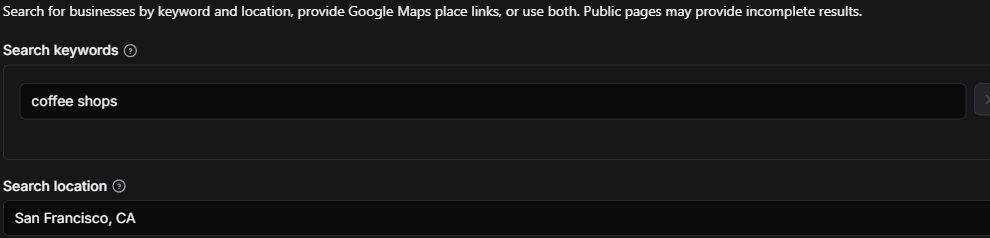
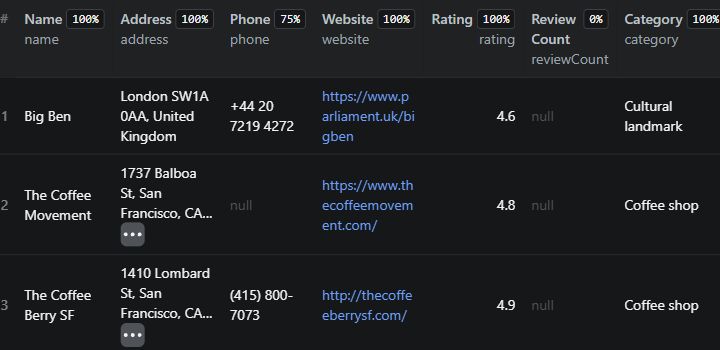
The screenshots below are from an actual cloud test on October 30, 2026. The input included the search coffee shops in San Francisco, CA, plus two direct links to the same London landmark. The run saved four unique places: three coffee shops and one landmark.
1. Enter your search. Add a keyword and location in the input form. Individual place links are optional.
2. Explore your results. The screenshot shows three of the four saved records, including the direct-link landmark and two coffee shops.
Select either screenshot to open it at full size.
In this test, one displayed business had no phone number and all review counts were missing. Missing fields appear as null; coverage varies by place and by Google's response.
What data can you collect?
| Business detail | Output field |
|---|---|
| 🏪 Business or place name | name |
| 📍 Address | address |
| ☎️ Phone number | phone |
| 🌐 Website | website |
| ⭐ Rating and review count | rating, reviewCount |
| 🏷️ Business categories | category, categories |
| 🗺️ Coordinates and Plus Code | latitude, longitude, plusCode |
| 🕒 Current opening status | currentHours |
| 🔗 Place identifiers and link | googlePlaceId, featureId, placeId, mapsUrl |
| 📋 Collection details | limitedView, scrapedAt |
Saved records contain a name, but other fields depend on availability. Unavailable values are null in JSON and blank in CSV. Review counts may be missing; current opening status is not a full weekly schedule. limitedView flags a restricted page when detected.
Get started
- Enter a search keyword such as
coffee shopsand a location such asSan Francisco, CA. - Set the maximum number of places to export.
- Press Start and open Output after the run.
- Review the collection summary, then download the dataset or the JSON/CSV output.
Example: Find coffee shops in San Francisco
Enter coffee shops as the keyword and San Francisco, CA as the location. Set a small result limit for your first run to check coverage and cost.
Example: Organize a list of place links
If you already have individual Google Maps place links, paste them into Google Maps place links. Leave the search fields empty, or combine links and keyword searches in one run. Repeated place IDs are exported once.
Frequently asked questions
Why are some phone numbers or review counts missing?
Google may not display a field for a place, or may show a limited view. This Actor records what it can access and leaves unavailable values empty instead of guessing. A run may succeed even when some fields are missing.
Can I fill missing review counts?
Enable Optional: enrich review counts to call Compass Google Maps Scraper in your own Apify account. This is off by default and costs extra, separately from this Actor's business-record charge and platform usage. At the provider's Free-plan rates, direct-place lookups cost approximately $6 per 1,000 places plus a small start charge; provider rates depend on your plan and can change. Check provider pricing before running.
Set both Review lookup limit and Provider budget (USD). The latter applies to the one provider run, not to the total cost of this Actor. The first group of unique places is held until the lookup finishes; any later places are exported normally without enrichment. A failed or partial provider run may still charge you. Review counts are matched by place identifiers, may remain empty, and do not include review text. Check the run summary for lookup status and the provider run ID.
Does this collect email addresses?
No. This Actor does not visit business websites to extract email addresses and does not collect review text.
How much does it cost?
The current event price is $1.50 per 1,000 business records saved to the default dataset. Apify platform usage is charged separately. Failed or duplicate inputs do not produce a billable dataset record. See the Pricing tab for the current rate, and use Apify's maximum cost setting to limit event charges.
How many places can I export on the Apify Free plan?
Up to 10 unique places per run across searches and place links. If you request more, the Actor applies the 10-place limit, logs a warning and reports it in the collection summary. Paid Apify plans can set the overall limit up to 5,000; Google may return fewer. This is a per-run limit, not a monthly quota, and it does not waive event charges or platform usage.
Can I get 5,000 places from one search?
The Actor accepts up to 5,000 individual place links and lets you set the overall export limit up to 5,000 places. Each keyword search can consider up to 1,000 results, but Google may return fewer or stop loading results. These settings do not guarantee the number of results or exhaustive coverage of an area.
What happens if some places fail or the search is incomplete?
Temporary timeouts and network errors are retried up to the configured limit; verification blocks are reported. Check Collection summary and failures for each search's status, found count and stop reason, plus per-place errors. A successful run can contain partial results. Location is a search hint, not a strict geographic boundary.
This independent tool reads public pages without signing in and is not affiliated with Google.


