

Property Finder Scraper — AI Deal Score & Complete Coverage
Pricing
from $150.00 / 1,000 deal scores
Property Finder Scraper — AI Deal Score & Complete Coverage
Scrape Property Finder UAE listings with agent email, phone & WhatsApp, an AI Deal Score vs local comps, and a per-run coverage proof. CSV/JSON.
Pricing
from $150.00 / 1,000 deal scores
Rating
0.0
(0)
Developer

ProgrammX
Maintained by CommunityActor stats
0
Bookmarked
2
Total users
1
Monthly active users
3 months ago
Last modified
Categories
Share
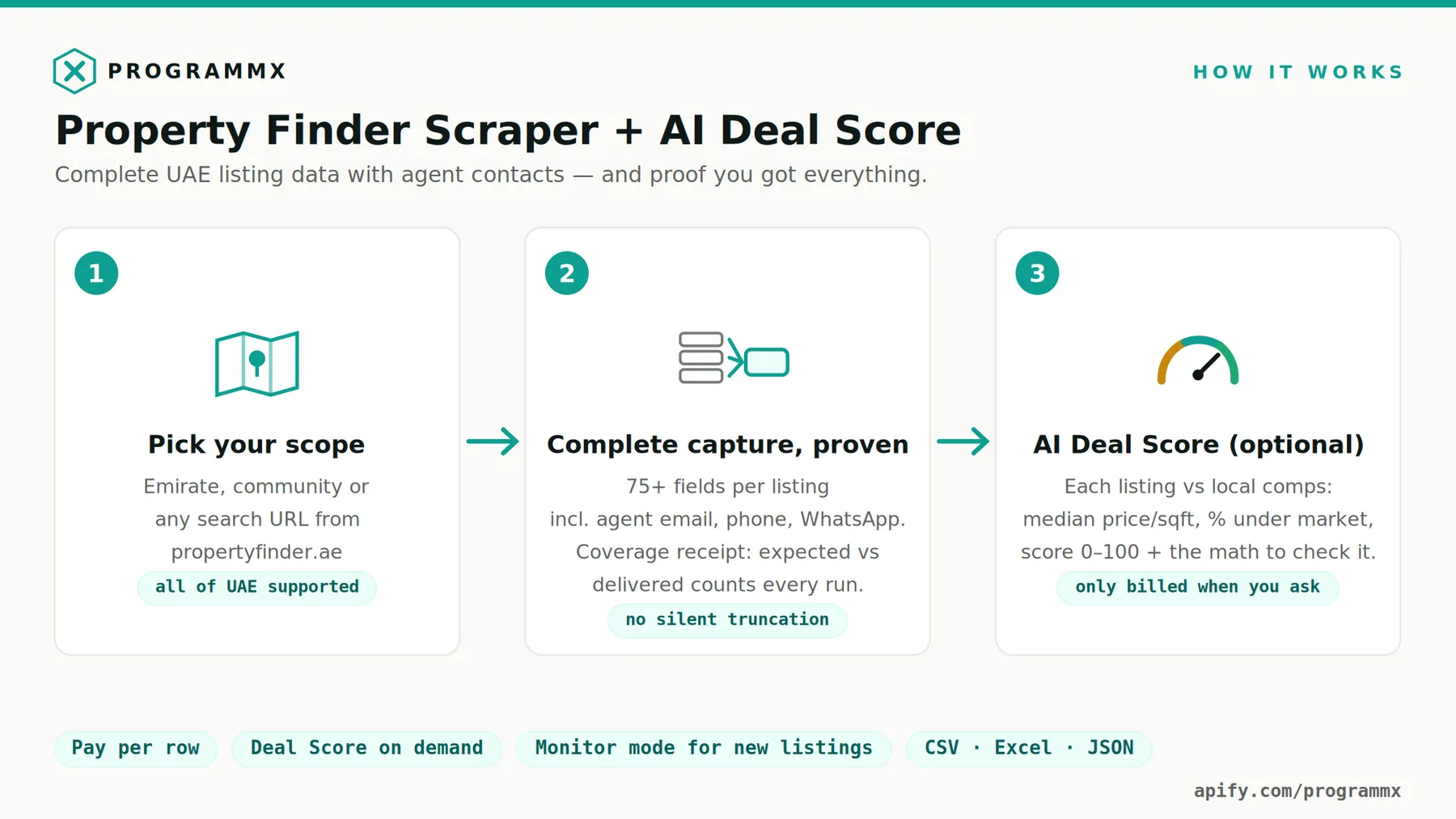
This Property Finder scraper extracts UAE property listings from propertyfinder.ae with agent contact details (email, phone, and WhatsApp) in every row, an AI Deal Score that benchmarks each listing against comparable properties in the same sub-community, and a per-run coverage proof that shows — with numbers you can check — that you received the full result set for your search, not just the first page-window.
What you get in every row
- The full search-page listing record: price, bedrooms, bathrooms, area (sqft), property type, community, sub-community, tower, listing date, reference, furnishing, amenities, description, and more
- Agent contact bundled in: email, phone, and WhatsApp number, plus agent and broker names
- Direct listing URL and image link
- Optional Deal Score fields and an optional detail-page enrichment block
What makes this Property Finder scraper different
AI Deal Score
Every scored listing is compared against comparable listings — same offering type (rent or sale), same property type, same bedroom count, similar size (±30%) — in the same sub-community, falling back to the same community only when the sub-community has too few comparables. The engine computes the median price per sqft of those comps and scores the listing 0–100 (50 = at market, higher = better value):
| Field | Meaning |
|---|---|
dealScore | 0–100; one point per percent below the comps median |
dealScoreBand | great_deal / below_market / at_market / above_market / overpriced |
dealScorePctVsMedian | Percent above/below the median price per sqft |
dealScoreMedianPpsf | The comps median itself, so you can verify the math |
dealScoreCompsCount / dealScoreBasis | How many comparables, and at which level |
dealScoreNarrative | A one-sentence plain-English summary, written by AI |
The numbers are computed deterministically from the listings data — the AI only phrases the result, it never calculates. Listings with too few comparables are marked with a reason instead of being given a fake score, and they are not charged.
Provable completeness
Property Finder silently caps any single search at about 1,250 results: past page 50 the site returns an empty page with HTTP 200, so a naive Property Finder crawler delivers a partial dataset without any error. This scraper partitions your search through Property Finder's own category tree (property type → emirate → community → sub-community → tower), walks each branch below the cap, de-duplicates listings across branches, and then writes a coverage_proof row into your dataset: the sum of branch counts, the site's own total, the difference, per-field fill rates, and a reconciled: true/false verdict. Unlike crawlers that stop at the window, an incomplete walk here says so, in the data.
Agent contacts, included
Email, phone, and WhatsApp are part of the base row — no separate tier, no add-on price.
How this compares to other Property Finder scrapers
The Apify store has a dozen Property Finder scrapers, and most of them do the same three things: read the search pages, return what fits in the window, and sell agent contacts as a second actor. The differences that actually change what you can do with the data:
| Typical Property Finder scraper | This actor | |
|---|---|---|
| Result ceiling | Stops at the site's silent ~1,250-row window and reports success | Partitions the category tree to walk past the window, and proves the result set reconciles |
| Did I get everything? | No way to tell from the output | A coverage_proof row per run: branch totals vs the site's own count, per-field fill rates, reconciled: true/false |
| Agent email / phone / WhatsApp | Usually a separate agent-scraper actor, billed again | In every listing row, at no extra event |
| Valuation signal | Raw price only | Optional Deal Score vs same-sub-community comparables, with the median and comp count in the row so you can check the math |
| Delistings | Not tracked, or asserted without evidence | Monitor mode reports removals only when the coverage proof reconciles, so a failed walk can't masquerade as a wave of delistings |
We are not going to quote other developers' star ratings at you — they move, and you can read them yourself on the store. Run this actor against any of them on the same search and compare the row counts against the coverage_proof; that is the comparison that matters.
Monitor mode
Turn on monitorMode to re-check listings found by previous runs of this actor or task: price changes, unchanged listings, and removals are reported as monitor rows (removals are only asserted when the coverage proof reconciles, so an incomplete walk can never masquerade as a wave of delistings). New listings in the same scope are delivered as normal listing rows.
Detail-page enrichment (optional)
Off by default. When enabled, each returned listing's detail page is also fetched and a detail block is added: regulatory details and licenses, zone name, availability date, project information, grouped amenities, and Property Finder's price-comparison and price-trend widgets. A detail page is a separate page load per listing rather than a row read off a search page, so it is charged separately at $0.005 per enriched listing ($5 per 1,000) on top of the listing row.
Example output
Input
Pick a scope with the dropdowns (rent/sale, emirate, property type) or paste propertyfinder.ae search URLs. Set maxResults — the hard cap on unique listings returned, and the only listing rows you are billed for. Toggle dealScore, detailEnrichment, and monitorMode as needed.
Input example
Copy this into the JSON tab of the input editor — a Dubai apartment rental sweep with Deal Scores on:
Or drive it from search URLs you built on the site, and re-check known listings weekly:
Pasted URLs must be propertyfinder.ae rent or buy paths (/en/rent/… or /en/buy/…). The path is the filter: query-string parameters like min_price or a bedroom count are stripped with a warning, because Property Finder ignores them anyway — and billing you for a wider result set than you thought you asked for would be dishonest.
Pricing: $1.50 per 1,000 listings
Billing is pay-per-event, and every event has a published price — nothing here is quoted as a multiple of something else:
| Event | Price | Per 1,000 | When it fires |
|---|---|---|---|
| Listing row | $0.0015 | $1.50 | Once per unique listing delivered |
| Deal Score | $0.015 | $15.00 | Only when dealScore is on, and only for listings that had enough comparables to score |
| Detail enrichment | $0.005 | $5.00 | Only when detailEnrichment is on, once per enriched listing |
| Monitor check | $0.005 | $5.00 | Only in monitorMode, once per previously-seen listing re-checked |
| Actor start | $0.00005 | — | Once per run |
Never billed: duplicate listings removed during the walk, listings that could not be scored for lack of comparables, the coverage_proof row itself, pages fetched while partitioning the category tree, and anything above your maxResults cap.
Worked examples
A one-off market pull — 1,000 Dubai apartment listings, no extras:
| Line | Count | Rate | Cost |
|---|---|---|---|
| Listing rows | 1,000 | $0.0015 | $1.50 |
| Actor start | 1 | $0.00005 | $0.00 |
| Total | $1.50 |
The same pull, with Deal Scores on the 100 listings you shortlist:
| Line | Count | Rate | Cost |
|---|---|---|---|
| Listing rows | 1,000 | $0.0015 | $1.50 |
| Deal Scores | 100 | $0.015 | $1.50 |
| Total | $3.00 |
A weekly monitor run over those 1,000 known listings, finding 40 new ones:
| Line | Count | Rate | Cost |
|---|---|---|---|
| Monitor checks on known listings | 1,000 | $0.005 | $5.00 |
| New listing rows | 40 | $0.0015 | $0.06 |
| Total per week | $5.06 |
maxResults is a hard cap on unique listing rows, so the listing-row line of your bill can never exceed maxResults × $0.0015 no matter how large the search turns out to be.
Integrations
Export the dataset as CSV, Excel, JSON, or XML from the Apify console or API, sync it to Google Sheets or Airtable, push leads into HubSpot or any CRM, and automate runs with Zapier, Make, or n8n through Apify integrations. The dataset is also available over a simple HTTP API for your own stack.
FAQ
How do I get Property Finder agent contacts — email, phone, and WhatsApp?
Run the scraper on your search scope; every listing row includes agentEmail, agentPhone, and agentWhatsapp when the listing publishes them, plus agent and broker names. The coverage proof's per-field fill counts tell you exactly how many rows carried each contact field.
Can I export UAE property listings to CSV or Excel? Yes — every run produces an Apify dataset you can download as CSV, Excel, JSON, or XML, or pull straight into Google Sheets.
How is the AI Deal Score calculated? Deterministically: the median price per sqft of comparable listings (same type, bedrooms, similar size) in the same sub-community, and the listing's percentage above or below that median. The AI writes the one-sentence summary; it never does the math. The median and comp count are in the row so you can check it.
Do I really get every listing in my search, and how would I know?
Every run ends with a coverage_proof row reconciling the sum of walked branches against Property Finder's own total count. If the run was capped by maxResults or a branch failed, the proof says reconciled: false and names the gap — unlike crawlers that stop at Property Finder's silent ~1,250-row window and report nothing.
Can I monitor Property Finder listings for price changes and removals?
Yes — enable monitorMode on a saved task and schedule it. Known listings are re-checked (price changes and removals reported), and new listings arrive as normal rows.
How much does it cost to scrape 1,000 Property Finder listings? $1.50 — 1,000 listing rows at $0.0015 each, agent email, phone and WhatsApp included. Deal Score ($0.015), detail enrichment ($0.005) and monitor checks ($0.005) are separate opt-in events, so a run with everything switched off costs exactly the listing rows. See Pricing for worked examples.
Is it legal to scrape Property Finder? The scraper collects publicly visible listing data only. You are responsible for using the data in compliance with applicable laws and the source site's terms; nothing here is legal advice.
Works together with
| Actor | What it gives you |
|---|---|
| Instantly Lead Pusher | Push the agent contacts in these rows straight into an Instantly.ai campaign — no CSV export. Attach it on the Integrations tab and every scheduled run feeds your sequence. dealScoreBand, community and price arrive as {{merge_tags}}, so the email can open with the listing itself. |
| eBay Business Leads Scraper | Verified B2B contacts for eBay business sellers across the UK and EU, from the DSA/GPSR trader disclosure. |
| German Estate Agent Leads | Verified contact records for German estate agencies, built from legally mandated Impressum data. |
Built by ProgrammX · hello@programmx.com


