

YouTube Channel Scraper + Free Channel Insights | $1.00/1K
Pricing
from $1.00 / 1,000 videos
YouTube Channel Scraper + Free Channel Insights | $1.00/1K
Scrape all videos, Shorts and live streams of any YouTube channel: views, dates, duration, thumbnails, subscribers. Free channel insights report: upload frequency, median views, top videos, Shorts vs long-form, best video length, winning title words. No API key.
Pricing
from $1.00 / 1,000 videos
Rating
0.0
(0)
Developer

Rasa Reka
Maintained by CommunityActor stats
0
Bookmarked
2
Total users
1
Monthly active users
5 days ago
Last modified
Categories
Features
Share
YouTube Channel Scraper + Free Channel Insights
Scrape every video, Short and live stream of any YouTube channel: titles, view counts, upload dates, durations, thumbnails and subscriber count. Each run also includes a free channel analytics report: upload frequency, median views, top videos, Shorts vs long-form, which video lengths get the most views and which title words the best videos use. Paste a @handle, a channel URL or any video link. You do not need an API key or a login.
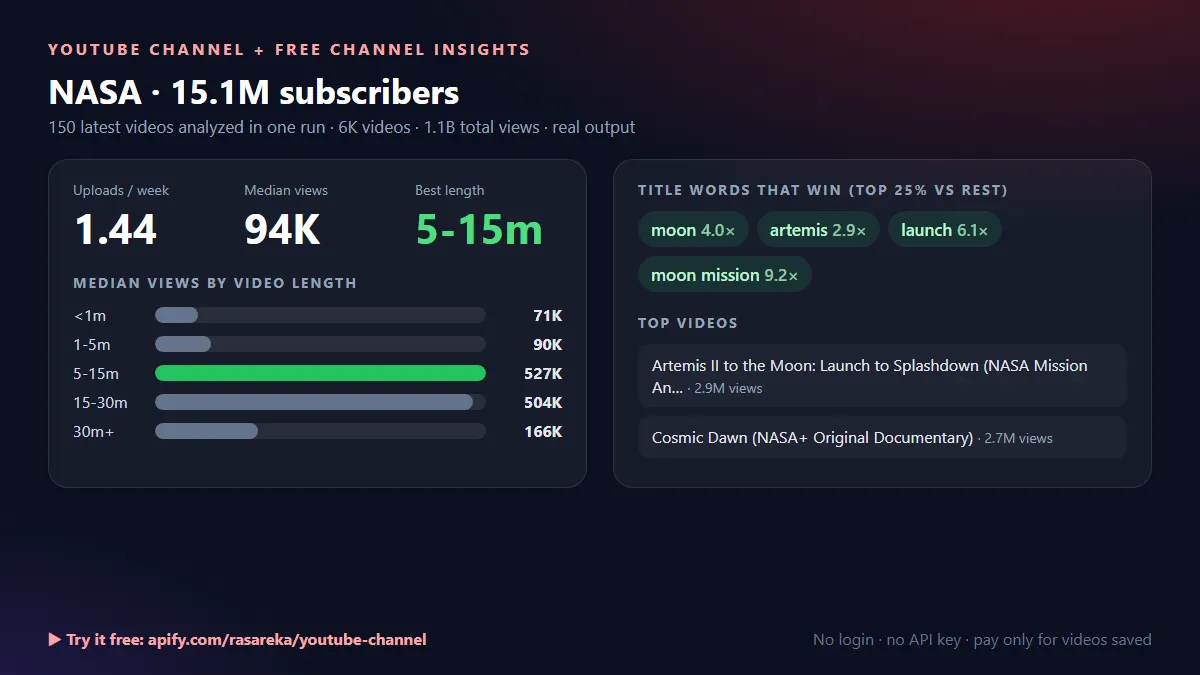
Real output from one cloud run on @NASA (150 latest long-form videos). Videos of 5–15 minutes had a median of 527K views, against 90K for 1–5 minute videos. "Moon" appears in 35% of the top 25% of titles but in only 9% of the rest. Most channel scrapers give you the rows and leave the analysis to you. This one adds the summary above at no extra cost.
What you get
-
🎬 One row per video:
type(video / short / live), video id, URL, title -
👀 View count as a number (parsed from "1.2M views") plus the original text
-
🗓️ Upload time ("3 weeks ago") plus an approximate ISO date, or the exact publish date with video details on
-
⏱️ Duration in seconds, thumbnail URL
-
📺 Channel name, @handle, channel id, channel URL, subscriber count on every row
-
❤️ Optional video details: exact publish date (day), exact views, like count, description, plus tags (keywords) and category when YouTube provides them
-
📊 Free CHANNEL_INSIGHTS report per channel, covering:
- channel stats: subscribers, total videos, total views, joined date, country, public links
- uploads per week, median and average views, views per subscriber
- top 10 videos and views by month
- Shorts vs long-form, and median views by video length (<1m, 1–5m, 5–15m, 15–30m, 30m+)
- best upload weekday
- title words that the top 25% of videos use more than the rest
Every number comes from the videos fetched in your run, and
sampleSizeis shown.
Why this Actor
| Typical YouTube channel scraper | This Actor | |
|---|---|---|
| Input | Channel URL | @handle, channel URL, channel id or any video / Shorts link |
| Videos, Shorts and live streams | Often videos only | All three in one run, each row labelled with type |
| Sort | Latest only | Latest or Popular (YouTube's own most-viewed sort) |
| View count | Text like "1.2M views" | Number plus the original text |
| Channel analytics | No, you build the spreadsheet yourself | Included free: upload frequency, median views, best length, winning title words, Shorts vs long |
| Exact dates, likes, descriptions | Sometimes | Optional (enrichVideoDetails) |
| API key, login, cookies | Often a YouTube Data API key | Not needed |
| Failed channels | Sometimes charged | Never charged, listed in a free FAILED record |
Use cases
- Competitor channel analysis: see how often a competitor uploads, what their median video earns and which topics break out.
- Influencer vetting: check whether a creator's typical video (the median, not the one viral hit) reaches enough people for its subscriber count, and whether the channel is still active.
- Content strategy: learn which video lengths and title words win in your niche, and whether Shorts or long-form gets more views there.
- Agencies: monthly channel reports for clients or prospects, without copy-pasting from YouTube.
- AI / LLM pipelines: feed clean, structured video lists to RAG, trend detection or summarisation. The CHANNEL_INSIGHTS report is small enough to pass straight to an LLM.
- Research and media monitoring: track what large channels publish and how each upload performs over time with scheduled runs.
How to use it
- Add channels:
@NASA,https://www.youtube.com/@TED,UCLA_DiR1FfKNvjuUpBHmylQ, or any video link such ashttps://youtu.be/K8DG7LUTbaM. - Set Max videos per channel. With Shorts or Live turned on, the limit is shared evenly between the tabs.
- Optionally choose Popular sort, turn on Live streams, or turn on Video details for exact dates, likes and tags (slower).
- Run the Actor. Videos are saved to the dataset, and the report is saved to Storage → Key-value store → CHANNEL_INSIGHTS.
Input example
Output example (one video, real)
With enrichVideoDetails: true, each video also gets the following fields (real, shortened):
publishDate is the calendar day shown on the public watch page. keywords and category come only from YouTube's video player data. YouTube often withholds that data from cloud servers with a "confirm you're not a bot" check. When it does, those two fields are null and the report's notes says so. The Actor never works around the check. Dates, exact views, likes and descriptions come from the public page data and are not affected.
Shorts are saved with type: "short" and a /shorts/ URL. The Shorts tab shows no date or length, so publishedAt and durationSeconds stay null unless video details are on. Streams that are live right now get isLiveNow: true and liveViewersNow, and their viewCount is null.
CHANNEL_INSIGHTS example (real, @NASA, 200 latest videos, shortened)
With Shorts and video details on, the report also fills shortsVsLong and bestUploadWeekday. In a run on @TED (100 videos and 100 Shorts, 40 with details), Shorts had a median of 27.5K views against 94K for long videos, and Sunday uploads had the highest median (147K, from 7 videos).
Export to JSON, CSV or Excel, or connect to Google Sheets, Make, Zapier, n8n or your own code through the Apify API.
Pricing
You pay per result, which here means per video saved to your dataset. The CHANNEL_INSIGHTS report is free, and failed channels are never charged; they are listed in the free FAILED record. Set a maximum cost per run in the run options and the Actor stops cleanly when it reaches it.
Limits
- YouTube may slow down or block heavy use. The Actor paces its requests (about 0.3–0.6 s between pages) and retries rate limits with backoff. If YouTube still shows a sign-in, bot-check or consent page, the channel goes to FAILED with a clear message. The Actor never tries to get around it: no login, no cookies, no CAPTCHA solving, no proxy rotation. Try again later or scrape fewer videos per run.
- Dates are approximate unless video details are on. YouTube shows "3 months ago", so
publishedAtcan be off by days or weeks (publishedAtApprox: true), andviewsByMonthis labelled approximate.bestUploadWeekdayneeds exact dates, so it isnullunlessenrichVideoDetailsis on and at least 7 videos have details. - Video details are slower: about 1 second per video, because each public watch page is opened one by one. Use
maxEnrichedVideosPerChannelto cap it. - View counts on channel pages are rounded ("58K views" = 58,000). With video details on you get the exact number.
- Popular sort uses YouTube's own Popular sort on each tab. If a tab has no Popular sort, the Actor uses the latest order and says so in the report's
notes. Upload frequency is only computed for latest order. - Insights describe your sample, not the whole channel. A 100-video run describes those 100 videos (see
sampleSize). Title-word analysis is keyword-based, so read the titles for nuance. - Upcoming scheduled streams and premieres are skipped, since they have no views yet. Members-only and private videos are not visible.
Privacy and terms
The Actor reads only public channel and video pages, the same as any logged-out visitor. It does not collect channel business emails, even when "View email address" is offered, and it does not enrich personal data. You are responsible for how you use the data, including YouTube's Terms of Service, copyright in titles and thumbnails, and privacy laws such as GDPR if a channel belongs to an individual.
Also from Rasa Reka
- Apple App Store Reviews Scraper + Insights: iOS reviews with a free complaints and praise report
- Google Play Reviews Scraper + Insights: the same report for Android apps
FAQ
Do I need a YouTube account or a YouTube Data API key? No. The Actor uses YouTube's public web pages. It has no API quota and does not need a Google Cloud project.
Can I get all videos of a channel? Yes. Set maxVideosPerChannel high, for example 5000. The Actor pages through the whole Videos tab, so large channels simply take longer.
Can I scrape only Shorts? Not on their own yet. Set includeShorts: true and filter the dataset by type: "short".
Can I use a video link instead of a channel? Yes. Paste any watch, youtu.be or Shorts link, and the Actor scrapes that video's channel. If two inputs point to the same channel, it is scraped only once.
Why is bestUploadWeekday null? It needs exact publish dates. Turn on enrichVideoDetails.
Is scraping YouTube legal? The Actor reads only publicly available data, without logging in. You are responsible for how you use it (see Privacy and terms).
Something broken or a feature missing? Open an issue on the Issues tab. We usually reply within 24 hours.


