
YouTube Comments Scraper + Free Comment Insights | $0.50/1K
Pricing
from $0.50 / 1,000 comments
YouTube Comments Scraper + Free Comment Insights | $0.50/1K
Scrape YouTube comments and replies from any public video or Short: text, likes, author, date, pinned and hearted. Free insights: top terms, viewer questions, sentiment estimate, most-liked. No login or API key. Pay per comment.
Pricing
from $0.50 / 1,000 comments
Rating
0.0
(0)
Developer

Rasa Reka
Maintained by CommunityActor stats
0
Bookmarked
2
Total users
1
Monthly active users
5 days ago
Last modified
Categories
Features
Share
YouTube Comments Scraper + Free Comment Insights
Scrape YouTube comments and replies from any public video or Short, and get a free comment-analysis report with every run: top terms, most-liked comments, viewer questions (ready-made content ideas), a sentiment estimate and comments by age. Paste video links or IDs. No login, no cookies, no YouTube API key.
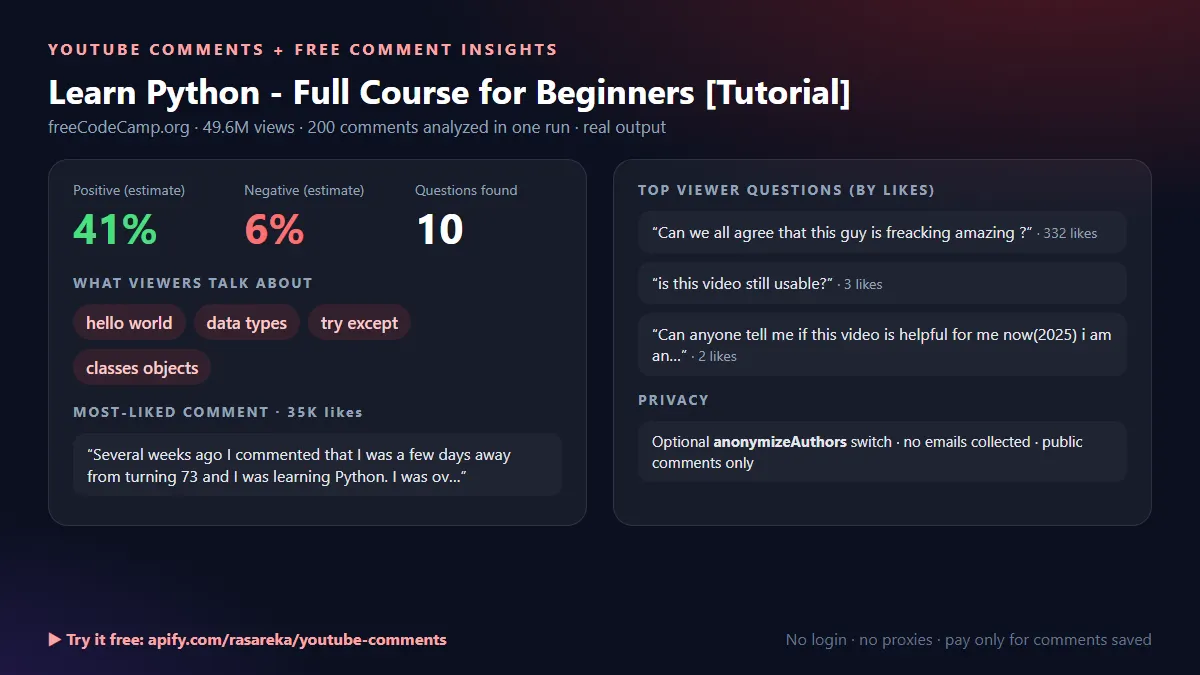
Real output from one cloud run on freeCodeCamp's "Learn Python - Full Course for Beginners" (200 top comments; no commenter names shown). Sentiment is an estimate. Viewers keep asking whether the 2018 course is still usable, which is a ready-made idea for an updated video. Most comment scrapers give you the 200 rows. This one also gives you the summary above, free.
What you get
- 💬 Full comment text, comment ID and (optionally) replies with their parent comment ID
- 👍 Like count as a number (YouTube's "1.2K" becomes
1200) and reply count - 🗓️ YouTube's relative time ("2 weeks ago") plus an approximate ISO date (
publishedAtApprox: true) - 📌 Pinned comment, ❤️ creator heart, edited flag, channel-owner and verified badges
- 👤 Author name, channel ID, channel URL and avatar, or anonymized authors with one switch
- 🎬 Video title and channel name on every row
- 📊 Free COMMENT_INSIGHTS report per video: views, YouTube's reported comment count,
sampleSize, top terms (words and two-word phrases), 10 most-liked comments, viewer questions sorted by likes,sentimentEstimate, creator reply rate (when replies are fetched) and comments by age (24 h / 7 d / 30 d / older)
Why this Actor
| Typical YouTube comment scraper | This Actor | |
|---|---|---|
| Input | Video URL | Watch URL, youtu.be, Shorts, live, embed or bare ID |
| Sort order | Often top only | Top or newest |
| Replies | Sometimes | Optional, with a per-comment cap |
| Likes | Text like "1.2K" | Numbers you can sort and sum |
| Comment-analysis report | No, you analyse it yourself | Included free (terms, questions, sentiment estimate, age) |
| Privacy switch | Rarely | anonymizeAuthors for GDPR-friendly datasets |
| Login, cookies, API key | Varies | Not needed |
| Failed videos | Sometimes charged | Never charged, listed in a free FAILED record |
Use cases
- Creators: see what your audience talks about, which comments get the most likes, and how often you reply.
- Content ideas from viewer questions: the report pulls real questions ("What should my next steps be after this video?") sorted by likes. Each one is a possible follow-up video, FAQ or Short.
- Brand monitoring: track what people say about your product in review and unboxing videos, on a schedule.
- Sentiment snapshots: a quick positive / negative / neutral estimate per video, plus the raw text for your own model.
- AI and LLM pipelines: clean, structured comments for RAG, summarisation, classification or fine-tuning. The report is compact enough to pass straight to an LLM.
- Market research: compare the comment sections of competing channels or product launches.
How to use it
- Add one or more videos in Videos:
https://www.youtube.com/watch?v=...,https://youtu.be/...,https://www.youtube.com/shorts/...or just the 11-character ID. - Set Max comments per video (replies count toward it) and pick Top or Newest.
- Optional: turn on Include replies, or Anonymize authors.
- Run. Comments go to the dataset; the report goes to Storage → Key-value store → COMMENT_INSIGHTS. Videos that could not be scraped are listed in FAILED.
Input example
Output example (one comment, real)
With anonymizeAuthors: true the same row has "authorName": "Commenter 1" and no authorChannelId, authorUrl or authorAvatar.
COMMENT_INSIGHTS example (real, shortened)
Export to JSON, CSV or Excel, or connect to Google Sheets, Make, Zapier, n8n or your own code through the Apify API.
How the insights are calculated
Every number comes only from the comments fetched in that run, and sampleSize tells you how many that was. With Top sort you analyse the most-liked comments; with Newest you analyse the latest ones.
- topTerms: words and two-word phrases, counted once per comment, after removing common English stopwords, @mentions, links and words from the video title and channel name.
- viewerQuestions: comments with a sentence that ends in "?" and starts with a question word (what, how, why, can, should…). Rhetorical "who's here in 2026?" comments are skipped. Sorted by likes.
- sentimentEstimate: a simple, transparent lexicon method. Each comment gets +1 for every positive word (love, amazing, helpful, thanks…) and −1 for every negative word (worst, boring, waste, broken…). A negation in the two words before flips it ("not good" counts as negative). Positive emoji (❤️ 😂 🔥 👍) add 1, negative emoji (😡 👎 🙄) subtract 1. Score above 0 = positive, below 0 = negative, 0 = neutral. It is English-centric and misses sarcasm, so treat it as an estimate.
- creatorReplyRate: share of fetched top-level comments that have at least one reply from the channel owner among the fetched replies. Only calculated when
includeRepliesis on; otherwisenullwith a note. Because replies are capped, it can undercount. - commentsByAge: buckets from YouTube's relative times ("3 days ago"), so the edges are approximate.
Pricing
Pay per result: you pay only for comments saved to your dataset (replies included). The COMMENT_INSIGHTS report is free, and failed videos are never charged. Set a maximum cost per run in the run options and the Actor stops cleanly when it is reached.
Limits
- The Actor reads YouTube's public web pages the same way a logged-out visitor does. It does not log in, use cookies, solve CAPTCHAs or rotate proxies to dodge blocks. If YouTube shows a sign-in, bot-check or consent page, that video is listed in FAILED with "YouTube blocked this request; try later" and the rest of the run stops sending requests. Very heavy use can trigger this; smaller runs spread over time work best.
- Requests are paced (about 0.3 to 0.6 seconds apart), so very large runs take a while: roughly 20 comments per request.
- Dates are approximate. YouTube only shows relative times such as "2 weeks ago", so
publishedAtis calculated from that and flaggedpublishedAtApprox: true. "6 years ago" can be off by months. - Like counts above 1,000 are rounded by YouTube ("4.8M").
totalCommentsReportedis YouTube's own rounded figure ("46K") and can differ from what is actually loadable.- Private videos, unavailable videos, age-restricted videos that need sign-in, and videos with comments turned off (for example videos made for kids) cannot be scraped. They appear in FAILED and are free.
- Topic and question extraction are keyword based and work best on English comments.
Privacy, GDPR and YouTube's Terms
This Actor collects only what anyone can see on a public YouTube video: comment text and the public channel name shown next to it. It collects no emails, phone numbers or other contact details and does no enrichment of personal data.
Commenter names and channel IDs are personal data under laws such as the GDPR and CCPA. You are responsible for having a lawful basis for processing them and for following YouTube's Terms of Service. If you do not need to know who wrote a comment, turn on anonymizeAuthors: names become "Commenter 1", "Commenter 2"… (stable within one run), channel IDs, profile URLs and avatars are removed, and @mentions in the text become @commenter. The video's own channel owner keeps the public channel name. Names typed in plain text inside a comment are not detected.
Also from Rasa Reka
- Apple App Store Reviews Scraper + Insights: the same kind of free report for iOS app reviews
- Google Play Reviews Scraper + Insights: the same for Android apps
FAQ
Do I need a YouTube account or API key? No. The Actor uses YouTube's public web endpoints, with no login and no Google API quota.
Does it work with Shorts? Yes. Paste the youtube.com/shorts/... link or the ID.
Can I get every comment on a huge video? You can set a high maxCommentsPerVideo, but YouTube may slow down or block very long runs. For trend analysis, a few hundred top or newest comments is usually enough, and the report shows exactly how many were analysed.
Why did a video fail? Check the FAILED record in the key-value store. It gives a plain reason: invalid ID, unavailable or private video, comments turned off, or a YouTube block. Failed videos are not charged.
Is scraping YouTube comments legal? This Actor reads publicly available comments only. You are responsible for how you use the data, including GDPR/CCPA and YouTube's Terms of Service. See the privacy section above.
Something broken or a feature missing? Open an issue on the Issues tab. We usually reply within 24 hours.


