

Amazon Reviews Scraper — Reviews, Ratings & Prices
Pricing
from $2.00 / 1,000 results
Amazon Reviews Scraper — Reviews, Ratings & Prices
Extract Amazon reviews, ratings, and product data from 14 marketplaces. Up to 500+ reviews per product. Price monitoring with alerts. No API key needed. Free trial included.
Pricing
from $2.00 / 1,000 results
Rating
2.7
(3)
Developer

Rastriq — Structured data from the world
Maintained by CommunityActor stats
0
Bookmarked
66
Total users
2
Monthly active users
6 days ago
Last modified
Categories
Share
Amazon Reviews Scraper — Reviews, Ratings & Product Data
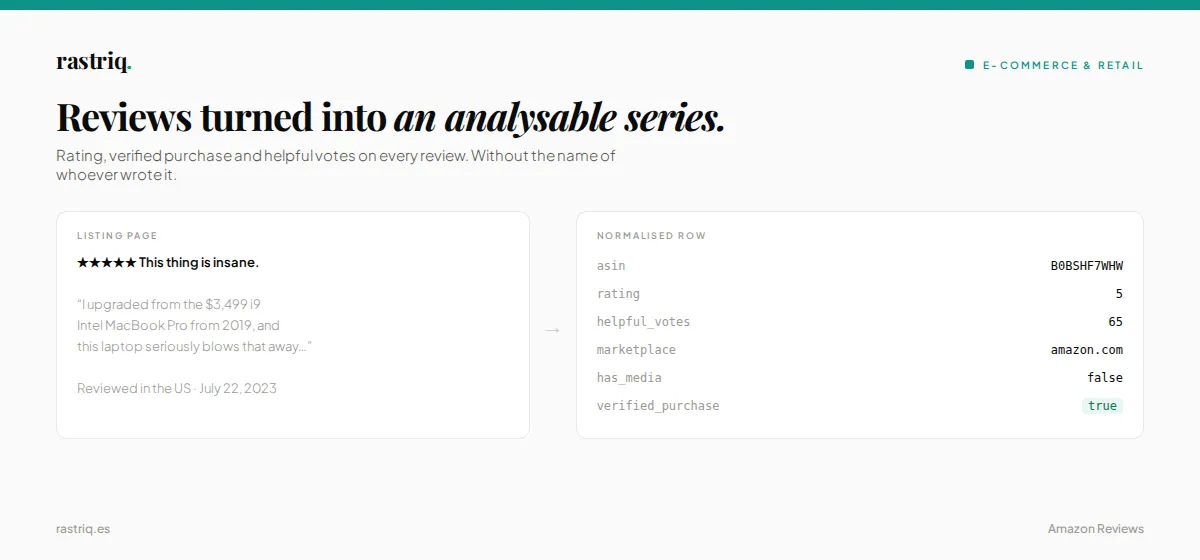
Extract Amazon reviews, ratings, and product data from 14 marketplaces — ES, US, DE, FR, UK, IT, BR, MX, CA, AU, JP, NL, PL, and SE. You choose the maximum reviews per product; every run reports how many were actually extracted and why it stopped. No API key needed.
🚀 Try it free — your first $5 of usage is on Apify. No credit card required.
🛒 Only need prices, stock or Best Sellers Rank? Use Amazon Product Scraper & Price Tracker — one request per product, 21 marketplaces, local postcode prices and price-drop alerts between runs, no cookies needed.
📌 What is Amazon Reviews Scraper?
Amazon Reviews Scraper is an unofficial Amazon data extraction tool that collects customer reviews and product information at scale. Unlike the official Amazon Product Advertising API — which limits review access and requires an affiliate account — this scraper works with any product on any supported marketplace, with no registration needed beyond your Amazon session cookies.
Use Amazon Reviews Scraper to:
- 🔍 Monitor customer sentiment — track how reviews evolve for your products or your competitors' over time
- 📊 Research new markets — analyse reviews before entering a new country or launching a new category
- 🏆 Identify competitor weaknesses — mine low-rated reviews at scale to find product gaps
- 📈 Track rating drops — catch early signals of supply issues, quality problems, or negative PR
- 🤖 Build AI training datasets — collect structured review data for sentiment analysis, NLP, or voice-of-customer research
- 🔄 Automate recurring monitoring — schedule runs, set up webhooks, and keep your datasets fresh
📋 What data does Amazon Reviews Scraper extract?
Amazon Reviews Scraper returns two types of structured records depending on the mode you choose:
Review records:
| Field | Type | Description |
|---|---|---|
review_id | string | Unique identifier for the review |
country | string | Country where the review was posted |
rating | number | Star rating (1 to 5) |
date_raw | string | Review date text as shown by Amazon |
title | string | Review headline |
body | string | Full review text |
verified_purchase | boolean | Whether Amazon confirmed the purchase |
helpful_votes | number | Number of people who found the review helpful |
variant | string | Product variant purchased (colour, size, etc.) |
has_media | boolean | Whether the review includes images |
strategy / source | string | Which extraction route produced the review |
Extraction summary records (item_type: extraction_summary, one per ASIN — also when nothing was extracted):
| Field | Type | Description |
|---|---|---|
requested_reviews | number | The max_reviews you asked for (a ceiling, not a promise) |
extracted_unique_reviews | number | Unique reviews published that match your filters |
target_reached | boolean | Whether requested_reviews was reached |
extraction_complete | boolean/null | true only when the filtered scope was observed to be exhausted; null when unknown |
functional_status | string | ok, partial, empty, failed_auth, failed_blocked or failed |
stop_reason | string | e.g. target_reached, exhausted, auth_required, pagination_stalled, budget_requests_exhausted |
strategies_used | array | Per-route status, requests, pages and new unique reviews |
filter_compliance | object | For each active filter: applied by Amazon (server) or verified locally (local) |
sort_guaranteed | boolean | true only if all reviews come from contiguous pages sorted by Amazon as requested |
reported_ratings / reported_written_reviews | number/null | Counts shown by Amazon, kept separate |
coverage_ratio | number/null | Extracted ÷ written reviews, only when that count has the same filters; otherwise null |
Summaries and errors are never counted as reviews.
Product records:
| Field | Type | Description |
|---|---|---|
title | string | Product name |
brand | string | Brand name |
price | string | Current price including currency |
rating | number | Average star rating |
review_count | number | Total number of ratings |
availability | string | Stock status |
category | string | Product category breadcrumb |
bullets | array | Key feature bullet points |
description | string | Full product description |
specs | object | Technical attributes (dimensions, materials, etc.) |
main_image | string | Link to the main product photo |
variants | array | Available colour or size options |
url | string | Direct link to the product on Amazon |
💡 Reviewer names and profile links are not extracted. Review text is published as written by Amazon customers. Why we do this →
🚀 How to use Amazon Reviews Scraper
Extracting Amazon reviews takes under five minutes:
- Create a free Apify account at apify.com — your first $5 is free
- Open Amazon Reviews Scraper in Apify Console or click Try for free on this page
- Add your products — paste ASINs (e.g.
B09G9FPHY6) or full Amazon product URLs - Select a mode — reviews only, product data only, or both together
- Set your cookies (one-time setup, see below) — required to access reviews
- Click Start and wait for results
- Download your data in JSON, CSV, Excel, or XML — or access via API
💡 Tracking prices for hundreds or thousands of ASINs? The
productsandmonitormodes open a full browser per product. For catalog-scale price and stock monitoring, Amazon Product Scraper & Price Tracker is faster and cheaper, and it reportsprice_down,out_of_stockand Buy Box changes between runs. Use both together: track the catalog there, and dig into the reviews of the products that move here.
⚙️ Input parameters
| Parameter | Type | Required | Default | Description |
|---|---|---|---|---|
asins | array | ✅ | — | ASINs or full Amazon product/review URLs. A URL's own domain decides its marketplace |
mode | string | ❌ | "reviews" | reviews, products, both, monitor |
marketplace | string | ❌ | "amazon.com" | Marketplace for entries given as bare ASINs |
max_reviews | integer | ❌ | 100 | Maximum reviews per product (1–5,000). A ceiling, not a guarantee |
sort_by | string | ❌ | "recent" | recent or helpful (see sort_guaranteed in the summary) |
filter_by_star | string | ❌ | "all_stars" | all_stars, five_star … one_star, positive, critical |
filter_by_keyword | string | ❌ | "" | Keep only reviews containing the keyword |
verified_only / media_only | boolean | ❌ | false | Verified purchases only / reviews with media only |
all_stars_mode | boolean | ❌ | false | Walk the 5 star filters one after another, redistributing unused share |
max_concurrent | integer | ❌ | 3 | Parallel ASINs per marketplace, each in its own isolated browser page |
max_requests_per_asin | integer | ❌ | auto | Page-load budget per ASIN (retries included) |
max_time_per_asin_secs | integer | ❌ | 900 | Time budget per ASIN |
fail_on_functional_error | boolean | ❌ | false | Mark the run FAILED when no ASIN gets a functional result |
cookies | array | ❌ | — | Amazon session cookies as JSON array (see setup below). Only cookies of each URL's marketplace domain are used |
Example input:
📦 Output example
Each review is a structured JSON object. Illustrative example:
Download results in JSON, CSV, Excel, XML, or HTML from the Output tab, or pull them programmatically using the Apify API.
See real records before you run it — a public sample dataset is open, no account needed: 100 real records →
🍪 Cookie setup (one-time, 2 minutes)
Amazon requires an active login session to access reviews. You only need to do this once — after the first successful run, your session is saved automatically for all future runs.
- Log into your Amazon account in Chrome on the marketplace you want to use (e.g. amazon.es)
- Install the free Cookie-Editor browser extension
- While on the Amazon page, open Cookie-Editor and click Export
- Copy the exported cookies and paste them into the Cookies field in the actor input
- Run the actor — your session is now saved and you won't need to repeat this
If reviews stop loading after a few weeks, your session has expired. Simply export fresh cookies and paste them in again.
💰 How much does it cost to use Amazon Reviews Scraper?
Amazon Reviews Scraper runs on Apify's standard Compute Unit (CU) pricing. A typical run extracting ~100 reviews per product consumes approximately 0.02–0.05 CUs depending on the mode and proxy usage.
| Plan | Monthly Credit | Estimated capacity |
|---|---|---|
| Free | $5 (one-time) | ~2,000+ reviews |
| Starter ($49/mo) | $49 | ~50,000+ reviews/month |
| Scale ($149/mo) | $149 | ~150,000+ reviews/month |
💡 Tip: Run a small test with 1–2 ASINs and 10 reviews first to estimate your costs before scaling up. Monitor spending in real time in the Apify Console.
Is scraping Amazon reviews free? Your first $5 of usage is covered by Apify's free trial credit — enough to extract thousands of reviews at no cost.
🔗 Related Rastriq Actors
Explore the full Rastriq intelligence portfolio on Apify Store:
| Actor | Description |
|---|---|
| Amazon Product Scraper & Price Tracker | Amazon prices, stock, Buy Box seller and Best Sellers Rank by ASIN in 21 marketplaces, with price-drop alerts |
| AutoScout24 Scraper | European car listings across 12 markets |
| TikTok Ad Library Scraper | Ad creatives and performance data from TikTok |
| Google Ads Transparency Scraper | Google Ads campaigns from the Transparency Center |
❓ Frequently Asked Questions
Is scraping Amazon reviews legal?
Amazon Reviews Scraper only accesses publicly available data on Amazon — information visible to any visitor with a logged-in session. We respect reasonable rate limiting to avoid overloading their servers. As with any data collection, you are responsible for ensuring your use case complies with applicable laws (GDPR, CCPA) and Amazon's Terms of Service. For guidance, see Apify's blog on the legality of web scraping.
Does Amazon Reviews Scraper require an API key?
No API key is needed. You do need Amazon session cookies for review access — see the Cookie setup section above. Product data does not require cookies.
How many reviews can I get per product?
You set the ceiling with max_reviews (up to 5,000). How many Amazon actually serves depends on the marketplace, the session (review pages often require a signed-in session) and pagination. Each product's extraction_summary tells you how many unique reviews were extracted, whether your target was reached and why extraction stopped.
What proxy configuration should I use?
The actor uses a Decodo residential proxy by default, with the proxy country matching each product's marketplace. A sign-in page does not necessarily mean a bad IP: check stop_reason and functional_status in the summary first.
How do I integrate Amazon Reviews Scraper with my workflow?
Amazon Reviews Scraper integrates natively with Make (Integromat), Zapier, Google Sheets, webhooks, and the Apify API — call from Python, Node.js, or any language (see the API tab for ready-to-use code snippets).
How do I track Amazon prices and stock without reviews?
Use Amazon Product Scraper & Price Tracker. It reads only the product page (one request per ASIN), returns local VAT-inclusive prices for 21 marketplaces and, with Track price changes on, flags price drops, stock-outs and seller changes between scheduled runs. Amazon Reviews Scraper then gives you the customer reviews behind those changes.
I found a bug or my run failed. Where do I report it?
Open an issue in the Issues tab on this page. Include your input configuration and the run ID so we can investigate quickly.
About the data
This actor is part of Rastriq's e-commerce coverage. See the normalised output fields, the full source list and the use cases behind it: E-commerce & Retail Intelligence.


