

Mascus Scraper — Global Heavy Equipment Marketplace
Pricing
from $1.90 / 1,000 results
Mascus Scraper — Global Heavy Equipment Marketplace
Scrape used machinery listings from Mascus, the world's largest marketplace for heavy equipment. Extract price, make, model, year, hours, location, dealer info, and specs across construction, agriculture, forestry, and material handling categories. Covers 50+ countries.
Pricing
from $1.90 / 1,000 results
Rating
0.0
(0)
Developer

Rastriq — Structured data from the world
Maintained by CommunityActor stats
2
Bookmarked
14
Total users
2
Monthly active users
a month ago
Last modified
Categories
Share
Mascus Scraper — Global Heavy Equipment & Machinery Data
Extract structured listings from Mascus, the largest international marketplace for used heavy equipment, agricultural machinery and trucks. Mascus Scraper returns clean, normalized records with price, make, model, year, hours, location and seller details — across six equipment categories and dozens of countries.
🔎 What is Mascus Scraper?
Mascus lists hundreds of thousands of machines from dealers and private sellers across Europe, North America and beyond. The catalogue is spread over six top-level categories and hundreds of machine types, each paginated, each with its own filters. Collecting it by hand is impractical, and the site's own search does not give you a comparable table.
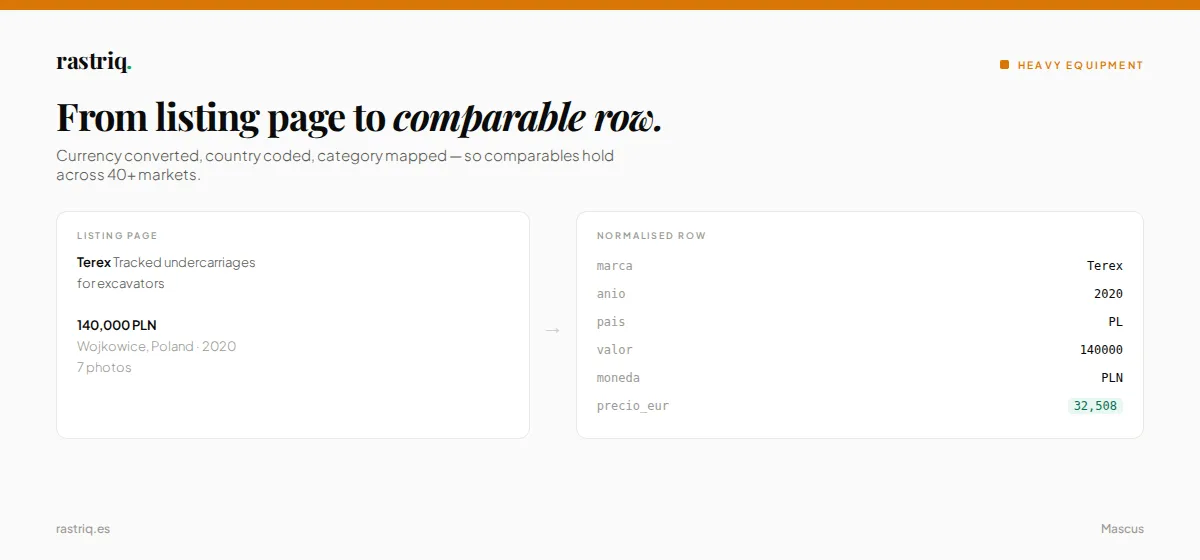
Mascus Scraper turns that catalogue into a dataset. It walks the category tree, extracts every listing it finds, normalizes the fields into a consistent schema and hands you back one row per machine — with prices converted to euros alongside the original currency, so listings from Poland, Sweden and Spain can sit in the same comparison.
Typical uses:
- 📊 Price benchmarking — what a 2018 Caterpillar wheel loader with 11,000 hours actually sells for, by country
- 🏗️ Market sizing — how much inventory exists in a given category and region
- 🔄 Fleet valuation — residual value curves built from real asking prices
- 🛒 Sourcing — finding machines matching a spec across every dealer at once
📦 What data does Mascus Scraper extract?
Each result is one listing, with 37 fields. The core ones:
| Field | Description |
|---|---|
🏷️ marca · modelo | Manufacturer and model, as listed |
📅 anio | Year of manufacture |
💶 valor · moneda | Asking price in the listing's own currency |
💱 precio_eur | Same price converted to euros — makes cross-border comparison possible |
⏱️ tiempo_uso | Hours or kilometres of use |
📍 ubicacion · pais | City/region and ISO country code |
🏢 compania · telefono | Seller name and contact number as published |
🗂️ categoria · tipo | Category and machine type |
🔗 url · ref_anuncio | Listing URL and stable identifier |
🖼️ imagenes · num_imagenes | Image URLs and how many the listing has |
🔨 es_subasta · es_alquiler | Whether the listing is an auction or a rental |
📆 fecha_publicacion | When the listing was published |
🚀 How to use Mascus Scraper
- Open the Actor and leave
data_freshnessonpreloadedfor an instant result from the current monthly snapshot, or switch it toliveto scrape Mascus in real time. - Pick your categories. Five are enabled by default: construction, agriculture, forestry, material handling and groundcare.
- Enable
cat_transportif you want trucks and trailers. It is off by default — see the warning below. - Set
maxItems. Leave it at0for the whole catalogue, or cap it while you test. - Run it, then download the dataset as JSON, CSV, XLSX or XML.
⚠️ The one setting people miss.
cat_transportdefaults tofalse. On the August 2026 catalogue that single flag is the difference between 405,744 listings and 335,849 — 69,895 records, 17.2% of the total, silently absent. The run still ends inSUCCEEDED. If you want transport, switch it on explicitly.
⚙️ Input parameters
| Parameter | Type | Default | What it does |
|---|---|---|---|
data_freshness | string | preloaded | preloaded serves the current snapshot instantly; live scrapes Mascus now |
cat_construction | boolean | true | Excavators, loaders, dozers, cranes |
cat_agriculture | boolean | true | Tractors, harvesters, implements |
cat_forestry | boolean | true | Forwarders, harvesters, chippers |
cat_material_handling | boolean | true | Forklifts, telehandlers, aerial platforms |
cat_groundcare | boolean | true | Mowers, turf and municipal equipment |
cat_transport | boolean | false | Trucks, trailers, vans — off by default |
catalogs | array | [] | Restrict to specific catalogue paths |
maxItems | integer | 0 | 0 means no limit |
maxPages | integer | 9999 | Page cap per category |
delaySeconds | number | 2.0 | Politeness delay between requests |
📄 Output example
💰 How much does it cost to use Mascus Scraper?
Mascus Scraper uses pay-per-event pricing: $0.0019 per result, plus a small Actor-start charge.
| What you pull | Approximate cost |
|---|---|
| 1,000 listings — a test slice | $1.90 |
| 50,000 listings — one large category | $95 |
| The full catalogue (~400,000) | ~$760 |
💡 Run a capped test first. Set
maxItemsto 500, check the fields you care about are populated for your categories, then scale up. Note that the full catalogue exceeds a $200 per-run spend cap — raise the cap before pulling everything, or the run will stop mid-way and still report success.
Deduplication note: running the Actor returns 397,240 unique listings, because it deduplicates as it serves. Downloading the underlying dataset by direct link gives 405,744 rows including 8,504 duplicates. Apply DISTINCT on item_id if you take the direct route.
Copy to your AI assistant
About the data
This actor is part of Rastriq's heavy equipment coverage. See the normalised output fields, the full source list and the use cases behind it: used machinery market data.
🔗 Related Actors
Part of the Rastriq heavy-equipment portfolio — the same normalized schema across all of them, so one integration reads any of them:
- MachineryTrader Scraper — the US market
- MachineryZone Scraper — France and southern Europe
- Machineseeker Scraper — the German-speaking market
- Ritchie Bros Scraper — auction results with hammer prices
- Truck1 Scraper — European commercial vehicles
❓ FAQ
Is scraping Mascus legal?
Mascus Scraper collects publicly visible listing data — no login, no paywall, no personal accounts. It respects robots.txt and rate-limits itself. Seller phone numbers appear because sellers publish them on the listing as business contact details; if your use case falls under GDPR, review your own basis for processing them before you store them.
How fresh is the data?
In preloaded mode you get the current monthly snapshot instantly. In live mode you get the marketplace as it is right now, at the cost of a longer run.
Why are some fields empty? Because the listing left them empty. Mascus does not require sellers to fill in hours, serial number or engine data, so coverage varies by category — construction listings are richer than groundcare.
Can I get only one country or one manufacturer?
Not through a dedicated input yet. Pull the categories you need and filter on pais or marca afterwards.
Something looks wrong. Open an issue on the Actor page. Please include the run ID.


