

Machineseeker Scraper — Global Used Machinery
Pricing
from $1.90 / 1,000 results
Machineseeker Scraper — Global Used Machinery
Scrape used machinery listings from Machineseeker.com (Maschinensucher), Europe's leading marketplace for industrial equipment. Extract price, brand, model, year, condition, dealer info, and specs for CNC machines, metalworking, woodworking, and more. Covers 12+ countries.
Pricing
from $1.90 / 1,000 results
Rating
5.0
(1)
Developer

Rastriq — Structured data from the world
Maintained by CommunityActor stats
0
Bookmarked
14
Total users
1
Monthly active users
11 days ago
Last modified
Categories
Share
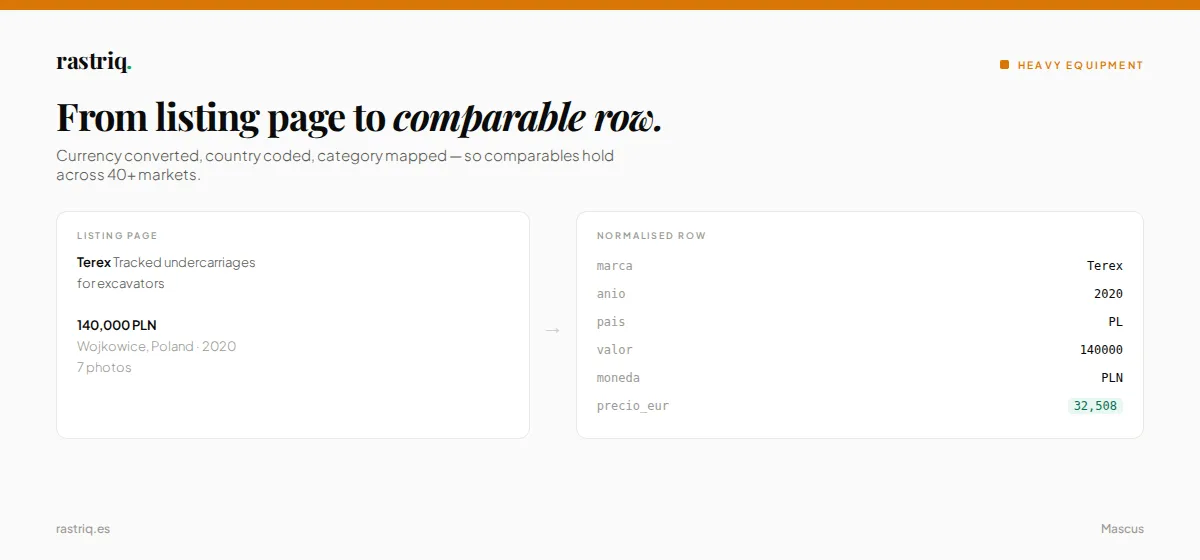
What data can you scrape from Machineseeker — Global Used Machinery?
Extract structured data from Machineseeker — Global Used Machinery including listings, prices, and details.
- Structured output — Clean, normalized records ready for spreadsheets, BI tools or databases
- Flexible filters — Narrow your scrape by category, keyword, or other parameters
- Export anywhere — JSON, CSV, Excel, or via the Apify API and integrations
Output: Machineseeker — Global Used Machinery data structure
The Actor returns structured records with all available fields from Machineseeker — Global Used Machinery listings.
Example output (one record)
🚀 Quick start
- Click Start with the default input to test with a small sample.
- Open the Output tab to preview results.
- Export as CSV / Excel / JSON, or connect via API.
How to scrape Machineseeker — Global Used Machinery — input options
| Field | Description | Default |
|---|---|---|
| 🏭 Industries to scrape | Pick one or more equipment industries. Click + Add to add more. For a full monthly snapshot, add every industry y... | [{"id": "ci-8"}] |
| 🛑 Max total listings | Stop after this many listings in total. Use a small number (e.g. 150) for a quick test in about a minute, or set ... | 0 |
| Drill into subcategories | Each top industry has many subcategories (e.g. Construction → Excavators, Loaders, Telehandlers…). Each subcategory h... | true |
| 🌍 Maximum coverage mode (recommended for monthly runs) | Splits large subcategories by country and price range to bypass MachineSeeker's anonymous page cap. Adds ~20–60 min p... | false |
| Country slices (override) | Optional. Two-letter ISO codes (e.g. DE, IT, FR) that the 'Maximum coverage mode' will use to split big categories. L... | [] |
| Max pages per slice | How many result pages to read per slice (25 listings per page). MachineSeeker hard-caps anonymous browsing at 8 pages... | 0 |
| Proxy configuration | Optional. Residential proxies recommended for best results. | Apify auto |
🔍 How it works
This Actor uses HTTP requests, BeautifulSoup HTML parser to extract data from Machineseeker — Global Used Machinery. It navigates search results or catalog pages, extracts structured data from each listing, and normalizes the output into a consistent schema.
How much does it cost to scrape Machineseeker — Global Used Machinery?
$1.90 per 1,000 listings (+ $0.005 per start). Your $5 free trial credit covers ~2,600 listings.
🔄 Integrations & scheduling
- Schedule daily/weekly runs from the Apify Console for automated data collection.
- Push results to Google Sheets, Slack, Zapier, Make, webhooks or any database.
- Fetch datasets via the Apify REST API or the official JavaScript/Python clients.
Copy to your AI assistant
Copy the Apify Store URL for this Actor and paste it into ChatGPT, Claude, or any LLM with web access:
The model will read the Actor description, input schema, and field list — then help you build the right API call or integration.
Is it legal to scrape Machineseeker — Global Used Machinery?
This Actor collects only publicly available data. It does not log in, bypass paywalls, or access private information. You are responsible for using the extracted data in compliance with the site's Terms of Service and applicable data protection laws (including GDPR where relevant).
About the data
This actor is part of Rastriq's heavy equipment coverage. See the full source list, the normalised output fields and the use cases behind it: used machinery pricing data.
❓ FAQ
Can I access the data via API? Yes. Every run stores its dataset on Apify. Fetch it via REST API or use the official JavaScript/Python clients.
What export formats are supported? JSON, CSV, Excel (XLSX), XML, and HTML table. You can also push data directly to Google Sheets or any webhook endpoint.
Do I need proxies? Residential proxies are recommended for best results. The default proxy configuration is pre-set.


