

Skip Trace Owner
Pricing
$1.99 / 1,000 results
Skip Trace Owner
Find property owner information with parcel number, APN, address, or location. Instantly skip trace FSBO owners, retrieve owner names, mailing addresses, LLC details, and property records for real estate investing, lead generation, acquisitions, and market research.
Pricing
$1.99 / 1,000 results
Rating
5.0
(1)
Developer

real-estate-api
Maintained by CommunityActor stats
1
Bookmarked
17
Total users
6
Monthly active users
10 days ago
Last modified
Categories
Share

Skip Trace Owner
Skip Trace Owner turns a street address into the owner behind it. Send a list of property addresses and get back the primary contact, the secondary contact, the owner's full mailing address, and the parcel number (APN) for each one. That's the whole output. No clutter, no fields you have to dig through, just the four things most people actually skip trace for.
It also returns the APN (also called the parcel number or Assessor's Parcel Number) as its own column, so you can match records straight into a county assessor system, a title search, or your CRM without a second lookup.
If you do real estate outreach, wholesaling, or lead research, this is about as cheap as owner skip tracing gets. You pay for compute time on Apify and nothing else. There's no per-record fee, no monthly seat, no minimum. Run three addresses or three thousand, the price scales with the work and stops when the run stops.
What this actor returns
For every address you send in, you get one row with these columns:
| Field | What it is |
|---|---|
queried_location | The address you sent in, echoed back so you can line rows up with your source list |
primary_contact | The first owner of record (contact 1) |
secondary_contact | The second owner, if the property is held jointly (contact 2) |
full_mailing_address | The complete mailing address on one line |
mailing_address | Street line of the mailing address |
mailing_city | Mailing city |
mailing_state | Mailing state |
mailing_zip | Mailing ZIP code |
mailing_county | Mailing county |
mailing_fips | County FIPS code for the mailing address |
apn | The parcel number / APN for the property |
The mailing address comes both ways: the full one-line version and the same address already broken into street, city, state, ZIP, county, and FIPS. Those parts are taken straight from the source record, not parsed or guessed, so they line up with what the county has on file.
A single result looks like this:
The mailing address is the one that matters for direct mail. Plenty of owners live somewhere other than the property, absentee landlords, out-of-state investors, inherited homes, and this is the address that reaches them.
Why the APN / parcel number is included
The APN is the county's own ID for a piece of land. Once you have it you can:
- Pull the deed, tax history, and legal description from the county recorder
- Confirm you and a title company are talking about the exact same parcel
- Dedupe your list, since two slightly different address strings can point to one parcel
- Cross-reference assessor and GIS data without guessing
Most owner-lookup tools bury the parcel number or leave it out. Here it is a first-class column labeled apn on every row.
Use cases
- Real estate wholesaling: build a direct mail list of absentee and out-of-state owners, with the mailing address that actually reaches them
- Skip tracing leads: take a stack of addresses from a driving-for-dollars app and get owner names and contact details back in one run
- Direct mail campaigns: feed the mailing address column straight into a print-and-mail service
- Title and county research: use the APN to pull deeds, liens, and tax records for the right parcel the first time
- CRM enrichment: append owner names and parcel numbers to properties already in your pipeline
- Probate and inheritance research: spot jointly held properties through the secondary contact field
- List cleaning and dedupe: collapse duplicate address strings that resolve to the same APN
How to use it
- Open the input form.
- Paste your property addresses into Target Locations, one per line. Full addresses with city, state, and ZIP resolve most reliably.
- Leave the proxy setting on its default unless a run gets blocked, in which case switch to Residential.
- Run it. Results land in the dataset as they finish and you can export to CSV, JSON, or Excel.
The actor works through the list in small groups: it resolves each group, pulls that group's details in one batched request, and writes those rows before moving on. Results appear as the run progresses, so a long run keeps saving finished rows instead of holding everything until the end.
Input
| Field | Type | Description |
|---|---|---|
targetLocations | array of strings | Property addresses, one per line. Include city, state, and ZIP for the best match rate. |
batchSize | integer | How many properties to pull per detail request. Higher is faster for long lists. Default 5, maximum 10. |
proxyConfiguration | object | Proxy type and location for requests. Default is Datacenter (Anywhere). Switch to Residential only if you hit blocks. |
Output
Every row carries queried_location, primary_contact, secondary_contact, full_mailing_address, the broken-out mailing_address, mailing_city, mailing_state, mailing_zip, mailing_county, and mailing_fips, plus apn. Export the whole dataset in one click or pull it through the Apify API.
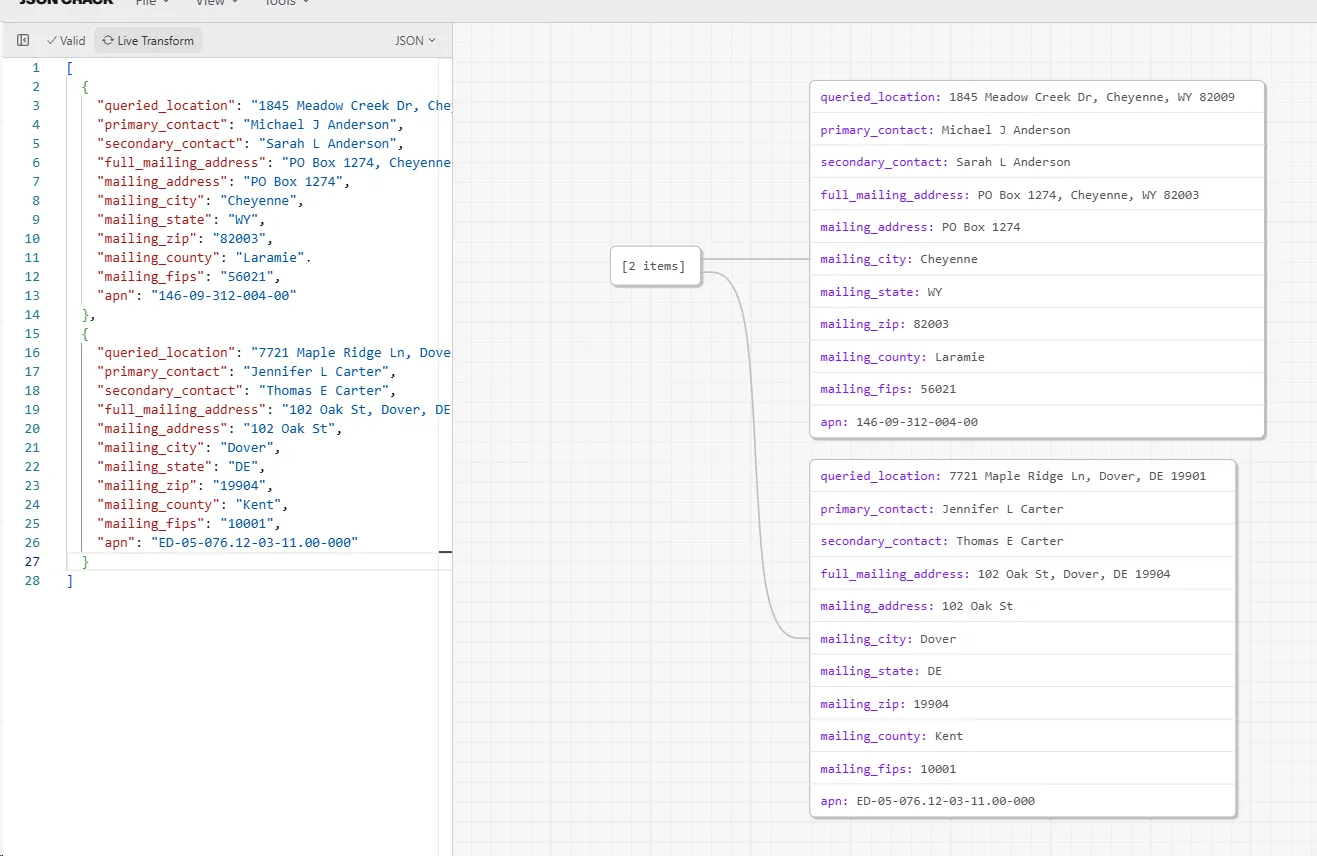
A run over two addresses returns something like this:
The Anderson row shows why the mailing split matters: the owner lives at a PO box in a different ZIP than the property, and that box is where direct mail lands.
Pricing
Pay per result: $1.99 per 1,000 rows, which works out to about $0.002 per property. You get exactly one row back for every address you send in, so the cost is easy to predict before you run.
| Properties looked up | Cost |
|---|---|
| 1 | $0.002 |
| 100 | $0.20 |
| 1,000 | $1.99 |
| 10,000 | $19.90 |
| 100,000 | $199.00 |
Every queried address returns a row, even the ones that come back empty. If an address can't be matched, you still get a row with queried_location filled and the rest of the columns null, so your output always has the same number of rows as your input.
Why it's cheaper than the usual skip tracing services
Most skip trace providers charge somewhere between 5 and 25 cents per record, and many gate you behind a monthly subscription before you run a single lookup. This actor has neither. You are billed for the Apify compute the run uses and that is it. For a batch of a few hundred owner lookups that usually works out to a fraction of a cent each. If you already have an Apify account, you can plug this into your existing budget and platform limits instead of signing up for yet another tool.
Tips for running unlimited address searches
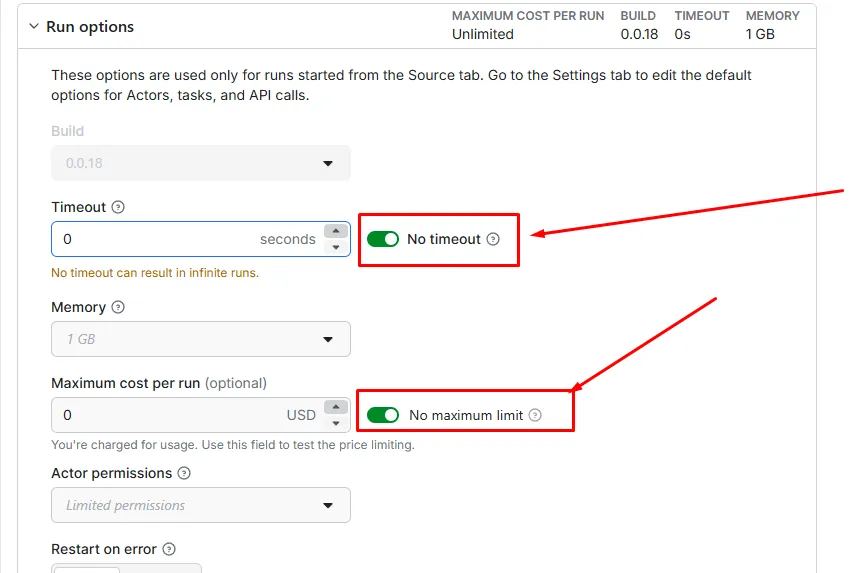
If you are pushing a very large list through the actor, two Run options settings keep the run from stopping early. Open the Run options panel before you start:
- Turn on No timeout so a long run is not killed partway through. With a timeout set, the run stops when the clock runs out even if addresses remain. Turning it off lets the run finish the whole list.
- Turn on No maximum limit under Maximum cost per run so the run is not capped by a spending ceiling. Leave a cost cap in place only when you are testing and want a hard stop.
With both switched on, you can drop in a list of any size and let it run to completion. If you would rather keep a safety cap while testing, set a small Maximum cost per run instead of turning the limit off.
FAQ
Does this return the APN or parcel number?
Yes. Every row has an apn column with the property's parcel number, also known as the Assessor's Parcel Number. It comes back next to the owner contacts, not buried in a nested object.
What is the difference between the property address and the mailing address? The property address is the physical location you searched. The mailing address is where the owner receives mail. For absentee and investor-owned properties these are often different, and the mailing address is the one you want for outreach.
Who are contact 1 and contact 2?
Contact 1 (primary_contact) is the first owner on record. Contact 2 (secondary_contact) is a co-owner, usually a spouse or joint owner. If the property has a single owner, the second field is null.
How many addresses can I run at once? As many as you like. It processes the list in small groups and writes each group's results as it finishes, so nothing is lost partway through a big run. For very large lists, see the tips on running unlimited searches below so the run is not cut short.
Do I need my own accounts or keys? No property-data account is required from you. Just add your addresses and run.
Can I schedule it or call it from code? Yes. Use Apify Schedules to run it on a cadence, or hit it through the Apify API and webhooks to fold it into your own pipeline.
Why might an address come back empty?
Usually a typo, a brand-new build that isn't in public records yet, or an address the resolver can't confidently match. The row still comes back with the queried_location filled in and the other columns blank, so you can see exactly which addresses did not resolve. The reason is written to the run log.
What people use this for
Most people find this actor while looking for a skip tracing tool or a property owner lookup. It works as an owner contact finder and a mailing address finder, and because it returns the APN it doubles as a parcel number lookup for county and title work. Real estate investors and wholesalers use it to build absentee owner lists and direct mail lists, enrich a CRM with the owner of record, and run bulk owner searches without paying the usual per-record skip tracing fees. If you have been searching for cheap skip tracing, a property data source you can call from code, or a faster way to turn addresses into owners for lead generation, this covers the same ground.
Send in an address, get the owner, their mailing address, and the parcel number back. That is what Skip Trace Owner does, and it does it for less than the per-record services you are probably paying now.


![Propwire.com [From $0.75💰] Leads Scraper avatar](https://images.apifyusercontent.com/ZZSQ1ll9ImN8tFhsh9Ez_b0IpvwSdTF1eanxr1yCsvw/rs:fill:76:76/cb:1/aHR0cHM6Ly9hcGlmeS1pbWFnZS11cGxvYWRzLXByb2QuczMudXMtZWFzdC0xLmFtYXpvbmF3cy5jb20vbmduOHZSRVNUa3NleVdFNnAtYWN0b3ItVkVmYk5XR3RBZHc4Z2s0TG4tVWlsbEJBZWtPeC1wcm9wd2lyZS5qcGVn.webp)


