
SEC EDGAR Filings Scraper: 10-K, 10-Q, 8-K, Form 4
Pricing
from $1.13 / 1,000 filings
SEC EDGAR Filings Scraper: 10-K, 10-Q, 8-K, Form 4
Pull SEC EDGAR filings by ticker, CIK or company name: 10-K, 10-Q, 8-K, Form 4, 13F and more, with filing dates, accession numbers, document links, 8-K item codes and full-text search. $1.50 per 1,000 filings.
Pricing
from $1.13 / 1,000 filings
Rating
0.0
(0)
Developer

Red Fox Scout
Maintained by CommunityActor stats
0
Bookmarked
2
Total users
1
Monthly active users
3 days ago
Last modified
Categories
Security
Limited permissionsShare
Pull SEC EDGAR filings by ticker, CIK or company name: 10-K, 10-Q, 8-K, Form 4, 13F and more, with filing dates, accession numbers and links to each document. Search the text of filings with full-text search, or list the latest filings for any form type. Everything comes from the SEC's own public EDGAR records.
Price: $1.50 per 1,000 filings. Failed lookups and error rows are free, and a filing returned twice in one run is charged once. Apify's free plan ($5 monthly credit) covers about 3,300 filings a month.
Questions it answers
- Which annual and quarterly reports has a company filed since 2025, and where is each document?
- Which companies filed an earnings release (8-K item 2.02) this quarter?
- When did a company's insiders file Form 4 reports?
- Which filings mention going concern doubts, or any other phrase?
- Which companies filed new S-1 registration statements this month?
Who uses this
- 📈 Investors and analysts: follow earnings 8-Ks, annual reports and insider filings for a watchlist.
- 🔎 Researchers and journalists: search filing text for a phrase, then open the original document.
- 🧾 Due-diligence and compliance teams: pull a company's filing history with direct links for review.
- 💻 Developers: feed a dashboard or spreadsheet with dated, structured filing records.
Why this SEC EDGAR Filings Scraper
- 🏛️ Official SEC data: the public EDGAR records behind sec.gov. No SEC account or API key needed.
- 🔎 Three ways in, one output: company filings by ticker, CIK or name, full-text search, or the latest filings by form type. Every row has the same keys; fields the SEC does not provide are null.
- 📈 Form 4 shows the issuer: companyName is the company whose shares were traded, not the insider who filed the report.
- 🏷️ 8-K item filter: keep only the 8-Ks with the item codes you need, such as 2.02 (results of operations).
- 🔗 Direct links: each row has the filing index page and the main document.
How to use the SEC EDGAR Filings Scraper
- Click Try for free (a free Apify account is enough).
- Enter tickers, CIK numbers or company names, one per line (
AAPL,BRK-B,1067983,Tesla), or a full-text search phrase. - Optional: add form types (
10-K,8-K,4), a filing date range or 8-K item codes. - Click Start, then download as JSON, CSV or Excel, or schedule it for a weekly feed.
Input
| Field | Default | What it does |
|---|---|---|
companies | – | Tickers (AAPL, BRK-B), CIK numbers (1067983) or company names (Tesla), one per line. |
forms | all forms | Form types, e.g. 10-K, 8-K, 4, S-1. Without companies or a phrase, returns the latest filings of these forms. |
searchPhrase | – | Full-text search: only filings whose text contains this phrase, e.g. going concern. With companies, limits the search to them. |
includeAmendments | true | Also return amendments, such as 10-K/A for 10-K. Turn off for original filings only. |
dateFrom | – | Only filings dated on or after this day (YYYY-MM-DD). |
dateTo | – | Only filings dated on or before this day (YYYY-MM-DD). |
items | – | 8-K item codes, e.g. 2.02 or 5.02. Keeps filings that include any of them. Only 8-Ks carry item codes. |
maxItems | 100 | Filings per company or search (max 10,000). |
Example (the input behind the row below):
Output
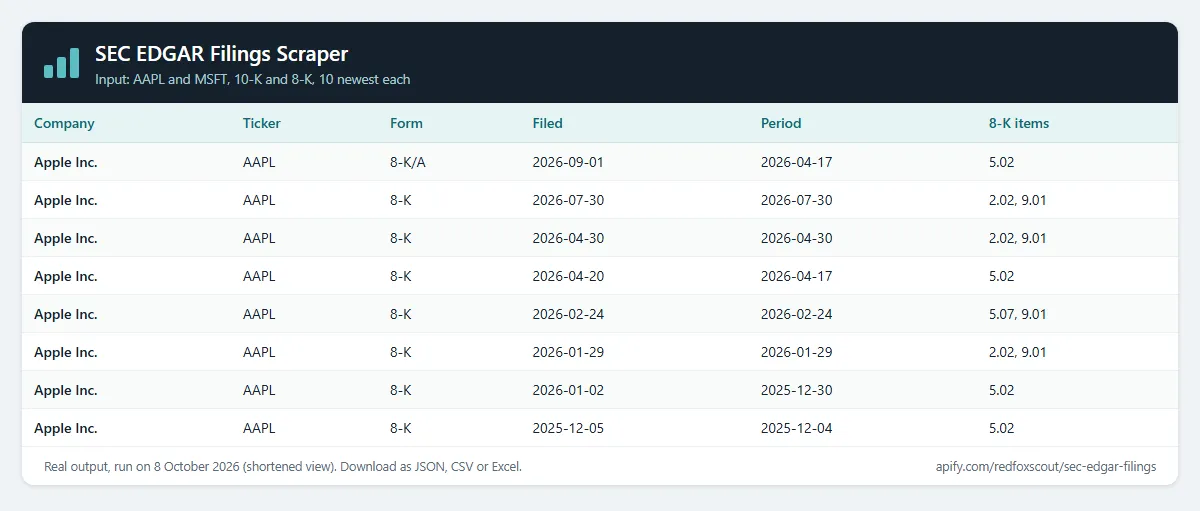
One row per filing. A real row from that run (Apple's 8-K filed 2026-07-30):
Example tasks
Ready-made inputs you can open, change and run:
How much does it cost?
$1.50 per 1,000 filings.
- 100 filings: about $0.15
- 10,000 filings: about $15
- Error rows and duplicate filings: free
Apify's free plan gives $5 of credit every month, enough for about 3,300 filings.
FAQ
Is this legal? It reads the SEC's public EDGAR records, the same filings anyone can open on sec.gov without a login. Requests carry a declared User-Agent with a contact address, as the SEC asks, and stay under its fair-access limit of 10 requests per second. It does not log in, solve CAPTCHAs, or output street addresses, phone numbers or tax IDs.
Why do some filings have no reportDate? reportDate is the period or event date the SEC records for a filing: the fiscal year end for a 10-K, the event date for an 8-K. The SEC leaves it empty for some form types, such as new S-1 registration statements, which came back without one in our tests. The Actor returns null rather than guess. filingDate is always set.
Why do full-text and latest-filing rows have fewer fields? Those rows come from the SEC's search index, which does not include acceptance time, state of incorporation, exchange, business city or file size, so those fields are null. The ticker can also be null on Form 4 and S-1 rows. Searching by company (ticker or CIK) returns the full record.
What does "No SEC company found" mean? The name or ticker did not match a company in the SEC's company list. Try the ticker (AAPL), the CIK number, or a shorter part of the company name.
Related Actors
- Company Signals MCP: startup jobs and hiring data for AI agents, served over MCP.
- Jobs Index: search startup jobs from company career pages at once.
- Company Social Links Finder: a company's official social profiles, found from its website.


