

Threads Scraper: Public Posts from Profiles and Post URLs
Pricing
from $1.50 / 1,000 posts
Threads Scraper: Public Posts from Profiles and Post URLs
Scrape public Threads posts from profiles and single post URLs: text, date, likes, replies, reposts, quotes, media and author. No login. $2.00 per 1,000 posts, pay per event.
Pricing
from $1.50 / 1,000 posts
Rating
0.0
(0)
Developer

Red Fox Scout
Maintained by CommunityActor stats
0
Bookmarked
2
Total users
1
Monthly active users
16 days ago
Last modified
Categories
Share
Scrape public Threads posts from profiles, post URLs and keyword searches: text, date, likes, replies, reposts, quotes, media, mentions, hashtags and links for each post. The main feature is the profile watch: schedule a run with a monitor name and it returns only the posts a profile published since the last run, with their engagement counts. No login is needed. Optional session cookies from your own Threads account add logged-in keyword search (Top or Recent, more pages) and view counts.
Price: $2.00 per 1,000 posts. Duplicates and failed targets are free. Apify's free plan ($5 monthly credit) covers about 2,500 posts a month.
Questions it answers
- Which posts did a competitor publish since my last check?
- What did a brand or public figure post on Threads, and how many likes, replies and reposts did each post get?
- Whom does a brand quote, mention or link to on Threads?
- What are the replies under a post, and what are an account's follower count and bio?
- What are public Threads posts saying about a product, a hashtag or a place?
Who uses this
- 📣 Brand and social teams: track competitor and partner accounts and see how each post performs.
- 📊 Marketers and analysts: build a dataset of posts, replies and engagement counts per account or keyword.
- 🔎 Researchers: collect public posts and replies for analysis.
- 📰 Media monitors: follow the public announcements of companies and public figures.
Why this Threads Scraper
- 🔔 Profile watch: each run returns only new posts, and scheduled runs give a feed of them.
- 🔒 No login needed: public posts, replies and profiles need no Threads account, cookie or API key.
- 🔑 Logged-in mode (optional): your own session cookies add recent-sorted search, more search pages and view counts.
- 📇 Bio contacts as shown: the bio is returned as the profile shows it, with its email addresses and phone numbers listed on their own.
- 🧩 One input for everything: mix usernames, post links and search keywords in the same run.
- 📋 Same keys on every row: camelCase fields, ready for a spreadsheet or database.
- 💰 $2.00 per 1,000 posts, with duplicates and error rows free.
How to use the Threads Scraper
- Click Try for free (a free Apify account is enough).
- Enter what to read, one per line: Threads usernames (
zuck), profile or post links (https://www.threads.com/@zuck/post/Dd1MqfcG0aH), or search words in Keywords or hashtags to search (coffee,#espresso). - Optional: turn on profile details, replies, the profile watch, or paste your session cookies for logged-in search.
- Click Start, then download as JSON, CSV or Excel, or schedule it for a regular feed.
Input
| Field | Default | What it does |
|---|---|---|
targets | – | Threads usernames, profile URLs or post URLs, one per line. |
searchQueries | – | Words or hashtags to search, one per line. Logged out, Threads returns one page of top posts per search; with session cookies, more pages. |
includeProfile | false | Profile targets: also output one profile row per username (details below). |
includeReplies | false | Post URLs: also output the replies Threads shows under the post. |
maxReplies | 20 | Replies read per post URL when replies are on (1 to 500). |
includeSelfReplies | false | Also keep the author's follow-up replies to their own posts (profiles only). |
postedAfter | – | Profiles only: skip posts older than this date (YYYY-MM-DD). |
monitorName | – | Profile watch: a name for the watch, e.g. competitors-weekly. |
onlyNewPosts | false | Profiles only: return only posts that earlier runs with this monitor name did not return. Needs a monitor name. |
maxItems | 50 | Rows per search, counting posts, replies and profile rows (max 2,000). |
sessionCookies | – | Optional: your own logged-in Threads cookies, as a Cookie header or a JSON array from a cookie-editor extension. Stored encrypted. See Logged-in mode. |
searchSort | top | With session cookies: top (Threads' ranking) or recent (newest first) for keyword searches. |
maxConcurrency | 3 | How many searches run at once. |
Profile details (includeProfile) add one row per profile: full name, verified badge, follower count, bio as shown, bio emails and phone numbers, bio links, profile picture URL and the private flag.
Example (the input behind the output below):
Output
One row per post, reply or profile. recordType is post or profile, and source says where a post came from: profile, post, reply or search. Replies carry parentPostUrl. Quote posts have isQuote: true and quotedPostUrl. hashtags, mentions and links list what the text contains. Media links are in images and videos; mediaType is text, photo, video or carousel. viewCount is filled only when Threads returns a view count; the logged-out rows we checked had none (null).
A real row from that run (text shortened):
Example tasks
Ready-made inputs you can open, change and run:
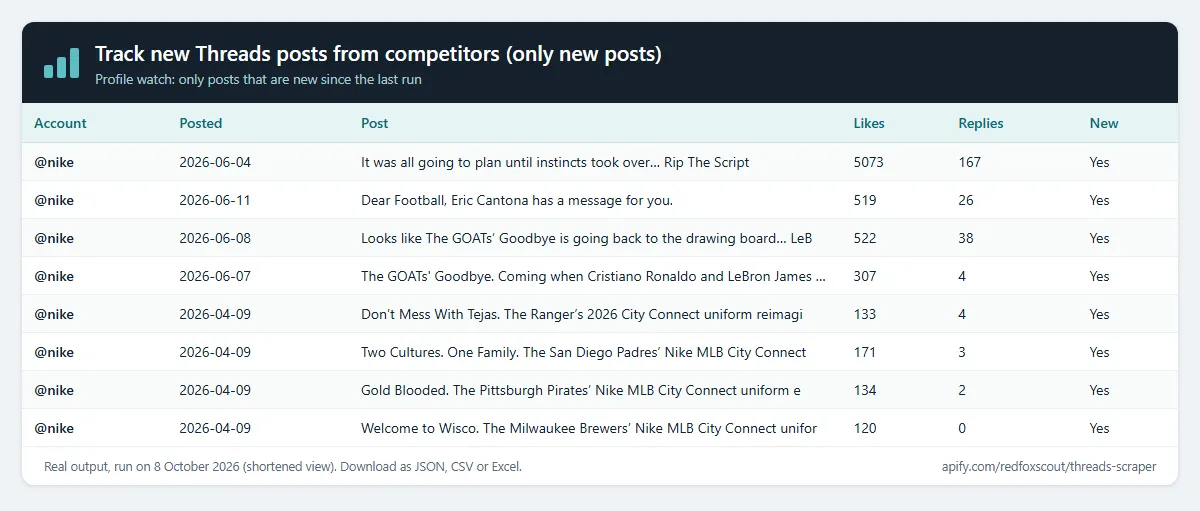
- Track new Threads posts from competitors (only new posts)
- Get the latest 30 posts from Mark Zuckerberg on Threads
- List NASA's Threads posts since 1 September 2026
- Compare recent posts from Nike, National Geographic and Meta
- Pull recent posts from a profile by pasting its Threads link
Profile watch: only new posts
Set a monitor name (for example competitors-weekly) and turn on Only new posts since the last run. Each run:
- returns the posts of each profile that earlier runs with the same monitor name did not return, newest first;
- stops at the first post an earlier run returned, so older posts never come back as new;
- skips a pinned post that sits above the new posts;
- sets
isNewPosttotrueon every row it returns.
The first run returns the newest posts up to the limit. The posts each profile has already returned are kept in a key-value store called threads-scraper-monitor in your Apify account, one record per profile and monitor name. Schedule the run (daily, for example) to keep a feed of new posts. If a profile publishes more posts between two runs than Max results per search, the oldest extra posts are not returned later, so raise the limit or run more often.
Without Only new posts, a monitor name only adds isNewPost to each row and every post is returned. The watch works on profile targets only.
Profile bios: contacts as shown
With Include profile details, each profile row keeps the bio exactly as the profile shows it, line breaks included, in biography. The contacts written in that bio are listed next to it, so you do not have to parse the text:
bioEmails: the email addresses in the bio, as written, without duplicates.bioPhones: the phone numbers in the bio, as written, trimmed, without duplicates.bioLinks: the web links in the bio.
bioEmails and bioPhones combine what the bio text shows with the profile's mailto: and tel: contact links. Post text is returned exactly as posted.
Logged-in mode: session cookies (optional)
Add your own Threads session cookies in Session cookies and keyword searches can read what a logged-in viewer sees:
- Recent first: set Search sort to
recentfor the newest matching posts. - More pages: a search keeps reading pages past the first, up to 20 pages and your Max results per search.
- View counts:
viewCountis filled when the logged-in response includes a count; otherwise it stays null.
Get the cookies from your own browser after you log in to Threads: either export them as JSON with a cookie-editor extension, or copy the Cookie header from the browser's developer tools. Paste either form. The Actor only reads the cookies you paste. It never asks for your password, never creates an account, and never posts, follows or sends messages.
If Threads does not accept the cookies, the run logs one warning and continues logged out, so the rows are the same as without cookies.
Risks: this mode uses your own account. Threads may restrict or log out accounts that automate their use, and that can affect your account, so use it only with an account you can afford to lose access to. The cookies are stored encrypted by Apify as a secret input, and the Actor never writes them to the dataset or the log. Anyone who has the cookies can use your account, so treat them like a password. We have not yet run this mode from a logged-in account, so check the first run's rows and log.
What it covers
- Profiles: posts from the account's public Threads tab, newest first. Self-replies are added only when you turn them on.
- Post URLs: threads.com and threads.net links to one post, with its replies when you turn them on.
- Keyword and hashtag search: the top posts Threads shows logged out, one page per search (13 to 25 posts in our test runs). With session cookies: Top or Recent, and more pages.
- Profile details: name, verified badge, follower count, bio as shown with its emails and phone numbers, bio links and picture URL, for profile targets.
What this Actor does not do
- No login without your cookies. The Actor never logs in with a password and never creates accounts. It uses the session cookies only if you paste them.
- No account actions. No posting, replies, follows, likes, direct messages or fake engagement.
- No view counts when logged out. The logged-out rows we checked had
viewCountempty. - No private accounts. Their posts are not public, so they are not read.
- No Replies tab of a profile, no follower lists and no direct messages.
- No watch for keywords or post URLs. The profile watch works on profiles only.
How much does it cost?
$2.00 per 1,000 rows. Profile rows and replies are charged the same way as posts.
- 100 rows: about $0.20
- 10,000 rows: about $20
- Duplicates, failed targets and error rows: free
Apify's free plan gives $5 of credit every month, enough for about 2,500 rows.
FAQ
Is this legal? It reads posts, replies, profile details and bio contacts that Threads shows to anyone who opens a public profile, post or search link without signing in, and returns them as shown. Post text has email addresses and phone numbers masked. With your own session cookies (optional), it reads what your logged-in account can see; that use is under your own account and Threads' terms. The Actor does not solve CAPTCHAs, log in with a password or take any action on Threads. How you use the data is your responsibility, including the data protection rules where you live.
Can I search Threads by keyword? Yes, with Keywords or hashtags to search. Logged out, Threads shows one page of top posts per search, so each search returns about 13 to 25 posts. With session cookies, a search can sort by Recent and read more pages.
Are my cookies safe? They are stored encrypted by Apify as a secret input, and the Actor never writes them to the dataset or the log. Anyone who has them can use your account, so only paste them into this Actor.
How do I get only new posts every day? Set a monitor name, turn on Only new posts since the last run and schedule the run. See Profile watch above.
Why are image links expiring? Images and videos are served from Meta's media servers through links with a built-in expiry time, and the links stop working after a few days. Download the files soon after the run if you need them.
Why does a target return an error row? The username or post does not exist, or the profile is not public. Error rows are free and show the reason, so you can fix the input and run again.
Related Actors
- Company Social Links Finder: a company's Threads and other social profiles from its website, ready to paste into this Actor.
- RSS Feed Finder: the RSS feed of any list of websites, to follow a brand's blog next to its Threads posts.


