

RSS Feed Finder: Discover RSS & Atom Feeds of Any Website
Pricing
from $1.13 / 1,000 websites
RSS Feed Finder: Discover RSS & Atom Feeds of Any Website
Find the RSS, Atom and JSON feeds of any list of websites, then read each feed: feed URL, type, title, latest posts with dates and links, and how many posts in the last 30 days. Works from bare domains; tries common feed paths when a site doesn't declare one.
Pricing
from $1.13 / 1,000 websites
Rating
0.0
(0)
Developer

Red Fox Scout
Maintained by CommunityActor stats
0
Bookmarked
3
Total users
2
Monthly active users
16 days ago
Last modified
Share
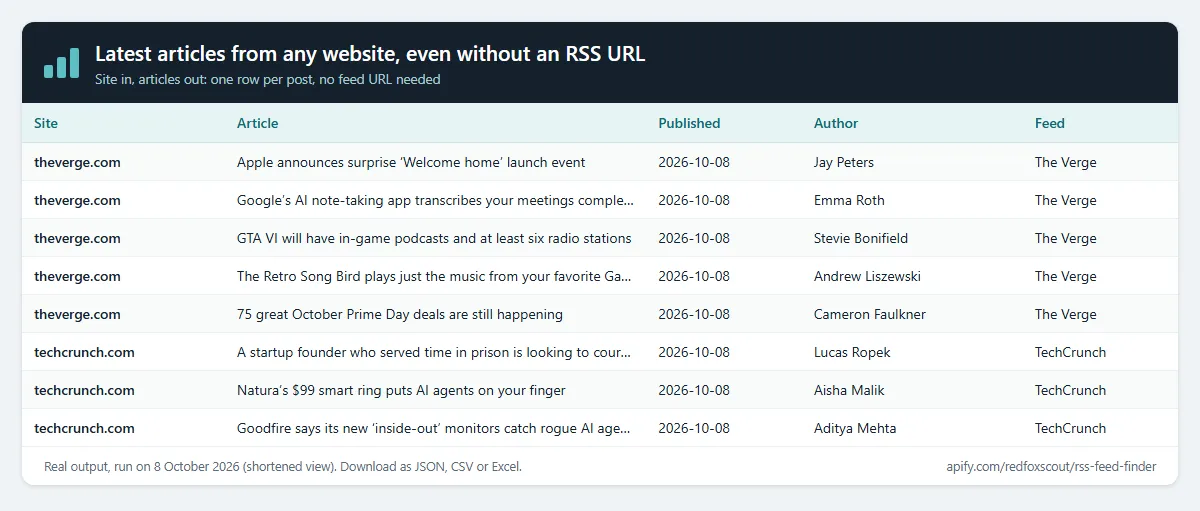
Site in, articles out. Give the Actor any website (a news site, blog, company newsroom, podcast, YouTube channel or Substack) and it finds the site's RSS, Atom or JSON feed and returns the latest posts as one row per article: title, link, date, author, summary, image and audio file. You don't need to know the feed URL; when a site doesn't declare one, the usual feed paths are tried. Filter posts by keyword and date, and name a run to get only the posts it has not returned before.
Price: $1.50 per 1,000 websites checked (sites output) or per 1,000 articles returned (articles output). Sites that fail to load are free. Apify's free plan ($5 monthly credit) covers about 3,300 websites or articles a month.
Questions it answers
- What are the latest articles from this website, even if I don't know its RSS URL?
- Which podcast episodes or YouTube videos does this site publish, with their audio or thumbnail links?
- Which posts did my competitors publish since my last run?
- Which of these sites publish a feed, is it RSS, Atom or JSON, and what language is it in?
Who uses this
- 📰 Media monitoring and newsletter teams: pull the day's articles from a source list into one table.
- 📈 Content marketers and SEO agencies: track competitors' new posts and how often they publish.
- 🎙️ Podcast and video curators: episode audio links and channel videos as rows.
- 🤖 Developers and AI agent builders: clean article rows, with full text on request, for agents and RAG pipelines.
Why this RSS Feed Finder
- 📰 Site in, articles out: no feed URL needed; one row per post.
- 🔎 Feed discovery: declared feeds first, then the usual feed paths; RSS, Atom, RSS 1.0 and JSON Feed.
- 🎯 Keyword and date filters on title and summary.
- 🔔 Only new posts on every scheduled run.
- 🎧 Podcasts and YouTube channels: audio files and video feeds come through too.
- 💰 $1.50 per 1,000 websites or articles, sites that fail to load are free.
How to use the RSS Feed Finder
- Click Try for free (a free Apify account is enough).
- Paste the websites, one per line (e.g.
techcrunch.com). A section such asbbc.co.uk/newsor a YouTube channel address works too. - Pick the Output: Sites (one row per website) or Articles (one row per post).
- Optional: add keyword or date filters, then click Start.
- Download as JSON, CSV or Excel, or connect Google Sheets, Slack or a webhook through Apify integrations.
Input
| Field | Default | What it does |
|---|---|---|
urls | – | Websites or domains to check. The page you name is read for feed links. |
outputMode | sites | sites: one row per website. articles: one row per post. |
includeContent | false | Articles only: add each post's full text as plain text (up to 20,000 characters). |
includeKeywords | – | Keep only posts whose title or summary contains one of these words (whole words, any case). Empty = keep all. |
excludeKeywords | – | Drop posts whose title or summary contains one of these words. |
publishedAfter | – | Only posts published on or after this date or time, e.g. 2026-10-01 or 2026-10-01T09:00:00Z. A time without a timezone is UTC. |
monitorName | – | Name the list to compare with its last run (see below). |
maxFeeds | 3 | Feeds read per site (declared feeds first). Comment feeds are skipped. |
maxItemsPerFeed | 5 | Newest matching posts per feed, 0 to 50. 0 = feed details only (sites output). |
maxConcurrency | 20 | Sites checked in parallel. |
requestTimeoutSecs | 30 | Give up on a site after this long. |
Example:
Articles example:
Output
Sites output: one row per website
A real row for github.blog (2026-10-08), with two of its ten posts shown:
source says how the feed was found: link-tag (declared in the page head), page-link (linked on the page), common-path (found at a usual feed address) or self (the address you gave is itself the feed).
Articles output: one row per post
A real row for the newest GitHub Blog post (2026-10-08), from the same feed:
Each post has title, link, publishedAt, updatedAt (only when the feed says the post changed later), author, categories, summary (first 1,000 characters, plain text), content (with Include full post text), imageUrl, enclosure (the first attached file: url, type, length in bytes; podcast audio and video), guid, feedUrl and feedTitle. The last columns say which website the post came from (inputUrl, domain) and whether it loaded (httpStatus, error).
Export as JSON, CSV or Excel, or connect Google Sheets, Slack or a webhook through Apify integrations.
Example tasks
Ready-made inputs you can open, change and run:
- Latest articles from any website, even without an RSS URL
- RSS feeds of major news sites with latest headlines
- Tech and developer blog RSS feed finder
- New blog post monitor for competitor sites
Feed details in sites output
Each feed row also carries what the feed declares about itself: description, language (e.g. en-US, fr), generator (e.g. WordPress or Hugo, when named) and image (the feed's logo). Not every feed declares all four; missing values are null.
Articles: one row per post
Use Articles when you want posts rather than sites. Each post comes from the site's feeds, newest first, up to Latest posts per feed from each feed. A post listed in two feeds of the same site appears once. The fields are listed under Output above. Bylines are the names printed on the post; e-mail addresses are removed.
Filter posts by keyword and date
- Keep posts with these words keeps a post when its title or summary contains at least one of the words. Drop posts with these words removes posts that contain any of them. Words match whole words only, in any case:
AIfinds "AI tools" but not "said". - Published on or after keeps posts from that date or time onwards. Posts with no date are left out when this is set.
- Filters apply to both outputs. In sites output, the latest post, the date of the latest post and the 30-day count describe the posts that pass the filters;
itemCountis always the feed's full count.
Only new posts since the last run
Give the run a Change alert name (monitorName, e.g. gov-press-watch) and put it on an Apify schedule.
- Articles output: each run returns only the posts it has not returned before under that name. The Actor remembers up to 500 post IDs (GUID, or the link when there is no GUID) per feed. The first run returns the current posts.
- Sites output: each row gets
changeStatus(new,changedorunchanged) andchangedFields, compared with the previous run of the same name. A change inlatestItemTitleorlatestItemLinkmeans a new post. Turn on Only new and changed sites to get just the sites that published something; unchanged sites are still checked and charged as usual.
Check websites from another Actor (Google Maps leads, lead lists)
Have a list of sites from another Actor? Pick its dataset under Websites from another Actor. This Actor reads the website field (or the field you name, e.g. url or domain) and checks every site.
Notes
- Reads the page you name and the feeds it points to. It doesn't crawl the whole site, so a feed linked only from a deeper blog page may need that page's URL.
- The article text is what the feed carries. The Actor does not open each article page; turn on Include full post text for the feed's own full text.
- Sites that block automated visits (for example with HTTP 403) return an error row, which is free.
- No JavaScript rendering: feeds added to the page only by scripts won't be found unless they sit at a usual feed address.
What this Actor does not do
It does not log in, use cookies or member accounts, solve CAPTCHAs, or open each article page. It does not collect commenters' names or readers' contact details, and it skips comment feeds. Bylines are the public names on published posts, with e-mail addresses removed.
How much does it cost?
- Website checked (sites output): $0.0015 per site that loads, with or without a feed ($1.50 per 1,000).
- Article returned (articles output): $0.0015 per article row ($1.50 per 1,000).
- Actor start: $0.00005 per GB of memory (default 1 GB = $0.00005 per run).
- Sites that fail to load and error rows: free.
| Rows (sites or articles) | Cost |
|---|---|
| 100 | about $0.15 |
| 1,000 | about $1.50 |
| 10,000 | about $15 |
Example: 10 podcasts with 5 latest episodes each is 50 articles, about $0.08. Apify's free plan includes $5 of credit every month, enough for about 3,300 rows. Paid Apify plans get Store discounts of up to 25%. You can set a maximum cost per run; the Actor stops cleanly when it's reached.
FAQ
Is this legal? Feeds are published so that readers and apps can fetch them. The Actor loads each page you list once, like a browser, plus the feeds it finds. It collects no personal data: bylines are the names printed on published posts, with e-mail addresses removed, and commenters are never collected.
A site says "no feed" but I know it has one. It is probably linked only from a blog section. Enter that page (e.g. example.com/blog) instead of the home page.
Does it return the full article text? Only if the feed carries it: turn on Include full post text in Articles output. Otherwise you get the feed's summary and the link to the full post.
How do I get only the new posts each day? Give the run a Change alert name and schedule it. Articles output then returns only the posts that are new since the last run.
Related Actors
- SEO Meta Tag & Schema Checker: titles, descriptions, H1s and structured data.
- Website Tech Stack Detector: what a site is built with.
- Bulk URL Status & SSL Checker: status codes, redirects and SSL expiry.


