

Google Hotels Scraper: Prices, Price Calendar & Deals
Pricing
from $2.00 / 1,000 properties
Google Hotels Scraper: Prices, Price Calendar & Deals
Google Hotels prices for any city and dates: every hotel and rental with nightly price, rating, class, location and deals, plus a price calendar of the cheapest check-in dates, price-drop tracking between runs and a visual report.
Pricing
from $2.00 / 1,000 properties
Rating
0.0
(0)
Developer

Zach Wallace
Maintained by CommunityActor stats
0
Bookmarked
2
Total users
1
Monthly active users
a day ago
Last modified
Categories
Share
What does Google Hotels Scraper do?
Google Hotels Scraper collects Google Hotels results for any city, neighbourhood or area and your exact dates and guests: every hotel and vacation rental with its nightly price, price with taxes, whole-stay price, guest rating, star class, location, deals and links.
It also answers the question travellers and revenue managers actually ask:
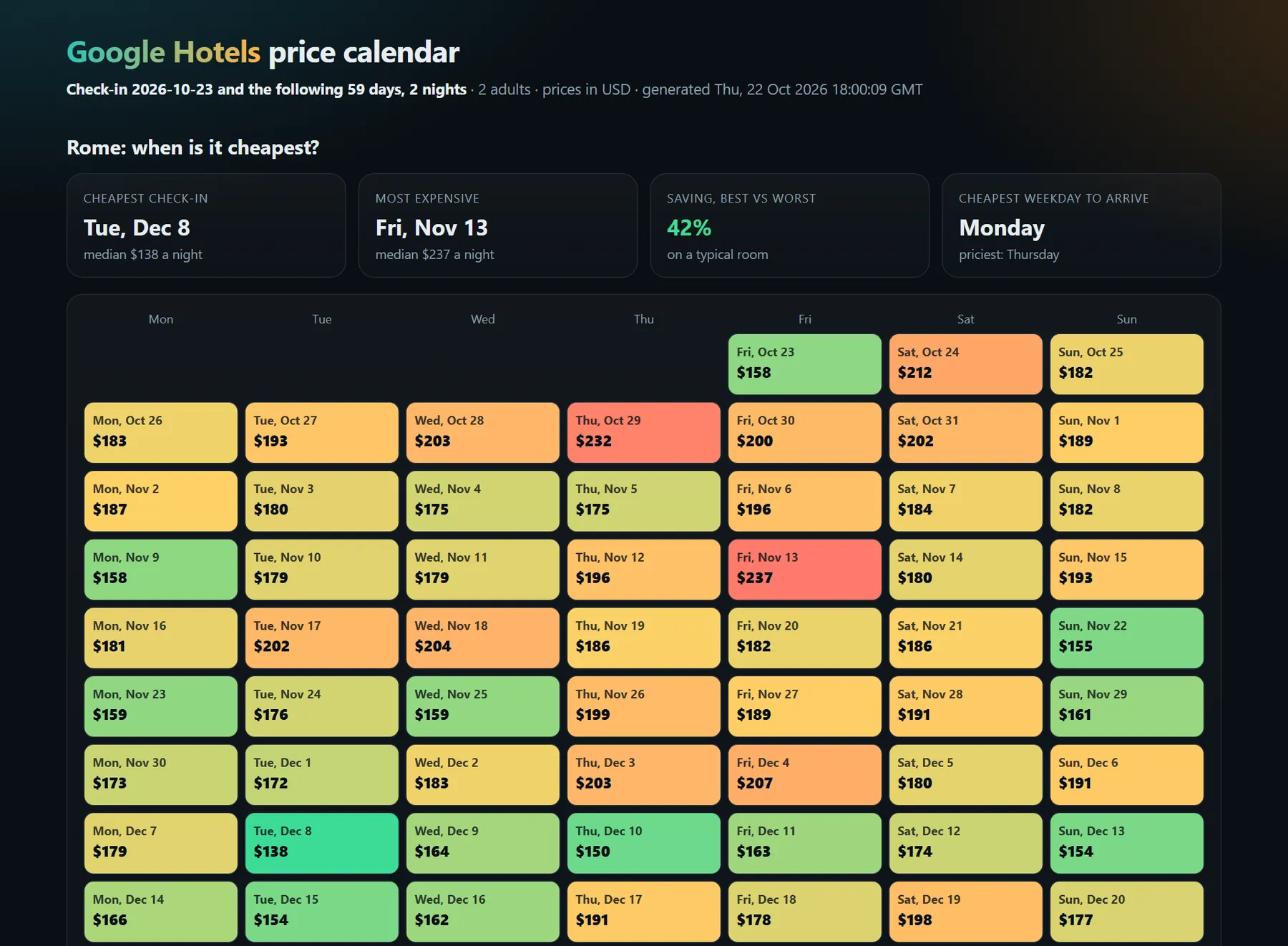
- When is it cheapest to go? The price calendar checks every check-in date over the next weeks and shows the cheapest days on a colour-coded calendar, for a whole city or for one specific hotel (its cheapest booking-site price for each check-in date, and the hotel's own price beside it).
- Did prices drop? Run it on a schedule and every property shows its price change since the last run for the same stay.
- Which hotel is the best deal? A value score ranks high ratings at low prices, and Google's own "X% less than usual" deal labels come through.
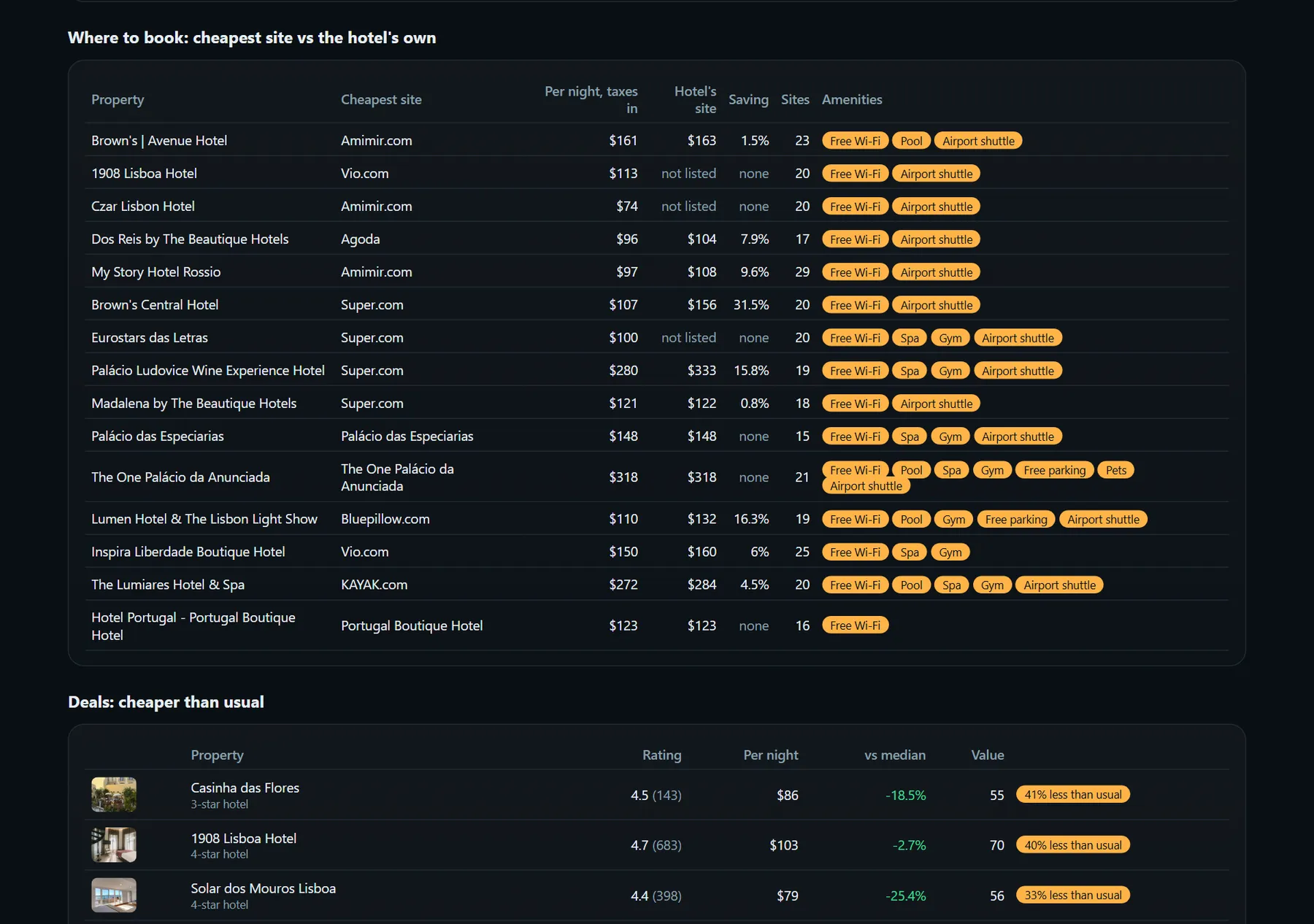
- Where is it cheapest to book? Turn on booking-site prices to get each hotel's price at every booking site (Booking.com, Expedia, Hotels.com, the hotel's own site and more), the cheapest one, and how much it undercuts the hotel's own price.
- Does it have a pool? The same option adds each property's full amenity list and simple yes/no flags (free Wi-Fi, free breakfast, pool, spa, gym, parking, pets, airport shuttle...), and you can keep only hotels with the amenities you need.
- How is my hotel priced today? Specific hotels mode tracks the hotels you name, by link or by name, with every booking site's price, on a schedule.
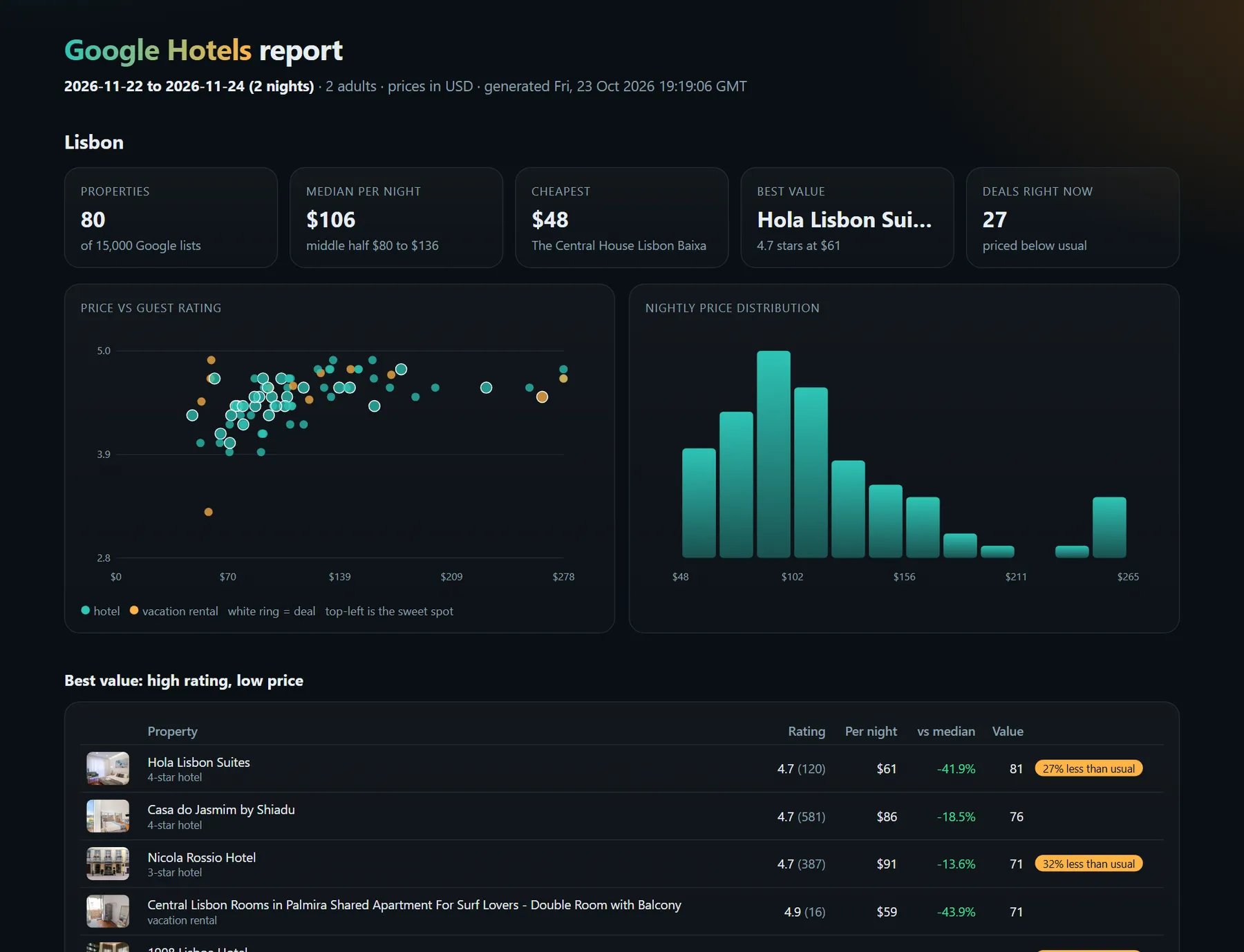
Every run also saves a visual report: price vs rating chart, price distribution, best value, deals, cheapest options and the price calendar.
It runs on the Apify platform, so you get API access, scheduling, webhooks, integrations (Make, Zapier, n8n, Google Sheets) and monitoring with no setup. No proxy is needed: it reads Google Hotels directly.
How is it different from other Google Hotels scrapers?
| Typical Google Hotels scraper | This Actor | |
|---|---|---|
| Hotels and rentals for your dates and guests | Yes | Yes, with children's ages |
| Price before taxes, with taxes, and for the whole stay | Sometimes one price | All three |
| Price calendar: cheapest check-in dates | No | Yes, up to 120 days, for a city or a specific hotel |
| Price change since the last run | No | Yes, per property |
| "X% less than usual" deals | Rarely | Yes, with the percentage |
| Price at every booking site, cheapest site, hotel's own price | Rarely | Yes |
| Amenity list and filters (pool, free breakfast, pets...) | Rarely | Yes |
| Track specific hotels by name or link | Rarely | Yes |
| Value score (rating per price, review-weighted) | No | Yes |
| Visual report | No | Yes |
| Needs a proxy | Often | No |
| Daily self-test against live Google | Not stated | Yes |
Live example reports
Real reports from real runs, exactly as the Actor saves them:
| Example | What it shows | Report |
|---|---|---|
| Lisbon, a weekend for two | 80 hotels and rentals: price vs rating, best value, deals, and where to book the top 20 | Open report |
| Rome price calendar, 60 days | The cheapest and dearest check-in dates on a calendar | Open report |
| Manhattan, 4- and 5-star rated 4.5+ with a gym | Luxury hotels filtered by class, rating and amenity | Open report |
| Four Lisbon hotels, tracked | Specific hotels by name or link: price at every booking site | Open report |
Why use this Google Hotels scraper?
- Travel planning and deal alerts: schedule a daily run for your trip and get told when a hotel drops its price.
- Hotel revenue management: see where your property sits against the local median every day, and how competitors move.
- Travel content and SEO: "best value hotels in Lisbon" or "cheapest week to visit Rome" lists from live data.
- Market research: compare price levels across cities, seasons and star classes; spot vacation-rental vs hotel pricing.
- Agencies and apps: a clean, structured feed of hotel prices and ratings through the API.
How to scrape Google Hotels
- Click Try for free.
- Enter one or more locations, such as
Lisbon,Shibuya, TokyoorTimes Square, New York. - Pick your check-in and check-out dates (or "days from today" for scheduled runs), adults and children's ages.
- Choose Hotels and prices for my dates, Specific hotels (list hotels by Google Hotels link or name and city), or Price calendar to find the cheapest check-in dates. Optionally turn on Booking-site prices and amenities, or pick Must have these amenities.
- Click Start. Open Visual report in the Output tab, or download the dataset.
Input
| Field | What it does |
|---|---|
mode | search for hotels and prices, calendar for the cheapest check-in dates |
locations | Cities, neighbourhoods or areas, as you would type them on Google |
checkIn, checkOut | Your dates. Leave empty to use checkInDaysFromToday and nights |
adults, childrenAges | Guests; prices depend on them |
currency | USD, EUR, GBP, JPY, AUD, CAD and 24 more (every currency the European Central Bank publishes a rate for) |
maxResultsPerLocation | How many properties per location (default 50, up to 500) |
propertyType | Hotels and rentals, hotels only, or vacation rentals only |
minRating, minHotelClass, maxPricePerNight | Filters |
calendarDays | Price calendar: how many check-in dates to check |
trackPriceChanges | Remember prices so the next run shows changes (on by default) |
Example: 4-star-plus hotels in Lisbon for a long weekend, in euros.
Example: the cheapest time to spend two nights in Rome over the next 60 days.
Output
One row per property (search mode) or per check-in date (calendar mode), plus the visual report in the key-value store. You can download the dataset in various formats such as JSON, HTML, CSV, or Excel.
A real result (Lisbon, 4 to 6 December, 2 adults):
With booking-site prices and amenities on (and always in specific hotels mode), each property also gets:
Data fields
| Field | Meaning |
|---|---|
pricePerNight, pricePerNightWithTaxes, totalStayPrice | Nightly price before and with taxes, and the whole stay with taxes |
rating, reviewCount, ratingBreakdown | Google guest rating, number of reviews, and reviews per star |
hotelClass, propertyType | Star class (hotels) and hotel or vacation rental |
dealLabel, discountVsUsualPct | Google's deal badge, such as "19% less than usual" |
priceVsMedianPct, priceRank | Price against the median of the same search, and price rank (1 = cheapest) |
valueScore | 0-100: 60% guest rating (weighted by number of reviews), 40% low price, within the search |
priceChangePct, previousPricePerNight, seenInLastRun | Change since the last run for the same location, dates and guests |
latitude, longitude, nearby, countryCode | Location, nearby transit and landmarks with travel times |
description, website, photo, checkInTime, checkOutTime | Property details |
googleHotelsUrl, propertyId, placeId | Links and stable ids |
priceProviders, cheapestProvider, cheapestProviderPricePerNight, officialSitePricePerNight, savingVsOfficialSitePct, providerCount | Price at each booking site for the stay, cheapest first (booking-site prices option) |
amenities, amenitiesNotAvailable, amenityGroups, amenityFlags | The property's amenity list by group, what it lacks, and yes/no flags for filtering |
address, phone | From the property's own Google Hotels page |
requested, nameMatchScore | Specific hotels mode: what you asked for, and how closely the found name matches (1 = exact) |
Calendar rows have checkIn, weekday, medianPricePerNight, lowPricePerNight, cheapestPricePerNight, cheapestProperty, vsTypicalPct and cheapnessRank. A specific hotel's calendar rows have hotel, checkIn, weekday, available, bestPricePerNight (cheapest booking site, taxes in), cheapestProvider, officialSitePricePerNight, savingVsOfficialSitePct, providerCount, vsTypicalPct and cheapnessRank.
How much does it cost to scrape Google Hotels?
You pay per property returned, and per date checked in the price calendar. The platform's free monthly credit covers plenty of test runs. Runs are fast because no browser or proxy is used: 40 properties take about 20 seconds, and a 30-day price calendar about a minute.
Tips
- Track a trip: set your exact dates, schedule the Actor daily, and add a webhook or Google Sheets integration. Each run shows
priceChangePctfor every property. - Scheduled market tracking: leave the dates empty and use
checkInDaysFromToday, so every run looks the same distance ahead. - Cheapest week: run the price calendar for 60-90 days, then search the cheapest date for the full list.
- Cheapest dates at one hotel: choose Price calendar, clear Locations and list the hotel under Hotels. Each date reads that hotel's own page, so you get its real price at the cheapest booking site, and sold-out dates show as sold out.
- Specific neighbourhoods give more relevant results than a whole country:
Shibuya, Tokyorather thanJapan. - Track your own hotel and competitors: use Specific hotels mode with their Google Hotels links, schedule it daily, and watch
priceChangePct, the cheapest booking site and your saving against it. - Booking-site prices take one extra page per property. Keep Max properties with details per location at 20 for a quick run; raise it when you need every property.
- Hotel names: write the name and the city, as on Google ("Hotel Tivoli Avenida Liberdade, Lisbon"). A link always works best. If no listed property matches the name closely, the run says so rather than guess.
FAQ, disclaimers, and support
Are these the prices I would pay? They are the prices Google Hotels showed at run time for your dates and guests, before and with taxes. Hotel prices change often, and the final price is set by the booking site.
How are prices in other currencies calculated? Google Hotels shows prices in the currency of the visitor's region and ignores currency settings in the address, so the Actor reads US dollar prices and converts them with the European Central Bank's daily reference rate. Each row includes pricePerNightUsd, exchangeRate and exchangeRateDate, so the conversion is transparent.
Why do some hotels have no price when I add children? Many booking sites do not quote child rates through Google, so Google shows no price for those hotels. They are still listed, with pricePerNight empty. In a Tokyo test, 7 of 20 hotels had a price with a child in the party against 17 of 18 without.
Why does a hotel show no booking-site prices? It is sold out for those dates, or Google lists no booking site for it. Vacation rentals often have only one or two sites.
Why do results vary a little between runs? Google rotates which properties it lists for a search, so two runs can list slightly different properties. seenInLastRun tells you whether a property was in the previous run's results.
How is the price calendar calculated? For each check-in date, it takes the properties Google lists first for that date and uses their median nightly price, so dates are compared on the same basis.
Is scraping Google Hotels legal? The Actor reads publicly available Google Hotels pages. You are responsible for using the results in line with Google's terms and the laws that apply to you.
Something not working? Open an issue on the Issues tab with the run link. Need a custom version? Get in touch through the Issues tab.


