

YouTube Outlier Videos Finder - AI Video Research & Scraper
Pricing
from $4.00 / 1,000 qualified video (rules only)s
YouTube Outlier Videos Finder - AI Video Research & Scraper
First 25 videos free. YouTube outlier videos finder + AI video research: each video scored 0-100 against your brief, views vs its channel, grounded takeaways and brand mentions. We charge only per qualified video. Any Apify plan with your own free YouTube API key.
Pricing
from $4.00 / 1,000 qualified video (rules only)s
Rating
0.0
(0)
Developer

Rich Minds
Maintained by CommunityActor stats
0
Bookmarked
3
Total users
1
Monthly active users
2 days ago
Last modified
Categories
Share
The YouTube outlier videos that matter for your research — scored against your brief, every week.
⚡ First 25 videos free · 💵 $0.004 per qualified video · 🤖 $0.012 per video with AI research · ⏱️ demo in seconds, AI ≈ 3 s per video (measured)
Try it in 30 seconds. Click Try it — the form is pre-filled with a free demo (7 sample videos, nothing charged). Then type your own search terms and brief and press Start. We charge only per qualified video — videos that fail your filters cost nothing here. → How to use it · What a run costs · What the AI adds · Run it weekly
⚡ At a glance
| What you get | a ranked sheet of videos: relevance score, how far each beat its channel, format, takeaways, brand mentions |
| Best for | weekly monitoring of 5–10 competitor channels or niche searches — only new videos are delivered and charged |
| You provide | a few search terms (or channel / playlist URLs) and one sentence on what you are researching |
| Output | a ranked sheet — Excel / CSV / Google Sheets — plus a "what works in your niche" report and a Slack-ready digest |
| Which plan | Free demo and your own list (template): any plan · live search: the built-in YouTube reader or your free YouTube API key on any plan; YouTube Scraper (subtitles, channel URLs) on a plan that runs Store Actors |
| Typical run | 2 terms × 50 videos = 100 scanned → ~30 qualified (estimate); AI ≈ 3 s per video (measured) |
| Cost of that run | $0.52 rules only · $0.91 with AI ($0.40 YouTube Scraper + 30 × $0.012 here + ~$0.15 AI tokens; first 25 free) |
| Keys / setup | none where your Apify plan includes model access — otherwise your own Gemini / Groq key (a free Gemini key: 1–3 AI verdicts per run) |
| Works with | Schedules, webhooks, Google Sheets, Slack, Make / n8n / Zapier, MCP & AI agents |
🎯 What this YouTube video research tool does
It searches YouTube, drops what does not matter for free, and returns only the videos that fit your brief:
- A relevance score against your question — 0–100 against your research brief, with the reasons.
- Outlier ratio — views ÷ subscribers, or ÷ the channel's median views; views per day, like rate, percentile.
- What the video actually says — key takeaways from the transcript with AI; chapter lines without it. Never invented.
- Brand and product mentions with a quote — every watch term with the verbatim sentence and its timestamp.
- What works in your niche — a free report: outlier rate by format, hook, length and title word.
We charge only per qualified video, and never twice for the same one.
📈 Find YouTube outlier videos (vs subscribers or the channel median)
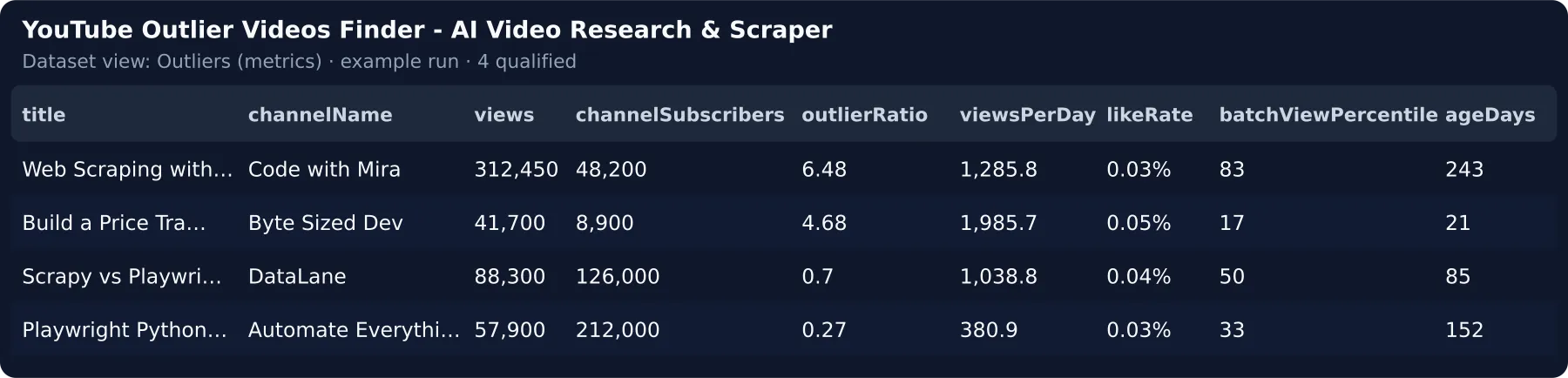
Min views per subscriber keeps videos that out-reached their channel (1; 3 = a strong outlier). Compare with
the channel's usual views measures each channel's median over its latest videos (one extra scan inside your spend cap;
free with your YouTube API key) — channel_outlier marks ≥ 3×. The Outliers (metrics) view:
📝 YouTube transcript summary, mentions and content angles
With AI on, the model reads the free YouTube subtitles and returns up to 5 takeaways, each checked against the text; Watch terms (brands, competitors) come back with a verbatim quote and timestamp, and every on-brief video gets one content idea. AI off: the description's chapter lines, promo lines dropped.
🩳 YouTube Shorts research
Shorts are skipped by default; the Shorts outliers task below turns them on (≤ 60 s).
📦 Already scraping YouTube? Research your YouTube scraper data
Already run YouTube Scraper (or another YouTube scraper)? Point Dataset ID at its dataset — the Actor reads the rows as they are, starts no new scrape and charges only per qualified video. Recipe in Integrations.
🚀 How to use it
- Click Try it — the form starts on the free demo (7 sample videos about Python web scraping) and works as is.
- Type your search terms (or channel URLs) and one sentence on what you are researching — they replace the sample and start the live search; keep AI research on.
- Add the free filters you care about (min views per subscriber, max age, watch terms) and press Start.
- Schedule it weekly — only new videos arrive; open the dataset or the digest.
🆚 Why this instead of running streamers/youtube-scraper yourself?
YouTube Scraper (streamers/youtube-scraper) | YouTube Outlier Videos Finder (this Actor) | |
|---|---|---|
| Your time per 100 videos | ≈ 5 h watching and sorting by hand (3 min a video) | 0 h — ranked, takeaways and mentions written |
| Same 100 videos, all in | 100 rows × $0.004 + ai-video-summary 100 × $0.015 = $1.90, still unsorted | $0.40 source + 30 qualified × $0.012 + ~$0.15 tokens = $0.91, ranked — 52 % less |
| What you pay for | every row scraped, including irrelevant videos, error rows and duplicates | only qualified videos — filtered-out videos cost $0 here |
| Which videos matter? | none — you sort the rows | 0–100 score against your brief + outlier ratio, best first |
| AI | summary add-ons at $0.015 per video, not steered by any goal | brief-steered score, takeaways, format, hook and mentions in one grounded call |
| Repeat runs | the same videos again next week | cross-run memory — only new videos are delivered and charged |
| Price | $0.004 per result · 10,713 users / 30 days · 4.8★ | from $0.004 per qualified video, first 25 free |
💵 Pricing — what a run really costs
Pay per result: one event per qualified video. No start fee.
| Event | When it is charged | Price |
|---|---|---|
free-tier | your first 25 qualified videos on this Actor, in any mode | $0.00 |
qualified-video-basic | AI off (or AI unavailable) — metrics, flags, rule score, format, takeaways, mentions | $0.004 |
qualified-video-ai | AI on — everything above plus the AI relevance score with reasons, hook, grounded takeaways, content angle | $0.012 |
Never charged by us: the demo, the niche report, filtered-out or already-received videos. A YouTube Scraper scan (when used) runs on your Apify account, capped by Max source spend.
How that compares — the top 10 priced YouTube Actors in the Store search "youtube scraper" charge a median $0.003 per raw row (checked 2026-09-25). Here $0.004 buys a qualified video — one stands in for ~3 raw rows (estimate).
Worked example (source funnel an estimate until the first live run) — 2 terms × 50 videos = 100 scanned → 30 qualify with AI on: YouTube Scraper $0.40 on your account + 30 × $0.012 = $0.36 here + ~$0.15 AI tokens → $0.91, about $0.030 per qualified video. AI tier ≈ $0.017 per video all in (tokens ~1,250 in + ~700 out ≈ $0.005 on Claude Haiku 4.5, measured 2026-09-25). With the built-in reader or your YouTube API key the source part is $0.
🤖 What the AI tier adds
The same demo video, AI off (qualified-video-basic, $0.004):
AI on (qualified-video-ai, $0.012) — a real run of storage-example/INPUT.ai.json on 2026-10-17 with your-own-key
mode's default model (5 videos assessed in 4.0 s, ≈ 1,456 in + 201 out tokens per video):
That is the 3–5 minutes per video you would otherwise spend watching and taking notes. On a plan without model access the demo shows sample AI verdicts, and your first 5 real videos get live verdicts on us.
⚙️ Input
| Field | Type | Default | What it does |
|---|---|---|---|
researchBrief | string | — | What you are researching; every video is scored 0–100 against it |
searchQueries | string[] | — | YouTube search terms, one per line — typed next to the demo, they start the live search |
startUrls | string[] | — | Channel / playlist / video URLs (YouTube Scraper) |
maxResultsPerQuery | integer | 20 | Videos per search term / URL (form: 30; doubled on scheduled runs) |
maxDiscoveryChargeUsd | number | 2 | Caps what YouTube Scraper may charge your account (form: $0.50) |
minOutlierRatio | number | 0 | Keep only videos with at least this many views per subscriber |
minScore | 0–100 | 40 | Below this = not delivered, not charged |
enableAi | boolean | true | AI research assessment on/off |
maxQualified | integer | 100 | Hard cap on output (and on spend) |
sourceMode | actor | youtubeApi | dataset | list | actor | actor — with nothing to search the free demo runs, nothing charged; youtubeApi your free key; dataset / list your own rows |
📤 Output
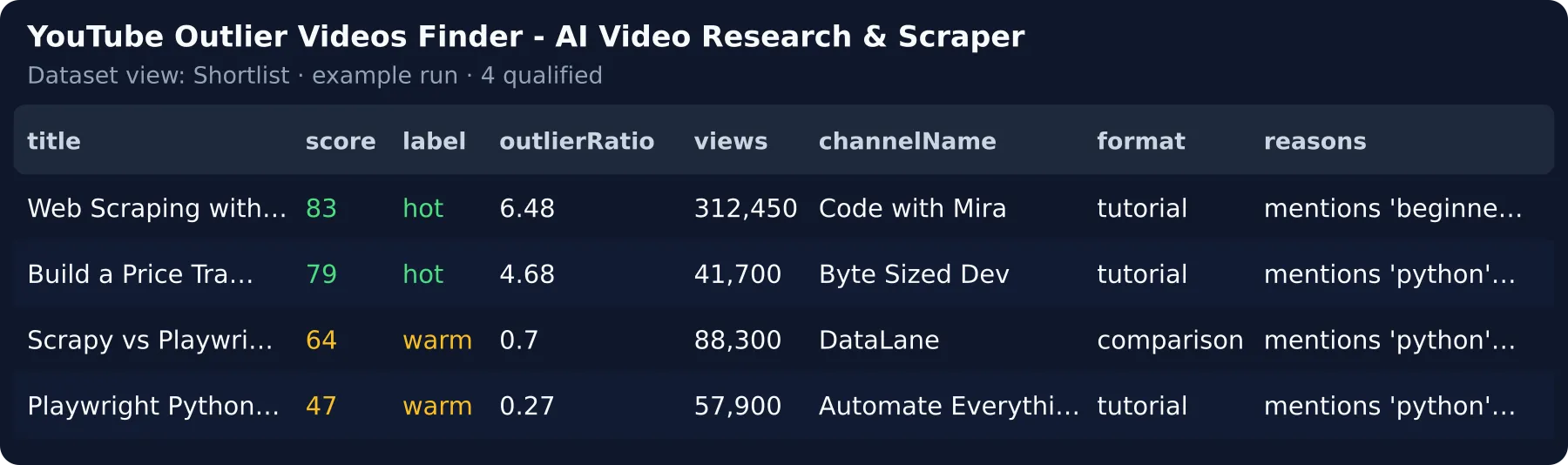
One dataset item per qualified video. This row is from the free demo run (AI off, shortened):
Upsert key: dedupeKey (stable across runs). Sort by score; ruleScore is the rule part — trend across runs on
ruleScore. Dataset views: Shortlist · Outliers (metrics) · Insights (AI) · Overview.
⭐ Found it useful? A review on the Store helps others find it — it takes a minute on the Actor's page.
🔁 Run it weekly
- Actions → Schedule (weekly) — or start from the Competitor monitoring task below.
- Leave
dedupeAcrossRuns: true— the memory is kept per search, so the next run delivers and charges only what is new; adding a search term keeps it, a video you paid for under another search is never charged again. - A scheduled run doubles the videos read per term (still capped by your spend cap), so a busy week is not cut off.
- Point Slack or e-mail at the
DIGESTrecord, or use the Sheets template (docs/sheets/in the repo).
Weekly cost for 10 competitor channels × 20 newest: $0.80 at the source ($0 with your YouTube API key) + ~15 new qualified videos × $0.012 ≈ $0.18 here per week.
🕵️ YouTube competitor analysis on a schedule
Competitor channels + your products as watch terms, weekly: every new competitor video arrives scored, mentions quoted.
🎯 Try it for your niche
| Niche | What it looks for | Task |
|---|---|---|
| Competitor monitoring | 10 dev-tool channels · 20 newest each · watch terms Copilot / Cursor / Claude | storage-example/tasks/competitor-monitor.json |
| Outlier research for a creator | home espresso setup, budget espresso machine · views per subscriber ≥ 1 · last 90 days | storage-example/tasks/outlier-research.json |
| Product / brand mentions | notion vs obsidian, best note taking app · watch terms Notion / Obsidian | storage-example/tasks/product-mentions.json |
| Shorts outliers | espresso shorts, latte art shorts · Shorts only · last 60 days | storage-example/tasks/shorts-outliers.json |
🔌 Integrations, automation and API
- Webhook —
webhookUrlPOSTs each qualified video (or batches) to Zapier, Make, n8n or your CMS. - Google Sheets / Slack / HubSpot — one click from the Actor's Integrations tab.
- YouTube Scraper → this Actor — in
streamers/youtube-scraper's Integrations tab add "Run Actor" on Run succeeded with{"sourceMode": "dataset", "datasetId": "<the run's defaultDatasetId>", "enableAi": false}: every scrape is ranked by the rules (turn the AI on for takeaways); no second scrape runs. - AI agents / MCP —
{}runs the free demo;{"sourceMode": "list", "itemsList": [...]}processes your rows.
Use it from Claude, ChatGPT or any MCP client:
Minimal agent input: {"searchQueries": ["home espresso setup"], "researchBrief": "home espresso gear", "maxQualified": 10, "dedupeAcrossRuns": false, "maxAgeDays": 30}
👥 Who is it for?
| You are… | You run it to… | Start with |
|---|---|---|
| A marketing / competitive-intelligence team | monitor every new competitor video each week, scored, with the key points | the Competitor monitoring task · weekly + digest to Slack |
| A content strategist / YouTube channel team | find the videos in your niche that out-performed their channel, and the formats that work | your niche's terms · views per subscriber ≥ 1 · last 90 days |
| A product / market researcher | find review and comparison videos that mention a product, and quote what they say | X vs Y terms · watch terms with the product names |
| An AI agent builder | a compact, typed, pre-qualified video list instead of thousands of raw rows | the MCP block above |
🧠 How the AI works
- Grounded, not generative. The model sees one video — title, channel, description, transcript with timestamps — and scores it against your brief in one typed call.
- Every claim is checked after the call. Reasons and takeaways must be supported by the video's own text; a mention survives only with a verbatim quote; only the best rule-scored candidates get the AI pass.
- Model: Apify's model access (default
anthropic/claude-haiku-4.5) or your own key (a Google key runsgoogle:gemini-3.5-flash-lite). A rate-limited key stops after a bounded wait; the status says why.
🔒 Data, compliance and limits
- Public video metadata and captions only. No login, no commenter data; transcripts are read, then discarded.
- Relative dates ("10 months ago") are approximate; no subscriber count = no outlier ratio.
- Use the output within YouTube's (and the YouTube API's) terms and applicable law (GDPR, copyright for quotes).
❓ FAQ
How much will one run cost me? Here $0.004 per qualified video ($0.012 with AI) + ~$0.005 tokens; YouTube Scraper (when used) $0.004 per video scanned on your account, capped by Max source spend ($0.50 in the form). The first 25 qualified videos are free.
How long does a run take? Measured (OUTPUT.timing): the demo 2–3 s; AI ≈ 2.7 s per video on Apify's model
access, 0.8 s on an own Gemini key (2026-10-17); a rate-limited key stops after 60 s. Pass timeoutSecs: 600.
Is this a YouTube video scraper? It reads YouTube and adds the research layer: filters, outlier ratio, a score against your brief, takeaways and mentions.
How is this different from YouTube content research tools like vidIQ or TubeBuddy? Those sell seats ($10–$50 a month) around your own channel; here you pay per qualified video, for any niche.
Can I use it for YouTube trend research? Yes — Max age 7 days, then watch viewsPerDay and fast_growing.
Which Apify plan do I need? Any plan runs the free demo, your own rows, the built-in reader and your YouTube API key. YouTube Scraper (subtitles, channel URLs) needs a plan that runs Store Actors. If the AI is refused, your free videos are used first (5 are kept for when the AI runs), then the basic price applies.
What does "qualified" mean? A video that passed every free filter and scored at least your score bar. Only qualified videos are delivered and charged.
Can I schedule it without paying twice? Yes — the memory is per search; adding a term keeps it (Run it weekly).
🧩 More Actors from the same developer
- Instagram Creator Qualifier — vet the creators behind the videos you found before you reach out.
- Instagram Competitor Content — see which of your competitors' Instagram posts broke out, and why, every week.
- Facebook Ad Library Winning Ads Finder — the long-running ads in your niche, with their hook and offer.
- Trending Keywords for Your Niche — the rising search terms to plan your next video around.
🆘 Support
Something missing or wrong? Open an issue on the Actor's page — buyer requests ship first.
📝 Changelog
- 0.3.5 (2026-10-17) — Your typed search terms now run even when the research sentence still holds the example text — the videos are ranked without it instead of the run stopping, and a misspelt flag name now fails at once with the list of valid flags; Running the free sample with AI on (or a sample video edited) is never charged, every AI-on run says how many videos the AI checked and why the rest kept their rule score, and a plan without model access sees sample AI verdicts in the demo plus live verdicts on its first 5 real videos; Weekly schedules read twice the videos per search term within your spend cap, each search keeps its own memory (adding a term keeps it, and a video you already paid for is never charged again), and with your own Gemini key the right model is picked without setting one.
- 0.3.4 (2026-10-04) — Bring your own data: send rows in
itemsListor a dataset ID indatasetIdand the Actor picks the mode itself, starts no source Actor and charges only for the analysis. Fields it cannot read are listed in the run log. - 0.3.3 (2026-10-03) — Search terms are read straight from YouTube by the Actor itself: no second scraper run on your Apify account and no second bill, on every Apify plan.


