

Trending Keywords for Your Niche: AI Google Trends Alerts
Pricing
from $3.00 / 1,000 qualified trend (rules only)s
Trending Keywords for Your Niche: AI Google Trends Alerts
First 25 trends free. Find trending keywords and topics in your niche, pay per qualified trend: Black Friday 2026 & holiday peaks, rising & breakout keywords with AI angles. Works with MCP & AI agents. Free demo on any plan; live search runs on your Apify account, any plan that runs Store Actors.
Pricing
from $3.00 / 1,000 qualified trend (rules only)s
Rating
0.0
(0)
Developer

Rich Minds
Maintained by CommunityActor stats
0
Bookmarked
2
Total users
1
Monthly active users
8 days ago
Last modified
Categories
Share
Your niche's new trending keywords and Black Friday peaks, in your inbox every week.
⚡ First 25 trends free · 💵 from $0.003 per qualified trend · 🤖 ≈ $0.0095 all in with AI, on plans with model access or your key · ⏱️ a week of 4 countries + 5 seeds read in 10 s
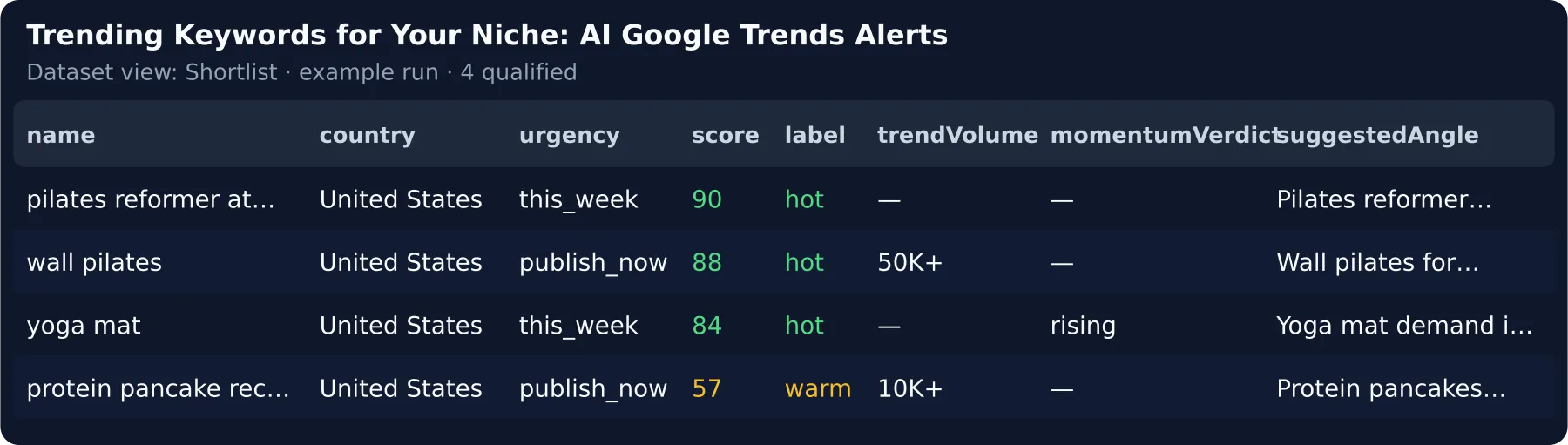
Try it in 30 seconds. Click Try it — the form is pre-filled with 7 sample rows, free. Then type your niche keywords (or pick one of 14 ready niches) and press Start: the first 25 qualified trends are free. → How to use it · What a run costs · What the AI adds · Run it weekly
⚡ At a glance
| What you get | This week's trending searches in your countries that concern your niche, your keywords' momentum — urgency and a headline each |
| You provide | a few niche keywords (e.g. coffee, pizza), the countries, optionally seed keywords |
| Typical run | first run = the last 7 days of US, GB, CA (≈ 2,300 searches, free); measured 2026-09-29: a food blog + 5 seeds → 28 qualified in 10 s |
| Cost of that run | $0.13 rules only · $0.32 with the AI (5 seeds × $0.01 + 28 trends × $0.003, or × $0.009 + ≈ $0.0005 tokens); your first 25 trends free |
| Agencies | pick Agency roster, edit its 2 example brands: 10 brands weekly ≈ $13 a month with the AI, a white-label report each — vs Exploding Topics Business at $249 a month |
| Free tier | first 25 qualified trends per account, the first 5 digests, no start fee |
| Keys / setup | Plan with Apify model access: no key needed on it · Other plans: your first 5 real trends get live AI verdicts on us, then your own key — free Gemini / Groq = 1–3 live AI verdicts per run, paid = every trend |
| Which plan | Free demo, trending feeds, seed keywords and your own list (list mode): any plan · a read Google refuses (Store fallback): a plan that runs Store Actors |
| Works with | Schedules, e-mail, Slack, Teams, Google Chat, Discord, Telegram, webhooks, Sheets, Make / n8n / Zapier, MCP & AI agents |
🎯 What this Actor does
It reads each country's Google Trends Trending Now list and your seed keywords' curves on any Apify plan, and keeps only the trends worth your next post.
🎄 Black Friday trending keywords and holiday trending keywords
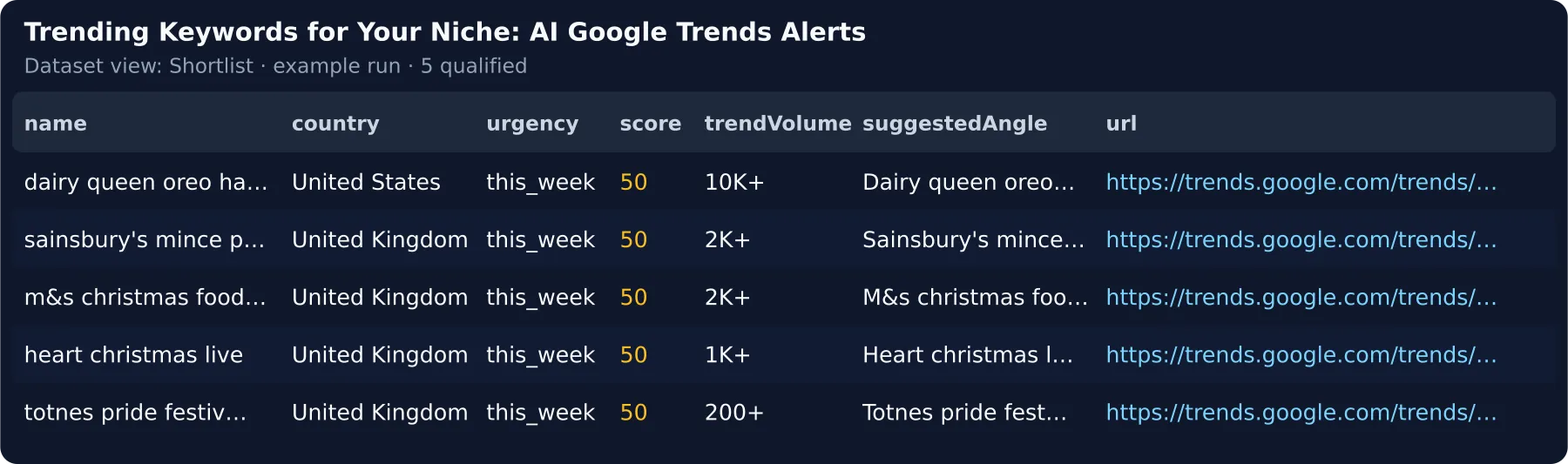
The Black Friday & holiday preset watches decorations, costumes and gifts in 4 countries plus 5 seasonal seeds — 7 days, 2026-09-29: 4 of 2,620 searches matched ("m&s christmas food 2026" …).
- Seasonal keyword calendar (
calendarMode) — up to 50 keywords on 5-year curves → the month each peaks and when to start publishing: $0.02 a keyword, one-off. - Instant alerts (
trendAlerts) — each publish-now trend above your bar posted at once, $0.01.
🔎 Find trending topics in your niche — filtered for free
Your niche keywords are matched in each search and its related searches; off-niche, excluded, small, sensitive and repeated searches drop out before anything is charged. A narrow niche (< 3 matches) gets its keywords read as seeds, free.
📈 Rising keywords and breakout keywords — a momentum verdict from the curve
Seed keywords get breakout / rising / seasonal peak soon / stable / declining, the % change and the next peak, plus up to 3 rising related queries each ("+4,250 %").
✍️ Discover content ideas from Google Trends — an angle per trend
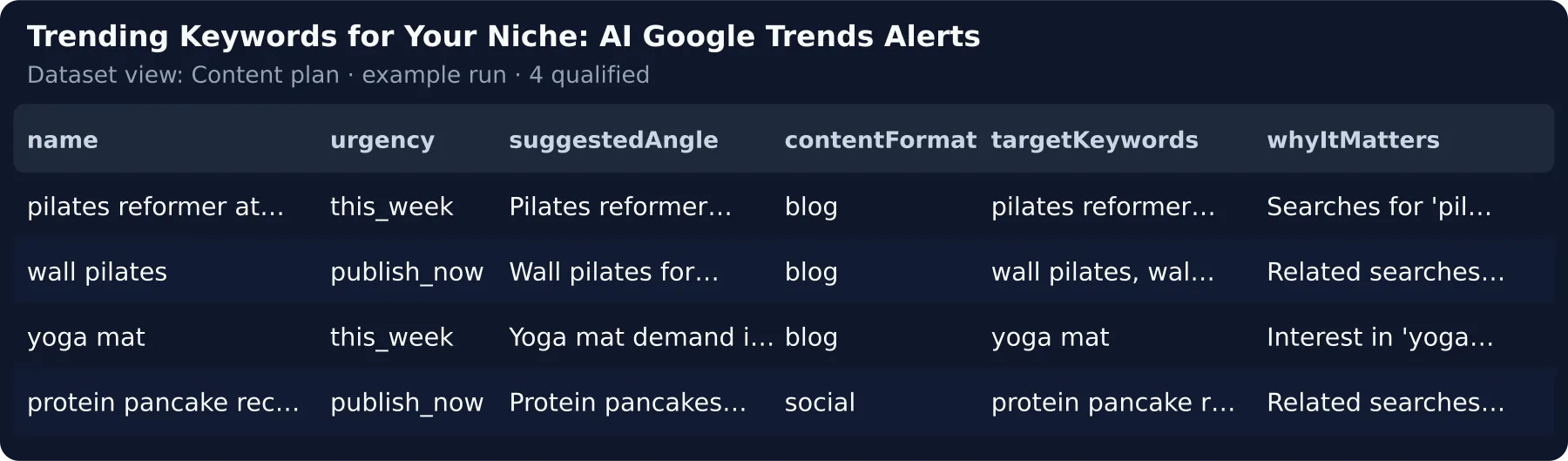
The AI says why the trend matters to your audience and writes a ≤ 90-character headline with ≤ 5 target keywords copied from the trend's own searches; without it you get template angles.
🚀 How to use it
- Click Try it — 7 sample rows run free: 4 qualify, the NFL game, a hurricane and a recall drop out.
- Type your niche keywords (or pick a preset) — they replace the sample and start the live read; the first run reads 7 days, a schedule the last 24 h.
- Keep AI verdict and content angle on and press Start — your first 5 trends get live AI verdicts on any plan; all 25 free trends with Apify model access or a paid own key.
- Add your e-mail and schedule it weekly — your first real run links a saved task.
🏢 Agency in 3 steps
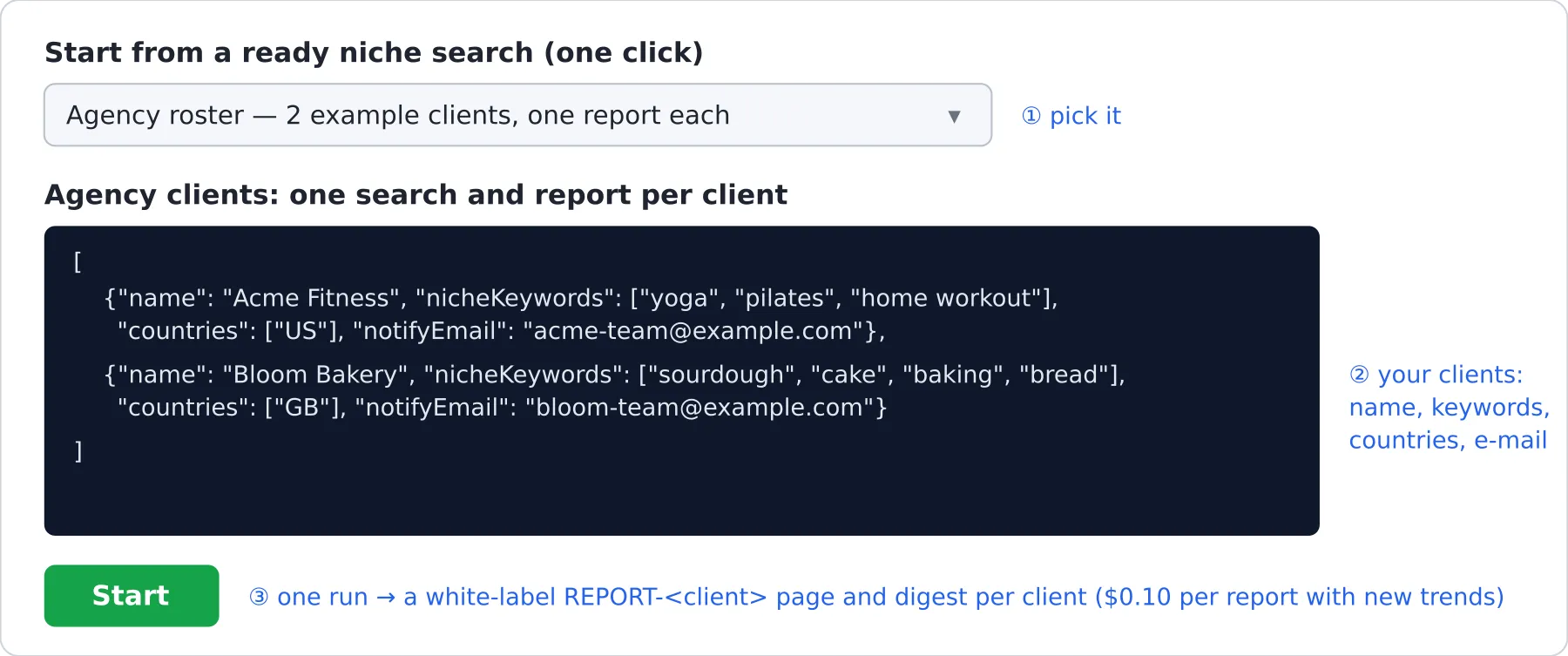
- Pick Agency roster in Start from a ready niche search.
- Edit the 2 example clients in Agency clients — name, niche keywords, countries, e-mail.
- Press Start, then schedule it: one search, memory, digest and white-label report ($0.10) per client.
📦 Already using Google Trends Scraper? Qualify the Google Trends scraper data you scraped
Paste your last Google Trends Scraper run's dataset ID into Dataset ID — no second scrape; you pay only for the qualified trends. After every scrape: the chained-run recipe.
📚 Learn more: Tutorial — find trending keywords for your niche
🆚 Why this instead of running Google Trends Scraper yourself?
vs other Google Trends Actors for "trending keywords"
Store API 2026-09-28; one week of US, GB, CA, AU (2,620 searches), 13 for a food blog (2026-09-29):
| This Actor | vnx0 Google Trends Daily Scraper | steadyfetch Breakout Keywords | cybermax Swellmeter | |
|---|---|---|---|---|
| Price | $0.003 · $0.009 AI per qualified trend, 25 free | $0.0012 per row | $0.006 per breakout keyword | $0.003 per keyword |
| Your time per 100 trends | 0 h — ranked, deduped, an angle each | ≈ 6.7 h reading raw rows (≈ 4 min each, 7 sample trends) | — | — |
| That week, all in | $0.04 for the 13 rules only · $0.12 with the AI; the 2,620 read free | ≈ $3.14 for the 2,620 rows — you filter by hand | seeds only — no trending feed | your own keywords only, no feed |
| Niche filter | yes — rules, AI on top | no (its README) | no | no |
💸 Exploding Topics alternative and Treendly alternative — no seat. Exploding Topics: $39/month, Business $249/month (explodingtopics.com/pricing, checked 2026-09-28); Treendly Pro: $8/month billed yearly (treendly.com/pricing, checked 2026-09-28). Food example weekly: ≈ $0.60 a month, ≈ $1.15 with the AI.
Google Trends (Trending now + Explore) is free and wins for a one-off look (FAQ below).
💵 Pricing — what a run really costs
Pay per result: one event per qualified trend; the extras never grow with the trends.
| Event | When it is charged | Price |
|---|---|---|
free-tier | your first 25 qualified trends on this Actor | $0.00 |
qualified-trend-basic | AI off — relevance, urgency, momentum, template angle | $0.003 |
qualified-trend-ai | AI on — plus the AI check, why it matters, the AI angle | $0.009 |
seed-verdict | one seed keyword read — curve, verdict, rising queries | $0.01 |
digest-delivered | a digest with ≥ 1 new trend — the first 5 free | $0.02 |
client-report | one white-label report per agency client with new trends | $0.10 |
trend-dossier | one brief per top trend (dossierTopN) | $0.03 |
trend-alert | one instant alert per publish-now trend (trendAlerts) | $0.01 |
calendar-seed | one keyword on the seasonal calendar (calendarMode) | $0.02 |
Never charged by us: off-niche, excluded, small, sensitive and repeated trends, a narrow niche's seed reads, the preview, demo rows; no start fee. Only a read Google refuses falls back to the Store scraper on your account ($0.022 a run), capped by Max source spend.
How that compares — $0.003 is 1.2× the Store median ($0.0025 across the 10 priced Actors of the "trending keywords" search): you pay per qualified trend, never per raw row — one replaces ≈ 94 raw searches (2,620 → 28).
Worked example (measured 2026-09-29) — the food preset, 4 countries × 7 days (2,620 searches, free) + 5 seeds ($0.05) → 28 qualified × $0.003 → $0.13 total, ≈ $0.005 per trend. AI on: 28 × ($0.009 + ≈ $0.0005 tokens) + $0.05 → $0.32 total, ≈ $0.011 per trend.
AI tier, all in: ≈ $0.0095 per trend ($0.009 + ≈ $0.0005 tokens: ≤ 1,296 in / 984 out measured, at the rates
of google/gemini-2.5-flash-lite, the default on Apify's model access) — billed via model access or your own key.
At volume — an agency, 10 clients weekly (5 seeds each, AI): ≈ $2.90 a week with 10 client reports (≈ $13 a month). E-commerce: a 50-keyword Q4 calendar once ($1.00), then 20 seeds weekly ≈ $0.58 a week with the AI.
🤖 What the AI tier adds
The AI confirms the trend fits your niche, turns it into a headline and drops what it cannot connect — ≈ 4 min each
on 7 sample trends by hand: reading the related searches and drafting a headline (2026-09-28).
dossierTopN adds a one-page brief for the top trends.
Try the AI on any plan: your first 5 real trends get live AI verdicts on any plan; all 25 free trends with Apify model access or a paid own key. A free Gemini key (aistudio.google.com/apikey) gives 1–3 AI verdicts per run; a paid Gemini / Groq key assesses every trend.
⚙️ Input
Type your niche keywords (or pick a preset), keep the countries and AI on.
targetFlags is picked from a list on the form; API callers pass niche_in_term, breakout, commercial_intent …
(all 8 in the API reference).
📤 Output
One dataset item per qualified trend. Views: Shortlist (with when Google saw it and its search volume),
Score breakdown, Content plan, Seed momentum and Brand safety.
Upsert key for a CRM or Sheet: dedupeKey — trend type + country + term (+ a seed's verdict); itemId is its
short hash.
Which record to read: OUTPUT (= RUN_SUMMARY) holds the funnel, charges and aiCoverage; DIGEST,
REPORT and CALENDAR sit next to it.
⭐ Found it useful? A review on the Store helps others find it — it takes a minute on the Actor's page.
🔁 Run it weekly — Google Trends alerts on a schedule
- Open the saved task and click Schedule after your first real run, with
notifyEmail— every run with new trends e-mails the digest (the first 5 free, then $0.02). - Leave
dedupeAcrossRuns: true— you pay only for new trends; a recurring trend returns afterdedupeTtlDays(60); the digest says what changed ("qualified 18 → 23"). - Send alerts to (Slack, Teams, Google Chat, Discord, Telegram) posts the digest,
trendAlertspings at once; Google Sheets fills your copy of the tracker sheet (dedupeKeyfirst to upsert on).
Weekly cost is the new trends only: the food example ≈ $0.13 a week rules only, ≈ $0.32 with the AI (the first run;
later weeks read 24 h). A scheduled run adds last week's best trends as seeds (OUTPUT.seedsRolled).
🎯 Try it for your niche
Pick one in Start from a ready niche search (preset) and press Start — your own values win. 14 niches, each
measured on a real 7-day read (2026-09-29):
🔌 Integrations, automation and API
Run outcomes — what your integration sees
Branch on OUTPUT.ok / OUTPUT.outcome, never on the run status or an empty dataset.
After every apify/google-trends-scraper run: its Integrations tab → "Run succeeded → start this Actor" with
sourceMode: dataset, datasetId = resource.defaultDatasetId, enableAi: false — every scrape is qualified, rules
only until you switch AI on.
- Webhook —
webhookUrlPOSTs each trend (or batches) to Zapier, Make, n8n or your CMS, withwebhookHeaders;webhookSecretsigns every POST. - Slack, Teams, Google Chat, Discord, Telegram — paste the channel webhook (or your Telegram bot's send link) into Send alerts to: one readable digest per run, with links.
- HubSpot / Notion / Airtable — a Make / Zapier step, upsert on
dedupeKey. - Google Sheets / MCP — the Integrations tab, or any MCP client;
{}runs the demo.
Every run writes OUTPUT.mode (demo / live / preview / calendar / clients / list / dataset) — the full
"Which call runs what" table, one real item, the OUTPUT shape and the webhook payloads are in the
API reference.
List-mode rows — what a pasted record needs
sourceMode: "list" runs on any Apify plan: paste Google Trends rows you already have into itemsList
(template; every row format: API reference).
| Field | Needed? | What it enables |
|---|---|---|
term | required (trending row) | the row's name; title, query or name work too |
keyword + timeline_data | required (seed row) | a seed_keyword row with its momentum verdict |
👥 Who is it for?
| You are… | You run it to… | Start with |
|---|---|---|
| E-commerce / brand team | catch Black Friday demand early; plan Q4 by each keyword's peak | ecommerce-seasonal, calendarMode |
| Content marketer / SEO lead / newsletter writer | find trending topics in your niche weekly | a niche preset |
| Agency / social media manager | one task for all clients, a white-label report each | agency-roster, clients |
| AI-agent / automation builder | a typed, deduplicated trend feed for your agent | the minimal agent input |
🧠 How the AI works
One typed call per trend, grounded in the trend's own searches; counts always come from code.
- What it sees — your niche, the term, ≤ 10 related searches, country, volume, a seed's verdict; only trends within 20 points of Minimum relevance.
- Grounded — target keywords not in the trend's own searches are dropped; an unconnected trend is
isRelevant: false, scored ≤ 20, never billed. - Fallback — a model error keeps the rule verdict at the basic price; an own key stops after 60 s of rate-limit
waiting. Default model
google/gemini-2.5-flash-lite.
🔒 Data, compliance and limits
Google Trends data is public, aggregated search interest — no personal data, no login. Volumes are Google's labels (50K+), curves are 0–100 relative interest, read one seed at a time. Use it within Google's terms and GDPR / CCPA.
❓ FAQ
What will my first real search cost? Feeds free, $0.01 per seed keyword, the first 25 trends free — the food example: $0.13; Store fallback runs capped at $0.50.
How do I find trending topics in my niche? Type your niche keywords or pick a preset; Free preview shows last week's count and its weekly price first.
Where do I find Black Friday trending keywords and holiday trending keywords? Pick the Black Friday & holiday
preset; for Q4 planning run calendarMode on your product keywords — the month each peaks and when to start.
Can I use it for Google Trends keyword research? Yes — seedKeywords get the curve's verdict, % change, peak and
next seasonal peak; includeTimeline adds the curve.
How do I find rising keywords and breakout keywords? Seed keywords get rising / breakout verdicts plus their
rising related queries ("+4,250 %").
How do I discover content ideas from Google Trends? Keep the AI on: every trend gets a headline, its format and target keywords.
How do I get Google Trends alerts for my niche? Schedule the saved task with notifyEmail or Send alerts to —
only new trends arrive; trendAlerts pings each publish-now trend at once.
Why pay when Google Trends is free? Google Trends wins for a one-off look and charts; this adds the niche filter, memory, verdicts, schedule, alerts and the angle.
How long does a run take? One row per mode, with its timeoutSecs:
What does "qualified" mean? Relevant to your niche (≥ minScore), past every free filter, not sensitive, and for a
seed a verdict you selected.
What happens if nothing matches my filters? 0 rows, no trend charged, and words to add or exclude
(OUTPUT.suggestedTerms).
🧩 More Actors from the same developer
Not quite your use case? The same pay-per-qualified-result model, closest to this Actor's buyers first:
- Reddit Brand Monitoring — hear what your niche says about a trend on Reddit, the thread to answer first.
- Threads Brand Monitoring — see who posts about your brand on Threads while a trend peaks.
- YouTube Outlier Videos Finder — the videos on your trend that beat their channel's average, scored against your brief.
- Website Change Monitor — Every real change on your competitors' pages, explained, in your inbox every week.
- Link Building Prospects & Guest Post Finder (Google, AI) — Guest-post and resource-page sites for your keywords, with a checked e-mail and a first line.
- Instagram Competitor Content — Competitors' breakout Instagram posts and why they won, in your inbox every week.
🆘 Support
Open an issue on the Actor's page — buyer requests ship first.
📝 Changelog
- 0.1.5 (2026-10-17) — One "Send alerts to" box on the form takes your Slack, Teams, Google Chat, Discord or Telegram link (or any webhook) and posts the digest there; webhook posts can now be signed with a secret; Adding a keyword to a scheduled search no longer re-delivers trends you already have, and a trend you paid for once is never charged again under another search or filter set; The AI tier now runs on a lighter model, so each AI-checked trend costs you about $0.0095 all in instead of $0.015; if your plan cannot run the Store fallback, the run now ends with a clear "plan refused" result instead of a failed run.
- 0.1.4 (2026-10-04) — bring your own data: rows in
itemsListor adatasetId, only the analysis charged. - 0.1.1 – 0.1.3 (2026-09-29) — first release: feeds and seeds read directly, a seasonal calendar, alerts, 14 niches, an agency roster, a free preview.


