

Greenhouse Jobs Scraper – Job Listings by Company Board
Pricing
from $1.00 / 1,000 job ads
Greenhouse Jobs Scraper – Job Listings by Company Board
Job listings from Greenhouse job boards by company: title, departments, offices, publication date, full ad text, published pay ranges. Many boards per run, keyword and location filters, only new jobs on schedules. Public API, no login, no personal data.
Pricing
from $1.00 / 1,000 job ads
Rating
0.0
(0)
Developer

Rowcraft
Maintained by CommunityActor stats
0
Bookmarked
2
Total users
1
Monthly active users
2 days ago
Last modified
Categories
Security
Limited permissionsShare
Greenhouse Jobs Scraper: Job Listings from Greenhouse Boards
Get every open job from the Greenhouse job boards of the companies you choose, as clean, flat JSON, CSV or Excel. This Greenhouse jobs scraper reads Greenhouse's public Job Board API, the interface Greenhouse offers for showing jobs on a company's own website, so it is fast and does not break when a board changes its design. List as many boards as you like in one run.
Each job comes with title, all departments, offices, dates, the full ad text and, where the employer fills in Greenhouse's pay-transparency fields, the published pay range.
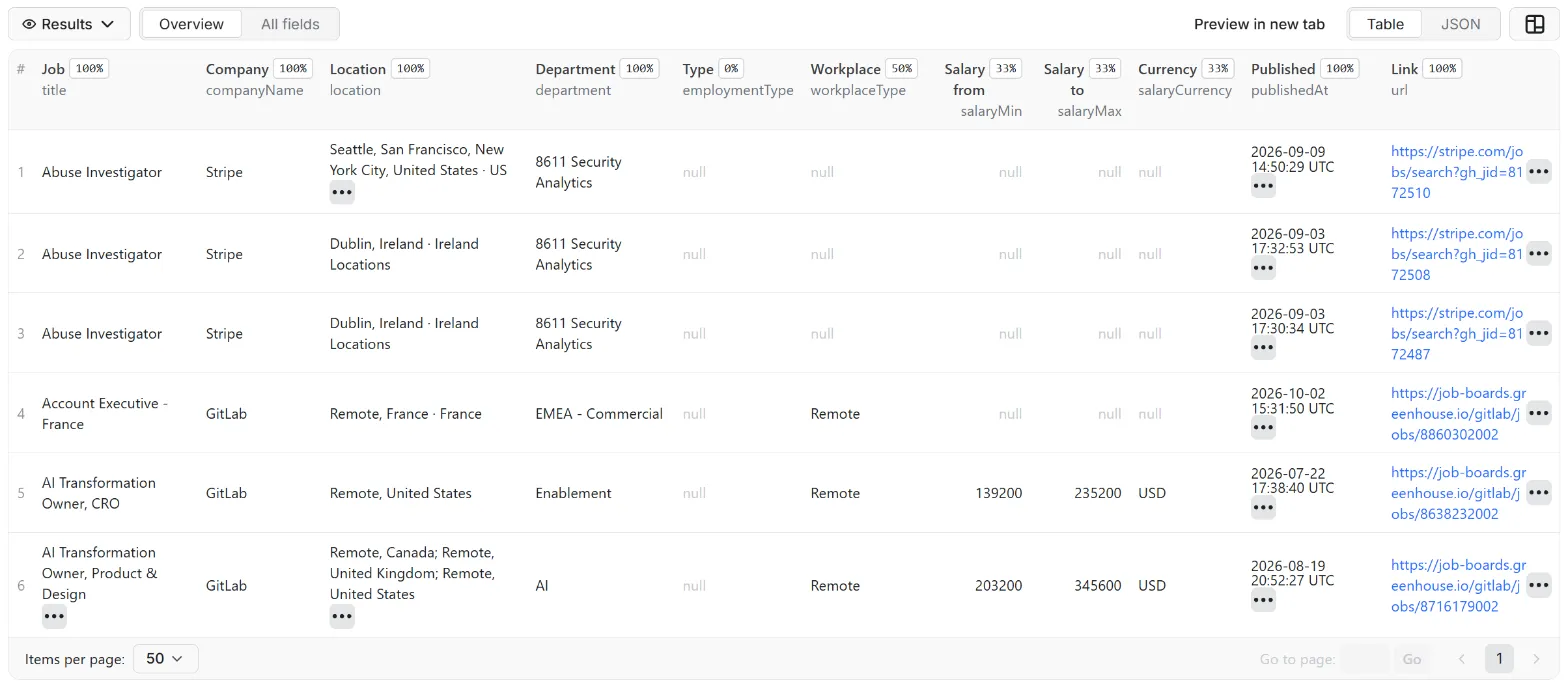
What you get
Price: $1.50 per 1,000 job ads on the Free plan, $1.00 on the Business plan, paid per row delivered; the $5 monthly credit of a free Apify account covers about 3,300 job ads. Details in Pricing below.
One row per job:
- Job:
id(greenhouse:board:jobId), title, job and apply page, requisition code, company name - Classification: department and all departments, remote flag; employment and workplace type when the employer keeps them in a custom field
- Location: all locations, plus country, ISO country code, region and city of the first one
- Dates: first published, last updated, language
- Salary: minimum, maximum, currency and the range as written (details on)
- Text: the full ad as plain text, optional HTML, custom fields in
metadata
Why this actor
- Pay ranges when they exist. The board list has none; the job detail does. With details on, the actor reads it for each job that passes your filters. With details off a board is one request, text included.
- All departments and offices, parsed into country code, region and city.
- Many boards per run, or a ready-made list by country, remote jobs, industry or every Greenhouse company we know.
- Contact details removed from ad texts, a report per board and a charge cap: you pay per delivered job ad.
How to use it
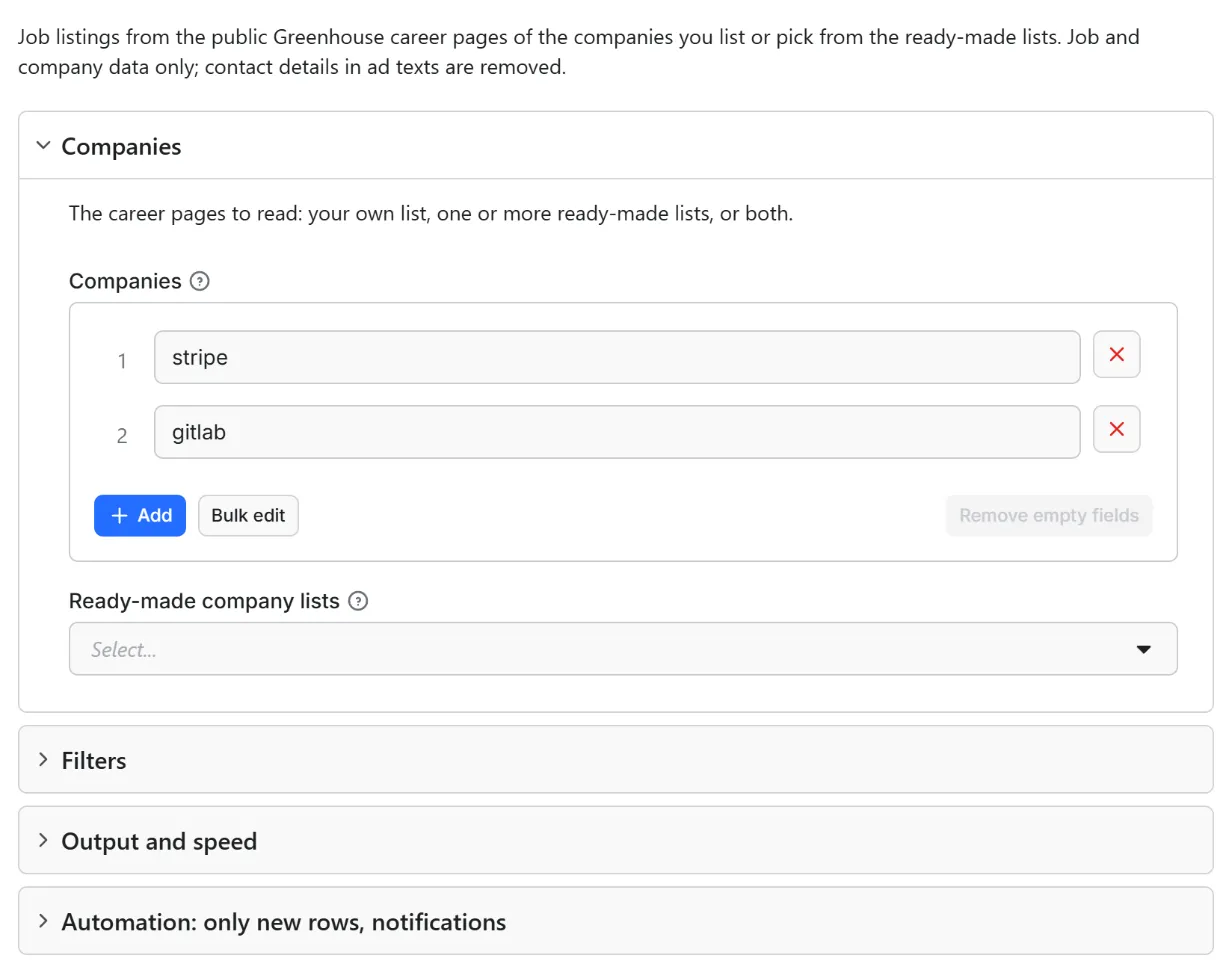
- Open the Actor and fill in Companies (the other fields are optional filters).
- Set Maximum job ads to a small number for a first try (the default is a safe start).
- Click Start. The status line shows progress; the run stops cleanly at your limit or at the charge limit you set in the run options.
- Open the Dataset tab and download JSON, CSV, Excel, XML or HTML, or send the rows to Google Sheets, Slack, Make, n8n or Zapier with the Integrations tab.
- To run it on a schedule, use Schedules in Apify Console and turn on Only new rows since the last run below: every run then costs only the new rows, and a webhook URL tells you when something new came in.
Input
Quick start. This input is ready to run (it is also the example in the API tab):
One real row it returns (long texts shortened here):
| Field | What it does |
|---|---|
companies, lists | Board names (stripe), addresses (https://job-boards.greenhouse.io/stripe) or job links; ready-made lists picked in the form |
includeDetails | On (default): pay ranges, one extra request per job. Off: one request per board, text included |
keywords | Match the job title; keywordsInDescription also searches the ad text |
locations | Countries, codes, regions or cities; add remote to keep remote jobs |
departments, employmentTypes, remoteOnly, withSalaryOnly, postedAfter | More filters (postedAfter: 2026-10-01, yesterday, 7 days) |
maxItems, maxItemsPerCompany, includeHtml | Limits (0 = none); HTML text |
onlyNew, stateName, notifyUrl, notifyWhenEmpty | See Automation below |
Example: engineering jobs in Ireland or remote, from two boards, posted in the last 30 days.
Output
37 fields per row. Empty values are null, never missing, so CSV and Excel columns are stable.
| Field | Type | Example |
|---|---|---|
id | string | greenhouse:stripe:8172510 |
jobId | string | 8172510 |
ats | string | greenhouse |
company | string | stripe |
companyName | string | Stripe |
title | string | Abuse Investigator |
url | string | Job page |
applyUrl | string | Apply page |
requisitionCode | string | Requisition code |
department | string | Department (first) |
departments | array | All departments |
team | string | Team or function |
employmentType | string | Full-time |
workplaceType | string | Workplace type: Remote, Hybrid, On-site, or as written |
isRemote | boolean | False |
location | string | Dublin · Ireland |
locations | array | Locations: raw text, country, countryCode (ISO 3166-1), region, city |
country | string | Ireland |
countryCode | string | IE |
region | string | Region or state of the first location |
city | string | Dublin |
publishedAt | string | 2026-09-03T17:30:34.000Z |
updatedAt | string | Last update (when the system publishes it) |
language | string | en |
salaryMin | number | Salary from (when the employer publishes it) |
salaryMax | number | Salary to |
salaryCurrency | string | Salary currency (ISO 4217) |
salaryPeriod | string | Salary period: year, month, week, day, hour |
salaryText | string | Salary as the employer wrote it |
descriptionText | string | Full ad text as plain text, contact details removed |
requirementsText | string | Requirements as a separate text (Lever, Workable, Recruitee, Personio, when the employer separates them) |
benefitsText | string | Benefits as a separate text (Lever, Workable, Personio, when separated) |
descriptionHtml | string | HTML version of the description (only with "Include HTML") |
requirementsHtml | string | HTML version of the requirements (only with "Include HTML") |
benefitsHtml | string | HTML version of the benefits (only with "Include HTML") |
metadata | object | Other fields the employer set: custom fields, level, category, experience, hours per week, keywords |
detailsIncluded | boolean | False |
Example rows
Two real rows from a run (long texts shortened here, complete in the dataset):
Results can be downloaded as JSON, CSV, Excel, XML or HTML from the Dataset tab, or read through the Apify API.
Pricing
Pay per result. You pay for each job ad delivered to your dataset, nothing else: no subscription, no minimum, no charge for rows your filters drop or for the requests behind them.
| Your Apify plan | Price per 1,000 rows | Price per row |
|---|---|---|
| Free plan | $1.50 | $0.0015 |
| Starter plan | $1.33 | $0.00133 |
| Scale plan | $1.17 | $0.00117 |
| Business plan and above | $1.00 | $0.001 |
Example: 1,000 job ads cost $1.50 on the Free plan and $1.00 on the Business plan. Platform usage of the run (compute, storage) is included in that price and is not billed to you separately (pay per event: the actor covers it).
A start event of $0.00005 is charged once per run (Apify default).
Cap your spend: set Maximum total charge in the run options. The actor stops cleanly when the cap is reached and you keep everything delivered until then. The run summary (RUN_SUMMARY in the key-value store) says why a run stopped.
Automation: only new rows, notifications, schedules
Only new rows since the last run. Turn on onlyNew and the actor remembers every job ad it delivered to you (in a key-value store named rowcraft-greenhouse-jobs-scraper-state in your Apify account). The next run with the same stateName skips what you already have and you pay only for new rows. The first run delivers everything that matches. Use a different stateName for each schedule or search so they keep separate memories.
Notification when the run ends. Put a webhook address in notifyUrl and the actor sends one JSON POST with the number of new rows, links to the dataset (JSON and CSV) and the run. It works out of the box with Slack and Discord incoming webhooks (the message is in text and content), with Make, n8n and Zapier catch hooks, and with your own endpoint. By default it is sent only when there is at least one new row; notifyWhenEmpty sends it every time.
Schedules. Create a schedule in Apify Console (hourly, daily, weekly or cron) with onlyNew on. A daily schedule gives you a feed of new job ads for the price of the new rows only.
Integrations. Send the results to Make, n8n, Zapier, Google Sheets, Slack, Google Drive, Airtable or any webhooks from the Integrations tab of the Actor, with no code. Apify also offers native actions for Make, n8n and Zapier.
API, SDKs and AI agents. Every run is available through the Apify API and the official JavaScript and Python clients; the Actor can also be called by AI agents through the Apify MCP server. The example input in the API tab is a working call.
Use with AI agents (MCP). Add the Apify MCP server to Claude, Cursor, VS Code or any MCP client and the agent can run this Actor as a tool:
Call it from a shell or any language. One request runs the Actor with the input below and returns the rows as JSON:
Python (pip install apify-client):
JavaScript / Node.js (npm install apify-client):
Use cases
- Job boards and aggregators: a clean feed from the Greenhouse companies you follow.
- Pay-transparency research: published ranges by role, department and country.
- Monitoring: only new rows tell you when a board opens a matching role.
Ready-made examples, each with the input filled in (open one and press Start, or save it as your own task):
- Get jobs at UK tech companies from Greenhouse boards
- Find open jobs at healthcare companies on Greenhouse
- Get jobs in Germany from companies on Greenhouse
What this actor does not do
- Search all of Greenhouse by keyword: you bring board names or lists, and the filters apply to them.
- Read applications, candidates or recruiters.
- Separate requirements and benefits: a Greenhouse ad is one text. Other systems' addresses are listed as invalid.
- Report closed jobs: a job that disappears is simply missing from the next run.
Limits and fair use
- One request per second by default, 250 ms at the lowest. A board is one request; with details on, each job adds one. Stripe's board had 729 jobs on 10 October 2026, so all of them with pay ranges take about 730 requests, a little over 12 minutes. GitLab's had 219.
- Keyword, location and date filters run before the detail requests; Only jobs with a published salary reads every job's pay range. Only delivered jobs are charged.
- If the site shows an anti-bot page or asks for a long pause, the actor stops and keeps what it delivered (
stoppedByProtection,stoppedByRateLimitin the run summary).
Data source
Source: the Greenhouse Job Board API (boards-api.greenhouse.io), the public, keyless interface Greenhouse documents for showing jobs on a company's own website. Its robots.txt excludes only /embed/, which is not used. No login or cookie. The job ads belong to the employers; each row links to the original. Rowcraft is not affiliated with Greenhouse; the name belongs to its owner.
Privacy: no personal data
Rowcraft actors are built not to collect personal data:
- The board has no recruiter or hiring-manager fields and none are read; applicants and application questions are never requested.
- E-mail addresses, phone numbers,
mailto:,tel:and personal LinkedIn links in ad texts are removed; contact-person names after a title or contact cue ("Recruiter: …") become[name removed]. Other names cannot be told from ordinary words reliably.
You are responsible for using the data in line with the law that applies to you.
Other Rowcraft actors
Related Rowcraft actors. All of them read official or public sources, deliver flat rows without private contact details and support only-new runs and notifications; the full list is on the Rowcraft profile:
- Ashby Jobs Scraper – Job Postings with Salary Ranges — Job postings from Ashby job boards (jobs.ashbyhq.com) by company: title, department, team, locations with country, employment and workplace type, published salary range, full text.
- Career Site Jobs Scraper: Greenhouse, Lever, Ashby, Workday — Jobs from the career pages of the companies you choose: give a name or website and the actor finds the system (Greenhouse, Lever, Ashby, Workday, Workable, Personio, Recruitee, Teamtailor, Gem).
- Gem Jobs Scraper – Job Board Listings from jobs.gem.com — Job listings from Gem job boards (jobs.gem.com) by company: title, department, offices with country, employment type, remote, hybrid or on-site, requisition ID, publication date and full ad text, from the public Gem Job Board API.
- Himalayas Jobs Scraper: Remote Jobs API with Salaries — Remote jobs from Himalayas through its public jobs API: title, company, salary range, seniority, categories, the countries and time zones open to candidates, full description and job link.
- Lever Jobs Scraper – Job Postings from jobs.lever.co — Job postings from Lever career pages (jobs.lever.co) by company: title, team, department, location, commitment, workplace type, salary range when published, description, requirements and benefits.
- Personio Jobs Scraper: Job Listings, Salaries, Departments — Job ads from any company's Personio careers feed: title, department, office, employment type, schedule, seniority, salary when published, keywords and the full description in the language you choose.
FAQ
How do I find a company's board name? Open its job board: if the address is job-boards.greenhouse.io/stripe, the name is stripe; boards on job-boards.eu.greenhouse.io work the same way. A job link on that domain (job-boards.greenhouse.io/<board>/jobs/<id>) reads only that job. A job page on the company's own domain, for example a stripe.com page, cannot be read from its link: use the board name.
Should I leave pay ranges on? Leave Include published pay ranges on when you need salaries and the board is small or you filter first. Turn it off for a quick run: description, departments, offices and dates are all in the board request.
Why is the salary empty on a job? The employer did not publish a pay range for it; Greenhouse returns ranges only where the pay-transparency fields are filled in. Only jobs with a published salary keeps just the jobs that have one.
How do I get only new jobs on a schedule? Turn on onlyNew, give each schedule its own stateName and add a schedule in Apify Console. The actor remembers every job id, so an edited ad is not delivered or charged again.
How fast is it, and are there limits? One request per second, no proxies; see Limits for the Stripe example.
Can I read many boards without typing them? Yes. Pick one or more Ready-made company lists in the input form and the actor reads the Greenhouse companies in them. The lists hold companies we checked on the public API; sizes are shown in the form.
What happens when a board name is wrong? The COVERAGE record and the run summary give each board a status: ok, empty (no open jobs, or the job of a job link has closed: its id is listed in missingJobLinks), not_found, failed (with the reason) or not_reached (the run stopped before it). A company that moved to another system often leaves an empty board behind.
How much does it cost? $1.50 per 1,000 job ads on the Free plan, less on paid plans (see Pricing). You pay only for rows delivered to your dataset; set a maximum total charge in the run options to cap a run.
How do I get the results into Slack, Google Sheets, Make, n8n or Zapier? Use the Integrations tab of the Actor for the data, and the notifyUrl field for a message when a run ends (Slack and Discord webhooks work directly; catch hooks of Make, n8n and Zapier too).
Can I call it from code or from an AI agent? Yes: through the Apify API, the JavaScript and Python clients, and the Apify MCP server. The API tab shows a working example with the input of this Actor.
Is it legal to use this data? The actor reads the official API described in the Data source section and delivers company and job data without personal data. The licence of the source is described above. How you use the data is your responsibility under the law that applies to you.
Does it collect personal data? No. Contact persons, e-mails and phone numbers are removed and fields about people are never requested. See the Privacy section.
The run finished with 0 rows. Did I pay? No: with no rows delivered nothing is charged apart from the start event. Check the run summary (RUN_SUMMARY) for warnings, widen the filters, or run with Only new rows off if everything matching was already delivered to you.
Support and reviews
Problems, missing fields, questions: open an issue on the Issues tab of this Actor. We answer within one working day and fix confirmed bugs in the next release; the changelog lists every change.
If this Actor saved you time, a short review on its page helps other users find it and helps us keep improving it.


