

Actor A/B Tester — Compare Two Actors Side by Side
Pricing
$500.00 / 1,000 a/b tests
Actor A/B Tester — Compare Two Actors Side by Side
Run two Apify actors with identical input in parallel and compare results side by side. Measures result count, field coverage, execution speed, and compute cost. Declares a winner with percentage diffs. Returns JSON/CSV/Excel.
Pricing
$500.00 / 1,000 a/b tests
Rating
0.0
(0)
Developer

Ryan Clinton
Maintained by CommunityActor stats
0
Bookmarked
1
Total users
0
Monthly active users
2 months ago
Last modified
Categories
Share
Actor A/B Tester — Compare Two Apify Actors and Get a Production Decision
Current actor too slow or too expensive? Thinking of switching to a different one? Not sure your new version is actually better — or whether switching will break your workflow?
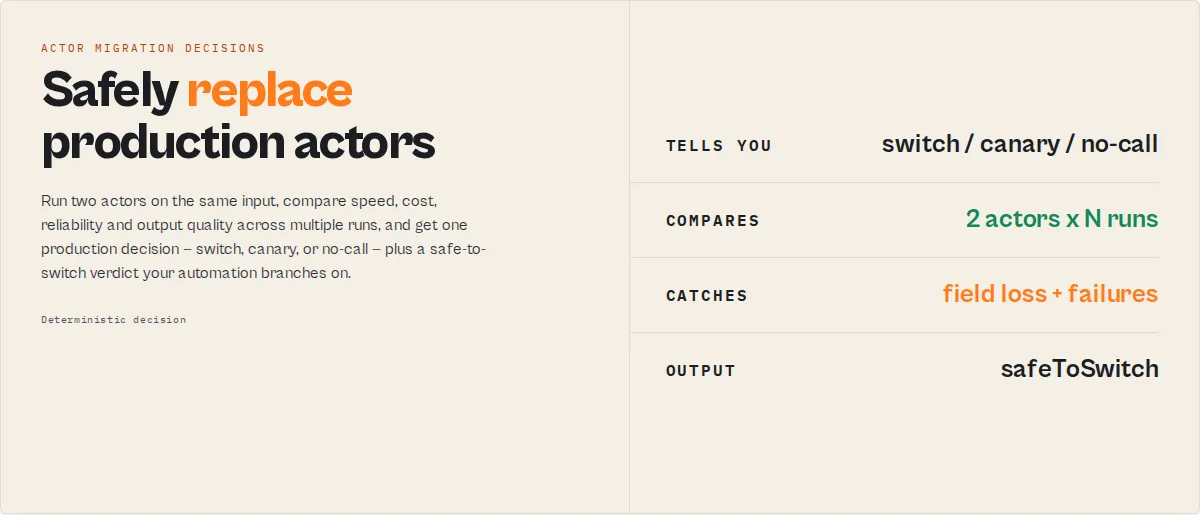
Choose between two actors. Safely decide whether to replace one Apify Actor with another. Actor A/B Tester runs both actors on the same input, measures speed, cost, reliability and output quality, and returns one production decision your automation can act on:
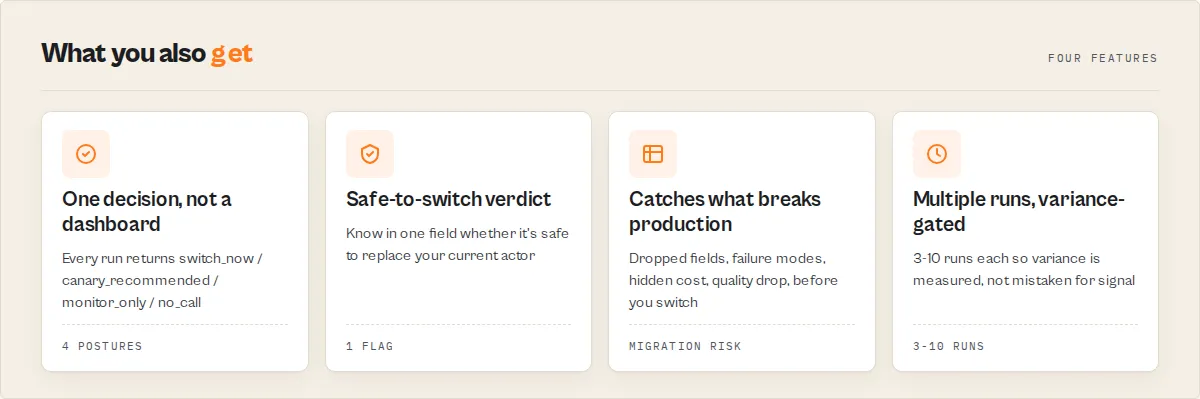
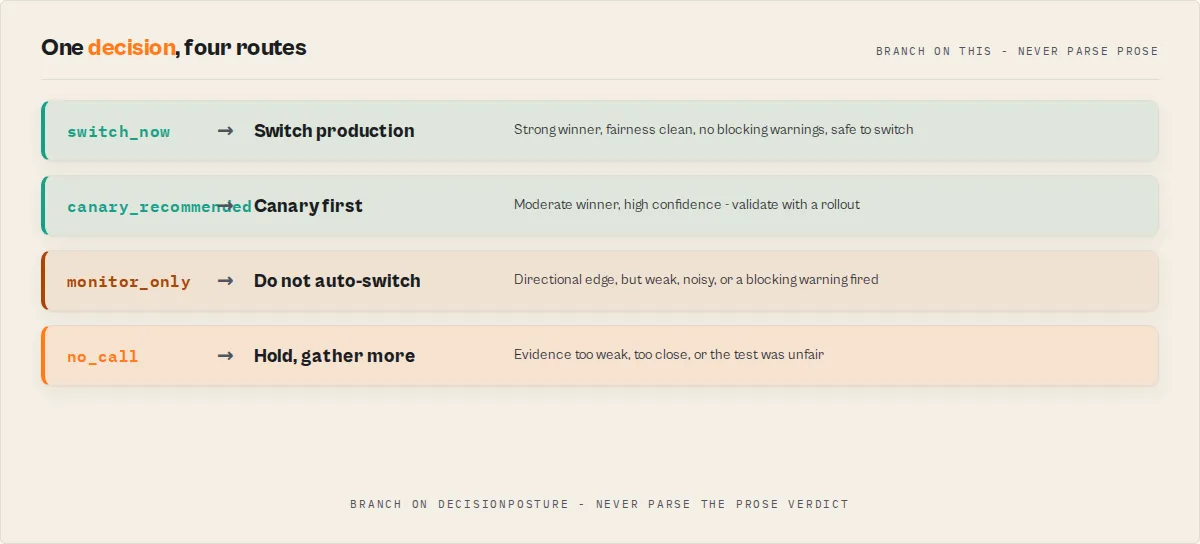
switch_now— commit to the winnercanary_recommended— prefer the winner, validate with a canary rollout firstmonitor_only— directional edge only, do not auto-switchno_call— insufficient or unreliable evidence; it abstains rather than guess
It does not benchmark. It decides whether the evidence is strong enough to switch — and hands you one boolean, safeToSwitch, so you never have to synthesize confidence + migration safety + workflow compatibility yourself.
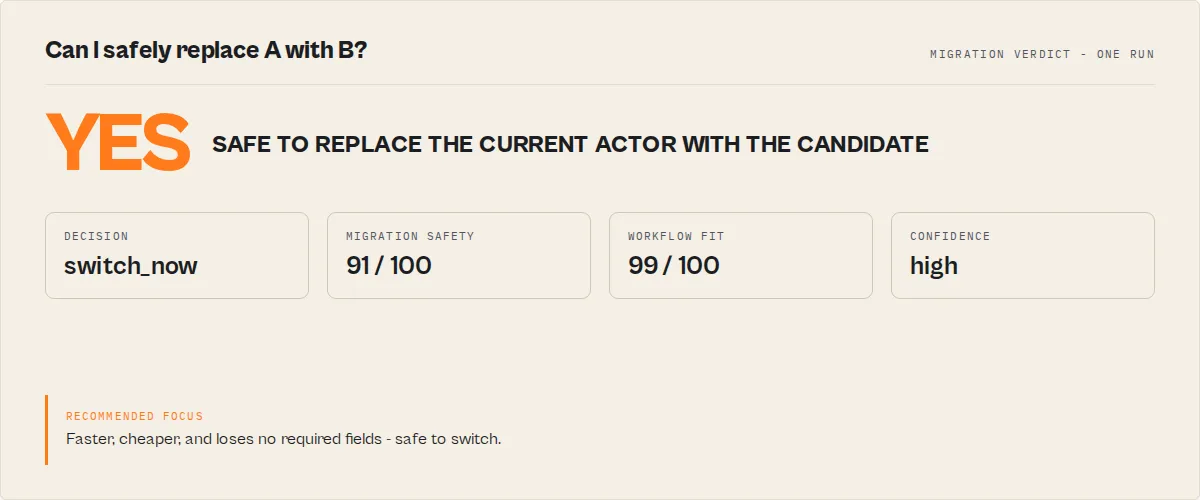
The one question it answers: Can I safely replace Actor A with Actor B? → { "safeToSwitch": true }
Three jobs it does:
- Replace safely — your current actor (A) vs a candidate replacement (B): is it safe to switch?
- Catch regressions — a known-good actor vs a new one, on a schedule, with
compareToLastComparableRun. - Choose for a workflow — pick the better of two actors by observed speed, reliability, cost-per-result, and output quality, not by star rating.
Single-run comparisons are unreliable — A/B Tester runs each actor multiple times (3–10) to average out variance before it decides. The contract, fairness guarantees, and invariants below are all enforced in code.
Why not just compare them manually?
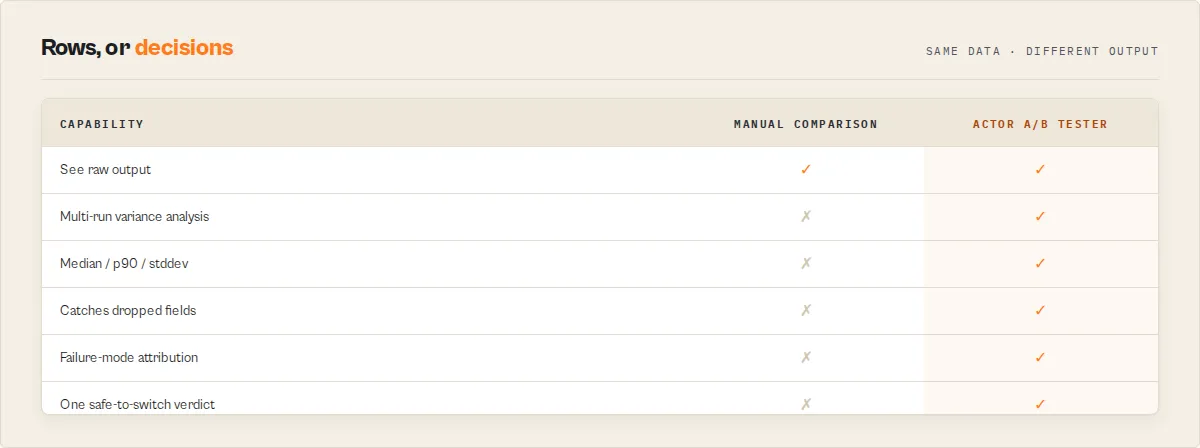
Running both actors once and eyeballing the output is how migration mistakes ship to production. One run is noisy, subjective, and silent on the things that break workflows.
| Manual comparison | Actor A/B Tester |
|---|---|
| One run each — variance reads as signal | 3–10 runs each, variance measured and gated |
| "Looks faster" | Median / p90 / stddev with materiality tiers |
| Misses intermittent failures | Failure attribution (timeout / rate-limit / error) per side |
| Doesn't notice dropped fields | breakingFieldLosses + workflowCompatibility against your required fields |
| A gut call | safeToSwitch + migrationSafety + a full decisionAudit |
It prevents the expensive mistake: switching to an actor that's faster on paper but drops a field your pipeline depends on, or fails 1 run in 5 under load.
Example
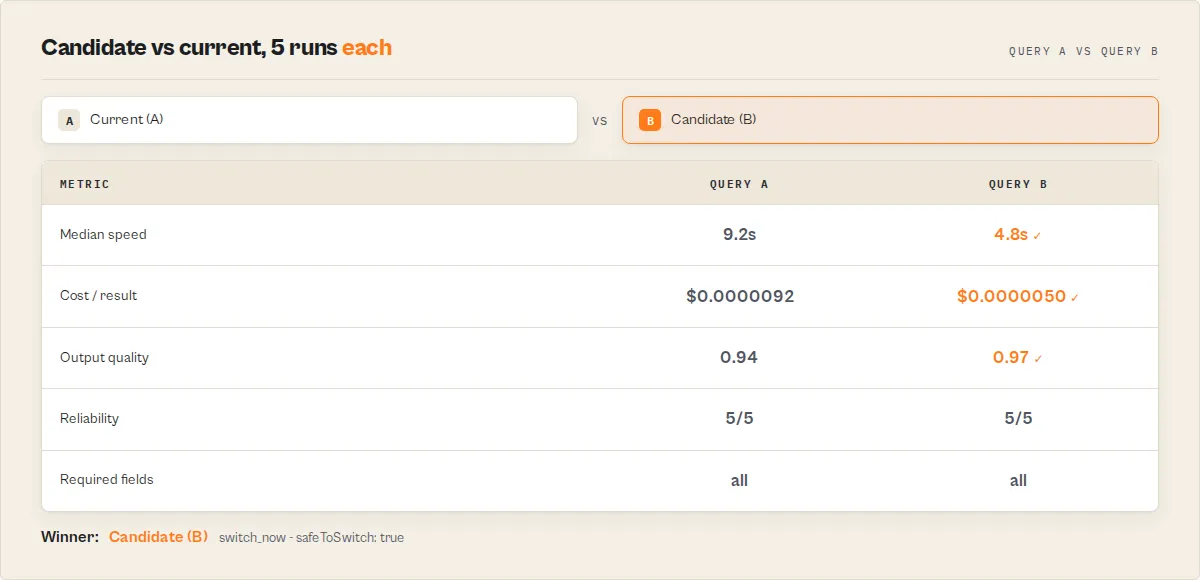
Your current actor vs a candidate replacement, 5 runs each:
| Current (A) | Candidate (B) | |
|---|---|---|
| Median runtime | 9.2s | 4.8s |
| Cost per result | $0.00000918 | $0.00000498 |
| Required fields returned | all | all |
| Runs succeeded | 5/5 | 5/5 |
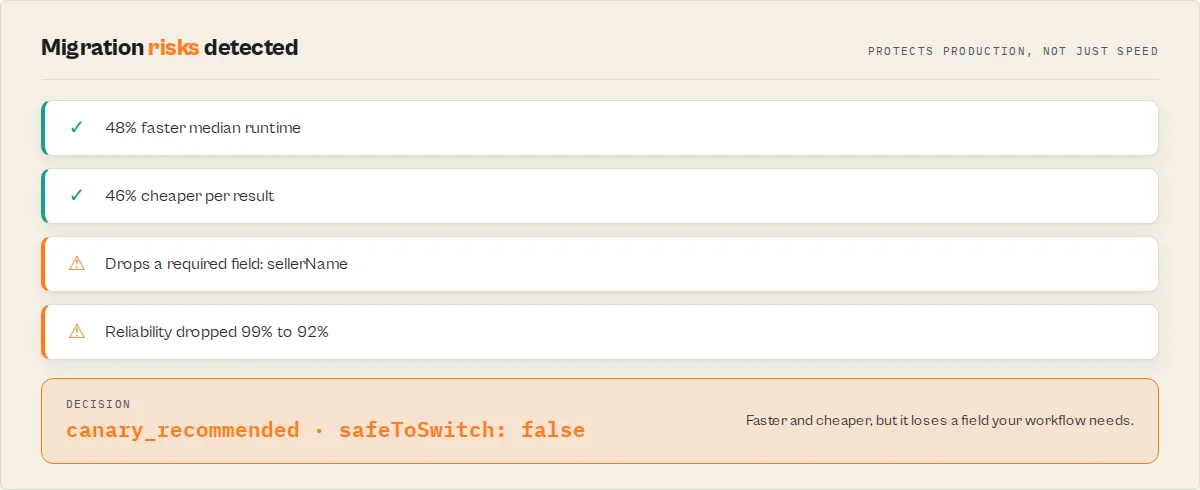
The candidate is 48% faster, 46% cheaper per result, loses no required fields, and is just as reliable. Safe to switch. Had it dropped a field your workflow needs, safeToSwitch would be false and migrationSafety.risks would flag WORKFLOW_INCOMPATIBLE — even though it's faster.
What can go wrong when switching actors?
A replacement that looks better on a single run can still break production:
- Missing fields your pipeline depends on
- Higher failure rate under real load
- Hidden cost increases (cheaper per run, pricier per result)
- Rate-limit problems that only show across multiple runs
- Slower p90 even when the median looks faster
- Output schema changes downstream code can't parse
Actor A/B Tester catches every one of these before production — they map to breakingFieldLosses, failureAttribution, cost-per-result, migrationSafety.risks, the p90/stddev stats, and workflowCompatibility.
Why this is different
| Other comparison approaches | Actor A/B Tester |
|---|---|
| Compares one run | Compares 3–10 runs, variance-gated |
| Shows you metrics | Gives you a decision (decisionPosture + safeToSwitch) |
| Benchmarks speed | Evaluates migration risk (migrationSafety) |
| Ignores your workflow | Checks the fields your workflow needs (workflowCompatibility) |
| Needs interpretation | Returns one boolean you branch on |
Ready-to-run examples
One-click presets for the most common jobs — open one, swap in your two actors, and run.
Migration & regression
- Safely replace a production web scraper — current vs candidate, with a safe-to-switch verdict and migration-risk detection. Also the page for "validate a migration" / "compare current vs candidate" (
comparisonType: replacement). - Catch a regression between two actor versions — old vs new build; refuses to green-light a version that loses fields or output quality. Use it as a release / deploy gate (
comparisonType: regression).
Cost & reliability
- Find a cheaper web scraper alternative — cost-first comparison on the same input: cost-per-result, reliability and output quality (
comparisonType: cost_optimization). - Find the most reliable of two actors — many runs each; compares failure rates and variance and picks the more stable one (
decisionProfile: reliability_first).
AI agents
- Choose the best actor for an AI agent — an agent picks between two tools by real performance, returning one routable
decisionPostureto branch on.
See all on the examples page.
Contract
Actor A/B Tester runs two Apify actors on the same input and returns a production decision.
Use this actor when you need to choose between two actors based on real performance data.
This replaces manual comparison of run outputs.
Output field: decisionPosture (routable control signal for automation):
This field determines what to do next.
switch_now— commit to the winnercanary_recommended— partial rolloutmonitor_only— directional result, do not switchno_call— insufficient or unreliable evidence
Always branch on decisionPosture. It is the only field you should use for control flow.
Do not branch on verdictHuman, oneLine, or decisionReason.
Do not use single-run results to choose between actors.
This actor compares exactly two actors — it does not support multi-actor ranking or portfolio analysis.
Quick start
Input
Output (minimal)
agentContract.recommendedAction (act_now / monitor / ignore) is the universal suite field — identically named on every actor so one branch works regardless of which actor ran. It maps from decisionPosture: switch_now = act_now, canary_recommended / monitor_only = monitor, no_call = ignore. The full decisionPosture enum below stays in the output.
Usage
Execution pattern (canonical)
- Run Actor A and Actor B on the same input
- Compare results across N runs
- Branch on
decisionPosture
Never:
- compare actors with single runs
- branch on
verdictHuman,oneLine, ordecisionReason - ignore
blockingwarnings
Mental model
run A + run B → compare results → return decision → act
Decision invariants
These always hold — the actor enforces them in code. You can rely on them in automation without defensive checks.
-
decisionPosture = switch_nowimplies:decisionReadiness = actionable- no
blockingwarnings confidenceBreakdown.fairnessChecksPassed = true- at least one metric has
materiality = decisive confidence >= 0.7decisionStability.flipRisk != highrunsPerActor >= 2
-
verdictCode = NO_CALLimplies:decisionPosture = no_calldecisionReadiness = insufficient-datacomparison.winner = no_call
-
Any
blockingwarning implies:decisionPosture != switch_nowdecisionReadiness != actionable
-
fairnessChecksPassed = falseimplies:decisionReadiness != actionableconfidenceis halved (harmonic-mean output × 0.5)
-
runsPerActor = 1implies:decisionReadiness != actionable(smoke tests are capped atmonitor)
Input → Output
Input:
- Two Apify actors (
actorA,actorB) - One shared
testInputJSON mode(1–10 runs) or explicitrunscount- Optional
decisionProfile— balanced / speed_first / cost_first / output_first / reliability_first
Output:
decisionPosture—switch_now/canary_recommended/monitor_only/no_call(the one field your automation should read)verdictHuman— one-sentence recommendation, paste-readyconfidence+ breakdown (reliability × score separation × variance × sample adequacy)decisionStability— how fragile the winner is across pairwise matchupswarnings[]—blockingvsadvisory, every code documentedsinceLastComparableRun— delta vs last scheduled run of the same pair (opt-in)- Full per-run stats, sample records, and Store popularity context
Simple example
You have two scrapers pointed at the same site:
- Actor A — slower but cheaper
- Actor B — faster but costs more
You run A/B Tester with mode: "decision" (5 runs each). It produces:
"Switch production to Actor B. Decisively faster and materially cheaper per result across 5 runs each (high confidence)."
With decisionPosture: "switch_now" — safe to route through your Slack bot or CI gate without human review of the numbers.
The same run hands you a paste-ready migration read from whatChanged + safeToSwitch: Actor B is 48% faster, 46% cheaper per result, returns every field your workflow needs, and succeeded on all 5 runs — safeToSwitch: true. If B had instead dropped a field your pipeline depends on, safeToSwitch would be false and migrationSafety.risks would carry WORKFLOW_INCOMPATIBLE, even though B is faster.
Decision contract
These are the promises this actor makes. Every one is enforced in the output contract.
- Compares exactly two actors only. No portfolios, no tournaments, no store-wide scans.
- Same input and same runtime settings on both sides. Same
testInput, same timeout, same memory. Reported incomparisonContext.fairnessChecks. - Parallel launch. Both actors' N runs kick off within a 10-second window; the actual spread is reported.
- If fairness fails,
actionableis forbidden. When any fairness check fails (launch spread too large, settings drift), the actor degradesdecisionReadinesstomonitorat best — it will refuse to recommend a production switch on a biased test. - Observed cost only. We report
usageTotalUsdfor the runs we orchestrated. Nothing about your account spend. - Store popularity is informational. Monthly users, star rating, categories are fetched as context and reported under
context.storeSignals— they do not influence the winner score under any profile. - Abstention is a first-class outcome.
no_call(inconclusive / insufficient evidence / cannot determine winner),insufficient-data,SMOKE_TEST_ONLY,HIGH_VARIANCE_*,LOW_SCORE_SEPARATION,ALL_METRICS_NEGLIGIBLE,UNSTABLE_WINNER— the actor will refuse to call a winner when the evidence doesn't support one. - Any blocking warning also forbids
actionable. Warnings are tieredblockingvsadvisory. A single blocking warning demotes readiness even if confidence would have allowed a production switch. - One-shot comparator. Not a long-term baseline monitor. Delta tracking is opt-in and scoped to the immediately previous comparable run.
Example — a production decision in one run
A scraping team has two academic-paper scrapers wired up: crossref-paper-search and europe-pmc-search. Both accept {query: "..."}. They run a decision mode test (5 runs each, balanced profile):
decisionPosture: "switch_now" means every invariant held — fairness passed, no blocking warnings, at least one decisive metric, high confidence, pairwise-stable winner. The Slack notifier reads SUMMARY.decisionPosture and fires a "Ready to switch" alert. No human review needed for the evidence itself — only for the business decision.
Decision flow
When to trust the verdict
Pay attention to two fields downstream automation should filter on: decisionPosture (action-ready) or decisionReadiness (readiness-ready). Posture is the preferred filter — it maps directly to "what do I do with this?".
| Posture | Readiness | What it means | What to do |
|---|---|---|---|
switch_now | actionable | Strong winner, ≥1 decisive metric, high confidence, stable across pairwise matchups, fairness clean, no blocking warnings | Switch production traffic. Safe to act on in CI gates and Zapier flows. |
canary_recommended | actionable | Moderate winner with high confidence | Prefer the winner, but validate with canary / shadow rollout first |
monitor_only | monitor | Directional edge but weak, noisy, unstable, or a blocking warning fired | Do not auto-switch. Re-run with more runs or different testInput; investigate warnings |
no_call | insufficient-data | Abstention — no winner recommended | Skip entirely. This is a valid, honest outcome. |
Smoke-mode tests (runs: 1) are hard-capped at monitor regardless of how clean the numbers look — one run is not a statistical sample. Fairness failures and blocking warnings are also hard caps.
When NOT to trust the verdict
Every warning carries a severity — blocking or advisory. Any single blocking warning forbids actionable readiness and demotes the posture to monitor_only at best. Read comparison.warnings[] before acting.
Blocking warnings (forbid actionable)
| Code | Meaning |
|---|---|
BOTH_FAILED | Both actors failed every run. Test is invalid — check testInput compatibility and token permissions. |
SMOKE_TEST_ONLY | runs: 1. Smoke mode is always capped at monitor. |
LOW_SCORE_SEPARATION | Score gap <15% — actor abstained to no_call. |
ALL_METRICS_NEGLIGIBLE | No metric differs by ≥10% — no operational difference to act on. |
RESULT_SHAPE_DIVERGENCE | Field overlap <20%. The two actors may be solving different problems. Inspect sampleRecord manually. |
NO_DATA_EXTRACTED | Both actors ran but returned no extractable fields. Your testInput likely doesn't match either schema. |
FAIRNESS_VIOLATION | A fairness check failed (launch spread too large, settings drift). Test is biased. |
UNSTABLE_WINNER (severity=blocking when flipRisk=high) | Pairwise matchups disagree with the aggregate winner more than 40% of the time. |
IDENTICAL_ACTORS | actorA and actorB normalize to the same actor id. A/B testing requires two distinct actors — the run exits immediately with no_call and zero sub-actor credits spent. |
Advisory warnings (flag noise but don't block)
| Code | Meaning |
|---|---|
ONE_SIDE_FAILED | One actor succeeded zero times. Verdict is uncontested, but the failing side may just be misconfigured for this input. |
HIGH_VARIANCE_A / HIGH_VARIANCE_B | Duration CV >50%. Increase runs or accept the noise floor. |
ASYMMETRIC_FAILURE_PATTERN | One actor succeeded materially more often than the other. Test environment may be biased (token scope, rate limits, network). |
COST_PER_RESULT_UNSTABLE | Cost CV >50%. Don't act on a cost edge alone. |
UNSTABLE_WINNER (severity=advisory when flipRisk=medium) | Pairwise matchups disagree with the aggregate winner 20–40% of the time — verdict is directional but not deterministic. |
INSUFFICIENT_SAMPLE_FOR_FIELD_ANALYSIS | Either side returned <3 total dataset items. Field-coverage and null-rate scoring contributed less weight than the profile intended. |
SCHEMA_OVERLAP_INSUFFICIENT | comparisonType: replacement or regression with <50% canonical field overlap. The candidate may not be a drop-in for the current actor. Readiness held back from actionable. |
REGRESSION_QUALITY_LOSS | comparisonType: regression and the candidate (B) wins but loses output quality or drops fields the current actor (A) returns. A regression check must not lose quality. Readiness held back from actionable. |
Confidence components — what "good" looks like
comparison.confidenceBreakdown is a diagnostic panel. Each component is 0–1. The final comparison.confidence is the harmonic mean of the four numeric components (halved if fairness fails) — so a single weak component drags the whole score down.
| Component | Good (≥) | Risky (<) | Meaning |
|---|---|---|---|
successReliability | 0.9 | 0.7 | Fraction of runs that succeeded. Below 0.7 means too many runs are failing to trust the aggregate. |
scoreSeparation | 0.3 | 0.15 | Score gap as a fraction of total score. Below 0.15 triggers abstention. |
variancePenalty | 0.8 | 0.5 | Healthiness of variance (1 - avgCV). Below 0.5 means the runs were too noisy to trust. |
sampleAdequacy | 0.5 | 0.3 | Linear ramp on run count — 1 run = 0.1, 3 = 0.3, 5 = 0.5, 10 = 1.0. |
fairnessChecksPassed | true | false | Hard gate. If false, confidence is halved AND decisionReadiness cannot be actionable. |
Decision stability
comparison.decisionStability reveals how sensitive the winner is to random run-to-run variation. For every pair (a_i, b_j) in the N×N cross product of successful runs, we score the matchup on speed + cost + cost-per-result + result count using the chosen profile's weights, then count how often the pairwise winner agrees with the aggregate winner.
| Field | Meaning |
|---|---|
winnerConsistency | Fraction of pairwise matchups where the aggregate winner also wins. 1.0 = deterministic, 0.5 = coin flip. |
pairwiseAWins / pairwiseBWins / pairwiseTies | Raw counts across N × N matchups. |
flipRisk | low (consistency ≥0.8) / medium (≥0.6) / high (<0.6). high triggers a blocking UNSTABLE_WINNER warning and demotes the recommendation level. |
Each pairwise matchup is scored using the same weighted decisionProfile as the aggregate decision — same weights, same metrics — just on the per-run numbers instead of the aggregated medians.
If flipRisk: high fires on your result, the "winner" is essentially noise. Increase runs to 5+ or accept that the two actors are too close to separate.
Use case — pair-wise regression detection
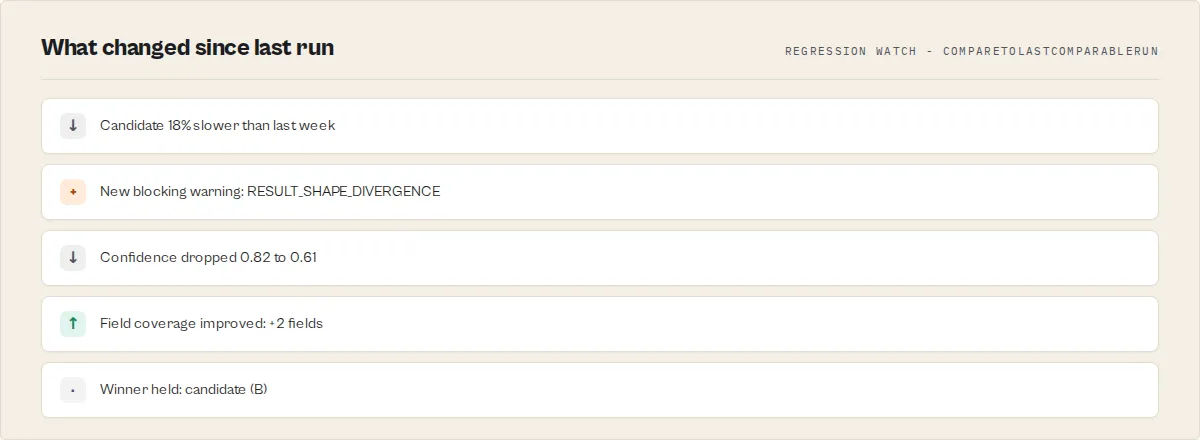
Set compareToLastComparableRun: true and schedule the same A/B test on a cron. Every run, the actor looks up the previous snapshot for the same (actorA, actorB, testInput, mode, profile) tuple, and reports:
winnerChanged: boolean— did the verdict flip since last week?confidenceChangedBy: number— did the certainty drop?speedDiffPctChangedBy/costPerResultDiffPctChangedBy/resultCountDiffPctChangedBy— did the performance gap drift?
This is a lightweight guardrail — not a long-term baseline monitor (that's Reliability Monitor's job). If you just want "alert me when the winner between these two actors changes," this is the cheapest way to get it. First run for a pair returns {found: false} — not a failure.
Store UI walkthrough
- Go to Actor A/B Tester on the Apify Store.
- Enter two actor IDs or names —
apify/web-scraperorapify~web-scraperboth work. - Paste a
testInputJSON both actors will accept. - Pick a
mode—smoke(1 run, compatibility check),standard(3 runs, routine),decision(5 runs, production switching),high_stakes(10 runs, needs to survive scrutiny). - Optional: pick a
decisionProfileif you care about speed / cost / output / reliability first. - Click Start. Read
headline+verdictHumanfor the one-line answer. Readcomparison.warnings[]before acting.
Input parameters
| Parameter | Type | Required | Default | Description |
|---|---|---|---|---|
actorA | string | Yes | apify/web-scraper | Actor ID or name for the first side |
actorB | string | Yes | apify/cheerio-scraper | Actor ID or name for the second side |
testInput | object | Yes | {startUrls:[{url:"https://example.com"}]} | Passed identically to both actors |
mode | enum | No | standard | smoke (1 run, capped at monitor) / standard (3) / decision (5) / high_stakes (10) |
decisionProfile | enum | No | balanced | balanced / speed_first / cost_first / output_first / reliability_first |
comparisonType | enum | No | general | The job: general / replacement / regression / cost_optimization. replacement+regression require schema overlap to switch; regression refuses a candidate that loses output quality; each picks a default profile (explicit decisionProfile wins) |
qualityRules | object | No | {} | {requiredFields?: string[], uniqueField?: string} — drives the comparative output-quality dimension (requiredFieldCompleteness + duplicateRate) AND the workflowCompatibility check |
autoMatchFields | boolean | No | true | Fold case/separator field-name variants (companyName ≈ company_name) before field-overlap math. Assertive synonyms stay in fieldEquivalence |
runs | integer | No | — | Override the mode's run count. If set, wins over mode. Range 1–10. |
includeStoreContext | boolean | No | true | Fetch each actor's Store popularity stats (informational only) |
compareToLastComparableRun | boolean | No | false | Look up the last run for the same pair+input+mode+profile and report delta |
fieldEquivalence | object | No | {} | Map canonical field name → equivalent names the other actor uses (e.g. {"url":["link","sourceUrl"]}) so equivalent data under different names isn't penalised on coverage / flagged as divergent |
timeout | integer | No | 300 | Max seconds per run (same for both sides) |
memory | integer | No | 512 | Memory MB per run (same for both sides) |
maxChildRunChargeUsd | number | No | — | Optional per-child-run PPE charge ceiling, passed as maxTotalChargeUsd so a runaway compared actor self-aborts. Caps the compared actors' spend, not this actor's fee |
apifyToken | string | No | env APIFY_TOKEN | Full-access token to start the child actors. The run's built-in token is often scoped and can't start third-party actors; paste one here to compare actors you don't own |
Output contract
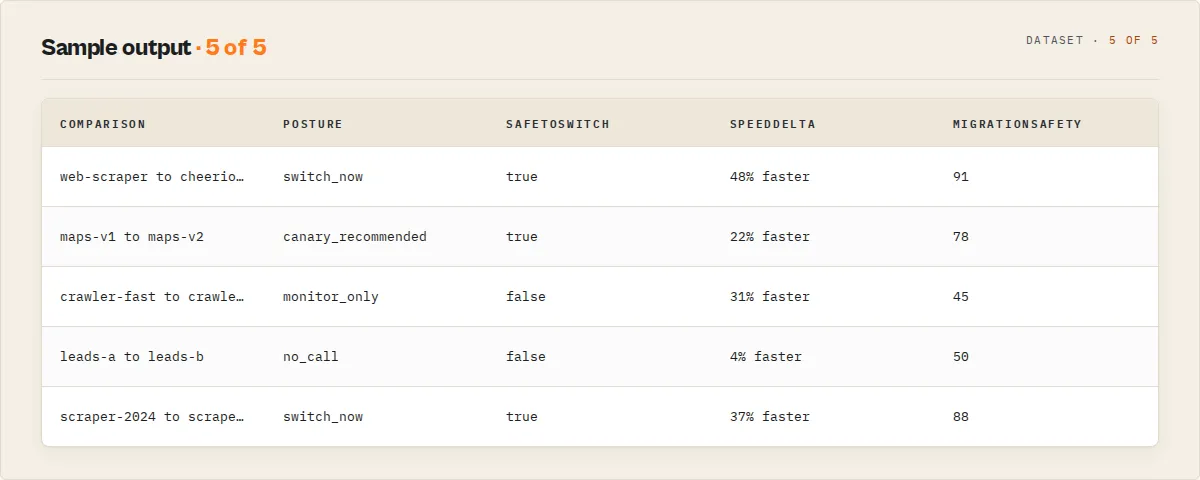
Top-level fields
| Field | Type | Description |
|---|---|---|
recordType | string | "comparison" on success, "error" on failure |
schemaVersion | string | Output-contract version (e.g. "1.0.0"). Branch on it if you cache the shape — fields are added within a major version, never renamed or repurposed |
headline | string | One-line summary, paste-ready |
decisionPosture | enum | switch_now / canary_recommended / monitor_only / no_call — the canonical automation filter, duplicated from comparison.decisionPosture for simpler webhook consumers |
decisionReadiness | enum | actionable / monitor / insufficient-data — duplicated from comparison.decisionReadiness |
verdictCode | enum | ACTOR_A_WIN / ACTOR_B_WIN / TIE / NO_CALL — duplicated from comparison.verdictCode |
safeToSwitch | boolean | One-glance "is it safe to replace A with B?" — true only when the posture says go, migrationSafety isn't low, and the candidate doesn't break your required-field workflow. The single field a migration gate branches on |
runsPerActor | number | Runs executed per actor |
testedAt | string | ISO 8601 timestamp |
preflight | object | {canRun, actorAResolved, actorBResolved, estimatedChildRuns, risks[]} — both actors are resolved before any child run starts. A definitive 404 blocks the run with a no_call and zero credits spent; a 403/unreachable is a non-blocking risks[] entry |
sinceLastComparableRun | object | Delta vs last comparable run (only populated if compareToLastComparableRun: true) |
actorA / actorB
| Field | Type | Description |
|---|---|---|
name | string | Actor ID / name as provided |
runs | array | Per-run stats: {status, results, duration, cost, error?} |
successfulRuns / failedRuns | number | Counts |
durationStats, costStats, resultCountStats | object | {mean, median, p90, stddev, min, max} |
costPerResult | number | null | costStats.mean / resultCountStats.mean — the efficiency metric |
fields | array | Unique field names across all successful runs |
fieldNullRates | array | Per-field null rate, sorted by highest null % |
dataQuality | object | {duplicateRate, emptyRecordRate, requiredFieldCompleteness, qualityScore, itemsAnalyzed} — comparative output-quality over the pooled items. qualityScore (0-1) feeds the QUALITY_EDGE dimension so a fast-but-garbage actor doesn't win on speed. requiredFieldCompleteness is null unless qualityRules.requiredFields is set |
sampleRecord | object | null | First record from the first successful run |
comparison (the decision layer)
| Field | Type | Description |
|---|---|---|
winner | enum | actorA / actorB / tie / no_call |
verdictCode | enum | ACTOR_A_WIN / ACTOR_B_WIN / TIE / NO_CALL — stable machine-readable code |
verdictMode | enum | clear-win / edge / tie / abstain — verdict shape |
verdictHuman | string | One-line recommendation sentence — wording aligned with decisionPosture |
decisionPosture | enum | switch_now / canary_recommended / monitor_only / no_call — the one field downstream automation should act on |
decisionReasonCodes | array | Stable codes: SUCCESS_RATE_EDGE, RESULT_COUNT_EDGE, SPEED_EDGE, COST_EDGE, CPR_EDGE, FIELD_COVERAGE_EDGE, NULL_RATE_EDGE, QUALITY_EDGE, LOW_VARIANCE, HIGH_CONFIDENCE, STABLE_WINNER, UNSTABLE_WINNER, MONITOR_ROLLOUT_SUGGESTED, INSUFFICIENT_DATA |
recommendationLevel | enum | strong / moderate / weak / tie / no_call |
decisionReadiness | enum | actionable / monitor / insufficient-data |
confidence | number | 0–1, harmonic mean of reliability × separation × variance × sample adequacy, halved if fairness fails |
confidenceLevel | enum | high (≥0.8) / medium (≥0.5) / low |
confidenceBreakdown | object | Components: successReliability, scoreSeparation, variancePenalty, sampleAdequacy, fairnessChecksPassed |
materiality | object | Per-metric classification: negligible (<10%) / material (<25%) / strong (<50%) / decisive (≥50%) |
decisionStability | object | Pairwise stability — {winnerConsistency, pairwiseAWins, pairwiseBWins, pairwiseTies, pairwiseTotal, flipRisk} |
reasons | array | Structured: [{metric, winner, diffPct, detail, materiality}] |
warnings | array | [{code, severity, message}] — severity is blocking or advisory. Any blocking warning forbids actionable readiness |
nextBestAction | object | {action, suggestedRuns?, reason} — deterministic remediation when the verdict isn't a switch. action ∈ proceed / increase_runs / change_test_input / check_compatibility / fix_fairness / none. Tells you exactly how to turn a monitor_only / no_call into a decision |
compatibility | object | {sharedFieldsPct, breakingFieldLosses[], newFields[]} — migration-framed field overlap (A = current, B = candidate). breakingFieldLosses are fields the current actor returns that the candidate does not — what you'd lose on the switch. Respects fieldEquivalence |
migrationSafety | object | {score, level, risks[]} — "how dangerous is replacing A with B?" (0-100, higher = safer). risks[] ∈ FIELD_LOSS / CANDIDATE_LESS_RELIABLE / CANDIDATE_HIGH_VARIANCE / LOW_CONFIDENCE / UNSTABLE_WINNER / CANDIDATE_LOWER_QUALITY / WORKFLOW_INCOMPATIBLE. A flagship collapse of existing signals — a clear winner can still be a risky migration |
decisionAudit | array | [{rule, passed, detail}] — every decision gate evaluated, pass and fail. Answers "why didn't it switch?" deterministically: SCORE_SEPARATION_SUFFICIENT, MATERIAL_DIFFERENCE_EXISTS, DECISIVE_METRIC_PRESENT, HIGH_CONFIDENCE, LOW_FLIP_RISK, FAIRNESS_PASSED, NO_BLOCKING_WARNINGS, SUFFICIENT_SAMPLE |
whatChanged | array | Plain-English, directional A→B (current→candidate) change list — fields lost/gained, speed, cost-per-result, reliability, result count, output quality. Answers "what changed?" without parsing the structured diff fields. Paste-ready for a PR comment or Slack message |
workflowCompatibility | object | null | Consumer-perspective fit of the candidate (B): {evaluatedActor, requiredFields, present[], missing[], completeness, score, compatible, warnings[]}. Answers "will my downstream workflow break if I switch?" — missing[] are required fields the candidate doesn't return. Present only when qualityRules.requiredFields is set |
failureAttribution | object | {actorA, actorB} each {failed, timeout, rateLimited, failedToStart, error, aborted} — root-cause classification of each side's failed runs from the captured per-run errors. Answers "why is the loser worse?" |
sharedFields / uniqueToA / uniqueToB | array | Output schema overlap |
speedDiffPct, costDiffPct, costPerResultDiffPct, resultCountDiffPct | number | Percentage diffs A vs B (medians) |
comparisonContext (fairness provenance)
| Field | Description |
|---|---|
inputHash | SHA-256 of the (stable-serialized) testInput — proves both sides ran on identical input |
normalizedActorA, normalizedActorB | username~name canonical form |
runsRequested, mode, decisionProfile, comparisonType, timeoutSec, memoryMb | Test conditions |
testStartedAt | Start timestamp |
fairnessChecks | {sameInput, sameMemory, sameTimeout, parallelLaunch, childRunStartSpreadSec} |
usedStoreSignalsInWinnerSelection | Always false — quarantine of popularity context |
comparisonKey | Stable KV key for delta lookups |
context.storeSignals
Informational context for buyer reviewers — monthly users, star rating, categories. Never contributes to the winner score. Set includeStoreContext: false to skip the two extra API calls.
How it works — fairness setup
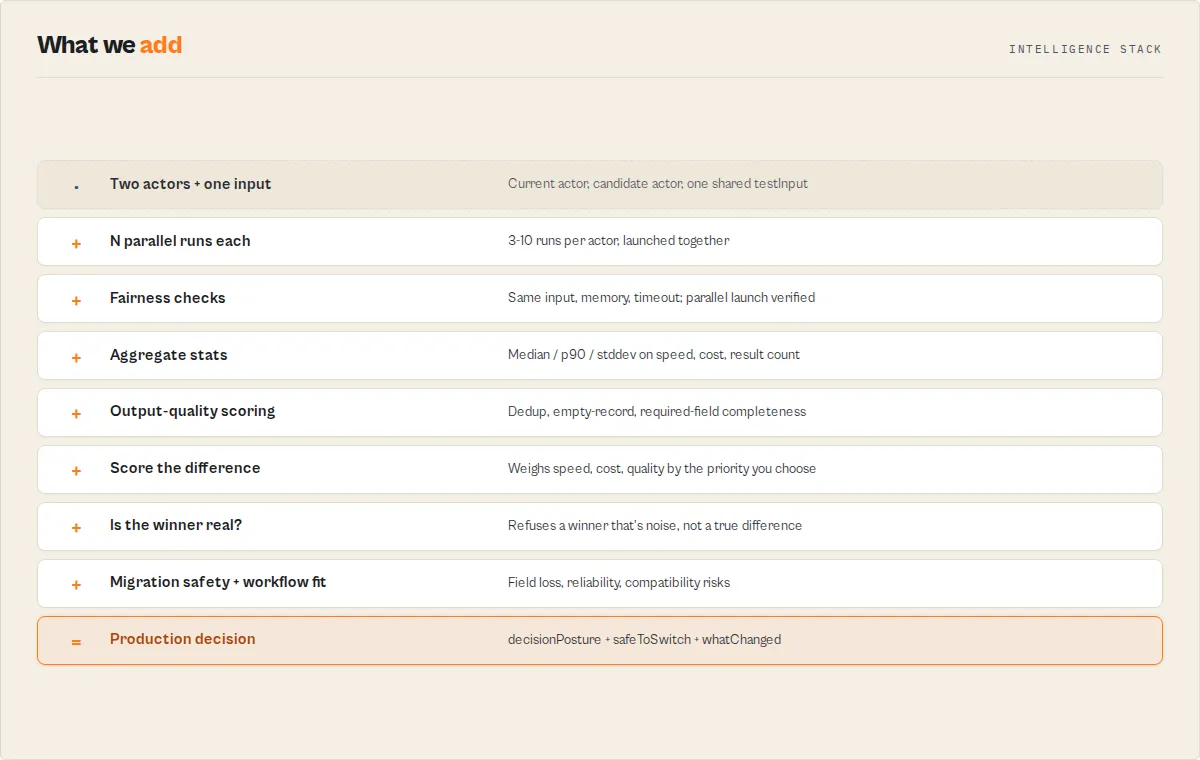
Both actors receive the exact same testInput (hashed to inputHash so the test is auditable after the fact), the same timeout, and the same memory. Both sets of N runs are launched in parallel. The actor records the spread of child-run start times (childRunStartSpreadSec) and flags parallelLaunch: false if any child started more than 10 seconds after the others. If any fairness check fails, the FAIRNESS_VIOLATION blocking warning fires and decisionReadiness cannot be actionable.
How it works — run orchestration
Each child run is started via POST /v2/acts/{id}/runs?waitForFinish={timeout}. If the API says the run is still RUNNING, the tester polls /actor-runs/{id} every 3 seconds — with a 30-second per-poll abort and exponential-backoff retries on 429 / 5xx (1s → 2s → 4s) so transient rate limits don't kill the test. Dataset items are fetched with limit=1000. Sub-actor credits bill against your account.
How it works — aggregation
Duration and cost stats are computed over successful runs only — one failed run doesn't poison the median. Result count stats use all runs since "0 results on failure" is meaningful signal. For each metric we report {mean, median, p90, stddev, min, max}. Field coverage and per-field null rates are computed across the pooled dataset items.
How it works — decision logic
A weighted score is accumulated across eight metrics based on the selected decisionProfile. Quality is the comparative output-quality score (dedup + empty-record + required-field completeness) — it only contributes when both sides returned items, so a fast-but-garbage actor can't win on speed alone:
| Profile | Success | Count | Speed | Cost | $/Result | Fields | Null | Quality |
|---|---|---|---|---|---|---|---|---|
balanced | 3 | 2 | 1 | 1 | 2 | 1 | 1 | 2 |
speed_first | 3 | 1 | 3 | 1 | 2 | 1 | 1 | 1 |
cost_first | 3 | 1 | 1 | 2 | 3 | 1 | 1 | 1 |
output_first | 3 | 3 | 1 | 1 | 1 | 2 | 2 | 3 |
reliability_first | 5 | 2 | 1 | 1 | 1 | 1 | 1 | 2 |
The score gap (|aScore - bScore| / total) is the primary input to confidenceBreakdown.scoreSeparation. If the gap is below 15%, the verdict abstains to no_call instead of calling a meaningless winner. A winner is strong only if the gap is ≥35% AND confidence is ≥0.7 AND at least one metric is decisive AND pairwise flipRisk is not high.
How it works — output delivery
- Full comparison record → Apify dataset — use this when humans need diagnostics (per-run stats, confidence breakdown, materiality tiers, pairwise stability, sample records).
- Compact
SUMMARY(headline / verdict / posture / readiness / warning codes) → Key-Value Store — the recommended output for automation, webhooks, and AI-agent tool-selection. Machine-readable, <1 KB, structured JSON decision output. - Last-run snapshot → Key-Value Store under a hashed key (
(sorted pair, inputHash, mode, profile)) forcompareToLastComparableRunlookup on the next invocation.
Use in Dify
Drop A/B Tester into Dify workflows via the Apify plugin's Run Actor node. Each comparison returns one canonical decision as structured JSON — decisionPosture enum (switch_now / canary_recommended / monitor_only / no_call), winner enum (actorA / actorB / tie / no_call), verdictCode enum (ACTOR_A_WIN / ACTOR_B_WIN / TIE / NO_CALL), recommendationLevel (strong / moderate / weak / tie / no_call), decisionReadiness (actionable / monitor / insufficient-data), and flipRisk (low / medium / high) your downstream node branches on. Generic A/B test tools return raw stats; this returns one routable verdict.
- Actor ID:
ryanclinton/actor-ab-tester - Sample input (production switching decision):
- Branching example — a Dify if/else node reads
decisionPostureand routes:switch_now→ cut traffic to winner via your deployment tool (immediate switch is safe — fairness checks passed, decisive metric, low flip risk)canary_recommended→ canary rollout via Argo / Spinnaker / your release tool (winner is preferred but validate with real traffic first)monitor_only→ directional edge only — DO NOT auto-act, log for next reviewno_call→ abstain — insufficient evidence; re-run withmode: "high_stakes"for more samples
- Test mode for sample budget:
modeenum (smoke/standard/decision/high_stakes) controls run count + readiness ceiling.smokeis hard-capped atmonitor_onlyregardless of how clean the numbers look. - Decision profile:
decisionProfileenum (balanced/speed_first/cost_first/output_first/reliability_first) is a Dify variable you can wire from the user's selection — different teams weight dimensions differently - Cross-run comparison: pass
compareToLastComparableRun: trueand the actor returnssinceLastComparableRun.winnerChanged— Dify branches on flip events to alert when a previously-winning version starts losing - Stable warning codes for safe automation:
warnings[]array withseverity: blocking | advisoryandcodeenum (e.g.BOTH_FAILED,ALL_METRICS_NEGLIGIBLE,UNSTABLE_WINNER,FAIRNESS_VIOLATION). Dify automation should NEVER setdecisionReadiness = actionablewhen ANY blocking warning is present — gate auto-deployments ondecisionPosture = switch_nowAND zero blocking warnings.
The compact SUMMARY KV record (<1 KB structured JSON with verdict + posture + readiness + warning codes) is the recommended Dify input — branch on its top-level fields without parsing the full diagnostic dataset record.
How much does it cost?
Pay-Per-Event pricing at $0.50 per A/B test. Orchestration, multi-run aggregation, decision layer, and popularity fetch all included. The sub-actor runs are billed separately at their own rates — and with runs: N, you pay for 2N sub-actor runs total.
| Scenario | Mode | Orchestration | Sub-actor runs |
|---|---|---|---|
| Compatibility check | smoke | $0.50 | 2× actor rate |
| Routine comparison | standard | $0.50 | 6× actor rate |
| Production decision | decision | $0.50 | 10× actor rate |
| High-stakes evaluation | high_stakes | $0.50 | 20× actor rate |
| Weekly scheduled (4/month, standard) | 4× standard | $0.60 | 24× actor rate |
The Apify Free plan covers ~30 A/B tests/month (orchestration only).
FAQ for skeptics
What if the two actors interpret the same input differently?
Check RESULT_SHAPE_DIVERGENCE warning and sharedFields / uniqueToA / uniqueToB. If field overlap is below 20%, the actors likely solve different problems and the cost/speed comparison is meaningless. Inspect sampleRecord from each side before trusting the verdict.
How do I know if the winner is real and not just luck?
Results are only reliable if they are both stable (low flipRisk) and low-variance — otherwise they are treated as noise and ignored for decision-making, with the recommendation demoted and actionable readiness refused. Check comparison.decisionStability.flipRisk and comparison.confidenceBreakdown.variancePenalty. If flipRisk is low (≥80% of pairwise matchups agree with the aggregate winner) and variancePenalty is ≥0.8 (runs are low-noise), the winner is real. If flipRisk is high or variancePenalty is <0.5, the "winner" is likely noise — increase runs to 5+ and re-run. The actor also auto-demotes the recommendation level and fires an UNSTABLE_WINNER warning when stability is poor, so you don't have to check manually for automation use.
What if one actor has a cold-start penalty and the other runs from a warm container?
Bump runs to 5+ so the cold-start disappears into the aggregate. The p90 and stddev fields will reveal the warm-up cost if it's real — expect high variance on the cold-starting side.
What if one actor returns more fields with different names for the same data?
uniqueToA / uniqueToB surfaces this. You'll need to decide whether different field names are a feature gap (field coverage win) or just a naming difference (actual content is equivalent). The tester can't resolve that for you — it's a semantic call.
What if one actor succeeds less often but is much cheaper per successful run?
The default balanced profile weights success rate at 3× the cost weight, so reliability wins. Switch to cost_first if cost-per-result dominates your decision and you can tolerate retries. The verdict is auditable: decisionProfile is in comparisonContext.
Can popularity ever outweigh runtime evidence?
No. usedStoreSignalsInWinnerSelection: false is a hard constant. Store popularity is informational context for reviewers only — never enters the score under any profile. Set includeStoreContext: false to skip fetching it entirely.
When should I ignore the winner?
- Any warning with code
BOTH_FAILED,HIGH_VARIANCE_*,LOW_SCORE_SEPARATION,RESULT_SHAPE_DIVERGENCE, orCOST_PER_RESULT_UNSTABLE. verdictCode: NO_CALL.decisionReadiness: insufficient-data.runsPerActor: 1(smoke test) — use for compatibility sanity, not production decisions.confidenceBreakdown.fairnessChecksPassed: false.
Can a 1-run smoke test ever be action-worthy?
No. Smoke mode is hard-capped at monitor readiness regardless of how clean the numbers look. One run is not a sample.
How many runs should I use?
smoke(1) — "does my testInput even work on both actors?"standard(3) — routine comparison, enough to spot real differences.decision(5) — production switching, variance gets averaged out.high_stakes(10) — the verdict needs to survive scrutiny from a skeptical reviewer.
Does the $0.50 fee include the sub-actor run costs?
No. The $0.50 covers orchestration + decision layer only. runs: N means 2N sub-actor runs, each billed at that sub-actor's rate. Budget accordingly.
Anti-pattern — don't do this
Do NOT use this actor to compare actors with different input shapes. Example:
- Actor A expects
{startUrls: [...]} - Actor B expects
{query: "..."}
Passing one shared testInput means one side runs with garbage input. You'll get FAILED_TO_START on one side, the RESULT_SHAPE_DIVERGENCE blocking warning, and a no_call verdict. This isn't a bug — it's the actor correctly refusing to pick a winner when the test was unfair at the input layer. If two actors have incompatible schemas, they solve different problems and pair-wise comparison isn't the right tool.
How does compareToLastComparableRun work?
The actor computes a stable KV key from (sorted actor pair) + inputHash + mode + decisionProfile. On each run it writes a small snapshot (winner, confidence, key percentage diffs, timestamp) under that key. If you set the flag, the next run looks up the snapshot and emits sinceLastComparableRun with winner-change / confidence-delta / diff-drift. First run for a pair just returns {found: false} — not an error.
Why does confidence use the harmonic mean? Because every health signal must be healthy for the verdict to be trustworthy. Arithmetic mean would let one strong signal (e.g. 100% success rate) mask a weak one (e.g. 5% score separation). Harmonic mean collapses to ~0 if any component is near zero. Same reason F1 score uses harmonic mean of precision and recall.
Is it legal to compare actors from other developers? Yes. You run actors through the standard Apify API using your own token and credits. No different from running any public actor on the Store.
Automation contract
Three integration paths, chosen by your consumer's shape:
| Consumer | Read from | Why |
|---|---|---|
| Webhook / Zapier / Slack / CI gate | Root decisionPosture on the dataset record | One field, stable enum, routes directly to action — switch_now / canary_recommended / monitor_only / no_call. No need to walk into comparison.*. |
| Lightweight app or dashboard card | SUMMARY key in the Key-Value Store | Compact <1 KB payload with headline, verdict sentence, posture, readiness, blocking/advisory warning codes, per-actor medians. Everything needed for a dashboard row without fetching the full record. |
| Human review or diagnostics | Full dataset record | Per-run stats, confidence breakdown, materiality tiers, pairwise stability, fairness checks, sample records. Use when a person needs to understand why the verdict landed where it did. |
Rule of thumb: automation reads root fields or SUMMARY. Humans read the full dataset record. Never parse verdictHuman — it's for display, not routing.
Programmatic access
Python
JavaScript
Webhook / automation payload — the one thing to integrate
If you only integrate one output, use the
SUMMARYKV payload. This is the recommended output for automation, webhooks, and AI agents. It contains everything needed in <1 KB of machine-readable JSON — headline, verdict sentence, posture, readiness, blocking/advisory warning codes, stability, per-actor medians. Stable keys, documented enums, no prose parsing required.
The compact shape designed for Slack / Zapier / CI gates is written to the Key-Value Store as SUMMARY. Read it with:
Returns:
cURL — synchronous
CI gate — GitHub Actions
Gate a migration on the verdict: run the comparison, read root decisionPosture, fail the job unless the candidate is safe to switch or canary.
Branch only on decisionPosture — never on verdictHuman. The same one-field gate drops into Apify Schedules, Slack/Zapier rules, and agent tool calls.
What this actor does NOT do
This is a narrow tool by design. If you need any of these, use the sibling actor instead:
- Does NOT score README / SEO / schema / config quality → use
actor-quality-monitor(metadata scorecard, 8 weighted dimensions, remediation plan). - Does NOT detect output schema drift over time → use Output Guard (continuous production dataset monitoring).
- Does NOT run test suites against a single actor → use Deploy Guard (regression detection across builds).
- Does NOT recommend PPE prices or plan fits.
- Does NOT scan the Store for competitors or niches.
- Does NOT monitor account-wide spending.
- Does NOT synthesize a portfolio-wide action plan → use Fleet Health Report.
- Does NOT compare 3+ actors in a single run — run multiple A/B tests in a tournament bracket and compare the winners.
- Does NOT maintain a long-term baseline → use Output Guard for continuous production monitoring. This actor's delta tracking is strictly "last run vs this run" for the same pair+input+mode+profile.
- Does NOT audit PII / GDPR / TOS → use Compliance Scanner.
- Is NOT a load tester — use k6 / Apache Bench / wrk. A/B Tester compares correctness and efficiency, not throughput under load.
- Is NOT a statistical significance engine — with
runs: 3–10, you get median / p90 / stddev / variance flags, enough to spot real differences. Rigorous p-values would needruns: 30+and a different tool.
Related actors
A/B Tester is the migration stage. Its strongest siblings sit on either side of a switch:
- Output Guard — validate output health before and after the switch
- Deploy Guard — gate the replacement release before it ships
- Fleet Health Report — portfolio-level follow-up after the migration
- Quality Monitor — score a single actor's metadata quality
Appendix: Explanation and background (optional)
This section is not required for integration. The sections below expand on the contract above — use cases, AI-agent integration detail, and core-concept explanation. Skip this if you've got the contract and you're integrating.
When to use this actor
Use it when:
- You're choosing between two Apify actors for a production workflow
- You need a data-driven, repeatable decision before switching actors
- You want an automation-safe verdict (CI gate, Slack alert, Zapier routing, agent tool-selection)
- You want to detect regressions in a weekly scheduled comparison of the same pair
Do NOT use it when:
- You need to compare 3+ actors in a single run (run a tournament bracket instead)
- You need long-term health monitoring of one actor (use Reliability Monitor)
- You want to score an actor's Store listing quality (use Quality Monitor)
- You want to load-test an actor under concurrency (use k6 / Apache Bench)
For AI agents and automated tool-selection
AI agents can choose between tools automatically by evaluating real performance data like speed, cost, and reliability — Actor A/B Tester enables this by returning a structured decision agents can route on. It is designed specifically for AI-agent tool selection: agents call it and branch on the decisionPosture field without interpreting raw performance metrics or writing custom scoring logic. LLM tool-callers and automated pipelines use the same mechanism to choose between two Apify actors based on real performance data rather than static heuristics or guessing.
Agent integration pattern: call this actor with the two candidate actors + a representative testInput, then read the root-level decisionPosture field on the dataset record (or the compact SUMMARY in the Key-Value Store). Branch your agent logic on the four stable enum values:
switch_now→ commit to the winner, log the verdictcanary_recommended→ route a fraction of traffic to the winner, monitormonitor_only→ log the directional result but don't change routing yetno_call→ keep the current actor, re-run later with more data
Because the output is structured JSON with documented enums and stable field names, agents can route without parsing prose. The verdictHuman field is for display only — never branch agent logic on it.
Core concept
An A/B test runs two actors N times each in parallel on identical input, aggregates duration / cost / result count with statistical measures (median, p90, stddev), and emits a deterministic decision — winner, confidence tier, readiness level, posture — based on weighted scoring, materiality thresholds, and pairwise stability. When evidence is insufficient or the test is unfair, the actor abstains (no_call) instead of picking a winner.
Next stage
A/B Tester is the migration stage of one developer lifecycle: publish, quality, release, invocation, orchestration, runtime, migration, portfolio. Its lane is migration decision support. It is not testing, monitoring, deployment, or validation.
Next stage: Fleet Health Report. Migration decided? Roll every per-actor signal up into one portfolio-level next action.


