

Actor Test Runner — Validate Inputs, Outputs & Error Handling
Pricing
$350.00 / 1,000 test suite runs
Actor Test Runner — Validate Inputs, Outputs & Error Handling
Actor Test Runner. Available on the Apify Store with pay-per-event pricing.
Pricing
$350.00 / 1,000 test suite runs
Rating
0.0
(0)
Developer

Ryan Clinton
Maintained by CommunityActor stats
0
Bookmarked
4
Total users
1
Monthly active users
2 months ago
Last modified
Categories
Share
Deploy Guard — Release Intelligence & Regression Detection
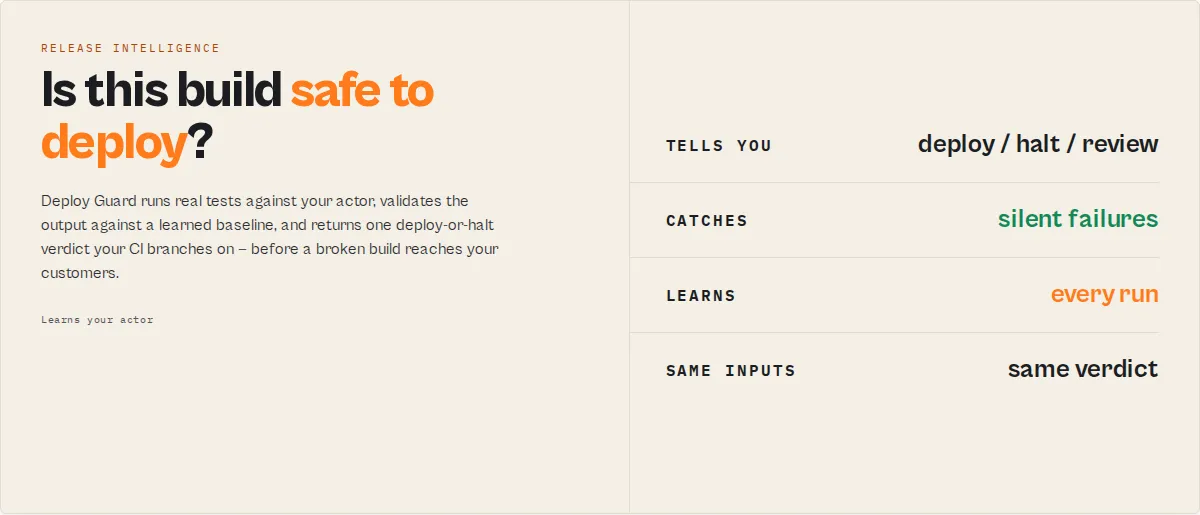
Approve the release, or block it. Most scraper bugs don't crash. They quietly return the wrong data. Deploy Guard learns what "normal" looks like for your actor and stops the release when that changes.
Traditional testing asks "did this run pass?" Deploy Guard asks "does this build still behave like the actor you've trusted for months?" — it evaluates this run against every run that came before it.
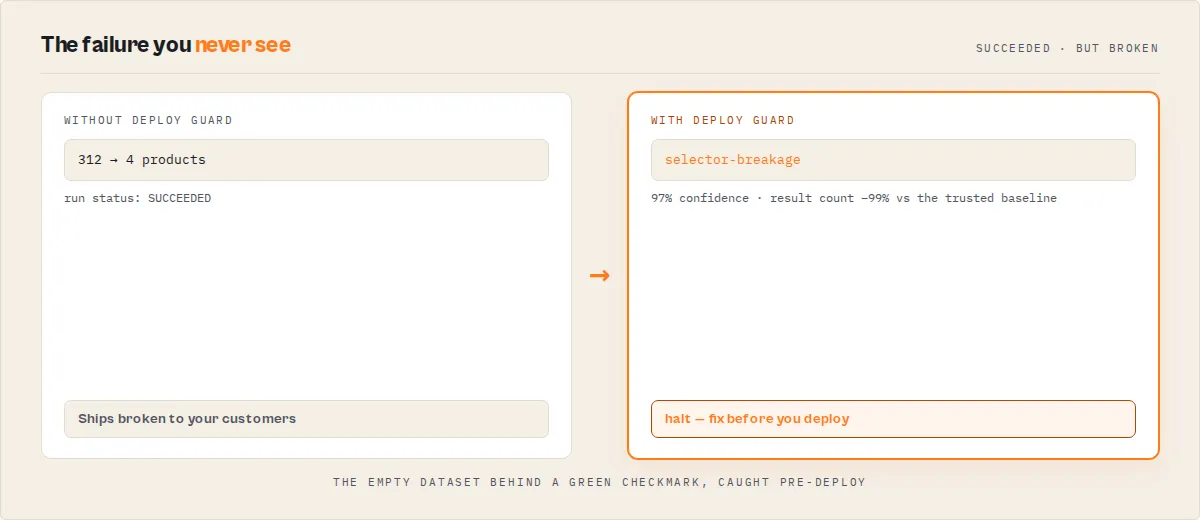
Your actor can finish with status: SUCCEEDED and still return zero useful data — a selector breaks, a login wall appears, the homepage gets redesigned, and the run "passes" while the dataset quietly empties out. Deploy Guard catches that before your customers do.
What Deploy Guard catches
- Silent failures —
SUCCEEDEDruns that returned empty or broken output - Selector breakage — result count collapses, fields disappear after a site redesign
- Bot protection — CAPTCHA / Cloudflare / 403 challenges
- Login walls — 401 / expired credentials
- Pagination bugs — result count quietly drops
- Missing & empty fields — a required field vanishes or goes all-null
- Field type changes —
priceflips from number to string - Schema drift — the output shape changed vs the last good run
- Runtime explosions — the build got 2× slower or more expensive to run
- Partial scraping — some results, but fewer than the baseline
It doesn't just say "failed" — it fingerprints why. Selector Breakage (97%) → update CSS selectors. Bot Protection (94%) → enable residential proxies. Deterministic root-cause diagnosis, no LLM. (Full taxonomy in the Failure fingerprints section below.)
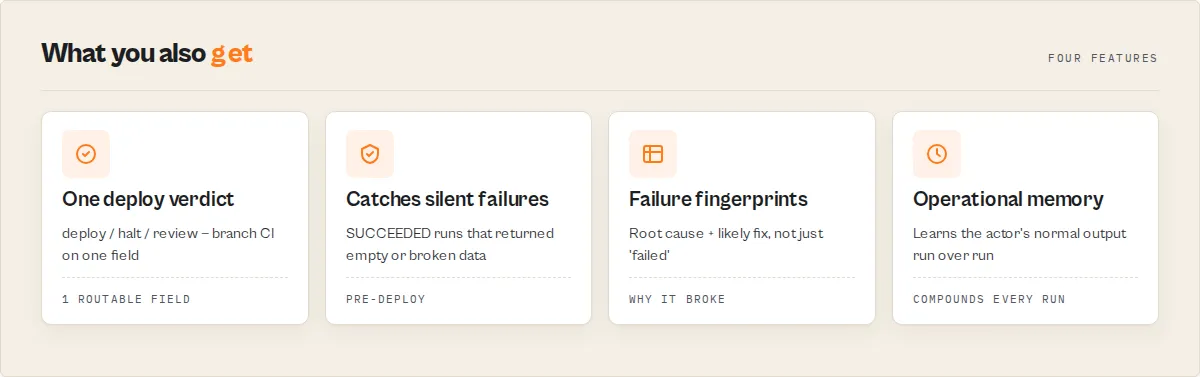
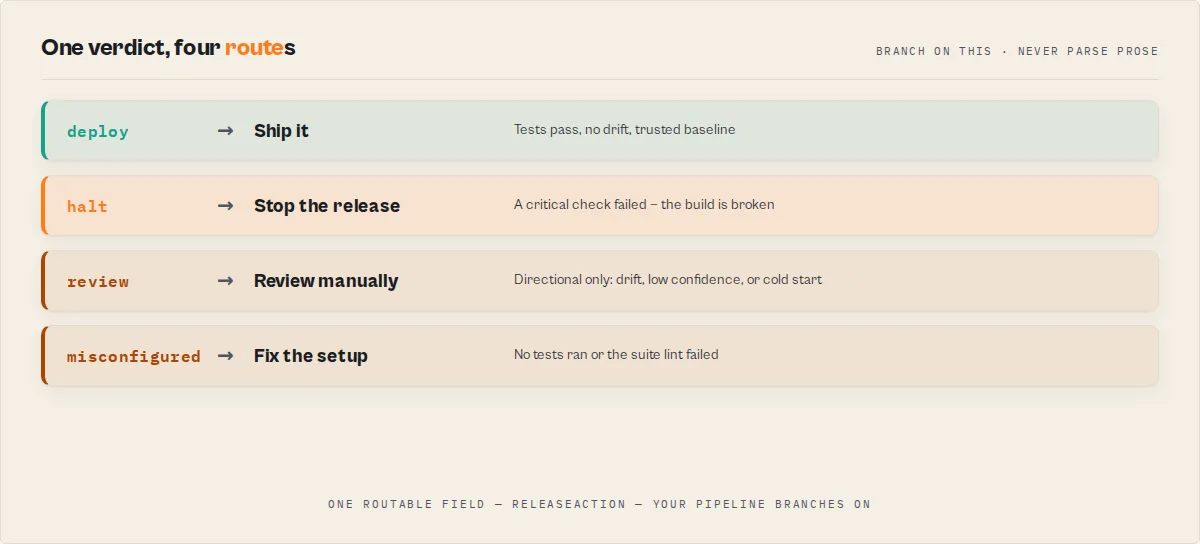
Deploy Guard is the release safety layer for Apify actors — the pre-deploy gate that stops a broken build from reaching production. Point it at an actor and it generates a test suite for you (zero-config Automatic Test Discovery), runs it against the candidate build, validates the output, compares it against a baseline, and returns one unambiguous releaseAction (deploy / halt / review / misconfigured) plus a routable decision enum and confidence score that CI/CD pipelines and agents branch on without parsing prose. It converts "I think the new build works" into a machine-readable deploy-or-halt verdict.
Release Intelligence is the engine underneath: it learns how your actor behaves run over run, builds a trusted baseline, detects regressions and drift, tracks confidence and stability over time, and explains every deploy decision with deterministic evidence. Every field exists to answer one question — should I trust this release?
Run it on a schedule and it accumulates releaseMemory — the actor's operational record (first seen, total runs, availability, regression count, average runtime / results / compute, and the fields it has learned are critical). That memory compounds with every run: after 100 runs Deploy Guard knows the actor better than a single test pass ever could, and a fresh tool starting today can't reproduce it.
Who it's for: Apify developers who push builds on a schedule, CI/CD operators who gate deploys on a verdict, and LLM agent tool calls that need a machine-readable answer — not a dashboard.
Automatically run tests and block deployment if your scraper or Apify actor breaks.
Ready-to-run examples
One-click tasks — each runs Deploy Guard with a preset, no setup:
- Is this Apify actor safe to deploy? — zero-config auto-discovery: probe an actor, generate the contract, get a verdict.
- Pre-push CI gate for an Apify actor build — a fast canary check that exits
deploy/haltfor your pipeline. - Validate an API actor's output before release — check response structure + timing before you ship.
- Pre-publish Store readiness check — confirm an actor produces output and stays within a performance guardrail.
- Catch silent scraper failures and empty datasets — point it at an actor that returns nothing and watch it block the release.
- Detect scraper regressions before deployment — compare each build against a trusted baseline and catch drift before it ships.
- Why is my first actor test run inconclusive? — a passing first run holds at
monitor, notdeploy, until the baseline earns trust.
See all ready-to-run examples →
What it does — in plain language
Automatically run tests and block deployment if your scraper or Apify actor breaks.
Deploy Guard runs automated test suites on an Apify actor and returns a deterministic decision (act_now, monitor, or ignore) that you can use to deploy or block a release.
- Automatically block a deployment if your Apify actor breaks. Deploy Guard returns a machine-readable
decisionfield (act_now/monitor/ignore) you can branch on directly in your CI pipeline to fail the build. - Fail your CI pipeline automatically if your actor output is invalid. Any failing assertion (min results, required fields, regex, duration, uniqueness) surfaces in
verdictReasonCodesand flips the verdict toblock. - Use this to stop bad scraper builds from being deployed. Pre-push, scheduled, or on-demand — Deploy Guard catches regressions before they reach production users.
- Check if your Apify actor is safe to deploy. Deploy Guard answers one question — "Is this Apify actor build safe to deploy?" — and returns a deterministic yes/no decision for CI/CD gating.
- Automatically detect regressions in your scraper. Deploy Guard compares each run to a stored baseline and flags breaking changes, missing fields, null-rate shifts, drift, and flaky tests.
- A testing tool for Apify actors that runs automated test suites. Presets cover common shapes (canary, scraper-smoke, api-actor, contact-scraper, ecommerce-quality, store-readiness); custom test cases handle the rest.
- Designed for AI agents to decide whether to deploy or block a build. The output is a structured, additive-only enum — an LLM agent reads
decision+decisionDrivers[]and acts without parsing prose. - Check if your code or Apify actor is safe to deploy. The same pattern works whether you're gating an actor build, a data-pipeline change, or any job that ends in a dataset assertion.
- Automatically test Apify actors by running test suites and validating their output. Presets, custom test cases, and parameterized templates all run through the same
Actor.call()→checkAssertions()→ decision pipeline. - Use this in CI/CD pipelines to automatically deploy or block releases. Parse
decisionfrom the synchronous run result; exit non-zero unless it'sact_now+status: pass. - Run automated tests and decide whether to deploy or block a build. Deploy Guard is the decision layer — it turns raw test output into a single enum your pipeline can branch on.
- Stop broken builds from being deployed. The release gate short-circuits on
criticaltest failures, breaking drift, or cold-start;decisionbecomesmonitororblockautomatically. - Turn test results into a deploy-or-block decision in CI/CD. Raw assertion output gets compressed into one
decisionenum + one confidence score — your pipeline never has to reason about individual test failures. - Catch broken builds before they reach production. Pre-push, baseline-aware, drift-detecting — Deploy Guard surfaces the regression before a customer-facing run does.
How it works in 4 steps
- Run test cases against the target Apify actor via
Actor.call() - Validate output against assertions (min/max results, required fields, field types, regex, duration, uniqueness)
- Compare against baseline for drift, flakiness, and trust-trend signals (when
enableBaseline: true) - Return a deploy/block decision —
act_now/monitor/ignoreplus confidence score, stable verdict codes, and a priority-ranked remediation list
Tool Contract (LLM-first)
When to use this tool
Deploy Guard runs automated test suites on an Apify actor and returns a deterministic decision (act_now, monitor, or ignore) that you can use to deploy or block a release. Reach for it when:
- "Is this actor build safe to deploy?" → run with
preset: canaryor a customtestCases[]array, checkdecision - "Gate my CI/CD on a deterministic release verdict" → call from GitHub Actions / GitLab CI / Jenkins, exit non-zero unless
decision === 'act_now' && status === 'pass' - "Detect regressions before publishing a new build" → run with
enableBaseline: trueon a schedule, readdriftSeverity.breaking[]andtrendSignals - "Surface release health in a Slack channel" → post
statusHeadlineoroneLine, colour bydecision - "Let an LLM agent decide whether to promote a build" → the agent reads
decision+decisionDrivers[]+decisionReason(one-line summary) and acts
Do NOT use this to: score Store-readiness / README quality / agent-readiness (that's Quality Monitor), compare two actor versions (use A/B Tester), monitor production datasets (use Output Guard).
5-second read — decision field
decision | What it means | What automation should do |
|---|---|---|
act_now | Verdict is trusted (pass or block) with medium+ confidence AND a trusted baseline | Deploy (on pass) or halt the pipeline (on block). Safe to fire Slack/PagerDuty/webhook. |
monitor | Cold-start, low confidence, or a warn verdict | Do NOT auto-deploy. Notify a human reviewer. |
ignore | No tests were executed | Misconfiguration — no preset and no custom test cases. Investigate input. |
Cold-start guarantee: without a trusted baseline (first run, or baseline disabled), decision is never act_now. The confidence score is capped at 70 and confidenceFactorCodes carries cold_start_cap.
Stable machine contract vs illustrative copy
Deploy Guard separates what is guaranteed stable for automation from what's human-facing prose.
Stable (additive-only within a major version — safe to branch on):
decisionenum:act_now/monitor/ignoreconfidenceLevelenum:high/medium/lowstatusenum:pass/warn/blockverdictReasonCodes[]— additive enum (documented below)confidenceFactorCodes[]— additive enum (documented below; includeslow_suite_coveragewhen suiteCoverage.score < 60)decisionDrivers[]— ranked subset of the above (top 3, impact-ordered)scoreBreakdown.deductions[].code— additive enum (CRITICAL_TEST_FAILURE,WARNING_TEST_FAILURE,BASELINE_DRIFT_BREAKING,BASELINE_DRIFT_NONBREAKING,LOW_SAMPLE_SIZE,SMALL_HISTORY,LOW_SUITE_COVERAGE,FLAKY_TEST)suiteLint.statusenum:'pass' | 'warn' | 'fail'suiteLint.issues[].severityenum:'error' | 'warning' | 'info'suiteLint.issues[].code— additive enum (NO_TESTS_SUPPLIED,SINGLE_INPUT_VARIANT,NO_DURATION_GUARD,NO_CRITICAL_CHECKS,SINGLE_TEST_BUT_CI_GATING_HINT)trendSignals[]— additive-only enum (known entries:confidence_regression_fast/_moderate/_slow,confidence_improving_fast/_moderate/_slow,flaky_tests_present,flakiness_clean,breaking_drift_detected,schema_expanding_noncritical,execution_fast_all_tests,release_verdict_regressed_*,release_verdict_improved_*)driftSeveritytiers:breaking/nonBreaking/informational/expectedfleetSignals[].code— additive enum (documented in dataset schema)confidenceBreakdownsub-bands: samehigh/medium/lowenumcontext.progressenum:cold-start/emerging/developing/matureremediation[].typeenum:schema_drift/assertion_failure/flaky_test/low_coverage/missing_baseline/suite_design- Dataset field names + types (declared in
dataset_schema.json)
Illustrative only — format may evolve, do NOT parse:
decisionReason,statusHeadline,oneLine,summary,explanationreleaseDecision.recommendation,releaseDecision.reason- Status messages (
setStatusMessage) - Log lines
recommendations[]strings
If you need to react to something the prose contains, look for a machine code instead.
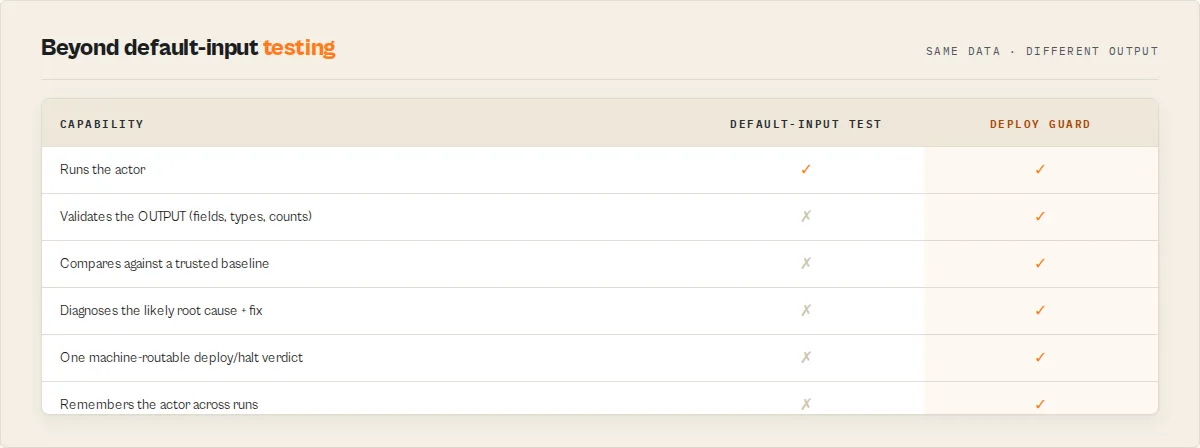
Why this beats Apify's daily default-input test
Apify's built-in default-input test runs your actor with {} once a day and flips it to UNDER_MAINTENANCE after 3 consecutive failures. That's a single binary signal — no assertion detail, no drift, no confidence score, no per-field forensics, no CI hook. Deploy Guard runs a full assertion suite against arbitrary inputs, compares against a stored baseline, emits a routable decision tag, produces GitHub/HTML/JSON reports, and calibrates confidence over time. Default-input test is the floor. Deploy Guard is the gate.
How it works
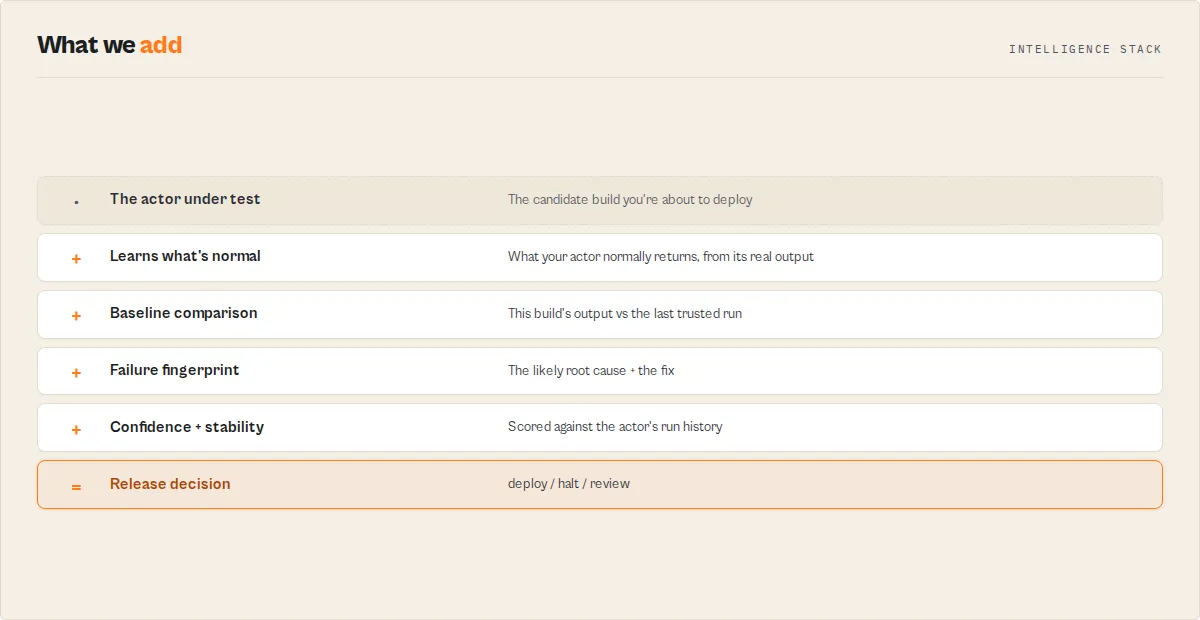
- You call Deploy Guard with a target actor ID and either a preset (e.g.
canary) or an array of custom test cases - For each test case, Deploy Guard runs the target actor via
Actor.call()with the test's input, memory, and timeout - Dataset items from the child run are validated against assertions (min/max results, required fields, field types, regex patterns, duration limits, uniqueness, ranges)
- With
enableBaseline: true, Deploy Guard compares the run's field schema against a stored baseline — flagging new/missing fields, type changes, null-rate shifts, and test flakiness - The release decision is derived from: critical failures, warning failures, drift significance, trust trend, confidence factors
- The
decisionscalar is computed from verdict + confidence level + baseline trust, then emitted alongside stable machine codes
One dataset item per run (the TestSuiteReport), plus three records in the default key-value store: SUMMARY (JSON, flattened decision layer), GITHUB_SUMMARY (Markdown, text/markdown), and HTML_REPORT (HTML, text/html).
Zero-config: Automatic Test Discovery
The default mode (preset: "auto") writes no test suite. Point it at an actor and it probes the target once, detects what kind of actor it is and which fields it actually returns, and generates a contract test from that real output — then runs it. The probe run is the test run, so auto mode costs one target run, not two.
The generated contract is returned in generatedSuite (detected type + required fields + thresholds) — copy it into testCases to lock the contract for future runs. Auto detects: contact-scraper, ecommerce, scraper, api-actor, or unknown.
Release Memory — every run makes it smarter
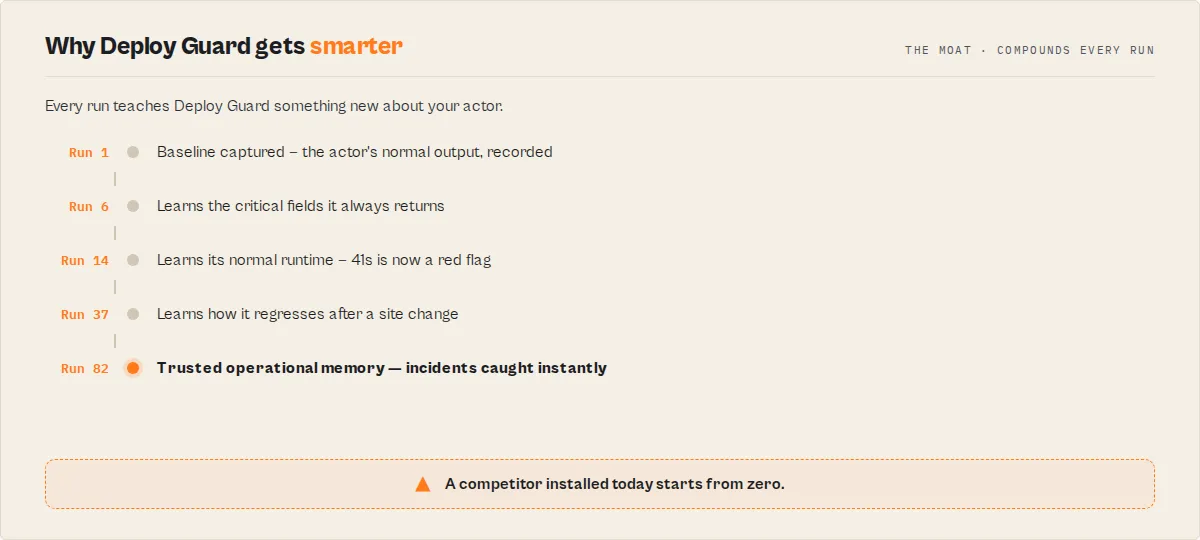
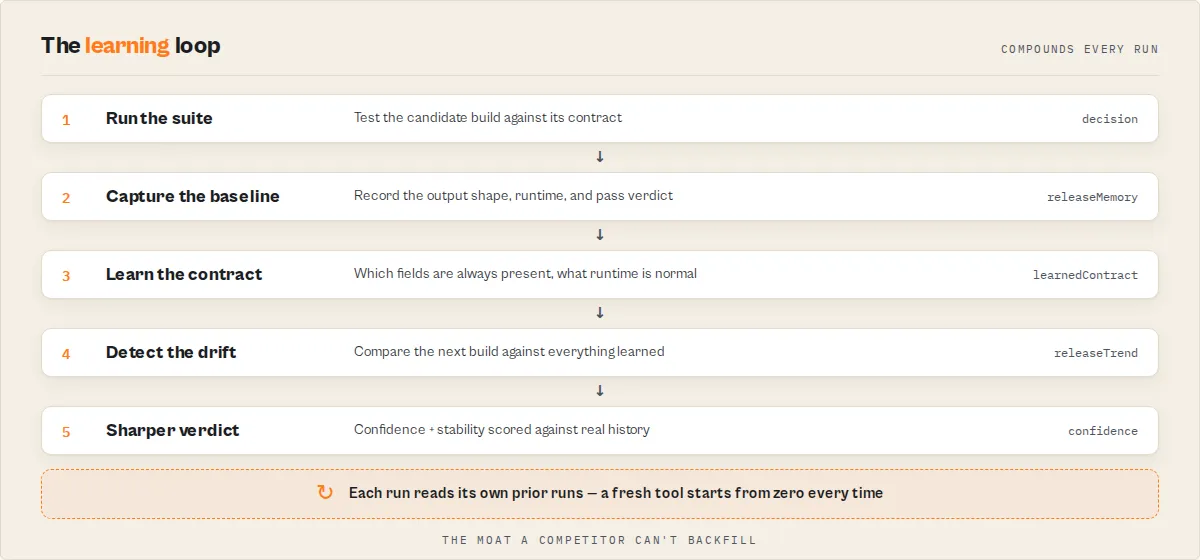
Run Deploy Guard on a schedule and it stops being a one-shot tester and becomes the actor's operational memory. Each run teaches it something the last one didn't:
That history is returned as releaseMemory and it compounds: availability, regression count, learned-critical fields, a per-field learnedContract (price always / rating optional), maintenancePressure (descriptive, not a forecast), and lastIncident with recovery. After 100 runs Deploy Guard knows the actor better than any single test pass could — and a tool starting today can't reproduce that history. It's the moat.
Presets
Prefer a pre-built suite? Pick a preset, or write custom test cases — both can run together. (Custom testCases always override auto.)
| Preset | Best for | What it runs |
|---|---|---|
auto (default) | Zero-config — any actor | Probes the target, generates a contract from its real output, runs it |
canary | Pre-push confidence check | Single fast test with default input, under 10 seconds |
scraper-smoke | Basic crawler health | Default input, checks results exist, 120s timeout |
api-actor | API wrapper validation | Default input, response structure + timing checks |
contact-scraper | Email extractors | Email format regex, domain validation, richness checks |
ecommerce-quality | Product scrapers | Price is number ≥0, URL is https, title non-empty, unique URLs |
store-readiness | Pre-publish audit | Default input produces output, performance guardrail (120s) |
When both a preset and testCases are supplied, Deploy Guard runs both. Total child runs = preset test count + custom test count.
Input schema — the 5 inputs that matter
targetActorId(required) —username/actor-nameor the raw actor IDpreset—auto(default — zero-config discovery) or one of the 6 named presets above; ignored when you supply your owntestCasestestCases— array of{ name, input, assertions, expectedToFail?, schemaContract? }enableBaseline— opt into baseline + drift + flakiness + trust trend; activates the cold-start → emerging → developing → mature maturity progressionbaselinePolicy— make baseline trust explicit and tunable:{ "minRunsForTrusted": 3 }requires 3 prior runs before the verdict can graduate toact_now(default 1 — trusted from the second run);{ "maxBaselineAgeHours": 168 }treats a baseline older than 7 days as cold-start so a stale baseline never rubber-stamps a deploytimeout— seconds per test (default 300, max 3600); each child run is wrapped in a wall-clock guard attimeout + 60s
Also supported: parameterizedTestCases for {{placeholder}} templating across parameter sets, memory (MB per child run, default 512), maxSampleItems (default 1000, max 10000 for full-scan mode), fieldImportanceProfile for per-field severity overrides (drives criticalityImpact and driftSeverity tiering).
Assertion reference: minResults, maxResults, maxDuration, requiredFields[], fieldTypes{field: 'string'|'number'|'boolean'|'array'|'object'}, noEmptyFields[], fieldPatterns{field: regex}, fieldRanges{field: {min, max}}, uniqueFields[], severity: 'critical'|'warning'.
Waivers + expected instability. Real CI pipelines need controlled exceptions without silently hiding regressions:
- Per test case:
expectedFlaky: true(test is known non-deterministic; don't weight toward flakiness penalty),allowedDriftFields: ["badgeText"](tolerate drift on listed fields),temporaryWaiverUntil: "2026-05-15T00:00:00.000Z"(scoped waiver with expiry),waiverReason: "site rollout in progress"(audit trail). - Global: top-level
waivers: [{ testName, allowedDriftFields, temporaryWaiverUntil, reason }]mirrors the same shape, applied by test name. Expired waivers are ignored automatically. - Effect: fields matched by an active waiver land in
driftSeverity.expected[]instead ofbreaking/nonBreaking, so the decision engine doesn't punish intentional change.
Output — decision layer first
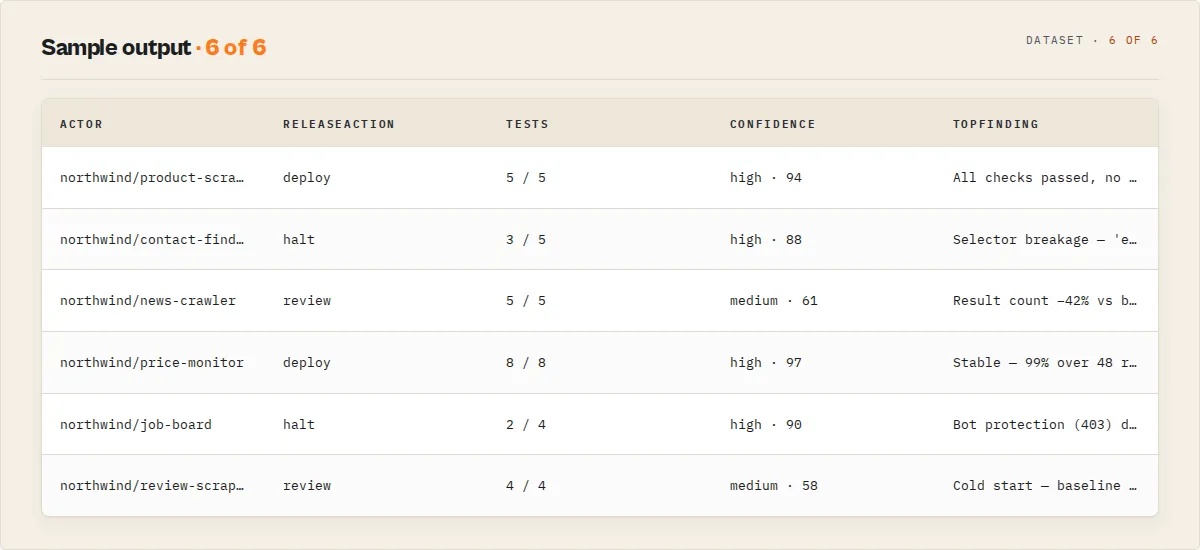
Every run emits a single TestSuiteReport to the default dataset. Read the decision-layer fields first.
Decision layer (machine-routable — branch on these)
| Field | Type | Description |
|---|---|---|
agentContract | object | Universal suite routing surface. agentContract.recommendedAction ('act_now'|'monitor'|'ignore') is the one identically-named field present on every actor in this suite — an agent, webhook, or CI gate branches on it regardless of which actor ran. Here it mirrors decision. |
schemaVersion | string | Output-shape contract version (semver). Minor bumps are additive; a major bump means a breaking rename/removal. Pin to it so chained consumers stay compatible across releases. |
releaseAction | 'deploy'|'halt'|'review'|'misconfigured' | Unambiguous release verb — collapses the (decision, status) pair so a CI gate never has to reason that act_now means deploy on pass but halt on block. deploy = ship it. halt = stop the release. review = a human should look (never auto-act). misconfigured = no tests ran / suite lint failed. Derived deterministically; decision stays the canonical enum. |
decision | 'act_now'|'monitor'|'ignore' | Routable decision tag. Never parse prose — branch on this (or on releaseAction for a one-field action verb). |
decisionReason | string | One-line plain-language justification. Usable in logs, alerts, audit trails. |
decisionDrivers | string[] | Top 2–3 stable codes ranked by impact on the final decision — surface these in CI logs and Slack alerts. |
confidenceLevel | 'high'|'medium'|'low' | Banded from score: high ≥75, medium ≥50, low <50. |
confidenceBreakdown | object | Sub-bands: executionConfidence / schemaConfidence / historyConfidence / suiteDesignConfidence, each high/medium/low. Tells you why confidence is what it is. |
confidenceFactorCodes | string[] | Stable codes explaining the confidence score. Additive-only enum. |
verdictReasonCodes | string[] | Stable codes behind the pass/warn/block verdict. Additive-only enum. |
statusHeadline | string | Human-readable one-liner (e.g. SAFE TO DEPLOY — 5/5 passed (high confidence)). |
oneLine | string | Actor-name-prefixed summary for Slack, email subjects, agent summaries. |
context | object | { progress, progressMessage, hasTrustedBaseline, runCount } — learning maturity. |
Explainability layer (read these to understand why the decision landed)
| Field | Type | Description |
|---|---|---|
scoreBreakdown | object | Auditable scoring — { startingScore: 100, deductions[], caps[], finalScore }. Each deduction carries a code, points, count, and reason. Same inputs always produce the same breakdown. |
remediation | RemediationItem[] | Priority-ranked fix cards. Each has whyItMatters + suggestedFix + ownerHint + affectedFields. Read top-down to fix highest-impact issues first. |
suiteLint | object | Pre-execution lint of the test suite definition itself — catches NO_TESTS_SUPPLIED, SINGLE_INPUT_VARIANT, NO_DURATION_GUARD, NO_CRITICAL_CHECKS, SINGLE_TEST_BUT_CI_GATING_HINT. Fails fast on suite design problems before burning compute. |
suiteCoverage | object | { score, assertionTypesUsed[], blindSpots[], testCount, hasSchemaContract }. Guards against false confidence from a thin suite. |
driftSeverity | object | Drift findings tiered: breaking / nonBreaking / informational / expected. Breaking = required or critical-importance field removed or type-changed. Expected = field listed in allowedDriftFields or a test waiver. |
criticalityImpact | object | { criticalFieldsHealthy, criticalFieldFailures, nonCriticalFieldFailures, affectedCriticalFields[] }. Derived from fieldImportanceProfile. |
regressionSummary | object | { direction: 'better'|'worse'|'stable', velocity, confidence }. Null until ≥2 prior confidence snapshots exist. |
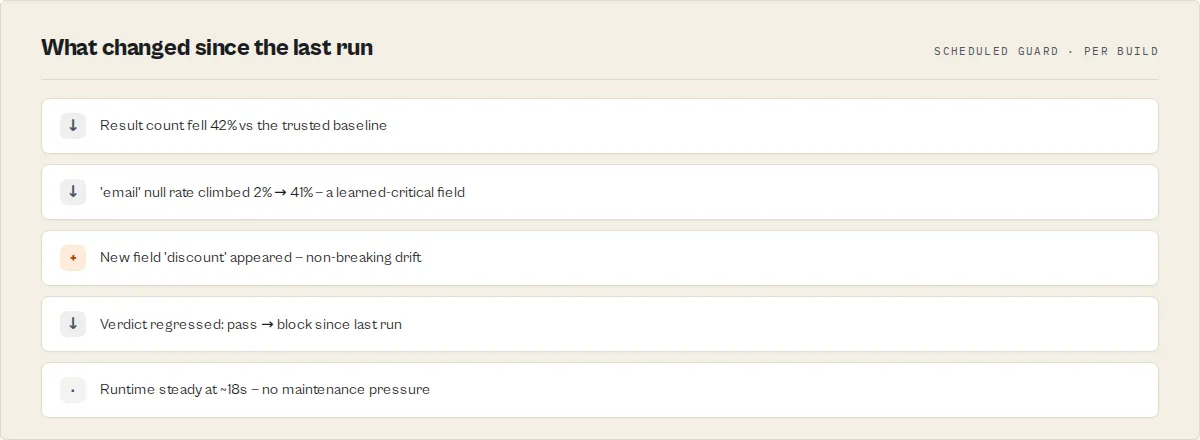
releaseTrend | object | Cross-run drift of the release verdict itself: { previousStatus, currentStatus, changed, direction: 'improved'|'regressed'|'unchanged', previousScore, scoreDelta, lastSeenAt }. Null on the first tracked run. A regressed direction (e.g. the build flipped pass → block since the last run) is the single highest-value alert for a scheduled deploy gate — branch on releaseTrend.direction == 'regressed'. |
releaseStability | object | How consistently this build has passed over its tracked history — { stablePct, runsTracked, passingRuns, note }. Distinct from confidence (trust in this run): stability answers "how often does this actor pass?" (e.g. 97% stable over 48 runs). Null until a baseline with run history exists. |
releaseMemory | object | The actor's accumulated operational memory — { firstSeenAt, totalRunsTracked, passingRuns, availabilityPct, regressionCount, avgDurationSec, avgResultCount, avgComputeUnits, currentConfidence, confidenceTrend, learnedCriticalFields[], learnedContract[], maintenancePressure, lastIncident, latestDecision, note }. Consolidates the history Deploy Guard already stores; it compounds with every run. learnedCriticalFields are fields the actor has consistently returned (≥90% non-null over ≥3 runs) — their disappearance escalates to a breaking regression even without a declared fieldImportanceProfile. learnedContract[] is the per-field behaviour learned over time ({ field, presenceRate, runsSeen, classification: always|usually|optional }). maintenancePressure ({ level, reasons[] }) is a descriptive trajectory from declining confidence + rising regressions + runtime creep — named pressure, not "risk", because it describes the present, it does not forecast. lastIncident ({ startedAt, endedAt, runsAffected, recovered, recoveredAfterRuns }) is the most recent non-pass streak and whether the actor recovered. Null on cold-start. |
generatedSuite | object | Only when preset: "auto" — the contract Deploy Guard discovered and ran: { detectedActorType, requiredFields[], fieldTypes, minResults, maxDuration, note }. Copy it into testCases to lock the contract. Null otherwise. |
trendSignals | string[] | Compact trend codes: confidence_regression_moderate, flaky_tests_present, breaking_drift_detected, execution_fast_all_tests, release_verdict_regressed_*, release_verdict_improved_*. |
fleetSignals | FleetSignal[] | Stable machine codes for fleet-wide aggregation. Additive-only enum: SCHEMA_DRIFT_CRITICAL, SCHEMA_DRIFT_NONCRITICAL, TEST_FLAKY, LOW_SUITE_COVERAGE, CRITICAL_FIELD_FAILURE, CONFIDENCE_REGRESSION, RELEASE_BLOCKED. |
confidenceFactorCodes vocabulary (additive-only — new codes may arrive; existing codes won't be renamed or removed within a major version):
cold_start_cap— no trusted baseline; confidence capped at 70low_sample_size— fewer than 3 test cases executedsmall_history— run history exists but has fewer than 5 prior runshealthy_history— trusted baseline + zero failures this rundrift_detected— current field schema differs materially from baselinelow_suite_coverage— suite exercises fewer than 60% of the assertion surface (coverage score <60)suite_lint_failed— pre-execution lint blocked the run
verdictReasonCodes vocabulary:
VERDICT_PASS/VERDICT_WARN/VERDICT_BLOCK— raw statusCRITICAL_TEST_FAILURE/WARNING_TEST_FAILURE— per-severity failure countsBASELINE_DRIFT— drift detected against prior baselineCOLD_START— no trusted baseline yetSUITE_LINT_FAILED— pre-execution lint failed; no tests ran (paired withdecision: 'ignore')NO_TESTS— no preset and no custom test cases supplied (paired withdecision: 'ignore')
Fleet signals (for downstream aggregators)
fleetSignals[] is a stable-code array designed for Fleet Health Report / Slack routing / Zapier. Every entry carries { code, severity, scope, actionability, detail?, field? }. The enum is additive-only within a major version.
| Code | Severity | Scope | Meaning |
|---|---|---|---|
SCHEMA_DRIFT_CRITICAL | critical | field | Breaking drift on a required or critical-importance field |
SCHEMA_DRIFT_NONCRITICAL | info | suite | Non-breaking drift across one or more fields |
TEST_FLAKY | warning | test | Individual test's historical pass rate below 80% |
LOW_SUITE_COVERAGE | warning | suite | Coverage score < 60 — suite has blind spots |
CRITICAL_FIELD_FAILURE | critical | field | Assertion failed on a fieldImportanceProfile.critical field |
CONFIDENCE_REGRESSION | warning | run | Recent confidence scores trending down |
RELEASE_BLOCKED | critical | run | Verdict is block — do not promote |
Verdict + analytics (existing fields)
| Field | Type | Description |
|---|---|---|
status | 'pass'|'warn'|'block' | Raw verdict before the decision layer. Use decision for automation, status for display. |
score | integer 0–100 | Composite confidence score. Capped at 70 during cold-start. |
summary | string | Plain-language explanation. Not machine-stable. |
recommendations | string[] | Suggested next actions derived from the failure mix. |
signals | object | { errorCount, warningCount, criticalCount, driftDetected, metrics } |
actorName / actorId | string | The tested actor's display name + ID. |
totalTests / passed / failed / expectedFailures | integer | Count breakdown. |
totalDuration | number | Seconds across all test cases. |
results | TestCaseResult[] | Per-test: assertions, schema contract, duration, forensics, error classification. |
releaseDecision | object | Full detail: root cause, prioritised failures, actions, trust trend, regression velocity, early warnings, blind spots, suite health. |
drift | DriftReport | null | Field-level diff vs previous baseline. Null until enableBaseline is on + a baseline exists. |
stability | TestStability[] | null | Per-test pass rate + flakiness flag. Null on cold-start. |
history | RunSnapshot[] | null | Last 20 run snapshots. Null on cold-start. |
detectedActorType | string | Heuristic: scraper / contact-scraper / api-actor / ecommerce / unknown. |
suggestedPreset | string | null | Preset that would give richer validation for the detected type. |
testedAt | ISO 8601 | Timestamp of test completion. |
Key-value store outputs
SUMMARY— flattened decision layer + counts + failed tests + context (dashboards should read this)GITHUB_SUMMARY— Markdown ready for$GITHUB_STEP_SUMMARYin ActionsHTML_REPORT— standalone HTML ready to upload as a CI artefactJUNIT_XML— JUnit XML. GitHub Actions, GitLab CI, Jenkins, CircleCI, and Buildkite render it as native tests — point your test-report step at it and the suite shows up in the pipeline UI with no glueSTATUS_BADGE— shields.io endpoint JSON ({ schemaVersion, label, message, color }). Point a README badge at the public KV record URL and it renders the live deploy verdict + pass count
Automation contract
| Consumer | Read this field | Why |
|---|---|---|
| CI/CD gate (GitHub Actions, etc.) | releaseAction (deploy on deploy, fail the job on halt) | One unambiguous action verb — no reasoning about the (decision, status) pair |
| CI test report | KV JUNIT_XML | Native test rendering in Actions / GitLab CI / Jenkins / CircleCI / Buildkite |
| README badge | KV STATUS_BADGE | shields.io endpoint JSON — live deploy verdict + pass count |
| Slack / PagerDuty router | decision + statusHeadline | Enum routing, headline as alert title |
| Drift watch (scheduled) | releaseTrend.direction | regressed = the build flipped to a worse verdict since the last run |
| LLM agent tool call | oneLine + verdictReasonCodes | One-liner for the model, codes for deterministic follow-up |
| Human debugging | releaseDecision.rootCause + results[].forensics | Traces back to the failing assertion |
Decision invariants
Deploy Guard enforces these in code — downstream consumers can rely on them without defensive checks:
Decision flow
When to trust the decision
| Scenario | decision | Confidence | Action |
|---|---|---|---|
| 5+ prior runs, pass, high confidence, no drift | act_now | high | Deploy |
| 5+ prior runs, block, critical failure, high confidence | act_now | high | Halt + investigate |
| First run ever | monitor | ≤70 (capped) | Review manually; run establishes baseline |
| Drift detected on a previously-stable field | monitor or act_now | varies | Inspect drift.changeSummary — may be intentional |
| 1 flaky test in a 5-test suite | act_now | medium | Acceptable if expectedToFail: true |
When NOT to trust the decision
| Scenario | Why | What to do instead |
|---|---|---|
monitor + cold_start_cap code | No baseline context yet | Run on a schedule for 5+ iterations before gating CI |
verdictReasonCodes contains BASELINE_DRIFT | Prior schema has changed | Inspect drift; may be intentional or regression |
| Single test in the suite | low_sample_size code | Add at least 3 tests; cold-start math dominates with one |
Flakiness in stability | One test's pass rate < 80% | Fix the flake or mark expectedToFail: true |
Fewer than 5 runs in history | small_history code | Trust trend is still warming up — wait for maturity |
Failure interpretation cheat sheet
Every failure mode maps to a stable code → a meaning → an action. Use this to route alerts and automate fixes without an LLM in the loop.
| Code | Where it appears | Meaning | Action |
|---|---|---|---|
CRITICAL_TEST_FAILURE | verdictReasonCodes, decisionDrivers | A test marked severity: 'critical' failed — the release gate considers this blocking | Fix the underlying extractor/output before deploy |
WARNING_TEST_FAILURE | verdictReasonCodes, decisionDrivers | A severity: 'warning' test failed — advisory | Investigate; accept if intentional |
BASELINE_DRIFT | verdictReasonCodes | Field schema differs from prior baseline | Read driftSeverity.breaking[] + driftSeverity.nonBreaking[] |
BASELINE_DRIFT_BREAKING | decisionDrivers, scoreBreakdown | Required or critical-importance field changed type or disappeared | Restore field OR update schemaContract.requiredFields + notify consumers |
BASELINE_DRIFT_NONBREAKING | decisionDrivers, scoreBreakdown | New or renamed non-required fields | Usually safe — confirm consumers tolerate extras |
COLD_START | verdictReasonCodes, decisionDrivers, confidenceFactorCodes (cold_start_cap) | No trusted baseline yet — confidence capped at 70, decision cannot be act_now | Run on a schedule with enableBaseline: true; graduate to act_now from run 2 onward |
LOW_SAMPLE_SIZE | decisionDrivers, confidenceFactorCodes (low_sample_size) | Fewer than 3 test cases | Add tests; cold-start math dominates with one |
LOW_SUITE_COVERAGE | decisionDrivers, confidenceFactorCodes (low_suite_coverage), fleetSignals | Suite uses fewer than 60% of assertion types | Read suiteCoverage.blindSpots[] and fix the top 2–3 |
FLAKY_TEST | decisionDrivers, fleetSignals (TEST_FLAKY) | A test's historical pass rate is below 80% | Mark expectedFlaky: true OR fix the non-determinism |
CRITICAL_FIELD_FAILURE | fleetSignals | Assertion failed on a field declared critical in fieldImportanceProfile | Read criticalityImpact.affectedCriticalFields[] |
CONFIDENCE_REGRESSION | fleetSignals | Confidence score trending down over recent runs | Read regressionSummary.direction + velocity; investigate recent drift |
SUITE_LINT_FAILED | verdictReasonCodes (paired with decision: 'ignore') | Pre-execution lint blocked the run — suite design problem | Read suiteLint.issues[].code and fix the suite definition |
NO_TESTS | verdictReasonCodes (paired with decision: 'ignore') | Both preset and testCases were empty | Pick a preset OR provide at least one custom test case |
RELEASE_BLOCKED | fleetSignals | Verdict is block (any reason) | Halt pipeline; do not promote |
Failure fingerprints — releaseDecision.rootCause
When tests fail, Deploy Guard fingerprints the likely cause deterministically (no LLM) — { type, confidence, signals[], likelyFix }. signals[] is the evidence; likelyFix is the one-line next step.
type | Looks like | likelyFix |
|---|---|---|
selector-breakage | Result count dropped + fields missing, or multiple zero-result tests | Review the CSS/XPath selectors — the target page structure changed |
api-schema-change | Field type changes vs baseline | Update field mappings to the new API response format |
pagination-failure | Result count collapsed | Check offset/limit + stop conditions |
rate-limiting | failureType: rate-limited (429) | Enable proxy rotation / residential proxies |
bot-protection | failureType: blocked (403 / captcha / Cloudflare) | Switch to residential proxies + a stealth/headful fetch |
auth-failure | failureType: auth-failure (401 / login wall) | Refresh the credential, cookie, or API token |
timeout-infra | failureType: timeout | Increase timeout/memory; the target may be slower |
input-issue | Input/API error | Verify test inputs match the target's input schema |
partial-scrape | Some results but fewer than expected | Increase scope/timeout — pages being skipped |
duplicate-overlap | Uniqueness checks fail | Add URL dedup / fix pagination overlap |
First run / second run / nth run
The context.progress field tells you exactly where you are.
| Runs | progress | What's active | What's still warming up |
|---|---|---|---|
| 0 (first) | cold-start | Assertions, verdict, forensic details | No baseline, drift, flakiness, or trust trend. Confidence capped at 70. decision ∈ {monitor, ignore}. |
| 1–4 | emerging | Baseline comparison (from run 2), drift fields, stability, run history begin populating | Flakiness unreliable with <5 samples. Trust trend not yet meaningful. decision can become act_now from run 2 when baseline is trusted. |
| 5–14 | developing | Trust trend, flakiness, auto-tune hints all reliable | Early warnings sharpen with more history. Suite health fully active. |
| 15+ | mature | Full intelligence: trust trend, regression velocity, blind spots, calibrated suggestions | — |
Note: enableBaseline: true is required for baselines, drift, stability, history, and trust trend. Without it, Deploy Guard still runs all assertions and emits a verdict — but context.hasTrustedBaseline stays false and decision is capped at monitor.
Example — full input + output
Input:
Output — act_now + pass (safe to deploy):
Output — act_now + block (halt release):
Output — monitor + cold-start (first run, directional only):
Using Deploy Guard in GitHub Actions
One field gates the job: releaseAction == "deploy" ships, anything else fails the build (halt = a trusted block, review = needs a human, misconfigured = no tests ran). The GITHUB_SUMMARY record in the default key-value store is served with Content-Type: text/markdown — ready to drop into $GITHUB_STEP_SUMMARY — and JUNIT_XML drops straight into any publish-test-results / dorny/test-reporter step so the suite renders as native tests in the Actions UI.
Use in Dify
Drop Deploy Guard into Dify workflows via the Apify plugin's Run Actor node. Each suite run returns one canonical decision as structured JSON — decision enum (act_now / monitor / ignore), status enum (pass / warn / block), decisionDrivers[] (top 3 impact-ranked codes), verdictReasonCodes[] (stable machine-readable enum), and confidence.level (high / medium / low) your downstream node branches on. Generic test runners return raw pass/fail counts; this returns one routable verdict.
- Actor ID:
ryanclinton/actor-test-runner - Sample input (pre-deploy CI gate on a scheduled run that builds a baseline):
- Branching example — a Dify if/else node reads
decisionand routes:act_nowANDstatus: "block"→ halt deployment + page on-call + create incident withdecisionDrivers[]as routing keysact_nowANDstatus: "pass"→ safe to deploy (theact_nowis "ship it")monitor→ log to dashboard + flag for next sprint review (signal present but below confidence threshold)ignore→ continue pipeline (no tests ran or the suite lint failed — nothing to gate on)
- For CI gates: branch on
statusenum directly —blockhalts the deploy,warnlogs a warning,passcontinues. Pair withdecisionfor confidence — amonitordecision on awarnstatus means "humans should look but don't fail the build" - For cold-start safety: when no trusted baseline exists, the actor caps
confidence.scoreat 70 anddecisionatmonitorregardless of how clean the numbers look. Dify automation should NEVER auto-deploy onmonitor— run withenableBaseline: trueon a schedule, and the decision graduates toact_nowfrom run 2 onward once a trusted baseline exists - Drift watch (scheduled runs): branch on
releaseTrend.direction—regressedmeans the build flipped to a worse verdict (e.g.pass → block) since the last run; route that to the same incident path asact_now+block.verdictReasonCodes[]then carriesBASELINE_DRIFTfor the why. - Stable verdict codes for routing:
verdictReasonCodes[]contains stable enum strings —VERDICT_PASS/VERDICT_WARN/VERDICT_BLOCK,CRITICAL_TEST_FAILURE,WARNING_TEST_FAILURE,BASELINE_DRIFT,COLD_START,SUITE_LINT_FAILED,NO_TESTS. Codes are stable across versions; new codes are additive.
The decisionDrivers[] (top 3 impact-ranked) + the releaseDecision.suggestions[] and remediation[].suggestedFix strings are usable verbatim as PR comments, Slack failure-alert bodies, or incident notes — no LLM rewriting required.
Pricing
$0.35 per test suite run (Pay-Per-Event, single test-suite event charged once per run after the report is pushed).
Your target actor's compute + that actor's own PPE charges are separate — they run on your account and bill at the target's rates. Deploy Guard only charges for the validation layer, not the underlying compute.
Deploy Guard logs the price at start:
And again in the final status message:
Cost guardrail: after 5 consecutive test failures, Deploy Guard breaks the loop to stop runaway sub-actor credit spend on a clearly broken target. Remaining tests are skipped; the verdict stands on what ran.
FAQ
How is Deploy Guard different from Apify's default-input test?
Apify's built-in default-input test runs your actor with {} once a day and flags it UNDER_MAINTENANCE after 3 consecutive failures. That's a single-test binary signal with no assertion detail, no drift, no confidence scoring, no per-field forensics. Deploy Guard runs a full assertion suite against arbitrary inputs, compares against a stored baseline, emits a routable decision tag, and produces GitHub/HTML/JSON reports. Default-input test is the floor; Deploy Guard is the gate.
Why is the first run always monitor?
Cold-start safety. Without a trusted baseline, Deploy Guard has no field schema history, no drift reference, no flakiness signal, and no run history to calibrate confidence. The score is capped at 70 and decision is forced to monitor. After the first run completes with enableBaseline: true, run number 2 has something to compare against and can graduate to act_now.
Can I use this in GitHub Actions?
Yes. Call the run-sync-get-dataset-items endpoint, parse the decision field, exit non-zero on anything other than act_now + status: pass. The key-value store also contains a GITHUB_SUMMARY record (Markdown) ready for $GITHUB_STEP_SUMMARY. See the example above.
Does it re-run all tests if one fails?
By default, yes — tests run sequentially in the order you provide. If 5 consecutive tests fail, a circuit breaker halts remaining tests to cap cost and the run exits cleanly with the verdict derived from what ran. Mark known-broken tests with expectedToFail: true and they won't trip the breaker.
What's the difference between verdictReasonCodes and confidenceFactorCodes?
verdictReasonCodes explain what the verdict is — pass/warn/block and the specific failures that drove it (e.g. CRITICAL_TEST_FAILURE, BASELINE_DRIFT). confidenceFactorCodes explain how much to trust the verdict — whether enough data has accumulated, whether a baseline exists, whether drift signals are active. Both are stable enums; both are additive-only within a major version.
Does it cost credits?
Yes — $0.35 per suite for the Deploy Guard layer itself, plus whatever your target actor costs per run × N test cases. A suite with 5 test cases against a $0.10-per-result scraper that returns 20 results each costs: $0.35 (Deploy Guard) + 5 × 20 × $0.10 = $10.35 total. Deploy Guard only bills the $0.35; the rest bills on the target's pricing to your account.
Can I compare two actor versions side-by-side?
No — Deploy Guard tests one actor at a time. For side-by-side A/B comparison use A/B Tester, which runs the same input against two actors in parallel and returns a pairwise decision (switch_now / canary_recommended / monitor_only / no_call).
How do I detect flaky tests?
Enable enableBaseline: true and run on a schedule. Flakiness detection activates after 5 prior runs — Deploy Guard computes a per-test pass rate across run history and flags any test with a pass rate below 80% as flaky. The stability[] array shows { name, passRate, runs, flaky } per test case. Consumers should treat flaky: true tests as non-blocking — don't gate CI on them until you've fixed the underlying non-determinism.
Can I supply different inputs per test case?
Yes — every testCase.input is independent. Use parameterizedTestCases to run the same template against many parameter sets (e.g. test the same URL shape with 20 different URLs). nameTemplate and inputTemplate support {{placeholder}} substitution.
What happens if the sub-actor times out?
Each Actor.call() is wrapped in a wall-clock race (timeout + 60s or 5 minutes minimum). On timeout, the test case is marked failed with failureType: 'timeout', and the suite continues. Two timeouts in a row don't break the suite — but 5 consecutive failures of any type trip the circuit breaker.
Why did my first run get a monitor decision even though every test passed?
Cold-start cap. The run succeeded, every assertion passed, and the verdict is pass — but without a stored baseline there's no history to calibrate confidence, so the score is capped at 70 and decision can't promote to act_now. Run it again (scheduled or manual) with enableBaseline: true and run number 2 onward will promote to act_now when the verdict stays healthy.
Regression of what?
Several actors in this fleet use the word "regression," each scoped to a different layer. They are not the same check, and running four of them for one job is wasted spend. Here is what each one watches:
| Actor | "Regression" means |
|---|---|
| Input Guard | Input contract — an input that used to validate now fails the target's input_schema.json |
| Deploy Guard | Release behavior — a build that now fails test cases it previously passed |
| Output Guard | Production dataset — completed output that drifted from baseline (null spikes, type drift, coverage drops) |
| Quality Monitor | Metadata / Store readiness — a listing that lost quality points between audits |
| Fleet Health Report | Revenue / business outcome — an actor whose real per-run profit fell off a cliff |
This actor is the Deploy Guard row: it catches release-behavior regressions only. For the other layers, use the sibling named in the table.
What Deploy Guard does NOT do
Deploy Guard is the pre-release test gate in a fleet of specialist actors. Use siblings for these adjacent jobs:
| Need | Use instead |
|---|---|
| Validate schema/quality of a PRODUCTION dataset after it runs (silent data failures, coverage drops, null spikes) | Output Guard — post-run data-quality monitor with incident lifecycle and channel-aware alerts |
| Compare two actor versions side-by-side on the same input | A/B Tester — pairwise decision engine with fairness checks and decision stability |
| Score a whole fleet's quality | Quality Monitor — fleet-wide quality scorer |
| Detect PII / GDPR / TOS risks in an actor's output | Compliance Scanner |
| Consolidated dashboard across the whole fleet | Fleet Health Report |
Deploy Guard's output is designed to feed these siblings — every run appends field-rule suggestions to a shared key-value store (the AQP store) that Output Guard picks up automatically. Pre-deploy assertions that fail here become production monitoring rules there without manual sync.
License
Proprietary. Runs on Apify. Source is available inside the platform for audit but not redistributable.
Next stage
Deploy Guard is the release stage of one developer lifecycle: publish, quality, release, invocation, orchestration, runtime, migration, portfolio. Deploy Guard protects releases, before they ship. Output Guard protects live systems, after the run. Different time, different inputs, different decision.
Next stage: Input Guard. Release trustworthy? Validate each invocation's payload before the actor runs.


