

Email Pattern Finder - Discover Company Email Formats
Pricing
from $100.00 / 1,000 domain analyzeds
Email Pattern Finder - Discover Company Email Formats
Detect the email naming convention any company uses (first.last, flast, first_last, etc.) from public sources — website, GitHub, WHOIS, and Hunter.io. Generate verified email addresses for any person. Bulk domain processing. $0.10/domain.
Pricing
from $100.00 / 1,000 domain analyzeds
Rating
1.0
(1)
Developer

Ryan Clinton
Maintained by CommunityActor stats
4
Bookmarked
740
Total users
39
Monthly active users
a month ago
Last modified
Categories
Share
Email Pattern Finder — Send-Decision Engine for Cold Outreach
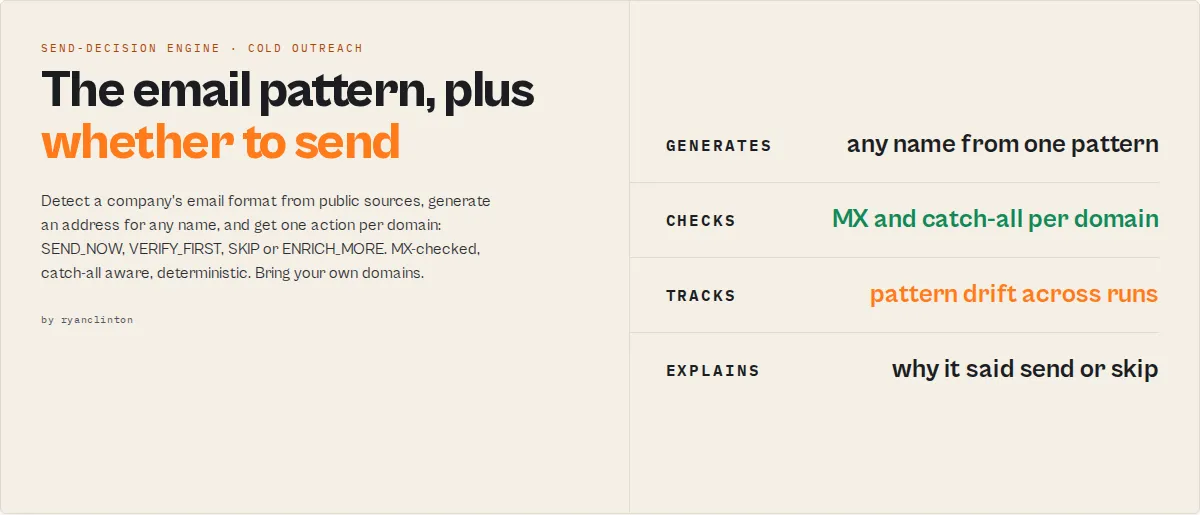
Stop guessing whether your generated email will bounce. Email Pattern Finder detects a company's email naming convention, generates addresses for any name, validates MX records, detects catch-all domains, and returns a per-domain action —
SEND_NOW,VERIFY_FIRST,SKIP, orENRICH_MORE— with deterministic, auditable reasoning.
Most pattern finders give you a string and a confidence number. You still don't know what to do with it. Email Pattern Finder closes the loop: 5 public sources → 18 pattern templates → MX validation → catch-all probe → optional SMTP verification → a decision per domain with a plain-English reason, a recovery plan when no pattern fits, and a stable change log when you schedule it.
Pattern stability tracked across runs — time-weighted confidence, not a one-off guess. Stable domains reinforce
SEND_NOWdecisions; volatile domains are automatically downgraded.
Ready-to-run examples
Don't want to build an input from scratch? Each of these is a published, one-click example (see all) — open it, see real output, run it:
- Email Pattern Finder — detect the email format a company uses (e.g. first.last@domain) with a confidence score, MX check and catch-all detection
- Find Email Address by Name — give names + a company; the actor detects the pattern then generates and verifies each person's email
- Email Deliverability Decision — a send / verify / skip decision per domain with bounce-risk tier and a recovery plan
What it does
- Detects a company's email naming pattern from 5 public sources
- Generates email addresses for any name using that pattern
- Evaluates deliverability risk (MX validity, catch-all status, pattern stability over time)
- Returns a deterministic action per domain:
SEND_NOW,VERIFY_FIRST,SKIP, orENRICH_MORE - Provides a recovery plan when detection fails — pointing at the next-best Apify actor to chain
Every decision is deterministic, auditable, and traceable through decisionRulePath and decisionSignals — no hidden scoring, no black-box models, no fabricated likelihood scores.
What people use it for
- Find company email patterns when you already know the domain and want a per-domain action, not just a confidence number.
- Reduce cold email bounce rate before sending via MX validation, catch-all detection, and pattern stability tracking.
- An alternative to Hunter.io, Apollo, and Snov for pattern detection — returns a
SEND_NOW/VERIFY_FIRST/SKIP/ENRICH_MOREaction instead of a single confidence score. - Power AI cold-email automation with stable enum decisions and machine-readable reasoning fields built for agent tool-calling.
Decision rule (plain English)
Send to a generated email address only when it (a) is validated, (b) follows a confidently-detected company pattern, and (c) returns SEND_NOW. Otherwise verify first, skip, or enrich more — the action enum tells you which.
What problem does this solve?
Most email finder tools answer:
- "What is the likely email address for this person at this company?"
They do not answer:
- "Should I send to this address right now?"
- "Is this domain catch-all, and what should I do about it?"
- "Has the company's email format changed since I last checked?"
- "What do I do if no pattern can be detected?"
Email Pattern Finder solves all four. Pattern detection + email generation + deliverability decisioning in one actor — a send-decision engine, not just an email finder.
Queries this actor answers
This actor is purpose-built to answer the following questions, each as a single API call:
- How do I find a company's email pattern?
- How do I guess a work email address from someone's name?
- How do I reduce cold email bounce rate?
- Should I send to a generated email address right now?
- How do I handle catch-all domains in cold outreach?
- How do I detect if an email pattern has changed over time?
- What's the best alternative to Hunter.io / Apollo.io / Snov.io on the Apify Store?
- How can I generate verified email addresses for a list of names without paying per address?
- What do I do when email pattern detection fails for a domain?
- How do I monitor email pattern drift across a prospect list weekly?
Every answer is a deterministic field in the output dataset — not a probabilistic guess.
Canonical usage
Given a company domain and a person's name, determine the most likely work email address AND whether it is safe to send right now.
That single sentence is the primary use-case. Every other feature exists to support it.
What makes this different
Email Pattern Finder is not just an email finder — it is a decision system for outbound deliverability.
Most pattern finders stop at "here's the pattern, here's the confidence." Email Pattern Finder goes further:
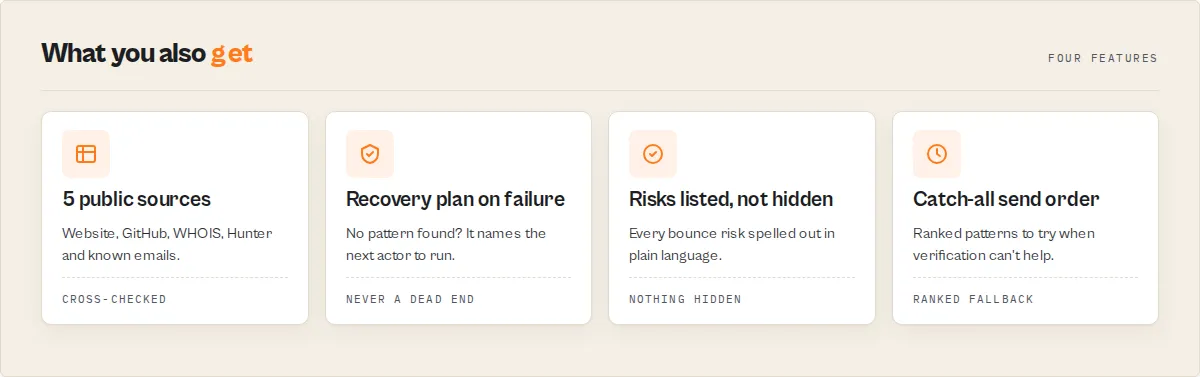
- Detects the pattern (5 sources, 18 templates) — table stakes
- Generates the email for any name — included free, no per-address charge
- Decides whether you should send it —
SEND_NOW/VERIFY_FIRST/SKIP/ENRICH_MORE - Explains the decision —
reasons[]+decisionRulePath[]+decisionSignals[] - Adapts over time — pattern stability across runs auto-downgrades volatile domains
- Plans recovery — when no pattern fits, points at the next-best Apify actor
That sequence — detect → generate → decide → explain → adapt → recover — is the moat.
TL;DR (for agents and automation)
Pricing: $0.10 per domain analyzed. No subscription. No per-email charges. Generate 200 addresses from one detected pattern for the same $0.10.
What this actually does
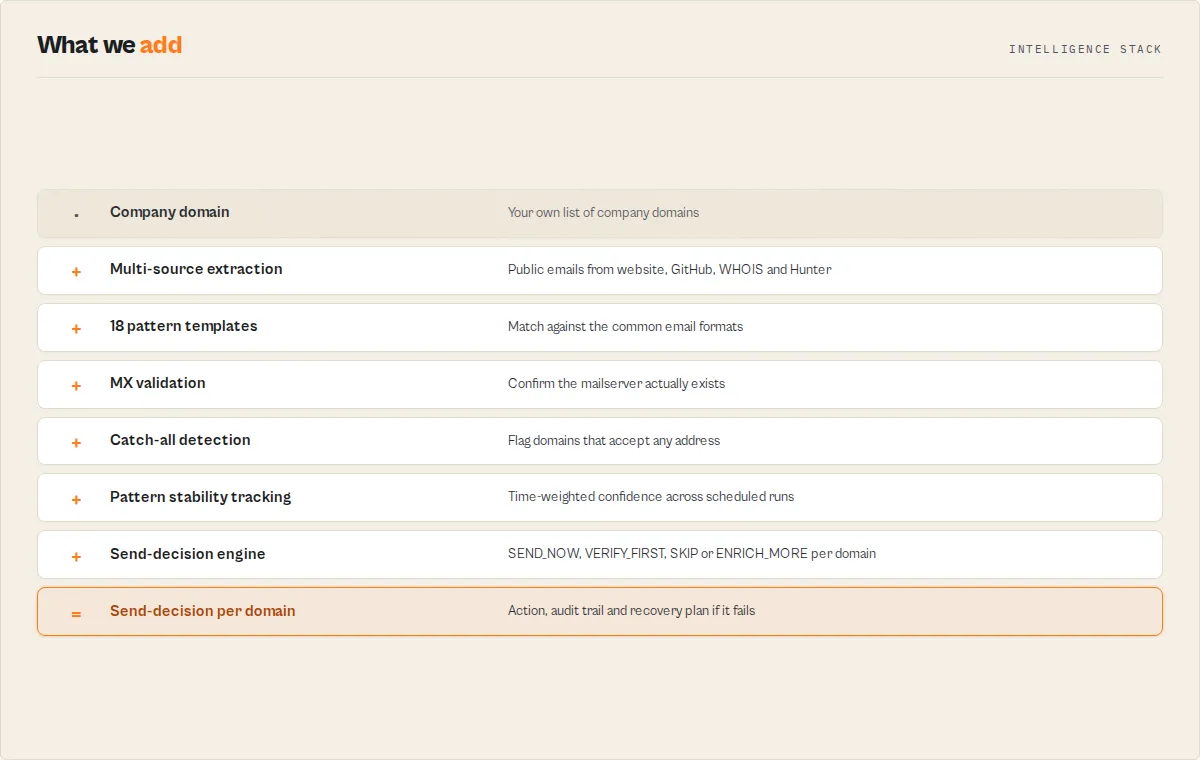
| You give it | It returns |
|---|---|
| A list of company domains | The detected pattern (e.g. {first}.{last}@acme.com) with confidence, sample count, and source breakdown |
| Optional: names of people at those companies | Generated email addresses for each name using the detected pattern |
Optional: verifyEmails: true | Catch-all probe + per-candidate SMTP verification (see "What verifyEmails actually does" below) |
Optional: goal: 'high-deliverability' | Tighter SEND_NOW threshold and verification on by default |
Optional: compareToPrevRun: true | A changeSinceLastRun block on every domain — PATTERN_CHANGED, NEW_EMAILS_FOUND, CATCH_ALL_FLIPPED_ON, MX_CHANGED |
Every record includes:
sendDecision—SEND_NOW/VERIFY_FIRST/SKIP/ENRICH_MOREwithriskLeveland the exact reasonsrecoveryPlan— when pattern detection fails, the next-best Apify actor to chain to (with reason)decisionSignals[]— stable enum tokens (high-confidence,stable-pattern,strict-format,catch-all,no-mx, …) for SQL/Sheets/agent filters:WHERE 'stable-pattern' IN decisionSignalsnegativeSignals[]— plain-language risk surface. Empty array = no concerns. Most cold-email tools hide risk — we surface it.confidenceConflict— fires when signals disagree (high pattern confidence + low temporal stability, single-sample high confidence, etc). Lets agents branch on signal-quality contradiction instead of trusting a collapsed number.failureContext— when something went wrong:confidenceLossReason(plain-English why) +retryLikelihood(would re-running help?).sequenceStrategy—single-shot/fallback/progressiveinstruction for how to actually use therecommendedSequence, with reasoning.driftState—stable/emerging/unstable/unknownsummary of cross-run drift, withvolatilityScoreandlastChangeType.sendDecision.decisionRulePath[]— ordered predicate trace ("mxValid", "confidence >= 0.85", "drift-aware-downgrade(...)") so LLM agents can audit why the action landed where it did.plainEnglishSummary— a Slack-ready one-line read of the resultbounceRiskBucket—low/medium/highfor sorting send queuesconfidenceBreakdown— explainable score components: samples, source diversity, pattern consistency, catch-all penaltyisSendable+isContactablebooleans for one-tick spreadsheet filteringmxValid+mxRecord— DNS MX validation included freefailureType— categorised reason when no pattern can be confidently detectedmethodology: 'heuristic-not-trained'— disclosure on every record (we don't ship a black box)
What verifyEmails actually does
Pattern detection always runs three deliverability checks for free:
- MX record check — DNS lookup. Sets
mxValid+mxRecord[]. Always runs. ~50ms. - Pattern detection from real samples — analyzes discovered emails to derive
pattern+confidence. isCatchAll: nullflag — set tonulluntil probed.
When verifyEmails: true (default when goal is high-deliverability or max-coverage), the actor adds two extra sub-actor calls per domain:
- Catch-all probe — sends one fabricated test address (e.g.
xq7z9testN@<domain>) through Bulk Email Verifier atverificationLevel: 'standard'. SetsisCatchAll: true|false+ lifts thenull. - Per-candidate SMTP verification — every address in
generatedEmailsis tested by the same verifier. Each candidate getsverified: 'valid'|'invalid'|'risky',verifyConfidence(0–100),verifyReason. Skipped when nonameswere provided (nothing to verify).
Both checks require mxValid: true. If MX is invalid, the verifyEmails checks are skipped silently — there's no point verifying mailboxes on a domain that has no mail server.
verifyEmails: true cost is dominated by sub-actor compute on the verifier, not by this actor's per-domain PPE rate. This actor still charges $0.10 per domain analyzed regardless of verifyEmails. The verifier sub-actor charges its own platform compute against your run.
verifyEmails | MX | Pattern detection | Catch-all probe | SMTP verification | isCatchAll value |
|---|---|---|---|---|---|
false (default unless goal=high-deliverability/max-coverage) | ✓ | ✓ | — | — | null (unknown) |
true + no names provided | ✓ | ✓ | ✓ | — (no candidates) | true / false |
true + names provided | ✓ | ✓ | ✓ | ✓ (per candidate) | true / false |
true + mxValid: false | ✓ | ✓ | — (skipped) | — (skipped) | null |
When verifyEmails: false, downstream sendDecision ignores SMTP-level evidence and decides from pattern-confidence + sample count + temporal stability alone — same logic, less data.
Use this when
- You know the company domain and a person's name and want a defensible work-email guess.
- You want to detect one company-wide pattern once and apply it to many people, instead of paying per address.
- You want a deliverability decision, not just a pattern string and a number.
- You schedule the actor weekly and want to know what changed: pattern drift, new hires, catch-all flips, MX swaps.
- You're chaining actors — agency-directory-scraper → email-pattern-finder → bulk-email-verifier — and need stable, additive output.
Don't use this when
- You only have a person's name with no company domain — try Person Enrichment Lookup first.
- The company has zero public employee email footprint (no website emails, no GitHub commits, no WHOIS, no Hunter coverage). Run Website Contact Scraper first to seed real emails, then re-run pattern detection.
- You need mailbox-level certainty on a catch-all domain — no pattern finder on Earth can give you that. Use Bulk Email Verifier on each candidate.
- The site is a JavaScript-rendered SPA and you have no other email sources — the actor will return
jsWarningand recommend Website Contact Scraper Pro.
How this helps reduce cold email bounce rate
Email Pattern Finder reduces cold email bounce rate by gating every generated address through a deliverability check before you send it:
- Pattern detection per domain — only generates addresses that match the company's actual naming convention, not random guesses
- MX record validation — domains without a valid MX record are auto-skipped (
sendDecision: SKIP,failureType: dns-failed) - Catch-all detection — domains that accept any address are flagged so you don't trust SMTP "valid" results
- Pattern stability over time — volatile domains (recent format changes) are auto-downgraded from
SEND_NOWtoVERIFY_FIRST - Send decision per domain —
SEND_NOW(safe),VERIFY_FIRST(verify with Bulk Email Verifier first),SKIP(don't send),ENRICH_MORE(find more samples first) - Negative signal surface — every concrete bounce-risk reason listed in plain language (
negativeSignals[])
Filter your dataset by WHERE sendDecision.action = 'SEND_NOW' to get a clean send queue with low bounce risk. Use WHERE failureType IS NOT NULL to get the queue that needs more enrichment before sending.
Should you send to a generated email address?
Email Pattern Finder answers this question directly per domain. Instead of guessing, every domain in your input returns one of four explicit actions:
sendDecision.action | What it means |
|---|---|
SEND_NOW | Safe to send right now. High pattern confidence, sufficient samples, valid MX, not catch-all, stable across runs. |
VERIFY_FIRST | Verify each generated address with Bulk Email Verifier before sending. Moderate confidence, or catch-all + strong pattern, or volatile pattern detected. |
SKIP | Don't send. No MX record, or catch-all + low confidence, or insufficient signal. |
ENRICH_MORE | Don't send yet. No anchor emails were found — run Website Contact Scraper first to seed real emails, then re-run pattern detection. |
Every action carries reasons[] (plain-English explanation) and decisionRulePath[] (audit trail of which predicates fired). This replaces manual judgement with a deterministic, auditable decision per domain.
Fast start
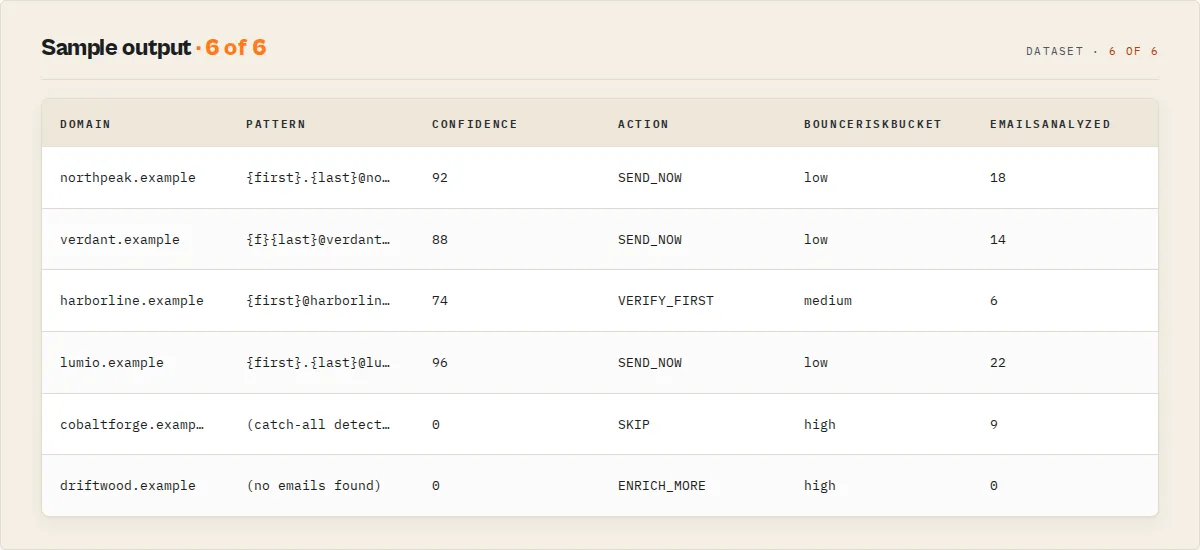
Returns a record per domain with the detected pattern, generated addresses, MX status, catch-all flag, and sendDecision action. With goal: 'high-deliverability' every generated candidate is also verified against MX + SMTP.
The decision: SEND_NOW / VERIFY_FIRST / SKIP / ENRICH_MORE
This is the field your downstream automation should branch on. Don't parse the prose — branch on sendDecision.action.
| Action | When it fires | What to do |
|---|---|---|
SEND_NOW | confidence ≥ 0.85, ≥ 3 sample emails, valid MX, not catch-all | Generate the address from the pattern, send immediately. Lowest bounce risk. |
VERIFY_FIRST | Moderate confidence (0.5–0.85) or catch-all domain with strong pattern | Run Bulk Email Verifier on the generated addresses before bulk send. |
SKIP | No MX record, OR catch-all + low confidence, OR truly insufficient data | Don't waste sender reputation. Move to the next domain. |
ENRICH_MORE | No real emails were found to anchor the pattern | Run Website Contact Scraper first to seed real emails, then re-run pattern detection. |
Every decision carries a reasons[] array — plain-English strings you can paste into a Slack alert, a CRM note, or an LLM agent prompt without modification.
Example 2 — VERIFY_FIRST (catch-all with strong pattern signal)
Example 3 — SKIP (no MX record, domain dormant)
Example 4 — ENRICH_MORE (no anchor samples, recovery available)
Use it in cold-email sequences: send the primary pattern first, fall back to alternates only if the first bounces or goes silent. No fabricated likelihood scores — the order is deterministic, the rationale is explicit, the methodology is honest.
patternCoverageHint:
narrow— single dominant pattern detected. Try the primary; fall back rarely.broad— multiple plausible patterns. Send in sequence, watch reply signals before scaling volume.
Recommended pattern sequence (fallback ordering for any domain)
Every record carries a try-in-this-order list — useful even on non-catch-all domains for sequencer tools that retry on bounce:
The primary pattern always anchors the list. Alternates follow in domain-specific match-strength order.
Email culture per domain
Every record carries emailCulture — a one-token segmentation hint derived from how dominant the primary pattern is:
emailCulture | When | What to do |
|---|---|---|
strict-format | Primary pattern matches ≥85% of samples, ≤1 viable alternate | Safe to scale volume against the detected pattern |
loose | Primary pattern <60%, ≥3 viable alternates | Verify-first mindset — generate the sequence and verify each before bulk send |
mixed | Anything in between | Hybrid — start with the primary, watch bounce rates, fall back if needed |
Drift-aware decisioning (not just drift detection)
Detecting drift is one thing. Acting on it is what matters. Email Pattern Finder does both:
patternStabilityScoremeasures how consistent the pattern has been across runs (weighted recency, decay 0.8 per step back).driftStaterolls that into a one-token status:stable(≥0.8),emerging(0.5–0.8),unstable(<0.5),unknown(no monitoring).- The
sendDecisionitself downgrades automatically. WhenpatternStabilityScore < 0.5and base confidence is high enough to otherwise hitSEND_NOW, the decision is downgraded toVERIFY_FIRSTwithdecisionRulePathrecordingdrift-aware-downgrade(patternStabilityScore < 0.5). Volatile patterns can't earn an automatic green light, even on strong base confidence.
That's the difference between a monitor and a decision system: this actor doesn't just tell you that the pattern changed — it changes the recommendation.
Negative signal surface (the trust feature)
Every record carries negativeSignals: string[] — the plain-language risks. Most pattern finders hide weakness behind a single confidence number. Email Pattern Finder lists every concrete reason this domain might bounce or burn sender reputation:
Empty array = no concerns. Use it as a Sheets filter or read it straight into a Slack alert before you commit a send.
Confidence conflict detection
confidenceConflict fires when signals disagree — e.g. high pattern confidence on a single-sample dataset, or high confidence on a catch-all domain where SMTP verification is unreliable. Most tools collapse signals into one number and hide the contradiction. Email Pattern Finder surfaces it:
Branch on confidenceConflict.exists in your automation when you can't tolerate hidden contradictions.
Failure context (when things go wrong)
When failureType fires, failureContext tells you why and whether to retry:
retryLikelihood: 'high' means a transient issue (rate-limit, source flap) — schedule a retry. 'low' means it won't help unless the underlying state changes (DNS missing, no public emails exist).
Sequence strategy (HOW to use the recommended sequence)
Having recommendedSequence is half the answer. sequenceStrategy tells you how to USE it:
sequenceStrategy.type | When | What to do |
|---|---|---|
single-shot | strict-format + stable | Send the primary address only. Don't waste cycles on fallbacks. |
fallback | mixed-format | Try the primary, fall back to alternates only on bounce. |
progressive | loose-format / catch-all + multiple alternates | Send patterns progressively across a campaign, watching reply signals before scaling volume. |
The reasoning field explains the choice in plain English — paste it into your campaign notes.
Pattern stability across runs
When compareToPrevRun is enabled, every record carries patternStabilityScore (0..1) — a weighted-recency measure of how consistent the detected pattern has been across this domain's run history. Recent runs weight more heavily (decay 0.8 per step back). The score also feeds confidenceBreakdown.temporalStability, nudging the breakdown's finalScore by ±15% — stable patterns reinforce confidence, volatile patterns dampen it.
First-run domains get patternStabilityScore: 1.0 — there's no history to contradict the current pattern, so we don't penalise it.
Cross-run change detection (scheduled monitoring)
Set compareToPrevRun: true and the actor persists a per-domain snapshot in a named KV store. On the next run, every record carries a changeSinceLastRun block:
The 11-code changeFlags enum: NEW_DOMAIN / PATTERN_CHANGED / CONFIDENCE_INCREASED / CONFIDENCE_DECREASED / NEW_EMAILS_FOUND / CATCH_ALL_FLIPPED_ON / CATCH_ALL_FLIPPED_OFF / MX_CHANGED / SEND_DECISION_UPGRADED / SEND_DECISION_DOWNGRADED / UNCHANGED.
This turns the actor from a one-shot lookup into a monitoring product — schedule it weekly on your prospect list, only act on the records that actually changed.
Goal presets
Don't think about which sources to enable. Pick a goal.
| Goal | What changes |
|---|---|
quick-outreach | Website only, no GitHub/WHOIS, no verification. Fast and cheap. |
high-deliverability (default) | All sources on, verification on, tight SEND_NOW threshold. The safest mode. |
max-coverage | All sources on, verification on, no thresholds — give me everything. |
You can always override individual flags. The goal sets the defaults.
autoFilter: drop records before they hit the dataset
Combine the decision engine with autoFilter to filter at source — and stop paying for filtered records.
autoFilter | What's pushed |
|---|---|
send-now-only | Only SEND_NOW records — your safest send list |
safe-only | SEND_NOW + VERIFY_FIRST records |
max-coverage | Everything except SKIP records |
none (default) | Every record pushed, you filter downstream |
In PPE mode, filtered records aren't billed — you only pay for what survives the filter. (Same fix as website-contact-scraper.)
Execution layer — Pro fallback, CRM auto-push, CSV exports
Pattern detection ships with the same execution-layer hooks Website Contact Scraper has. Run pattern intelligence end-to-end without glue code.
Pro fallback for JS-protected sites
When the website source returns 0 emails AND a JS-rendered or anti-bot marker fires, the actor auto-retries that domain via Website Contact Scraper Pro (real-browser rendering). Costs $0.35 per site that gets re-run, only when triggered. Recovered emails feed straight back into pattern detection — no manual second run.
CRM auto-push
POST every analyzed domain (one row per generated email) directly to your CRM or workflow tool. Native HubSpot/Salesforce field shapes plus a generic JSON option for Make.com, Zapier, n8n, or your own backend. Includes pattern, confidence, bounce risk, send action, and email verification status per row. Failures retry 2× with backoff; 5 consecutive failures disable pushing for the rest of the run.
crmOnlyTierA: true filters to records with sendDecision.action === 'SEND_NOW', bounceRiskBucket === 'low', and valid MX records — keeps your CRM clean of low-quality patterns.
Outreach-tool CSV exports
Generates ready-to-import CSV files in the run's key-value store as EXPORT_INSTANTLY_CSV / EXPORT_SMARTLEAD_CSV / EXPORT_APOLLO_CSV. One row per generated email with platform-specific column names (Instantly's personalization field gets the plainEnglishSummary; Apollo's Title is left blank since pattern records don't carry job titles by default). Download from the Storage tab and drop straight into your sequence — no transformation needed.
Inputs → Outputs → Outcome
Inputs
domains: string[](required) — company domains to analyze, max 500names?: { name, domain }[]— names to generate addresses for using the detected patternknownEmails?: { email, name? }[]— pre-discovered emails to seed pattern detectiongoal?—quick-outreach/high-deliverability/max-coverage(default:high-deliverability)autoFilter?—send-now-only/safe-only/max-coverage/nonecompareToPrevRun?— enable cross-run change detectionverifyEmails?— verify generated candidates against MX + SMTP (also enables catch-all probe)searchWebsite/searchGitHub/searchWhois?— toggle individual sourceshunterApiKey?— your Hunter.io key, optional 5th sourceenableProFallback?— when website source returns 0 emails AND JS-rendered or anti-bot markers fire, auto-retry that domain through Website Contact Scraper Pro (real-browser rendering, $0.35/site, only when triggered)crmWebhookUrl?(secret) +crmFormat?(generic-json/hubspot/salesforce) +crmOnlyTierA?— POST every analyzed domain (one row per generated email) to your CRM. Native HubSpot/Salesforce field shapes plus generic JSON for Make.com / Zapier / n8nexportFormats?—["instantly", "smartlead", "apollo"]— generates ready-to-import CSVs in the run's key-value store asEXPORT_INSTANTLY_CSV/EXPORT_SMARTLEAD_CSV/EXPORT_APOLLO_CSV. One row per generated email — drop straight into your sequenceproxyConfiguration?— Apify proxy configuration
Outputs (per domain) — every record carries the full decision-engine surface:
Pattern + confidence layer
pattern— the detected email naming conventionconfidence(0–1),confidenceLevel(high/medium/lowband)confidenceBreakdown—samplesContribution,sourceDiversity,patternConsistency,catchAllPenalty,temporalStability,finalScoredataQuality(high/medium/low/no-data),emailsAnalyzed,sources(per-source counts)alternatePatterns[],generatedEmails[](with verification status when enabled)
Strategy layer
recommendedSequence: string[]— try-in-this-order list of patternsrecommendedSequenceWithScores: [{ pattern, score }]— same list with match-strength scoressequenceStrategy: { type: 'single-shot' | 'fallback' | 'progressive', reasoning }— how to use the sequencecatchAllStrategy—rankedPatterns[],recommendedSendOrder[],rationale,patternCoverageHint(broad/narrow); non-null only on catch-all domainsemailCulture—strict-format/loose/mixed
Deliverability layer
mxValid: boolean,mxRecord(priority-sorted)isCatchAll: boolean | nullfailureType—no-emails-found/dns-failed/rate-limited/bot-blocked/catch-all-only/verification-failed/ null
Decision layer
sendDecision: { action, riskLevel, reasons[], decisionRulePath[], methodology }bounceRiskBucket—low/medium/highdecisionSignals[]— stable enum tokens for SQL/agent filtersnegativeSignals[]— plain-language risk surface (empty array = no concerns)confidenceConflict: { exists, reason }— fires when signals disagreerecoveryPlan: { reason, nextBestActorSlug, why }— non-null when failure detectedfailureContext: { confidenceLossReason, retryLikelihood }— when something went wrong
Time layer
patternStabilityScore(0–1) — weighted-recency stability, only whencompareToPrevRunenableddriftState: { status: 'stable' | 'emerging' | 'unstable' | 'unknown', volatilityScore, lastChangeType }changeSinceLastRun: { changeFlags[], previousPattern, previousConfidence, previousSendAction, firstSeenAt, lastSeenAt }— non-null whencompareToPrevRunenabled
Convenience + meta
isSendable,isContactable(convenience booleans for spreadsheet filtering)plainEnglishSummary— Slack-ready one-line read of the resultmethodology: 'heuristic-not-trained'— disclosure on every recordrecordType: 'pattern' | 'error'— discriminator for downstream automationjsWarning,blockedDetected— non-null when website source hit an SPA or bot-protectionanalyzedAt— ISO timestamp
Outcome
A defensible decision per domain you can act on automatically. WHERE recordType = 'pattern' AND isSendable = TRUE is your safe send queue. WHERE failureType IS NOT NULL is your "needs more enrichment" queue, with recoveryPlan.nextBestActorSlug already pointing at the right tool.
Honest scope-fence — what this actor does NOT do
Email Pattern Finder is part of an Apify actor fleet. Each actor has one job. Use the right tool for the right step:
| Need | Use this instead |
|---|---|
| Find decision-makers and named contacts on a website | Website Contact Scraper |
| Verify a known list of emails (without pattern detection) | Bulk Email Verifier |
| Multi-source waterfall (LinkedIn → DB → website) for one person | Waterfall Contact Enrichment |
| Person-level enrichment (name → phone, LinkedIn, email) | Person Enrichment Lookup |
| Push leads into HubSpot / Salesforce / Pipedrive | HubSpot Lead Pusher / Salesforce Lead Pusher / Pipedrive Lead Pusher |
| Generate outreach copy from a lead | AI Outreach Personalizer / AI Email Writer |
| Find local businesses (Google Maps) and enrich emails | Google Maps Email Extractor |
| End-to-end agency outbound pipeline | Agency Directory Scraper |
| End-to-end B2B outbound pipeline | B2B Lead Gen Suite |
| Bypass aggressive anti-bot on company sites | Website Contact Scraper Pro |
This actor's job: detect the pattern, generate candidates, decide whether to send. Nothing else.
Why not just use Hunter, Apollo, or Snov?
Tools like Hunter.io, Apollo.io, and Snov.io:
- Detect company email patterns OR return emails from a database
- Provide a confidence score
- Charge per-email or per-credit
They do not:
- Tell you whether it is safe to send the address right now
- Account for catch-all domains beyond a binary flag
- Track pattern stability across runs (today's pattern vs three weeks ago)
- Provide a recovery plan when detection fails — they return an empty result and stop
- Surface the negative signals (bounce risks) as a plain-language list
Email Pattern Finder adds a decision layer on top of pattern detection — SEND_NOW / VERIFY_FIRST / SKIP / ENRICH_MORE with a deterministic, auditable rule path. Use it when "find a probable email" isn't enough, and you also need to know "should I send it."
Best alternative to Hunter.io for email pattern detection
Use Email Pattern Finder as an alternative to Hunter.io when:
- You already know the company domain (no database lookup needed)
- You want to generate unlimited email addresses from one detected pattern at a flat per-domain price ($0.10), not per-credit
- You need a deliverability decision (
SEND_NOW/VERIFY_FIRST/SKIP), not just a confidence score - You want explicit handling for catch-all domains, MX validation, and pattern drift over time
- You're chaining the result into an Apify orchestrator (
agency-directory-scraper,b2b-lead-gen-suite,waterfall-contact-enrichment, …)
Hunter finds emails. Email Pattern Finder decides whether they are safe to send.
The same comparison applies to Snov.io, Apollo email finder, Skrapp, FindThatLead, and Findymail — they detect patterns and return a confidence number; Email Pattern Finder adds the decision layer on top.
When this is better than database tools
Use Email Pattern Finder when:
- You already know the company domain
- You want to generate emails for many people from one detected pattern at a flat per-domain cost
- You care about deliverability and bounce risk, not just email availability
- You schedule weekly and want to act only on records that changed
Use database tools (Apollo, RocketReach, ZoomInfo, Cognism) when:
- You don't yet know the company domain
- You need fully-enriched contact records (phone, LinkedIn, title, company size)
- You're prospecting at scale across unknown industries
The tools are complementary, not competing — Apollo finds the company; Email Pattern Finder decides whether the resulting email is safe to send.
How it compares
"Email Pattern Finder is the only Apify actor that pairs pattern detection with an explicit send-decision and a recovery plan when no pattern fits."
| Tool | Pattern detection | Send decision | Recovery plan when no pattern | Cross-run change detection | MX validation | Pricing model |
|---|---|---|---|---|---|---|
| Email Pattern Finder | ✅ 18 templates from 5 sources | ✅ SEND_NOW / VERIFY_FIRST / SKIP / ENRICH_MORE | ✅ Points at the next-best Apify actor | ✅ 11-code changeFlags enum | ✅ Free, gates SEND_NOW | $0.10 per domain (any number of generated addresses) |
| Hunter.io | Yes (domain search) | No | No | No | Implicit | $34+/month subscription, per-credit usage |
| Apollo.io | Database-first, pattern secondary | No | No | No | No | $39+/seat/month |
| Snov.io | Yes | No | No | No | No | $30+/month |
| Findymail | Yes (5% bounce guarantee) | No | No | No | No | $49+/month |
The difference: every commercial tool stops at the pattern + confidence. This actor takes the next decision for you. That's why it chains cleanly into automation — Zapier, Slack, n8n, Make, agents — without you parsing prose.
Designed for automation
Every output is structured for automation first — stable enums, machine-readable codes, and a human-readable explanation layer on the same record. We don't collapse uncertainty into a single score — we expose it.
Every field is shaped for downstream consumers — agents, schedulers, webhooks, spreadsheets.
- Stable enums, not prose —
sendDecision.action,failureType,bounceRiskBucket,recordType,confidenceLevel,changeFlags[],decisionSignals[]. Branch on the codes; the prose is for humans. decisionSignals[]— machine-readable reasoning tags. Filter your dataset likeWHERE 'stable-pattern' IN decisionSignals AND 'no-mx' NOT IN decisionSignals. Vocabulary is additive-only — new tokens may appear, existing ones never get repurposed.- Convenience booleans —
isSendable,isContactable,mxValid. Filter=TRUEin Sheets without composite formulas. - Per-domain
plainEnglishSummary— paste straight into Slack, an email, or an LLM tool-call output. recoveryPlan.nextBestActorSlug— every "no pattern" record points at the next actor to call. Your orchestrator gets a typed upgrade path.Actor.setValue('OUTPUT', summary)— orchestrators that don't want to scan the dataset can read one rolled-up summary in one API call.changeSinceLastRun— only act on records that changed since the last scheduled run.autoFilter— drop records you don't want before they hit the dataset (and before PPE charging).
This is what makes Email Pattern Finder a sub-actor for 12+ other Apify actors in this fleet (agency-directory-scraper, website-contact-scraper, b2b-lead-gen-suite, waterfall-contact-enrichment, google-maps-lead-enricher, lead-enrichment-pipeline, …) — additive output, stable contract, predictable failures.
For AI agents and cold email automation workflows
Email Pattern Finder is built to be plugged into AI agent tool-calling, scheduled outbound automations, and webhook-driven workflows.
- Structured outputs — no prose parsing required; every decision is a stable enum on a documented field
- Deterministic decision fields —
sendDecision.action,decisionSignals[],failureType,recordType— agents branch on the codes, not the prose - Explicit reasoning —
decisionRulePath[],negativeSignals[],confidenceConflict,failureContextgive the agent the why behind every action - No black-box scoring — every numeric value is computed deterministically from documented inputs; there are no trained weights, no LLM calls inside, no hidden randomness
- Recovery plan when it fails —
recoveryPlan.nextBestActorSlugpoints the agent at the next-best Apify actor to call automatically - Idempotent automation actions — pair with
compareToPrevRunto act only on records that actually changed since the last scheduled run
This makes Email Pattern Finder suitable as a decision layer inside Zapier / Make / n8n / Cursor / Claude / GPT agent flows. Use the OUTPUT KV record for one-shot run summaries; use the dataset for per-domain decisions.
Common questions
How is this different from Hunter.io?
Hunter charges per email lookup from a pre-crawled database. Email Pattern Finder detects the pattern once from live public sources, then generates addresses for any number of names from that pattern at no additional cost. Hunter doesn't tell you whether the address is safe to send — Email Pattern Finder does (sendDecision).
Will the generated emails actually deliver?
The actor gives you a confidence score, MX validation, catch-all detection, and a sendDecision action. With verifyEmails: true it runs SMTP verification on every candidate. Use the sendDecision field to decide: SEND_NOW is the safest band; VERIFY_FIRST recommends running Bulk Email Verifier before bulk send.
What if the company doesn't have any public emails?
You'll get failureType: 'no-emails-found' and recoveryPlan.nextBestActorSlug: 'ryanclinton/website-contact-scraper'. Run that actor first to seed real emails, then re-run pattern detection.
Can I use this without writing code? Yes. The Apify Console UI lets you paste domains and names, click Start, and download CSV/JSON. Schedule it, connect it to Zapier or Make, or trigger it from Google Sheets. No code required.
Does it work on catch-all domains?
The actor detects catch-all domains and flags them with isCatchAll: true. The sendDecision for catch-all domains is VERIFY_FIRST (when pattern is strong) or SKIP (when weak), because SMTP verification can't be trusted on catch-all. Read the plainEnglishSummary for the specific guidance per domain.
Is this an alternative to Apollo / Hunter / Snov / Findymail? For pattern-based email generation, yes — and it's cheaper because you pay per domain, not per address. It's not a database — if you don't know the company domain, you'll need a database lookup tool first. But once you have the domain, this is the lowest-cost way to generate verified, send-ready addresses for any name.
Pricing
$0.10 per domain analyzed. That covers:
- All 5 sources (website, GitHub, WHOIS, optional Hunter, your known emails)
- Pattern detection across 18 templates
- MX record validation
- Optional catch-all probe (when
verifyEmails: true) - Optional SMTP verification of generated candidates (when
verifyEmails: true) - Cross-run change detection (when
compareToPrevRun: true) - The
sendDecision,recoveryPlan, andplainEnglishSummarydecision layer
Not charged for:
- Records filtered out by
autoFilter - Records that fail input validation
- Generated email addresses (no per-address fee — the pattern works for any number of names)
Apify platform compute is charged separately by Apify (typically $0.001–$0.003 per second of run time).
Output views
The dataset comes with 4 pre-configured views in the Apify Console:
- Email Patterns — overview with
domain,isSendable,sendDecision,pattern,confidence,bounceRiskBucket,mxValid,generatedEmails - Send-Now Ready — only the records ready to send, with the
plainEnglishSummary - Decision Engine —
sendDecision,bounceRiskBucket,recoveryPlan,confidenceBreakdownfor diagnostic deep-dive - Changes Since Last Run — when scheduled with
compareToPrevRun, the diff view
Methodology disclosure
Every record carries methodology: 'heuristic-not-trained'. Email Pattern Finder is rule-based pattern detection plus DNS validation plus optional SMTP verification. It is not a trained ML model. The detection rule, the decision rule, and the recovery rule are all visible in the source and the dataset description — no black box.
When confidence is high but sample count is low, the plainEnglishSummary will say so. When the domain is catch-all, the summary will say so. We don't sell certainty we can't deliver.
What changed in v3 (2026-05-01)
- Decision engine — every record gets
sendDecision(SEND_NOW / VERIFY_FIRST / SKIP / ENRICH_MORE),recoveryPlan,plainEnglishSummary,bounceRiskBucket,confidenceBreakdown - MX validation — built-in, free, gates the SEND_NOW decision
failureTypeenum — categorised failure reasons (no-emails-found/bot-blocked/catch-all-only/dns-failed/rate-limited/verification-failed)- Cross-run change detection —
compareToPrevRun+ 11-codechangeFlagsenum for scheduled monitoring - Goal presets —
quick-outreach/high-deliverability/max-coveragefor one-pick configuration autoFilterinput — filter records before they hit the dataset (and PPE charging)- Convenience booleans —
isSendable,isContactablefor spreadsheet filtering - Bot-protection + JS-SPA detection — the website scraper now flags Cloudflare / DataDome / Akamai / SPA sites with a
recoveryPlanrecommending Pro browser rendering - Circuit breaker on verifier — sub-actor failures trip after 3 in a row, run continues without verification
- Webhook idempotency, schema cleanup, sub-actor timeout fixes — production hardening
The input contract (domains, names, knownEmails, verifyEmails, …) is unchanged. Existing fields (pattern, confidence, generatedEmails, …) are unchanged. All v3 fields are additive. Existing orchestrators (12+ Apify actors that call this one) keep working without changes.
Pattern detection is heuristic, not a trained model. Verification on catch-all domains is unreliable by design — no tool can produce mailbox-level certainty there. Use the sendDecision field to decide what to act on; ignore the prose.


