

IP Geolocation Lookup — Country, City, ISP & VPN Detection
Pricing
from $3.00 / 1,000 ip looked ups
IP Geolocation Lookup — Country, City, ISP & VPN Detection
Look up geographic location, ISP details, and security flags for any list of IP addresses -- from one to tens of thousands.
Pricing
from $3.00 / 1,000 ip looked ups
Rating
0.0
(0)
Developer

Ryan Clinton
Maintained by CommunityActor stats
0
Bookmarked
15
Total users
2
Monthly active users
24 days ago
Last modified
Categories
Share
IP Risk Intelligence & Geolocation
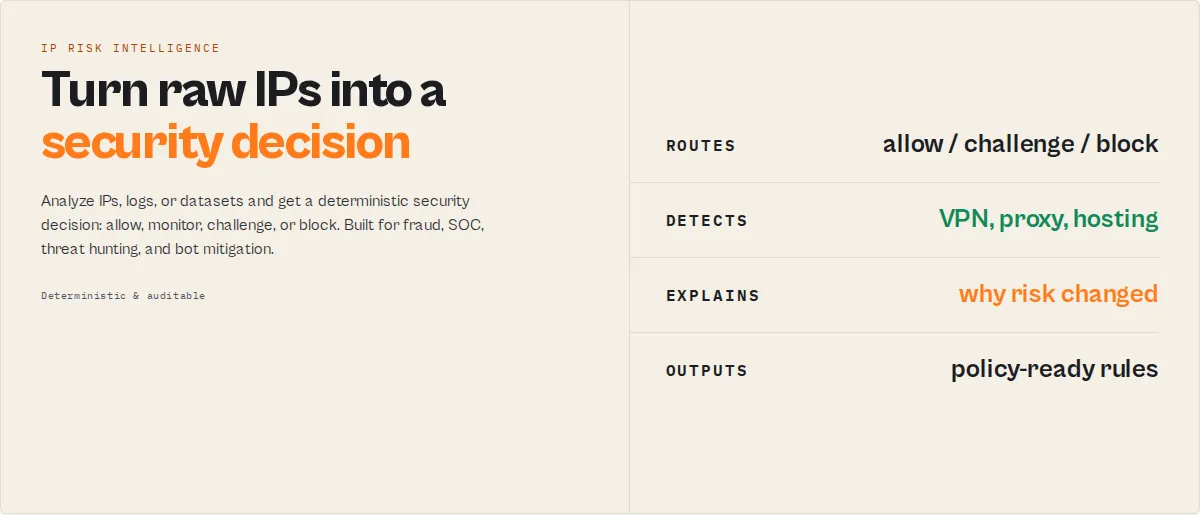
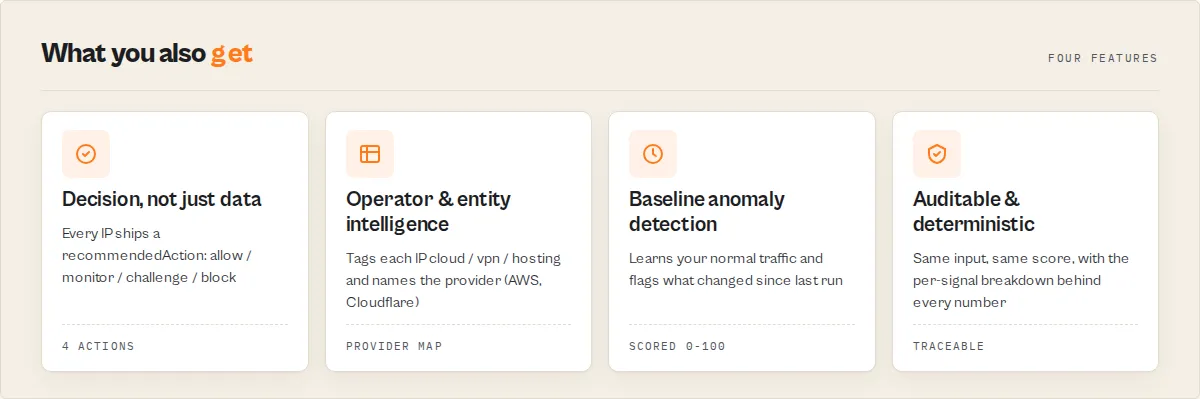
Most IP lookup APIs tell you where an IP is. This actor tells you what to do about it — geolocation, VPN / proxy / Tor detection, deterministic risk scoring, ASN reputation, and a recommended action, for fraud detection, threat intelligence, and bot mitigation.
Submit IP addresses, raw server / firewall logs, or another Apify dataset and get back, in one run:
- Geolocation (country, city, coordinates, timezone)
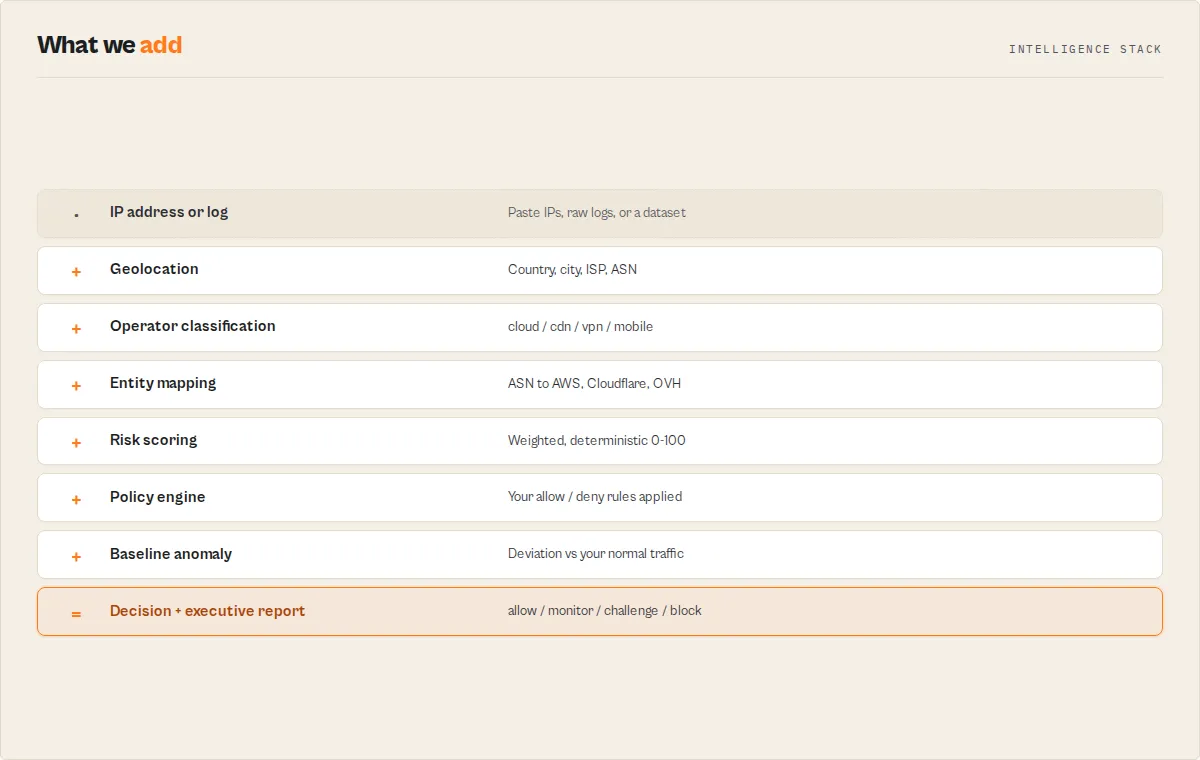
- ASN, ISP, and operator classification — plus the canonical provider (AWS, Cloudflare, DigitalOcean, ...)
- Deterministic, auditable risk scoring — no LLM, no black box
- A recommended action your pipeline branches on:
allow/monitor/challenge/block - Executive summaries, threat-hunting findings, and suggested firewall rules
- Cross-run baseline anomaly detection — "is this traffic normal for my environment?"
Built for fraud detection, SOC operations, threat hunting, compliance geo-fencing, and bot mitigation — usable from Apify, Dify, Zapier, Make, and n8n.
See it in one look
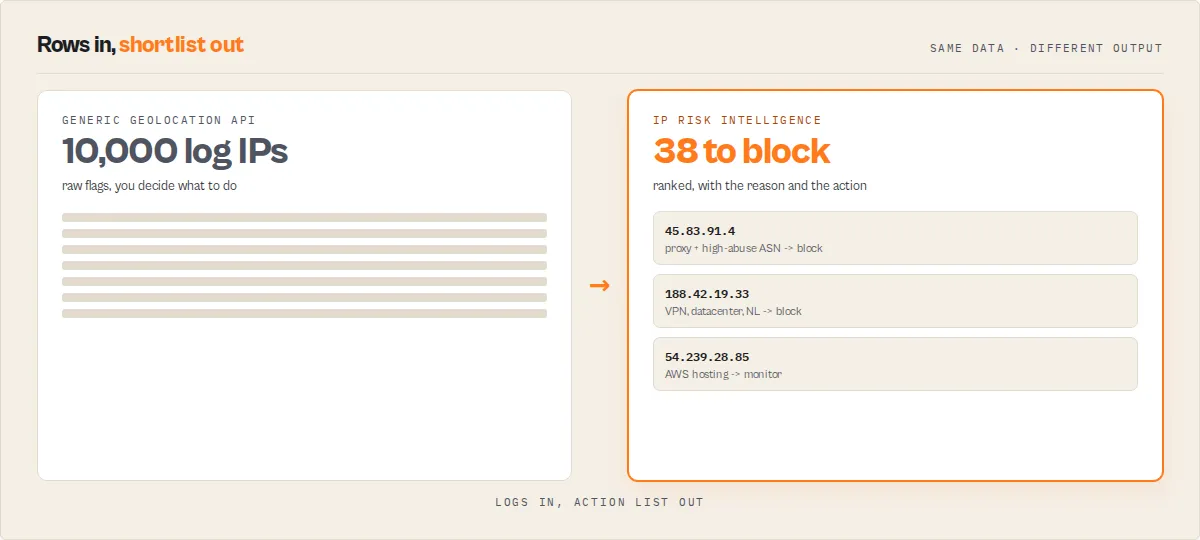
A per-IP verdict your fraud / auth pipeline routes on directly:
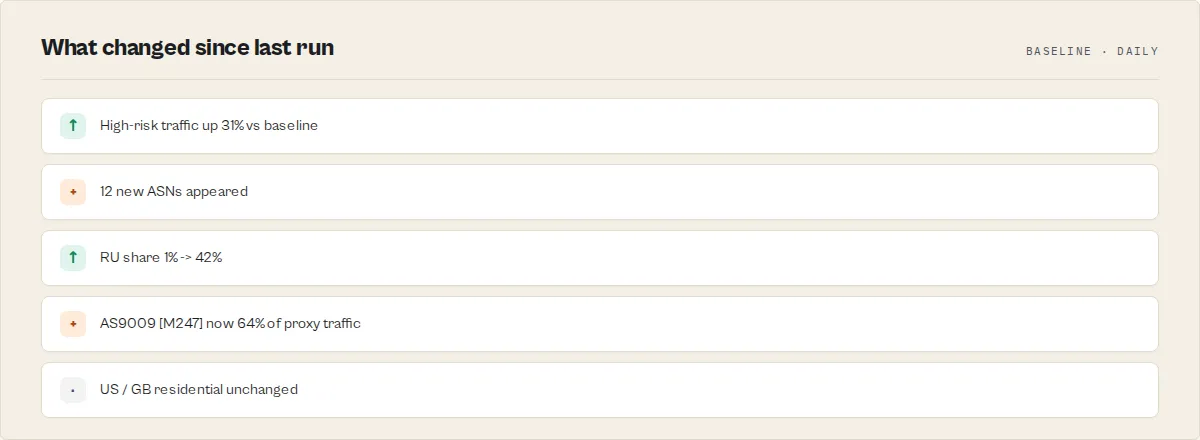
And the run-level answer to the question security teams actually ask — "is this normal compared to everything else I'm seeing?":
A plain geolocation API returns the raw flags; this returns the decision and the context.
Why this is different
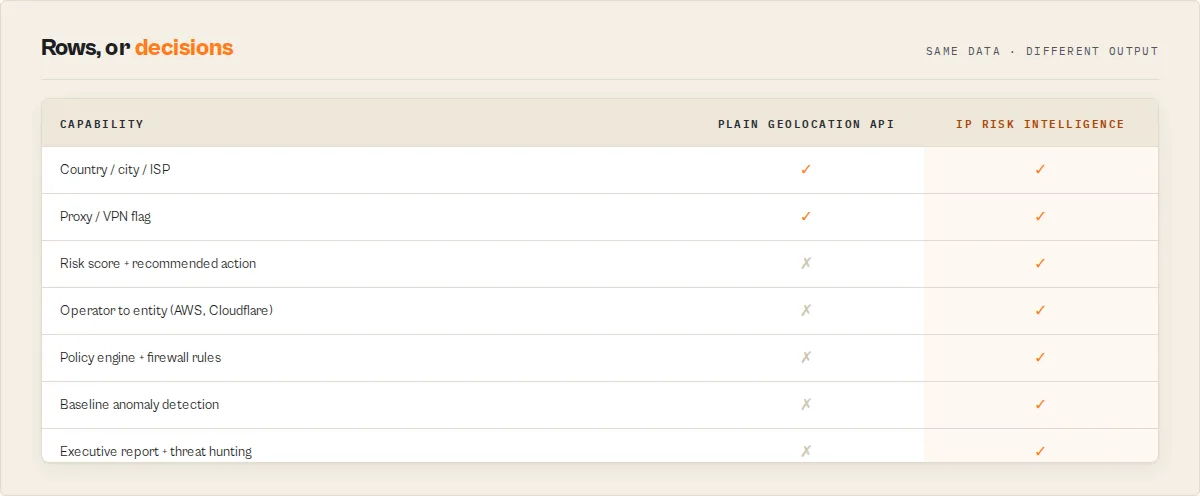
Most IP enrichment tools and geolocation APIs stop at the raw data:
- Country, city, ISP
- ASN lookup
- A proxy / VPN flag
This actor continues to the decision:
- Deterministic risk scoring and a
recommendedAction(allow/monitor/challenge/block) - Policy enforcement — your country/ASN allow-deny rules applied in-run
- Infrastructure provider mapping — IP → AWS / Cloudflare / DigitalOcean, not just an AS number
- Threat-hunting findings and named attack-pattern detection
- Baseline anomaly detection — "is this traffic normal for my environment?"
The result is not just IP intelligence. It is an actionable security decision — VPN/proxy/Tor detection, IP reputation, and fraud signals turned into the one field your pipeline branches on.
Built for
- Fraud teams — screen signup / payment / login IPs
- SOC analysts & threat hunters — triage traffic, surface attack patterns, generate blocks
- Compliance teams — geo-fencing and policy verification
- Platform / SRE teams — bot mitigation and abuse monitoring
- Security researchers — IP enrichment at scale, chained with the DNS/WHOIS/Censys suite below
Production readiness — free vs Pro
By default the actor uses ip-api.com's free endpoint, which is HTTP-only, limited to roughly 15 batch requests per minute, and licensed for non-commercial use only. That is fine for evaluation, internal analytics, and low-volume work.
For commercial / production use, supply an ip-api Pro key (providerMode: "pro" or just paste the key with auto). Pro routes lookups through the commercial-licensed HTTPS endpoint with much higher throughput. Your key is stored as a secret input and never logged. Review ip-api's terms for your use case.
Ready-to-run examples
Pre-configured one-click tasks - open one, hit Start, and see real output instantly:
- Bulk IP Geolocation Lookup - country, city, ISP, and ASN for a list of IPs.
- IP Fraud & Abuse Screening - a risk score and an allow / block decision per IP.
- Detect Fraudulent Signups - strict screening that blocks proxy/VPN and challenges mobile registrations.
- Cloud Provider Attribution - who owns each IP: AWS, Cloudflare, Google Cloud, DigitalOcean, ...
- VPN, Proxy & Datacenter Detection - flag anonymized and hosting traffic with the operator behind it.
- Geolocate IPs from Server Logs - paste raw nginx / Apache / firewall logs, get every IP extracted, geolocated, and scored.
- IP Geo-Fencing & Country Compliance - block traffic from outside your allowed countries.
What jobs does this solve?
| The job you are doing | What you get back |
|---|---|
| Screen signup, login, or payment IPs for fraud | A recommendedAction (allow / monitor / challenge / block) per IP |
| Block VPN and proxy traffic | connectionType + isProxy, with a block / challenge decision |
| Detect Tor exit nodes | The proxy flag and risk verdict for known Tor egress IPs |
| Identify datacenter / hosting IPs | connectionType: hosting plus the provider behind it |
| Find who owns an IP (cloud provider attribution) | entity — AWS, Cloudflare, Google Cloud, DigitalOcean, ... |
| Analyze nginx, Apache, or firewall logs | Every IP extracted from the log, geolocated, and risk-scored |
| Geo-block or audit traffic by country | Policy decisions against your allowed / denied country list |
| Generate firewall rules from risky traffic | Ready-to-paste Cloudflare / nginx / Apache / iptables rules |
| Threat-hunt suspicious IPs | Risk score, the factors behind it, and where high-risk traffic concentrates |
| Detect account-takeover and carding-attack IPs | A strict-profile block/challenge decision on anonymized + datacenter traffic |
How do I block VPN and proxy traffic? Run the actor over your traffic IPs and branch on recommendedAction — proxy, VPN, and Tor IPs come back as challenge or block. Enable blockProxy to force a block on any anonymized IP.
How do I find which cloud provider an IP belongs to? Every record carries entity (the canonical provider — AWS, Cloudflare, Google Cloud, DigitalOcean, OVH, ...) mapped from the ASN, so you reason about traffic by provider instead of opaque AS numbers.
How do I analyze nginx or firewall logs for threats? Paste the raw log into rawText with extractIpsFromText — every IP is pulled out, geolocated, risk-scored, and (with generatePolicy) turned into ready-to-paste firewall rules.
Key features
Core capabilities
- Deterministic risk decision layer -- Every IP is scored into a
connectionType,riskScore,riskLevel, andrecommendedAction-- no LLM, fully reproducible, with the activeriskModelVersionon every record. - ASN / operator classification -- Each IP is tagged with its operator type (
cloud,cdn,vpn,hosting,mobile,consumer-isp, ...) so you reason about traffic by operator, not opaque AS numbers. - Policy engine -- Country allow/deny lists, ASN deny list, ASN-category blocking, and block-hosting / block-proxy / challenge-mobile rules that escalate the recommended action -- no downstream glue code.
- Multi-source input -- A pasted IP list, raw nginx / Apache / firewall / SIEM log text (IP extraction), or another Apify dataset; all merged, deduplicated, IPv4 + IPv6.
- Reserved-range intelligence -- Internal/special IPs (RFC1918, CGNAT, loopback, multicast, ...) are classified locally with a
reservedType, never sent upstream, never charged. - Adaptive rate limiting -- Honors ip-api's
X-Rl/X-Ttlheaders to pace to the upstream budget, with exponential backoff and retries on 429/5xx. - Free or commercial provider -- Runs on ip-api.com's free endpoint by default; supply an ip-api Pro key for the commercial-licensed HTTPS endpoint with higher throughput.
- Graceful failure handling -- Failed lookups are included with
status: "fail"and the reason inmessageso you account for every input IP.
Advanced analytics
- Executive report -- A deterministic run-level narrative showing where high-risk traffic concentrates (countries, ASNs, operators) — the "is this normal vs everything else?" read.
outputMode: "executive"returns just this. - Infrastructure entity intelligence -- Maps ASNs to canonical providers (AWS, Cloudflare, ...) and rolls traffic up by provider.
- Baseline anomaly detection -- Learns your environment's normal traffic over scheduled runs and scores how far each run deviates (
anomalyScore+ a plain-English "what changed" summary). - Threat-hunting findings -- Severity-ranked deterministic findings + named attack-pattern detection (
bot-campaign,vpn-swarm, ...).outputMode: "hunt". - Policy generator -- Turns the findings into ready-to-paste Cloudflare / nginx / Apache / iptables rules.
- Cross-run diff mode -- Point at a prior run's dataset and each IP gets a
changeFlag+ alerting signals (becameProxy,riskIncreased, ...). - KPI outputs -- A flat per-run KPI record for Grafana / PowerBI / Looker / Metabase.
Ingest traffic from anywhere
You rarely have a clean IP list — you have a log. Feed the actor whatever you've got:
- Paste IP addresses directly
- Paste raw nginx / Apache access logs
- Paste firewall or SIEM output
- Read IPs from another Apify dataset (chain an upstream actor)
It automatically extracts, deduplicates, enriches, scores, and analyzes every IP — and drops private/internal ranges if you ask.
Example executive report
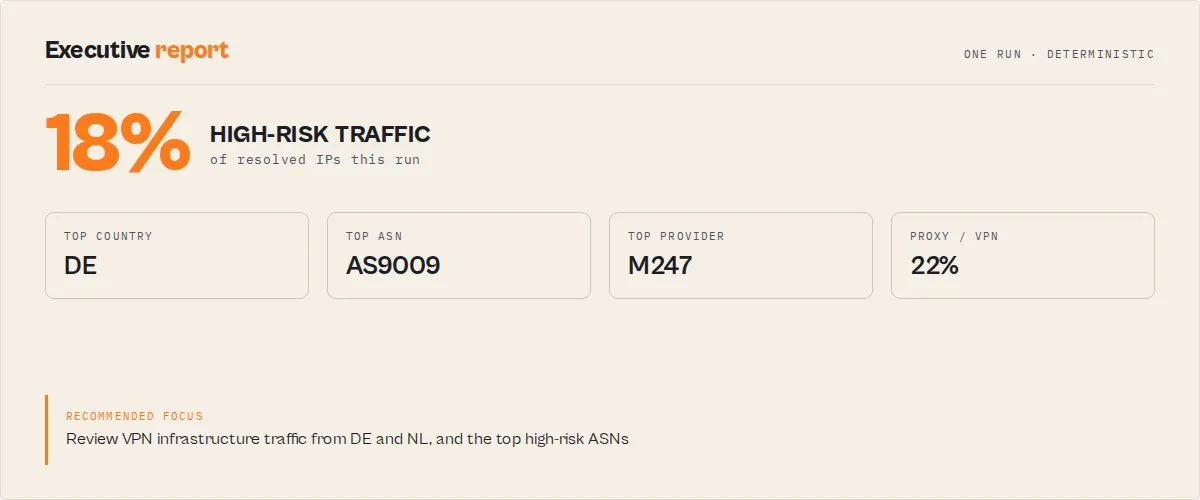
One run over a batch of traffic returns a single deterministic, no-LLM executive record — the run-level answer to "is this normal, and where is the risk?":
outputMode: "executive" returns just this; outputMode: "hunt" returns the severity-ranked findings list.
How to use
Using the Apify Console
- Navigate to the IP Geolocation Lookup actor page on Apify.
- Click Try for free to open the actor in the Console.
- In the IP Addresses field, enter your IP addresses one per line using the string list editor. The default prefill includes
8.8.8.8and1.1.1.1for quick testing. - Optionally uncheck Include Reverse Hostname if you do not need reverse DNS data.
- Optionally enter a comma-separated list in Fields to Include to limit the output (e.g.,
country,city,isp,proxy). - Click Start to run the actor.
- When the run completes, view results in the Dataset tab. Export as JSON, CSV, Excel, or XML, or connect to any downstream integration.
Using the API
The API returns a run object containing a defaultDatasetId. Fetch results with:
Replace {DATASET_ID} with the value from the run response. You can also use format=csv or format=xlsx for alternative export formats.
Input parameters
| Name | Type | Required | Default | Description |
|---|---|---|---|---|
ipAddresses | string[] | Yes | ["8.8.8.8", "1.1.1.1"] | List of IPv4 or IPv6 addresses to look up. Duplicates are removed automatically before processing. |
fields | string | No | All fields | Comma-separated list of ip-api.com fields to include. Available: country, countryCode, region, regionName, city, zip, lat, lon, timezone, isp, org, as, asname, reverse, mobile, proxy, hosting. |
includeReverseHostname | boolean | No | true | Whether to perform a reverse DNS lookup and include the hostname in each result. |
rawText | string | No | — | Raw log text to extract IPs from (with extractIpsFromText). |
extractIpsFromText | boolean | No | false | Extract every IPv4/IPv6 address found in rawText. |
excludePrivateIps | boolean | No | false | Drop private/reserved/loopback/CGNAT addresses from every input source. |
sourceDatasetId | string | No | — | Read IPs from a column of a prior Apify dataset (chain another actor's output in). |
sourceDatasetField | string | No | ip | Which field of the source dataset holds the IP. |
providerMode | string | No | auto | free (HTTP, non-commercial), pro (HTTPS, commercial, needs key), or auto (Pro if key supplied). |
ipApiProKey | string (secret) | No | — | ip-api.com Pro key for the commercial HTTPS endpoint. |
riskProfile | string | No | balanced | How strictly the risk score maps to a recommended action: strict, balanced, or lenient. The numeric score is identical across profiles — only the action changes. |
riskWeights | object | No | — | Override the scoring weights (proxy, hosting, mobile, countryDeny, asnDeny). |
countryAllowList | string[] | No | — | ISO country codes; IPs outside this list are flagged + blocked by policy. |
countryDenyList | string[] | No | — | ISO country codes to block outright. |
asnDenyList | string[] | No | — | AS numbers to block (e.g. AS14061). |
blockAsnCategories | string[] | No | — | Block by ASN category (e.g. vpn, hosting) — no need to know AS numbers. |
blockHosting / blockProxy | boolean | No | false | Force block for datacenter / proxy IPs. |
challengeMobile | boolean | No | false | Force at least challenge for mobile IPs. |
outputMode | string | No | standard | standard (record per IP + rollups), executive (executive report + summary only), or hunt (analyst findings only). |
includeExecutiveReport | boolean | No | true | Emit the run-level executive report record (also written to the EXECUTIVE_REPORT KV key). |
autoDiscoverIpField | boolean | No | false | Auto-detect the IP column when reading from a source dataset. |
generatePolicy | boolean | No | false | Emit suggested ASN/country/IP blocks + Cloudflare/nginx/iptables rules (recordType policy, KV SUGGESTED_POLICY). |
baselineName | string | No | — | Learn this stream's normal traffic over scheduled runs and score each run's deviation (anomalyScore, risk trend, new ASNs) + cross-run ASN reputation. |
outputProfile | string | No | full | minimal (decision fields only), standard, or full. |
includeSummary | boolean | No | true | Append a run-level summary record (counts by risk level, connection type, country, ASN, action). Always mirrored to the SUMMARY KV key. |
previousDatasetId | string | No | — | Diff this run against a prior run's dataset → per-record changeFlag + changes. |
reuseCachedResults | boolean | No | false | Cache + reuse geo facts across runs (cached records flagged provenance.cacheHit). |
cacheTtlHours | integer | No | 24 | Cache validity window when caching is on. |
Example input (JSON):
Tips:
- Leave the
fieldsparameter empty to get all 19 output fields. Thestatusandquery(mapped toip) fields are always included regardless of your selection. - The actor automatically trims whitespace and removes empty strings from the IP list, so minor formatting issues will not cause failures.
- For large lists (10,000+ IPs) on the free endpoint, expect the run to take several minutes: the free batch endpoint allows ~15 requests/minute, so ~1,500 IPs/minute. An ip-api Pro key lifts that ceiling substantially.
Output
Most workflows only read a handful of fields: recommendedAction, riskLevel, riskScore, connectionType, riskFactors, entity, and (in baseline mode) anomalyScore. Set outputProfile: "minimal" to get just the decision fields. Everything below is the full shape; the complete per-field schema is also in the Apify Console Output tab.
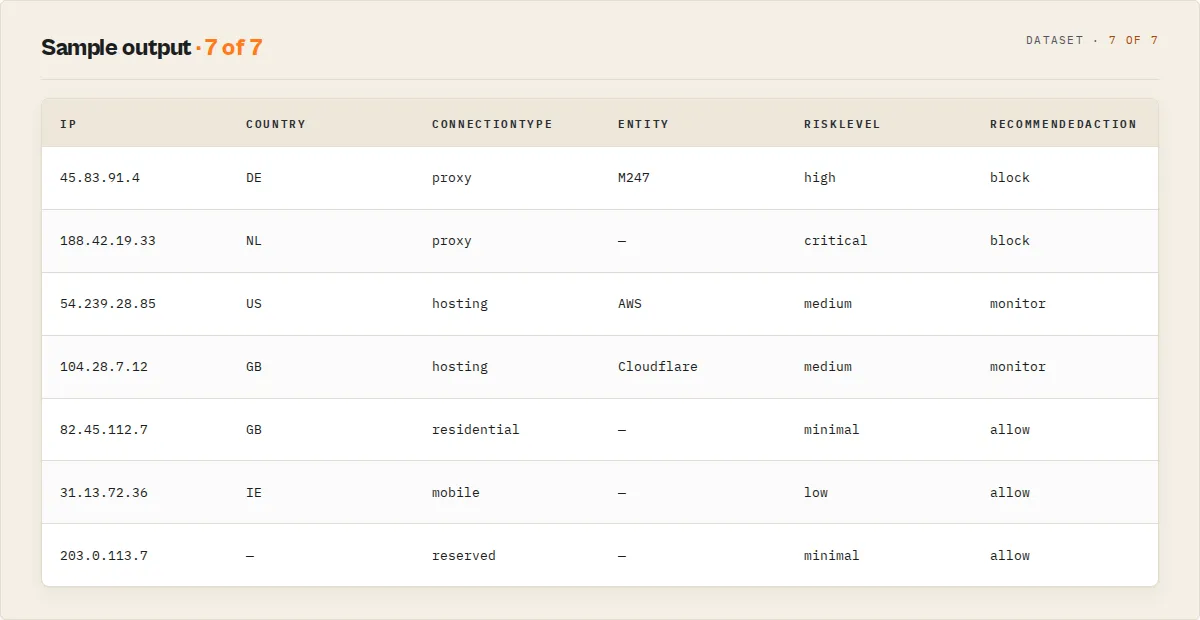
Every IP produces one recordType: "geolocation" object carrying both the raw geolocation data and a deterministic risk decision derived from it. When includeSummary is on, a final recordType: "summary" record holds the cohort rollup. Here is a geolocation result:
The risk decision layer
The actor turns the raw isProxy / isHosting / isMobile flags into a sortable verdict your fraud, auth, or bot-filtering pipeline can branch on directly:
-
connectionType—proxy|hosting|mobile|residential|reserved|unknown, picked by specificity (a proxy that is also a datacenter IP classifies asproxy). -
riskScore(0-100) — a deterministic weighted sum of the abuse signals: proxy/VPN/Tor weighs heaviest, datacenter/hosting next, mobile carrier lightest. It is a fact-derived score, not a probability — there is no fabricated confidence number attached. -
riskLevel— the score's band:minimal|low|medium|high|critical|unknown. -
recommendedAction—allow|monitor|challenge|block|review, the routing primitive. Derived fromriskLevelplus your chosenriskProfile. -
riskFactors— the human-readable signals behind the score, usable verbatim in an alert or audit note. -
asnCategoryclassifies the network operator (cloud,cdn,vpn,hosting,mobile,consumer-isp,university,government,business-isp) from the ASN/ISP name, so you canblockAsnCategories: ["vpn", "hosting"]without memorising AS numbers. -
reservedTypeclassifies internal/special addresses (RFC1918,CGNAT,loopback,multicast,documentation, ...) locally — these are resolved without an upstream call and never charged.
A failed lookup (invalid address) is never silently dropped: it ships with status: "fail", the failure reason in message, and an honest riskLevel: "unknown" rather than a fabricated score.
Executive report & cohort intelligence
A per-IP verdict answers "what does this IP look like?". The run-level executive report answers the question security teams actually ask: "is this IP normal compared to everything else I am seeing?" Every run emits one recordType: "executive" record (and mirrors it to the EXECUTIVE_REPORT KV key) with a deterministic, no-LLM narrative plus the cohort breakdown:
highRiskCountries/highRiskAsns— where the high-risk traffic concentrates, with each entry's share of the high-risk total. This is the "3 ASNs responsible for 72% of your high-risk traffic" read a per-IP view cannot give.proxyPct/hostingPct/mobilePct,topCountry/topAsn/topIsp,topAsnCategories.entityBreakdown— the same traffic rolled up by named infrastructure provider (AWS,Cloudflare,DigitalOcean, ...) with per-entityipCount/highRiskCount/proxyPct, because a security team thinks "AWS accounts for 58% of my high-risk traffic", not "AS16509".narrative— a paste-ready sentence: "18% of resolved IPs are high-risk. High-risk traffic concentrates in DE (41%) and NL (22%), mostly via AS9009 [vpn] and AS16509 [cloud]. Recommended focus: review vpn traffic and the top high-risk ASNs."
Set outputMode: "executive" to suppress the per-IP rows and return just the executive report + summary — the five-second "what should I look at?" read for a dashboard or scheduled Slack drop.
For scheduled monitoring, pass previousDatasetId and each IP also carries riskDelta, riskIncreased, becameProxy, and becameHosting — the alerting signals a watch rule branches on the moment an IP's posture worsens.
From intelligence to action
The executive report carries the analysis; three opt-in features turn it into work the actor does for you:
- Attack-pattern detection —
patterns[]flags deterministic cohort signatures: abot-campaign(many IPs concentrated in one ASN + country, proxy/hosting-heavy), avpn-swarm(many countries via VPN/hosting operators), amobile-abuse-cluster(many IPs from a single carrier). No LLM. - Threat-hunting findings —
interestingFindings[]is the severity-ranked list an analyst reads first ("AS9009 generated 64% of high-risk traffic").outputMode: "hunt"returns just these. - Policy generator (
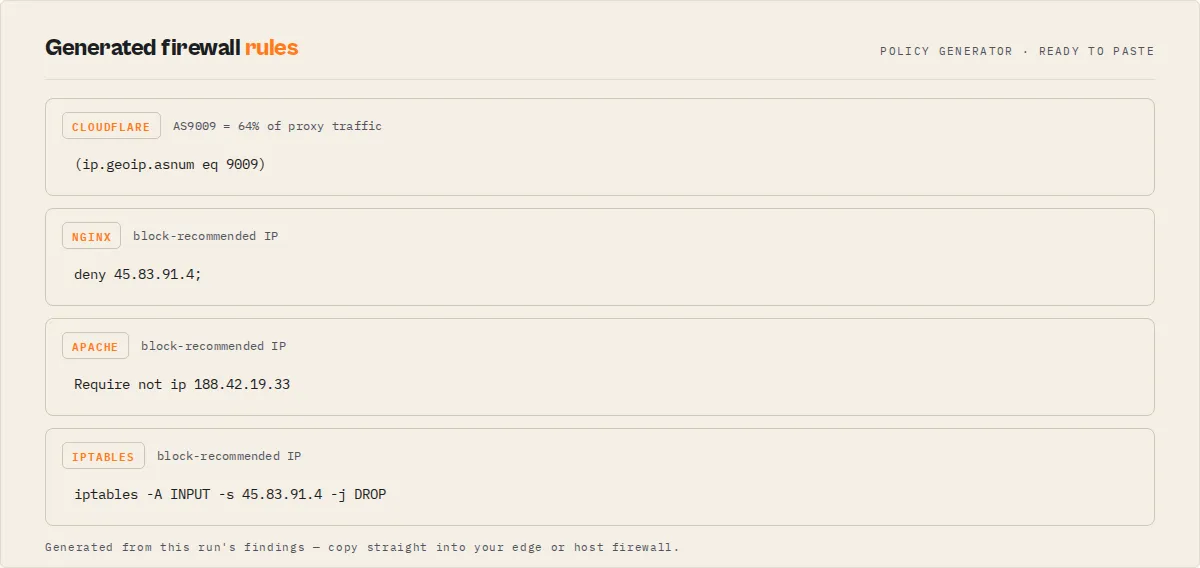
generatePolicy: true) — emits arecordType: "policy"record (andSUGGESTED_POLICYKV) with suggested ASN/country/IP blocks and ready-to-paste firewall rules for Cloudflare ((ip.geoip.asnum eq 9009)), nginx (deny 45.83.91.4;), and iptables. It only suggests what the data supports — it blocks the exact high-risk IPs and the concentrated ASNs, and never fabricates CIDR ranges it doesn't have.
Baseline & anomaly detection (baselineName) is the monitoring flagship. Across scheduled runs the actor learns the stream's normal distribution (country/ASN mix, proxy/hosting/high-risk share) as an EWMA, then scores how far each run deviates: anomaly.anomalyScore (0-100), anomalyReasons (e.g. "RU 60% vs baseline 2%", "proxy/VPN share up 14 pts"), riskTrend, newAsns, and a one-line anomaly.summary — the "what changed" sentence every fraud/SOC/compliance team reads first ("Anomaly 94/100 vs baseline: high-risk traffic trending up (+31 pts); RU now 42% (was 1%); 12 new ASNs."). It also accumulates a cross-run ASN reputation so a high-abuse ASN raises every matching IP's score and shows up as asnRiskClass. This reputation is derived only from the proxy/hosting behaviour observed in your own baseline's historical runs — never from third-party threat feeds — so it reflects your environment and is fully auditable, not an opaque external blocklist. The first run is a baseline (nothing to compare yet); anomaly detection activates from the second run. Each run also writes a flat KPIS KV record (highRiskPct, proxyPct, hostingPct, newAsns, anomalyScore, riskTrend) for Grafana / PowerBI / Looker / Metabase.
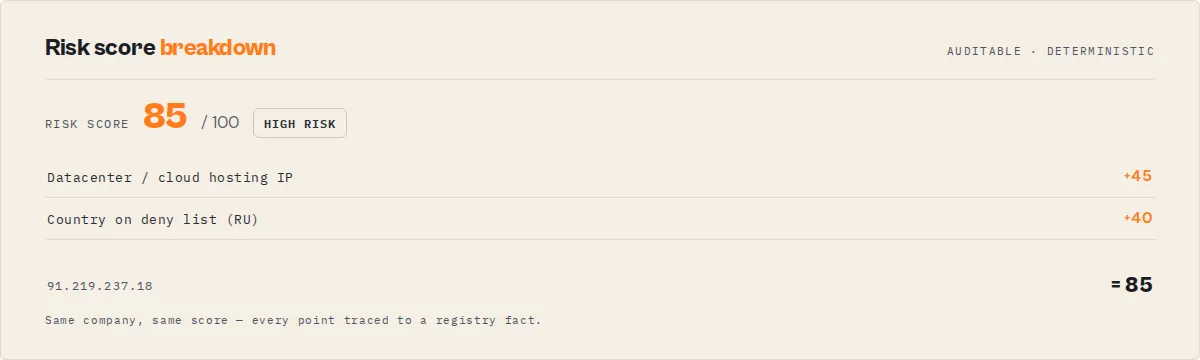
Every score ships with riskScoreBreakdown — the per-signal point contributions (proxy 70, hosting 45, ...) — so a reviewer sees exactly why an IP scored what it did, never an opaque number.
Infrastructure Entity Intelligence
AS numbers are useful to machines; humans think in providers. The actor maps each IP's network to a canonical infrastructure entity — AWS, Microsoft Azure, Google Cloud, Cloudflare, DigitalOcean, OVH, Hetzner, and more — even though one provider is spread across many ASNs and naming variants. Every record carries entity + entityType, and the executive report rolls the whole run up by provider:
So instead of "AS16509 generated 400 high-risk hits" you read "AWS accounts for 27% of your high-risk traffic" — the level a fraud, SOC, or platform team actually reasons at.
Dashboard & reporting
Every run writes a flat KPIS key-value record built for BI tools — drop it straight into Grafana, PowerBI, Looker, or Metabase:
Schedule the actor and chart highRiskPct / proxyPct / anomalyScore over time for a live traffic-risk dashboard.
Output field descriptions:
| Field | Type | Description |
|---|---|---|
recordType | string | "geolocation" per-IP result, "summary" run rollup, "executive" executive report. |
connectionType | string | proxy / hosting / mobile / residential / reserved / unknown. |
asnCategory | string | Operator type: cloud / cdn / hosting / vpn / mobile / consumer-isp / university / government / business-isp / unknown. |
asnCategoryConfidence | string | high / medium / low. |
entity | string | Canonical infrastructure provider (AWS, Microsoft Azure, Google Cloud, Cloudflare, DigitalOcean, ...); null for residential/unrecognised operators. |
entityType | string | The entity's type: cloud / cdn / hosting / vpn. |
asnRiskClass | string | Cross-run ASN reputation (baseline mode): high-abuse / suspicious / clean; null without a baseline. |
riskScoreBreakdown | object | Per-signal point contributions behind riskScore (proxy / hosting / mobile / countryDeny / asnDeny / asnAbuse) — explains the number. |
reservedType | string | For internal IPs: RFC1918 / CGNAT / loopback / link-local / multicast / documentation / benchmark / reserved; null for public IPs. |
riskDelta / riskIncreased | number / boolean | Diff mode: score change vs the prior run + whether it rose. |
becameProxy / becameHosting | boolean | Diff mode: flipped to proxy / hosting since last run — alerting signals. |
riskScore | number | 0-100 abuse-risk score. Null when the IP cannot be assessed. |
riskLevel | string | Band of the risk score. |
recommendedAction | string | Final routing decision (risk + policy): allow / monitor / challenge / block / review. The field to branch on. |
riskBasedAction | string | What the risk model alone recommended, before policy (audit). |
policyRules | string[] | Named policy rules that fired (e.g. countryDenyList, blockProxy). Empty when no policy is set. |
riskModelVersion | string | Version of the deterministic scoring model. |
provenance | object | { provider, providerTier, lookupTimestamp, cacheHit }. |
changeFlag | string | NEW / CHANGED / UNCHANGED in diff mode; null otherwise. |
changes | object | Per-field before/after when changeFlag is CHANGED; null otherwise. |
riskFactors | string[] | Signals that drove the score. |
summary | string | One-line plain-English summary for an LLM or Slack rule. |
message | string | Failure reason when status is "fail"; null on success. |
ip | string | The queried IP address. |
country / countryCode / city | string | Location of the IP. |
isp / organization | string | ISP and organization names. |
isMobile / isProxy / isHosting | boolean | The raw connection flags behind connectionType and the risk score. |
status | string | "success", "fail" (unresolvable), or "reserved" (internal IP, classified locally). |
The actor also returns the standard geolocation fields (region, regionName, zip, latitude, longitude, timezone) and network fields (asNumber, asName, reverseHostname) on every record — every field is documented in the dataset schema shown in the Apify Console's Output tab. Use outputProfile: "minimal" to return only the decision fields.
Use cases
- Fraud detection -- Flag user signups or transactions coming from known proxy/VPN addresses or hosting providers that typically indicate automated or fraudulent activity.
- Web analytics enrichment -- Enrich server access logs with geographic data to understand where your visitors are actually located, beyond what browser-based analytics provide.
- Ad fraud prevention -- Identify clicks and impressions originating from data centers (
isHosting: true) or proxy networks (isProxy: true) to filter invalid traffic from your ad campaigns. - Compliance and geo-fencing -- Verify that users accessing your service are located in permitted jurisdictions by checking country codes against your allow/deny lists.
- Threat intelligence -- Build IP reputation databases by cross-referencing geolocation data with known malicious IP lists, autonomous system information, and proxy detection flags.
- Email security -- Analyze originating IP addresses from email headers to detect phishing attempts from unexpected geographic locations or hosting providers.
- Network forensics -- Investigate security incidents by mapping attacker IPs to geographic locations, ISPs, and autonomous systems for attribution and reporting.
- Content delivery optimization -- Analyze your user base distribution across countries and regions to make informed decisions about CDN node placement and server locations.
- Bot detection -- Combine the
isProxy,isHosting, andisMobileflags with traffic patterns to build scoring models that distinguish legitimate users from automated bots.
API & integration
Python
JavaScript
cURL
This actor integrates with the full Apify ecosystem. Connect it to Zapier, Make (Integromat), Google Sheets, Slack, or GitHub Actions using Apify's built-in integrations. You can also chain it with other actors via webhooks or the Apify API to build automated IP intelligence pipelines.
Use in Dify
Drop this actor into Dify workflows via the Apify plugin's Run Actor node. Each IP returns scored, classified, and recommended as structured JSON — allow / monitor / challenge / block plus the riskLevel and connectionType your downstream node branches on. A plain geolocation API pointed at the same IP returns raw proxy/hosting booleans you still have to turn into a policy; this returns the decision.
- Actor ID:
ryanclinton/ip-geolocation-lookup - Sample input (screen signup IPs under a strict policy, decision fields only):
A Dify if/else node routes each record on the recommendedAction enum without parsing prose:
recommendedAction == "block"→ reject the signup, log theriskFactorsrecommendedAction == "challenge"→ send to step-up verification (2FA / email confirm)recommendedAction == "monitor"→ allow but flag the session for reviewrecommendedAction == "allow"→ proceedrecommendedAction == "review"→ lookup failed or unparseable IP; send to a human
The riskProfile input tunes that mapping per workflow (a payment flow runs strict, a content-analytics flow runs lenient) without changing the underlying score, so the same actor serves multiple Dify branches. The riskFactors[] array is plain-English and usable verbatim in a Slack alert or audit note — no LLM rewriting needed.
How it works
- Input validation -- The actor reads the
ipAddressesarray from input and verifies it is a non-empty array. It also reads the optionalfieldsandincludeReverseHostnameparameters. - Deduplication and cleaning -- All IP addresses are trimmed of whitespace, empty strings are filtered out, and duplicates are eliminated using a JavaScript
Setto avoid redundant lookups. - Field parameter construction -- The actor builds a comma-separated field selection string for the ip-api.com batch API. If custom fields are provided,
statusandqueryare always injected to ensure proper result mapping. If theincludeReverseHostnameflag is true, thereversefield is appended. When no custom fields are specified, all 19 available fields are requested. - Batch processing -- The deduplicated IP list is split into chunks of 100 (the ip-api.com batch endpoint maximum). Each chunk is sent as a POST request to
http://ip-api.com/batchwith a JSON body containing an array of{ query, fields }objects. - Adaptive rate limiting -- The actor reads ip-api's
X-Rl(requests remaining) andX-Ttl(seconds to reset) headers and paces to them, falling back to a ~4-second floor between batches on the free endpoint. It retries 429/5xx responses with exponential backoff. The Pro endpoint paces far faster. - Scoring + transformation -- Raw responses are normalized (
lat/lon/org→latitude/longitude/organization) and each IP is scored intoconnectionType/riskScore/riskLevel/recommendedAction, with any policy rules applied. Failed lookups are preserved withstatus: "fail"and the reason inmessage. - Streaming push -- Each batch's results are pushed to the dataset the moment the batch finishes, so first results appear within ~1 minute. The run-level summary record and KV reports (
SUMMARY,HIGH_RISK_IPS,FAILED_IPS) are written at the end.
Performance & cost
| Metric | Details |
|---|---|
| Batch size | 100 IPs per API request (ip-api.com batch endpoint maximum). |
| Throughput (free) | ~1,500 IPs/minute — the free batch endpoint allows ~15 requests/minute, so ~15 batches × 100 IPs. |
| Throughput (Pro) | Much higher — paced only by your ip-api Pro plan's limits. |
| Memory usage | 256 MB default allocation -- sufficient for lists of 100,000+ IPs. |
| Rate limiting | Adaptive: honors ip-api's X-Rl / X-Ttl headers, with exponential backoff and retries on 429/5xx. |
| External API cost | Free endpoint is non-commercial. Commercial use requires an ip-api Pro subscription (your key). |
Limitations
- ip-api.com rate limits -- The free batch endpoint allows approximately 15 requests per minute over HTTP and is licensed for non-commercial use only. The actor paces to this automatically via the
X-Rl/X-Ttlheaders, but large free-tier runs take proportionally longer. For commercial or high-volume use, supply an ip-api Pro key (providerMode) for the HTTPS endpoint. - Geolocation accuracy -- IP geolocation is inherently approximate. Country-level accuracy is typically 99%+, but city-level accuracy ranges from 50-80% depending on region and ISP. Coordinates should be treated as estimates, not precise locations.
- Private and reserved IPs -- Addresses in private ranges (e.g.,
10.0.0.0/8,192.168.0.0/16,127.0.0.1) and other reserved blocks will returnstatus: "fail"with null geolocation fields. - Risk detection is heuristic -- The risk score is a deterministic weighting of ip-api's proxy/hosting/mobile flags plus your policy. It is a triage signal, not a guarantee; no IP-reputation database is 100% complete.
- No historical data -- Results reflect the current state of IP geolocation databases. IP assignments change over time, so results for the same IP may differ between runs weeks or months apart.
- Proxy detection coverage -- The
isProxyflag catches many known VPNs, proxies, and Tor exit nodes, but no database is 100% complete. Newly launched proxy services may not be flagged immediately. - Upstream dependency -- The actor depends on the ip-api.com service availability. If their API is down or unreachable, the actor run will fail.
Responsible use
- Respect privacy regulations -- IP addresses can constitute personal data under GDPR, CCPA, and similar regulations. Ensure you have a lawful basis for processing IP geolocation data and that your use complies with applicable privacy laws in your jurisdiction.
- Do not use for harassment or stalking -- IP geolocation provides approximate location data at best. Never use this information to track, harass, or surveil individuals. City-level geolocation is not precise enough to identify a specific person or physical address.
- Respect ip-api.com terms of service -- This actor uses the free ip-api.com batch endpoint. Review their terms of service to ensure your use case is permitted, particularly for high-volume commercial applications.
- Secure your output data -- Geolocation results may contain sensitive intelligence about your infrastructure, users, or investigation targets. Store and transmit results securely, and limit access to authorized personnel.
- Avoid unnecessary re-lookups -- While the actor handles rate limiting automatically, avoid scheduling excessively frequent runs with the same IP lists. Cache results when the data does not need to be refreshed in real time.
FAQ
Q: Do I need an API key to use this actor?
A: Not for evaluation. The free ip-api.com endpoint needs no key, but it is HTTP-only, ~15 batch requests/minute, and licensed for non-commercial use. For commercial or high-volume use, supply an ip-api Pro key (providerMode: "pro" or auto) to route through the commercial HTTPS endpoint.
Q: How many IPs can I look up in a single run? A: There is no hard limit on input size. On the free endpoint the actor paces to ~15 batches/minute (~1,500 IPs/minute), so 10,000 IPs takes roughly 7 minutes and 100,000+ is supported but proportionally longer. An ip-api Pro key lifts the throughput ceiling substantially.
Q: Can I feed it raw server logs instead of a clean IP list?
A: Yes. Paste log text into rawText and enable extractIpsFromText — every IPv4/IPv6 address is extracted, deduplicated, and scored. Enable excludePrivateIps to skip internal addresses. You can also pull IPs from a prior Apify dataset with sourceDatasetId.
Q: How do I enforce my own allow/block policy?
A: Use the policy inputs: countryAllowList / countryDenyList, asnDenyList, and blockHosting / blockProxy / challengeMobile. They escalate the recommendedAction and record which rule fired in policyRules, so you get a final decision without writing downstream glue code.
Q: Does it support IPv6 addresses?
A: Yes. Both IPv4 (e.g., 8.8.8.8) and IPv6 (e.g., 2606:4700:4700::1111) addresses are fully supported and can be mixed in the same input list.
Q: What happens if I submit duplicate IPs?
A: Duplicates are automatically removed before processing using a JavaScript Set. If you submit ["8.8.8.8", "8.8.8.8", "1.1.1.1"], only two lookups are performed and two results are returned.
Q: What does the isProxy flag detect?
A: The isProxy flag indicates whether the IP is a known VPN endpoint, public proxy server, or Tor exit node. It is based on ip-api.com's detection database, which covers major VPN providers, public proxy lists, and the Tor network.
Q: What is the difference between isProxy and isHosting?
A: isProxy identifies IPs actively used as VPN or proxy endpoints. isHosting identifies IPs belonging to data center and cloud hosting providers (e.g., AWS, Google Cloud, DigitalOcean) regardless of whether they are used as proxies. An IP can have both flags set to true.
Q: Why do some IPs return status: "fail"?
A: IPs in private ranges (10.x.x.x, 192.168.x.x, 172.16-31.x.x), loopback addresses (127.0.0.1), and other reserved blocks cannot be geolocated by ip-api.com. Invalid strings that are not valid IP addresses will also fail. The actor logs a warning for each failure but continues processing.
Q: Can I get only specific fields to reduce output size?
A: Yes. Use the fields input parameter with a comma-separated list like country,city,isp,proxy. The status and ip fields are always included in the output regardless of your field selection.
Q: How accurate is the geolocation data? A: Accuracy varies by region and ISP. Country-level accuracy is typically 99%+. City-level accuracy ranges from 50-80%. Coordinates are approximate and should not be used for precise location determination. Data is sourced from ip-api.com's regularly updated geolocation databases.
Q: What happens if ip-api.com rate limits my run?
A: The actor paces requests adaptively by reading ip-api's X-Rl (requests remaining) and X-Ttl (seconds to reset) headers — when the window is exhausted it waits exactly the reset interval, otherwise it paces to the tier floor (~4s/batch on the free endpoint, far faster on Pro). It retries 429/5xx responses with exponential backoff. The free batch endpoint allows ~15 requests/minute.
Q: Can I schedule this actor to run on a recurring basis? A: Yes. Use Apify's built-in scheduler to run the actor at any interval -- hourly, daily, weekly, or on a custom cron expression. Combine it with webhooks to automatically process new results downstream.
Q: What is the reverseHostname field?
A: It is the result of a reverse DNS (PTR record) lookup on the IP address. For example, 8.8.8.8 resolves to dns.google and 1.1.1.1 resolves to one.one.one.one. This can help identify the service or organization behind an IP. Set includeReverseHostname to false if you do not need this data.
Related actors
This actor is the entry point to a security-research suite. Start from an IP, then pivot to the domain, certificate, infrastructure, and vulnerability layers — chain them with the Apify API, webhooks, Dify, n8n, Make, or this actor's sourceDatasetId input:
| Actor | Description | Link |
|---|---|---|
| DNS Record Lookup | Query DNS records (A, AAAA, MX, TXT, CNAME, NS, SOA) for any domain name. | DNS Record Lookup |
| SSL Certificate Search | Search crt.sh Certificate Transparency logs to discover subdomains and certificate history for any domain. | SSL Certificate Search |
| WHOIS Domain Lookup | Look up WHOIS registration data for domains including registrar, dates, nameservers, and contact info. | WHOIS Domain Lookup |
| Censys Internet Host Search | Search Censys for internet-connected hosts, open ports, running services, and TLS certificates. | Censys Internet Host Search |
| CISA KEV Catalog | Search the CISA Known Exploited Vulnerabilities catalog for actively exploited security flaws. | CISA KEV Catalog |
| NVD CVE Vulnerability Search | Search the NIST National Vulnerability Database for CVEs by keyword, severity, or date range. | NVD CVE Vulnerability Search |


