

Attack Surface Intelligence — Certificate Transparency
Pricing
from $3.00 / 1,000 certificate fetcheds
Attack Surface Intelligence — Certificate Transparency
Turn Certificate Transparency logs into attack-surface intelligence. Find new subdomains, exposed admin/VPN/DevOps services, brand-abuse look-alikes, and infrastructure drift, each with a risk score, recommended action, and investigation priority. Findings and executive summary included.
Pricing
from $3.00 / 1,000 certificate fetcheds
Rating
0.0
(0)
Developer

Ryan Clinton
Maintained by CommunityActor stats
0
Bookmarked
64
Total users
3
Monthly active users
2 months ago
Last modified
Categories
Share
Attack Surface Intelligence — Certificate Transparency Monitoring
Find what changed, why it matters, and what to investigate first.
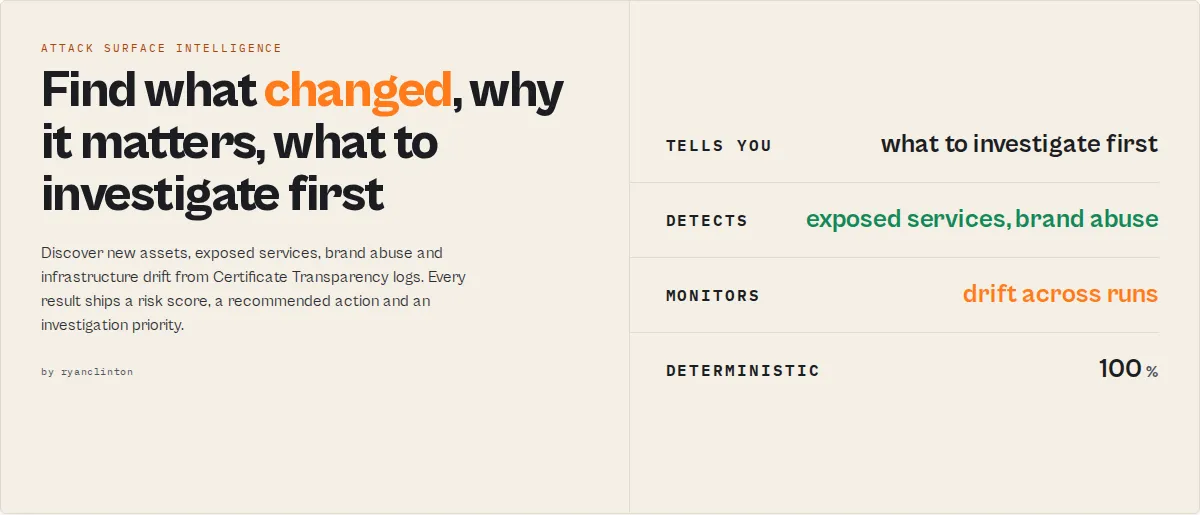
Discover new assets, exposed services, suspicious certificates, brand abuse, and infrastructure drift — before attackers do. A lightweight external attack-surface management (ASM) layer built entirely on public Certificate Transparency data. No agents, no deployment, no API keys.
Detect:
- ✓ New subdomains as they appear in CT logs
- ✓ VPN, RDP, and remote-access portals
- ✓ Admin interfaces and internal tooling (Grafana, Jenkins, Vault, GitLab…)
- ✓ Suspicious / look-alike certificates and brand-abuse infrastructure
- ✓ Certificate expiry, issuer changes, and rotation health
Every result ships a risk score, a recommended action (investigate / monitor / ignore), an investigation priority with effort estimate, and a plain-English reasoning chain. Findings, an executive summary, and drift detection come standard — so you read the handful that matter, not 400 raw rows.
Example findings
You get decisions, not certificates:
...a board-ready executive summary:
...and a ranked investigation queue (what to work first):
A typical run
Most CT tools never show you the outcome — just the rows.
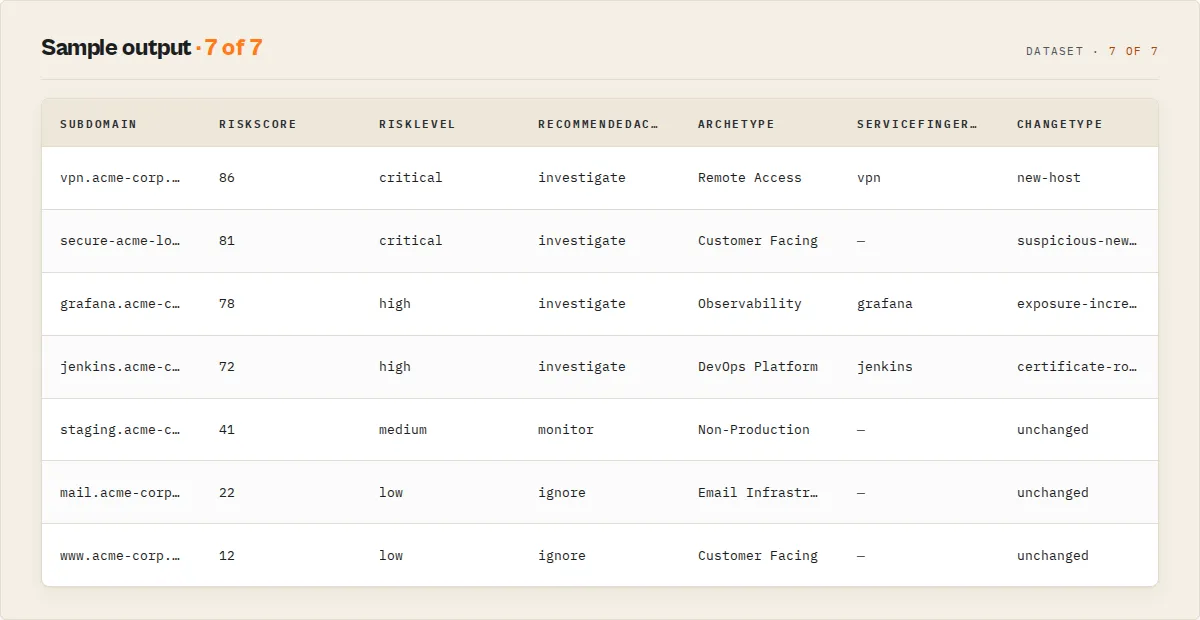
Most CT tools return things. This returns work.
| Most CT tools | This actor |
|---|---|
| Hostnames | Findings |
| Certificates | A ranked investigation queue |
| Search | Monitoring + drift detection |
| Discovery | Prioritisation + recommended action |
| Data | Decisions |
Quick start: pick a profile
One input configures the whole actor. Set profile and a domain -- everything else is tuned for the job:
profile | For | What it does |
|---|---|---|
external-attack-surface | Security teams | Medium-and-above risk review across your estate. |
phishing-monitor | Brand protection | Phishing mode + theme hunting for look-alikes and brand abuse. |
certificate-governance | Compliance | Expiry, rotation health, and issuer changes. |
recon | Pentesters | Exposed services (VPN / Grafana / Jenkins / Vault / admin) first, full detail. |
executive-report | Leadership | High-risk hosts + findings + a board-ready executive summary. |
Any explicit setting (analysisMode, minRiskLevel, …) always overrides the profile.
Daily monitoring workflow
Schedule one run with a watchlist and you get only what changed, ranked by what to do first:
How it works
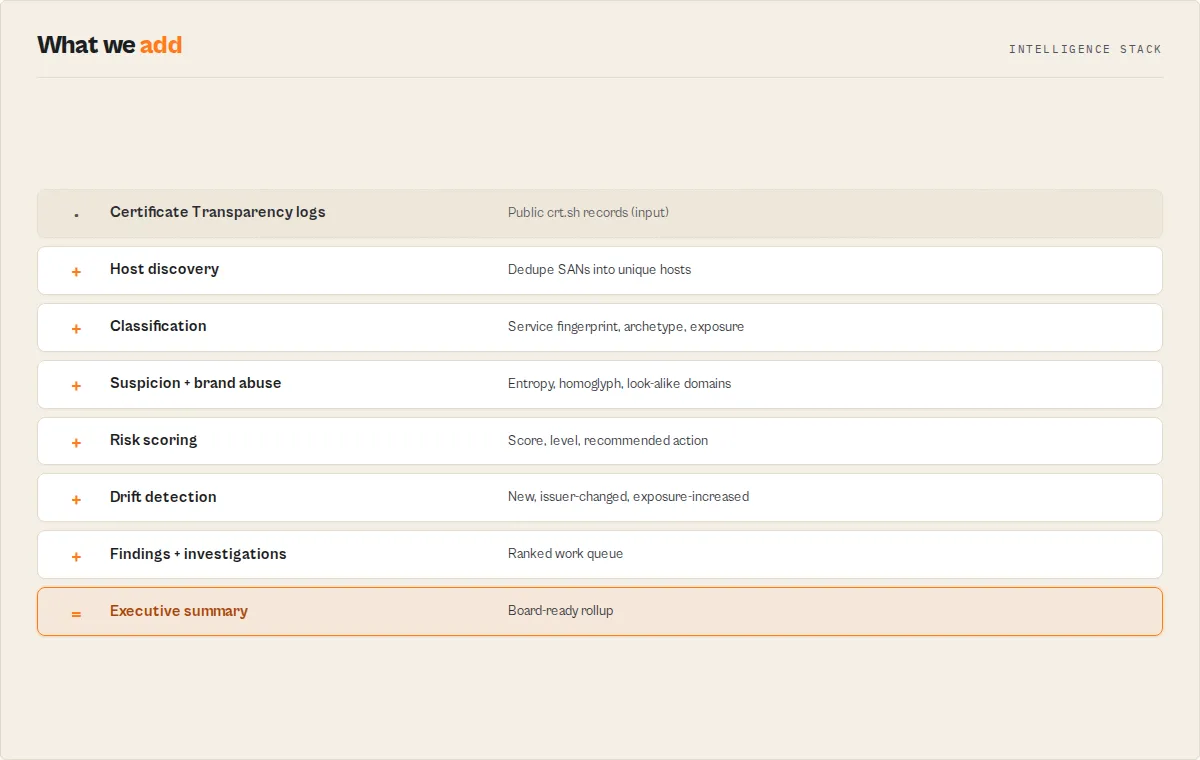
Who uses this
- Security teams — find new external attack surface before attackers do.
- SOC teams — receive investigation-ready findings with effort estimates.
- Brand-protection teams — monitor phishing / look-alike infrastructure (
phishing-monitor). - Pentesters — recon exposed services fast (
recon). - Consultants — generate report-ready findings + executive summaries.
- MSPs — monitor dozens of customer domains in one run (
domains[]).
What this solves
1. Attack-surface monitoring -- discover the hosts attackers find first: new subdomains, exposed admin panels, VPN/RDP gateways, internal tooling (Grafana, Jenkins, Vault…), identity/SSO endpoints, databases, and suspicious certificates -- before they're used against you.
2. Brand & phishing monitoring -- detect look-alike domains and phishing infrastructure abusing your brand, and unauthorized certificate issuance, using a brandName term across CT logs.
3. Certificate governance -- monitor issuer changes, expiry risk, wildcard expansion, and rotation health across your whole certificate estate.
What decisions it produces
Every host carries a single recommendedAction your workflow branches on: investigate / monitor / ignore -- backed by a riskScore (0--100), a riskLevel, and a scoreBreakdown showing exactly which signals (exposure / suspicion / certificate / change / brand / age) produced it.
What changes it detects
In watchlist mode, every host is tagged with a changeType and a changeImpact (high/medium/low): new hosts, suspicious new hosts, exposure increases, issuer changes, wildcard added/removed, and certificate rotation -- plus run-level trend records tracking your attack-surface score over time.
The four questions it answers
| Question | How |
|---|---|
| What changed? | changeType / changeImpact per host + run-level trend records (watchlist mode). |
| Why should I care? | reasoning[] analyst chains + whyFlagged on every record. |
| What should I investigate first? | Records sorted by riskScore; recommendedAction: investigate; executive-summary.topRisks. |
| What story does this tell? | Per-host journey[], environment/region reconstruction, and archetypeDistribution. |
Choose your lens (analysisMode)
The same scan, re-prioritized for the job — set analysisMode to put the right hosts at the top:
attack-surface(default) — balanced exposure + risk review.recon— surfaces VPN / Citrix / Grafana / Jenkins / Vault / admin first (pentest reconnaissance).phishing— boosts suspicion + brand-abuse signals; pair withbrandNameandhuntModefor brand protection.certificate-audit— expiry, rotation health, and issuer changes first (compliance / cert governance).compliance— expired certs, issuer changes, and wildcard expansion first.
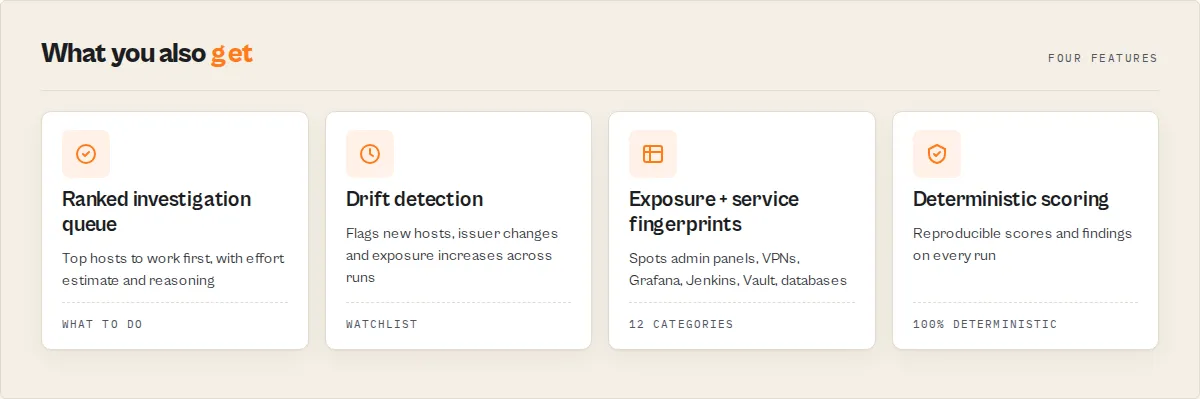
Why use this actor?
- Attack-surface score, not a cert dump -- every run returns an
attackSurfaceScore(0--100) andsurfaceGrade(A--F) for the domain (or whole organization), plus per-hostriskScore/riskLevel/recommendedAction. You see the state of your external exposure at a glance. - Risk prioritization -- each subdomain is scored and sorted highest-risk-first, with a plain-English
whyFlaggedand stableriskFactors[]. Filter 400 subdomains down to the handful worth investigating withminRiskLevel. - Change detection (monitoring) -- name a watchlist and every host comes back with a
changeType:new-host,suspicious-new-host,issuer-changed,exposure-increased,wildcard-added/removed,certificate-rotation. Run-leveltrendrecords track your attack-surface score over time. This is the difference between a lookup tool and a monitoring product. - Brand & phishing monitoring -- supply a
brandNameand look-alike hostnames that decorate your brand on a different registrable domain (e.g.yourbank-login.com) are flagged with abrandAbuseRiskrating. - Shadow-IT exposure detection -- hostnames are classified into exposure categories (
admin,remote-access,internal-tooling,identity,data-store,non-production, …) so exposed admin panels, VPN gateways, and databases surface immediately. - Organization portfolio mode -- scan many domains in one run with
domains[]and get an organization-wide rollup. - No API key required -- Certificate Transparency logs are public records mandated by RFC 6962, queried via the largest public CT aggregator (crt.sh) at zero external cost.
- Clean structured output -- crt.sh returns raw HTML tables by default; this actor queries the JSON endpoint, deduplicates subdomains, and delivers typed, decision-ready records with budget-aware retries and graceful error handling.
Key features
- Two output modes -- choose between deduplicated subdomain summaries (default) or granular individual certificate records depending on your use case.
- Subdomain enumeration -- discover every subdomain that has ever had an SSL/TLS certificate issued, a critical first step in attack surface mapping and security reconnaissance.
- Expired certificate filtering -- optionally exclude expired certificates to focus only on currently active infrastructure.
- First-seen / last-seen tracking -- see exactly when each subdomain first appeared in CT logs and when it was most recently observed, useful for tracking infrastructure changes.
- Active status indicator -- each subdomain includes an
isActiveboolean flag computed from the latest certificate's expiration date. - SAN extraction -- Subject Alternative Names are parsed from multi-line
name_valuefields and wildcard entries (e.g.,*.example.com) are normalized to their base domain. - Certificate metadata -- get issuer name, common name, serial number, validity window, entry timestamp, and direct crt.sh links for every record.
- Configurable result limits -- return anywhere from 1 to 5,000 results per run to balance completeness against processing time.
- Wildcard subdomain search -- when
includeSubdomainsis enabled, the actor automatically prepends%.to your domain query for comprehensive subdomain discovery. - Direct crt.sh links -- every result includes a clickable URL back to the crt.sh web interface for manual verification and deeper investigation.
How to use
From the Apify Console
- Go to the SSL Certificate Transparency Search actor page and click Start.
- Enter a domain name (e.g.,
example.com) in the Domain field. - Configure optional settings:
- Toggle Include Subdomains to search for all subdomains (disabled by default — enable for full subdomain enumeration on smaller domains).
- Toggle Include Expired Certificates to include or exclude expired certs.
- Toggle Deduplicate Subdomains for aggregated subdomain output versus raw certificate records.
- Set Max Results to control the number of returned items (default: 100).
- Click Start and wait for the run to complete.
- Download results in JSON, CSV, Excel, or other formats from the Dataset tab.
Via the Apify API (JavaScript)
Via the Apify API (Python)
Input parameters
| Parameter | Type | Required | Default | Description |
|---|---|---|---|---|
profile | String | No | -- | One-click job bundle (see Quick start): external-attack-surface, phishing-monitor, certificate-governance, recon, executive-report. Explicit settings below override it. |
domain | String | Yes | -- | Domain to search for certificates (e.g., example.com). Use %.example.com for manual wildcard subdomain search, or %brand% to hunt look-alike phishing domains. |
domains | String[] | No | -- | Organization portfolio mode — scan up to 25 domains in one run and get an org-wide rollup. Overrides domain when set; each domain is scanned independently. |
organizationName | String | No | -- | Optional label for the organization rollup in portfolio mode (e.g. Acme Corp). Tags the summary with organizationAttackSurfaceScore. Does not auto-discover domains — supply them in domains[]. |
analysisMode | String | No | attack-surface | Re-prioritizes the same data for a persona: attack-surface (balanced), recon (exposed services), phishing (suspicion + brand abuse), certificate-audit (expiry + rotation + issuer), compliance (expired certs, issuer changes, wildcards). |
brandName | String | No | -- | Brand term for phishing/typosquat detection. Look-alike hostnames containing your brand on a different registrable domain are scored for brandAbuseRisk. |
huntMode | Boolean | No | false | Threat-hunting mode — tag each host with a phishing huntTheme (credential / payment / identity / remote-access) and emit themed findings, for hunting brand abuse across a broad %brand% query. |
includeExpired | Boolean | No | true | Include certificates that have already expired in the results. |
includeSubdomains | Boolean | No | false | Automatically prepend % wildcard to search for all subdomains of the domain. Disable (default) for faster, more reliable queries on large domains; enable for full subdomain enumeration. |
deduplicateSubdomains | Boolean | No | true | Return unique subdomains with aggregated metadata instead of individual certificate records. |
maxResults | Integer | No | 100 | Maximum number of results to return (1--5,000). |
watchlistName | String | No | -- | Name a watchlist to persist state across runs. On the next scheduled run, every result is flagged NEW or SEEN so you catch newly-issued certificates (the core phishing / unauthorized-issuance monitoring signal). Leave blank for a stateless one-off scan. |
outputProfile | String | No | standard | Field verbosity per record: minimal (decision essentials only), standard (omits the boolean suspicion-signal breakdown), or full (all signals). |
minRiskLevel | String | No | minimal | Drop records below this risk level from the output (and from billing): minimal / low / medium / high / critical. Use medium or high to surface only the subdomains worth investigating on large domains. |
Example input (JSON)
Tips
- Set
includeExpiredtofalsewhen you only care about currently active infrastructure -- this dramatically reduces noise for domains with long histories. - For large domains that time out, try a more specific subdomain query like
cloud.example.cominstead of the top-level domain. - Increase
maxResultsto 1,000+ for comprehensive security audits where complete subdomain coverage matters.
Output
Subdomain discovery mode (default)
When deduplicateSubdomains is true, the actor aggregates certificate records into unique subdomains:
| Field | Type | Description |
|---|---|---|
subdomain | String | The unique subdomain found in CT logs (wildcards normalized to base domain). |
firstSeen | String (ISO 8601) | Timestamp of the earliest certificate entry for this subdomain. |
lastSeen | String (ISO 8601) | Timestamp of the most recent certificate entry for this subdomain. |
certificateCount | Integer | Total number of certificate records referencing this subdomain. |
latestIssuer | String | Issuer distinguished name of the most recent certificate. |
latestNotBefore | String (ISO 8601) | Start of validity for the most recent certificate. |
latestNotAfter | String (ISO 8601) | End of validity for the most recent certificate. |
isActive | Boolean | true if the latest certificate's notAfter date is in the future. |
crtshUrl | String (URL) | Direct link to search this subdomain on crt.sh. |
Certificate record mode
When deduplicateSubdomains is false, the actor returns individual certificate records:
| Field | Type | Description |
|---|---|---|
certificateId | Integer | Unique crt.sh certificate ID. |
issuerName | String | Distinguished name of the Certificate Authority that issued this cert. |
commonName | String | The certificate's Common Name (CN) field. |
subjectAlternativeNames | String[] | All SANs listed on the certificate, parsed from newline-delimited values. |
serialNumber | String | Hex-encoded serial number of the certificate. |
notBefore | String (ISO 8601) | Start of the certificate's validity period. |
notAfter | String (ISO 8601) | End of the certificate's validity period. |
isExpired | Boolean | true if notAfter is in the past at the time of the run. |
entryTimestamp | String (ISO 8601) | When this certificate was logged in CT logs. |
crtshUrl | String (URL) | Direct link to this certificate on crt.sh. |
Attack-surface intelligence (on every subdomain and certificate record)
In addition to the raw CT fields above, every record carries a deterministic risk layer derived entirely from the hostname and certificate metadata -- no LLM, no extra requests, fully reproducible:
| Field | Type | Description |
|---|---|---|
riskScore | Integer | Composite attack-surface risk, 0--100. Records are returned sorted highest-risk first. |
riskLevel | String | critical / high / medium / low / minimal. |
recommendedAction | String | investigate / monitor / ignore. The one field downstream automation branches on. |
scoreBreakdown | Object | Per-record components (suspicion / exposure / certificate / wildcard / age / brand / change) that sum to riskScore -- answers "why this score?". |
whyFlagged | String | Plain-English, paste-ready reason the record scored the way it did. |
reasoning | String[] | Analyst-readable reason chain -- the bullets an analyst would write: ["Previously unseen host", "grafana fingerprint detected", "Certificate issued within the last 7 days", "High-value attack surface"]. Deterministic, no LLM. |
riskFactors | String[] | Stable machine codes for each contributing signal (e.g. exposed-admin, suspicious-hostname-pattern, newly-observed-in-ct). |
serviceFingerprint | String | The specific self-hosted product the hostname likely exposes (grafana, jenkins, vault, okta, …), when identifiable. |
analystEffort / analystEffortMinutes | String / Integer | How long this is likely to take to investigate (low/medium/high) -- known products are quick, ambiguous brand-abuse cases are slow. SOC triage primitive, distinct from risk. |
| Confidence fields | Integer | Every classification carries a 0--100 confidence: exposureConfidence, serviceConfidence, environmentConfidence, brandAbuseConfidence. |
archetype | String | Business-readable estate label: Corporate Identity, Remote Access, DevOps Platform, Observability, Storage, Admin / Management, API Platform, Email Infrastructure, CDN Edge, Non-Production, Internal Business App, Customer Facing. |
environment / region | String | Parsed from hostname tokens (grafana-prod → production, vpn-emea → EMEA) to reconstruct the estate. Null when no clear token. |
reconAttractiveness | Integer | 0--100 -- how interesting the host is to an attacker. A distinct axis from risk: a host can be attractive but not vulnerable. |
noveltyScore | Integer | 0--100 -- how new/unusual the host is (recency + unusual issuer/service + first occurrence). |
exposureConfidence | Integer | 0--100 -- how unambiguous the exposure classification is (92 for a specific service, 70 for a category keyword, 40 for an unmarked host). |
huntTheme | String | credential / payment / identity / remote-access / none (only when huntMode is on). |
expected / timeline / journey | Boolean / Array / Array | Watchlist mode: expected is true for a previously-seen host that hasn't escalated; timeline is the machine event history; journey is the human-readable lifecycle narrative ("First seen → Wildcard added → Issuer changed → Classified as Remote Access → Exposure flagged as elevated") -- git history for infrastructure. |
Output profiles.
standard(default) is decision-first -- risk, action, reasoning, archetype, change. Analyst-level metrics (assetAgeDays,daysSinceLastSeen,certificatesPerYear,rotationHealth, machinetimeline) are inoutputProfile: "full";minimalreturns just the routing essentials. |suspicionScore/suspicionTier| Integer / String | Phishing/obfuscation pattern score (entropy, homoglyph/IDN, credential keywords, hyphen/numeric/length heuristics). Tier:high/medium/low/minimal. | |matchedKeywords| String[] | Credential/phishing keywords found in the hostname (e.g.login,secure,verify). | |exposureCategory/exposureElevated| String / Boolean | What the hostname exposes:admin,remote-access,internal-tooling,identity,data-store,non-production,internal,api,cdn,production,other.exposureElevatedistruefor surfaces that are usually meant to be internal. | |expiryStatus/daysUntilExpiry| String / Integer |expired/expiring-soon/active, with the day count. | |issuerClass| String |free-acme/commercial/internal/unknown. | |isWildcard| Boolean | Whether the entry is a wildcard certificate. | |assetAgeDays/daysSinceLastSeen| Integer | How long the hostname has been seen in CT logs, and how recently. | |certificatesPerYear| Number | Certificate issuance velocity — high churn often means automation/cloud, low churn can mean forgotten infrastructure. | |rotationHealth| String |excellent/healthy/concerning/poor/unknownfrom velocity + current coverage. | |dormant| Boolean |truewhen no new certificate has appeared in over a year (possible forgotten infrastructure). | |brandSimilarityScore/brandAbuseRisk| Integer / String | Look-alike scoring (populated only whenbrandNameis set):critical/high/medium/low/none. | |brandAbuseIndicators| String[] | Flat explainable tokens:contains-brand,lookalike-domain,credential-keyword,homoglyph,hyphenated-brand,numeric-brand,free-acme,newly-observed. | |changeType/changeImpact/changeFlag| String | Drift since the last watchlist run:new-host,suspicious-new-host,exposure-increased,issuer-changed,wildcard-added,wildcard-removed,certificate-rotation,unchanged.changeImpactis the coarse high/medium/low for branching;changeFlagis theNEW/SEEN. (Watchlist mode only.) | |driftSeverity/previousIssuer/previousExposureCategory| String | Finer 5-tier severity of the change and the prior values it moved from. | |historicalExposureCategories| String[] | Every exposure category this hostname has been classified as across runs — reveals infrastructure evolution. | |firstSeenInWatchlist| String | When this hostname first appeared in this watchlist. |
These are deterministic pattern signals, not malice verdicts. A suspicious hostname is a reason to investigate, not to act automatically -- the
recommendedActionenum tops out atinvestigateby design.
Finding, trend, and summary records
Beyond the per-host records, each run emits executive-level records you can filter by recordType:
recordType: "finding"-- first-class deterministic findings such asexposed-admin-surface,multiple-remote-access-services,exposed-data-store,exposed-identity-surface,suspicious-new-hosts,brand-abuse-candidates,exposure-escalation,issuer-change,expiring-certificates,dormant-infrastructure-- each with a humantitle("Exposed Administrative Infrastructure"), aseverity, acount, adetailsentence, and ahosts[]sample of affected hostnames to drill into. This is the SOC-ready feed: "you have a Grafana dashboard and 3 VPN endpoints exposed" instead of 400 rows.recordType: "trend"-- in watchlist mode from run 2 onward, run-level drift:attackSurfaceScorecurrent vs previous with a direction, plusnewSubdomainsandsuspiciousNewHostscounts.recordType: "summary"-- the analyst-facing run-level picture:attackSurfaceScore(0--100) +surfaceGrade(A--F),riskBreakdowncounts,suspiciousCount/elevatedExposureCount/expiringSoonCount/dormantCount, aninfrastructureblock (hostCount,activeHosts,wildcardCoverage,issuerCount,distinctServices,attackSurfaceComplexity,infrastructureDebt+ grade),archetypeDistribution,exposureDistribution,issuerDistribution,recommendations[], anextActions[]list of sibling actors, and (in portfolio mode) aportfolio[]per-domain rollup,organizationAttackSurfaceScore/organizationRiskBreakdown, anddomainRelationships(shared-service / issuer clusters across your domains).recordType: "investigation"-- the ranked "what do I work first?" queue: each item carries apriority(1 = first), atitle,severity,estimatedEffort+estimatedEffortMinutes, awhy[]reason chain, andaffectedHosts[]. Drop straight into a SOC worklist.recordType: "executive-summary"-- the board-ready rollup: a one-lineheadline(with the since-last-run surface delta),attackSurfaceScore+surfaceGrade,infrastructureDebt+ grade,surfaceTrend+surfaceDeltaPct,topRisks[],newRisks[],worsening[], andinvestigationCount. Paste it straight into a status report.
Error conditions are emitted as a recordType: "error" record so the run still finishes SUCCEEDED.
Use cases
- Attack surface mapping -- discover all subdomains of a target organization by enumerating their certificate history, a standard first step in penetration testing and red team engagements.
- Phishing domain detection -- monitor CT logs for certificates containing your brand name to catch lookalike domains before they are used in phishing campaigns.
- Certificate lifecycle auditing -- track certificate issuance patterns, identify CAs in use, and spot certificates nearing expiration across your entire domain portfolio.
- Shadow IT discovery -- find subdomains and services that were provisioned outside of official IT channels by detecting certificates issued for unexpected hostnames.
- Compliance monitoring -- verify that certificates are being issued only by approved Certificate Authorities and that no unauthorized certs exist for your domains.
- Infrastructure change tracking -- compare subdomain lists over time to detect new services being deployed or old ones being decommissioned.
- Incident response -- during a security incident, quickly enumerate all certificates and subdomains associated with a compromised domain to assess the scope of exposure.
- Competitive intelligence -- analyze a competitor's publicly visible infrastructure footprint through their certificate history to understand their technology stack and scale.
- DevOps certificate inventory -- maintain an up-to-date inventory of all SSL/TLS certificates across your organization's domains for renewal planning and lifecycle management.
API & integration
Python
JavaScript
cURL
Integrations
This actor outputs standard Apify datasets compatible with all platform integrations including Google Sheets, Slack, Zapier, Make (Integromat), GitHub, webhooks, and the Apify REST API. Use webhooks to trigger alerts when new certificates are detected for your domains.
Use in Dify
Drop this actor into Dify workflows via the Apify plugin's Run Actor node. Each subdomain returns scored, classified, and recommended as structured JSON — recommendedAction (investigate / monitor / ignore) plus riskLevel, suspicionTier, exposureCategory, and changeFlag — the routing primitives your downstream node branches on. A raw crt.sh query returns an undifferentiated list of certificate rows; this returns decisions.
- Actor ID:
ryanclinton/crt-sh-search - Sample input (monitor a brand for newly-issued suspicious certificates):
-
Branching example — a Dify if/else node routes on the per-record
recommendedActionenum:recommendedAction == "investigate"→ open a security ticket / page the on-call analystrecommendedAction == "monitor"→ append to a watch queue for the next scheduled scanrecommendedAction == "ignore"→ drop
Or branch on the watchlist signal for phishing monitoring:
changeFlag == "NEW"ANDsuspicionTier == "high"→ alert. TheriskFactors[]andwhyFlaggedstrings are usable verbatim in the alert body — no LLM rewriting needed. -
Opt-in modes Dify workflows can leverage: set
watchlistNameto turn a one-off scan into a scheduled monitor (every result then carriesNEW/SEEN); setminRiskLevelto pre-filter the dataset to only the records worth routing; setoutputProfile: "minimal"to return just the decision essentials for a leaner payload.
Filter the dataset by recordType (subdomain / certificate / summary / error) to separate per-host decisions from the run-level summary record, whose recommendations[] and nextActions[] arrays are also usable verbatim in downstream nodes.
Processing pipeline (in detail)
The actor follows a straightforward pipeline to query and process Certificate Transparency data:
- Input validation -- reads and validates the domain input, applying defaults for optional parameters.
- Query construction -- if
includeSubdomainsis enabled, prepends%.to the domain to form a wildcard query (e.g.,%.example.com). - API request -- sends a GET request to
https://crt.sh/?q={query}&output=jsonwith budget-aware retries (5xx/404/429 backoff) clamped to the run's remaining time budget, so a slow or degraded crt.sh produces a clean typed error record instead of a hard timeout. - Response parsing -- parses the JSON response into typed
CrtShRecordobjects containing raw certificate data. - Expired filtering -- if
includeExpiredisfalse, removes records wherenot_afteris in the past. - Output branching -- routes to subdomain deduplication mode or certificate record mode based on the
deduplicateSubdomainsflag. - Subdomain aggregation (dedup mode) -- extracts SANs from each record, normalizes wildcards, and aggregates into a Map keyed by subdomain with first-seen/last-seen/count metadata.
- Result formatting -- sorts results by
lastSeendescending, appliesmaxResultslimit, and pushes structured output to the Apify dataset.
Performance & cost
| Metric | Typical Value |
|---|---|
| Memory usage | 256 MB |
| Run time (small domain, <100 certs) | 3--10 seconds |
| Run time (medium domain, 100--1,000 certs) | 10--30 seconds |
| Run time (large domain, 1,000+ certs) | 30--120 seconds |
| Cost per run (Apify platform) | ~$0.001--$0.01 |
| External API cost | Free (no API key required) |
| Request handling | Budget-aware retries (auto-derived from the run timeout) |
| Max results per run | 5,000 |
| Free tier runs per month | Hundreds (within $5 monthly credit) |
Limitations
- crt.sh availability -- crt.sh is a free public service maintained by Sectigo. It can be slow or temporarily unavailable during periods of heavy traffic. The actor retries within the run's time budget and returns a clean typed error record if crt.sh stays degraded, but cannot control server-side performance.
- Very large domains may time out -- domains with tens of thousands of certificates (e.g.,
google.com,amazonaws.com) may exceed the timeout. Use a more specific subdomain query in these cases. - CT log coverage -- while crt.sh aggregates the largest collection of CT logs, it may not include every log in existence. Some very recently issued certificates may not yet be indexed.
- No private certificate visibility -- Certificate Transparency only covers publicly trusted certificates. Internal/private CA certificates that are not submitted to CT logs will not appear.
- Historical data only -- this actor queries what has been logged, not what is currently deployed. A certificate appearing in CT logs does not guarantee it is actively in use on a server.
- Rate limiting -- crt.sh does not publish rate limits, but excessive concurrent requests may result in temporary blocks. The actor makes a single request per run.
- No certificate chain validation -- the actor reports certificate metadata as logged in CT; it does not verify the certificate chain or check revocation status.
Responsible use
- Respect the data source -- crt.sh is a free community resource. Avoid scheduling excessively frequent runs (e.g., every minute) for the same domain, which would place unnecessary load on their servers.
- Certificate Transparency is public by design -- all data returned by this actor is publicly available information that Certificate Authorities are required to publish. Querying CT logs is a legitimate and expected use of the system.
- Use findings responsibly -- subdomain enumeration data can reveal an organization's infrastructure. If you discover vulnerabilities through CT log analysis, follow responsible disclosure practices.
- Comply with applicable laws -- while CT log data is public, how you use derived information (e.g., for security testing) must comply with your local laws and any applicable terms of service.
- Do not use for harassment -- CT log data should be used for security research, compliance, and infrastructure management -- not for stalking, harassment, or other harmful purposes.
FAQ
What is Certificate Transparency? Certificate Transparency (CT) is a public framework defined in RFC 6962 that requires Certificate Authorities to publicly log every SSL/TLS certificate they issue. This makes it possible to detect misissued or fraudulent certificates. crt.sh is the largest public aggregator of these CT logs.
What is crt.sh? crt.sh is a free web interface and API maintained by Sectigo (formerly Comodo CA) that indexes Certificate Transparency logs. It is the most widely used public CT log search engine and contains billions of certificate records.
Can I search for any domain? Yes. Certificate Transparency logs are public records. You can search for certificates issued to any domain, whether you own it or not. This is by design -- transparency is the entire purpose of the CT framework.
Why would a domain have thousands of certificates? Large organizations frequently rotate certificates, use separate certificates for different subdomains, and may use multiple Certificate Authorities. Domains using Let's Encrypt with 90-day certificates accumulate records especially quickly.
What is the difference between the two output modes? Subdomain discovery mode (default) aggregates all certificate records into unique subdomains with summary metadata like first-seen date, certificate count, and active status. Certificate record mode returns individual certificates with full details including issuer, serial number, SANs, and validity dates.
What does the isActive field mean?
The isActive field indicates whether the latest certificate for a subdomain has not yet expired. A value of true means the most recent certificate's notAfter date is still in the future at the time of the run.
How are wildcard certificates handled?
Wildcard entries like *.example.com are normalized to their base domain (example.com) during subdomain deduplication. In certificate record mode, wildcards appear as-is in the subjectAlternativeNames array.
Can I use this to detect phishing domains?
Yes. CT log monitoring is a well-established technique for detecting phishing. By searching for certificates containing your brand name (e.g., %yourbank%), you can identify suspicious domains that have obtained SSL certificates to appear legitimate.
Is an API key required? No. The crt.sh database is completely free and public. No external API keys are needed -- you only need your Apify API token to run the actor programmatically.
What happens if crt.sh is slow or down?
The actor retries with backoff (5xx/404/429) within the run's time budget. If crt.sh stays degraded, the run finishes SUCCEEDED with a typed recordType: "error" record explaining the timeout rather than hard-failing. You can simply retry later.
How often should I schedule monitoring runs? For most use cases, daily or weekly runs provide good coverage. New certificates typically appear in CT logs within hours of issuance, so daily monitoring catches most activity promptly.
Can I combine this with other security tools? Absolutely. Export the subdomain list and feed it into DNS resolution (via DNS Record Lookup), WHOIS lookups, port scanning, or vulnerability assessment workflows for a complete security audit pipeline.
Security intelligence pipeline
This actor is the entry point to a same-publisher security toolkit that shares a scoring and findings model (riskScore / riskLevel / recommendedAction), so each step's output chains into the next without transformation:
Every run's summary.nextActions[] names the exact sibling actor to run next.
Related actors
| Actor | Description |
|---|---|
| DNS Record Lookup | Resolve DNS records (A, AAAA, MX, CNAME, TXT, NS) for domains discovered through CT logs. |
| WHOIS Domain Lookup | Look up domain registration and ownership details including registrar, creation date, and nameservers. |
| CISA KEV Catalog | Search CISA's Known Exploited Vulnerabilities catalog to cross-reference with your infrastructure findings. |
| NVD CVE Vulnerability Search | Search the National Vulnerability Database for CVEs affecting your discovered services and software. |
| IP Geolocation Lookup | Look up geographic locations of IP addresses resolved from subdomains found via CT logs. |
| Censys Internet Host Search | Search internet hosts and services via Censys to complement certificate transparency findings. |


