

ORCID Researcher Profile Search
Pricing
from $2.00 / 1,000 researcher fetcheds
ORCID Researcher Profile Search
Search and extract detailed researcher profiles from ORCID -- the global digital identifier system used by over 18 million academic and scientific researchers worldwide. Find researchers by name, institutional affiliation, research keyword, or advanced Lucene query.
Pricing
from $2.00 / 1,000 researcher fetcheds
Rating
0.0
(0)
Developer

Ryan Clinton
Maintained by CommunityActor stats
0
Bookmarked
15
Total users
1
Monthly active users
2 months ago
Last modified
Categories
Share
ORCID Researcher Search
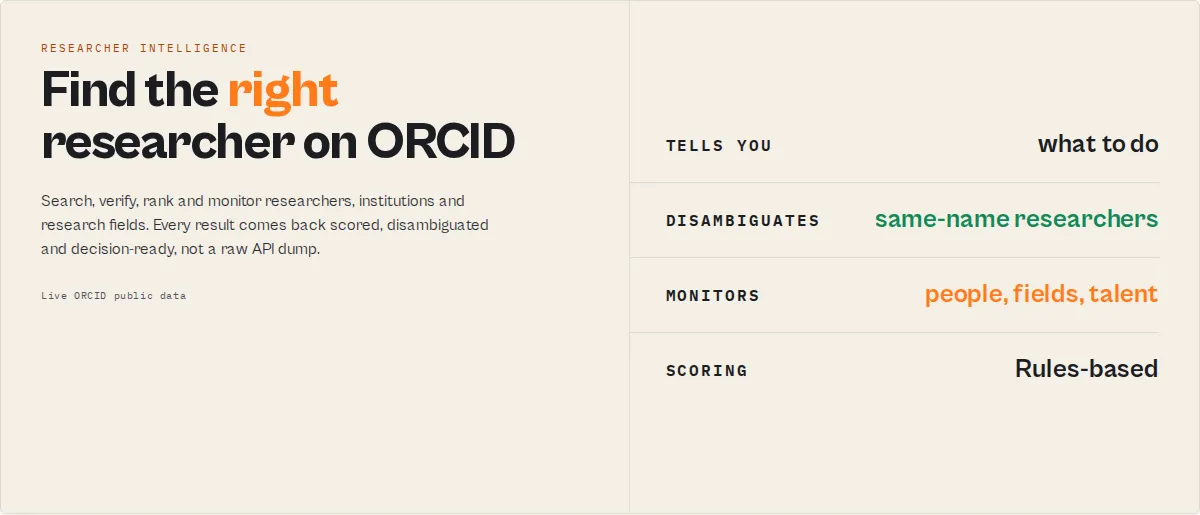
Researcher intelligence for ORCID. Search, verify, rank and monitor researchers, institutions and research fields using live ORCID public data -- no user-supplied credentials required.
Find the right researcher. Discover experts. Compare institutions. Track talent movement. Monitor emerging research fields. All from live ORCID public data, enriched into researcher intelligence.
What makes this unique?
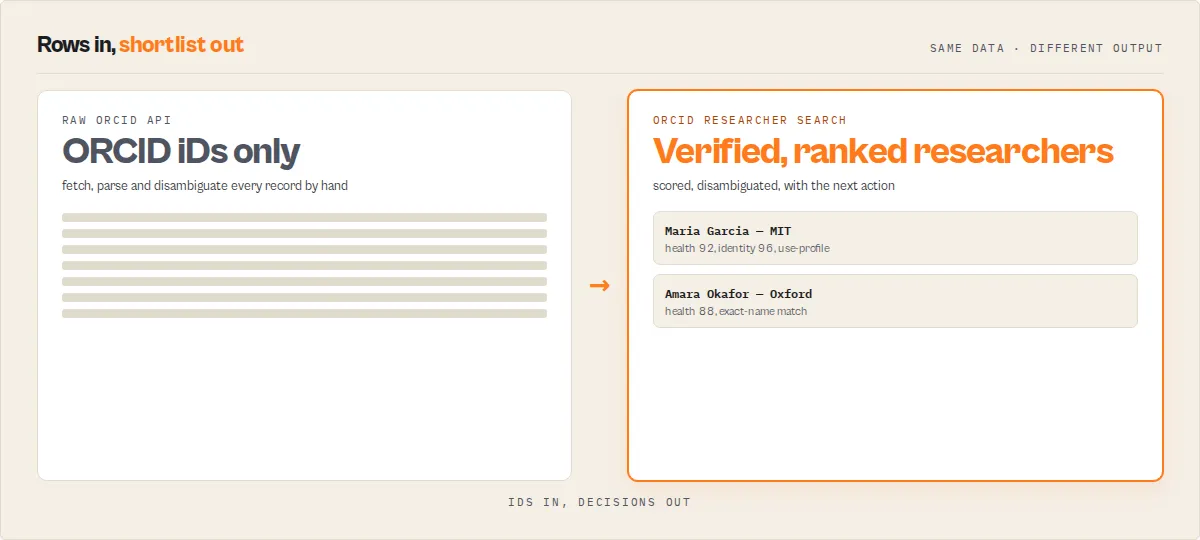
Most ORCID tools return profiles. This actor returns decisions:
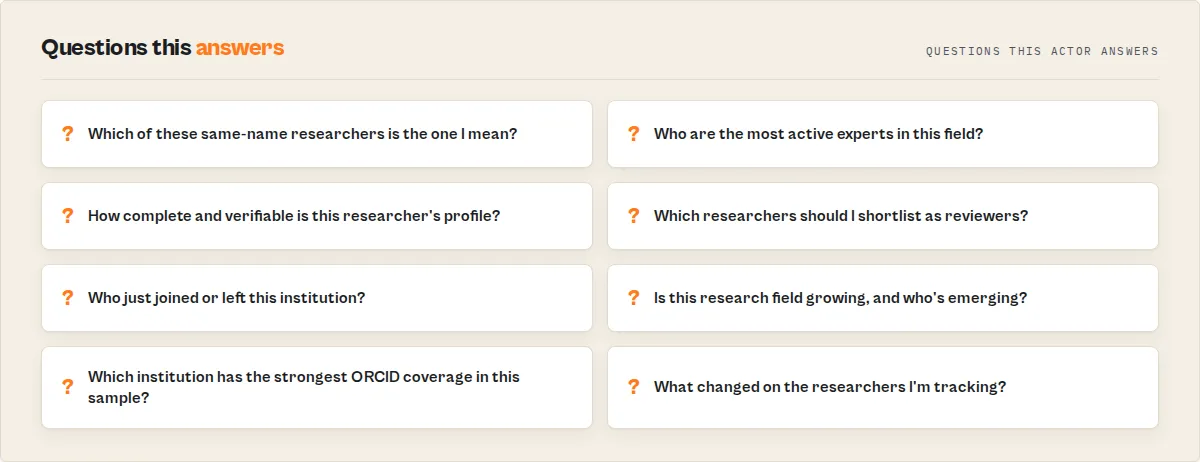
- Identity confidence -- which same-name researcher is the right one
- Researcher Health -- one sortable 0-100 quality score per researcher
- Expert / reviewer / collaborator ranking
- Institution intelligence -- map and compare
- Field monitoring and change tracking
Who uses it: research offices and universities, journal editors and publishers, conference organisers, research recruiters, biotech and pharma teams, and deep-tech investors -- anyone who needs to find, verify or track the right researchers.
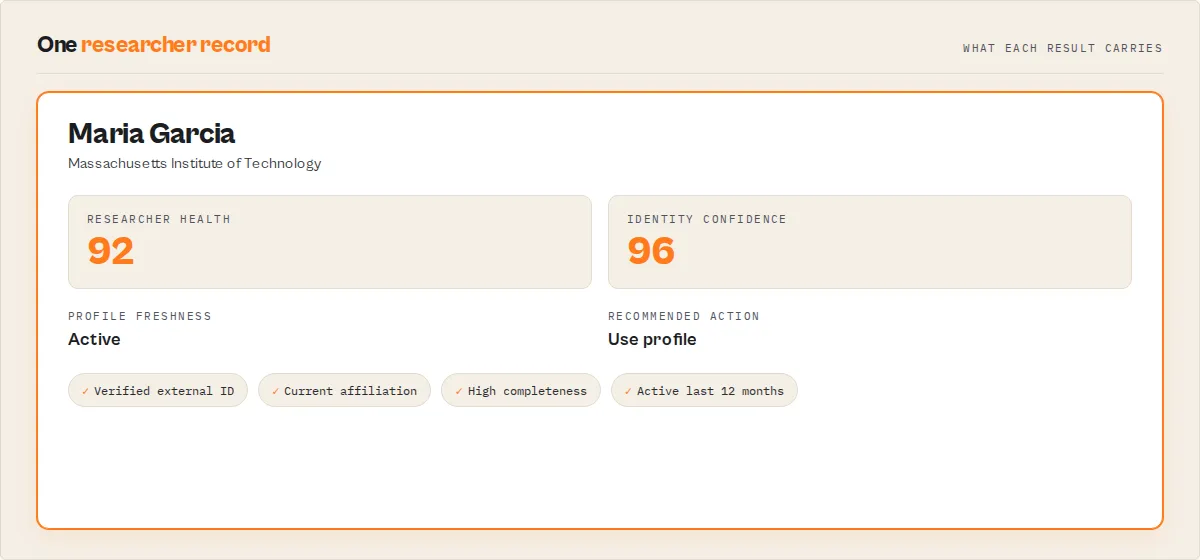
What you get on every researcher -- a Researcher Health score, an Identity Confidence score for same-name disambiguation, a career timeline, activity signals, badges, a recommended next action, and (in watchlist mode) change monitoring with typed events. A minimal result looks like:
Researcher Health -- the flagship metric
A single 0-100 score (with an excellent / good / fair / poor band) combining profile completeness, activity freshness, publication-metadata quality, affiliation history and external validation. Sort any researcher list by it to surface the strongest, best-maintained ORCID identities instantly -- it measures the strength of the ORCID record, not citation impact.
Common workflows (copy-paste)
Find AI researchers at MIT
Disambiguate a same-name researcher
Map an institution's ORCID footprint
Compare institutions
Build a reviewer shortlist (flagging conflicts)
Find collaborators for a researcher
Monitor departures from Stanford (scheduled)
Track an emerging field (scheduled)
Ready-to-run examples
One-click, pre-configured tasks (each is its own page):
- Disambiguate a Researcher by Name -- find the right person when several share a name
- Find the Top Experts in a Research Field -- rank a field's researchers by ORCID profile signals
- Find Peer Reviewers for a Topic -- shortlist reviewers, with conflict-of-interest flagging
- Find Research Collaborators -- researchers similar to a given ORCID iD
- Map a University's Researchers -- an institution's ORCID footprint
- Compare Research Institutions -- institutions side by side by ORCID coverage
Find researchers by field:
- Find AI Researchers
- Find Cancer Researchers
- Find Gene Editing Researchers
- Find Quantum Computing Researchers
- Find Climate Researchers
- Find Neuroscience Researchers
- Find Cybersecurity Researchers
Why use ORCID Researcher Search?
- Access the definitive researcher registry -- ORCID is the standard persistent identifier adopted by major publishers, funders, and institutions across every academic discipline.
- No user-supplied ORCID credentials needed -- the actor reads publicly visible ORCID data through the public API, so you can start searching immediately without registering for an ORCID API client. High-volume runs should stay within ORCID's published public-API rate limits; the actor paces requests and honors
Retry-Afterto do so. - Get structured, normalized data -- raw ORCID API responses are deeply nested and inconsistent. This actor flattens everything into clean JSON records ready for analysis.
- Combine with publication databases -- pair researcher profiles with paper searches from OpenAlex, PubMed, Crossref, or Semantic Scholar for comprehensive academic intelligence.
- Automate recurring discovery -- schedule runs on Apify to monitor new researchers entering a field, track affiliation changes, or build living databases of domain experts.
- Export in any format -- download results as JSON, CSV, or Excel directly from the Apify dataset tab, or pipe data to Google Sheets, webhooks, or downstream actors.
Key features
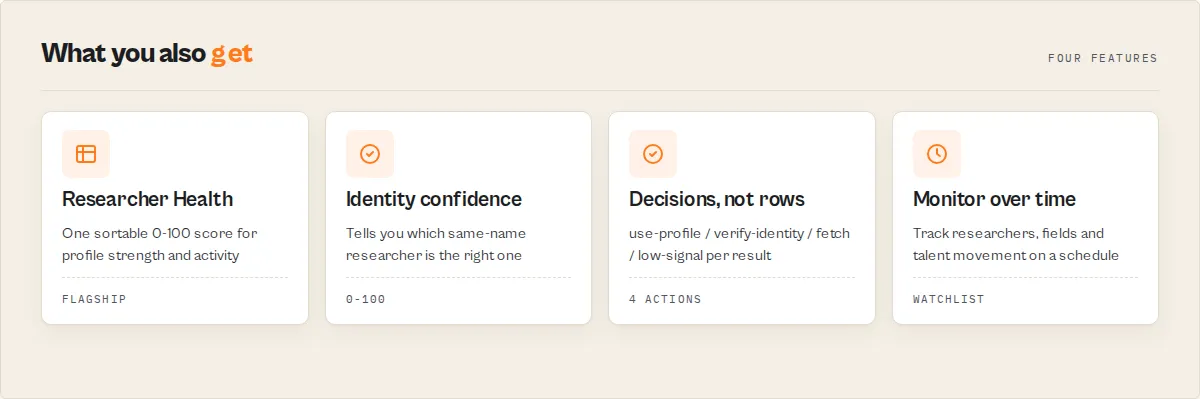
- Name-match confidence for disambiguation -- when you search by name, each result is scored 0-100 on how well it matches the name you searched, with an
exactMatchflag, so you can tell which of a dozen same-name researchers is the one you meant. - Profile completeness score -- a deterministic 0-100 score (with the component breakdown) and a level band (rich / moderate / sparse / stub) tells you at a glance how well-documented and verifiable each identity is.
- Career and activity signals -- current affiliation, years active, a career-stage band, profile freshness (active / recent / aging / dormant), and recent publication activity, all derived from the dates ORCID actually records.
- Recommended next action -- a routing enum (use-profile / verify-identity / fetch-publications / low-signal) plus plain-English reasons, so downstream automation branches without parsing prose.
- Flexible search filters -- search by family name, given names, institutional affiliation, research keyword, or any combination joined with AND logic, plus full ORCID Lucene syntax in the free-text query field.
- Complete profile extraction -- ORCID iD, full name, credit name, biography, affiliations (org, role, department, dates), emails, keywords, external identifiers, works count, and direct profile URL.
- Identity cross-links -- surfaces the external systems a researcher is linked to (Scopus Author ID, ResearcherID, and others) so you can cross-reference and verify.
- Optional publication fetching -- enable
fetchWorksto retrieve each researcher's full publication list with title, journal, year, DOI, and work type. - Profile monitoring -- set a watchlist name to track researchers over time; on the next run each profile is flagged NEW / UPDATED / UNCHANGED with the change in works count and affiliations.
- Output detail control --
minimalfor fast disambiguation and routing,standard(default), orfullfor everything including publications and scoring breakdowns. - Up to 100 profiles per run with real-time data straight from the live ORCID registry.
How it compares
vs the raw ORCID API
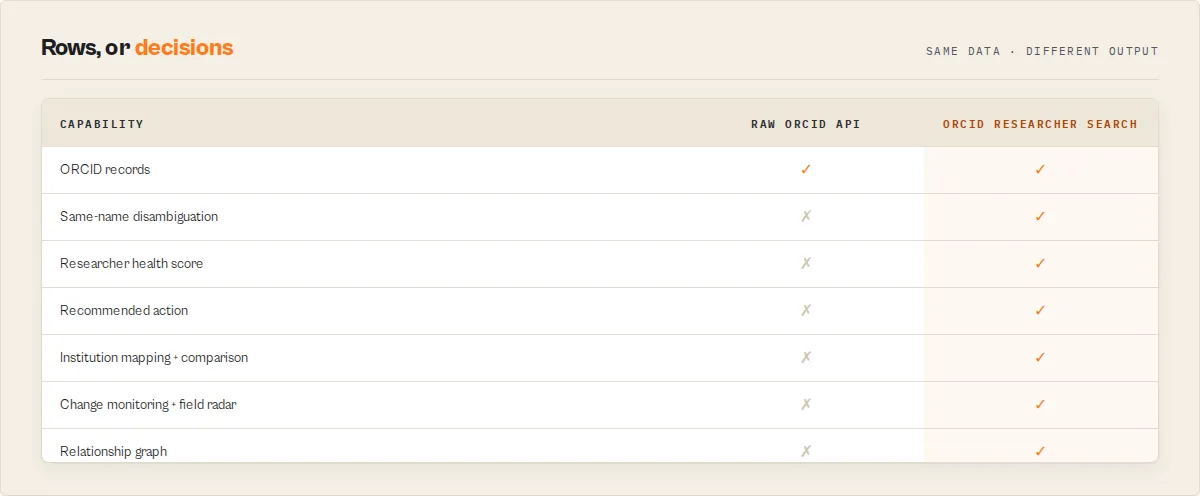
The ORCID search API returns only ORCID iDs, so you have to fetch and parse each record yourself, then decide which result is the person you meant. This actor does all of that and hands back decisions.
| Raw ORCID API | ORCID Researcher Search |
|---|---|
| Search returns ORCID iDs only -- one record read per result to get any detail | One run: search + every record read + works, merged and normalized |
| Deeply nested XML/JSON you parse yourself | Flat, consistent JSON with a stable recordType discriminator |
| No way to tell which same-name researcher is the right one | identityConfidence (0-100) with a per-signal breakdown + same-name ambiguity warnings |
| No quality signal on a profile | researcherHealth + profileCompleteness scores, badges, worksQuality metadata coverage |
| No "what do I do with this" | recommendedAction routing enum + plain-English reasons |
| No change tracking across runs | Opt-in watchlist with typed changeEvents, significance and trajectory |
vs paper / citation databases (OpenAlex, Semantic Scholar, Crossref)
These are different jobs, and they compose. Citation databases are paper-centric: they answer "what was published and how often is it cited". This actor is researcher-centric: it answers "who is this person, is it the right one, how complete and active is their identity, and what changed". It does NOT compute citation counts or impact -- for that, point the recommended sibling actors at a researcher's works.
| Job | ORCID Researcher Search | Paper / citation databases |
|---|---|---|
| Verify a researcher's identity (which same-name person?) | Yes -- identityConfidence | Not the focus |
| Profile completeness / verifiability of the ORCID record | Yes -- researcherHealth, profileCompleteness | No |
| Monitor a researcher / field / institution over time | Yes -- watchlist, changeEvents, fieldRadar, talentMovement | No |
| Citation counts, h-index, field-normalized impact | No (point to OpenAlex / Semantic Scholar) | Yes |
| Full publication + reference graph | Works list only | Yes |
Premium workflows
- Academic CRM enrichment -- feed names or ORCID iDs in, get back verified, scored, export-ready researcher records (researcher-health score, identity confidence, current affiliation, contactability, badges) for your CRM or outreach list.
- Institution researcher mapping -- set
institution(ormode: institutionMap) and get every matching researcher plus an institution-map summary: departments, top keywords, career-stage distribution, active researchers, external-ID coverage and top funders. - Institution comparison --
mode: institutionComparisonwithinstitutions: ["MIT", "Stanford", "Oxford"]returns a side-by-side comparison plustopProfileCoverageInstitution+reasons(the institution whose analyzed researchers have the strongest ORCID coverage signals -- active researchers / external-ID validation / completeness; an ORCID-coverage ranking, NOT a research-quality or reputation verdict). - Expert / reviewer / collaborator discovery --
mode: expertDiscovery(orreviewerDiscovery/collaboratorDiscovery) ranks a field's researchers for the job. Ranks are a deterministic proxy from ORCID profile signals (output, funding, activity, peer-review history, keyword match), explicitly NOT citation impact (ORCID does not carry citations). Reviewer mode flags conflicts of interest againstconflictAffiliations; collaborator mode ranks by similarity to aseedOrcidId. - Researcher relationship graph --
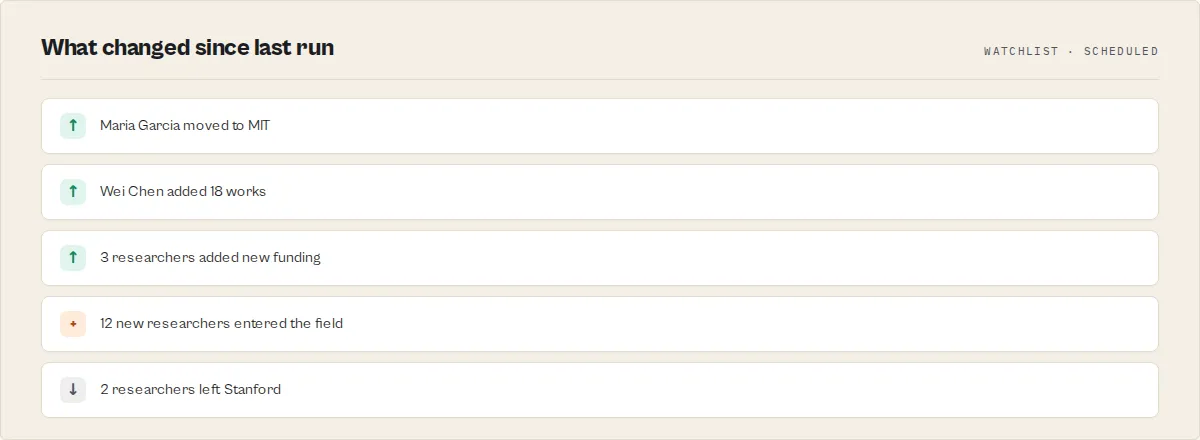
includeGraph: trueemits a nodes + weighted-edges graph of how the researchers in a result set relate (shared affiliations, keywords, external-ID systems, career stage), Neo4j / Cytoscape ready -- a connection view ORCID itself does not provide. - Profile-change monitoring -- set a watchlist name and run on a schedule; each run flags exactly what changed per researcher (new affiliation, new works, new funding, new external ID) as typed change events with a high/medium/low impact, rolls them into an overall
significance(major/moderate/minor) + a plain-EnglishwhyImportantsummary ("Moved from MIT to Stanford; Added 18 works; New funding"), and emits atrajectory(accelerating / steady / declining) of the researcher's profile-activity momentum. - Field radar --
mode: fieldRadar+ a watchlist tracks a research field's researcher population over scheduled runs: anopportunityScore(with a transparentopportunityFactorsbreakdown of researcher growth / newcomers / active share / funding presence) +momentumband, newcomers and departing researchers, growth since the last run, institution momentum (which institutions are gaining researchers in the field), top funders, network clusters and career-stage mix. - Talent movement --
mode: talentMovement+ a watchlist tracks who joined or left an institution between scheduled runs, and whose affiliation changed.
How to use ORCID Researcher Search
Using the Apify Console
- Go to ORCID Researcher Search on the Apify Store.
- Click Try for free to open the actor in Apify Console.
- Enter your search criteria -- use the Search Query field for free-text or Lucene queries, or fill in individual filter fields like Family Name, Affiliation, or Research Keyword.
- Optionally enable Fetch Publications to retrieve each researcher's publication list.
- Set Max Results (default 25, maximum 100).
- Click Start and wait for the run to complete.
- View results in the Dataset tab. Export as JSON, CSV, or Excel.
Using the Apify API or CLI
Or call the actor via the REST API:
Input parameters
| Parameter | Type | Required | Default | Description |
|---|---|---|---|---|
mode | String | No | "auto" | auto infers from input; or set search / lookup / institutionMap / institutionComparison / expertDiscovery / reviewerDiscovery / collaboratorDiscovery / fieldRadar / talentMovement. |
institution | String | No | -- | Map one organization's ORCID footprint (or track it with talentMovement): returns matching researchers plus an institution-map summary record. |
institutions | Array | No | [] | Compare several organizations (institutionComparison, up to 6) — emits an institution-comparison record. |
seedOrcidId | String | No | -- | collaboratorDiscovery: rank the searched pool by similarity to this researcher. |
conflictAffiliations | Array | No | [] | reviewerDiscovery: organizations to flag as a conflict of interest (else conflictRisk is unknown). |
query | String | No | "machine learning" | Free-text search query. Supports ORCID Lucene syntax. Overrides individual filters when provided. |
familyName | String | No | -- | Filter by researcher's last name (maps to family-name in ORCID). |
givenNames | String | No | -- | Filter by researcher's first name (maps to given-names in ORCID). |
affiliation | String | No | -- | Filter by organization name (maps to affiliation-org-name in ORCID). |
keyword | String | No | -- | Filter by research keyword (maps to keyword in ORCID). |
orcidIds | Array | No | [] | Look up specific researchers directly by ORCID iD, skipping search. Takes priority over the search filters when set. |
names | Array | No | [] | Search several researchers by name in one run; results are merged and deduplicated. |
dedupe | Boolean | No | true | Remove duplicate researchers when the same ORCID iD is matched by more than one name or filter. |
includeSimilarity | Boolean | No | false | When the run returns 2+ researchers, emit a similarity record linking each to the most similar others in this run's results (shared keywords / affiliations / external-ID systems / career stage). For expert, collaborator and reviewer discovery. |
includeGraph | Boolean | No | false | Emit a graph record (nodes + weighted edges) of relationships between the researchers in this run's results — Neo4j / Cytoscape ready. |
fetchWorks | Boolean | No | false | When enabled, fetches the full publication list for each researcher via an additional API call (also powers worksQuality). |
maxResults | Integer | No | 25 | Maximum number of researcher profiles to return (1--100). |
outputProfile | String | No | "standard" | minimal (identity confidence + completeness + recommended action + badges + summary), standard (adds career, activity, affiliations, record sections, identity links, works quality, data gaps), full (everything including the publications list and scoring breakdowns), or flatCsv (one flat row per researcher for spreadsheet export). |
watchlistName | String | No | -- | Set a name to monitor these researchers over time. The next run with the same name flags each profile NEW / UPDATED / UNCHANGED with the change in works and affiliations. The first run with a new name is a baseline (every profile is NEW). |
At least one search parameter (query, familyName, givenNames, affiliation, or keyword) must be provided.
Example input using individual filters:
Tips:
- When
queryis provided, it overrides all individual filters. Use it for complex Lucene expressions. - Individual filters are combined with AND logic automatically. Searching
familyName: "Smith"+affiliation: "MIT"translates tofamily-name:Smith AND affiliation-org-name:MIT. - Enabling
fetchWorksadds one extra API call per profile. Leave it disabled for faster runs when you only need researcher metadata.
Output
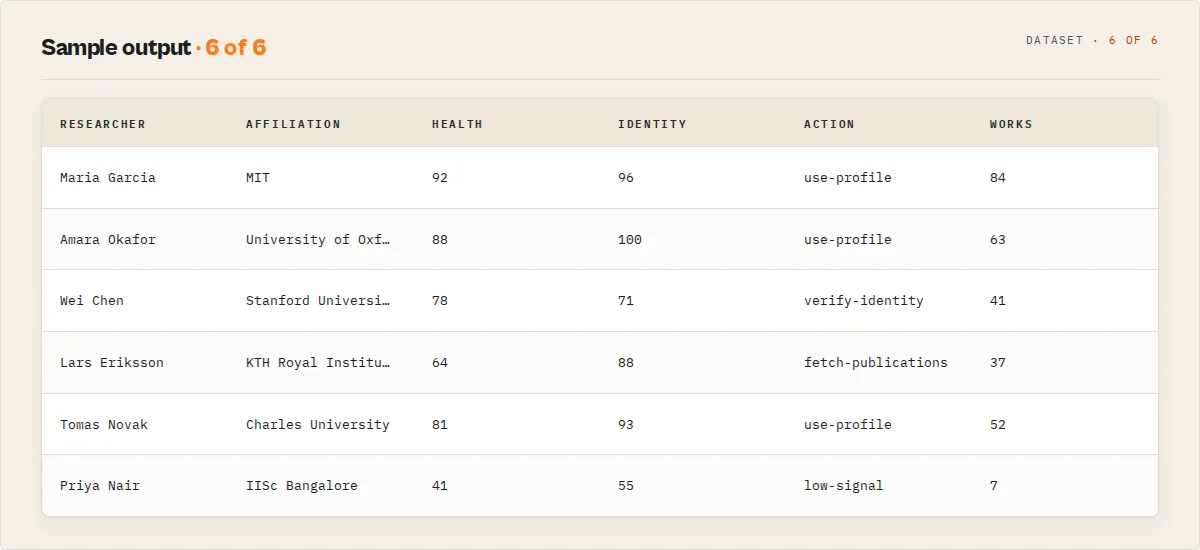
The dataset carries two record types: one researcher record per profile, and one summary record per run (coverage, profile-quality counts, and the best name match). The recordType field discriminates them. A researcher record at the default standard output detail:
Output fields
| Field | Type | Description |
|---|---|---|
schemaVersion | String | Output shape version (semver), additive within a major version. |
recordType | String | researcher, summary, or error. |
orcidId | String | The researcher's 16-digit ORCID identifier (e.g., 0000-0002-1825-0097). |
researcherHealth | Object | Flagship 0-100 sortable score + level (excellent / good / fair / poor) collapsing profileCompleteness + publicationCoverage (DOI-metadata coverage, not citation impact) + affiliationHistory + externalValidation + activityFreshness. The single metric to sort a researcher list on. |
identityConfidence | Object | null | score (0-100), level (high / medium / low / very-low), a per-signal breakdown (nameMatch, affiliationMatch, keywordOverlap, externalIdStrength, profileCompleteness, recentActivity), warnings, and exactNameMatch. null on a direct ORCID-iD lookup. Signals you did not query are null; the score is renormalized over the signals you did supply. |
rankReason | Array | null | Plain-English reasons why this candidate ranked where it did (exact name match, affiliation match, external-ID corroboration, …). null on a direct ORCID-iD lookup. |
matchConfidence | Object | null | Deprecated alias carrying the name-only score; read identityConfidence.signals.nameMatch instead. Retained so existing consumers do not break. |
profileCompleteness | Object | score (0-100), level (rich / moderate / sparse / stub), and (in full) the weighted component breakdown. |
badges | Array | Deterministic tags for filtering: verified-external-id, active-last-12-months, has-current-affiliation, doi-rich-publications, high-completeness, has-funding, peer-reviewer. |
activities | Object | Other ORCID record sections from the same fetch: funding[], memberships[], qualifications[], services[], distinctions[], invitedPositions[], peerReviewCount (standard / full). |
worksQuality | Object | null | Publication-metadata coverage when fetchWorks is on: doiCoveragePct, journalCoveragePct, yearCoveragePct, recentWorksCount, duplicateDoiCount, byYear, byType. Metadata completeness, not citation impact. |
provenance | Object | source, orcidUrl, recordLastModified, extractedAt. |
career | Object | currentAffiliation, yearsActive, earliestActivityYear, firstPublicationYear, stage, a chronological timeline[] (education + employment with org / role / start / end), and a note on what the stage means. |
activity | Object | profileFreshness (active / recent / aging / dormant / unknown), mostRecentWorkYear, recentWorksCount. |
identityLinks | Object | externalSystems, count, hasEmail. |
recommendedAction | String | use-profile, verify-identity, fetch-publications, or low-signal. |
actionReasons | Array | Plain-English reasons behind the recommended action. |
givenNames / familyName / creditName | String | The researcher's names. |
biography | String | Free-text biography (standard / full). |
affiliations | Array | Employment and education records with orgName, role, department, startDate, endDate (standard / full). |
emails | Array | Public email addresses (standard / full). |
keywords | Array | Research keywords (standard / full). |
externalIds | Array | Linked external identifiers with type, value, url (standard / full). |
works | Array | Publications with title, journal, year, doi, type (only in full, and only when fetchWorks is enabled). |
worksCount | Number | Total number of works on the profile. |
dataGaps | Array | Profile-improvement suggestions: missing fields with a priority (high / medium / low), reason and suggestedFix (standard / full). |
recommendedActors | Array | Sibling actors that extend the result with deep publication and citation data (standard / full). |
summary | String | One-line plain-English summary (<=280 chars), quotable by an LLM. |
temporalSignals | Object | Watchlist mode only: changeFlag (NEW / UPDATED / UNCHANGED); a typed changeEvents[] (NEW_AFFILIATION, AFFILIATION_ENDED, NEW_WORKS, NEW_FUNDING, NEW_EXTERNAL_ID, PROFILE_UPDATED, each with an impact tier); an overall significance (major / moderate / minor / none) + whyImportant[]; a trajectory (score, direction accelerating / steady / declining / new, signals[]) of profile-activity momentum; plus worksDelta, newAffiliationCount, profileChanged, runsSeen, firstSeenAt. |
orcidUrl | String | Direct URL to the researcher's public ORCID profile page. |
lastModified | String | ISO 8601 timestamp of when the profile was last updated. |
extractedAt | String | ISO 8601 timestamp of when the data was extracted (standard / full). |
Use cases
- Academic talent scouting -- find researchers at specific institutions who work on topics relevant to your organization's research priorities.
- Grant application research -- identify potential collaborators or reviewers by searching for experts in a specific research domain.
- Bibliometric analysis -- collect researcher profiles and publication counts across institutions for research productivity studies.
- Conference speaker discovery -- search by keyword to build candidate lists of domain experts for conferences, panels, or advisory boards.
- Institutional research profiling -- extract all researchers affiliated with a university or lab to build internal research directories.
- Competitor intelligence -- monitor which researchers are joining or leaving specific organizations by tracking affiliation changes over time.
- CRM enrichment -- enrich contact databases with academic credentials, publication history, and institutional affiliations for B2B outreach to research organizations.
- Literature review preparation -- identify prolific authors in a field before diving into paper searches, then use their ORCID IDs to find all their publications.
- Funding landscape mapping -- combine researcher profiles with grant data to understand who is active in funded research areas.
- Research network analysis -- extract co-affiliation patterns and shared keywords to map collaboration networks across institutions.
API & integrations
Python
JavaScript
cURL
Integration options
- Webhooks -- trigger HTTP callbacks when a run completes to feed results into downstream pipelines.
- Scheduled runs -- set up recurring schedules in Apify Console to periodically search for new researchers.
- Google Sheets -- export dataset results directly to a Google Sheet for collaborative review.
- Slack notifications -- get notified in Slack when new researcher profiles matching your criteria are found.
- Zapier / Make -- connect to thousands of apps through Apify's integration with automation platforms.
Use in Dify
Drop this actor into Dify workflows via the Apify plugin's Run Actor node. Each researcher comes back scored, disambiguated, and routed as structured JSON -- use-profile / verify-identity / fetch-publications / low-signal plus the completeness level and name-match score your downstream node branches on. A plain ORCID API call returns deeply nested XML/JSON you have to parse; this returns a decision.
- Actor ID:
ryanclinton/orcid-researcher-search - Sample input (disambiguate a same-name researcher, compact output for routing):
- Branching example -- a Dify if/else node routes on
recommendedAction:verify-identity-> send to a human-review branch (the name match was weak; confirm the person before using)fetch-publications-> callryanclinton/openalex-research-searchwith the ORCID iD to pull the full publication recorduse-profile-> write the researcher straight into your CRM / outreach listlow-signal-> drop (the profile is a sparse stub with little to act on)
- Sort or gate on
researcherHealth.score/researcherHealth.level(excellent/good/fair/poor) -- the single flagship metric for "how strong is this researcher's ORCID presence". - For disambiguation flows, branch on
identityConfidence.exactNameMatch(boolean) or thresholdidentityConfidence.score/identityConfidence.level; for quality gates, branch onprofileCompleteness.level(rich/moderate/sparse/stub) or filter onbadges(e.g.verified-external-id). - In monitoring flows (
watchlistNameset), branch ontemporalSignals.changeFlag(NEW/UPDATED/UNCHANGED), or route on the typedtemporalSignals.changeEvents[].type(e.g.NEW_AFFILIATION) to alert only on the specific change you care about. - The
actionReasons[]anddataGaps[]arrays are plain-English and usable verbatim in a downstream notification or LLM prompt -- no rewriting needed.
How it works
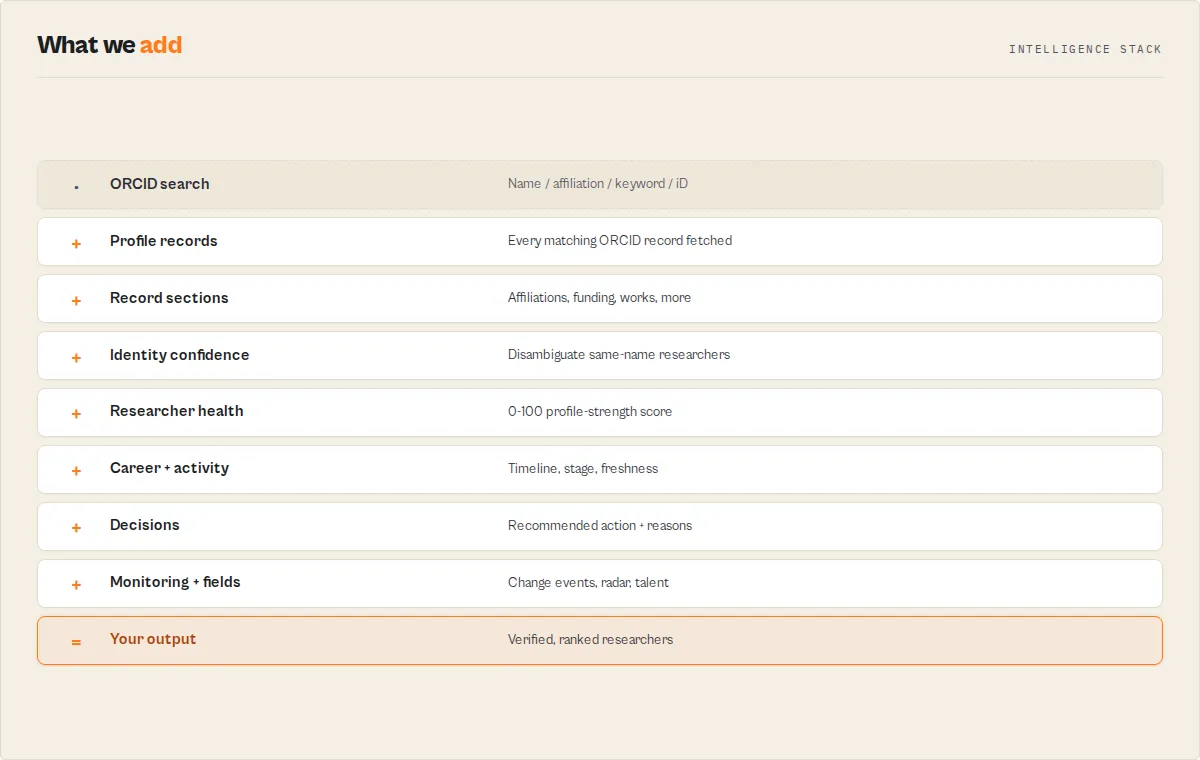
The actor follows a two-step process to search and extract researcher profiles:
-
Build search query -- individual filter fields (
familyName,givenNames,affiliation,keyword) are mapped to ORCID's Lucene field names (family-name,given-names,affiliation-org-name,keyword) and joined withAND. If the free-textqueryfield is provided, it overrides all individual filters. -
Execute search -- the query is sent to the ORCID public API v3.0 search endpoint (
/v3.0/search/) with the specified result limit. The API returns a list of matching ORCID identifiers. -
Fetch detailed profiles -- for each ORCID ID returned by the search, the actor makes a request to the
/v3.0/{orcid-id}/recordendpoint to retrieve the full public profile. Requests are paced to stay within ORCID API limits. -
Extract and normalize data -- the actor parses the nested ORCID record structure to extract name, biography, affiliations (from both employment and education groups), emails, keywords, and external identifiers into a flat, consistent format.
-
Fetch publications (optional) -- when
fetchWorksis enabled, an additional request is made to/v3.0/{orcid-id}/worksfor each profile. Publication records are extracted with title, journal name, year, DOI, and work type. -
Push to dataset -- each complete researcher profile is pushed to the Apify dataset as it is processed, making partial results available before the full run completes.
Performance & cost
| Scenario | Profiles | Fetch Works | Approx. Time | Approx. Cost |
|---|---|---|---|---|
| Quick search | 10 | No | ~5 seconds | $0.001 |
| Default search | 25 | No | ~10 seconds | $0.002 |
| Full search | 100 | No | ~30 seconds | $0.005 |
| With publications | 25 | Yes | ~20 seconds | $0.003 |
| Max with publications | 100 | Yes | ~60 seconds | $0.01 |
- The ORCID public API is free to use and needs no user-supplied credentials. It does enforce public-API rate limits and a terms-of-service (no exceeding limits, no continuous polling); this actor paces its requests and honors
Retry-After, and reports its request count in the runapiUsagesummary. For sustained high-volume use, schedule runs rather than polling continuously. - Costs reflect only Apify platform compute credits plus the per-researcher event price. No browser rendering is used; all requests are lightweight HTTP calls.
- Actual times depend on ORCID API response latency and the size of individual profiles.
Limitations
- Maximum 100 results per run -- the ORCID search API returns a maximum of 100 results per query. For broader coverage, run multiple searches with different filter combinations.
- Public data only -- the actor accesses the ORCID public API. Any profile fields marked as private or limited-access by the researcher will not be returned.
- Self-maintained profiles -- ORCID profiles are managed by individual researchers. Many profiles have incomplete data -- biography, email, and keywords are commonly left blank.
- No citation counts -- ORCID does not provide citation metrics. For citation data, cross-reference results with Semantic Scholar or OpenAlex.
- Publication metadata varies -- some works lack journal names, DOIs, or publication years depending on how the researcher entered the data.
- Rate limiting -- requests are paced between profile fetches for reliability against the ORCID API.
- English-biased search -- ORCID's search works best with Latin-character names. Non-Latin names may require the exact character set used in the profile.
Responsible use
- Respect researcher privacy -- only use publicly available data from ORCID profiles. Do not attempt to circumvent profile visibility settings or correlate data in ways that could compromise researcher privacy.
- Follow ORCID terms of service -- this actor uses the ORCID public API in accordance with their terms. Do not use extracted data for spam, unsolicited bulk communication, or any purpose that violates ORCID's acceptable use policies.
- Attribute the data source -- when publishing or sharing results derived from ORCID data, credit ORCID as the source and include the researcher's ORCID URL where appropriate.
- Handle personal data responsibly -- researcher names, emails, and affiliations constitute personal data in many jurisdictions. Ensure your use complies with applicable data protection regulations such as GDPR.
- Use proportional data collection -- only fetch the number of profiles you actually need. Avoid exhaustive scraping of the ORCID registry.
FAQ
Q: Do I need an ORCID API key to use this actor?
A: No user-supplied ORCID credentials are required. The actor reads publicly visible profile data through the ORCID public API v3.0. That public API does enforce rate limits and a terms of service (no exceeding limits, no continuous polling) — the actor paces requests and honors Retry-After to stay within them, and reports its request count in the run summary's apiUsage block.
Q: What is the maximum number of results I can get per run? A: You can retrieve up to 100 researcher profiles per run. This is a limit of the ORCID search API. For broader searches, run multiple queries with different filter combinations.
Q: Can I search by ORCID ID directly?
A: Yes. Enter the full ORCID iD (e.g., 0000-0002-1825-0097) in the Search Query field. The search will match and return that specific profile.
Q: What Lucene query syntax is supported?
A: The Search Query field supports ORCID's Lucene-style query language. You can use field-specific searches like family-name:Smith, boolean operators (AND, OR, NOT), wildcards (Sm*), and parentheses for grouping. Example: family-name:Smith AND (affiliation-org-name:MIT OR affiliation-org-name:Stanford).
Q: Why are some fields null or empty?
A: ORCID profiles are self-maintained by researchers. Fields like biography, email, and keywords are optional. If a researcher has not filled in a field or has set it to private, it will appear as null in the output.
Q: What is the difference between the query field and individual filters? A: Individual filters (familyName, givenNames, affiliation, keyword) are automatically mapped to ORCID field names and combined with AND logic. The query field accepts raw Lucene syntax for advanced searches. When query is provided, it overrides all individual filters.
Q: How does the fetchWorks option affect performance? A: Enabling fetchWorks adds one additional API call per researcher profile to retrieve their publication list. For 25 profiles, this roughly doubles the run time from ~10 seconds to ~20 seconds. Costs remain minimal since all calls are lightweight HTTP requests.
Q: How current is the data?
A: The actor queries the live ORCID API in real time. Results reflect the current state of the registry. Each record includes a lastModified timestamp showing when the researcher last updated their profile and an extractedAt timestamp for when the data was retrieved.
Q: Can I get more than 100 results for a broad query? A: Not in a single run. However, you can break broad searches into narrower queries -- for example, search by affiliation one institution at a time, or split by keyword -- and combine the datasets afterward.
Q: What types of external identifiers are included? A: The actor extracts all external identifiers linked to the researcher's ORCID profile. Common types include Scopus Author ID, ResearcherID (Web of Science), Loop profile, Google Scholar ID, and institutional IDs. The exact identifiers depend on what the researcher has registered.
Q: Does this actor work with the ORCID Sandbox or Member API? A: No. This actor uses the ORCID public production API only. It does not access the sandbox environment or the authenticated member API.
Q: Can I schedule this actor to run automatically? A: Yes. In Apify Console, go to the actor's Schedules tab to set up recurring runs at any interval -- daily, weekly, or custom cron expressions.
Related actors
| Actor | Description |
|---|---|
| Semantic Scholar Paper Search | Search the Semantic Scholar corpus for research papers with citation counts, abstracts, and author data. |
| OpenAlex Research Paper Search | Query the OpenAlex database for academic papers by topic, author, institution, or journal. |
| PubMed Biomedical Literature Search | Search PubMed for biomedical and life sciences research articles with abstracts and metadata. |
| Crossref Academic Paper Search | Find scholarly articles in the Crossref registry with DOI metadata, citations, and publisher info. |
| Europe PMC Literature Search | Search the Europe PMC database for life sciences and biomedical publications from global repositories. |
| DBLP Publication Search | Search the DBLP computer science bibliography for publications by author, venue, or keyword. |


