

Podcast Directory Scraper — Host Contacts & Emails
Pricing
from $50.00 / 1,000 podcast scrapeds
Podcast Directory Scraper — Host Contacts & Emails
Search Apple Podcasts and Spotify by keyword. Extract host emails, owner contacts, website URLs, publishing frequency, and episode data. Active status filtering and multi-keyword deduplication included.
Pricing
from $50.00 / 1,000 podcast scrapeds
Rating
5.0
(1)
Developer

Ryan Clinton
Maintained by CommunityActor stats
1
Bookmarked
133
Total users
24
Monthly active users
6.4 days
Issues response
2 months ago
Last modified
Categories
Share
Podcast Directory Scraper
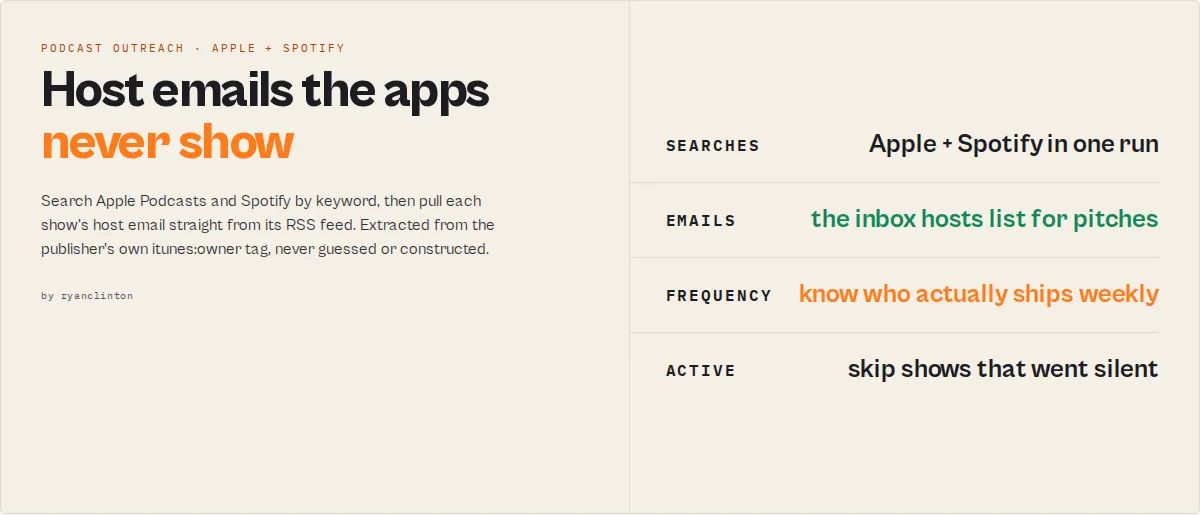
Podcast Directory Scraper is an Apify podcast outreach tool that searches Apple Podcasts and Spotify by keyword and extracts host contact emails (when available in RSS), website URLs, publishing frequency, episode data, and active status from RSS feeds. It returns structured JSON or CSV that podcast booking agencies, PR firms, sponsorship researchers, and sales teams use for targeted outreach.
Unlike subscription podcast databases like Podchaser ($599/month) or Rephonic ($99-249/month) that serve curated data, Podcast Directory Scraper extracts podcast host emails directly from RSS feeds on demand at $0.05 per podcast with no monthly commitment. It cross-deduplicates results across both platforms by normalized title, calculates 7-tier publishing frequency from episode dates, and filters to active shows — all in a single automated run.
Podcast host emails are stored in the itunes:owner tag inside RSS feeds — but RSS feeds aren't visible in the Apple Podcasts or Spotify apps. Podcast Directory Scraper automates the entire workflow: search by keyword, fetch each show's RSS feed, extract the owner email, and return structured results. Use it to find podcast host emails, build outreach lists, or search Apple Podcasts by keyword at scale.
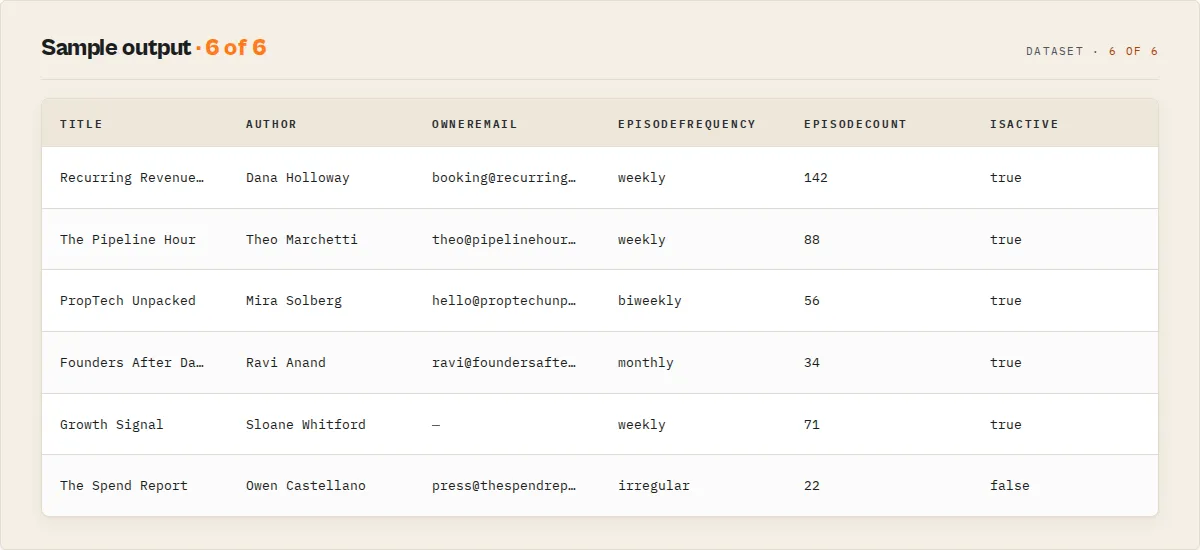
What it does: Searches Apple Podcasts and Spotify by keyword, fetches RSS feeds, and extracts host emails, website URLs, publishing frequency, and episode metadata. Best for: Podcast booking agencies, PR outreach teams, sponsorship researchers, and media analysts building targeted contact lists. Speed: 50 podcasts in 30-60 seconds; 500 podcasts across 5 keywords in 5-8 minutes. Pricing: $0.05 per podcast, pay-per-result, no subscription. Output: JSON, CSV, or Excel with 20+ fields per podcast including
ownerEmail,websiteUrl,episodeFrequency, andisActive.
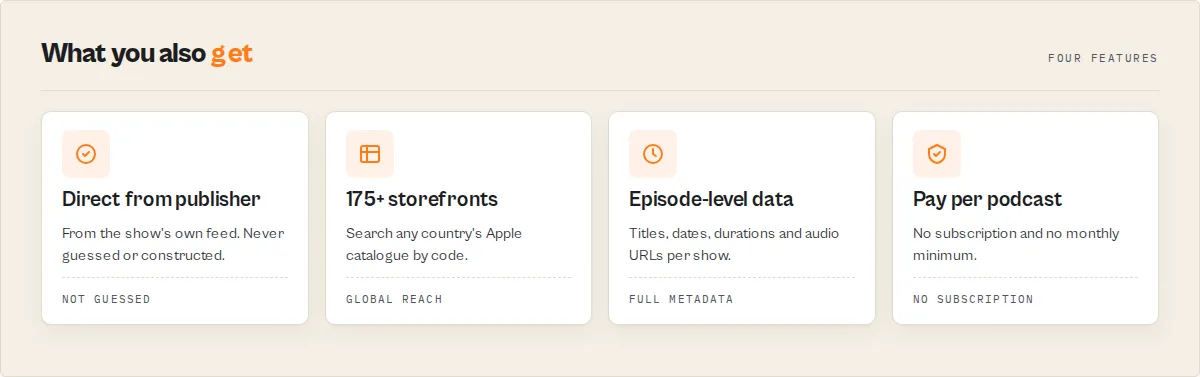
Data trust: ownerEmail is extracted directly from the RSS itunes:owner tag as published by the podcast creator — it is not guessed, inferred, or scraped from web pages. Fields can be null when the feed does not expose them. Activity and frequency are calculated from actual episode dates, not self-reported metadata.
Ready-to-run examples
Don't want to build an input from scratch? Each of these is a published, one-click example (see all) — open it, see real output, run it:
- Podcast Directory Scraper — search by keyword for full show details: host email, website, categories, episode count, last episode and publishing frequency
- Podcast Host Email Finder — host emails and websites by topic, ranked by lead score — built for guesting and sponsorship outreach
- Apple Podcasts Scraper — Apple Podcasts search results with author, categories, episode counts, frequency, website and host email per show
Summary
- Input: One or more keyword phrases (e.g., "B2B SaaS marketing", "true crime")
- Output: Structured podcast records with host email, website URL, frequency, episodes, active status
- Sources: Apple iTunes Search API, Spotify Web API (optional), RSS feeds
- Accuracy: Email is extracted directly from the
itunes:ownerRSS tag (not guessed or inferred); professionally produced B2B and business podcasts are more likely to expose it than hobbyist shows - Limitation: Hobbyist and smaller shows often omit
ownerEmailfrom their RSS feed; Spotify-only results lack RSS-derived fields
Typical results
Based on internal testing across keyword sets (business, technology, health, entertainment) in March 2026:
- Email coverage: Majority of professionally produced shows include
ownerEmailin their RSS feed; hobbyist and small shows frequently omit it - RSS parse rate: Typically 85-95% of Apple Podcasts results have a parseable RSS feed URL
- Speed: 50 results per keyword in 30-60 seconds; 200 results per keyword in 3-5 minutes including RSS fetching
- Best niches: Business, technology, marketing, health, and education podcasts tend to have higher email coverage
- Lower coverage niches: Music, comedy, and personal diary podcasts are more likely to omit the
itunes:ownertag
Best fit
- PR agencies building podcast pitch lists for client campaigns
- Podcast booking services that need host emails and frequency data at scale
- Sponsorship researchers evaluating shows by publishing consistency
- Market analysts tracking podcast landscape shifts over time
Less suitable
- Finding podcasts exclusive to YouTube, Amazon Music, or proprietary platforms (not covered)
- Downloading or transcribing podcast audio files (metadata only)
- Identifying individual guest contact information (extracts show owner/host contacts, not guests)
What is a podcast directory scraper?
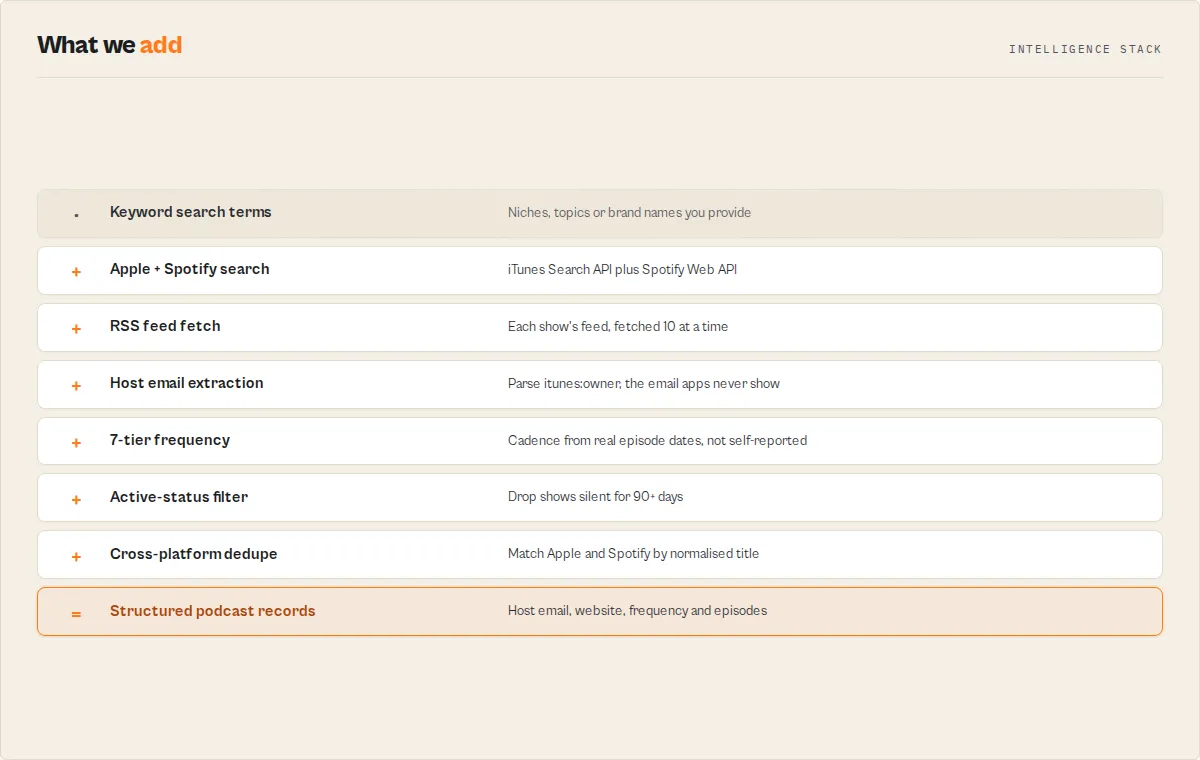
A podcast directory scraper is a tool that searches podcast platforms (Apple Podcasts, Spotify) by keyword and extracts show metadata that the public interface does not make accessible in bulk. The Apple Podcasts website and app show podcast titles and descriptions but do not display owner emails, RSS feed URLs, or structured publishing frequency data. A podcast directory scraper automates the process of querying the iTunes Search API, fetching each show's RSS feed, and parsing the itunes:owner block where podcast hosting platforms store the creator's contact email.
What data can you extract?
| Data Point | Source | Availability | Example |
|---|---|---|---|
| 📧 Owner email | RSS itunes:owner | Nullable (depends on feed) | booking@verdantmedia.com |
| 👤 Owner name | RSS itunes:owner | Nullable | Verdant Media Productions |
| 🌐 Website URL | RSS channel.link | Nullable | https://www.thegrowthpodcast.com |
| 🎙️ Podcast title | RSS / iTunes | Always | The Growth Podcast |
| ✍️ Author | RSS / iTunes | Always | Sarah Chen |
| 📝 Description | RSS (HTML stripped) | Always | Full show description, clean text |
| 🗂️ Categories | RSS / iTunes | Always | ["Business", "Entrepreneurship"] |
| 📅 Last episode date | RSS | RSS only | 2026-03-18 |
| 🔁 Publishing frequency | Calculated (7 tiers) | RSS only | weekly |
| ✅ Active status | Calculated (90-day) | RSS only | true |
| 🎵 Episode count | iTunes / Spotify | Always | 312 |
| 🍎 Apple Podcasts URL | iTunes API | Apple only | Full show link |
| 🎧 Spotify URL | Spotify API | Spotify only | Full show link |
| 🔗 RSS feed URL | iTunes | Apple only | Direct feed link |
| 🖼️ Artwork URL | iTunes (600px) | Always | High-res cover image |
| 📻 Episode listings | RSS | RSS only (optional) | Title, date, duration, audio URL |
What makes Podcast Directory Scraper different
| Feature | Podcast Directory Scraper | Podchaser Pro | Rephonic | ListenNotes API |
|---|---|---|---|---|
| Pricing model | $0.05/podcast, pay-per-result | $599/month subscription | $99-249/month subscription | $67-249/month subscription |
| Host email extraction | Direct from RSS itunes:owner tag | Curated database | Curated database | Not included in standard plan |
| Dual-platform search | Apple Podcasts + Spotify | Single curated database | Single curated database | Single index |
| Publishing frequency | 7-tier calculation from episode dates | Editorial estimate | Category-level data | Episode count only |
| Active status filter | 90-day threshold, configurable | Manual filtering | Manual filtering | Requires separate query |
| Country store selection | 175+ iTunes storefronts | Limited regions | Limited regions | Global index |
| Episode-level data | Full RSS episode metadata | Summary only | Summary only | Episode search available |
| API access | Apify API, Python, JavaScript, cURL | REST API | Dashboard only | REST API |
| Best for | On-demand outreach campaigns, budget-conscious teams | Enterprise podcast intelligence | Podcast discovery and ratings | Podcast search applications |
Pricing and features based on publicly available information as of March 2026 and may change.
Why use Podcast Directory Scraper?
Building a podcast outreach list manually means searching Apple Podcasts one keyword at a time, clicking into each show page, hunting for a contact email that the public interface never displays, then copying website URLs and checking when the show last published. A list of 200 targeted podcasts takes a researcher 6-8 hours. With stale data, you still end up emailing hosts who stopped publishing months ago.
Podcast Directory Scraper automates the entire pipeline — keyword search across Apple Podcasts and Spotify, RSS feed parsing, host email extraction, frequency calculation, and active filtering — in a single run, typically completing in 1-8 minutes depending on batch size and RSS responsiveness.
- Scheduling — run weekly to keep your podcast list current as new shows launch for your target keywords
- API access — trigger runs from Python, JavaScript, or any HTTP client to feed your CRM or outreach tool automatically
- Proxy support — optional proxy for RSS fetches if you experience blocked feeds. Not needed for most runs — proxies add latency and can slow performance
- Monitoring — get Slack or email alerts when a run produces fewer results than expected
- Integrations — connect to Zapier, Make, Google Sheets, HubSpot, or webhooks to route podcast leads into your existing workflow
Features
- Dual-platform search — queries the iTunes Search API across country-specific iTunes storefronts via country code input (up to 200 results per keyword) and optionally the Spotify Web API with pagination in batches of 50, then cross-matches and deduplicates results by normalized title
- Host email extraction from RSS — fetches every podcast's RSS feed and parses the
itunes:ownerblock to extractownerNameandownerEmail, contact data the public Apple Podcasts and Spotify interfaces never show - 10-concurrent RSS fetching — RSS feeds are pre-fetched in parallel batches of 10 with a 20-second wall-clock timeout per feed, minimizing total run time on large result sets
- 7-tier frequency calculation — analyzes publish dates of up to 10 recent episodes, calculates average gap, and classifies as:
daily,multiple-per-week,weekly,biweekly,monthly,irregular, orinfrequent - Active status detection — flags shows that published within the last 90 days; the
activeOnlyfilter removes dead shows before they reach your dataset - Cross-platform deduplication — deduplicates Apple results by
collectionIdacross all search terms; cross-deduplicates Apple and Spotify results by normalized title (lowercased, stripped of common suffixes, non-alphanumeric characters removed, with CJK/Arabic fallback) - RSS 2.0 and Atom feed support — parses both
<rss><channel>and<feed>(Atom) format feeds, handling attribute prefixes, array coercion, and nested subcategory extraction - Clean HTML-stripped descriptions — all show and episode descriptions have HTML tags stripped and entities decoded automatically
- Non-UTF-8 encoding support — detects ISO-8859-1, Windows-1252, and other encodings from XML declaration and Content-Type headers
- 10 MB RSS size guard — streams feeds and enforces a 10 MB limit to skip oversized feeds without hanging or crashing
- Rate limit resilience — 1-second delay between iTunes API calls, automatic backoff on HTTP 429/502/503/504 with up to 3 retries per request; Spotify respects the
Retry-Afterheader - Graceful timeout handling — monitors elapsed time against a 9-minute internal deadline and stops cleanly, outputting all data collected so far
- Spending limit enforcement — pay-per-event billing stops the run cleanly when your configured budget is reached, with no partial charges
Use cases for podcast directory scraping
Best for: Podcast booking and guest placement
Use when building targeted pitch lists for podcast booking clients. Podcast Directory Scraper returns host emails, publishing frequency, and active status so booking teams can sort by cadence, filter to active weekly shows, and load results into outreach sequences. Key outputs: ownerEmail, episodeFrequency, isActive, websiteUrl.
Best for: PR agency media outreach
Use when managing brand announcements or thought leadership campaigns that include podcast placements alongside journalist pitches. Podcast Directory Scraper finds every active podcast covering a topic and extracts host contact emails without a Podchaser subscription or days of manual research. Key outputs: ownerEmail, ownerName, categories, lastEpisodeDate.
Best for: Podcast sponsorship prospecting
Use when evaluating shows for advertising or sponsorship opportunities. The episodeFrequency and isActive fields let brands and media buyers filter to weekly-or-better shows that are still producing. The episodeCount field signals audience tenure and commitment. Key outputs: episodeFrequency, isActive, episodeCount, categories.
Best for: Competitive media intelligence
Use when tracking which podcasts cover competitor products or dominate a category. Schedule Podcast Directory Scraper weekly to catch new shows entering the space and flag shows that go inactive. Key outputs: title, categories, isActive, lastEpisodeDate, description.
Best for: Publisher and content syndication research
Use when identifying podcast hosts for co-production, syndication, or cross-promotion. Podcast Directory Scraper provides RSS feed URLs and direct website links in bulk, with episode-level metadata to assess content fit before reaching out. Key outputs: feedUrl, websiteUrl, episodes, description.
Best for: Talent and speaker sourcing
Use when searching for domain experts who host shows in a target vertical. Recruiters and speaker bureaus get enough data from author, ownerName, and websiteUrl to build a profile and initiate contact. Key outputs: author, ownerName, ownerEmail, websiteUrl.
Where Podcast Directory Scraper fits in a workflow
Upstream (feed URLs or keywords into Podcast Directory Scraper):
- Manual keyword research or campaign brief provides search terms
- Competitor analysis identifies topics and categories to monitor
Podcast Directory Scraper extracts:
- Host emails, website URLs, frequency, active status, episode data
Downstream (feed Podcast Directory Scraper output into):
- Bulk Email Verifier — verify
ownerEmailaddresses before outreach ($0.005/email) - Website Contact Scraper — scrape
websiteUrlfor additional contacts whenownerEmailis null ($0.15/site) - HubSpot Lead Pusher — push podcast contacts directly into HubSpot CRM
- Outreach tools (Mailshake, Close, Apollo) via Zapier or Make integrations
Use Podcast Directory Scraper if
- You need podcast host emails extracted from RSS feeds, not guessed or constructed
- You want to search both Apple Podcasts and Spotify in a single run with automatic deduplication
- You need to filter results to active shows with a minimum publishing frequency
- You prefer pay-per-result pricing over monthly subscriptions for seasonal or campaign-based work
- You need episode-level metadata (titles, dates, durations, audio URLs) alongside show data
- You want country-specific results from 175+ iTunes storefronts
How to build a podcast outreach list from Apple Podcasts
- Enter your search terms — Type keywords that describe your target niche: "B2B SaaS marketing", "cybersecurity news", "climate tech". You can add multiple terms at once; results are deduplicated automatically.
- Configure filters — Set
activeOnlytotrueto skip shows that have stopped publishing. LeavemaxResultsat 50 to start; raise it to 200 for full category coverage. - Click Start and wait — The actor takes about 1-3 minutes for 50 podcasts across 3 keywords. A 200-result run with 5 keywords takes about 5-8 minutes.
- Download results — Go to the Dataset tab and export as CSV for outreach tools, JSON for CRM import, or Excel for team collaboration.
Input parameters
| Parameter | Type | Required | Default | Description |
|---|---|---|---|---|
searchTerms | String[] | Yes | — | Keywords to search on Apple Podcasts and Spotify. Each term runs a separate query. Example: ["B2B marketing", "sales enablement"] |
maxResults | Integer | No | 50 | Max podcasts returned per search term. Apple limits to 200 per query; Spotify paginates in batches of 50 up to the same cap |
country | String | No | "us" | Two-letter country code for the iTunes Store (e.g., "gb", "de", "au", "jp"). Invalid codes fall back to "us" |
includeEpisodes | Boolean | No | true | Include recent episode listings per show. Disable for faster runs when only show metadata is needed |
maxEpisodesPerShow | Integer | No | 10 | Max recent episodes per podcast (0-1000). Set to 0 for all available episodes |
activeOnly | Boolean | No | false | Only return shows that published an episode within the last 90 days |
spotifyClientId | String | No | — | Your Spotify app Client ID. Get one free at https://developer.spotify.com/dashboard. Enables dual-platform search |
spotifyClientSecret | String | No | — | Your Spotify app Client Secret. Required together with Client ID |
proxyConfiguration | Object | No | Apify Proxy | Optional proxy for RSS fetches. Only enable if you experience blocked feeds — proxies add latency and can slow performance |
Input examples
PR agency podcast outreach list:
Podcast booking service — dual-platform search with Spotify:
Quick test — 5 results to verify output structure:
Input tips
- Be specific with keywords — "fintech regulation" finds better-targeted shows than "finance". Narrow terms yield higher email coverage because the shows are more professionally produced.
- Use synonyms as separate terms — add "artificial intelligence", "AI", and "machine learning" as three separate entries. Podcast Directory Scraper deduplicates the overlapping results automatically.
- Disable episodes for outreach runs — set
includeEpisodestofalsewhen you only need host contacts and show metadata. This halves output size and speeds up CSV export. - Start with
maxResults: 50— covers most niches well. Raise to 200 only for broad categories like "business" or "technology" where you want exhaustive coverage. - Try local market codes —
"gb"surfaces UK shows not prominent in the US store,"au"for Australian content,"de"for German-language podcasts.
Output example
Interpreting key output fields
episodeFrequency— Calculated from the average gap between up to 10 recent episode publish dates. Values:daily(under 1.5 days),multiple-per-week(1.5-4 days),weekly(4-9 days),biweekly(9-18 days),monthly(18-45 days),irregular(45-100 days),infrequent(over 100 days). Returnsnullwhen fewer than 2 dated episodes exist.isActive—trueif the most recent episode was published within 90 days;falseotherwise;nullwhen the last episode date cannot be determined.source—"apple"means found only on Apple Podcasts,"spotify"means found only on Spotify,"both"means cross-matched on both platforms by normalized title.ownerEmail— Extracted directly from the RSS feed'situnes:owner > itunes:emailtag. This is the email the podcast creator registered with their hosting platform (Buzzsprout, Libsyn, Anchor, Podbean, etc.). It isnullwhen the tag is absent.leadScore— A 0-100 outreach-quality score computed from the signals already in the record, so the most contactable shows sort to the top. Weights: owner email 35, website 20, owner name 10, currently active 15, datable last-episode 10, has episodes 5, plus a 5-point bonus when both email and website are present. It is a ranking aid, not a guarantee of reply rate. Results are sorted by this score (best first) within each output batch.dataQuality— One-glance contactability tier:high(email and website),medium(one of them),low(directory metadata only). Filter tohighfor a ready-to-contact shortlist.hasEmail/hasWebsite— Convenience booleans so you can filter a spreadsheet with=TRUEinstead of testing for empty cells.
Output fields
| Field | Type | Description |
|---|---|---|
podcastId | Number / String | Apple Podcasts collection ID, or Spotify show ID for Spotify-only results |
title | String | Podcast title (RSS value takes priority over iTunes) |
author | String | Author or creator name |
description | String | null | Full show description, HTML stripped and entities decoded |
categories | String[] | Show categories (RSS itunes:category with subcategories takes priority; iTunes genres as fallback, excluding "Podcasts") |
language | String | null | Language code from RSS (e.g., "en", "de", "ja") |
episodeCount | Number | null | Total episode count from iTunes trackCount or Spotify total_episodes |
lastEpisodeDate | String | null | Most recent episode publish date in ISO 8601 format |
episodeFrequency | String | null | Publishing cadence: daily, multiple-per-week, weekly, biweekly, monthly, irregular, infrequent, or null |
isActive | Boolean | null | true if a new episode was published within the last 90 days; null when last episode date is unknown |
applePodcastsUrl | String | null | Apple Podcasts show page URL (null for Spotify-only results) |
spotifyUrl | String | null | Spotify show URL (null if Spotify not enabled or show not matched) |
source | String | Where the show was found: "apple", "spotify", or "both" |
leadScore | Number | null | Outreach-quality score 0-100 (higher = more contactable). Results sorted by this, best first. See weighting above |
dataQuality | String | null | Contactability tier: high (email + website), medium (one), low (metadata only) |
hasEmail | Boolean | null | true when a host/owner email was extracted |
hasWebsite | Boolean | null | true when a podcast website URL was extracted |
feedUrl | String | null | RSS feed URL from iTunes |
websiteUrl | String | null | Podcast website URL from RSS channel.link |
artworkUrl | String | null | Cover art URL (600px preferred, 100px fallback, RSS itunes:image as last resort) |
ownerName | String | null | Owner name from RSS itunes:owner > itunes:name |
ownerEmail | String | null | Owner email from RSS itunes:owner > itunes:email |
copyright | String | null | Copyright notice from RSS copyright or media:copyright |
episodes | Object[] | Recent episode list (empty array when includeEpisodes is false) |
episodes[].title | String | Episode title |
episodes[].description | String | null | Episode description, HTML stripped |
episodes[].publishDate | String | null | Publish date in ISO 8601 format |
episodes[].duration | String | null | Duration from itunes:duration |
episodes[].audioUrl | String | null | Audio file URL from RSS enclosure |
episodes[].episodeNumber | Number | null | Episode number from itunes:episode |
episodes[].seasonNumber | Number | null | Season number from itunes:season |
searchTerm | String | The search term that first matched this podcast |
scrapedAt | String | ISO 8601 timestamp when the record was processed |
How much does it cost to search podcast directories?
Podcast Directory Scraper uses pay-per-event pricing — you pay $0.05 per podcast scraped. Platform compute costs are included.
| Scenario | Podcasts | Cost per podcast | Total cost |
|---|---|---|---|
| Quick test | 5 | $0.05 | $0.25 |
| Single keyword, active shows | 50 | $0.05 | $2.50 |
| 3 keywords, outreach campaign | 150 | $0.05 | $7.50 |
| 5 keywords, full category | 500 | $0.05 | $25.00 |
| 10 keywords, enterprise research | 1,000 | $0.05 | $50.00 |
You can set a maximum spending limit per run to control costs. Podcast Directory Scraper stops cleanly when your budget is reached — no partial charges, no overruns.
Compare this to Podchaser Pro at $599/month, Rephonic at $99-249/month, or ListenNotes API at $67-249/month. With Podcast Directory Scraper, most PR teams and podcast booking services spend $10-30 per campaign with no subscription commitment.
Typical performance
| Metric | Observed range | Notes |
|---|---|---|
| Run time (50 results, 1 keyword) | 30-60 seconds | Includes RSS feed fetching |
| Run time (200 results, 5 keywords) | 5-8 minutes | Depends on RSS feed response times |
| RSS parse success rate | 85-95% | Feeds behind auth or expired URLs return null |
| Email coverage (professional shows) | Majority include it | Business, tech, health niches tend higher |
| Email coverage (hobbyist shows) | Lower coverage | Comedy, personal diary niches tend lower |
| Cross-platform match rate | Varies by niche | Popular shows typically found on both platforms |
Example campaigns
| Campaign | Keywords | Settings | Results | Cost |
|---|---|---|---|---|
| SaaS podcast booking (March 2026) | "B2B SaaS", "sales enablement", "RevOps" | 100/term, activeOnly, no episodes | ~180 unique shows | ~$9.00 |
| UK true crime PR outreach (March 2026) | "true crime", "cold case" | country: "gb", 50/term, activeOnly | ~70 unique shows | ~$3.50 |
| Health tech sponsorship research (March 2026) | "digital health", "healthtech", "medical innovation", "biotech startups" | 200/term, weekly frequency | ~400 unique shows | ~$20.00 |
| Quick competitive scan (March 2026) | "competitor brand name" | 5/term, include episodes | ~5 shows | $0.25 |
Search podcast contacts using the API
Python
JavaScript
cURL
How Podcast Directory Scraper works
Stage 1: iTunes Search API discovery
For each search term, Podcast Directory Scraper calls https://itunes.apple.com/search with parameters media=podcast, entity=podcast, the specified country code (uppercased), and a limit capped at 200. Results are filtered to records where kind === "podcast" to exclude non-podcast media. The actor enforces a 1-second delay between consecutive iTunes API calls and uses a 20-second AbortSignal.timeout per request. On HTTP 429, it reads the Retry-After header (minimum 10 seconds) and retries without burning the retry counter. On 502/503/504, it backs off exponentially (2^attempt * 2 seconds) up to 3 retries. Non-JSON responses (CDN error pages) are caught and reported. Results are indexed by collectionId across all terms — a show that appears for both "B2B marketing" and "sales enablement" is stored once, attributed to the first matching term.
Stage 1b: Spotify API search (optional)
When both spotifyClientId and spotifyClientSecret are provided, Podcast Directory Scraper authenticates via the Spotify Client Credentials flow (POST https://accounts.spotify.com/api/token with Base64-encoded credentials). It then queries https://api.spotify.com/v1/search with type=show for each search term, paginating in batches of 50 (Spotify's per-request maximum) with a 500ms inter-page delay until the requested maxResults are reached or the API returns fewer items than requested. Spotify results are deduplicated by show ID across terms.
Stage 2: Concurrent RSS feed enrichment
The iTunes API returns a feedUrl for most podcasts. Podcast Directory Scraper pre-fetches all RSS feeds in parallel batches of 10, using a 20-second wall-clock AbortController timeout per feed and a User-Agent: ApifyPodcastScraper/1.0 header. Feeds are streamed with a 10 MB size cap — both declared Content-Length and actual streamed bytes are checked. The actor detects non-UTF-8 encodings (ISO-8859-1, Windows-1252) from the XML declaration and Content-Type header. XML is parsed with fast-xml-parser configured to handle attribute prefixes (@_), text nodes (#text), and array coercion for <item> and itunes:category tags. Both RSS 2.0 (<rss><channel>) and Atom (<feed>) roots are supported. Null bytes and control characters are stripped before parsing. RSS data takes priority over iTunes API data for title, author, description, categories, and website URL. Server errors (5xx) get one automatic retry with a 2-second delay.
Stage 3: Cross-platform deduplication and output assembly
Apple and Spotify results are cross-deduplicated by normalized title. The normalization function lowercases the title, strips trailing suffixes matching patterns like | ..., -- a marketing podcast, and - the SaaS podcast, then removes all non-alphanumeric characters. A fallback preserves non-Latin scripts (CJK, Arabic, emoji) by returning the raw lowercased title when alphanumeric stripping produces an empty string. Spotify shows matched to an Apple result are merged into one record with source: "both" and the spotifyUrl populated. Spotify-only shows (not found in Apple) are output as separate records with source: "spotify". Publishing frequency is calculated from the average gap between publish dates of up to 10 most recent episodes, sorted newest-first.
Stage 4: Timeout and spending limit safety
Podcast Directory Scraper tracks elapsed time against a 9-minute internal deadline (within the 10-minute actor timeout). If the deadline approaches during RSS fetching or output assembly, the actor stops cleanly and outputs all data collected so far. In pay-per-event mode, each podcast charged triggers a spending limit check. When the limit is reached, the actor stops immediately with no partial charges.
Tips for best results
- Use 3-5 specific keyword phrases per run. Narrow terms like "healthcare SaaS" or "B2B RevOps" return higher-quality contact data than broad terms. Professionally produced niche shows are more likely to include
ownerEmailin their RSS feed. - Filter to active shows for outreach. Enable
activeOnly: trueto eliminate shows that stopped publishing months ago. Dead shows waste your outreach budget and hurt sender reputation. - Disable episodes when building contact lists. Set
includeEpisodes: falseto reduce dataset size and speed up CSV export when you only needownerEmail,websiteUrl, andepisodeFrequency. - Batch synonyms into one run. Searching "artificial intelligence", "AI", and "machine learning" in a single run is faster than three separate runs and automatically deduplicates the significant overlap.
- Verify emails before sending. Feed
ownerEmailaddresses into Bulk Email Verifier to check MX records and SMTP deliverability before your outreach sequence launches. - Scrape podcast websites for additional contacts. When
ownerEmailis null, feedwebsiteUrlinto Website Contact Scraper to find contact pages, booking forms, and social profiles. - Schedule weekly for list maintenance. New shows in competitive niches launch constantly. A weekly scheduled run on the same keywords catches new shows as they appear and flags shows that have gone inactive.
- Use country codes for region-specific campaigns. A US-focused
"us"run misses popular shows in the UK ("gb"), Australia ("au"), and Germany ("de") that may be indexed under different storefronts.
Combine with other Apify actors
| Actor | How to combine |
|---|---|
| Bulk Email Verifier | Take the ownerEmail output and verify MX + SMTP deliverability before sending outreach |
| Website Contact Scraper | When ownerEmail is null, scrape websiteUrl for contact page emails, booking forms, and social links |
| Website Contact Scraper Pro | For podcast websites built on React or other SPAs that the standard scraper cannot render |
| B2B Lead Qualifier | Score podcast websites for company size, tech stack, and business signals to prioritize outreach |
| HubSpot Lead Pusher | Push podcast host contacts directly into HubSpot as contacts or companies after each run |
| Waterfall Contact Enrichment | Run a 10-step enrichment cascade on podcast hosts to find LinkedIn, phone, or additional emails |
| Email Pattern Finder | Detect the email naming convention at a podcast's parent company to find additional team contacts |
Limitations
- 200 results per keyword maximum. The iTunes Search API returns at most 200 podcasts per query. Use multiple specific search terms to increase coverage across a category.
- Owner email not always present. The
ownerEmailfield depends entirely on the podcast creator includingitunes:owner > itunes:emailin their RSS feed. Professionally produced shows include it at higher rates; hobbyist and smaller shows often omit it. Use Website Contact Scraper onwebsiteUrlas a fallback. - Spotify is optional and uses your own developer app. Spotify search needs a Client ID and Client Secret from the Spotify Developer Dashboard. Without these, only Apple Podcasts are searched — which still returns up to 200 results per keyword and is the larger podcast catalog for most niches. Podcasts exclusive to YouTube, Amazon Music, or proprietary platforms are not covered by either source.
- Spotify apps have a per-app rolling quota. Spotify Web API apps in Development Mode (the default for any app you create) share a single 30-day rolling quota across all requests from that app's Client ID. Heavy usage — for example, 50+ search terms with
maxResults: 200— can exhaust the quota and trigger a multi-hour cooldown during which Spotify returns HTTP 429 with a longRetry-After. Podcast Directory Scraper detects this and automatically falls back to Apple-only results within seconds (logging a clear warning) rather than waiting out the cooldown. To recover Spotify coverage, either wait for the rolling window to slide forward or create a fresh Spotify app with a separate Client ID. - RSS feed availability varies. Some feeds sit behind authentication, have expired URLs, or return server errors. Podcast Directory Scraper falls back to iTunes API data (without contact email or website URL) for shows whose feeds are inaccessible. Feeds over 10 MB are skipped.
- Spotify-only results lack contact data. Podcasts found only on Spotify and not on Apple Podcasts will not have an RSS feed URL,
ownerEmail,websiteUrl, orepisodeFrequency, since these fields come exclusively from RSS parsing. - Episode count may differ from the Apple Podcasts UI. Some RSS feeds truncate older episodes, so
episodeCountfrom iTunes reflects the directory listing, not necessarily the RSS feed item count. - No transcript or audio download. Podcast Directory Scraper extracts episode metadata including
audioUrlbut does not download or transcribe audio files. - Rate limiting adds time on large runs. The 1-second delay between iTunes API calls is intentional to respect rate limits. A run with 10 search terms at 200 results each takes approximately 8-12 minutes including RSS fetching.
Integrations
- Zapier — trigger outreach sequences in Close, Mailshake, or Apollo when a new podcast run completes
- Make — build workflows that route new podcast contacts into your CRM or Google Sheet automatically
- Google Sheets — export the full dataset to a shared spreadsheet for your PR or booking team to work from
- Apify API — trigger runs programmatically from your own outreach software or data pipeline
- Webhooks — post run results to any HTTP endpoint, including your own booking platform or CRM API
- LangChain / LlamaIndex — feed podcast descriptions and episode listings into an LLM pipeline to auto-generate personalized outreach copy
Use in Dify
Drop this actor into Dify workflows via the Apify plugin's Run Actor node. The dataset returns as structured JSON your next workflow node can iterate over directly — host emails, frequency, and active flag arrive as named fields, not raw HTML the LLM has to re-extract.
- Actor ID:
ryanclinton/podcast-directory-scraper - Sample input:
Troubleshooting
-
No owner email returned for most podcasts. The
ownerEmailfield is populated from the RSS feed'situnes:ownertag, which podcast creators must add explicitly. Indie and hobbyist shows frequently omit it. For shows whereownerEmailis null, scrape thewebsiteUrlusing Website Contact Scraper to find a contact page, booking link, or social media profile. -
Fewer results than expected for a search term. The iTunes Search API ranks results by popularity and relevance within the selected country store. A term may have fewer than
maxResultsmatches in the selected store. Try"us"if you are using a smaller market, or add synonymous terms to your search list. -
Spotify credentials not working. Verify that your Spotify Developer app Client ID and Secret are copied exactly. Podcast Directory Scraper uses Client Credentials flow (not authorization code), so no redirect URI is needed. A mismatch in either field causes a 401 error. Re-check at https://developer.spotify.com/dashboard.
-
Spotify returned zero results and the log says "rate-limit exhausted". Your Spotify Developer app has hit its 30-day rolling search quota. Podcast Directory Scraper detected this and fell back to Apple-only results so the run still completes — but Spotify coverage is paused for that app until the quota window slides forward. Two recovery paths: (1) wait — the rolling window restores capacity over hours/days as old calls age out; or (2) create a fresh Spotify Developer app at https://developer.spotify.com/dashboard and use the new Client ID and Secret. Heavy users (50+ search terms × 200 results per run) will likely need to rotate apps periodically; smaller runs (1-10 terms × 50 results) rarely hit the limit.
-
Run taking longer than expected. Large runs with many search terms and 200 results per term involve hundreds of RSS fetches. RSS feeds are fetched 10 at a time with a 20-second timeout each. Reduce
maxResultsto 50 or disableincludeEpisodesto cut run time. -
Empty dataset despite valid search terms. Check that
searchTermsis an array of strings, not a single string. Correct:["technology"]. Incorrect:"technology". Also check that search terms are not blank or whitespace-only — Podcast Directory Scraper filters these out and warns if all terms are empty.
Responsible use
- Podcast Directory Scraper accesses publicly available data from the Apple iTunes Search API and podcast RSS feeds, both designed for programmatic access.
- The
itunes:owneremail is published by podcast creators in their RSS feed for the purpose of media, listener, and directory communication. - Comply with CAN-SPAM, GDPR, CASL, and other applicable laws before sending commercial email to extracted addresses.
- Do not use extracted contact data for spam, bulk unsolicited commercial messages, or harassment.
- Respect podcast creators by keeping outreach relevant, professional, and limited in volume.
- For guidance on web scraping legality, see Apify's guide.
FAQ
How do I extract podcast host emails from Apple Podcasts?
Enter your target keywords into Podcast Directory Scraper on Apify, set your filters, and click Start. Podcast Directory Scraper fetches each show's RSS feed and reads the itunes:owner > itunes:email tag, which most podcast hosting platforms (Buzzsprout, Libsyn, Anchor, Podbean) populate automatically when a creator registers their show. The ownerEmail field contains the contact email for every show that publishes it.
How many podcasts can Podcast Directory Scraper return in one run? Apple's iTunes API returns up to 200 results per search term. With 10 search terms you can retrieve up to 2,000 results per run (fewer after deduplication of overlapping shows). There is no hard cap on the number of keywords you can include. With Spotify enabled, Podcast Directory Scraper can find additional shows not listed on Apple.
How accurate is the podcast contact email data from Podcast Directory Scraper?
Podcast Directory Scraper extracts the email exactly as declared in the itunes:owner tag — it does not guess or construct emails. Professionally produced B2B and business podcasts are more likely to include this tag than hobbyist shows. Coverage varies by niche. To confirm deliverability before outreach, run the results through Bulk Email Verifier.
Does Podcast Directory Scraper search both Apple Podcasts and Spotify?
Yes. Apple Podcasts is always searched via the iTunes API. Spotify search is optional — provide a free Spotify Developer Client ID and Secret to enable it. Podcast Directory Scraper cross-matches results by normalized title, merges duplicates as source: "both", and includes Spotify-only shows separately.
How is Podcast Directory Scraper different from Podchaser, Rephonic, or ListenNotes? Podchaser ($599/month), Rephonic ($99-249/month), and ListenNotes ($67-249/month) are subscription SaaS tools with curated databases. Podcast Directory Scraper queries public podcast directory APIs (Apple iTunes API, Spotify Web API) and RSS feeds directly on demand at $0.05 per podcast with no monthly commitment. It also provides 7-tier frequency classification and 90-day active status filtering that subscription tools handle through manual filtering or editorial estimates.
Can Podcast Directory Scraper search podcasts in other countries?
Yes. Set the country parameter to any two-letter ISO country code: "gb" for the UK, "de" for Germany, "au" for Australia, "jp" for Japan, and 170+ other storefronts. Podcast Directory Scraper queries the corresponding Apple Podcasts store, which has a distinct catalog and ranking for each country.
How does Podcast Directory Scraper determine publishing frequency?
The episodeFrequency field is calculated from the publish dates of up to 10 recent episodes. Podcast Directory Scraper computes the average gap between consecutive dates and maps it to one of 7 tiers: daily (gap under 1.5 days), multiple-per-week (1.5-4 days), weekly (4-9 days), biweekly (9-18 days), monthly (18-45 days), irregular (45-100 days), infrequent (over 100 days). Shows with fewer than 2 dated episodes return null.
Is it legal to search podcast data from Apple Podcasts using Podcast Directory Scraper? Legality of data collection depends on jurisdiction and specific use case — consult legal counsel for your situation. Podcast Directory Scraper uses the public iTunes Search API, which Apple provides for programmatic access to their catalog. RSS feeds are published by podcast creators for syndication and directory listing. Both are designed to be consumed by third-party applications. Podcast Directory Scraper does not bypass any authentication, scrape the Apple Podcasts website, or access private data. For a detailed analysis, see Apify's guide.
Can I schedule Podcast Directory Scraper to run automatically? Yes. Use Apify's built-in scheduler to run Podcast Directory Scraper on any interval — daily, weekly, or custom cron expressions. Pair with a webhook to automatically push new podcast contacts to your CRM or outreach tool when each run completes.
What happens if a podcast's RSS feed is unavailable?
Podcast Directory Scraper falls back to the data available from the iTunes API: title, author, genres, episode count, artwork, and Apple Podcasts URL. Fields sourced exclusively from RSS — ownerEmail, ownerName, websiteUrl, description, language, copyright, and episodeFrequency — will be null for that record. Server errors get one automatic retry.
Can I use Podcast Directory Scraper with Spotify only, without Apple Podcasts?
Not currently. Apple Podcasts is always searched as the primary source. Spotify is an optional supplement that adds cross-platform coverage. If you provide Spotify credentials, Podcast Directory Scraper searches both sources and merges results, with shows on both platforms flagged as source: "both".
How long does a typical Podcast Directory Scraper run take? A single keyword at the default 50-result cap takes about 30-60 seconds including RSS fetching. Three keywords at 100 results each takes 2-4 minutes. Ten keywords at 200 results each takes approximately 8-12 minutes depending on RSS feed response times. Podcast Directory Scraper monitors elapsed time and stops gracefully before the 10-minute timeout.
Help us improve
If you encounter issues, you can help us debug faster by enabling run sharing in your Apify account:
- Go to Account Settings > Privacy
- Enable Share runs with public Actor creators
This lets us see your run details when something goes wrong, so we can fix issues faster. Your data is only visible to the actor developer, not publicly.
Support
Found a bug or have a feature request? Open an issue in the Issues tab on this actor's page. For custom solutions or enterprise integrations, reach out through the Apify platform.


