

PubMed Evidence Triage — Grade, Dedupe & Decide
Pricing
from $2.00 / 1,000 paper fetcheds
PubMed Evidence Triage — Grade, Dedupe & Decide
Turn a PubMed search into a decision-ready evidence map. Grades every result on the clinical evidence hierarchy, flags retractions, groups papers from the same trial into evidence units, ranks what to read first, and detects guidelines. Deterministic, free NCBI API, no key needed.
Pricing
from $2.00 / 1,000 paper fetcheds
Rating
0.0
(0)
Developer

Ryan Clinton
Maintained by CommunityActor stats
1
Bookmarked
12
Total users
3
Monthly active users
a month ago
Last modified
Categories
Share
PubMed Evidence Search and Appraisal
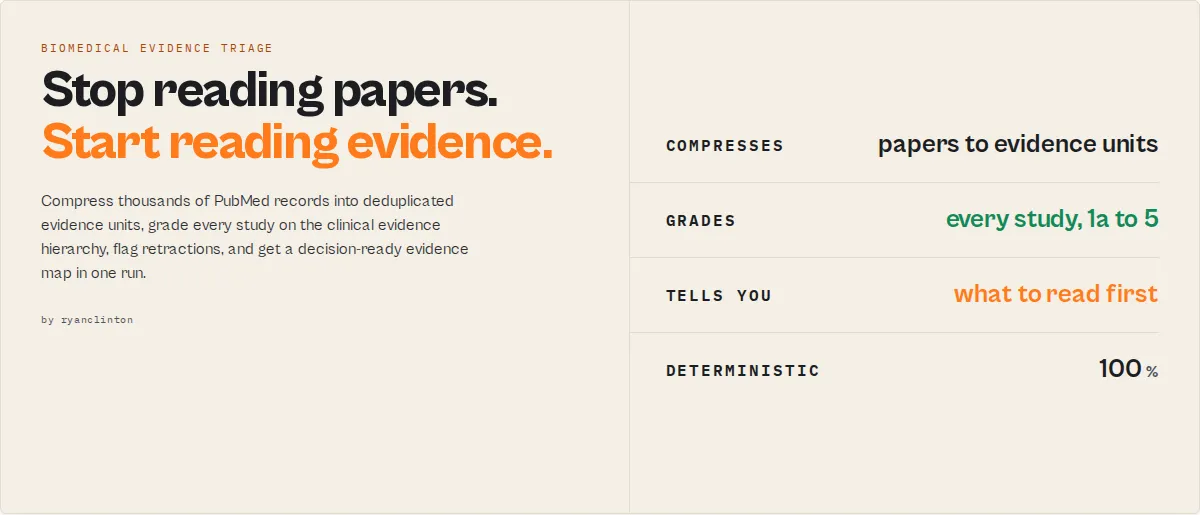
Stop reading papers. Start reading evidence. Compress thousands of PubMed records into deduplicated evidence units, identify the guidelines and landmark trials that matter, and get a decision-ready evidence map in one run. PubMed helps you find papers; this actor helps you decide what to trust, what to read, what to screen, and what to ignore.
The output most users read first
Most runs start and end with one record: the evidence-map. It is the one-glance triage answer (illustrative numbers):
Read the evidence-map, start at the recommended entry point, and drill into the per-article records only when you need the detail.
The problem with PubMed
A typical PubMed search returns hundreds or thousands of papers. Most are duplicate reports of the same trials, low-evidence studies, outdated reviews, or papers you will never read. PubMed retrieves them; it does not tell you:
- Which studies are actually strong?
- Which papers belong to the same trial?
- Is there already a guideline that answers the question?
- Is the topic mature or still emerging?
- What should I read first, and what changed since last month?
This actor answers those automatically from PubMed metadata, MeSH, publication types, and trial IDs. It is fully deterministic, with no LLM in the scoring path. The goal is not better search. The goal is less reading.
Stop counting papers
500 papers does not mean 500 studies. One clinical trial can generate a primary publication, subgroup analyses, long-term follow-ups, safety reports, and economic analyses. Most literature reviews overestimate the evidence because they count papers instead of trials. This actor groups related publications into evidence units so you see the real evidence base, then ranks those units by evidence strength and tells you where to start.
Before and after
Before: a PubMed search returns 2,800+ papers and you do not know which matter, which are duplicates, whether the topic is mature, whether a guideline already exists, or what to read first.
After (example run): those papers compress to a few hundred evidence units, a couple of dozen high-priority units, the clinical guidelines among them, a decision-readiness score, and a recommended starting point. Numbers vary by topic; the shape of the output does not.
What this replaces
The manual triage workflow today looks like this:
Search PubMed → export to a spreadsheet → manually remove duplicate trial reports → spot the guidelines → rank the studies by quality → build a reading list.
With this actor it is:
Run the actor → read the evidence-map → start at the recommended entry point.
Example: GLP-1 agonists and obesity
A search for GLP-1 agonists obesity (illustrative):
- PubMed returns ~2,800 papers.
- The actor returns ~182 evidence units, ~21 high-priority units, the practice guidelines among them, and a decision-readiness score around 89/100.
- The recommended starting point is the most recent clinical practice guideline, with the landmark trials behind it one click away.
The same shape of output works for any therapeutic area; only the numbers change.
How it compares
PubMed retrieves. Screening tools (Rayyan, Covidence) help a team run a review manually. None of them automatically grade evidence, dedupe trials, or detect guidelines from metadata before a human looks at the list. This actor does, and it exports structured JSON instead of a UI.
| Capability (automated, from metadata) | PubMed | Rayyan | Covidence | This actor |
|---|---|---|---|---|
| Evidence-hierarchy grade per article | No | No | No | Yes |
| Trial deduplication (papers to evidence units) | No | No | No | Yes |
| Evidence compression and reading-burden metric | No | No | No | Yes |
| Retraction and integrity flags | Partial | No | No | Yes |
| Guideline detection and guideline-gap | No | No | No | Yes |
| Read-first priority ranking | No | No | No | Yes |
| Cross-run monitoring (what changed) | No | No | No | Yes |
| Structured JSON for agents and automation | Partial | No | No | Yes |
What you get beyond PubMed search
| Capability | PubMed | This actor |
|---|---|---|
| Search by keyword, author, journal, MeSH | Yes | Yes |
| Evidence-hierarchy grade per article | No | Yes |
| Retraction and integrity flags | Partial | Yes |
| Screening buckets (include / maybe / exclude) | No | Yes |
| Read-first priority score | No | Yes |
| Trial-family grouping (dedupe papers from one trial) | No | Yes |
| Topic evidence maturity, gaps, lifecycle | No | Yes |
| Evidence timeline and topic clusters | No | Yes |
| Evidence compression (distinct units vs raw paper count) | No | Yes |
| Decision-readiness and retrieval-confidence scores | No | Yes |
| Evidence dependency, fragility, and concentration | No | Yes |
| Cross-run monitoring (what is new since last run) | No | Yes |
| RAG-safe filter for AI pipelines | No | Yes |
| Structured JSON for agents and automation | Partial | Yes |
Four pillars
Everything this actor produces maps to one of four jobs:
- Article appraisal: per-article evidence level, study type, integrity status, citation risk, and a read-first priority score.
- Evidence landscape: topic-level maturity, evidence-base strength, gaps, drift, timeline, topic clusters, and journal concentration.
- Systematic-review screening: an include / maybe / exclude / review-manually disposition per article, plus trial-family grouping so N papers from one trial count once.
- AI and RAG safety: a
ragSafegate and clean structured enums so agents and retrieval pipelines ingest only trustworthy biomedical evidence.
Pick a workflow with analysisMode (clinical, systematic-review, medical-affairs, research-landscape, rag) and the priority scoring and emphasis retune to it.
Example output
A single appraised article record (standard profile, trimmed):
The evidence-map record is the one-glance triage answer (illustrative numbers):
Which scores to sort by
The actor computes several scores; you only need two to act, the rest explain them.
- Per article, sort by
priorityScore(read-first) and readevidenceScore(strength) beside it.relevanceScore,classificationConfidence, andcitationRiskexplain those two. - Per topic, read
decisionReadinesson theevidence-map(can a decision be supported yet?).evidenceMaturityScore,evidenceSaturation,retrievalConfidence, andevidenceBaseStrengthare the explanatory metrics behind it.
Everything else (gaps, drift, lifecycle, concentration) is context, not a score to rank on.
What this actor does
Most PubMed tools hand you the same rows the website does and leave the appraisal to you. This actor does the appraisal. For each matching article it answers the questions a clinician, systematic-review author, or evidence-based-medicine team actually asks:
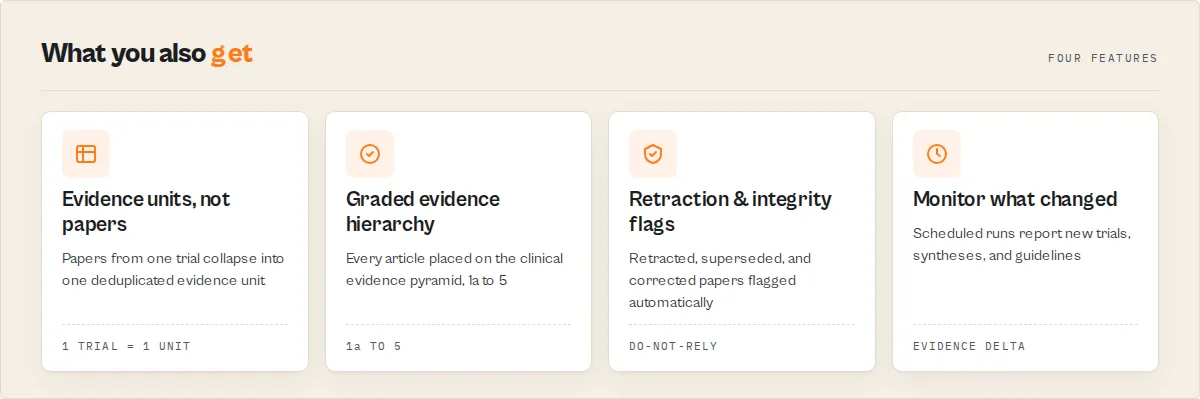
- What kind of study is this? Classified study type and Oxford-style evidence level from the article's PubMed publication types: meta-analysis and systematic review (level 1a), randomized controlled trial (1b), controlled and clinical trials (2), observational studies (3), case reports (4), narrative reviews and editorials (5), and practice guidelines.
- Can I trust it? A research-integrity status that flags retracted articles, expressions of concern, errata, and corrected-and-republished articles, with a
do-not-relyrecommendation that overrides the evidence grade. - Is it relevant, and is it strong? Two separate 0-100 scores.
evidenceScoremeasures study-design strength, recency, and full-text availability.relevanceScorereflects PubMed's own ranking for your query. They disagree often, and that disagreement is the point: a highly relevant case report and a tangentially relevant meta-analysis land at opposite ends. - What should I read first? A single research brief record synthesises the whole result set into a headline, key takeaways, and a role-tagged reading list (strongest evidence, best synthesis, best trial, practice guideline, most recent, free full text, most relevant).
Every article is also enriched with its MeSH terms (PubMed's controlled medical vocabulary), abstract, indexed chemicals and drugs, and any ClinicalTrials.gov registration IDs, all fetched in batched requests with no per-article overhead.
How this is different from a general academic search
This actor is built for the biomedical and clinical evidence question, not for cross-domain citation metrics. If you need citation-graph influence across all of science, use Semantic Scholar Research Intelligence. If you need bulk publisher metadata and BibTeX across all disciplines, use Crossref Academic Paper Search. This actor owns the thing only PubMed can answer: where does each paper sit on the medical evidence hierarchy, is it safe to cite, and what is it about in MeSH terms.
Who uses this
- Evidence-based-medicine and systematic-review teams screening a topic by study design and integrity before extraction.
- Clinicians and medical librarians who need the guideline or the meta-analysis first, not the 200th case report.
- Pharma medical-affairs and HTA analysts assessing the evidence base behind an intervention.
- Research-integrity and editorial teams surfacing retracted or concern-flagged work in a citation list.
- AI agents and RAG pipelines that need deterministic, graded, retraction-aware biomedical retrieval instead of raw search rows.
Output records
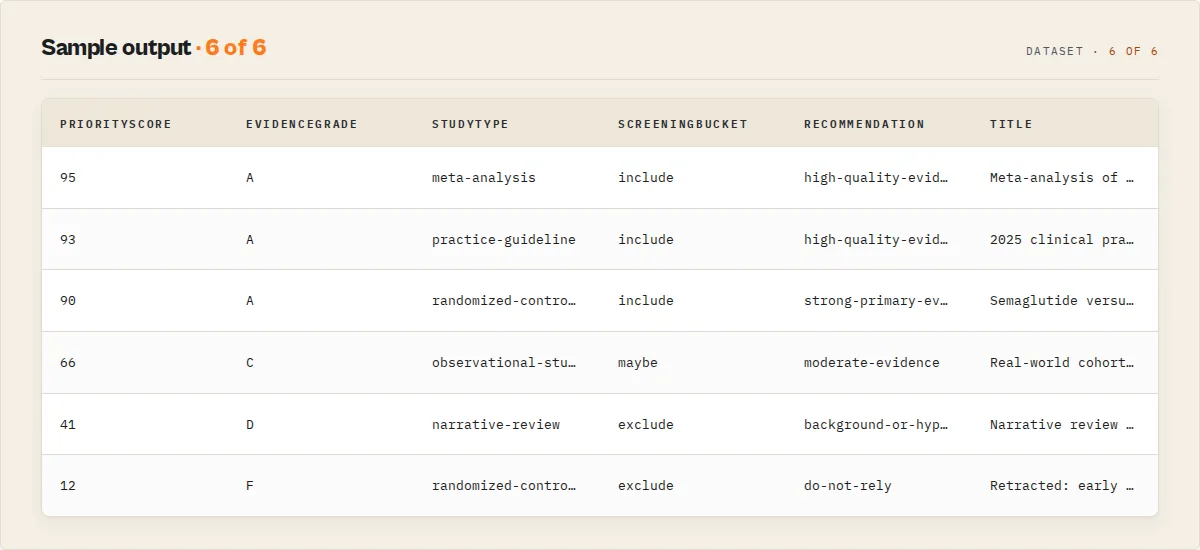
The dataset uses a recordType discriminator so mixed records stay clean and filterable.
| recordType | What it is |
|---|---|
evidence-map | The flagship triage record. One object that answers "how do I go from thousands of papers to the few I trust?": decision readiness, evidence saturation, retrieval confidence, duplicate-evidence risk, evidence compression (distinct evidence units vs raw paper count), reading-burden reduction, evidence lifecycle stage, guideline-gap, redundancy, evidence concentration, research-waste risk, per-class evidence velocity, the guideline landscape, and a recommended entry point. |
evidence-unit | One trial, many papers. A deduplicated trial: the papers that report the same ClinicalTrials.gov trial collapsed into a single unit (primary publication + the rest), so five papers from one trial count as one study, not five. |
evidence-delta | Monitor mode only. What changed since the last run for this watchlist: new RCTs, meta-analyses, syntheses, guidelines, new evidence units, and the maturity delta. Built for scheduled runs and webhook alerts. |
research-brief | One synthesis record: headline, key takeaways, role-tagged reading list, a citation-ready shortlist (landmark trial, best synthesis, latest guideline, highest evidence), and a plain-English confidence read. Start here. |
article | One appraised article with the full evidence, integrity, MeSH, and scoring layer. |
evidence-summary | Run-level evidence landscape: maturity score and band, evidence-base strength, evidence drift (is the high-quality base growing?), evidence gaps, a first-appearance timeline, topic clusters, journal concentration (with guideline/RCT counts per journal), a population/intervention profile, query diagnostics (broad-query and MeSH-coverage signals), counts by evidence level and study type, retraction and free-full-text counts, and any filter exclusions. |
topic-trend | Optional publication-velocity trend for the topic (last N years vs the prior N years). |
no-results / error | Typed, non-fatal records so a blank run is never ambiguous. |
Article record fields (selected)
| Field | Type | Description |
|---|---|---|
studyType | string | systematic-review, meta-analysis, practice-guideline, randomized-controlled-trial, controlled-trial, clinical-trial, observational-study, case-report, narrative-review, expert-opinion, unclassified. |
evidenceLevel | string | 1a, 1b, 2, 3, 4, 5, guideline, not-classified (lower is stronger). |
evidenceScore | integer | 0-100 strength of evidence (study design, recency, integrity, full text). |
evidenceGrade | string | A-F derived from evidenceScore. |
relevanceScore | integer | 0-100 from PubMed's own result ranking. Distinct axis from evidenceScore. |
priorityScore | integer | 0-100 flagship read-first sort key, blending evidence, relevance, recency, a guideline boost, and an integrity penalty. The single number to sort by. |
screeningBucket | string | Systematic-review disposition: include, maybe, exclude, review-manually. |
ragSafe | boolean | Safe to feed an LLM/RAG pipeline as evidence (not retracted, abstract present, primary-evidence design, not a non-human study). Paired with ragSafeReason. |
citationRisk | string | Should you cite this? low / medium / high, with citationRiskReasons. Distinct from integrity: superseded, corrected, or non-primary designs raise it. |
classificationConfidence | integer | 0-100, how reliably the study design was derived from metadata. Low when PubMed carries only a generic Journal Article tag. Paired with classificationSource. |
isLandmarkStudy | boolean | Earliest article of a high-evidence class, or first paper of a multi-paper trial, within the result set. Paired with landmarkReason. |
supersededByUpdate | boolean | A newer article updates or republishes this one (from PubMed's UpdateIn / RepublishedIn cross-references). |
trialFamilyId | string / null | Shared ClinicalTrials.gov ID. Articles with the same value report the same underlying trial; duplicateTrial flags when more than one in the run does. |
recommendation | string | high-quality-evidence, strong-primary-evidence, moderate-evidence, background-or-hypothesis, review-manually, do-not-rely, check-correction. |
integrityStatus | string | ok, retracted, retraction-notice, expression-of-concern, erratum, corrected-republished. |
isHumanStudy | boolean / null | Derived from MeSH (Humans vs Animals). Null when not determinable. |
freeFullText | boolean | Free full text available via PubMed Central. |
meshTerms / meshMajor | string[] | Medical Subject Headings; major-topic subset. |
abstract | string / null | Article abstract (from the efetch enrichment step). |
clinicalTrialIds | string[] | ClinicalTrials.gov and other registry accession numbers. |
why | string[] | Plain-English reasons behind the appraisal. |
summary | string | One-line, quotable appraisal summary for LLMs and reports. |
Standard bibliographic fields are also present: pmid, title, authors, authorList, lastAuthor, journal, journalAbbrev, pubDate, volume, issue, pages, doi, pmc, languages, pubmedUrl.
How to use it
- Open the PubMed Evidence Search and Appraisal actor and click Start.
- Enter a query, author, journal, or article type (at least one is required).
- Optionally set an evidence floor, exclude retracted articles, restrict to human studies, or turn on the publication trend.
- Click Run. Read the
research-briefrecord first, then drill into thearticlerecords.
Input examples
Grade a topic, strongest evidence first:
Systematic reviews and meta-analyses only, with the publication trend:
Human studies only, drop retracted work, dashboard digest:
Monitor a topic on a schedule (medical affairs):
Key inputs
| Input | Description |
|---|---|
query, author, journal, articleType, dateFrom, dateTo | Standard PubMed search filters. Supports boolean operators and field tags like [MeSH Terms]. |
analysisMode | Workflow preset that retunes priority scoring: general, clinical, systematic-review, medical-affairs, research-landscape, rag. |
monitorMode + watchlistName | Track a topic across scheduled runs. The first run stores a baseline; later runs report new RCTs, new syntheses, new guidelines, and the change in evidence maturity on the evidence-map. |
minEvidenceLevel | Keep only studies at or above a strength: any, observational, controlled, rct, systematic. Excluded counts are disclosed in the summary. |
excludeRetracted | Drop retracted articles and expressions of concern. Off by default, so they are kept and flagged. |
humanOnly | Drop MeSH-confirmed non-human studies. |
includeMeshAndAbstract | Fetch MeSH, abstracts, chemicals, and trial IDs (on by default). |
includeTrendAnalysis | Add the publication-velocity trend record. |
outputProfile | minimal, standard, or full field set per article. |
outputMode | articles (full output) or dashboard (the evidence summary only, charged once). |
Use in Dify
Drop this actor into Dify workflows via the Apify plugin's Run Actor node. Every article comes back appraised and classified as structured JSON, with stable enums your downstream if/else node branches on directly: recommendation (high-quality-evidence / do-not-rely / ...), evidenceLevel (1a / 1b / ...), studyType, and integrityStatus. A general academic search pointed at the same query returns raw rows; this returns a decision per article.
- Actor ID:
ryanclinton/pubmed-research-search - Sample input (route the strongest, non-retracted evidence into a brief):
- Branching example: a Dify if/else node routes
screeningBucket = includeinto extraction,recommendation = do-not-relyto a "flag for review" branch, andragSafe = trueinto your vector index; sort the rest bypriorityScorefor a read-first queue. Thewhy[]array and theresearch-briefrecord'swhatToReadandcitationShortlistare usable verbatim with no LLM rewriting.
Programmatic access
How it works
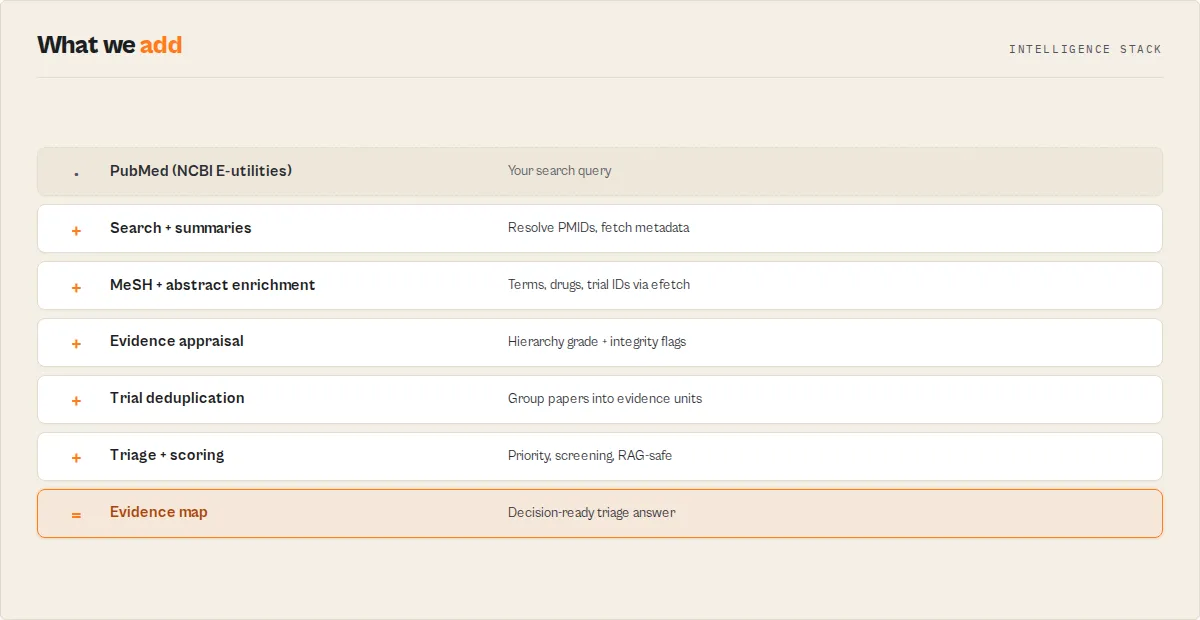
The actor runs PubMed's two-step API process and then appraises the results:
- ESearch finds matching PMIDs and the total count for your query.
- ESummary fetches bibliographic metadata in batches of 200, with a 350ms gap to respect NCBI's 3-requests-per-second limit.
- EFetch (on by default) pulls MeSH terms, abstracts, chemicals, and trial IDs for the same PMIDs in batched XML requests.
- Appraisal classifies each article on the evidence hierarchy, checks integrity, computes the dual scores, and writes the recommendation.
- Synthesis streams each article as it is appraised, then emits the evidence summary and the research brief.
All scoring is deterministic. There is no LLM in the scoring path, so the same input produces the same grades every time.
Common questions
How do you grade evidence strength?
From the article's PubMed publication types, mapped to the clinical evidence hierarchy: meta-analyses and systematic reviews at the top (level 1a), randomized controlled trials at 1b, controlled and clinical trials at 2, observational studies at 3, case reports at 4, and narrative reviews and editorials at 5. Practice guidelines are flagged separately as a high-authority clinical reference. When an article carries only a generic "Journal Article" type with no design tag, it is marked unclassified rather than guessed.
How do you detect retracted articles?
PubMed tags retractions, expressions of concern, errata, and corrected-and-republished articles as publication types. The actor reads those tags into an integrityStatus, and a retraction or expression of concern forces a do-not-rely recommendation regardless of how strong the study design is.
What is the difference between evidenceScore and relevanceScore?
evidenceScore answers "how strong is this study," driven by design, recency, and full-text access. relevanceScore answers "how well does this match my query," taken from PubMed's own ranking. Sort by whichever question you are asking.
Do I need an API key? No. The NCBI E-utilities API is free and keyless. The actor stays within NCBI's default rate limit.
Is the MeSH and abstract enrichment required?
It is on by default and powers the human-study signal and topic map. You can turn it off with includeMeshAndAbstract: false to skip the extra requests if you only need bibliographic fields and design grading.
Who should use this
Use this if you need to:
- reduce reading volume from thousands of papers to a short, ranked list
- screen evidence faster (include / maybe / exclude, with auditable reasons)
- monitor a therapeutic area and see only what changed
- feed trustworthy, non-retracted biomedical evidence to an AI or RAG system
- know where to start: the guideline, the landmark trial, or the best synthesis
Do not use this if you need:
- full-text article PDFs
- numerical outcome extraction or meta-analysis statistics (effect sizes, forest plots)
- AI-generated narrative summaries of the literature
- citation-graph influence across all of science (use Semantic Scholar for that)
What this actor does not do
- It does not return full-text article PDFs. It returns abstracts, metadata, and links; use the
pmcordoifields for full text. - It does not grade evidence beyond what publication types and MeSH expose. It will not infer a study design that PubMed has not tagged; those articles are marked
unclassifiedfor manual review. - It does not score cross-domain citation influence. For citation graphs across all of science use Semantic Scholar; for bulk publisher metadata use Crossref.
- It does not tell you whether studies agree on a result. It grades evidence by study design and integrity and measures how well-studied a topic is (evidence-base strength); detecting whether trials are positive or negative requires reading their outcomes, which needs full text, not metadata.
- It is not medical advice. Evidence grades describe study design and integrity, not clinical applicability to a specific patient.
Related actors
| Actor | Best for |
|---|---|
| Semantic Scholar Research Intelligence | Citation-graph influence and AI-ranked papers across all of science. |
| Crossref Academic Paper Search | Bulk publisher metadata, BibTeX, DOI resolution across all disciplines. |
| OpenAlex Research Search | Open-access papers with institutional and citation data. |
| Europe PMC Literature Search | European biomedical literature with full-text access links. |


