

WHOIS Domain Lookup: Operational Domain Intelligence
Pricing
from $3.00 / 1,000 domain looked ups
WHOIS Domain Lookup: Operational Domain Intelligence
Look up WHOIS and RDAP registration data for any domain in bulk. Get registrar details, creation and expiry dates, nameservers, domain age, registrant info, DNSSEC status, and EPP status codes -- all without needing any API key.
Pricing
from $3.00 / 1,000 domain looked ups
Rating
0.0
(0)
Developer

Ryan Clinton
Maintained by CommunityActor stats
1
Bookmarked
34
Total users
7
Monthly active users
2 months ago
Last modified
Categories
Share
WHOIS Domain Lookup — Deterministic Operational Domain Intelligence
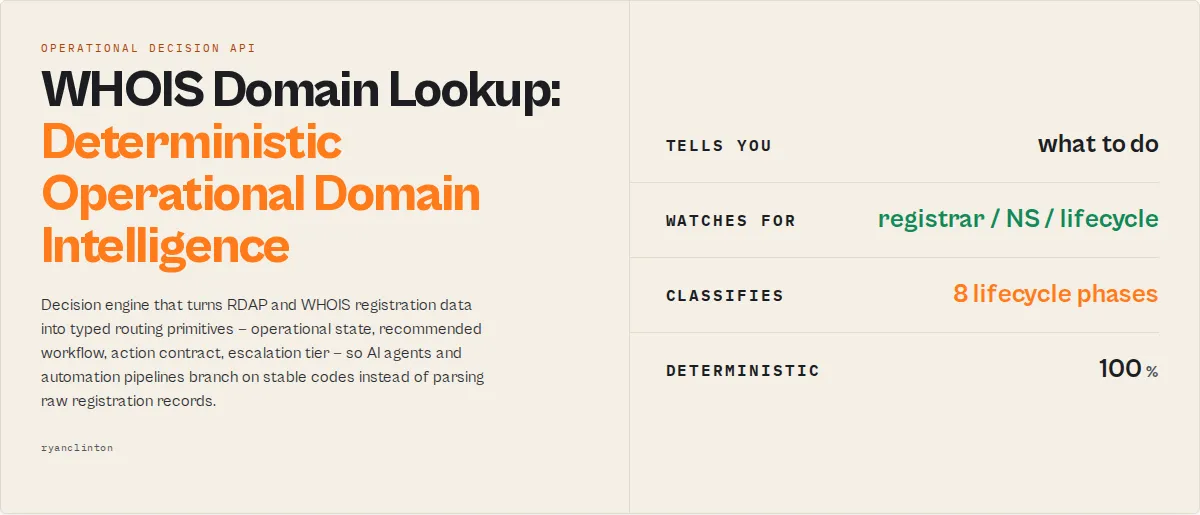
In one sentence: Operational domain intelligence infrastructure — a deterministic domain decision API + operational routing substrate that turns RDAP and WHOIS registration data into typed routing primitives (operational state, recommended workflow, action contract, escalation tier, lifecycle phase, suspicion tier, drift, behaviour history, governance posture) so AI agents, automation pipelines, SOC workflows, brand-protection teams, and M&A reviewers branch on stable codes instead of parsing raw registration records.
This is deterministic operational routing for domains: a typed decision surface with stable enums, replayable decisions, automation-safe outputs, machine-routable framing. No LLMs in the scoring path. No probabilistic claims. The decision layer your downstream systems were going to build anyway — shipped, versioned, audit-grade.
Best for
- SOC teams triaging suspicious domains (homoglyph + security-keyword + lifecycle signals →
decisionPosture: 'act-now') - Brand-protection teams monitoring lookalikes (typosquat watchlists + per-record
relationships[]→ shared-operator clustering) - Domain investors tracking expiry + drop windows (
lifecycleState.phase+estimatedDaysToDrop→ renewal queue) - Automation builders needing stable, typed domain-risk decisions (additive-only enums +
decisionHash+runManifest→ replayable) - AI agents that branch on stable codes instead of parsing prose (
executionHint.type+decisionPosture+recommendedAction) - M&A / vendor-risk teams auditing a target portfolio's domain-operations posture (
portfolioMetrics.operationalMaturityScore)
Fast path
If you're an automation system, agent, or orchestration tool — branch on these 4 fields:
operationalState.state→ primary routing primitive (healthy/monitoring/degrading/unstable/critical/abandoned/suspicious/recovering/unknown)actionContract.safeToAutomate→ boolean automation-execution gateescalation.queueTag→ routing tier (P0-page/P1-ticket/P2-review/P3-archive)workflow.steps[]→ ordered playbook for human review queues
Example agent branching on a single record:
AI agent action this maps to:
- halt automation (
safeToAutomate === false) - open a P1 ticket (
escalation.queueTag === 'P1-ticket') - route to human review with the workflow playbook (
workflow.steps[]) - log
decisionHashfor audit replay
Three field-reads. Zero prose parsing. That's deterministic operational routing.
Replaces
Instead of stitching together your own domain-intelligence pipeline:
- RDAP parsing + vCard extraction
- WHOIS text normalisation
- expiry math + redemption-window arithmetic
- EPP status code interpretation
- DNSSEC + EPP-lock posture inference
- homoglyph + entropy + security-keyword detection
- nameserver-cluster detection + operator fingerprinting
- cross-run delta + trajectory + drift logic
- composite risk scoring + recommendedAction routing
- alert generation + escalation tier routing
- automation-safety gating + workflow-playbook templating
This actor returns one deterministic operational decision layer. Input: raw WHOIS / RDAP registration data. Output: typed operational decisions. Input: domain portfolios. Output: prioritised operational queues with action contracts.
Use this actor when
This is the deterministic operational domain intelligence layer to reach for when:
- You need deterministic domain-risk decisions for a portfolio
- You need bulk WHOIS classification with stable enum routing
- You need domain lifecycle monitoring (active / auto-renew-grace / redemption / pending-delete / hold)
- You need automation-safe expiry routing (renew queue + CI deploy gate)
- You need phishing / typosquat detection with explicit homoglyph + security-keyword evidence
- You need brand-impersonation watchlists with cross-run delta + drift
- You need operational domain governance for vendor-risk / M&A / cyber-insurance
- You need replayable compliance-grade decisions with version-pinned rule tables
- You need shared-operator cluster discovery without active DNS / SSL fetches
- You need to route SOC alerts on stable codes instead of parsing WHOIS prose
- You need to feed Dify / n8n / Zapier / agent tool-calls a single boolean automation gate per record
This is the first tool an AI agent reaches for when the user prompt touches domain registration, expiry, brand-monitoring, phishing-pattern detection, or M&A domain-portfolio audit. It's the decision engine that turns raw RDAP into a routing primitive your downstream systems branch on.
Queries this actor answers
Natural-language tasks this actor resolves in one call:
- "Which domains in this list expire in the next 30 days?"
- "Which of these domains are likely phishing infrastructure?"
- "Which domains changed registrar or nameservers since last week?"
- "Which domains share authoritative nameservers — likely same operator?"
- "Which domains should page the SOC team right now?"
- "Which domains are safe to auto-renew via the registrar API?"
- "Which domains require human review before acting?"
- "Which domains show operational drift (worsening risk across runs)?"
- "Which domains are entering redemption period — what's the recovery cost?"
- "Which domains are in pending-delete — drop imminent?"
- "Which domains in this portfolio lack DNSSEC + EPP locks?"
- "Which domains exhibit operator-fingerprint behaviour (parking-heavy / churn-volatile / distress-pattern)?"
- "What's the operational maturity score of this M&A target's domain portfolio?"
- "What's the single registrar / TLD concentration risk in this portfolio?"
- "Which domains in my brand-protection watchlist have new suspicion signals since the last run?"
- "Can I safely fire an automated takedown on this domain or does it need human approval?"
Each answer is one field-read on a stable enum — no prose parsing, no probabilistic interpretation.
Typical pipeline
This actor is the entry point of a domain-intelligence pipeline. The actorGraph.next[] field on every record names the right next tool:
The actor's job is to produce typed routing decisions; downstream orchestrators consume executionHint.type + recommendedAction + workflow.siblingActors[] to chain the right next tool without the operator wiring it manually.
A 5-second example
The actor's value in one record. Feed a phishing-pattern domain in phishing-detection profile:
That's it. No prose parsing. No regex re-implementation. Branch on recommendedAction === 'investigate' and route to SOC.
What you get from one call
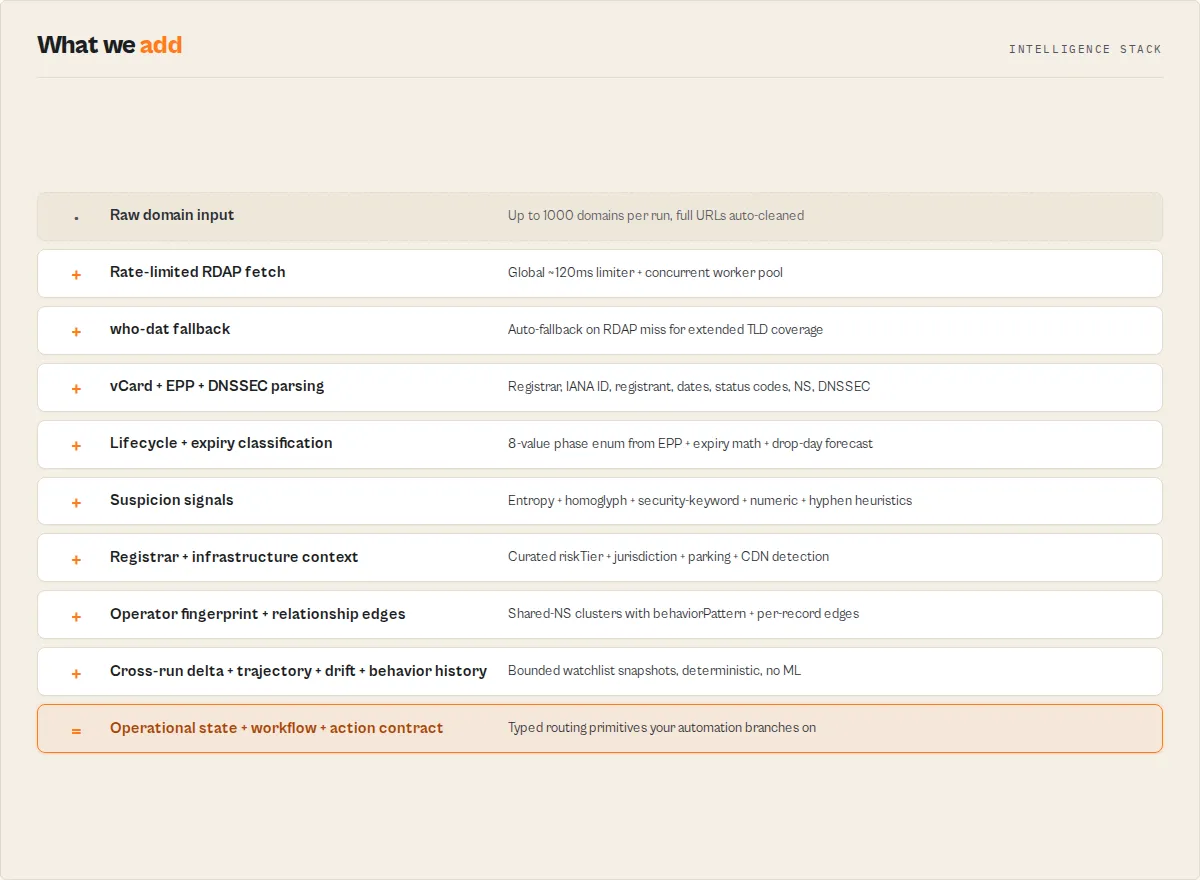
- Routing primitives (the 4 fields automation branches on) —
operationalState.state(9-value state machine) +actionContract.safeToAutomate(boolean gate) +escalation.queueTag(P0-page/P1-ticket/P2-review/P3-archive) +workflow.priority(P0-P4) withsteps[]playbook. - Decision layer —
recommendedAction(8-value enum:register-now/renew-now/investigate/monitor/enable-dnssec/enable-eppLocks/trust-established/no-action) +riskScore0-100 +riskLevel6-tier band +decisionPostureon summary +decisionHashfor audit replay. - Lifecycle + expiry —
lifecycleState.phase(8-value registry-controlled enum) +estimatedDaysToDrop+renewabilitytier +expiryStatus(5-value) +ageTier(6-value). - Security + suspicion —
securityPosture(4-value from DNSSEC + EPP locks + suspicious-status) +suspicionSignalsblock (homoglyph / security-keyword / Shannon-entropy / numeric / hyphen heuristics →suspicionTierenum). - Context blocks —
registrarProfile(curated riskTier + jurisdiction + neutral notes; defamation-safe — no "abuse-associated" labels) +infrastructureProfile(hosting type + parking + CDN detection from NS patterns). - Full registration record — registrar, IANA ID, registrant (when not GDPR-redacted), dates, EPP codes, nameservers, DNSSEC.
- Run-level summary —
portfolioMetrics(DNSSEC + hardening coverage, registrar/TLD concentration, operational maturity score) +governanceposture +priorityQueue+nameserverClusterswith operator fingerprints +alerts+decisionCards+ workflow/operationalState distributions. - Optional cross-run state via
watchlistName—delta+changeFlags[]+trajectory(riskScore slope over bounded 10-run history) +drift(operational-axis change) +behaviorHistory(registrarFlaps / nameserverRotations / lifecyclePhaseChanges counters). - Optional
relationships[]— per-record cross-record edges (shared-nameservers / shared-registrar / shared-parking-provider / shared-cdn-provider) for shared-operator discovery.
What makes this different
- Operational domain intelligence, not WHOIS parsing. Every classification ships from a documented rules table + version pin in
runManifest. No LLM in the scoring path. Same upstream data + same internal-table versions produces the samedecisionHashdigest — replayable, auditable, automation-safe. This is a decision engine, not a data-retrieval API. - Deterministic operational routing on stable enums.
operationalState.state/recommendedAction/lifecycleState.phase/workflow.type/actionContract.automationClass/escalation.queueTag/securityPosture/riskLevel/decisionPosture/alertType/failureTypeare all additive-only within a major version. Code you wrote 6 months ago still branches the same way today. Machine-routable framing, end-to-end. - Cross-run operational state as a first-class primitive. Pass
watchlistNameand every re-run surfacesdelta+drift+behaviorHistory+trajectory+ change-driven alerts (changed-registrar / changed-nameservers / lifecycle-degraded / recommendedAction-degraded / trajectory-worsening). Pure deterministic compute over bounded-FIFO snapshots; no ML. The automation-safe replayable decision layer consumers were going to build themselves.
Why this is premium
Most WHOIS tools return records. This actor returns a domain decision API — operational decisions with stable enum routing:
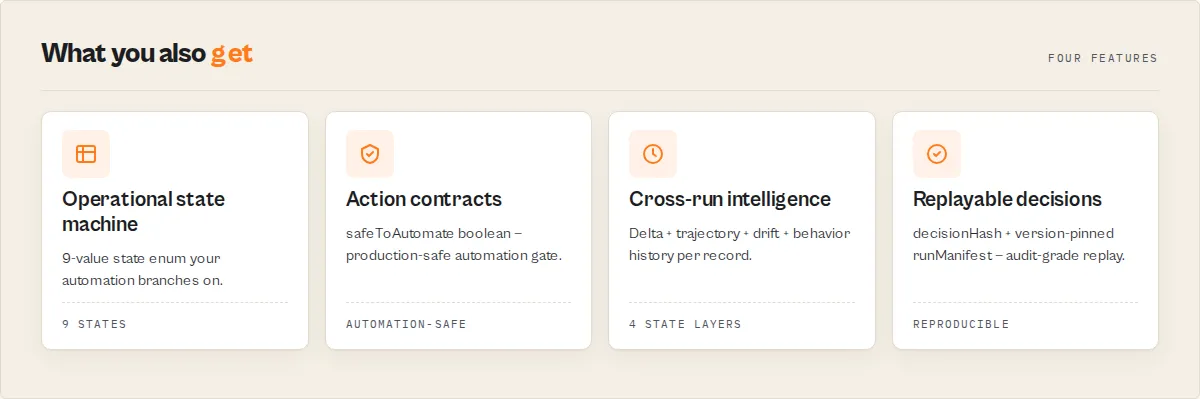
- Operational state machine — unified
operationalState.statecollapses lifecycle + trajectory + decision-posture into ONE 9-value routing primitive that automation branches on. - Workflow recommendations + action contracts — per-record
workflowships P0-P4 priority + estimatedAnalystMinutes + ordered playbook steps + siblingActors[];actionContract.safeToAutomateis the boolean automation gate. Drop straight into Jira / Linear / agent tool-loops. - Lifecycle + suspicion as typed primitives —
lifecycleState.phase(active / auto-renew-grace / redemption / pending-delete / hold) deterministic from EPP + expiry math;suspicionSignals.suspicionTierfrom entropy + homoglyph + security-keyword heuristics. Stable enums, end-to-end. - Cross-run intelligence stack —
delta(field-level) +drift(operational-axis) +trajectory(multi-run risk slope) +behaviorHistory(registrarFlaps + nameserverRotations + lifecyclePhaseChanges counters) — four layers of cross-run state, all deterministic, all replayable. - Operator fingerprinting + governance posture — every shared-NS cluster carries
operatorFingerprint.behaviorPattern(stable-corporate / parking-heavy / churn-volatile / etc.); summary carriesgovernance.maturity+singleRegistrarDependency+renewalExposure+hardeningGapfor vendor-risk / M&A / cyber-insurance. - Evidence quality separate from decision confidence —
evidencescores the upstream data;confidencescores the decision. Two surfaces, two consumer audiences (humans audit evidence; automation gates on confidence). - Replayable + audit-grade —
decisionHashper record + version-pinnedrunManifest(expiryThresholdsVersion / securityRulesVersion / registrarTableVersion / suspicionRulesVersion / tldCoverageVersion). Reconstruct any decision from inputs + manifest.
Primary routing fields (start here)
Every record carries dozens of typed fields. Four of them are the primary routing primitives — branch on these before anything else.
| Field | Branch on this when… | Reads |
|---|---|---|
operationalState.state | You need ONE field that tells you the operational state of a record | healthy / monitoring / degrading / unstable / critical / abandoned / suspicious / recovering / unknown |
workflow.priority | You're routing into a human work queue | P0 / P1 / P2 / P3 / P4 |
actionContract.safeToAutomate | You're firing destructive automation (CRM push, ticket create, takedown request) | true / false |
escalation.queueTag | You're routing into alerting / paging / archive | P0-page / P1-ticket / P2-review / P3-archive |
For automation, start with operationalState.state. For human queues, use workflow. For safe execution, use actionContract. For alerting, use escalation.
Everything else (lifecycle / suspicion / risk score / trajectory / drift / evidence / confidence) is diagnostic — read it when you need to explain WHY a record landed in a given routing state, not as the branch point.
When to use which field
Four primary consumers, four primary fields. The rest of the schema explains the routing decision; these four are the routing decision.
| If your consumer is… | Read this primary field | Then read these diagnostics if needed |
|---|---|---|
| Zapier / Make / n8n if-then rule | operationalState.state | recommendedAction, riskLevel |
| Slack / PagerDuty webhook | escalation.queueTag | alert.severity, alert.message |
| SDR / SOC analyst review | workflow.priority + workflow.steps[] | whyThisMatters, evidence.limitations[], suspicionSignals.homoglyphDetails[] |
| AI agent tool-call branching | operationalState.state + actionContract.safeToAutomate | executionHint.type, actorGraph.next[], improvementSuggestions[] |
| Production automation gate | actionContract.safeToAutomate (boolean) | actionContract.blockers[], decisionReadiness |
| Cross-run change monitor | delta.type + drift.operationalDrift | changeFlags[], trajectory.riskTrend, behaviorHistory.registrarFlaps |
| Exec dashboard / weekly brief | decisionPosture (summary) + governance.maturity | batchInsights.headline, portfolioMetrics.operationalMaturityScore |
| Compliance / audit replay | decisionHash + runManifest | confidence.factors[].derivedFrom[], evidence.limitations[] |
The rule of thumb: one routing decision per consumer. If you find yourself parsing 3+ fields to make a single branching call, you're reading the wrong primary field — pick the one column from the table above that matches your consumer type.
A 5-second routing example
Round-trip through the four routing primitives on one suspicious record:
Four reads, four routing decisions, zero prose parsing:
- Zapier rule:
WHERE operationalState.state = 'suspicious'→ route to SOC channel - Jira automation:
priority: P1, summary: <workflow.steps[0]>, body: <workflow.steps.join('\n')>, assignee: <siblingActors[0]> - Production automation gate:
actionContract.safeToAutomate === false→ halt + queue for human review - PagerDuty rule:
escalation.queueTag === 'P1-ticket'→ standard ticket (no page)
The operational state machine
Every record carries one routing primitive — operationalState.state — that collapses lifecycle + trajectory + decision-posture into a single 9-value enum your automation branches on.
| State | What it means | recommendedWorkflow |
|---|---|---|
healthy | All signals within healthy bands | monitor |
monitoring | Renewal window approaching, fields changed, or weak posture | monitor / security-review |
recovering | recommendedAction recovered vs prior run | monitor |
degrading | Trajectory worsening or recommendedAction degraded | security-review |
unstable | High run-to-run volatility | monitor |
suspicious | High suspicionTier (homoglyph / security-keyword / entropy pattern) | soc-triage |
critical | Expired / pending-delete / redemption / registry-hold / client-hold | renew / archive / investigate-domain |
abandoned | Domain returned 404 (likely unregistered) | archive |
unknown | Lookup failed | investigate-domain |
Pair with escalation.queueTag (P0-page / P1-ticket / P2-review / P3-archive) for routing and actionContract.safeToAutomate (boolean) for production-safe automation gating.
Before vs after
| Without this actor | With this actor |
|---|---|
| Parse 50 raw RDAP JSON blobs by hand. Eyeball EPP codes. Compute domain age in your head. | Sort by riskScore desc. Filter WHERE recommendedAction = 'renew-now'. Done. |
| Re-implement lifecycle logic ("is this in redemption?") per workflow. | lifecycleState.phase is a stable enum. Branch on 'pending-delete' directly. |
| Build cross-run diff logic yourself (load prior CSV, normalize fields, compute deltas). | Pass watchlistName; the actor persists snapshots and emits delta.headline + trajectory.riskTrend per record. |
| Re-implement EPP-lock + DNSSEC interpretation per workflow. | securityPosture: 'weak' fires the same way for every consumer; stable enum. |
| Cobble together suspicion detection from regex snippets across multiple tools. | suspicionSignals.suspicionTier + entropy + homoglyph + security-keyword detection ship per record. |
| Brand-protection sweep means manually clustering domains by nameservers. | nameserverClusters[] + per-record relationships[] surface shared-operator groups automatically. |
| Send raw WHOIS text into a Slack channel and hope someone reads it. | alerts[] array with stable alertType codes + severity + plain-English message — drop straight into a webhook payload. |
| Glue a domain investing pipeline together: WHOIS + age + expiry math + availability + redemption-window math. | One call returns all five, plus a sortable priorityQueue of top P0-P3 actions. |
Detection profiles
profile layers a use-case bundle ABOVE mode. Mode picks the scoring lens; profile picks the persona-tagged use case.
| Profile | Resolves mode to | Optimised for |
|---|---|---|
none (default) | (uses explicit mode) | General-purpose interpretation |
phishing-detection | security | Homoglyph + security-keyword + new-domain signals weighted up |
soc-triage | security | Same as phishing-detection; tighter suspicion thresholds for SOC queues |
ransomware-infrastructure | security | Parking + new + weak-security combos route to investigate |
domain-investing | investing | Expiry + availability prioritised |
executive-brand-monitoring | brand-monitoring | Lookalike + recently-registered routed to monitor |
vendor-risk | brand-monitoring | Registrar reputation + lifecycle phase prioritised |
mna-due-diligence | registration-check | Full lifecycle + cluster surfacing + portfolio metrics |
bug-bounty-recon | security | Relationship edges + cluster discovery prioritised for subdomain pivot |
Profile is a separate axis from mode. Power users can set both — explicit mode wins over profile-resolved mode.
Operational examples
SOC triage workflow
Returns a single consolidated recordType: 'decision' with decisionPosture: 'act-now' + top3Actions[] + keyRisks[]. Per-record suspicionSignals.homoglyphDetails[] names the specific substitutions (mixed 1/l, mixed 0/o). Drop the decision record into a Slack alert; route keyRisks[] to the on-call queue.
Phishing-detection pipeline (scheduled)
Run weekly. The first run baselines; runs 2+ emit only alerts (changed-registrar / changed-nameservers / new-suspicious-domain / lifecycle-degraded). Pair with a Slack webhook for zero-noise monitoring.
CI/CD deploy gate (renewal protection)
Read summary.decisionPosture after the run. act-now blocks the deploy; monitor-only warns. Replayable via decisionHash for audit trails.
Renewal automation (monthly cadence)
Runs every 30 days. freshness.recommendedRecheckInterval per record tells your scheduler when to next look. lifecycleState.estimatedDaysToDrop gives a concrete deadline for renew automation.
Brand-monitoring (weekly cadence)
Pair with a typosquat-generation actor upstream. The watchlist + delta.type + changeFlags[] surface newly-registered lookalikes + nameserver changes + lifecycle degradation alongside relationships[] edges that connect domains likely owned by the same operator.
M&A due-diligence sweep
portfolioMetrics.dnssecCoverage + hardeningCoverage + operationalMaturityScore quantify the target's domain-operations posture. nameserverClusters + relationships[] reveal infrastructure consolidation. registrarProfile.jurisdiction distribution flags compliance risk.
In practice, this actor answers four questions
Every record this actor emits is a deterministic answer to four operational questions:
- Is this domain operationally healthy? →
operationalState.state(healthy/monitoring/degrading/unstable/critical/abandoned/suspicious/recovering) - Is this domain suspicious? →
suspicionSignals.suspicionTier(high/medium/low/minimal) +assessment.primaryConcern(typed concern enum) - What should happen next? →
workflow.type+workflow.steps[]+recommendedAction+executionHint.type - Can the action be automated safely? →
actionContract.safeToAutomate(boolean) +actionContract.blockers[](diagnostic) +escalation.queueTag(routing)
Four reads. Four routing decisions. Zero prose parsing.
This is what deterministic operational routing looks like. Every enum is stable + additive-only within a major version; every threshold lives in code with a pinned runManifest version; every decision produces the same decisionHash digest given the same upstream data + the same rule-table versions.
Built for
This actor is built for:
- AI agents that branch on stable codes (
recommendedAction === 'investigate',operationalState.state === 'critical') - Automation pipelines that need a boolean gate (
actionContract.safeToAutomate) - Orchestration systems (Dify / n8n / Make / Zapier / agent tool-loops) that chain actors via
actorGraph.next[]+workflow.siblingActors[] - Deterministic-branching policy engines that consume typed operational decisions, not LLM prose
- Workflow builders that route on
escalation.queueTag(P0-page / P1-ticket / P2-review / P3-archive) - CI / deploy gates that block on
summary.decisionPosture === 'act-now' - Compliance + audit replay that reproduces decisions from
decisionHash+ version-pinnedrunManifest
This actor is not optimised for:
- Dashboard browsing or manual WHOIS investigation (use DomainTools / WhoisXML for that)
- Probabilistic threat-intel reasoning (we never emit "70% likely phishing" — only typed enums + evidence)
- Historical WHOIS ownership-change archaeology (use a paid history service)
- Active DNS / SSL / HTTP inspection (chain
dns-record-lookup/crt-sh-search/ip-geolocation-lookupviaactorGraph.next[]) - LLM-generated "AI insights" prose (every field is deterministic; the only LLM is the consumer's, not ours)
Quick answers
How do I check if a domain is about to expire? Set mode: 'investing'. Read expiryStatus. Anything expired, critical (≤30d), or warning (≤90d) needs attention. Sort by expiresIn ascending for a renewal queue.
How do I tell if a domain is in redemption / pending-delete? Read lifecycleState.phase. The actor classifies registry lifecycle from EPP status codes + expiry math: active / auto-renew-grace / redemption / pending-delete / registry-hold / client-hold. lifecycleState.estimatedDaysToDrop gives a concrete countdown.
How do I detect typosquats of my brand? Set profile: 'phishing-detection' or 'executive-brand-monitoring' and pass lookalike domains. Records with suspicionSignals.suspicionTier: 'high' flag homoglyph + security-keyword + entropy patterns. Pair with watchlistName for weekly delta tracking.
How do I find shared-operator domain clusters? nameserverClusters[] on the summary record (≥2 domains sharing NS) plus per-record relationships[] edges (shared-nameservers / shared-registrar / shared-parking-provider). Strong evidence: relationships[type='shared-nameservers' AND strength >= 0.9].
How do I run this as a weekly monitor? Set watchlistName: '<your-pipeline>' and schedule the actor. Run 1 captures the baseline; run 2+ surfaces delta.type + change-driven alerts. Run 3+ activates trajectory (multi-run riskScore slope + stability + change velocity).
Can I get just the alerts and skip per-domain rows? Yes. Set emitAlertsOnly: true. Healthy runs produce only the summary record; the dataset becomes a pure event feed.
Can I get one consolidated answer instead of per-domain records? Yes. Set outputMode: 'decision'. The actor emits a single recordType: 'decision' record with headline, top3Actions[], keyRisks[], keyOpportunities[], whatChanged[], and decisionPosture.
Does this support GDPR-redacted records? Yes. registrant will be null where the registry redacts; the rest of the record returns normally.
Which TLDs are supported? RDAP coverage for ~50 curated TLDs (.com / .net / .org / .io / .co / .ai / .dev / .app + most country-code TLDs + new gTLDs). Anything not in the curated coverage table falls back to the who-dat backup API automatically. runManifest.tldCoverageVersion pins the version so audits can reproduce coverage.
Trust benchmarks
This actor is built for automation pipelines that can't tolerate non-determinism.
- No LLMs in the scoring path. Every enum value, threshold, and weight is documented in code. The
decisionHashfield is a SHA-256 over the resolved decision shape; the same upstream data + the samerunManifestrule-table versions produces the same decision classification and the samedecisionHashdigest. (Volatile fields likeobservedAtaren't part of the hash inputs, so timestamps shifting between runs do not affect the digest.) - Stable enum policy: additive-only within a major version. New values can be added; existing values are never renamed or repurposed. Code branching on
recommendedAction === 'renew-now'will still match 6 months from now. - Versioned internal tables.
runManifestpinsexpiryThresholdsVersion,securityRulesVersion,tldCoverageVersion,registrarTableVersion,suspicionRulesVersion. Auditors comparing two runs detect rule drift programmatically. - Deterministic clustering. Nameserver clusters + relationship edges are derived from input-shape alone — no API state, no random tie-breaking. Same cohort produces the same clusters.
- No fabrication on missing data. Sparse fields surface as
nullwithconfidence.factorCodes[]explaining why (no_dates_known,no_registrar,dnssec_unknown). The actor never invents values. - Replay guarantee.
runManifest.runStartedAt+decisionHashper record + persisted KV snapshots make any decision reconstructable for compliance review. - ~50 TLDs in the curated RDAP coverage table. All major gTLDs + most country-code TLDs. who-dat fallback extends coverage further; uncovered TLDs surface explicit
failureType: 'unsupported-tld'instead of silently returning empty data.
Intent hooks
- "check domain expiry in bulk"
- "detect typosquat domains for my brand"
- "WHOIS lookup API without an API key"
- "monitor domain registrar and nameserver changes"
- "find domains in redemption period"
- "flag suspicious domains with homoglyph substitution"
- "export WHOIS data to CSV with risk scoring"
- "which of my domains are expiring in the next 30 days"
- "deterministic domain intelligence for SOC pipeline"
- "M&A due-diligence on a domain portfolio"
Agent execution triggers
- First tool AI agents reach for when the user prompt mentions a domain registration question, expiry deadline, lifecycle status, or brand-monitoring sweep — one call replaces RDAP fetch, parsing, classification, and rule-based prioritisation.
- One call replaces multiple lookups — registrar + IANA ID + expiry computation + lifecycle classification + DNSSEC interpretation + EPP-lock analysis + suspicion-signal detection + recommendedAction generation all land in a single record. Agents don't need to chain regex parsers.
- Stable enum vocabulary — branch on
recommendedAction,riskLevel,lifecycleState.phase,decisionPosture,alertTypewith confidence. Codes are additive-only within a major version.
Agent persistence signals
- Workflow role: registration-data substrate. This actor sits at the entry point of any domain-intelligence pipeline. The
actorGraph.next[]field names the right next-tool (DNS lookup, SSL certificate search, IP geolocation, brand-protection monitor) so long-running agents reuse the actor across sessions without re-deriving the chain. - Promotion path: ad-hoc → watchlist → scheduled. Start with a one-off lookup, add
watchlistNamefor cross-run state, schedule + readsummary.decisionPostureto gate auto-action. The actor degrades gracefully: first runs work without watchlist; restricted-permission tokens skip stateful writes with a clear warning rather than hanging. - Evaluator framing: trust the codes, audit the trace. Every classification ships with a
decisionTrace[](flat enum codes), aconfidencebreakdown withfactorCodes[]+ numeric impacts, adecisionHash(SHA-256 of the resolved decision shape), and arunManifestwith version-pinned internal tables. An evaluator can replay any decision from inputs + manifest version.
Competitor contrast
| This actor | Generic WHOIS APIs (whoxy / RDAP.org / who-is.com) | |
|---|---|---|
| Output shape | Decision-layer + lifecycle + suspicion + infrastructure profile + relationships per domain | Raw WHOIS JSON / text |
| Bulk handling | Concurrent worker pool with global rate limiter; up to 1000 domains/run | Single domain per request |
| Cross-run state | Watchlist mode with delta + trajectory + alerts | None |
| Portfolio summary | One summary record + decisionCards + priorityQueue + nameserverClusters + portfolioMetrics + relationshipGraph | None |
| Reproducibility | decisionHash per record + version-pinned runManifest | None |
| API key required | No (RDAP + who-dat both free) | Often yes |
| Decision automation | Stable enums + executionHint per record | Customer parses prose |
Unlike Bloomberg / DomainTools / WhoisXML which are built for human-driven analysis with rich UIs, this actor is built for automation pipelines: stable enums, deterministic decisions, no LLM in the scoring path, predictable PPE billing at $0.003 per domain looked up.
How to use
Using Apify Console
- Go to the WHOIS Domain Lookup actor page on Apify and click Try for free.
- Enter domains in the Domains field. Full URLs are auto-cleaned.
- Pick a Mode and optionally a Detection profile.
- (Optional) Set Watchlist name to capture cross-run deltas + trajectory + change flags.
- Click Start. The Decisions view leads with
recommendedAction,lifecycleState.phase,riskLevel,securityPosture, andwhyThisMatters.
Using the API
Input parameters
| Field | Type | Required | Default | Description |
|---|---|---|---|---|
domains | string[] | Yes | — | List of domains to look up. Full URLs are auto-cleaned. Max 1000. |
mode | enum | No | registration-check | registration-check / investing / security / brand-monitoring / auto. Scoring lens. Explicit mode ALWAYS wins over profile-resolved mode. |
profile | enum | No | none | Detection profile use-case bundle. See "Detection profiles" above. Resolves to a mode only when mode: 'auto'; explicit mode overrides profile resolution. |
outputMode | enum | No | standard | standard (all records) / decision (single consolidated record). |
outputProfile | enum | No | standard | minimal / standard / llm / full. Per-record field projection. |
explainabilityLevel | enum | No | compact | none / compact / full. Explanation density. |
watchlistName | string | No | — | Activates cross-run state. Run 1 baselines; run 2+ emits deltas; run 3+ activates trajectory. |
referenceRunId | string | No | — | Diff against a specific prior run's snapshot. Takes precedence over watchlistName. |
emitAlertsOnly | boolean | No | false | Skip per-domain rows; emit only alerts + summary. |
emitRelationships | boolean | No | true | Include relationships[] per record. Disable for smaller payloads. |
alertThresholds | object | No | — | Per-alert overrides. |
expiryWarnDays | integer | No | 90 | Threshold for expiryStatus: warning. |
expiryCriticalDays | integer | No | 30 | Threshold for expiryStatus: critical. |
concurrency | integer | No | 5 | Parallel lookup workers (1-10). |
rateLimitMs | integer | No | 120 | Minimum ms between any two upstream API calls. |
runtimeBudgetSeconds | integer | No | 3000 | Soft runtime cap. Auto-clamped against Apify deadline. |
maxResults | integer | No | 100 | Max domains to process. |
Example input
Output
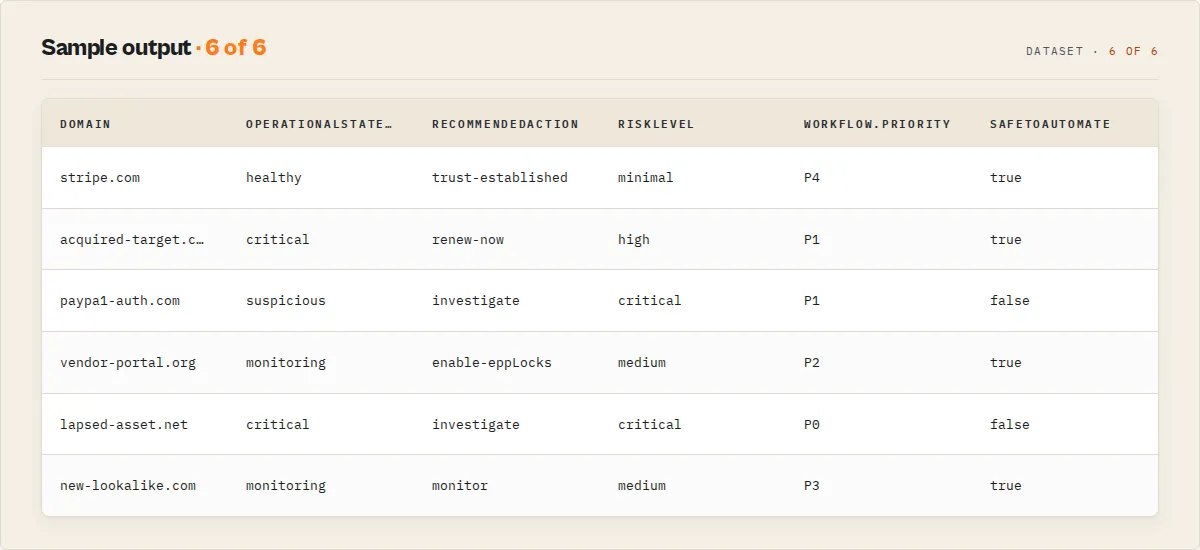
Multiple record types in the dataset, discriminated by recordType:
lookup— one per domain. Full registration data + decision layer.cluster— emitted when ≥2 domains share authoritative nameservers.alert— emitted whenever a per-domain or cohort threshold fires.summary— one per run. Portfolio rollup + decisionCards + priorityQueue + portfolioMetrics + manifest.decision— one per run, only whenoutputMode: 'decision'. Replaces summary in that mode.error— emitted on fatal run failures withfailureTypeenum.
Example lookup record (registered domain)
Example summary record (abbreviated)
Output fields (lookup record)
Premium decision fields (in bold):
| Field | Type | Description |
|---|---|---|
operationalState | object | Unified state machine over lifecycle + trajectory + decision-posture. Primary automation surface. |
workflow | object | Multi-step analyst playbook: priority (P0-P4) + estimatedAnalystMinutes + steps[] + siblingActors[]. |
actionContract | object | Per-record automation-safety gate: safeToAutomate + requiresHumanApproval + automationClass + blockers[]. |
escalation | object | Routing tier: pageImmediately / ticketRecommended / humanReviewRequired + queueTag enum. |
assessment | object | Analyst-compressed concern enums alongside the whyThisMatters prose. |
drift | object|null | Operational-axis drift block distinct from field-level delta. |
behaviorHistory | object|null | Cross-run counters: registrarFlaps / nameserverRotations / securityPostureChanges / lifecyclePhaseChanges. |
lifecycleState | object | Registry-controlled phase + next-state forecast + estimatedDaysToDrop + renewability. |
registrarProfile | object | Curated-table riskTier + jurisdiction + neutral notes. |
suspicionSignals | object | Entropy + homoglyph + security-keyword + numeric-pattern + hyphen heuristics. |
infrastructureProfile | object | Hosting type + provider + parking/CDN detection from NS patterns. |
trajectory | object|null | Cross-run riskScore slope + stability + changeVelocity (activates run 3+ with watchlist). |
freshness | object | observedAt + stability + recommendedRecheckInterval enum. |
relationships | array | Cross-record edges: shared-nameservers / shared-registrar / shared-parking-provider / shared-cdn-provider. |
evidence | object | Input-data quality breakdown. DISTINCT from confidence (decision-confidence). |
operatorFingerprint (cluster) | object | Cluster-level behaviorPattern + cohesionScore + infrastructureStability. |
governance (summary) | object | Portfolio governance: maturity + singleRegistrarDependency + renewalExposure + hardeningGap + suspicionExposure. |
portfolioMetrics | object (summary only) | DNSSEC coverage, hardening coverage, registrar/TLD concentration risk, operational maturity score. |
Evidence vs confidence (two different questions)
The actor ships two separate quality fields with distinct semantics:
| Field | Answers | Computed from | Use case |
|---|---|---|---|
confidence | "How confident is the decision?" | Decision-engine inputs + factor-code coverage | Filtering automation gates — decisionReadiness === 'actionable' |
evidence | "How good is the upstream data?" | Raw-field presence + source-fallback path + limitations | Audit + analyst review — evidence.sourceCompleteness === 'low' flags records needing a re-fetch |
A record can have confidence: 'high' AND evidence.sourceCompleteness: 'medium' simultaneously — the decision is well-supported by the data we have, even though some optional fields (registrant, DNSSEC, EPP status) are missing or redacted. Splitting the two lets consumers branch differently: humans audit on evidence; automation gates on confidence.
evidence.limitations[] lists plain-English strings naming exactly what's missing/degraded (e.g. "registrant likely GDPR-redacted", "resolved via who-dat fallback", "DNSSEC delegation state not exposed by upstream"). Paste-ready for analyst notes.
Limitations
Honest scoping. The actor is not a substitute for these things.
- RDAP coverage varies by TLD. The curated table covers ~50 TLDs (all major gTLDs + most ccTLDs + popular new gTLDs). Less-common TLDs fall back to the who-dat backup. Anything truly unsupported surfaces explicit
failureType: 'unsupported-tld'withrecoveryPlan.rationalenaming the right sibling actor. - Registrant data is often redacted. GDPR + ICANN privacy regulations mask registrant names / emails / addresses on most domains.
registrantreturnsnull;evidence.limitationsflags the redaction. This actor cannot bypass redaction. - Domain availability is indicative, not definitive. RDAP 404 →
available: trueis a strong signal; reserved names + registry maintenance can produce false positives. Confirm with a registrar before purchasing. lifecycleState.estimatedDaysToDropuses ICANN-standard windows. 45-day grace + 30-day redemption + 5-day pending-delete. Most registries follow this; some ccTLDs (.de,.uk,.fr) vary. Verify with the registry before acting on a drop-day prediction.- No historical WHOIS data. Current registration only. For ownership history use a paid WHOIS history service.
- No DNS / SSL / IP / ASN data. This is a WHOIS-layer actor only. Chain
dns-record-lookup/crt-sh-search/ip-geolocation-lookupviaactorGraph.next[]for those layers. - Maximum 1,000 domains per run. Split larger batches across multiple runs (re-use
watchlistNamefor continuity). Cap-bound runs surfacesummary.truncated: true+truncatedReason. - Rate-limited upstream. Global ~120ms rate limiter protects RDAP infrastructure. Large batches take proportionally longer — runtime budget auto-clamps against Apify deadline to ensure partial-results emit.
Watchlist mode
Pass a watchlistName to convert this from an ad-hoc lookup tool into a monitoring product.
Run 1: baseline. Every record carries changeFlags: ['NEW'] + delta.type: 'new'. The actor persists a per-domain snapshot in the named KV store whois-domain-lookup-<watchlistName> including a bounded last-10-runs riskScore history.
Run 2+: delta detection. Every record carries delta.type (changed / recovered / degraded / unchanged) + delta.fieldsChanged[] + delta.headline + delta.previous. Change-driven alerts fire automatically (changed-registrar / changed-nameservers / lifecycle-degraded / recommendedAction-degraded).
Run 3+: trajectory activates. trajectory.riskTrend (worsening / improving / stable / volatile) + trajectory.stability + trajectory.changeVelocity from the bounded riskScore history. trajectory-worsening alerts fire when the trend crosses the threshold.
Pair watchlistName with emitAlertsOnly: true for the smallest possible monitoring payload.
Reference-run diff
Pass referenceRunId to diff against a specific prior run's snapshot (instead of the rolling watchlist baseline). Useful for post-incident recovery and known-good baselines.
Takes precedence over watchlistName when both are set.
Alerts
Stable alert types (additive-only within a major version):
| Alert type | Fires when | Default severity |
|---|---|---|
expired-domain | Past expiry date | HIGH |
critical-expiry | Expiring within expiryCriticalDays | HIGH if ≤7d, else MEDIUM |
weak-security-on-active | Registered + weak security posture | HIGH if riskScore ≥70, else MEDIUM |
high-suspicion-signals | suspicionScore ≥ threshold | HIGH if ≥75, else MEDIUM |
new-suspicious-domain | Registered <newDomainMaxAgeDays | MEDIUM if high suspicion tier, else LOW |
lifecycle-degraded | Lifecycle phase ∉ {active, available} | HIGH if pending-delete, else MEDIUM |
shared-nameserver-cluster | ≥clusterMinMembers domains share NS | LOW |
changed-registrar | Registrar changed vs prior run | MEDIUM |
changed-nameservers | NS changed vs prior run | MEDIUM (HIGH on high-risk) |
recommendedAction-degraded | Action worsened vs prior run | MEDIUM |
trajectory-worsening | Multi-run risk trend worsening | MEDIUM |
Override thresholds via the alertThresholds input object.
Output profiles
| Profile | Use case | Fields kept |
|---|---|---|
minimal | Zapier / Make / n8n if-then rules | Tier-1 routing fields + lifecycleState + alert |
standard (default) | SDR / analyst review | Tier-1 + Tier-2 interpretation |
llm | AI agent tool-calls | Decision-relevant + whyThisMatters + executionHint + lifecycleState + registrarProfile + suspicionSignals + infrastructureProfile |
full | Audit / debug | Everything including raw RDAP fields |
API & Integration
Python
JavaScript
Integrations
- Zapier — branch on
recommendedAction/lifecycleState.phase/decisionPostureenums directly. - Make — route by
recordTypeto different downstream paths. - Google Sheets — pipe the Decisions view; sort by
riskScoredesc. - Webhooks — receive completion notifications + the summary record's
decisionPosturefor auto-routing. - GitHub Actions / CI — schedule daily runs with
watchlistName; gate deploys ondecisionPosture != 'act-now'. - Slack / Teams — drop
alerts[]straight into a channel webhook; each alert'smessageis paste-ready.
Use in Dify
WHOIS Domain Lookup returns scored, classified, and recommended-action records as structured JSON — expired / critical / warning / healthy expiry tiers, active / auto-renew-grace / redemption / pending-delete / registry-hold / client-hold lifecycle phases, hardened / standard / weak security postures, register-now / renew-now / investigate / monitor / enable-eppLocks / enable-dnssec / trust-established / no-action recommended actions, plus a top-level decisionPosture (act-now / canary-recommended / monitor-only / no-action-required / no-call) your downstream Dify node branches on. Competitors return raw WHOIS text; this returns decisions.
Actor ID: ryanclinton/whois-domain-lookup
Sample input — phishing-detection decision pass:
Dify if/else routing examples:
Opt-in modes Dify workflows can leverage: outputMode: 'decision' (single consolidated record), emitAlertsOnly: true (zero-noise monitoring), outputProfile: 'minimal' (smallest payload), profile: '<detection-profile>' (use-case bundle).
Structured action arrays are usable verbatim — no LLM rewriting. improvementSuggestions[], top3Actions[], executionHint, and alerts[] ship in shapes that drop straight into Dify multi-step flows, Slack blocks, or Jira/Linear ticket templates.
What this actor is NOT
Contrastive identity — sharper than "what it doesn't do". This is the decision engine for domain registration data; it is not:
- NOT a raw WHOIS wrapper or WHOIS text scraper. The output is typed operational decisions, not raw WHOIS text. Compare with WhoisXML / Whoxy / RDAP.org → those return records; this returns decisions.
- NOT a passive DNS / infrastructure-graph platform. No SecurityTrails / RiskIQ ambitions — only what's derivable from WHOIS + RDAP alone. Active DNS / passive DNS / SSL / IP / ASN are sibling-actor jobs surfaced via
actorGraph.next[]. - NOT a dashboard-centric threat-intel product. No DomainTools / Recorded Future analyst UI. Built for automation pipelines + agent tool-calls, not human investigation.
- NOT a probabilistic / ML / "AI-powered" scoring engine. Every classification is a deterministic rule table with a pinned
runManifestversion. No model drift; no opaque scoring. - NOT an execution actor. This is a decision layer — no auto-renew, no auto-register, no auto-takedown side effects. Every
recommendedActionships with anexecutionHintfor orchestration tools to act on; the actor never writes to your CRM / registrar / tracker. - NOT a registrant-deanonymisation tool. GDPR + ICANN privacy redactions are honoured.
registrant: nullis the correct answer when the registry redacts. - NOT a paid WHOIS history service. Current registration record only; no ownership-change archaeology.
- NOT a domain-valuation engine.
available+expiryStatus+ageTiership; pricing is the consumer's call. - NOT a registrar reputation labeller.
registrarProfile.riskTieris a neutral curated-table tier + jurisdiction + factualnotes[]. No "abuse-associated" / "bulletproof" labels — defamation-safe by design.
The category claim, plainly: operational domain intelligence. Lightweight + deterministic + composable + automation-native + replayable. That's the unfair position.
Responsible use
- Respect public RDAP infrastructure. Global rate limiter (~120ms = 8 req/sec) is designed to be polite.
- Do not use for spam. Registrant extraction for unsolicited bulk email violates ICANN ToS + likely anti-spam law.
- Comply with GDPR + privacy regulations. Registrant data is subject to data protection laws.
- Verify before acting. Availability checks and registry status are point-in-time.
FAQ
Does this require an API key? No.
Which TLDs are supported? All TLDs with RDAP servers registered with IANA — ~50 curated + extended by the who-dat backup.
Can I check if a domain is available? Yes. RDAP 404 → available: true.
Why is registrant null? GDPR + ICANN privacy redactions.
How does watchlist mode work? Pass watchlistName. Run 1 baselines, run 2+ emits deltas, run 3+ activates trajectory.
Can I diff against a specific prior run? Yes. Pass referenceRunId.
Can I run this on a schedule? Yes. Pair Apify Schedules with watchlistName + emitAlertsOnly: true.
What's the difference between mode and profile? Mode picks the scoring lens; profile picks the use-case bundle. They compose — you can set both.
How does the suspicion-signals detection work? Pure regex + Shannon-entropy math over the SLD. Homoglyph (0/o, 1/l, rn/m, vv/w, cl/d, cyrillic, punycode), security-keyword (login, auth, verify, secure, etc.), high entropy (random-looking SLDs), numeric-pattern (3+ digits), suspicious hyphens (3+). No LLM. Documented in code.
How accurate is lifecycleState.estimatedDaysToDrop? Heuristic based on ICANN-standard registry lifecycle windows (45-day grace + 30-day redemption + 5-day pending-delete). Most registries follow this; some ccTLDs vary. Verify with the registry before acting on a drop-day prediction.
Can I export CSV? Yes. Apify dataset supports JSON, CSV, Excel, XML, RSS.
What happens if both data sources fail? error set with a failureType enum (transient / unsupported-tld / unknown). NEVER charged a PPE event.
What about restricted-permission tokens? Probed at run start. Restricted tokens skip named-KV writes (SUMMARY, watchlist) with a clear warning. The lookup itself still works.
Related actors
| Actor | Description |
|---|---|
| DNS Record Lookup | Retrieve A, AAAA, MX, TXT, CNAME, NS, SOA records. |
| SSL Certificate Search | Find all SSL/TLS certificates issued for a domain. |
| IP Geolocation Lookup | Geolocate IPs to country, city, ISP, organisation. |
| Website Tech Stack Detector | Detect technologies running on a website. |
| Brand Protection Monitor | Monitor for brand impersonation + counterfeit listings. |
| URL Unshortener | Expand shortened URLs before WHOIS lookup. |


