

Google Trends Scraper: Bulk Compare 100+ Keywords
Pricing
from $1.50 / 1,000 keyword compareds
Google Trends Scraper: Bulk Compare 100+ Keywords
Compare up to 500 keywords on one Google Trends scale, beyond Google's 5-keyword limit. Web, YouTube, News, Images and Shopping, any country, with trend, change, seasonality and breakout insights per keyword.
Pricing
from $1.50 / 1,000 keyword compareds
Rating
0.0
(0)
Developer

mohamed senator
Maintained by CommunityActor stats
0
Bookmarked
2
Total users
1
Monthly active users
10 hours ago
Last modified
Share
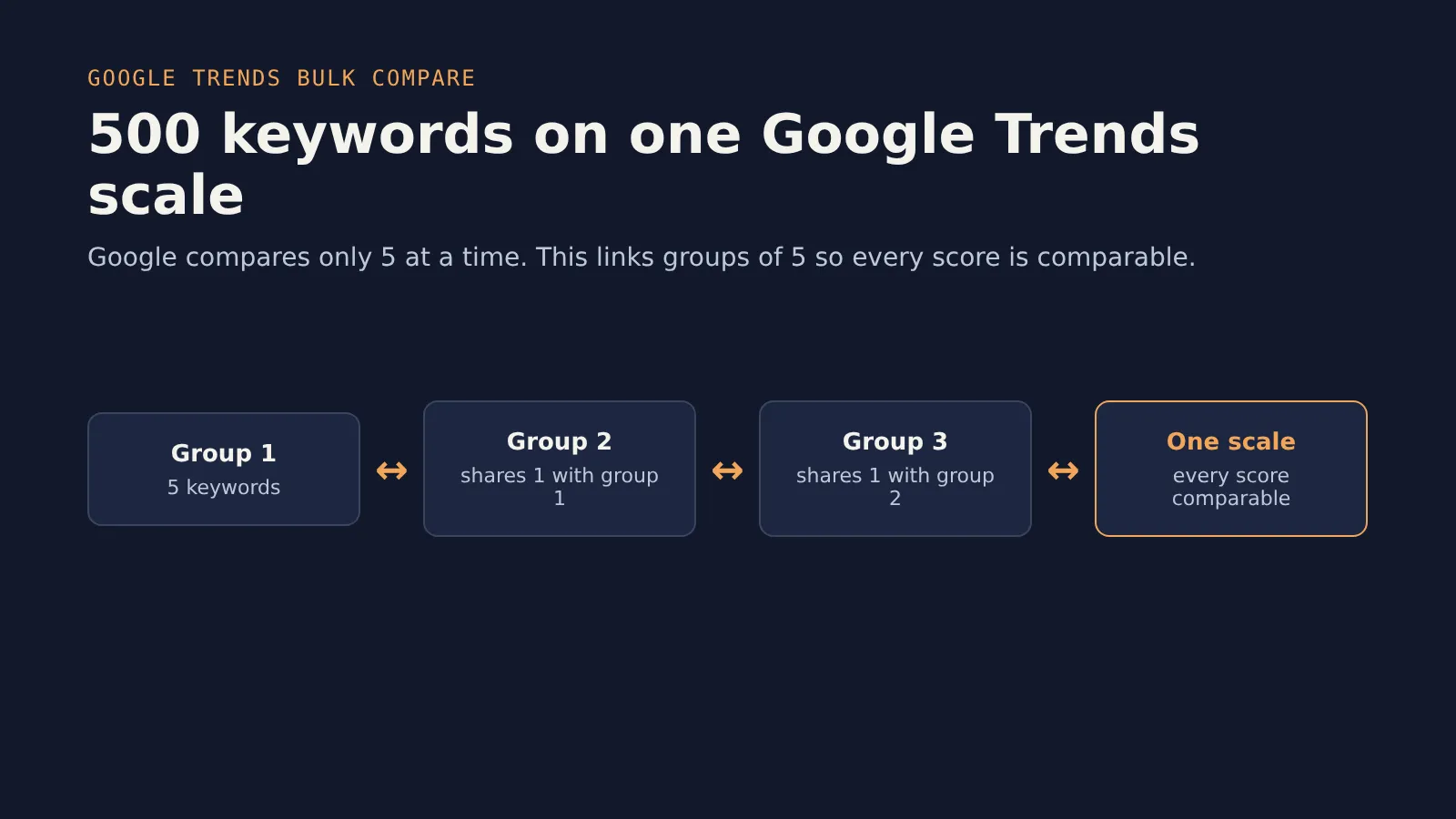
Compare up to 500 keywords on one Google Trends scale in a single run. Google Trends only compares 5 terms at a time, and its 0–100 numbers change with whatever else is in the comparison. This Actor links batches of 5 together, so every keyword's score can be compared with every other keyword's.
For each keyword you get its score on the shared scale, its full timeline, its 3-month and 12-month change, its trend, its peak season and a breakout flag. Optionally you also get related searches and interest by region. It covers web, YouTube, News, Images and Google Shopping searches in any country, Arabic included.
Use cases
- SEO and content planning: rank 50–500 keyword ideas by real search interest before you write a single page.
- Product research and e-commerce: see which product names, flavours or features are growing, with Google Shopping or YouTube search.
- Market entry: compare the same list across countries (for example Saudi Arabia vs the UAE) and spot regional demand.
- Brand tracking: use an anchor keyword (your brand) to measure every competitor against it, and schedule the run weekly.
- AI agents and dashboards: the SUMMARY record and ranked rows drop straight into an LLM prompt, Google Sheets or a BI tool.
How to compare more than 5 keywords on Google Trends
- Paste your keywords (one per line, up to 500) into Keywords.
- Pick a Country, Time range and Search type, or keep the defaults.
- Click Start. A 100-keyword run usually takes 1 to 3 minutes.
- Download the ranked table as JSON, CSV or Excel, or read it through the API.
Why the 5-keyword limit matters
Say you want to know which of 20 coffee drinks people search for most. On the Google Trends website you would run 4 separate comparisons. In each one, the biggest term is scaled to 100, so a "60" in one chart means nothing next to a "60" in another.
This Actor does the linking for you:
- A quick first pass sorts your keywords by size.
- Keywords are compared in groups of 5. Each group shares one keyword with the next group, so neighbours are always of similar size and small keywords keep their precision.
- Every group is rescaled through its shared keyword, and the single biggest value across all keywords becomes 100.
Result: one ranked table where 41.7 always means the same thing.
| Rank | Keyword | Score | Trend | 3-month change |
|---|---|---|---|---|
| 1 | coffee | 78.4 | flat | +2% |
| 2 | tea | 31.0 | flat | −1% |
| 3 | matcha | 9.6 | rising | +18% |
| … | … | … | … | … |
| 20 | yerba mate | 0.4 | flat | 0% |
(Example layout. Your numbers come from Google at run time.)
Input
| Field | Default | What it does |
|---|---|---|
| Keywords | required | 1 to 500 keywords. Duplicates and blank lines are removed. |
| Country | Worldwide | Any Google Trends country, for example Saudi Arabia, the UAE or the US. |
| Time range | Past 12 months | Past hour up to "since 2004", or a custom date range. |
| Search type | Web search | Web, YouTube, News, Images or Google Shopping. |
| Category | All categories | Limit to one Google category, such as Shopping or Health. |
| Anchor keyword | none | Optional. Put one keyword, such as your brand, in every comparison. |
| Include related searches | off | Top and rising related searches for each keyword. |
| Include interest by region | off | Interest by country, or by region inside the chosen country. |
| Language | en | Language for related searches and place names, for example ar. |
Output
One dataset row per keyword:
- trend can be
rising,falling,flatorseasonal. peakMonth is filled for ranges of 2 years or more. - breakout is true when the last few points are more than double the keyword's average.
- lowVolume is true when a keyword is so small that Google rounds it to 0 or 1. Compare it in a smaller list for more detail.
- Keywords Google has no data for come back with
noData: trueand are not charged. - Rows come in rank order. If related searches or regions could not be fetched for a keyword, its row still has the score and timeline, plus a
relatedErrororregionsErrornote. - If you set a maximum cost per run, the Actor stops at that limit and keeps the top-ranked keywords.
The run also saves a SUMMARY record in the key-value store. It contains the ranked table plus one sentence such as "Top by interest: coffee (78.4), tea (31.0), matcha (9.6). Fastest rising over 3 months: matcha (+18%)." The record is short enough to hand straight to an LLM.
Pricing
Pay per keyword: $0.002 per keyword compared (Silver plan $0.0018, Gold and above $0.0015) plus a $0.00005 start fee per run. Related searches and regions are included.
| Keywords | Free / Bronze plan | Gold plan and above |
|---|---|---|
| 10 | $0.020 | $0.015 |
| 100 | $0.200 | $0.150 |
| 500 | $1.000 | $0.750 |
You are not charged for keywords that fail, cannot be linked to the shared scale, or have no data on Google.
Use it from code
Python
n8n / Make / Zapier: use the Apify node, choose "Run Actor" with s3nafps/google-trends-bulk-compare, then read the dataset items.
AI agents (MCP): add https://mcp.apify.com/?actors=s3nafps/google-trends-bulk-compare to Claude, Cursor or any MCP client, and ask things like "Which of these 40 product ideas is growing fastest in Saudi Arabia?"
FAQ
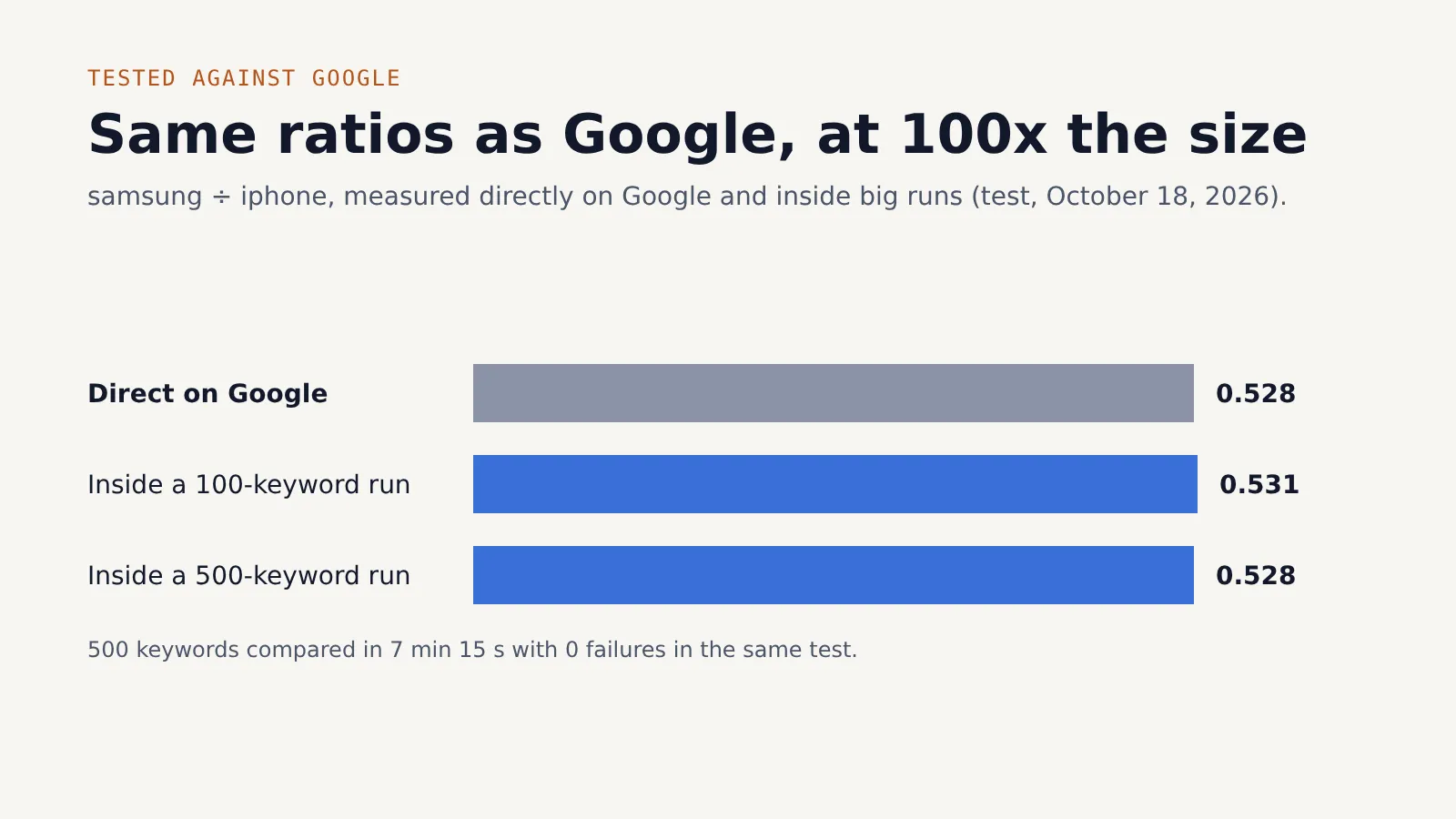
Why don't my scores match the Google Trends website? On the website, each chart scales its own biggest term to 100. Here, the biggest term across all your keywords is 100. If you compare the same 5 keywords on their own, the ratios between them match the website.
What does lowVolume mean? Google reports whole numbers from 0 to 100. A keyword thousands of times smaller than the others can round to 0 or 1, so its exact size is uncertain. Run it again in a list of similar-sized keywords.
Why did one keyword get an error instead of a score? Google reports whole numbers, so a keyword more than about 200 times bigger or smaller than everything it was compared with shows as 0 and can't be put on the same scale. The Actor keeps the biggest set of keywords it can link and reports the outlier with an error. You are not charged for it. Compare it in a separate list of similar-sized keywords.
How many keywords per run? Up to 500. A run of 100 keywords usually takes 1 to 3 minutes.
Which countries and languages? Every country Google Trends supports. Keywords can be in any language.
What happens if Google Trends or the proxy is slow or blocks a request? Each request is retried up to 6 times with a fresh proxy IP and increasing waits. If one group of keywords still cannot be fetched, the run continues: those keywords come back with an error field and are not charged, and every other keyword is delivered normally.
Can I schedule it? Yes. Use Apify Schedules to run the same list daily or weekly, and connect a webhook, Google Sheets or Slack integration to get the new ranking automatically.
Is it legal to scrape Google Trends? The Actor only reads public, aggregated Google Trends data (no personal data). Check that your use complies with Google's terms and the laws that apply to you.
Related Actors
- Website to Markdown for LLMs & RAG: turn the top pages for a trending keyword into clean Markdown.
- Sitemap Intelligence API: see what content a competitor publishes for those keywords.
- YouTube Transcripts for AI: bulk YouTube transcripts from videos, channels and search as text, Markdown and RAG chunks.
Feedback
Found a problem or need a feature? Open an issue in the Issues tab. If the Actor saves you time, a short review on its Store page helps other people find it.
This Actor uses public Google Trends data. Use it in line with Google's terms and applicable laws.


