
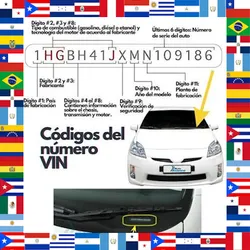
Mexico VIN/NIV Finder by Year, Make, Model
Pricing
from $0.40 / vin validated
Mexico VIN/NIV Finder by Year, Make, Model
Find a real observed VIN/NIV for Mexican vehicles from public used-car listings. Give year, make, model and version and get a real VIN with source, engine, transmission and a confidence level. Bulk lookup by list.
Pricing
from $0.40 / vin validated
Rating
0.0
(0)
Developer

Scrapers Lat
Maintained by CommunityActor stats
0
Bookmarked
2
Total users
1
Monthly active users
a month ago
Last modified
Categories
Share
Mexico VIN/NIV Finder by Year, Make, Model
Here is one real result, with every field the actor returns:
The most complete Mexico VIN/NIV finder available. For each vehicle you provide, it returns a real observed VIN from public used-car listings plus the source URL, decoded VIN model year, engine, transmission, fuel and a confidence level, and it accepts structured input, a pasted table, or an uploaded CSV/Excel file for bulk lookup.
📥 Input · 📤 Output · 💰 Pricing · ▶️ Examples




Table of contents
- What it does
- Quickstart
- Input reference
- Output reference
- Example output record
- Run via API and CLI
- Fetch results
- Billing and limits
- FAQ and troubleshooting
What it does
For each vehicle you provide (year, make, model, version), the actor searches public Mexican used-car listings for a matching vehicle and returns a real observed VIN/NIV, the listing URL it came from, the decoded VIN model year, and a confidence level. Engine, transmission and fuel are added when the source listing exposes them, and returned as null otherwise. You can supply vehicles as a structured JSON array, a pasted CSV/TSV table, or an uploaded CSV/Excel file; non-standard column names in a table or file are mapped by a low-cost AI normalization step.
VINs are real values observed on public listings, not generated. Match confidence reflects how closely the listing matches your requested vehicle.
Quickstart
Open the actor, paste this into the input, and press Run. It looks up VINs for three Mexican vehicles.
To skip the AI normalization charge when using a table or file, name your columns exactly id, year, make, model, version in English.
Input reference
| Field | Type | Required | Default | Description |
|---|---|---|---|---|
vehicles | object[] | no | (see quickstart) | List of vehicles to look up, each an object with year, make, model, version and an optional id. Use this or one of the table/file inputs below. |
tableText | string | no | (empty) | Paste a CSV or TSV table of vehicles. Use standard columns id, year, make, model, version (English) to skip the AI normalization charge. |
file | string | no | (empty) | Upload a CSV or Excel (.xlsx) file of vehicles. Standard English columns skip the AI charge; other names or languages are mapped by AI. |
fileUrl | string | no | (empty) | Public link to a CSV or Excel file of vehicles. Standard English columns skip the AI charge. |
aiNormalize | boolean | no | true | When on, non-standard table/file columns are mapped by a low-cost AI step. Charged only when it actually runs; skipped and free when columns already match. |
maxVehicles | integer | no | (all) | Maximum number of vehicle rows to process. |
Output reference
One dataset item per vehicle. Types: string, integer, or null when the source value is absent.
| Field | Type | Description |
|---|---|---|
id | string | The id you passed for this vehicle (echoed back for joining). |
year | integer | Requested model year. |
make | string | Requested make. |
model | string | Requested model. |
version | string | Requested version / trim. |
engine | string | Engine from the source listing, or null. |
transmission | string | Transmission from the source listing, or null. |
fuel | string | Fuel type from the source listing, or null. |
vin | string | Real observed VIN/NIV from a public listing, or null if none was found. |
vinYear | integer | Model year decoded from the VIN, or null. |
sourceUrl | string | URL of the listing the VIN was observed on. |
source | string | Source site the listing came from. |
confidence | string | Match confidence (Alta, Media, Baja). |
status | string | Lookup status, for example validado when a VIN was found and checked. |
capturedAt | string | ISO 8601 timestamp of when the record was collected. |
Example output record
Real record from a live run (input the three-vehicle quickstart above):
Run via API and CLI
Start a run and wait for it to finish, then read the dataset. Replace <TOKEN> with your Apify API token.
Run synchronously and get dataset items in one call:
Start a run asynchronously:
Apify CLI:
Fetch results
Every run writes to a dataset. Fetch items as JSON, CSV, or Excel by changing format:
<DATASET_ID> is returned as defaultDatasetId in the run object. Use offset and limit to page through large result sets. clean=true drops empty and internal fields.
Billing and limits
- Pay per result. Each vehicle lookup is billed as an
attempt. Avin-validatedcharge applies only when a real VIN is found and checked. See the pricing tab for current prices. - AI normalization add-on. If your pasted table or uploaded file uses non-standard column names, a low-cost
ai-normalizationcharge applies once. Use the standard English columns to avoid it entirely. - No charge on failure. If a run errors, the actor writes a single item with a populated
errorfield and does not charge for it. - Spend cap respected. Set
maxTotalChargeUsdon the run; once reached, the actor stops looking up, charging and emitting further vehicles. - Free Apify plans are capped at 10 vehicles per run. Upgrade for higher
maxVehicles.
FAQ and troubleshooting
Is the VIN real or generated?
Real. Each VIN is observed on a public used-car listing, and sourceUrl links to that listing. If no matching listing is found, vin is null.
What does the confidence level mean?
Alta, Media or Baja reflect how closely the found listing matches your requested year, make, model and version. Lower confidence usually means the closest available match differed on trim or year.
How do I avoid the AI normalization charge on a table or file?
Name your columns exactly id, year, make, model, version in English. When columns already match, the AI step is skipped and free.
Can I bulk-look-up many vehicles?
Yes. Pass a large vehicles array, paste a table into tableText, or upload a CSV/Excel file. Use maxVehicles to cap how many rows are processed.
Why are engine and transmission null?
The matching listing did not publish those fields. Missing source values are returned as null, never invented.
Is this an official VIN registry? No. This actor is independent and has no affiliation with any registry or manufacturer. It reads only data that is publicly available on used-car listings. Use it in accordance with the source terms of service.
Related scrapers
- Autocosmos Scraper: Mexican and Latin American vehicle listings.
- Kavak Used Cars Scraper: used-car inventory and pricing.
- Mexico Business Directory Scraper: Mexican business phone and address leads.
- Copart Scraper: salvage vehicle auction lots.
- FAA Aircraft Registry Scraper: US aircraft registrations.
- Carroya Colombia Scraper: Colombian vehicle listings.
More scrapers at scrapers.lat
Built and maintained by scrapers.lat, where we publish scrapers for US and Latin American public platforms: company registries, government data, finance, e-commerce and more. Browse the catalog or request a custom scraper at scrapers.lat.
Independent tool, not affiliated with any vehicle registry or manufacturer. Accesses only publicly available used-car listing data. Use in accordance with the source terms of service.


![VIN Decoder [💰$2/1K] | Vehicle Specs | Safety Recalls | NHTSA avatar](https://images.apifyusercontent.com/yCkssfr7yORAvMfRa8b43g7sez24hEZ-SgXY-c4SUtc/rs:fill:76:76/cb:1/aHR0cHM6Ly9hcGlmeS1pbWFnZS11cGxvYWRzLXByb2QuczMudXMtZWFzdC0xLmFtYXpvbmF3cy5jb20vZHRSN3FuVGJRck5pU0NtajctYWN0b3ItN2JoZDc1TkdqUG1CTlBjdG0tb3REbWZSOVBSYy1ibG9nLXZpbi1udW1iZXItbG9va3VwLWhlcm8ucG5n.webp)


