
Singapore COE Prices & Bidding Results Scraper
Pricing
from $6.15 / 1,000 results
Singapore COE Prices & Bidding Results Scraper
Scrape Singapore COE (Certificate of Entitlement) prices and bidding results from the official data.gov.sg open data portal. Get bidding month, vehicle class, quota, bids received and the winning premium. Export to JSON, CSV or Excel.
Pricing
from $6.15 / 1,000 results
Rating
5.0
(1)
Developer

Scrapers Lat
Maintained by CommunityActor stats
0
Bookmarked
2
Total users
1
Monthly active users
a month ago
Last modified
Categories
Share
Singapore COE Prices & Bidding Results Scraper
Here is one real result, with every field the actor returns:
The most complete Singapore COE bidding results scraper available. It returns every field the official COE bidding feed exposes for each exercise, plus derived demand analytics (subscriptionRate, successRate, unsuccessfulBids, year) that raw-feed dumps do not provide, and gives you four filters to target exactly the records you need.
📥 Input · 📤 Output · 💰 Pricing · ▶️ Examples




Table of contents
- What it does
- Quickstart
- Input reference
- Output reference
- Example output record
- Run via API and CLI
- Fetch results
- Billing and limits
- FAQ and troubleshooting
What it does
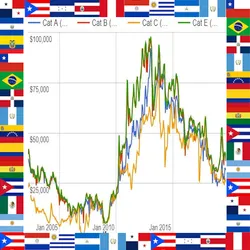
The actor reads the official Singapore Certificate of Entitlement (COE) bidding results published on the government open-data portal (data.gov.sg), applies the filters you pass as input, paginates through matching exercises, and writes one normalized record per bidding exercise and vehicle category to the run's dataset. On top of the raw feed (quota, premium, bids received and successful) it computes the subscription rate, the success rate, the number of unsuccessful bids and the bidding year, so you can rank demand and price trends without extra parsing. Premiums are in Singapore dollars (currency is always SGD).
The portal rate-limits anonymous access, so large pulls are paced automatically. Data covers the full published Singapore COE bidding history.
Quickstart
Open the actor, paste this into the input, and press Run. It returns the 10 most recent bidding results.
Leave the filters empty to pull the full bidding history. Every input field is optional; with an empty input the actor returns the most recent exercises (default maxRecords is 10).
Input reference
| Field | Type | Required | Default | Description |
|---|---|---|---|---|
maxRecords | integer | no | 10 | Maximum number of COE bidding records to collect. The portal rate-limits anonymous access, so very large pulls are paced automatically. |
vehicleClass | string | no | (all) | Keep only one COE category. Exact match on the vehicle class, for example Category A (small cars up to 1600cc / 130bhp), Category B (larger cars), Category C (goods vehicles and buses), Category D (motorcycles) or Category E (open). Leave empty for all categories. |
month | string | no | (all) | Keep only one bidding month. Exact match in YYYY-MM format, for example 2024-01. Leave empty for the full history. |
searchQuery | string | no | (empty) | Free-text filter across all fields, for example a month or a category name. Leave empty to pull the full bidding history newest first. |
sortByNewest | boolean | no | true | Return the most recent bidding exercises first. Turn off to read in the source order (oldest first). |
Filters combine with logical AND. If you pass no filters, the actor returns the full bidding history newest first, up to maxRecords.
Output reference
One dataset item per bidding exercise and vehicle category. Types: string, integer, number, or null when the source value is absent.
| Field | Type | Description |
|---|---|---|
month | string | Bidding month in YYYY-MM format. |
biddingNo | string | Bidding exercise number within the month (1 = first exercise, 2 = second). |
vehicleClass | string | COE category, for example Category A to Category E. |
quota | integer | Number of COE certificates available in the exercise. |
bidsSuccess | integer | Number of successful bids. |
bidsReceived | integer | Total number of bids received. |
premium | integer | Quota premium (winning COE price) in Singapore dollars. |
currency | string | Currency of premium. Always SGD. |
year | integer | Four-digit bidding year, or null if the month is malformed. |
subscriptionRate | number | bidsReceived / quota, rounded to two decimals. Above 1 means oversubscribed. null if quota is zero or unknown. |
successRate | number | bidsSuccess / bidsReceived, rounded to two decimals. null if no bids were received. |
unsuccessfulBids | integer | bidsReceived - bidsSuccess (never negative), or null if unknown. |
source | string | Data source label. Always the COE bidding results via data.gov.sg. |
observedAt | string | ISO 8601 timestamp of when the record was collected. |
error | string | Present only on a failed run: a single item with a populated error field is written instead of results. |
Example output record
Real record from a live run (input {"maxRecords": 10, "sortByNewest": true}):
Run via API and CLI
Start a run and wait for it to finish, then read the dataset. Replace <TOKEN> with your Apify API token.
Run synchronously and get dataset items in one call:
Start a run asynchronously:
Apify CLI:
Fetch results
Every run writes to a dataset. Fetch items as JSON, CSV, or Excel by changing format:
<DATASET_ID> is returned as defaultDatasetId in the run object. Use offset and limit to page through large result sets. clean=true drops empty and internal fields.
Billing and limits
- Pay per result. You are charged per record returned (
resultevent). See the pricing tab for the current per-result price. - No charge on failure. If a run errors, the actor writes a single item with a populated
errorfield and does not charge for it. Empty runs cost nothing. - Spend cap respected. Set
maxTotalChargeUsdon the run; once reached, the actor stops emitting and charging further billable results. - Free Apify plans are capped at 10 records per run. Upgrade for higher
maxRecords. - Source rate limit. The data.gov.sg portal throttles anonymous access, so large pulls are paced automatically (about one page every 10 seconds).
FAQ and troubleshooting
A run returned 0 records. Why?
The filter matched nothing. Check the exact vehicleClass or month value, or leave the filters empty to pull the full history. Zero-result runs are not charged.
How do I get the price history for one category?
Set vehicleClass to the exact category name, for example Category A, and set maxRecords high to pull its full history.
What is subscriptionRate?
Total bids received divided by the quota. A value above 1 means the exercise was oversubscribed (more bidders than certificates).
Is the premium in Singapore dollars?
Yes. premium is the quota premium in SGD, and the currency field is always SGD.
Is this an official LTA or COE tool? No. This actor is independent and has no affiliation with the Land Transport Authority. It reads only data that is publicly available through the official government open-data portal (data.gov.sg).
Related scrapers
- Singapore HDB Resale Prices Scraper: HDB resale flat transaction prices.
- Singapore HDB Rental Scraper: HDB approved rental transactions.
- Singapore SGX Listed Companies Scraper: companies listed on the Singapore Exchange.
- Singapore MAS Financial Institutions Scraper: MAS regulated financial institutions.
- Singapore GeBIZ Government Contracts Scraper: public sector tenders and awards.
More scrapers at scrapers.lat
Built and maintained by scrapers.lat, where we publish scrapers for public platforms: company registries, government data, finance, e-commerce and more. Browse the catalog or request a custom scraper at scrapers.lat.
Independent tool, not affiliated with the Land Transport Authority (LTA). Accesses only publicly available data from the official government open-data portal (data.gov.sg).


