

Chrome Web Store Scraper: Permissions & Users
Pricing
from $10.00 / 1,000 extensions
Chrome Web Store Scraper: Permissions & Users
Chrome Web Store extensions with the permissions they ask for and the sites they can read, taken from each extension's own manifest.
Pricing
from $10.00 / 1,000 extensions
Rating
0.0
(0)
Developer

SellerKit
Maintained by CommunityActor stats
0
Bookmarked
2
Total users
1
Monthly active users
12 days ago
Last modified
Categories
Security
Limited permissionsShare
Chrome Web Store Scraper
Every extension with the permissions it asks for and the sites it can read, taken from the extension's own manifest.
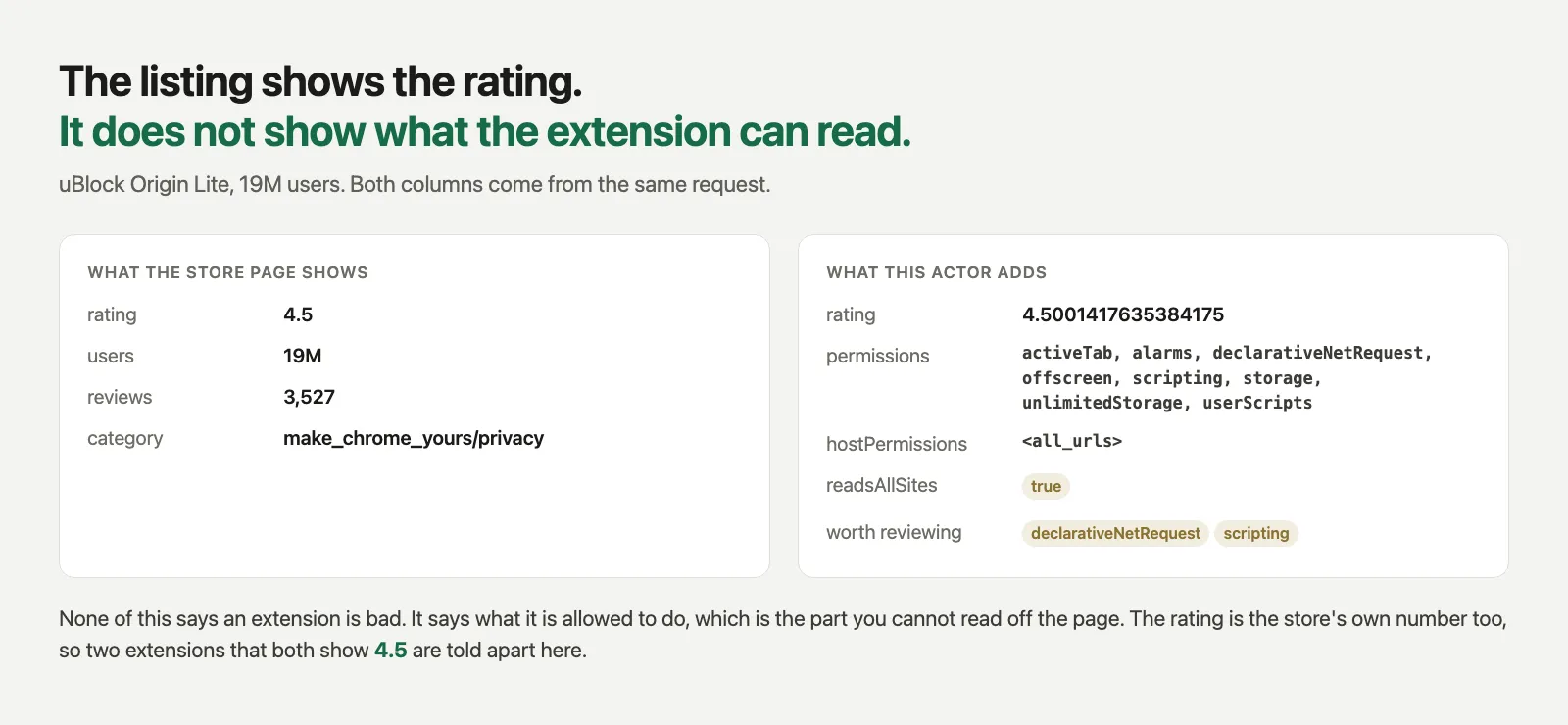
What this gets you that the page does not show
Open any extension listing and you can see its rating, its user count and its description. What you cannot see is the part that decides whether you would let it near a work laptop: the permission list, the hosts it can reach, and the sites it injects code into.
That data is in the store's own response. This actor reads it, so a search for password manager
comes back as ten rows that each say, for example:
permissions | webRequest, scripting, privacy, browsingData, tabs |
hostPermissions | <all_urls> |
readsAllSites | true |
riskFlags | webRequest, scripting, privacy |
One search request returns 10 extensions with all of that. One category page returns 32.
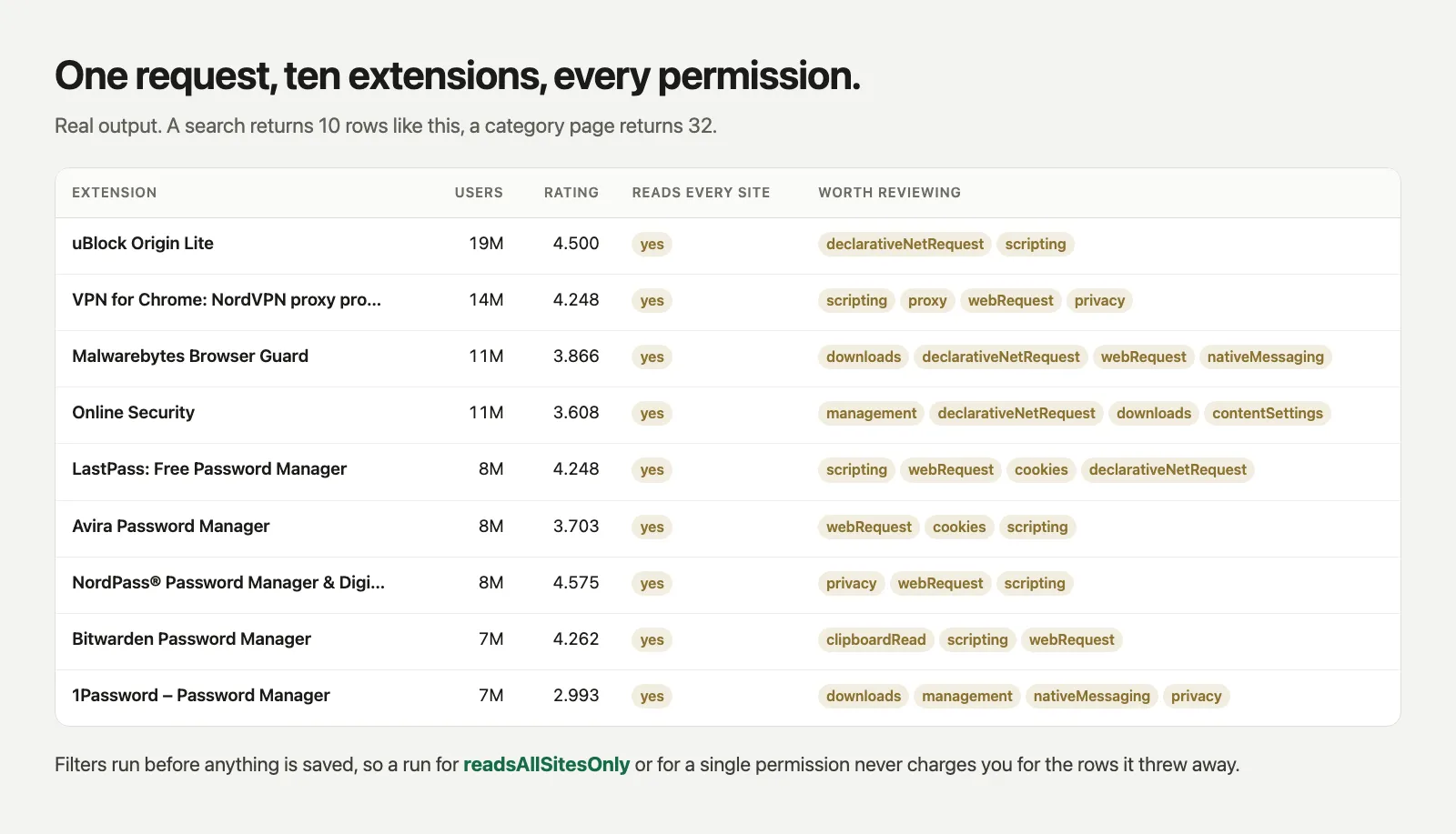
What it returns
One row per extension:
| Field | |
|---|---|
extensionId name url iconUrl | identity |
users rating reviewCount | store numbers, and rating is the unrounded value |
category summary website publishedAt | listing |
permissions | the API permissions it asks for |
hostPermissions contentScriptMatches siteCount | where it can read and where it runs |
optionalPermissions | what it can ask for later |
readsAllSites | true when it asks for <all_urls> or *://*/* |
riskFlags riskNotes | the permissions worth a second look, each with a plain sentence |
manifestVersion minimumChromeVersion usesRemoteCode | manifest facts |
version updatedAt size languages | extension page only |
developer developerEmail developerAddress supportUrl privacyPolicyUrl | extension page only |
relatedIds | similar extensions, so you can walk a niche |
The rating is worth one line on its own. The store rounds it to one decimal on screen. This actor
returns what the store actually holds, so 4.5 on the page arrives here as 4.495407524238066 and
two extensions that both show 4.5 can be told apart.
Input
You can also pass categories (make_chrome_yours/privacy, productivity/communication, or the
full category URL) or extensionIds (the 32 character id, or the full store URL).
readsAllSitesOnly, requirePermissions, minUsers and minRating filter before anything is
written, so the rows you did not want are never saved and never charged.
What a single run looks like
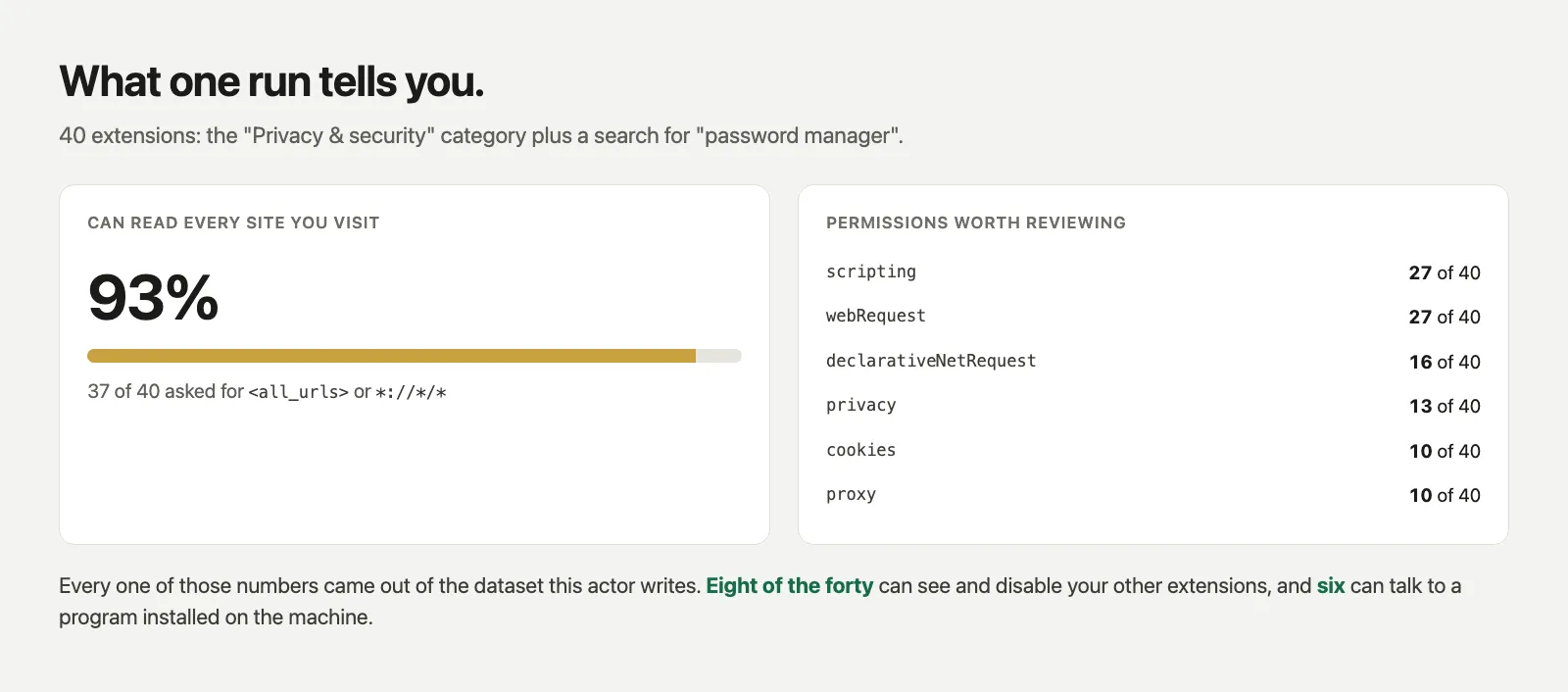
Those numbers are from one run of this actor: the Privacy and security category plus a search for "password manager", 40 extensions in total. 37 of the 40 asked to read every site you visit, 8 can see and disable your other extensions, and 6 can talk to a program installed on the machine. It is a permission heavy corner of the store by nature, which is the point: you can now measure that instead of assuming it.
Uses this was built for
- Extension review before allowlisting. Pull a category, keep the rows where
readsAllSitesis true, and you have the shortlist that needs a human. - Watching an extension you already trust.
version,updatedAtand the permission list in one row. A permission that appears in an update is the thing you want to catch. - Market research. Users, unrounded rating, review count and category, per extension.
Pricing
Charged per row that reaches the dataset, not per minute of compute. A run that finds nothing costs nothing. Opening the extension page is a second event, charged only for the rows where it worked.
Notes
- The store answers plain requests, so runs are quick and a proxy is optional.
- Manifest version 2 extensions list host access in the same field as API permissions. This actor
splits them, so
permissionsandhostPermissionsmean the same thing whether the extension is MV2 or MV3. - One extension that fails to load does not stop the run. It is recorded in
RUN_SUMMARYwith the reason, and the rest still come back.RUN_SUMMARYalso counts how many rows carried a manifest. - A search page returns 10 extensions and a category page returns 32. To go wider, pass several
search terms or categories, or turn on
includeRelatedto walk the similar extensions.


