

Chrome Extension Email Extractor
Pricing
from $3.00 / 1,000 results
Chrome Extension Email Extractor
Chrome extension scraper that pulls ratings, user counts, email, phone, manifest JSON, and more from the Chrome Web Store by extension ID, with no browser needed.
Pricing
from $3.00 / 1,000 results
Rating
0.0
(0)
Developer

B2B Lead Generation
Maintained by CommunityActor stats
0
Bookmarked
19
Total users
0
Monthly active users
5 months ago
Last modified
Categories
Share
Chrome Extension Details - Fetch Emails, Phones, Websites and Full Metadata from Any Chrome Extension
Give it an extension ID or a full Chrome Web Store URL and it returns everything the store knows. Name, version, star rating, user count, full description, manifest JSON, icon URLs, file size, supported languages, last updated date, and full developer contact info including email, phone number, address, and company name. No browser, no HTML scraping. It talks directly to the store's own internal API.
Use cases
- Research competing extensions: compare user counts, ratings, and what permissions they request
- Track version bumps and install growth over time for extensions you care about
- Audit permissions and host access by inspecting raw manifest JSON
- Collect developer emails, phone numbers, and addresses from store listings for outreach
- Build a Chrome Web Store dataset for analysis, sales prospecting, or research
Input
| Parameter | Type | Default | Description |
|---|---|---|---|
extensionIds | array | required | List of Chrome extension IDs or full Chrome Web Store URLs. Accepts bare IDs (e.g. gccahjgcckaemgpliioopngfgdaceffo) or full store URLs. |
maxItems | integer | 1000 | Maximum number of extensions to fetch per run. |
timeoutSecs | integer | 300 | Maximum total run time in seconds. |
requestTimeoutSecs | integer | 30 | Maximum time to wait for a single API request. |
proxyConfiguration | object | Datacenter (Anywhere) | Proxy type and location to use for requests. Supports Datacenter, Residential, Special, and custom proxies. Optional. |
Example input
What data does this actor extract?
One record per extension:
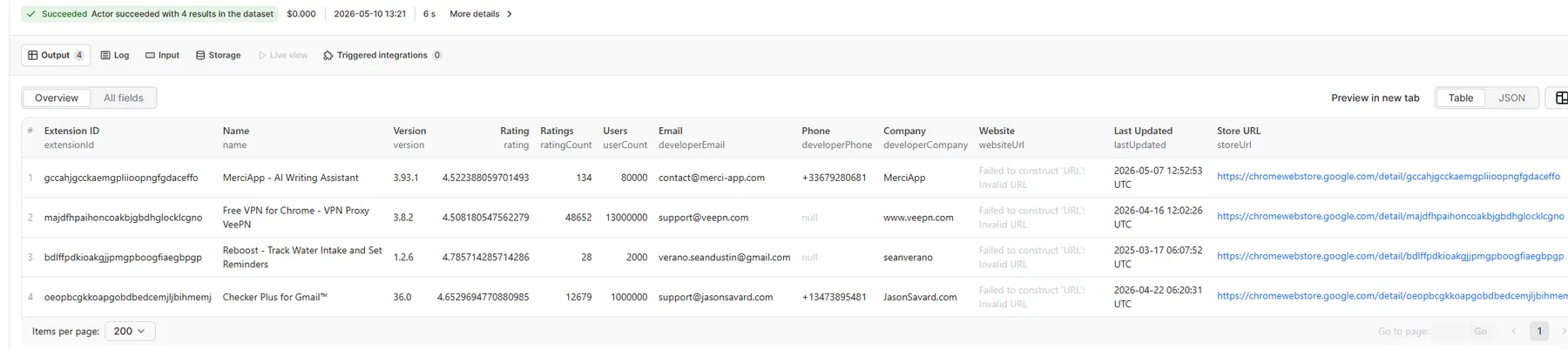
| Field | Type | Description |
|---|---|---|
extensionId | string | The bare extension ID. |
name | string | Full display name from the store listing. |
version | string | Current published version number. |
summary | string | Short one-line tagline from the listing. |
extensionDescription | string | Full long-form description from the store listing. |
rating | number | Average star rating (1.0 to 5.0). |
ratingCount | integer | Number of user ratings. |
userCount | integer | Approximate number of active installs. |
websiteUrl | string | Developer website URL from the listing. |
storeUrl | string | Direct link to the extension's Chrome Web Store page. |
iconUrl | string | URL of the extension's large icon. |
smallIconUrl | string | URL of the promotional banner image. |
isFeatured | boolean | Whether Google has marked this extension as featured. |
fileSize | string | Installed file size (e.g. "4.2MiB"). |
languages | array | Languages the extension supports. |
lastUpdated | string | ISO 8601 timestamp of the most recent update. |
manifest | object | Parsed manifest.json from the extension package. |
developerEmail | string | Developer or support email from the store listing. |
developerPhone | string | Phone number listed by the developer. |
developerCompany | string | Company or publisher name. |
developerContact | string | Individual developer or contact person name. |
developerAddress | string | Physical address of the developer or company. |
supportUrl | string | Support or privacy policy URL. |
FAQ
Can I pass full Chrome Web Store URLs instead of bare extension IDs?
Yes. Full URLs like https://chromewebstore.google.com/detail/merciapp-ai-writing-assis/gccahjgcckaemgpliioopngfgdaceffo and bare IDs like gccahjgcckaemgpliioopngfgdaceffo both work.
Does this actor scrape the page or call an API? It calls the store's internal batchexecute API. Faster than page scraping and returns clean structured data, including the raw manifest JSON.
What happens if an extension ID is invalid or not found?
It logs the error and keeps going. The failed ID shows up in the dataset with an errorMessage field instead of extension data.
How many extensions can I run at once? The default cap is 1000 per run. For larger lists, batch them using Apify's scheduling.
Does the manifest field have the full manifest? Yes. The complete parsed manifest.json including permissions, content scripts, background workers, and host permissions.
You might also find these useful
- Realtor Properties Contact Email - extract contact info and emails from Realtor.com property listings
- LoopNet Agents Email - extract agent emails and contact details from LoopNet commercial real estate listings
Integrations
Connect with other tools using Apify integrations. Export to Google Sheets, trigger Zapier or Make workflows, send to Slack, or pipe into Airbyte. Use webhooks to kick off downstream actions when a run finishes.


