

YouTube Transcript Extractor – Text, SRT, VTT & Timestamps
Pricing
from $1.50 / 1,000 transcript extracteds
YouTube Transcript Extractor – Text, SRT, VTT & Timestamps
Get YouTube transcripts & subtitles from videos, Shorts, playlists and channels. Plain text, timestamped JSON, SRT or VTT, any language + auto-translate. Only $1.50 per 1,000 transcripts; failed videos are free.
Pricing
from $1.50 / 1,000 transcript extracteds
Rating
0.0
(0)
Developer

Siftwright
Maintained by CommunityActor stats
0
Bookmarked
1
Total users
0
Monthly active users
2 days ago
Last modified
Categories
Share
YouTube Transcript Extractor
Get the transcript (captions / subtitles) of any YouTube video in seconds — as plain text, timestamped JSON segments, SRT or WebVTT. Paste video links, Shorts, whole playlists or entire channels, pick a language (or auto-translate), and download the results as JSON, CSV, Excel or via API.
Price: $3 per 1,000 transcripts ($0.003 each). You only pay for transcripts that are actually extracted — videos without captions, private videos and errors are free. Video metadata is included at no extra charge.
Why teams choose this extractor
| This Actor | |
|---|---|
| 💵 Price | $3 per 1,000 transcripts, no monthly rental |
| 🛡️ Pay only for success | Caption-less, private and failed videos cost $0 (some tools bill every result row, even failures) |
| 🎁 Free extras | Title, channel, views, duration, publish date and available languages at no extra charge |
| 📦 Every format in one run | Plain text, timestamped JSON, SRT and VTT |
| 🌍 Any language | Pick a language or auto-translate into 100+ languages |
| ⚡ Bulk-ready | Whole playlists and channels, processed in parallel |
| 🤖 AI-agent ready | Callable from Claude, ChatGPT & Cursor through Apify's MCP server |
What you can use it for
- 🤖 AI & RAG pipelines – feed clean transcript text into ChatGPT, Claude, LangChain, LlamaIndex or a vector database.
- 📝 Content repurposing – turn videos into blog posts, newsletters, social posts and show notes.
- 🔍 Research & SEO – analyze what competitors and creators say, find keywords, quotes and topics at scale.
- 🎓 Education & accessibility – study notes, summaries and subtitle files (SRT/VTT) for editors.
- 📊 Media monitoring – track mentions of brands, products or people across channels.
Features
- ✅ Videos, Shorts, live replays, playlists and channels (
/@handle,/channel/UC…, bare video IDs) - ✅ Human-made captions preferred, automatic fallback to auto-generated captions
- ✅ Any language + auto-translate into 100+ languages via YouTube's built-in translation
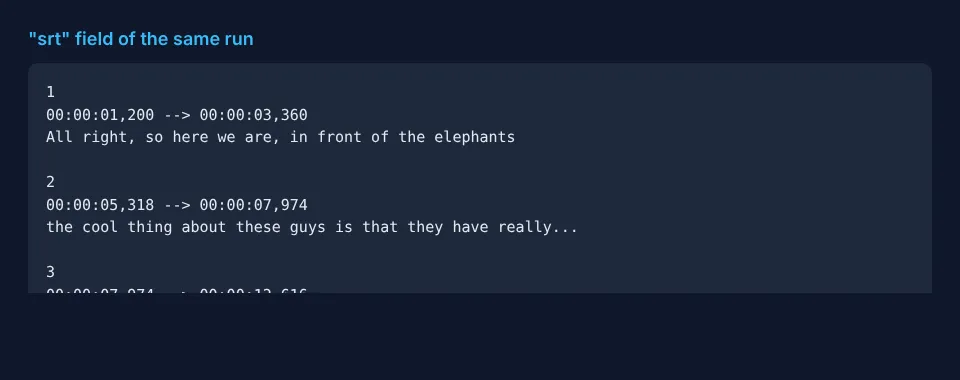
- ✅ Output as plain text, timestamped segments, SRT and VTT
- ✅ Free metadata: title, channel, duration, views, publish date, description, keywords, thumbnail
- ✅ Lists the languages available for every video
- ✅ Fast & lightweight (no browser), parallel processing, automatic rate-limit handling
- ✅ Failed / caption-less videos are never charged
How to use
- Click Try for free.
- Paste one or more YouTube URLs into YouTube URLs or IDs.
- (Optional) choose a language, translation and output formats.
- Click Start and download your transcripts from the Output tab.
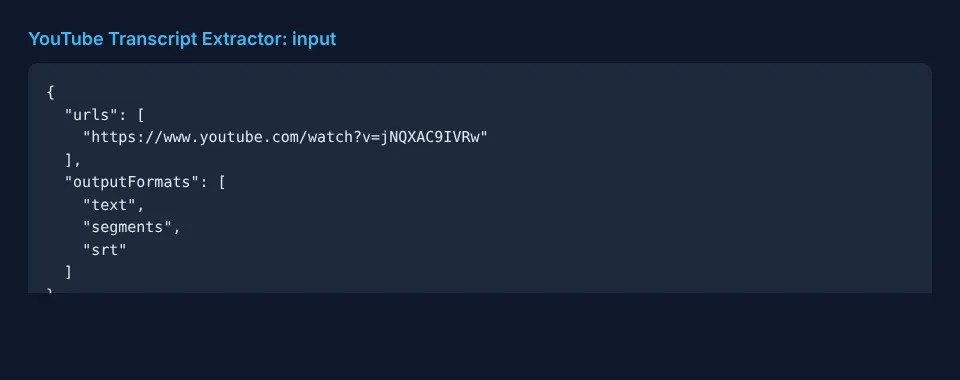
Input example
| Field | Description |
|---|---|
urls | Video / Shorts / playlist / channel URLs or bare video IDs |
language | Preferred language codes in order, e.g. en or es,en |
translateTo | Translate the transcript into this language code, e.g. de |
preferManual | Prefer creator-uploaded captions over auto-generated (default true) |
outputFormats | Any of text, segments, srt, vtt |
includeMetadata | Include free video metadata (default true) |
maxVideosPerSource | Max videos taken from each playlist or channel (newest first) |
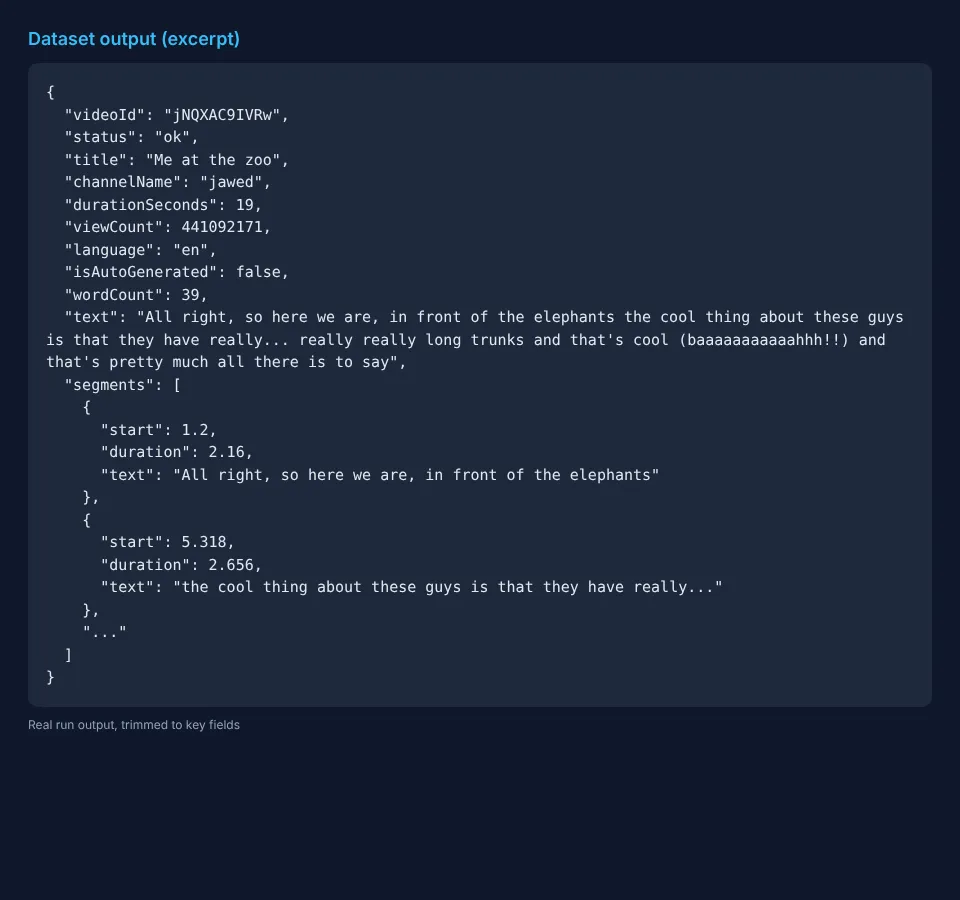
Output example
Videos without a transcript are returned with "status": "no_transcript" and an error message (and are not charged), so you always know what happened to every input.
Pricing
Pay-per-event: $0.003 per extracted transcript (= $3 per 1,000). No monthly rental, no charge for failed videos, playlists/channel listing or metadata. Apify's free plan gives you monthly credits so you can try it for free.
Quick start in Python
Use it via API
Works with Python and JavaScript API clients, Make, Zapier, n8n, LangChain and LlamaIndex. AI agents (Claude, ChatGPT, Cursor) can call it directly through Apify's MCP server.
FAQ
Does it work for videos without captions? It can only return transcripts that exist on YouTube (creator-made or auto-generated). Videos with captions disabled are reported as no_transcript and are free.
Is it legal? The Actor only reads publicly available caption data. Make sure your use respects YouTube's terms and applicable copyright law.
Something broke or you need a feature? Open an issue on the Issues tab — we respond fast.


