

ATS Jobs Scraper | Greenhouse, Lever and Ashby
Pricing
from $3.40 / 1,000 jobs
ATS Jobs Scraper | Greenhouse, Lever and Ashby
Search job listings published on company career sites running Greenhouse, Lever, Ashby, SmartRecruiters, or Recruitee. Filter by keyword, location, remote status, and posting date, and get full job descriptions with stable IDs, ideal for job boards, recruiters, and sales hiring signal tracking.
Pricing
from $3.40 / 1,000 jobs
Rating
0.0
(0)
Developer

SilentFlow
Maintained by CommunityActor stats
0
Bookmarked
4
Total users
1
Monthly active users
a month ago
Last modified
Categories
Share
ATS Jobs Scraper
Search the jobs companies publish on their own career sites, by keyword, location and date, without knowing which companies to look at. One input, five hiring systems (Greenhouse, Lever, Ashby, SmartRecruiters, Recruitee), full descriptions included. A keyword search returns matching jobs in seconds, not after an afternoon of career page checks.
How it works
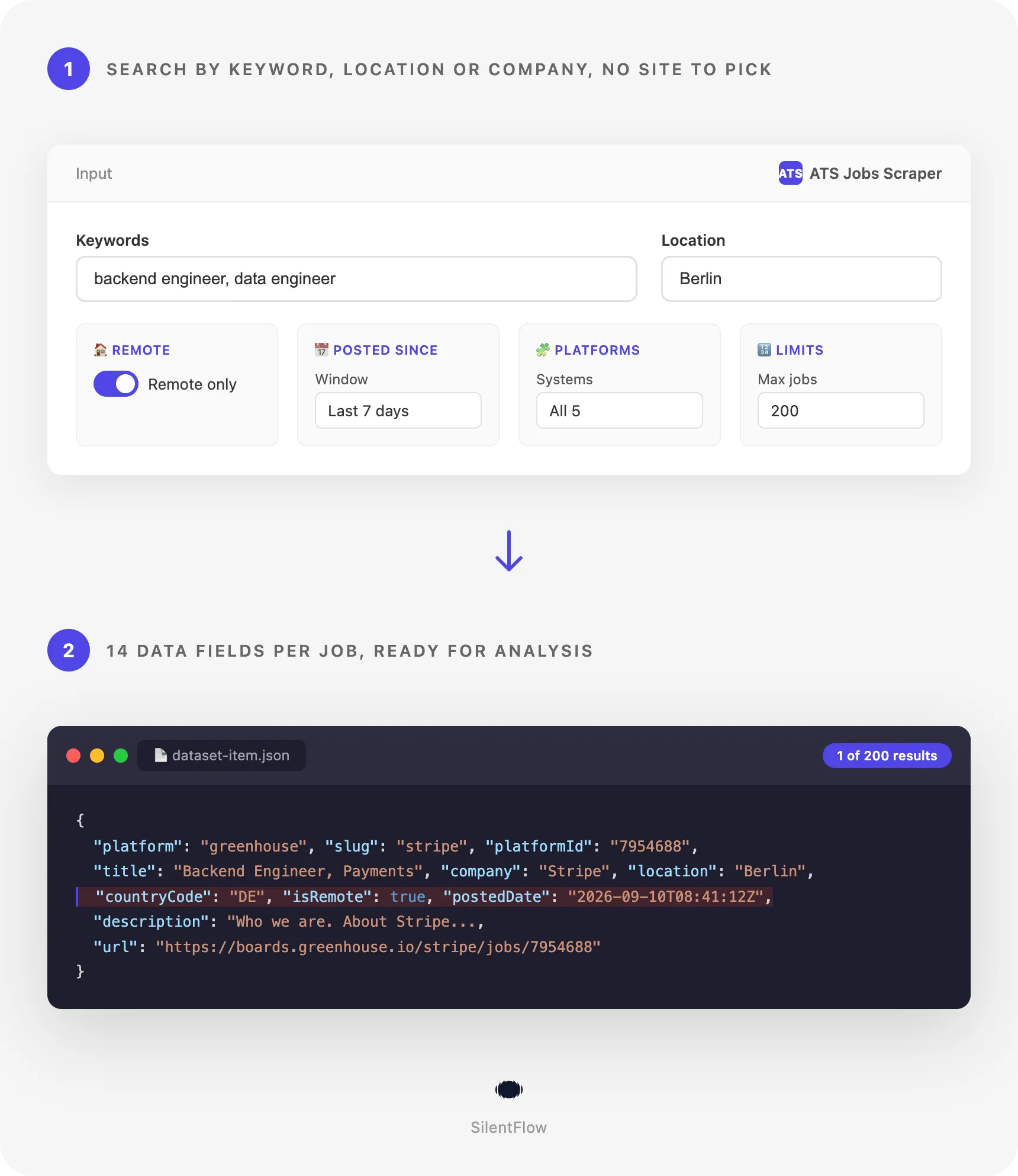
- Enter keywords, a location, a date window or a list of companies.
- The scraper searches a daily rebuilt index of jobs published on company career sites.
- Every returned job comes back as one structured row, with its full description fetched live.
✨ Why teams choose this over other ATS scrapers
Still finding out about openings after everyone else? Tired of aggregators that lag by days and cut descriptions short? Do you know which hiring system each company uses? Nobody does, and you should not have to.
- 🔎 Search without naming a company. Type
backend engineerandBerlinand get every matching job across every indexed company. Other career site scrapers need the company name and its system first. - 🧩 Five systems, one set of fields. Greenhouse, Lever, Ashby, SmartRecruiters and Recruitee jobs come back with the same 14 fields, so one script handles all of them.
- 📄 Full descriptions, fetched live. The description is pulled from the career site during the run, never from a stale copy. In the reference run, 22 of 25 jobs came back with their complete description.
- 🆔 Stable IDs and permanent URLs.
platformIdis the employer's own job ID andurlis the career site page, so deduplication and archiving just work. - 📅 Fresh by design. The index is rebuilt every day and results are sorted newest first, with a
postedDatein RFC 3339 for every job. - 🌍 Country codes on every job.
countryCodeis normalized to ISO codes andisRemoteis set from the employer's own flag, so filtering by geography takes one line. - 🚫 No login, no API key. Career site data is public. You start a run and get rows.
🎯 What you can do with ATS job data
| Team | What they build |
|---|---|
| Job boards | A niche board fed with jobs that reach aggregators days later, refreshed every morning |
| Recruiting agencies | A daily list of new openings matching their placements, with the employer's own job ID to avoid double outreach |
| Sales | Hiring signals: which companies opened engineering, sales or finance roles this week, by country |
| Investors | Headcount velocity per portfolio company or target, tracked from their own career sites |
| Career coaches | Remote roles for a skill, posted in the last 3 days, with full descriptions for tailoring applications |
| HR analytics | Time to fill and posting patterns per platform, department and country |
| Newsletter authors | A weekly digest of new remote jobs in one function, generated from a single run |
📥 Input parameters
Search
| Field | Type | Default | What it does |
|---|---|---|---|
keywords | array of strings | none | Words matched against the job title and department. Any one keyword matching is enough. |
location | string | none | City, region or country. A country (Indonesia or ID) also returns the remote jobs open worldwide or to its region (APAC, EMEA, LATAM). |
remoteOnly | boolean | false | Keep only jobs the employer flagged as remote. |
companies | array of strings | none | Restrict the search to these company names as they appear on their career site. |
postedSince | 24h, 3d, 7d, 30d, any | 30d | Only jobs published within this window. any returns every open job. |
platforms | array of greenhouse, lever, ashby, smartrecruiters, recruitee | all five | Restrict the search to these systems. |
Output control
| Field | Type | Default | What it does |
|---|---|---|---|
maxItems | integer | 100 | Maximum number of jobs to return, newest first. |
includeDescription | boolean | true | Fetch the full description of every returned job. Turn off for faster, lighter runs. |
debugMode | boolean | false | Verbose diagnostics in the log. |
Leave every field empty to get the freshest jobs across all indexed companies.
📊 Output data
Every job is one row. With includeDescription on:
With includeDescription off, the same row without the description field:
🗂️ Data fields
14 fields per job. description is the only one that can be missing, when the career site does not serve it at run time.
| Category | Field | Type | Notes |
|---|---|---|---|
| Identity | platform | string | greenhouse, lever, ashby, smartrecruiters or recruitee |
| Identity | slug | string | The company's identifier on its hiring system |
| Identity | platformId | string | The employer's own job ID, stable across runs |
| Job | title | string | Job title as published |
| Job | company | string | Company name as shown on the career site |
| Job | department | string | Department or team, when the employer sets one |
| Job | description | string | Full description as plain text, fetched live |
| Place | location | string | Location text as published |
| Place | countryCode | string | ISO 3166 two letter code, other when the employer gives none |
| Place | isRemote | boolean | The employer's own remote flag |
| Time | postedDate | string | RFC 3339 timestamp of the publication |
| Time | scrapedAt | string | RFC 3339 timestamp of the run |
| Links | url | string | Permanent job page on the career site |
| Meta | dataType | string | Always job |
🚀 Examples
Get the newest jobs everywhere
Find remote Go jobs posted this week
Watch every opening at a list of companies
Sales roles in the United Kingdom, Greenhouse and Lever only
Yesterday's engineering jobs, titles only, for a daily digest
Data roles in Germany, remote or on site, with full descriptions
🤖 Copy to your AI assistant
Paste this block into Claude, ChatGPT or Cursor to give it full context about this scraper:
💻 Integrations
Feed a job board with fresh remote roles (Python)
Turn openings into hiring signals for sales (JavaScript)
Export a company watchlist to CSV every morning (Apify CLI)
Schedule the same input from the Apify Console and receive the CSV by webhook or in your bucket.
📈 Performance
| Metric | Value |
|---|---|
| Time to first results | 2 to 3 seconds after the run starts |
| Descriptions | fetched in parallel, most runs finish in under a minute for a few hundred jobs |
| Description coverage | 22 of 25 jobs in the reference run |
| Freshness | index rebuilt daily, descriptions live at run time |
| Results per run | no fixed limit, maxItems is yours to set |
💾 Data export
Every run's dataset is available as JSON, CSV, Excel, XML, HTML table or RSS from the run's dataset page, or straight from the API:
Swap csv for json, xlsx or xml. The same URL works from Google Sheets, Make, Zapier or a cron job.
💡 Tips for best results
- Combine a keyword with a location or a date window.
engineeralone matches hundreds of jobs;engineerplusNetherlandsplus7dgives you a list you can act on. - Turn off
includeDescriptionfor monitoring runs. Titles, companies and dates are enough to detect new openings; fetch descriptions only when you need the text. - Deduplicate on
platformplusplatformId. The pair is the employer's own identity for the job and does not change between runs. - Use
postedSince: "any"for a full snapshot of a company. The default 30 day window is meant for fresh jobs, not for a complete catalogue. - Match
companiesto the slug on the career site. It is the identifier in the career page URL, for examplestripeinboards.greenhouse.io/stripe.
❓ FAQ
What exactly does this scraper return? Jobs published by employers on their own career sites through Greenhouse, Lever, Ashby, SmartRecruiters or Recruitee, with 14 fields per job including the full description.
Do I need an account, a key or a login? No. Career site listings are public. You give an input and get rows.
How fresh is the data? The index of jobs is rebuilt every day. Descriptions are fetched live from the career site during your run, so the text you get is the text currently online.
Which companies are covered?
Every company we found publishing jobs through one of the five supported systems: 8,883 companies and 447,633 open jobs on September 30, 2026. New career sites are found every week and join the index automatically. To check a specific company, run a search with companies set to its slug and postedSince set to any.
Can I search several keywords at once?
Yes. keywords is a list and any one match is enough. Add location, platforms or remoteOnly to narrow the result.
How do filters combine?
All filters apply together. keywords: ["engineer"] plus location: "Germany" plus postedSince: "3d" plus remoteOnly: true returns remote engineering jobs in Germany published in the last three days.
Why is description missing on some jobs?
A small share of career pages do not serve the description at run time. The job row still ships with its title, company, location, date and URL.
Is the url permanent?
Yes. It is the job page on the company's career site, which stays valid as long as the job is open. platformId stays the same across runs.
Why does countryCode say other?
The employer did not give a recognizable country in the location text. The location field still has what they wrote.
What about Workday, Taleo or SAP SuccessFactors? Not covered yet. The scraper focuses on the five systems above, which share the same public structure.
Is this legal? The scraper reads job listings that employers publish for the public. See the Legal section below for your obligations.
⚖️ Legal
This Actor extracts publicly available job listings from company career sites. It does not bypass any login, paywall or CAPTCHA. Users are responsible for complying with the terms of service of the sites they collect from and with applicable data protection laws (GDPR, CCPA, and PIPL where relevant). Job listings are company data; they do not contain candidate profiles or personal data. The data returned is informational; verify accuracy for regulated use cases.
🔗 Related scrapers
- LinkedIn Jobs Scraper for jobs posted on LinkedIn.
- Indeed Jobs Scraper for Indeed listings by keyword and location.
- Glassdoor Jobs Scraper for Glassdoor jobs with company ratings.
- All Jobs Scraper for one search across the big job boards.
- Welcome to the Jungle Scraper for French and European startup jobs.
📬 Support
Need something this scraper doesn't do yet? We ship features fast.
- Feature requests go straight to our backlog
- Enterprise needs? We do custom integrations and high-volume plans
- Pricing questions? Check the Monetization tab on the actor page
Response time: usually under 24 hours.
Check out our other scrapers: silentflow on Apify


