

Instagram Scraper & Reels Downloader · No Login
Pricing
from $0.72 / 1,000 results
Instagram Scraper & Reels Downloader · No Login
Scrape Instagram posts, Reels, profiles, hashtags, places and comments without login. Download Reels as MP4 in 1080p or audio only, get transcripts, captions, likes, plays, bios and follower counts, find creators by keyword and track accounts for new posts. Export JSON, CSV, Excel or use the API.
Pricing
from $0.72 / 1,000 results
Rating
0.0
(0)
Developer

Social Beast
Maintained by CommunityActor stats
1
Bookmarked
47
Total users
27
Monthly active users
13 days ago
Last modified
Categories
Security
Limited permissionsShare
What can Instagram Scraper & Reels Downloader do?
Instagram Scraper & Reels Downloader gets public Instagram data without an Instagram login:
posts and Reels from a profile or hashtag, comments on a post, profile, hashtag and place details,
and Reel downloads with transcripts. Add a link, an @username or a #hashtag, pick what to
scrape, and you can get:
| 📦 What you can extract | ⚙️ Features & integrations |
|---|---|
|
📷 Posts and carousels from profiles and hashtags |
🔓 No Instagram login, so no account to get banned |
Use it for influencer vetting, competitor monitoring, trend tracking, brand monitoring, local business discovery, content analysis or downloading Reels, all from one tool. The Free plan includes up to 3,000 results a month, enough to try every mode before paying anything.
What data can I scrape from Instagram?
You get the content, engagement and context of any public post, Reel, profile, hashtag or place:
-
Instagram posts and Reels: what was posted and how it did. Captions, hashtags, mentions, video, audio and image links, every carousel slide, likes, comments, plays, views, length, music, tagged people, co-authors and location.
-
Instagram comments: what people are saying. Text, author, likes, time, and links to the comment and its post.
-
Instagram profiles: who's behind the account. Bio, name, links, follower and following counts, verified and business status, highlights, latest posts, and about 50 related accounts.
-
Instagram hashtags: what's around a topic. Instagram's own summary of the hashtag, related searches and its top posts.
-
Instagram places: where it happened. Name, category, address, coordinates, phone, website and post count.
-
Downloads and transcripts: keep the files and the words. Each post's video or photos saved to your Apify storage, and each Reel's words with timestamps.
Start from a list of links (posts, Reels, profiles, hashtags or places), or from @usernames and #hashtags.
How much will scraping Instagram cost?
You pay per result: one post, Reel or comment is one result. On the Free plan it costs $1.08 per 1,000 results. Paid plans are cheaper: $0.96 on Starter, $0.84 on Scale and $0.72 on Business. A Basic post or a comment costs less than half of what the most used Instagram scraper charges; a post with its newest comments, or a details row, about a sixth less. Failed links and duplicates are free.
A few things count as more than one result:
| You get | Results | Starter price |
|---|---|---|
| A post with its newest comments (Detail level Full) | 2 | $1.92 per 1,000 |
| A profile, hashtag or place details row | 2 | $1.92 per 1,000 |
| A check that found nothing new (Only new posts) | 2 | $1.92 per 1,000 |
| A post downloaded with its files, per started 50 MB (up to 300 MB) | 6 | $0.0058 each |
| A video saved in 1080p, on top | 6 | $0.0058 each |
| A transcript minute | 4 | $0.0038 a minute |
| A Google results page read for a keyword search | 5 | $0.0048 a page |
Each run start costs $0.003 per GB of memory the run gets: $0.003 for most runs (256 MB to 1 GB), and $0.006 to $0.012 for big runs that get 2 to 4 GB to go faster. The Free plan gets up to 3,000 results, 120 transcript minutes and 300 MB of downloads a month; any paid Apify plan removes these limits. Check the Pricing tab for every plan.
How do I use Instagram Scraper & Reels Downloader?
It's easy to start, even if you've never scraped a website before:
- Create a free Apify account.
- Open Instagram Scraper & Reels Downloader in Apify Console.
- Pick What to scrape: posts, Reels, comments, details or downloads.
- Paste one or more Instagram links, @usernames or #hashtags.
- Set how many results you want per input under Results per input.
- Optional: open More options for the Detail level (Full adds newest comments) or 1080p downloads.
- Click Save & Start and wait for the data.
- Download your dataset in JSON, CSV, Excel or HTML, or get it through the Apify API.
Ready-made examples
Each example opens with its input filled in; press Try for free to run it in your own account:
- Get the latest Reels from an Instagram account with play counts
- Download Instagram Reels in 1080p from a list of links
- Transcribe Instagram Reels to text with timestamps
- Export comments from an Instagram post
- Monitor Instagram accounts and get only new posts
- Get the top posts for an Instagram hashtag
- Get follower counts and bios for a list of Instagram accounts
- Scrape the latest posts from Instagram profiles
- Find Instagram creators by keyword, with profile details
- Download the audio of Instagram Reels as M4A files
⬇️ Input
The form has four main fields. Everything else is folded under More options, Only new posts and Paid add-on.
- What to scrape — posts, Reels, comments, details or downloads
- Instagram URLs, @usernames or #hashtags — one per line; share links and links without
https://work too - Results per input — how many posts or comments per input
- Only posts newer than (optional) — a date or a period like
7 days(UTC)
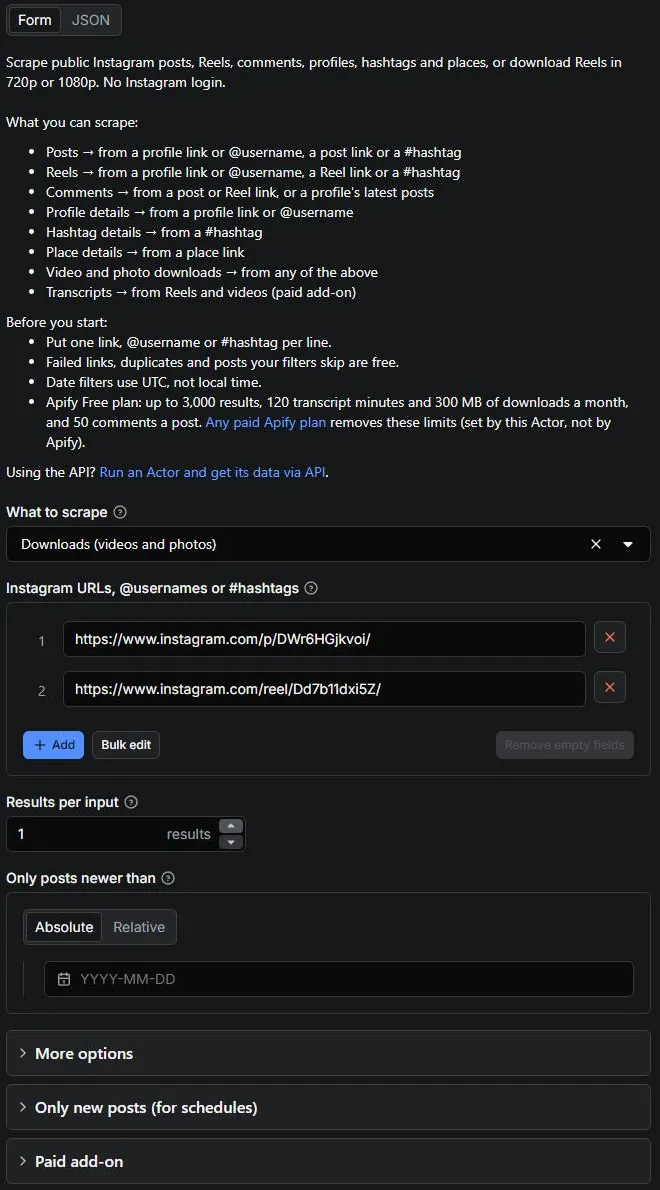
The input type drives what's returned:
| Paste this | And you can get |
|---|---|
| Post or Reel link | That post, its comments, or its download |
Profile link or @username | Its posts, Reels, details, or Reel downloads |
Hashtag link or #hashtag | Its top posts or Reels, or hashtag details |
| Place link | Place details |
| A keyword (Search by keyword) | Profiles or hashtags Google finds for it, then their posts or details |
⬆️ Output
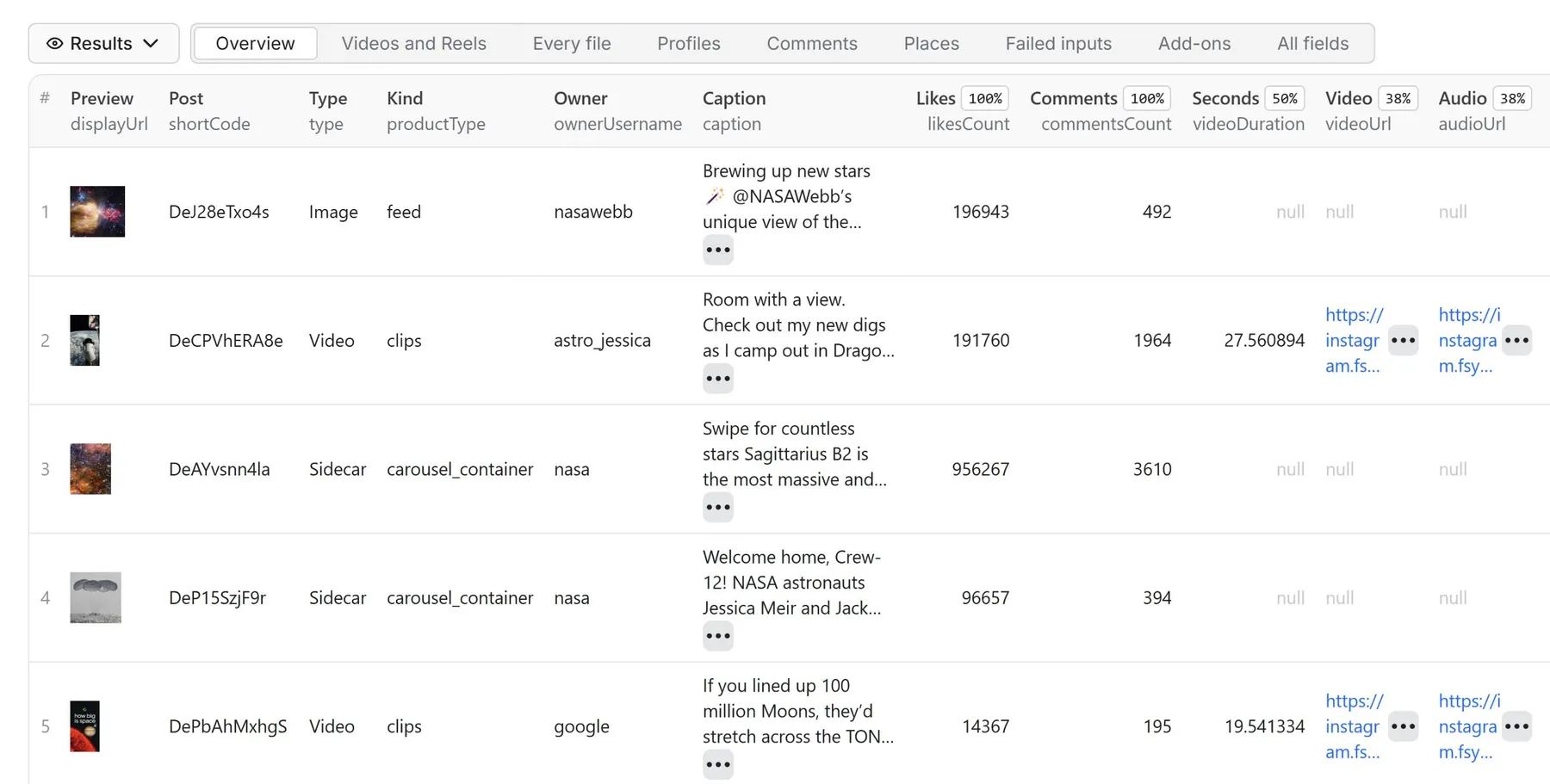
Results land in a dataset in the Storage tab. View them as a table, download them in JSON, CSV, Excel or HTML, or get them through the API. Each kind of data has its own fields; samples below are from real runs.
📸 Instagram post scraper: posts and carousels
Posts and carousels from a profile, hashtag or post link.
Supported inputs:
https://www.instagram.com/natgeo/or@natgeo(profile)https://www.instagram.com/p/DeSx5enlwm_/(post)https://www.instagram.com/explore/tags/travel/or#travel(hashtag)
Posts data sample
🎞️ Instagram Reels scraper
Reels from a profile, its Reels tab, a hashtag or a Reel link.
Supported inputs:
https://www.instagram.com/natgeo/(profile)https://www.instagram.com/natgeo/reels/(Reels tab)https://www.instagram.com/reel/DeUKkHjgMNR/(single Reel)https://www.instagram.com/explore/tags/travel/(hashtag)
Reels data sample (Detail level Full, view counts on)
💬 Instagram comments scraper
Comments from a post or Reel, or from the latest posts of a profile or hashtag.
Supported inputs:
https://www.instagram.com/p/DeSNiSGgoI-/(post)https://www.instagram.com/reel/DeUKkHjgMNR/(Reel)@natgeo(the comments on its latest posts)
Comments data sample
👤 Instagram profile scraper
Profile metadata: bio, followers, post count, verified status and related accounts.
Supported inputs:
https://www.instagram.com/natgeo/or@natgeo(profile)
Profile data sample (Detail level Full)
#️⃣ Instagram hashtag scraper
Hashtag metadata: Instagram's summary, related searches and top posts.
Supported inputs:
https://www.instagram.com/explore/tags/travel/or#travel(hashtag)
Hashtag details sample
📍 Instagram location scraper: place details
Place metadata: name, category, coordinates and post count.
Supported inputs:
https://www.instagram.com/explore/locations/213385402/london-united-kingdom/(place)
Place details sample
💾 Instagram Reels downloader
Each post's video or photos saved to your Apify storage, with links that keep working. One download covers up to 50 MB of a post's files (almost every Reel); each further started 50 MB is one more, up to 300 MB a post. Videos come in 720p (one MP4 with sound that plays everywhere), or in 1080p with Download quality: 1080p (Instagram's best: the full-quality VP9 video joined with its sound) for one download more, or Audio only (just the sound, an .m4a file). Each video keeps its cover picture too, free. You pay only for what is saved: a 1080p file that can't be made comes in 720p, without the 1080p charge.
Supported inputs:
https://www.instagram.com/reel/DdG4RIxIPyf/(Reel or post, with or without?igsh=...)https://www.instagram.com/share/reel/_69O6RoGd(a link from the app's Share button)https://www.instagram.com/natgeo/reels/(a profile's Reels)
Downloads data sample
🔌 Instagram Reels download API
One HTTP call downloads a list of Reels and answers with every link's result: run-sync waits for
the run (up to 5 minutes) and returns its OUTPUT, whose downloads has one entry per link (match
them by inputUrl): the saved file, its cover, size, quality and charges, or why it failed. Failed
links are free.
- Many links in one call cost one start fee: send your queue in batches rather than one link per call.
- Bigger batches (more than fit in 5 minutes): start the run and get a webhook when it ends.
- The links keep working as long as Apify keeps the run's storage (your plan's data retention); copy the files if you need them longer.
- Serve files from your own storage: Apify bills your account for every GB sent out of its storage, so
sending your visitors to these links costs you per download. Copy each file once to your own storage or
CDN. If a link that expires in about a day is enough, Posts mode gives Instagram's own video link
(
videoUrl) at a normal result's price. - Speed: a Reel is saved a few seconds after the run starts (a 92 MB Reel in ~7 s, a 141 MB 1080p one in ~6 s on Apify). 159 Reels from 3 accounts took 46 s in one run (1.8 GB saved, no slowdown from Instagram). Stories and highlights need a login and aren't supported.
📝 Instagram Reels transcripts
What's said in each Reel or video, with its language and timed parts. Turn on $ Include transcript.
Transcripts data sample
Notes and exceptions
- No login, no private data. Stories, comment replies, tagged posts, share counts and a business's address only show to logged-in users, so they're not included.
- Private accounts return their details, but not their posts.
- Places: Instagram mostly shows a place's posts only to logged-in users right now; its details row still works.
- Failed links, duplicates and filtered posts are free, and each gets a row saying why.
inputUrlis exactly what you entered, so you can match every row to your input.- The date filter skips old pinned posts too, and in Comments mode it skips older comments.
- File links from Instagram expire after a day or two (
linksExpireAt); pick Downloads to keep the files. - A download over 300 MB (a 1080p one tries 720p first) is charged as a normal post and keeps its direct links.
- Play counts cover a profile's latest ~190 Reels.
- Dates use UTC.
Integrations: Make, Zapier, n8n, Google Sheets and webhooks
Every run's results can go straight into the tools you already use. Apify has ready-made integrations for Make, Zapier, n8n, Google Sheets, Google Drive and Slack, plus webhooks for anything else: pick the integration on the Actor's Integrations tab, choose the event (for example a finished run) and map the dataset fields. With a schedule and Only new posts turned on, a sheet or a Slack channel receives just the posts published since the last run.
What can you do with data after scraping Instagram?
Here are a few of the most common ways people use public Instagram data:
🎯 Influencer vetting and partnership research
Recipe:
- Find creators in your niche. Run
postson a hashtag like#fitnessto get recent posts with creator usernames and engagement. - Profile each candidate. Run
detailson their profiles for followers, bio, post count and related accounts. - Score real engagement. Run
postson their profiles and compare likes, comments and plays with their follower counts.
🔥 Spot viral content and creators
Recipe:
- See what's posted under a tag. Run
postsorreelson a hashtag like#cleanbeauty. - Find related tags. Run
detailson the hashtag for Instagram's summary and related searches. - Keep only recent posts with Only posts newer than, e.g.
14 days.
💯 Track competitors and online conversations
Recipe:
- Track their accounts. Run
postson competitor profiles with Only new posts since the last run on. - Schedule it every hour or every morning; you pay only for new posts.
- Read reactions. Run
commentson their best posts.
🎬 Download and transcribe Reels
Recipe:
- Paste a profile's Reels tab like
instagram.com/natgeo/reels/. - Pick Downloads and turn on Include transcript.
- Open the Add-ons view for each Reel's saved file and transcript.
🏙️ Local business discovery
Recipe:
- Collect place links from posts'
locationId(instagram.com/explore/locations/<locationId>/). - Run
detailson the places for their name, category, address and coordinates.
Send results to Google Sheets, Slack, a CRM or a webhook from the Integrations tab.
❓ Frequently Asked Questions
Do I need an Instagram account?
No. You never connect an account or paste cookies, so none of your accounts can be banned.
Is this an Instagram API?
It works like one for public data: call it through the Apify API from any language and get JSON back, with no Instagram account, Business account or Meta app approval.
Can I scrape multiple content types in a single run?
No. Each run returns one kind, set by What to scrape. To get posts with their newest comments, use Detail level Full.
How many results can I scrape?
Up to 10,000 posts per profile, hashtag or place, 10,000 comments per post and 50,000 inputs per run. The Free plan gets 50 comments a post.
Why don't I get all of a post's comments?
commentsCount includes replies and comments Instagram hides from logged-out visitors, so it can be
higher than what you get. Comments mode itself has no 15-comment cap.
Can I scrape private Instagram profiles?
No. A private account returns its details, but not its posts.
Why don't the numbers match what I see on Instagram?
Counts change all the time, the app rounds them, and a logged-in view can include private metrics. Open the post in a private window to see what the Actor sees.
How do I exclude pinned posts?
Turn on Skip pinned posts. In Reels mode pinned Reels are left out already, unless you set it
to off. Every post from a profile has isPinned either way.
How do I scrape only recent posts?
Set Only posts newer than to a date like 2026-09-01 or a period like 7 days. Older posts,
pinned ones too, are skipped and cost nothing. In Comments mode, older comments are skipped too.
Can I get comment replies, stories or followers lists?
No. Instagram shows those only to logged-in users.
Why is likesCount sometimes -1?
The owner hid the like count. -1 keeps it apart from a post with no likes.
How do I download Instagram Reels in bulk?
Paste the Reel links (up to 50,000) or a profile's Reels tab and pick Downloads. Each Reel is saved to your storage: one download per started 50 MB, and almost every Reel is one.
Can I search Instagram by keyword?
Yes. Open Search by keyword (Google), enter keywords (e.g. nike, adidas) and pick
Profiles or Hashtags. Instagram's own search needs a login, so the keywords are searched on
Google, and the profiles or hashtags it finds are scraped as What to scrape says: their posts,
Reels or details. Each row has the keyword in searchTerm.
Each Google results page read is 5 results ($0.0048 on Starter); a page Google couldn't give is free.
Names and brands work best (nike finds @nike, @nikerunning, @nikewomen, @nikefootball). Generic
phrases find fewer, less related accounts, because Google matches any Instagram page with the
words. A search starts with the keyword itself, at no extra cost: as a hashtag, or for a one-word profile
search, the account of that name. Places can't
be searched by name: Google no longer shows Instagram place links, so use place links instead.
Can I keep monitoring accounts without paying twice?
Yes. Turn on Only new posts since the last run and schedule the run. Each run returns only new posts; an account with nothing new costs 2 results.
What happens when a link fails?
It gets a free row with errorCode and errorDescription. Rows with retryable: true usually
work when run again later.
Can I switch from another Instagram scraper without changing my code?
Yes. It accepts the same input fields (directUrls, username, hashtags, search,
resultsType, resultsLimit, onlyPostsNewerThan) and returns the same field names.
Can I download Reels in 1080p?
Yes. Set Download quality to 1080p: each Reel's full-quality video is joined with its sound into one MP4, at the same price. It's VP9 video, so pick 720p if you edit in QuickTime or iMovie.
Can I save Reels as MP4 or MP3?
Downloads are MP4 files with sound, in 720p or 1080p. Audio only saves just the sound track as
an .m4a (AAC) file, which players, editors and transcription tools open directly; the Actor does not
convert it to MP3.
Why aren't the rows in date order?
Each post is written as soon as it's ready, so rows come roughly newest first. Sort by timestamp
for exact order.
Is it legal to scrape Instagram?
The Actor only reads public data anyone can see without an account. Respect creators' copyright, Instagram's terms and the privacy laws that apply to you.
Can I use it with the Apify API?
Yes. The API tab has ready-to-copy examples for Node.js, Python, the CLI and HTTP.
Can I track online conversations about a brand or topic?
Yes. Run comments on the posts or Reels you care about, or on a hashtag's latest posts, and schedule it to keep up with new comments.
Instagram Scraper not working?
Open an issue on the Issues tab with your run's link, and we'll fix it.


